This article covers webhook implementation strategies, how POST/GET and JSON/XML delivery methods fit in, and how real-time DLRs improve customer experience. Whether you use our SMS API for OTP, order alerts, or promotional campaigns, these concepts apply.
Why Real-Time DLR Matters
DLR (Delivery Report) tells you the final status of an SMS: delivered, failed, pending, or expired. Without real-time callbacks, you either poll the delivery report API on a schedule or rely on users to refresh a page. Both approaches introduce delay. For transactional SMS (order confirmations, OTPs, alerts), that delay can mean:
- Customers waiting longer for confirmation
- Support not knowing if a message failed
- Retries or manual checks happening too late
With real-time DLR webhooks, your application receives each status update as soon as the operator or gateway has it. You can update order status, mark OTP as delivered, trigger retries, or notify support immediately. That keeps your customers informed and your systems in sync.
Webhook Implementation Strategies
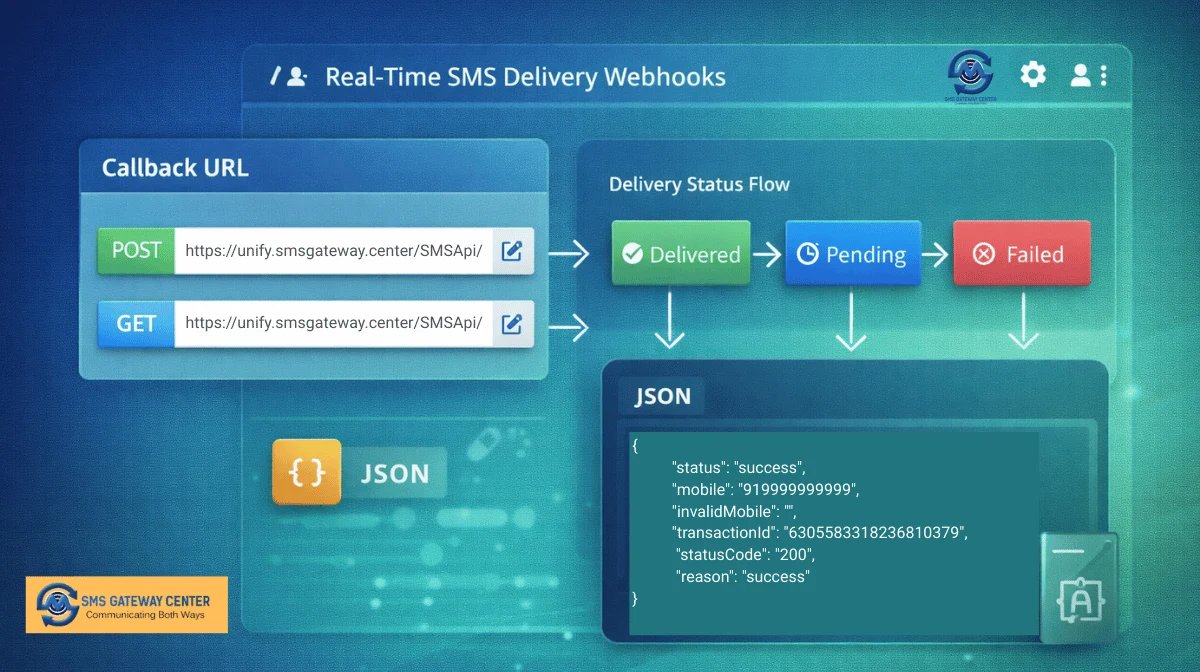
A webhook is a callback URL you register with the provider. When a delivery event occurs, the provider sends an HTTP request (POST or GET) to that URL with the DLR data. Your server must accept the request, validate it, and process the payload without blocking the provider’s request for too long.
1. Register and Secure Your Webhook
First, register your callback URL with the SMS gateway or developer API provider. Many platforms, including SMS Gateway Center, support webhook create/read/update/delete so you can point DLR events to a single endpoint or change it when needed.
Security is important. Prefer HTTPS so the payload is encrypted in transit. If the provider supports it, use a shared secret or signature in the request (e.g. in a header or query parameter) and verify it on your side before trusting the payload. Reject requests that fail validation and log them for review.
2. Idempotent and Fast Processing
Webhook requests may be retried if your endpoint is slow or returns an error. Design your handler so that processing the same delivery event twice does not create duplicate side effects (e.g. use transaction ID or message ID as idempotency key). Process the payload quickly: parse it, validate it, store or queue it, and return a 2xx response. Heavy work (e.g. sending emails or updating many tables) can be done asynchronously after you have acknowledged the webhook.
3. Logging and Monitoring
Log every webhook request (at least URL, timestamp, and outcome). Monitor for failures (4xx/5xx responses, timeouts) and for unexpected payloads. Set up alerts so you notice if DLR traffic stops or error rates rise. This helps you debug integration issues and stay on top of delivery problems.
4. Fallback to Polling When Appropriate
Webhooks are the primary way to get real-time DLRs, but polling can still be useful as a backup or for one-off reports. Use the SMS delivery report or DLR by transaction ID APIs when you need to reconcile batches or look up historical status. Combining webhooks for real-time updates with periodic polling for reconciliation gives you both speed and reliability.
POST, GET, and Payload Formats (JSON/XML)
Providers often support multiple ways to send DLR data to your URL. Choosing the right method and format simplifies integration and fits your stack.
POST vs GET
POST: The DLR payload is sent in the request body (e.g. form data or raw JSON/XML). POST is preferred for webhooks because it can carry larger payloads, avoid URL length limits, and keep sensitive or detailed data out of logs. Most modern webhook implementations use POST.
GET: The payload is sent as query parameters. GET is useful when your endpoint must be callable from a browser or when the provider only supports GET. It is simpler to test (paste URL in browser) but query strings can be truncated or logged, so use GET only when necessary and avoid putting secrets in the URL.
Recommendation: Use POST for production DLR webhooks when the provider supports it. Use GET only for testing or when POST is not available.
JSON vs XML
JSON: Lightweight and easy to parse in most languages. Fits well with REST APIs and front-end or mobile backends. Example: {"messageId":"123","status":"delivered","mobile":"919876543210"}.
XML: Still used in many telecom and enterprise systems. If your existing systems expect XML, or the provider’s default DLR format is XML, use it. Ensure your parser handles namespaces and encoding correctly.
When you create or update a webhook, check the provider’s documentation for the exact parameter names and formats (POST body vs query, JSON vs XML). Align your handler with that so you parse status, transaction ID, mobile number, and error code correctly.
Customer Experience Enhancement
Real-time DLR webhooks directly improve how your product behaves for end users and for your own teams.
1. Instant Confirmation and Transparency
When a customer completes an order or triggers an OTP, they expect quick confirmation. With webhooks, as soon as the gateway reports “delivered,” you can update the UI (e.g. “SMS sent to your mobile”) or send a follow-up (e.g. in-app notification). If the DLR says “failed,” you can show a clear message or offer an alternative (e.g. “SMS could not be delivered. Try email or retry.”). That transparency builds trust and reduces support calls.
2. Proactive Support and Retry
Support can see delivery status in real time instead of asking the user to wait or refresh. For OTP or transactional SMS, you can implement automatic retry or fallback (e.g. voice OTP) when the first attempt fails, using the DLR to decide when to retry and when to escalate. That improves first-time success and reduces friction.
3. Analytics and Optimization
Streaming DLRs into your analytics or data warehouse lets you measure delivery rates by campaign, time, or operator. You can spot patterns (e.g. failures for a certain operator or region) and optimize bulk SMS or promotional SMS accordingly. Better delivery means better customer experience and ROI.
4. Compliance and Auditing
Some industries need proof of delivery or non-delivery. Storing DLR payloads (with transaction ID, status, timestamp) gives you an audit trail. You can demonstrate that critical transactional SMS or OTP was sent and delivered, or that a failure was recorded and handled.
Practical Checklist for DLR Webhooks
- Register a callback URL via your provider’s webhook API and use HTTPS.
- Verify requests (signature or secret) and reject invalid ones.
- Process payloads idempotently (e.g. by transaction/message ID) and respond quickly with 2xx.
- Prefer POST for production; use JSON or XML as per your stack and provider docs.
- Log and monitor webhook traffic and set alerts for failures.
- Use delivery report or DLR summary APIs for batch or historical checks when needed.
Conclusion
Real-time DLR webhooks keep your systems and customers informed by pushing delivery status to your server as soon as it is available. A solid implementation (secure, idempotent, fast, and well-monitored) combined with the right choice of POST/GET and JSON/XML makes integration straightforward and reliable. When you use webhooks to drive instant confirmation, retries, and analytics, you improve both operational efficiency and customer experience.
For details on creating webhooks, SMS delivery report, or DLR by transaction ID, see our developer API section or contact our team.