WooCommerce WABAAPI WhatsApp Alerts: Elevate Your E-Commerce Communication
Supercharge your WooCommerce store's customer engagement with the free WABAAPI WhatsApp Alerts plugin by SMSGatewayCenter. Seamlessly send automated, personalized WhatsApp notifications for every order event—from order placement to shipping updates—directly through your WooCommerce dashboard. Designed for easy installation and full customization, this plugin ensures both customers and admins receive instant alerts, improving order transparency and enhancing the overall shopping experience. Compatible with WooCommerce 8.3.1 and above, it supports national and international messaging with robust delivery tracking and dynamic message templates.
⭐ What is WooCommerce WhatsApp Alerts Integration with WABA API?
WooCommerce WhatsApp Alerts Integration using SMSGatewayCenter's WABA API enables e-commerce store owners to send real-time, automated WhatsApp messages for order confirmations, shipment updates, payment notifications, and more—directly from their WordPress-based WooCommerce store.
With the WABA (WhatsApp Business API), businesses can deliver verified, fast, and secure messages to customers on the world's most popular messaging app. The integration ensures higher visibility than traditional email or SMS, with a 98%+ open rate and immediate user attention.
This integration is ideal for merchants who want to enhance their post-purchase experience, reduce support queries, and improve customer satisfaction by keeping buyers informed at every stage of their order lifecycle.
Unlock the power of instant messaging in your WooCommerce store with the WABAAPI WhatsApp Alerts Plugin. Effortlessly send customized WhatsApp order notifications, manage customer engagement, and enhance your online store's performance with our user-friendly, free plugin.
Download Plugin directly on Wordpress Plugins Directory
Use WhatsApp to build trust, boost conversions, and engage your WooCommerce customers like never before
WhatsApp Order Alert Notification for WooCommerce in India
WooCommerce, the leading E-Commerce platform used by store owners globally, is now more powerful with the WooCommerce Order WhatsApp Plugin. This plugin, offered for free, seamlessly integrates with your WordPress site to elevate your online business communication.
Automated WhatsApp Alerts with WABAAPI Plugin
The WABAAPI WhatsApp Alerts plugin revolutionizes how you connect with your customers. Automatically send WhatsApp alerts for every order placed on your WooCommerce E-Commerce platform. Both buyers and admins receive instant notifications, ensuring a seamless shopping experience.
Customize all WhatsApp alert texts easily from your WordPress admin panel. The best part? The WABAAPI WhatsApp Alerts plugin is completely free to use with WooCommerce, offering full features at no extra cost.
Features of WooCommerce WhatsApp SMS Add-on
- Global Reach: Send national and international WhatsApp messages via WABAAPI.com API.
- Global Alerts: Automatically sends WhatsApp notifications for every customer order.
- Global Messages: Fully personalize WhatsApp content for each status message from the admin panel.
- Global for Ease: Convenient shortcodes available on the WABAAPI WhatsApp Alerts Settings page.
- Global Log Management: Track and manage Delivery Receipt (DLR) logs directly from your WooCommerce WordPress platform.
- Global Messaging: Efficiently send bulk WhatsApp messages to subscriber groups.
- Global: Perfectly compatible with WooCommerce Version 8.3.1 and above.
Easy Installation of WABAAPI WooCommerce WhatsApp Alerts Plugin
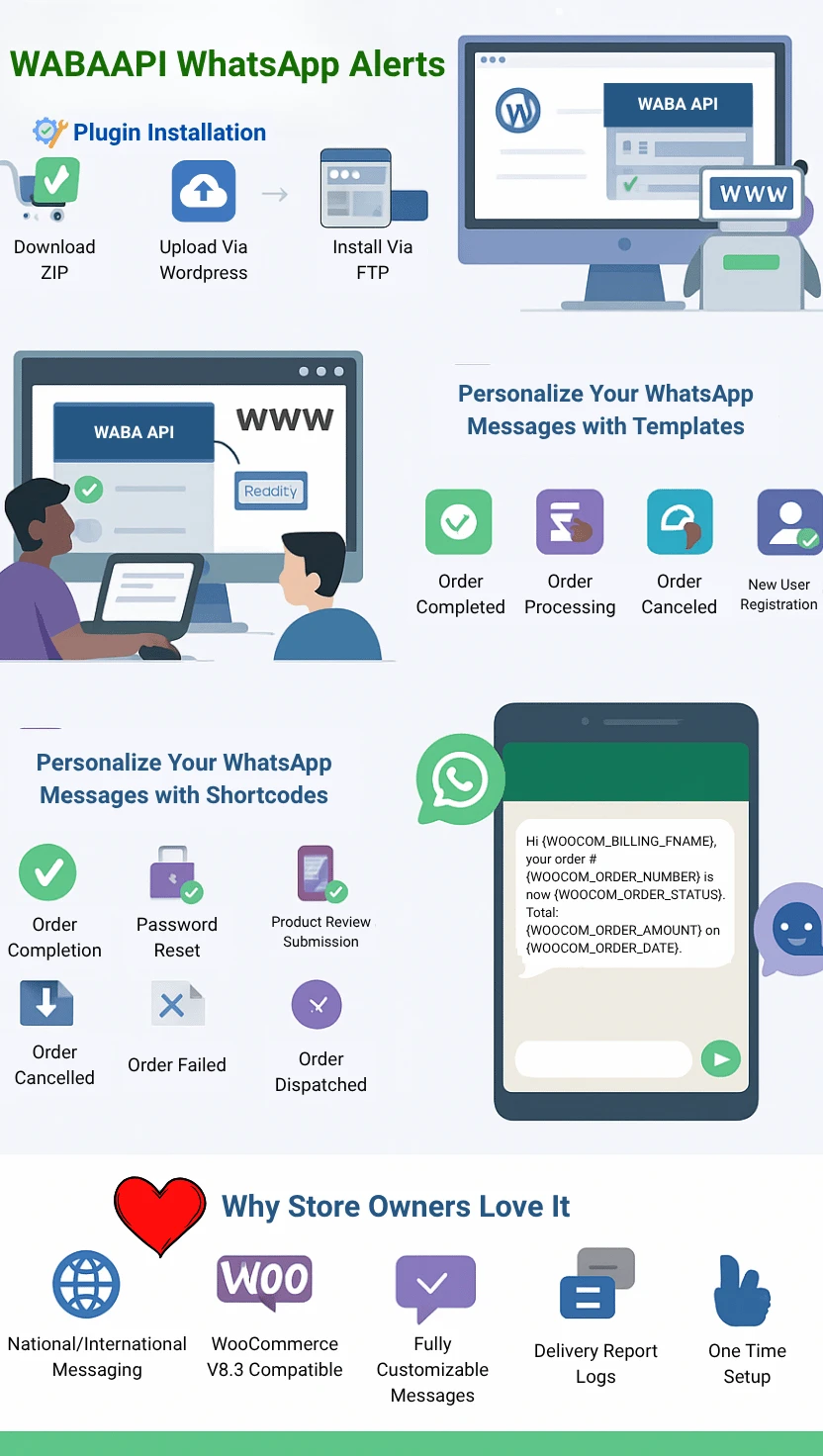
Option 1: WordPress Platform
- After downloading zipped folder plugin, Login to your WordPress admin interface.
- Go to Plugins from the left sidebar menu.
- Click on Add new.
- Click on Upload.
- Browse to the directory on your local system where you have downloaded the wabaapi_wa_woocommerce WhatsApp Alerts plugin and click Install Now.
- Once Wordpress will finish the unpacking of zipped file, now click on Activate Plugin.
- After the plugin has been activated you will notice a new section "WABAAPI WhatsApp Alerts" in sidebar menu.
- All Set and Done!
Option 2: FTP
- After downloading zipped folder plugin, unzip the file, SMSGatewayCenter_WooCommerce_Plugin.
- Launch your FTP client.
- Browse to var/www/html/wp_site/wp-content/plugins/ on your server.
- Upload SMSGatewayCenter_WooCommerce_Plugin for WooCommerce into the plugin folder.
- Go to your WordPress admin interface.
- Go to plugins and activate wabaapi_wa_woocommerce plugin.
- After the plugin has been activated you will notice a new section "WABAAPI WhatsApp Alerts" in sidebar menu.
- All Set and Done!
WooCommerce Call-To-Action Events
Choose specific events to trigger WhatsApp messages. Customize your own WhatsApp content for these events using various shortcode variables:
- Order Completed.
- Order Processing.
- Order Pending payment.
- Order On hold.
- Order Canceled.
- Order Refunded.
- Order Failed.
- New Registration Welcome SMS.
- Password Reset.
- Product Review Submission.
- Product Review Approval.
- User Update Profile.
Available ShortCodes
Use these dynamic shortcodes within your message content:
- {WOOCOM_SHOP_NAME}
- {WOOCOM_ORDER_NUMBER}
- {WOOCOM_ORDER_STATUS}
- {WOOCOM_ORDER_AMOUNT}
- {WOOCOM_ORDER_DATE}
- {WOOCOM_ORDER_ITEMS}
- {WOOCOM_BILLING_FNAME}
- {WOOCOM_BILLING_LNAME}
- {WOOCOM_BILLING_EMAIL}
- {WOOCOM_CURRENT_DATE}
- {WOOCOM_CURRENT_TIME}
Ready to revolutionize your WooCommerce store's communication? Download the WooCommerce WABAAPI WhatsApp Alerts Plugin now and enhance your customer engagement effortlessly.
Best Practices for WooCommerce WhatsApp Alerts Integration
- Test Before Launch: Send a test order to verify that your WhatsApp alerts are working correctly. Ensure correct formatting and delivery.
- Use Shortcodes Wisely: Customize alert content with available shortcodes like
{WOOCOM_ORDER_NUMBER}and{WOOCOM_ORDER_STATUS}to personalize messages. - Trigger Key Events Only: Avoid message fatigue. Use alerts only for important WooCommerce events such as “Order Placed,” “Order Shipped,” and “Order Cancelled.”
- Enable Admin Alerts: Keep store admins informed in real-time about customer actions to streamline order management.
- Monitor Logs: Regularly check the delivery report logs in the WABAAPI plugin to ensure your messages are successfully delivered.
- Stay DLT Compliant: If you're sending messages within India, ensure you use DLT-approved templates and sender IDs to comply with TRAI guidelines.
- Review Message Timing: Schedule alerts for optimal hours to avoid sending messages during non-business hours or late nights.
- Update Plugin Regularly: Keep the plugin updated to benefit from performance improvements, security patches, and new features.
By following these best practices, your WooCommerce WhatsApp Alerts integration will not only improve customer communication but also help you build trust and drive faster order fulfillment.

Frequently Asked Questions about WooCommerce WABAAPI WhatsApp Alerts
WABAAPI WhatsApp Alerts is a plugin that enables automatic sending of WhatsApp notifications for various order-related events in WooCommerce stores. It enhances customer engagement by providing real-time updates directly via WhatsApp.
Yes, the WABAAPI WhatsApp Alerts plugin is completely free to use with WooCommerce and comes with all features included at no extra cost.
Absolutely! The plugin allows full personalization of WhatsApp message content for each status update from the WordPress admin panel.
You can choose specific events like order completion, processing, pending payment, order hold, cancellation, refund, failure, new registration welcome SMS, password reset, product review submission and approval, and user profile updates to trigger WhatsApp messages.
Yes, the plugin provides a range of dynamic shortcodes such as {WOOCOM_SHOP_NAME}, {WOOCOM_ORDER_NUMBER}, and others, which can be used within message content for dynamic customization.
You can install it via the WordPress platform by downloading the plugin, uploading it, and then activating it from the WordPress admin interface. Alternatively, you can use FTP to upload and activate the plugin.
Yes, the plugin enables the sending of both national and international WhatsApp messages via the WABAAPI.com API.
Yes, the plugin allows you to track and manage DLR logs directly from your WooCommerce WordPress platform.
The WABAAPI WhatsApp Alerts plugin is regularly updated for compatibility and works seamlessly with WooCommerce Version 8.3.1 and above.
By providing instant, personalized communication directly through WhatsApp, the plugin enhances customer engagement, keeps them informed about their orders, and improves the overall shopping experience.