AI Assistant Connector

Send SMS and Check Delivery Without Leaving ChatGPT

The SMSGatewayCenter ChatGPT Connector is an OAuth-secured MCP connector that lets ChatGPT send SMS, schedule messages, check your balance, review delivery reports, search contacts, and read your templates and sender IDs, all from a normal chat.

No API key ever touches ChatGPT. You approve access once from your own SMSGatewayCenter login, and can revoke it at any time.

ChatGPT connected to SMSGatewayCenter through a secure OAuth connector

What Is the ChatGPT Connector?

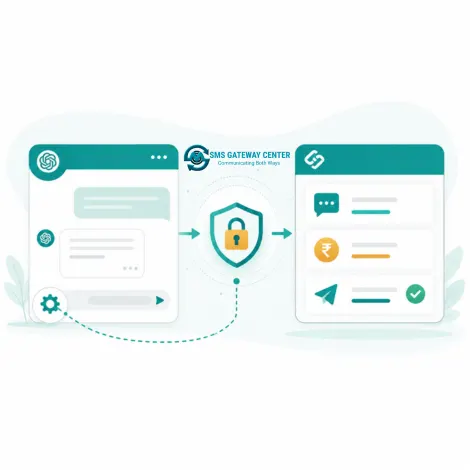
Illustration explaining how the ChatGPT connector links to SMSGatewayCenter

The ChatGPT Connector is built on the Model Context Protocol (MCP), the same open standard behind our Claude connector. It exposes a fixed set of SMSGatewayCenter actions, called tools, that ChatGPT can call during a conversation once you have authorized access.

Instead of logging into your panel to send a quick SMS or check whether a campaign delivered, you can just ask ChatGPT directly, and it calls the right tool on your behalf, using your own account's data and credits.

Typical use cases include:

  • Sending a one-off SMS or group SMS while drafting a message with ChatGPT
  • Checking account balance before scheduling a large campaign
  • Pulling delivery reports for a specific date or transaction ID during a support conversation
  • Looking up an approved template or sender ID without switching tabs

You need a Client ID and Client Secret from the SMSGatewayCenter team to set this up, see How to Connect below.


What You Can Do From ChatGPT

ToolWhat It Does
Send SMSSend a single SMS to any recipient using an approved sender ID and template.
Send Group SMSSend the same message to a saved contact group.
Schedule SMSQueue a message to go out at a future date and time.
Check BalanceRead your current account balance and credit type.
Delivery ReportsPull delivery reports for a date range or recent activity.
Delivery Report by Transaction IDLook up the exact delivery status for one message using its transaction UUID.
Search ContactsFind saved contacts or groups by name or number.
Get TemplatesList your DLT-approved message templates.
Get Sender IDsList your approved sender IDs.
SMS Usage GuideAsk ChatGPT how to use any of the above, it can query this built-in guide for help.

How to Connect ChatGPT to Your Account

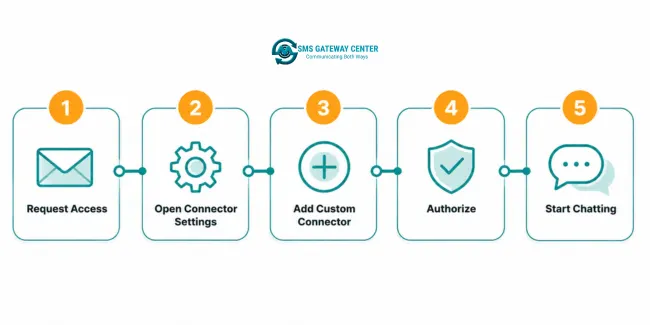
  1. Request access. Contact our team and ask for ChatGPT Connector access. We register an OAuth app for your account and send you a Client ID and Client Secret.
  2. Open ChatGPT connector settings. In ChatGPT, go to Settings, then Connectors (available on plans that support custom connectors and developer mode).
  3. Add a custom connector. Choose Add Custom Connector, and enter the SMSGatewayCenter MCP URL provided by our team along with your Client ID and Client Secret.
  4. Authorize. ChatGPT redirects you to SMSGatewayCenter's own login and consent screen. Sign in and approve access, you are never asked to paste a password or API key into ChatGPT itself.
  5. Start using it. Once connected, ask ChatGPT to check your balance, send an SMS, or pull a delivery report, it will call the connector automatically when relevant.

Access can be revoked at any time from ChatGPT's connector settings, or by asking our team to revoke the OAuth app on your account.

Five step diagram showing how to connect ChatGPT to SMSGatewayCenter

Example Prompts to Try in ChatGPT

Send a message

“Send an SMS to 919999999999 with sender ID MYBRAND saying your order is ready for pickup.”

Check your balance

“What's my current SMS balance and credit type?”

Schedule a send

“Schedule an SMS to my Customers group for tomorrow at 9 AM reminding them about the sale.”

Check delivery

“Show me delivery reports for today, and tell me if anything failed.”

Look up a contact

“Search my contacts for anyone named Raheja Hospital.”

Review templates

“List my approved SMS templates and their template IDs.”

Your Data Stays Yours

The connector uses OAuth2, the same authorization standard used by major apps you already trust. ChatGPT receives a scoped, revocable token, never your password, never your raw API key.

Scoped accessEach connector only gets the tool scopes your OAuth app is granted, nothing more.
Revoke anytimeDisconnect from ChatGPT's settings, or ask our team to revoke the app instantly.
Your account, your creditsEvery action runs against your own SMSGatewayCenter account and wallet.
Illustration representing secure OAuth access for the ChatGPT connector

Frequently Asked Questions about the ChatGPT Connector

What can the SMSGatewayCenter ChatGPT connector do?

It lets ChatGPT send SMS and group SMS, schedule messages, check your account balance, look up delivery reports by date or transaction ID, search saved contacts, and read your approved templates and sender IDs, all on your behalf.

Do I need to share my API key with ChatGPT?

No. The connector uses OAuth2 authorization. You approve access once from your own SMSGatewayCenter login, and ChatGPT never sees your password or API key.

How do I get a Client ID and Client Secret?

Contact our team from the Contact page. We register an OAuth app for your account and share the Client ID, Client Secret, and MCP connector URL you need.

Can I revoke ChatGPT's access later?

Yes. Disconnect it from ChatGPT's connector settings at any time, or ask the SMSGatewayCenter team to revoke the OAuth app from your account.

Does this work with the free version of ChatGPT?

Custom connectors currently require a ChatGPT plan that supports connectors and developer mode. Check your current ChatGPT plan's connector support before setting this up.

Is there a Claude version of this connector?

Yes. See our Claude Connector page, it uses the same underlying tools and MCP connection.


Satisfied Clients

World's Popular Brands are some of our satisfied clients.

At SMS Gateway Center, we strongly believe no client is too big nor too small
to work with us to obtain good advantage.


Metro Cash & Carry Hover
Samsung Hover
Limeroad Hover
Kurlon Hover
Tata Health Hover
Indian Medical Association Hover
Bharatiya Reserve Bank Note Mudran Hover
Bharat Co-operative Bank Mumbai Ltd Hover

Testimonials

Why do Great Businesses Trust SMS Gateway Center?

We have tied up with other SMS providers also, but SMS GatewayCenter is quite good. Good Service from the team. We are very happy with the service be it accounts related or technical issue. We always get good response.

K

Kurlon IT

2022-08-04

We have an excellent experience with SMS Gateway Center. The services and support has been of very high standard.

I

INOX Air Products

2018-02-09

I’ve been using SMSGatewayCenter’s bulk SMS and WhatsApp services since early 2022 for my small business, and the experience has been fantastic. The platform is intuitive, and the message delivery is incredibly reliable, reaching my customers without fail. The 24/7 support team is quick to assist, and the cost-effectiveness is a big plus. It’s transformed how I connect with my audience, and I highly recommend it to other entrepreneurs! (Google Revirews)

S

Shalabh Arora

2025-04-11

We’ve been using your bulk SMS services for a few months, and the results have been phenomenal. The open rates and customer engagement have gone through the roof. Highly recommend for any business looking to scale fast! (Google Revirews)

R

Reflex

2025-04-11

I’m Vedanth Gowda, leading a finance business, and I’ve been leveraging SMSGatewayCenter’s bulk SMS and WhatsApp tools —absolutely transformative! The platform’s speed and precision in delivering financial alerts to my clients are unmatched, giving me a competitive edge. Samrat’s expertise in tailoring notification workflows for market updates was a standout, and the robust security features instilled trust. The affordable pricing and proactive support team make it a no-brainer. Perfect for finance pros aiming to elevate client trust and efficiency! (Google Revirews)

V

Vedanth Gowda

2025-04-18

From day one, the team at SMS GATEWAY CENTER guided us through setup, testing, and launching campaigns. Their support is A+. Whether you’re new to SMS marketing or experienced, they make it smooth. Thank you Aakash. (Google Revirews)

N

Naval Bhatnagar

2025-04-12

CTA for Send SMS and Check Delivery Without Leaving ChatGPT

Send SMS and Check Delivery Without Leaving ChatGPT

Connect the ChatGPT Connector to send SMS, check balance, and review delivery reports from a chat. Contact us for your Client ID and Client Secret.

Get in touchSign up