Omnichannel Messaging

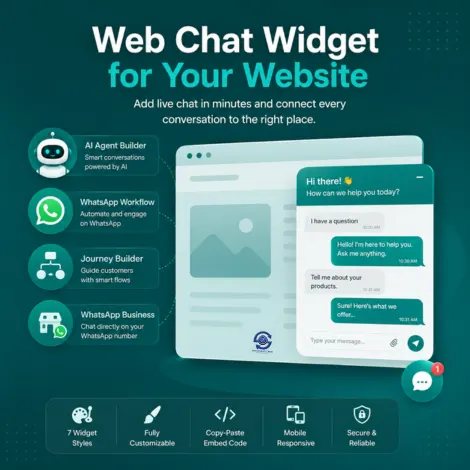
Web Chat Widget for Your Website

Add live chat to your website in minutes and route every conversation exactly where it should go, straight to your AI Agent Builder bot, a WhatsApp Workflow, a Journey Builder flow, or direct to your WhatsApp Business number.

Choose from seven widget styles, from a simple floating bubble to a full help-center experience, style it to match your brand, and go live with a copy-paste embed code, no developer required.

Web Chat Widget for websites connected to AI agents and WhatsApp

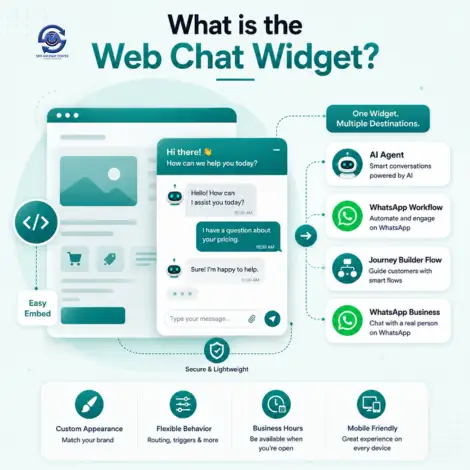
What is the Web Chat Widget?

Illustration explaining the Web Chat Widget

The Web Chat Widget is a lightweight chat window you add to your website with a single embed snippet. It is the bridge between a visitor typing on your site and the conversation actually being handled, by your AI agent, an automated workflow, or a real person on WhatsApp.

Every widget you create has its own routing, appearance, behavior, voice, security, and business-hours schedule, so you can run different widgets for different pages, for example a sales-focused popup on your pricing page and a help-center widget on your support page.

Typical use cases include:

  • Pre-sales chat that qualifies visitors before they leave your pricing page
  • Self-service support with an AI agent trained on your knowledge base
  • Lead capture that collects name, email, and message before starting a chat
  • Direct WhatsApp handoff so website visitors continue the conversation on their phone

You need the Web Chat Widget product enabled on your account, and a destination, an Agentic Bot, WhatsApp Workflow, Journey Builder flow, or WhatsApp number, to route chats to.


Route Chats to the Right Place

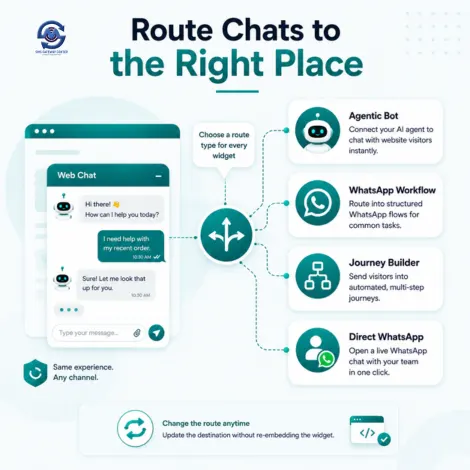
Every widget starts with a route type, which decides who or what answers the visitor:

  • Agentic Bot: Connect a bot you built in AI Agent Builder, so your website visitor gets the same trained agent that answers on WhatsApp or RCS.
  • WhatsApp Workflow: Route into a structured, rule-based WhatsApp flow for common journeys like support ticket creation or order lookup.
  • Journey Builder: Send visitors into a multi-step automated journey built in Journey Builder.
  • Direct WhatsApp: Skip automation entirely and open a live WhatsApp conversation with your team.

You can change the route target at any time without re-embedding the widget on your site.

Illustration of chat routing to an AI agent WhatsApp workflow or Journey Builder

Seven Widget Styles to Match Your Website

Floating Chat Bubble

A familiar round chat button in the corner. Best for most websites.

Bottom Right Chat

A labeled "Chat with us" button. Best for sales and pricing pages.

Full Page Chat

Chat takes over the page. Best for a dedicated Support page.

Embedded Widget

Chat sits inline in a sidebar or content area. Best for product pages and dashboards.

Help Center Widget

Welcome message plus topic buttons before chat starts. Best for FAQ-style self-service.

Popup Widget

Chat opens centered over a dimmed page. Best for proactive support and campaigns.

Contact Widget

Collects name, email, and message first, then opens chat. Best for lead capture.

Fully Customizable

Colors, launcher button style (round bubble or labeled bar), and size all match your brand.

Behavior, Voice, Security & Schedule

Beyond appearance, each widget has dedicated settings so it behaves exactly how you need it to:

  • Behavior: Control how and when the widget greets visitors and opens automatically.
  • Voice: Enable voice input so visitors can talk to your agent, not just type.
  • Security: Restrict which websites are allowed to load the widget and protect against misuse.
  • Schedule: Set business hours so visitors know when a live agent is available versus when the AI agent handles chats alone.
  • Embed Code: A single copy-paste script tag; no developer time needed to go live.
Illustration of widget configuration options

Turn Website Visitors Into Sales Conversations

  • Instant answers, no waiting: Connect an AI Agent Builder bot so pricing, product, and FAQ questions get answered the moment a visitor asks, day or night.
  • Qualify before you route: Use a Contact Widget to collect name and email up front, so your sales team follows up with context instead of a blank chat log.
  • Meet visitors on WhatsApp: Route to Direct WhatsApp or a WhatsApp Workflow so the conversation continues on the channel your customer already checks daily.
  • Track what is working: Widget Analytics and Conversation Logs show visitor volume, chat outcomes, and where visitors drop off.
  • Scale without adding headcount: An AI-agent-routed widget handles unlimited concurrent chats, so support and sales load does not depend on how many agents are online.
Website visitor chatting with an AI agent that routes to WhatsApp

How to Get Started

  1. Enable Web Chat Widget on your account by contacting Sales or your account manager.
  2. Have a destination ready: build an agent in AI Agent Builder, or have a WhatsApp Workflow, Journey Builder flow, or WhatsApp number to route to.
  3. Create a widget in your panel, choose a widget type, and set the route target.
  4. Style it under Appearance, and set Behavior, Voice, Security, and Schedule to match how you work.
  5. Copy the embed code from the Embed Code tab and paste it into your website before the closing </body> tag.

Pair this with our AI Agent Builder and WhatsApp Business API to give website visitors the same trained agent your other channels use.

Get started with Web Chat Widget

Frequently Asked Questions about Web Chat Widget

How do I add the Web Chat Widget to my website?

Create and configure your widget in the panel, then copy the embed code from the Embed Code tab and paste it into your website's HTML. No developer or custom coding is required beyond pasting the snippet.

Can the widget connect to my AI agent?

Yes. Set the widget's Route Type to Agentic Bot and select any bot you have built in AI Agent Builder. The widget will use that agent's personality, knowledge, and tools to answer visitors.

Can I route website chats to WhatsApp instead of a bot?

Yes. Choose Direct WhatsApp to open a live WhatsApp conversation, or WhatsApp Workflow to route into a structured rule-based flow, both without any AI agent involved if you prefer.

Which widget style should I use?

Floating Chat Bubble suits most general websites. Use Bottom Right Chat or Popup Widget for sales and campaign pages, Help Center Widget for FAQ-style support, Full Page or Embedded Widget for dedicated support pages, and Contact Widget when you want to capture visitor details before chat begins.

Can visitors use voice instead of typing?

Yes, the Voice tab lets you enable voice input on a widget so visitors can speak to your AI agent instead of typing.

Can I show the widget only during business hours?

Yes. Use the Schedule tab to set business hours, so visitors know when to expect a live agent versus when the AI agent is handling chats alone.

Is there a limit on how many widgets or visitors I can have?

Widget count, upload storage for knowledge files, and monthly visitor volume are governed by your subscription plan. Check My Widgets in your panel for your current usage and limits.

Can I restrict which websites are allowed to load my widget?

Yes. The Security tab lets you restrict the widget to specific domains, so it cannot be embedded or misused on a site you have not approved.

Where can I read detailed setup guides?

Visit our Knowledge Base for step-by-step guides on widget setup, routing, appearance, and the embed code.


Satisfied Clients

World's Popular Brands are some of our satisfied clients.

At SMS Gateway Center, we strongly believe no client is too big nor too small
to work with us to obtain good advantage.


Metro Cash & Carry Hover
Samsung Hover
Limeroad Hover
Kurlon Hover
Tata Health Hover
Indian Medical Association Hover
Bharatiya Reserve Bank Note Mudran Hover
Bharat Co-operative Bank Mumbai Ltd Hover

Testimonials

Why do Great Businesses Trust SMS Gateway Center?

K

Kurlon IT

2022-08-04

We have tied up with other SMS providers also, but SMS GatewayCenter is quite good. Good Service from the team. We are very happy with the service be it accounts related or technical issue. We always get good response.

I

INOX Air Products

2018-02-09

We have an excellent experience with SMS Gateway Center. The services and support has been of very high standard.

S

Shalabh Arora

2025-04-11

I’ve been using SMSGatewayCenter’s bulk SMS and WhatsApp services since early 2022 for my small business, and the experience has been fantastic. The platform is intuitive, and the message delivery is incredibly reliable, reaching my customers without fail. The 24/7 support team is quick to assist, and the cost-effectiveness is a big plus. It’s transformed how I connect with my audience, and I highly recommend it to other entrepreneurs! (Google Revirews)

R

Reflex

2025-04-11

We’ve been using your bulk SMS services for a few months, and the results have been phenomenal. The open rates and customer engagement have gone through the roof. Highly recommend for any business looking to scale fast! (Google Revirews)

V

Vedanth Gowda

2025-04-18

I’m Vedanth Gowda, leading a finance business, and I’ve been leveraging SMSGatewayCenter’s bulk SMS and WhatsApp tools —absolutely transformative! The platform’s speed and precision in delivering financial alerts to my clients are unmatched, giving me a competitive edge. Samrat’s expertise in tailoring notification workflows for market updates was a standout, and the robust security features instilled trust. The affordable pricing and proactive support team make it a no-brainer. Perfect for finance pros aiming to elevate client trust and efficiency! (Google Revirews)

N

Naval Bhatnagar

2025-04-12

From day one, the team at SMS GATEWAY CENTER guided us through setup, testing, and launching campaigns. Their support is A+. Whether you’re new to SMS marketing or experienced, they make it smooth. Thank you Aakash. (Google Revirews)


CTA for Add Live Chat to Your Website in Minutes

Add Live Chat to Your Website in Minutes

Embed a Web Chat Widget on your website and route visitors to your AI agent, a WhatsApp Workflow, Journey Builder, or Direct WhatsApp. Contact us to enable Web Chat Widget on your account.

Get in touchSign up