
Magento 2 No-Code Messaging Integration: Send SMS, WhatsApp, Voice and RCS from Your Store
Connect your Magento 2 store once with a store URL and Integration access token. Turn on automations for Order Placed, COD Order, Shipment, Order Status, Abandoned Cart, and New Customer. Send SMS, WhatsApp, Voice, or RCS with order and customer placeholders. No Magento module install required for this connected-services flow.
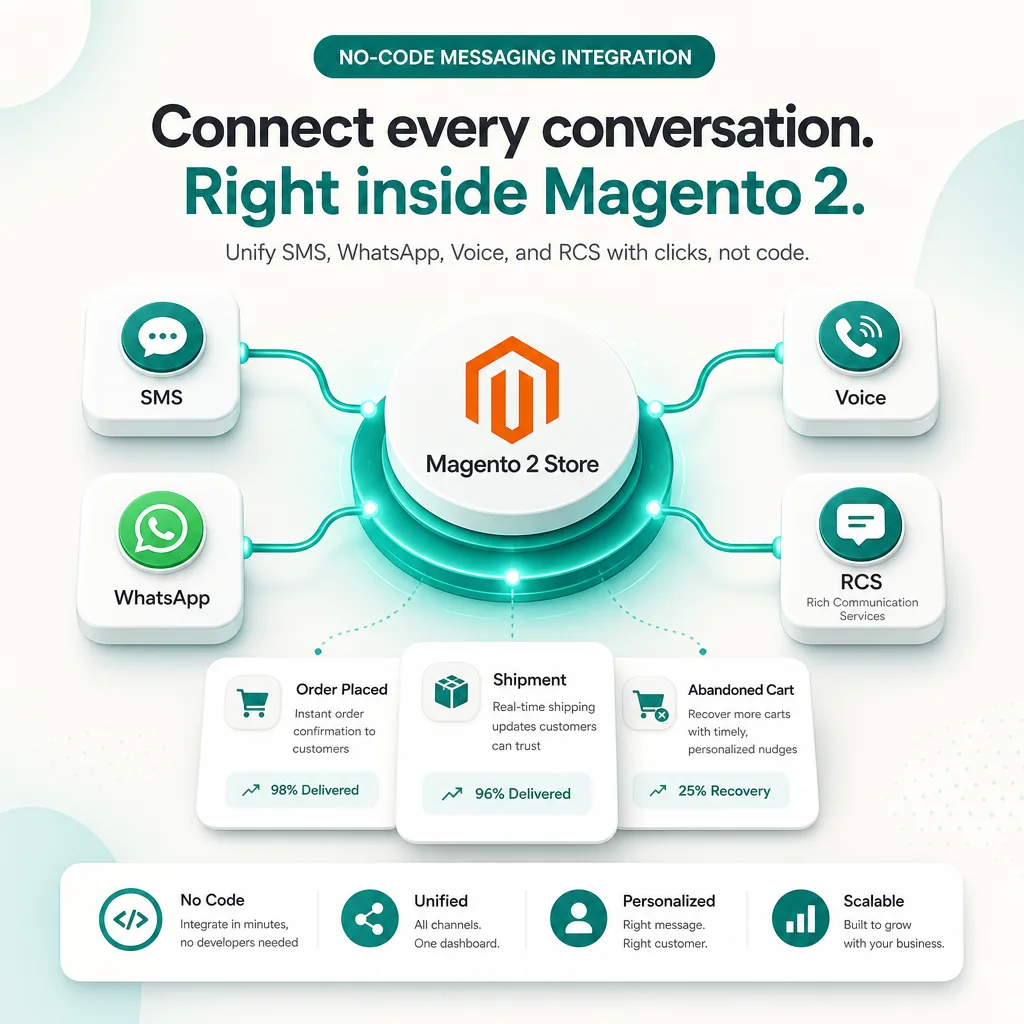
What is Magento 2 No-Code Messaging?
Magento 2 No-Code Messaging Integration connects your Magento 2 store to your SMSGatewayCenter account so store events trigger messages automatically. A customer places an order, a shipment is created, a cart sits quiet, or a new customer registers, and SMS, WhatsApp, Voice, or RCS can go out. You configure everything from Connected Services, not from Magento code.
What Can You Automate, Per Store Event?
- ✅ Send SMS, WhatsApp, Voice Call, or RCS when an order is placed, a COD order is created, a shipment is created, order status changes, a cart is abandoned, or a new customer signs up
- 🔗 Personalized messages using Magento placeholders such as
{Name},{OrderId},{Total}, and{TrackingNumber} - 🚚 Shipment alerts can include tracking number and carrier, which a generic status change cannot
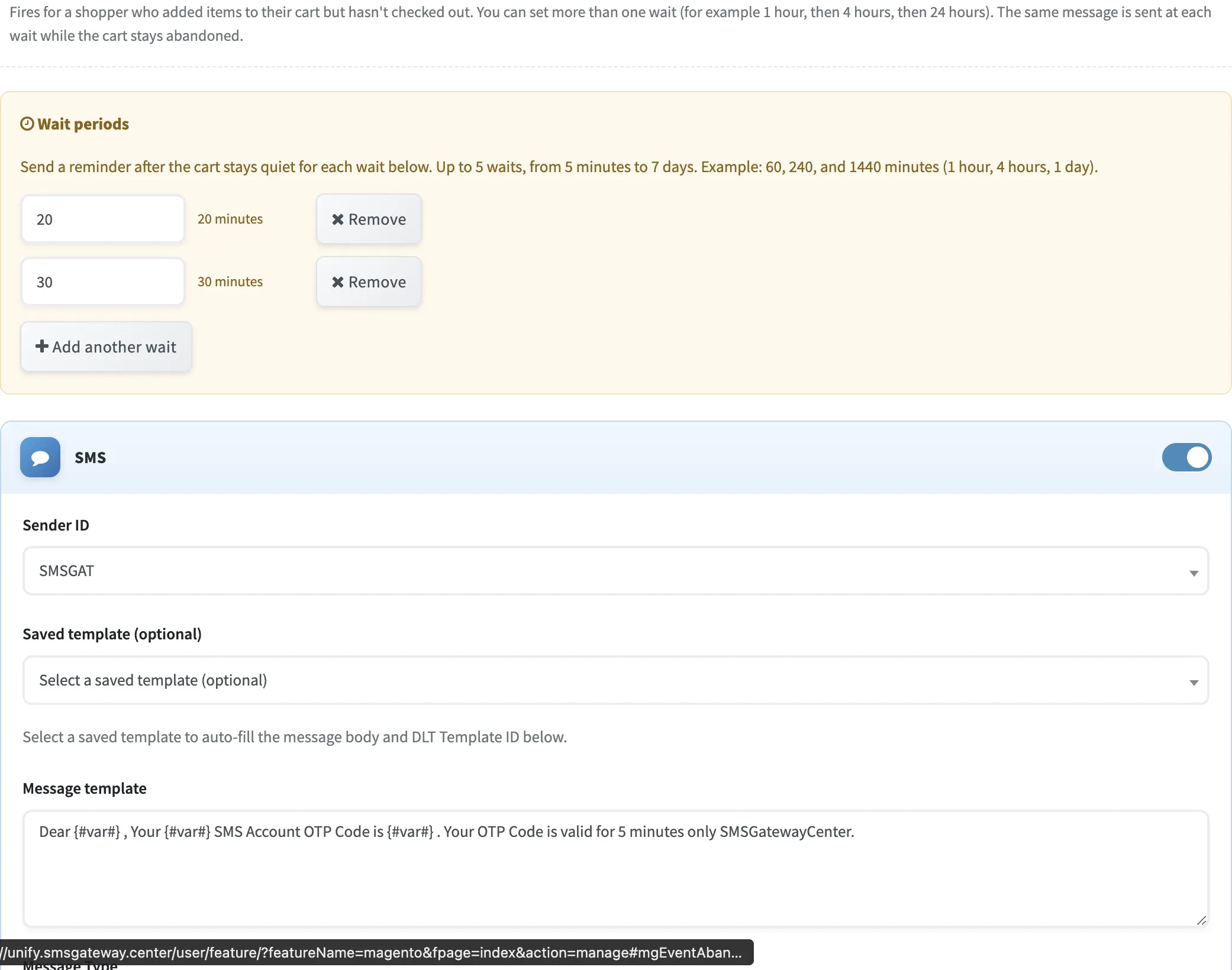
- 🛒 Abandoned cart reminders with multiple wait periods (for example 20 minutes, then 30 minutes)
- ⚙️ Connect with store URL plus Magento Integration access token (Resource Access All, Bearer tokens on 2.4.4+)
- 🔒 Fully secure, DLT, and TRAI-compliant for Indian businesses
Ideal for Magento merchants who want order, shipping, and recovery messaging without installing a custom module for this flow. Looking for the Magento 2 SMS extension instead? See Magento 2 SMS Order Alert Notification.
Automate SMS, WhatsApp, Voice, and RCS from Magento 2 using SMSGatewayCenter. Connect the store once, enable events, and let messaging run.
All Channels You Can Enable Per Event
Turn SMS, WhatsApp, Voice, and RCS on independently for each Magento event. Only the channels enabled on your account appear in the form.
SMS
Send DLT templates or free text on store events. Choose Sender ID, message type (Text/Unicode), optional DLT Template ID, and insert Magento placeholders.
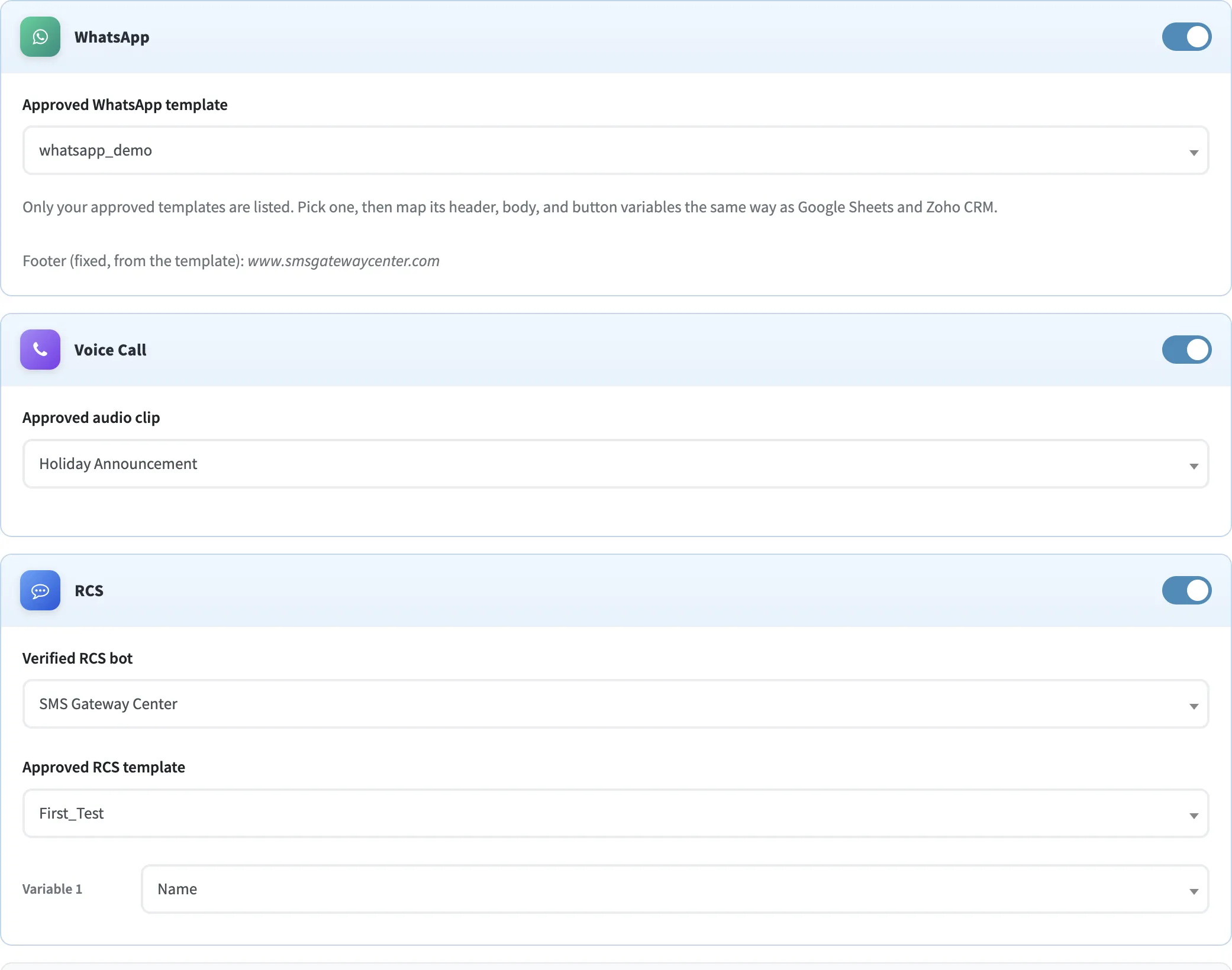
Send approved WhatsApp templates. Map header, body, and button variables to Magento order, cart, or customer fields.
Voice
Place an outbound call and play an approved audio clip from your voice library when the event fires.
RCS
Send approved RCS templates from a verified bot, with per-variable mapping to Magento fields such as Name or Order ID.
Relevant Messages You Can Send From Magento 2
Personalize with Magento placeholders. These samples use the SMSGatewayCenter teal conversation style.
Confirm a new order
Share tracking
Remind a quiet cart
Status change alert
How It Works
Four Steps, No Magento Module Required
1. Create a Magento Integration
In Magento Admin, add an Integration, set Resource Access to All (or Sales, Customers, and Carts), activate it, and copy the Access Token. On 2.4.4+, allow tokens as Bearer tokens.
2. Connect the Store
In SMSGatewayCenter Connected Services, open Magento 2, paste the store URL and token, and click Connect.
3. Enable Events and Channels
Open each automation tab, turn on SMS / WhatsApp / Voice / RCS, pick templates, and save that event.
4. It Runs Automatically
Orders and customers poll about once a minute. Abandoned carts poll about every 5 minutes. Check Recent Activity for delivery status.
Step-by-Step: Connect Magento 2 and Set Up Messaging
Follow these steps in order. Typical setup takes a few minutes once Magento Integration is available on your account.
Step 1: Open Magento 2 Integration
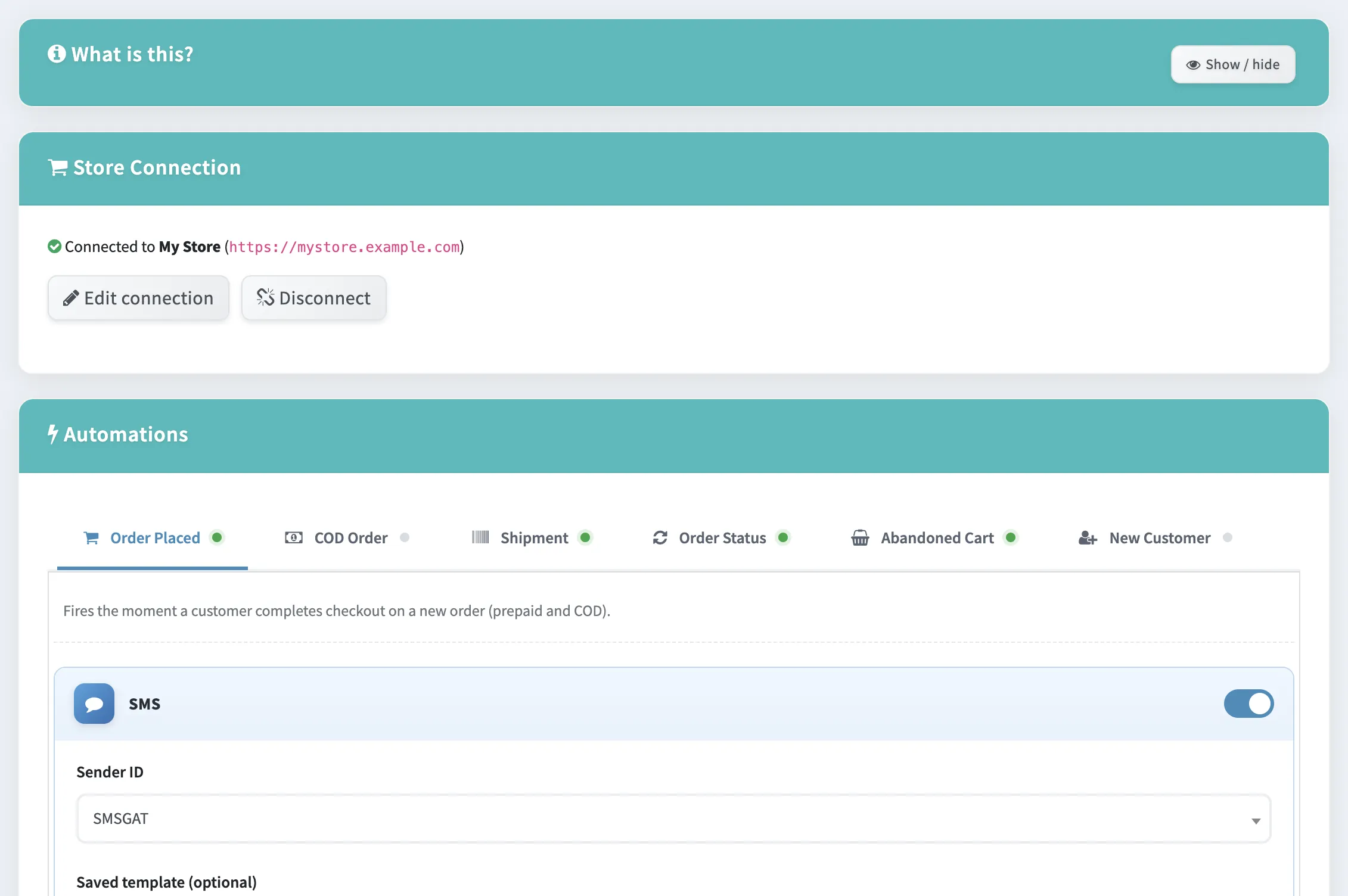
Login to your SMSGatewayCenter account. From the sidebar, open Integrations (or Connected Services) and choose Magento 2.
You will see Store Connection, Automations tabs for each store event, and Recent Activity once messages start sending.
Step 2: Create the Magento Integration Token
In Magento Admin go to System → Extensions → Integrations → Add New Integration. Name it (for example SMS Gateway).
Open the API tab and set Resource Access to All (or at least Sales, Customers, and Carts). Save, click Activate, and copy the Access Token.
On Magento 2.4.4 or later, also turn on Stores → Configuration → Services → OAuth → Allow OAuth Access Tokens to be used as standalone Bearer tokens.
Step 3: Connect Your Store URL and Token
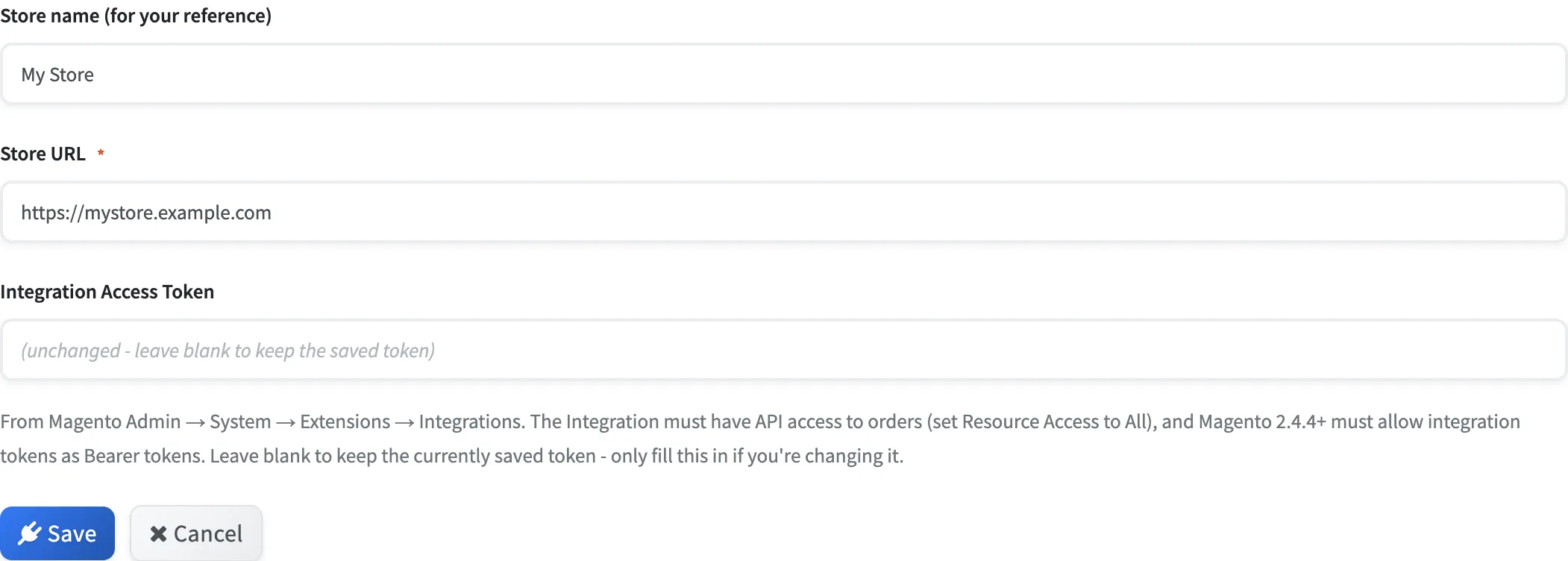
Back in SMSGatewayCenter, enter a store name for your reference, the Magento store URL, and the Integration Access Token. Click Connect.
When linked, the panel shows Connected to your store, with Edit connection and Disconnect. Leave the token blank on later edits if you are not rotating it.
Step 4: Turn On SMS for Order Placed
Open the Order Placed tab. This fires when a customer completes checkout (prepaid and COD).
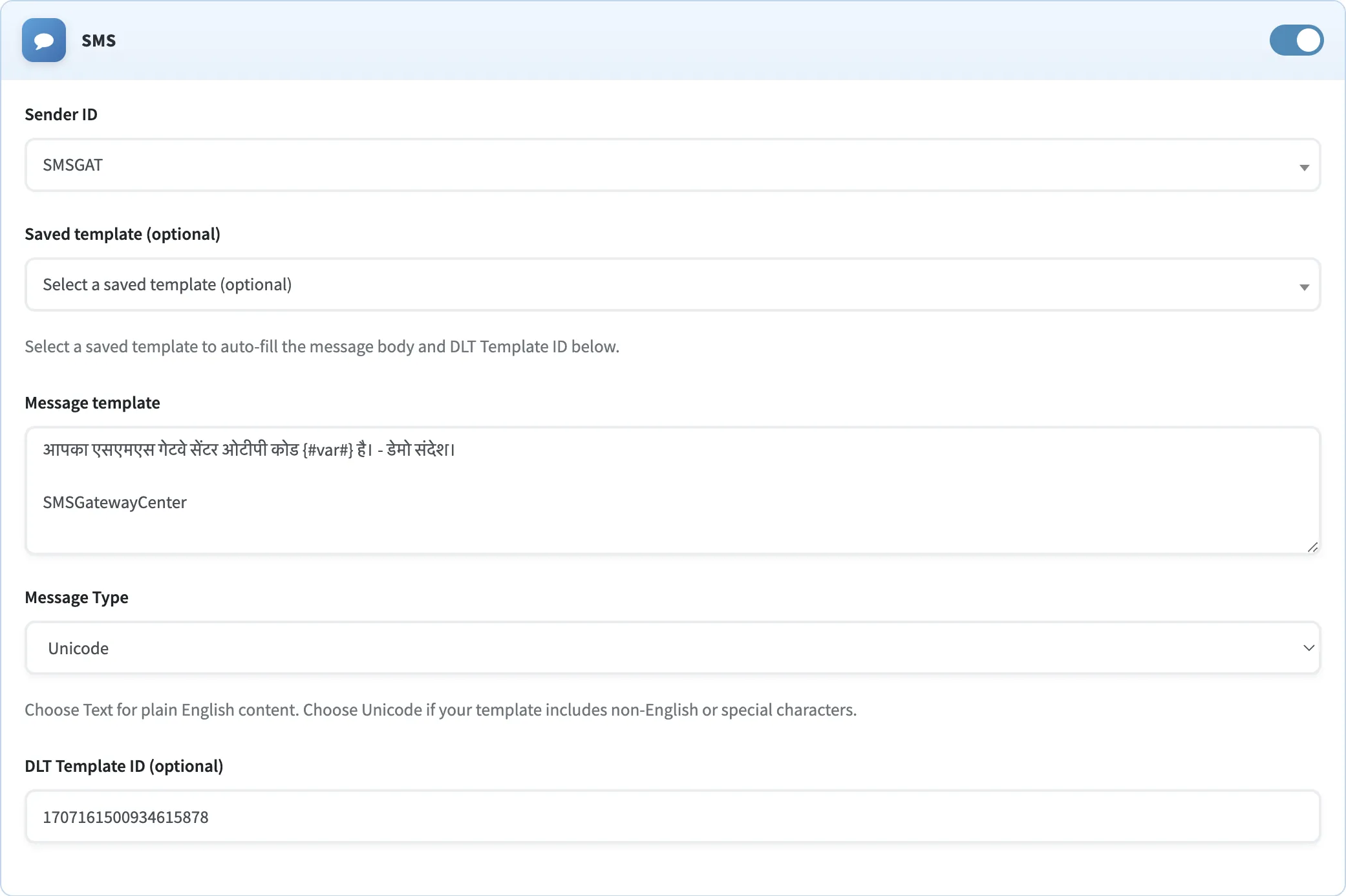
Enable SMS, choose a Sender ID, optional saved DLT template, message type, and write the body with placeholders such as {Name} and {OrderId}. Click the placeholder chips to insert fields. Save Order Placed automations.
Step 5: Enable WhatsApp, Voice, RCS, and Other Events
On the same Order Placed tab (and on Shipment, Order Status, Abandoned Cart, COD Order, or New Customer), enable extra channels:
- WhatsApp: pick an approved template and map variables to Magento fields such as Name.
- Voice Call: pick an approved audio clip.
- RCS: pick a verified bot, RCS template, and field mapping.
For abandoned carts, set wait periods (up to 5 waits, from 5 minutes to 7 days) before the reminder sends. Save each event you change. Place a test order and confirm the send under Recent Activity.
Store Events You Can Message From
Each event has its own channel mix. Turn on only what you need.
Order Placed
Fires the moment checkout completes for prepaid and COD orders. Best first confirmation SMS or WhatsApp.
COD Order
Fires only for Cash on Delivery orders. Use it for a keep-cash-ready note alongside Order Placed.
Shipment
Fires when Magento creates a shipment. This is the event that can include tracking number and carrier.
Order Status
Fires when status changes (processing, complete, canceled, and more). Use Shipment if you need tracking.
Abandoned Cart
Fires after the cart stays quiet for each wait you set. Same message can repeat at 1 hour, 4 hours, and 1 day.
New Customer
Fires on customer registration. Magento’s default signup has no phone field, so customers without an address phone are skipped until a developer adds a required telephone attribute. Order Placed always has a billing phone.
Frequently Asked Questions
No for this connected-services flow. You create a Magento Integration, copy the access token, and connect from SMSGatewayCenter. If you prefer a Magento 2 SMS extension inside Magento Admin, use the Magento 2 SMS Order Alert Notification page.
Each send is listed under Recent Activity in Magento 2 Integration, with channel, reference, mobile, transaction ID, and status such as SENT, DELIVERED, or FAILED.
Order Placed, COD Order, Shipment, Order Status, Abandoned Cart, and New Customer. Each event has its own SMS, WhatsApp, Voice, and RCS toggles.
Orders and customers run on a short polling cycle, about once a minute. Abandoned carts poll about every 5 minutes. Most events trigger within one to two minutes after Magento has the record.
Yes. Outbound SMS uses your registered Sender IDs and DLT templates on SMSGatewayCenter routes. WhatsApp, Voice, and RCS still require their usual approved assets.
Ready to connect Magento 2 to your messaging stack?
Talk to us to enable Magento 2 Integration on your account, then follow the steps above to connect the store and start sending.
Talk to a Specialist