Table of Contents
- The Short Answer
- TL;DR
- What the Preview API Actually Returns
- The Three Multiplications the API Does Not Do
- Preview the Rendered Message, Not the Template
- Reverse Template Lookup Is the Real Feature
- Two Counters, and Why They Disagree
- Building the Local Counter
- Never Call Preview From the Browser
- Debouncing, Caching and the Request Budget
- What the Preview UI Should Actually Show
- Preview at Save Time and in CI, Not on the Send Path
- A Local Template Registry From template/read
- Decision Matrix
- Build Order
- Implementation Checklist
- Ten Mistakes
- What This Article Deliberately Does Not Claim
- FAQs
The Short Answer
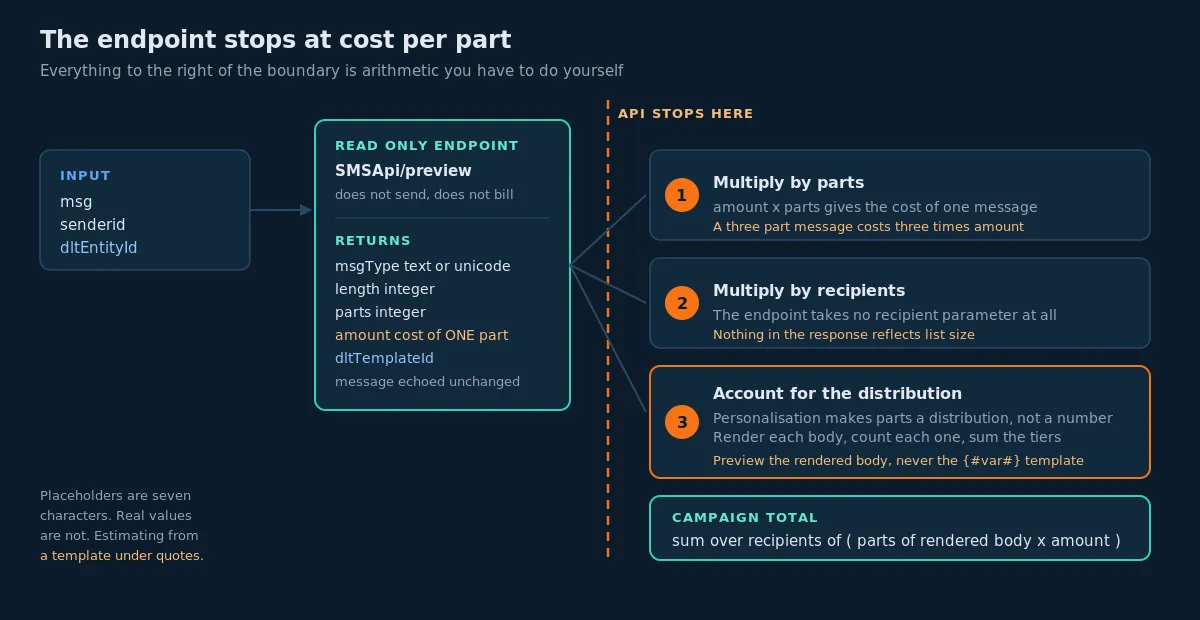
The Preview Message API accepts a message body and a sender ID, and returns msgType (text or unicode), length, parts, amount (the estimated cost of one part), and, when you also pass dltEntityId, the dltTemplateId of the registered template your body matches. That last field is the capability worth building around, because it inverts the usual relationship: instead of you asserting a template ID and the platform checking it, you supply a body and the platform tells you which template it is.
What the endpoint does not do is finish the arithmetic. amount is documented as the cost per SMS, and the official Python sample on the documentation page multiplies it by parts and then by the recipient count to reach a campaign total. Those two multiplications are yours. So is a third one that nobody mentions: the body you preview is usually a template containing {#var#} placeholders, and the body you send is that template with real values substituted in. Seven characters of placeholder can become forty characters of customer name. Preview the template and you will quote a number that the actual send does not honour.
An accurate estimator therefore does three things the naive one does not. It previews a rendered worst case rather than a template. It multiplies parts by recipients by cost per part, using the widest recipient in the list rather than the average. And it runs the preview call on your server, not in the browser, because the documented ways to authenticate that endpoint are an account password or an account API key, and both of them can send messages.
TL;DR
SMSApi/previewreturnsmsgType,length,parts,amount,message, and optionallydltTemplateIdanddltEntityId. It is a read-only analysis endpoint and it does not send anything.amountis the cost of one part. Campaign total isparts x amount x recipients. The API performs neither multiplication.- The reverse template lookup, body plus
dltEntityIdreturns which registered template matched, is the feature that distinguishes this endpoint from any client-side character counter. - Preview a rendered body with realistic variable values. A template full of
{#var#}placeholders is a different string from the one you will be billed for. - Estimate with the worst-case recipient, not the mean. Personalised campaigns have a segment distribution, not a segment count.
- A local counter is required for keystroke-level feedback. The server call is the authority. Show the local number continuously and reconcile to the server number on a debounce.
- Never ship
useridandpassword, or anapiKey, to a browser or a mobile app. Proxy the preview call through an endpoint you control that authenticates your own user. - Cache preview results keyed on the exact body plus sender ID plus entity ID. Identical bodies produce identical results and the cache hit rate on a real composer is high.
- Move template previewing to save time and to CI. A body that fails to match a template should fail your build, not your campaign.
- The single highest-value warning to put in front of a user is not the character count. It is the moment the encoding flips from text to unicode, because that is where the cost changes by a factor of more than two.
What the Preview API Actually Returns
The endpoint is https://unify.smsgateway.center/SMSApi/preview. It accepts POST or GET, and for POST it requires application/x-www-form-urlencoded. Authentication follows the same pattern as the rest of the SMS API: userid plus password as form fields, or an apiKey HTTP header.
The request parameters are short. msg and senderid are required. dltEntityId is optional and is described in the documentation as required for DLT template matching, which is the precise way of saying that without it you get length and cost but no template resolution. format accepts json, xml or plain, and output is documented on this page as an alias for format. That alias note matters beyond this endpoint, because it is the clearest statement anywhere in the documentation that the two parameter names are interchangeable across the API.
Here is a minimal call.
curl -X POST "https://unify.smsgateway.center/SMSApi/preview" \
  -H "Content-Type: application/x-www-form-urlencoded" \
  --data-urlencode "userid=YOUR_USERNAME" \
  --data-urlencode "password=YOUR_PASSWORD" \
  --data-urlencode "msg=Dear Customer, your order has been dispatched." \
  --data-urlencode "senderid=YOUR_SENDER_ID" \
  --data-urlencode "dltEntityId=YOUR_ENTITY_ID" \
  --data-urlencode "format=json"
Note the --data-urlencode rather than -d. The documentation calls this out explicitly, and it is not pedantry. A message body containing an ampersand, a plus sign or a hash will be silently truncated or mangled by plain -d, and the failure looks like a wrong length rather than an error.
The success response is flat, not wrapped in the response envelope that the campaign, template and report endpoints use.
{
  "status": "success",
  "statusCode": "200",
  "reason": "Preview generated successfully",
  "msgType": "text",
  "length": 28,
  "parts": 1,
  "dltTemplateId": "1234567890123456",
  "dltEntityId": "YOUR_ENTITY_ID",
  "amount": 0.05,
  "message": "Hello, this is a test message"
}
Three details in that block are worth pinning down before you write a parser.
statusCode is a quoted string, length and parts are unquoted integers, and amount is an unquoted float. Three different JSON types in one small object. If you have read the outbound message table article, you already know the house rule here: normalise at the boundary, coerce statusCode to a string on every path, and never compare it with a loose equality that will pass for both 200 and "200" on one runtime and fail on another.
amount is a float and it is money. Bind it to a decimal type the moment it crosses your boundary. Python’s Decimal(str(value)), PHP’s BCMath, Java’s BigDecimal. Multiplying an IEEE 754 double by a recipient count of five hundred thousand and showing the result to a customer as a rupee figure is how quotes end in a long tail of nines.
message echoes the original body as submitted. This is a meaningful contrast with validateTemplate, which returns a punctuation-normalised version of the template it matched. Preview hands your string back unchanged. So preview will not tell you that your curly apostrophe differs from the straight apostrophe in the registered template, whereas the template mismatch path will. The two endpoints are complementary and you want both.
The documented error codes are compact: 400 for invalid or missing parameters, 401 for authentication failure, 500 for a server error. Treat 401 on the preview path exactly as seriously as 401 on the send path, because it usually means the same credential is broken for both.
The Three Multiplications the API Does Not Do
This is where most cost estimators go wrong, and they go wrong quietly, in the direction of under-quoting.
Multiplication one: parts
amount is documented as the estimated cost per SMS. The documentation’s own Python sample removes any ambiguity about what that means by computing total_cost = parts * amount_per_sms. A three-part message costs three times the single-part figure. This is consistent with how the platform bills generally: a multi-part message is delivered to the handset as one message but consumes credits per part, which is the same arithmetic the SMS length calculation explainer and the text messages chart describe.
If you display amount directly next to a three-part message, you have understated the cost by two thirds.
Multiplication two: recipients
The preview endpoint takes no recipient parameter. It has no idea whether you are sending to one number or to a hundred thousand. The campaign total is parts x amount x recipient_count, and again the documentation’s own sample demonstrates exactly this.
Multiplication three: the one nobody writes down
Personalisation makes parts a distribution rather than a number.
Consider a template that renders to 152 characters with a short first name and 163 characters with a long one. Every recipient in the first group costs one part. Every recipient in the second group costs two. If eight percent of your list has a long name, your true cost is not 1 x amount x N and it is not 2 x amount x N. It is somewhere in between, and the naive estimate that previews the template with a placeholder name is wrong by whatever that eight percent is worth.
The honest way to handle this is to compute the distribution rather than a point estimate.
from collections import Counter
from decimal import Decimal

def campaign_cost(preview_fn, template, recipients, sender_id, entity_id=None):
    """
    preview_fn(body) -> dict with 'parts' (int) and 'amount' (str or float)

    Returns the exact total plus the segment distribution, because a single
    number hides the fact that personalisation splits a list into cost tiers.
    """
    distribution = Counter()
    cost_per_part = None
    seen = {}

    for r in recipients:
        body = render(template, r)          # your own substitution function
        if body not in seen:
            result = preview_fn(body)
            seen[body] = int(result["parts"])
            if cost_per_part is None:
                cost_per_part = Decimal(str(result["amount"]))
        distribution[seen[body]] += 1

    total_parts = sum(parts * count for parts, count in distribution.items())
    return {
        "total_cost": cost_per_part * total_parts,
        "cost_per_part": cost_per_part,
        "total_parts": total_parts,
        "recipients": len(recipients),
        "distribution": dict(sorted(distribution.items())),
    }
The seen dictionary matters more than it looks. On a list of a hundred thousand recipients, the number of distinct rendered bodies is often a few hundred, because most personalisation fields are short and many recipients share a segment-equivalent rendering. Deduplicating on the exact body before calling the endpoint turns an impossible number of API calls into a tractable one.
For very large lists you should not call the endpoint per distinct body at all. Call it once to learn amount and to confirm the encoding, then use a local counter, described below, for the per-recipient part counts. The endpoint establishes the price and the encoding. Local arithmetic scales the rest.
A worked example, using round numbers rather than any published rate so that the arithmetic is the point:
| Scenario | Parts | Recipients | Cost per part | Total |
|---|---|---|---|---|
Naive: preview the template, show amount | 1 | not counted | 0.05 | 0.05 |
| Better: multiply by parts | 2 | not counted | 0.05 | 0.10 |
| Correct: multiply by parts and recipients | 2 | 100,000 | 0.05 | 10,000 |
| Honest: account for the distribution | 92,000 at 1, 8,000 at 2 | 100,000 | 0.05 | 5,400 |
The last two rows differ by a factor of nearly two, and both of them are defensible depending on whether you are quoting a ceiling or an expectation. What is not defensible is the first row, and the first row is what you get if you display the API response without thinking about it.
Preview the Rendered Message, Not the Template
The msg parameter is documented as accepting DLT template variables in {#var#} form. That is genuinely useful for template matching, and it is a trap for cost estimation.
{#var#} is seven characters. The value that replaces it is whatever your data holds. A template that previews as 158 characters with three placeholders still intact will render to well over 160 for most real rows, and the user who saw “1 part” in your composer will be billed for two.
The rule follows directly:
- For template matching, send the body with
{#var#}placeholders intact. That is what the matcher expects and it is how you get adltTemplateIdback. - For cost estimation, send a body with realistic values substituted in. Not the placeholders, and not a one-character dummy.
Those are two different calls with two different bodies, and a good composer makes both. The first runs when the template is saved. The second runs when the user picks an audience.
If you cannot render real values at preview time, because the audience is not selected yet or the data is not available in the composer, then substitute a declared maximum for each variable and label the number as an upper bound. Do not substitute the empty string, and do not substitute the literal word “Customer”, because both of them produce an optimistic answer that will be wrong in the expensive direction.
# Field-level maxima declared once, alongside the template.
FIELD_MAXIMA = {
    "first_name": 30,
    "order_id": 12,
    "amount": 10,
    "tracking_url": 23,   # after link shortening, if you shorten
}

def worst_case_body(template, field_order):
    """Substitute each {#var#} with a run of 'X' at that field's declared maximum."""
    parts = template.split("{#var#}")
    if len(parts) - 1 != len(field_order):
        raise ValueError(
            f"template has {len(parts) - 1} variables, field_order declares {len(field_order)}"
        )
    out = [parts[0]]
    for field, tail in zip(field_order, parts[1:]):
        out.append("X" * FIELD_MAXIMA[field])
        out.append(tail)
    return "".join(out)
That arity check is doing real work. Templates on this platform can contain adjacent variables, and the documented sample response from the template read endpoint contains bodies like {#var#}{#var#}\nA/c Name: {#var#}{#var#}. Two placeholders with nothing between them are indistinguishable from one placeholder once rendered, so an off-by-one in your field ordering produces a body that is syntactically fine and semantically scrambled. Failing loudly at preview time is much cheaper than discovering it after a send. The same class of failure, and the same fix, is covered at length in DLT Template Rejected: Every Reason and How to Fix It.
One more caution about the worst case. Padding with X keeps the body in the GSM-7 alphabet. If any of your real values can contain a non-GSM character, a customer name with an accent, a product title with a curly quote pasted from a word processor, then the worst case is not “the longest string”, it is “the string that flips the encoding”. Those are different worst cases and the encoding one is far more expensive. Compute both and show the larger.
Reverse Template Lookup Is the Real Feature
Every SMS platform has a character counter. Very few have this.
Pass dltEntityId alongside your body, and the response comes back with dltTemplateId populated: the registered template that your body matched. You did not have to know the template ID. You did not have to store a mapping. You gave the platform a string and it told you which of your registered templates that string is.
Compare that with validateTemplate, which is the forward direction: you supply a dltTemplateId and a body, and it tells you whether they agree, returning statusCode 188 with reason message template mismatch when they do not. Both are useful and they answer different questions.
| Question | Endpoint | You supply | You learn |
|---|---|---|---|
| Does this body match the template I think it does? | SMSApi/validateTemplate | body plus dltTemplateId | agreement, or a 188 mismatch |
| Which of my templates does this body match? | SMSApi/preview | body plus dltEntityId | the matching dltTemplateId, or nothing |
| What are all my registered templates? | SMSApi/template/read | credentials | the full list with identifiers and sender ID bindings |
| How long is this body and what will it cost? | SMSApi/preview or SMSApi/info/msg | body | encoding, length, parts, cost |
The reverse direction is what makes a genuinely helpful composer possible. A user types a message. Before they have selected a template, before they have thought about DLT at all, you can tell them one of three things:
- “This matches your registered template Order Dispatch Alert.” Good. Proceed.
- “This does not match any registered template.” That is a send that will be rejected, and you now know it while the user is still typing rather than after they have committed a campaign.
- Nothing came back because you did not pass an entity ID. Fix your integration.
Case two is the valuable one. A rejected send on the India DLT path is not a soft failure, and catching it in the composer converts a support ticket into an inline warning.
Two honest limitations. First, the documentation says dltTemplateId is returned “if DLT entity ID provided and template found”, which means an absent field is ambiguous between “no entity ID” and “no match”. Your client should distinguish those two cases itself, by knowing whether it sent an entity ID, rather than inferring it from the response. Second, the documentation does not state what happens when a body could match more than one registered template, and I am not going to guess. Design your registry so that near-identical templates are avoided, and treat a surprising match as a reason to check rather than as a guarantee.
Two Counters, and Why They Disagree
You will end up with two counters, and they will not always agree. Understanding why is the difference between a composer that feels solid and one that flickers.
The server counter is the preview endpoint. It is authoritative for your account, it knows your rate, and it can resolve templates. It costs a network round trip and it requires credentials.
The local counter runs in the user’s browser on every keystroke. It is instant and free, and it is an approximation.
The documentation’s message type table describes text as “Standard ASCII” and unicode as “Extended Unicode”. That is a reasonable simplification for a docs page and a poor specification for a counter, because the GSM 7-bit alphabet is not ASCII. It includes characters ASCII does not have, such as £, §, Ñ, à and é, and it treats a small set of characters, including [, ], {, }, \, ~, ^ and |, as extension-table characters that consume **two** of the 160 units rather than one. A local counter that tests charCodeAt(i) < 128 will therefore disagree with the server at both edges: it will call a body with é unicode when the server may not, and it will undercount a body full of curly braces.
The vendor’s own SMS Length Calculator page states plainly that its result “may have difference with different SMS Providers”. That candour is the right posture and you should adopt it in your own UI. The local number is a live indicator. The server number is the quote.
| Property | Local counter | Preview endpoint |
|---|---|---|
| Latency | Zero | One network round trip |
| Cost | None | An API call |
| Runs on every keystroke | Yes | No, and it should not |
| Knows your account rate | No | Yes, via amount |
| Resolves DLT templates | No | Yes, via dltTemplateId |
| Handles the GSM-7 extension table | Only if you implement it | Yes |
| Correct at the encoding boundary | Approximately | Authoritatively |
| Safe to expose to a browser | Yes | No |
The reconciliation rule that works: show the local count continuously in a neutral colour, and when the debounced server response arrives, replace it. If the two disagree by a part, do not flash a warning, just update. If they disagree by more than a part, that is a bug in your local counter and it belongs in your logs, not in the user’s face.
Building the Local Counter
Here is a counter that implements the GSM 03.38 basic and extension sets properly, in the language a composer is actually written in.
// GSM 03.38 basic alphabet, one unit each.
const GSM_BASIC = new Set(
  "@£$¥èéùìòÇ\nØø\rÅåΔ_ΦΓΛΩΠΨΣΘΞÆæßÉ !\"#¤%&'()*+,-./0123456789:;<=>?" +
  "¡ABCDEFGHIJKLMNOPQRSTUVWXYZÄÖÑܧ¿abcdefghijklmnopqrstuvwxyzäöñüà"
);

// GSM 03.38 extension table, two units each (escape byte plus the character).
const GSM_EXTENDED = new Set("^{}\\[~]|€");

export function countSegments(text) {
  let units = 0;
  let unicode = false;

  // Iterate by code point, not by UTF-16 code unit. A single emoji is one
  // code point but two code units, and counting units double-charges it.
  for (const ch of text) {
    if (GSM_BASIC.has(ch)) {
      units += 1;
    } else if (GSM_EXTENDED.has(ch)) {
      units += 2;
    } else {
      unicode = true;
      break;
    }
  }

  if (unicode) {
    // UCS-2 counts UTF-16 code units, so a character outside the Basic
    // Multilingual Plane genuinely costs two. Here the code-unit count
    // is the correct one, which is the opposite of the GSM branch.
    units = text.length;
    const single = 70;
    const multi = 67;
    const parts = units <= single ? 1 : Math.ceil(units / multi);
    return { encoding: "unicode", units, parts, perPart: units <= single ? single : multi };
  }

  const single = 160;
  const multi = 153;
  const parts = units <= single ? 1 : Math.ceil(units / multi);
  return { encoding: "text", units, parts, perPart: units <= single ? single : multi };
}
The comment on the two branches is the part that gets skipped and then costs someone a day. In the GSM branch you iterate by code point, because the alphabet is defined over characters. In the Unicode branch you count UTF-16 code units, because UCS-2 segmentation is defined over 16-bit units and an astral-plane character such as an emoji really does occupy two of them. Using the same counting mode for both branches is wrong in one of them, always. The Unicode FAQ on encoding forms is the reference if you want to convince a reviewer.
The empty-string case deserves an explicit test. Zero characters should report zero units and one part, not zero parts, because a composer that shows “0 parts” invites the user to believe an empty send is free rather than impossible.
Boundary tests you should have, and which are the same boundaries the testing article argues belong in your fastest test layer:
| Input | Expected encoding | Expected units | Expected parts |
|---|---|---|---|
"" | text | 0 | 1 |
| 160 plain ASCII characters | text | 160 | 1 |
| 161 plain ASCII characters | text | 161 | 2 |
| 306 plain ASCII characters | text | 306 | 2 |
| 307 plain ASCII characters | text | 307 | 3 |
159 ASCII plus one { | text | 161 | 2 |
| 70 Devanagari characters | unicode | 70 | 1 |
| 71 Devanagari characters | unicode | 71 | 2 |
| 69 ASCII plus one emoji | unicode | 71 | 2 |
| 159 ASCII plus one curly apostrophe | unicode | 160 | 3 |
That last row is the one to put on a poster. A body sitting comfortably inside one GSM segment, plus a single typographic apostrophe of the kind every word processor inserts automatically, becomes a three-part unicode message. The cost tripled and the visible text did not change. This is the single most expensive character in bulk messaging and it is invisible in every font.
Never Call Preview From the Browser
The integration examples on the documentation page include a React Native component that calls the preview endpoint directly with userid and password in the request body. Read as a demonstration of the response shape it is fine. Copied into a product it is a credential leak.
The reasoning is short and it does not depend on anyone being careless. The preview endpoint authenticates with the same credentials as the send endpoint. There is no preview-only scope, no read-only key, and nothing in the documentation describing a restricted credential. So a browser bundle or a mobile app binary that can call preview can also call send, and can spend your balance.
An API key is not a mitigation here. The key management endpoints make the position clear: the read API key endpoint returns the key itself in plaintext to anyone holding the account credentials, and nothing in the documentation describes an expiry. A credential that is recoverable and does not expire is exactly the credential you least want in a client bundle. The OAuth article develops this argument fully for the multi-tenant case, and its conclusion applies here in miniature.
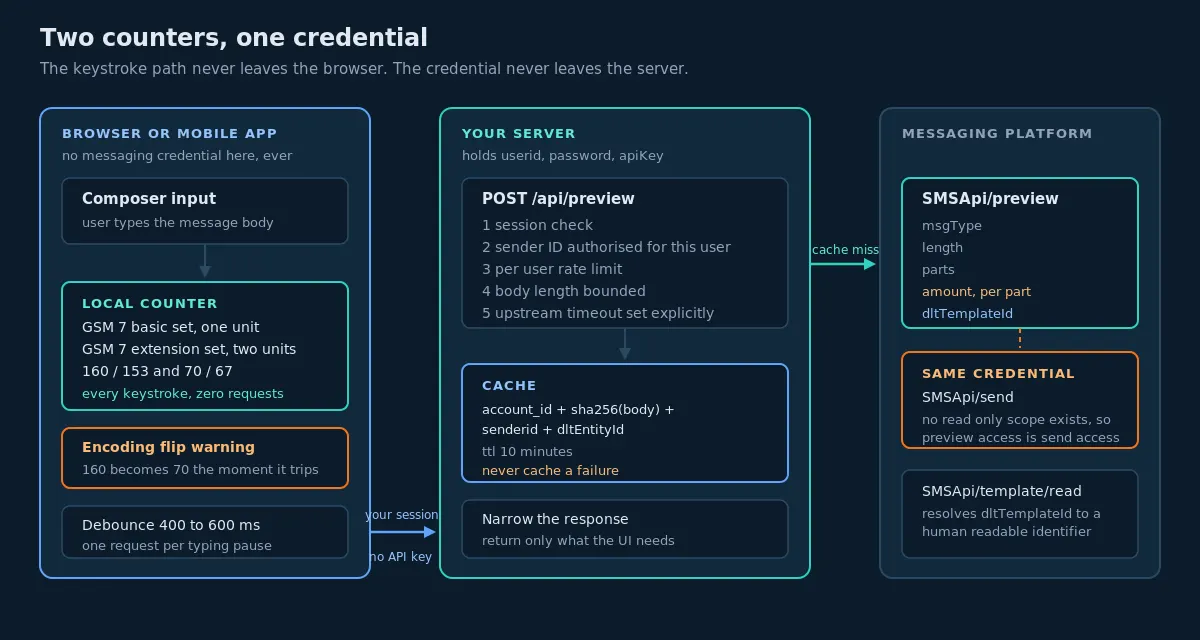
The fix is a proxy, and it is about fifteen lines.
// Express. The browser authenticates to YOU. Only your server holds
// the messaging credentials, and they never leave this process.
import express from "express";

const app = express();
app.use(express.json());

const PREVIEW_URL = "https://unify.smsgateway.center/SMSApi/preview";

app.post("/api/preview", requireSession, rateLimitPerUser, async (req, res) => {
  const { msg, senderId } = req.body ?? {};

  if (typeof msg !== "string" || msg.length === 0 || msg.length > 5000) {
    return res.status(400).json({ error: "invalid_message" });
  }
  // The sender ID must come from what this user is allowed to use,
  // never from whatever the client posted.
  if (!(await userMaySend(req.session.userId, senderId))) {
    return res.status(403).json({ error: "sender_not_permitted" });
  }

  const form = new URLSearchParams({
    userid: process.env.SGC_USERID,
    msg,
    senderid: senderId,
    dltEntityId: process.env.SGC_DLT_ENTITY_ID ?? "",
    format: "json",
  });

  const upstream = await fetch(PREVIEW_URL, {
    method: "POST",
    headers: {
      "Content-Type": "application/x-www-form-urlencoded",
      apiKey: process.env.SGC_API_KEY,
    },
    body: form.toString(),
    signal: AbortSignal.timeout(5000),
  });

  const data = await upstream.json();

  // Return only what the UI needs. Do not proxy the upstream body
  // verbatim; it echoes parameters and may grow fields later.
  res.json({
    encoding: data.msgType,
    length: data.length,
    parts: data.parts,
    costPerPart: data.amount,
    templateId: data.dltTemplateId ?? null,
  });
});
Four things in that handler are load-bearing. The session check means the caller is a logged-in user of yours. The sender ID authorisation means a user cannot preview against a sender ID that is not theirs, which in a multi-tenant product is a small information leak about other tenants’ registered headers. The AbortSignal.timeout is there because fetch has no default timeout, a point the Node.js integration tutorial makes at length. And the narrowed response body means a future field added upstream does not silently start flowing to browsers.
Add a per-user rate limit on this route. The preview endpoint is cheap for you but it is not free for the platform, and an unthrottled proxy attached to a keystroke handler is a load generator pointed at your own vendor. The mechanics of doing that correctly, including why a per-process limiter is not a global limiter, are in Rate Limiting and Backpressure in Messaging Systems.
Debouncing, Caching and the Request Budget
The documentation’s best-practice list includes “Call preview API as user types to show live character count and cost” and, two lines later, “Cache preview results for identical messages to reduce API calls”. The second recommendation is the one to build on. Taken literally, the first one produces an authenticated network request per keystroke, and a user typing a 300-character message generates 300 requests to compute a number that changes meaningfully perhaps four times.
The workable pattern is a division of labour.
Local, on every keystroke: character count, encoding, parts, and the encoding-flip warning. Zero requests.
Server, on a trailing debounce of roughly 400 to 600 milliseconds after typing stops: the authoritative parts, the cost per part, and the template match. One request per pause.
Server, immediately and without debounce: when the user changes the sender ID, selects a template, or clicks anything that looks like “check” or “estimate”. These are deliberate acts and they deserve a synchronous answer.
Caching sits underneath all of it. The cache key is the full tuple, because every element of it can change the answer:
sha256(msg) + ":" + senderid + ":" + (dltEntityId or "") + ":" + account_idInclude the account ID. Two tenants can submit the identical body and receive different amount values, and a cache that omits the account will quote one customer another customer’s rate. That is a correctness bug and a commercial one.
A short time to live is right. Five to fifteen minutes covers a composer session comfortably. Do not cache for a day, because amount reflects the account rate and rates change. Do not cache error responses at all, and in particular do not cache a 401, because the natural user response to a credential problem is to fix the credential and try again, and a cached failure makes that look broken.
import hashlib
from decimal import Decimal

CACHE_TTL_SECONDS = 600

def preview_key(account_id, msg, senderid, dlt_entity_id=""):
    digest = hashlib.sha256(msg.encode("utf-8")).hexdigest()
    return f"preview:{account_id}:{digest}:{senderid}:{dlt_entity_id}"

def cached_preview(cache, client, account_id, msg, senderid, dlt_entity_id=""):
    key = preview_key(account_id, msg, senderid, dlt_entity_id)
    hit = cache.get(key)
    if hit is not None:
        return hit

    result = client.preview(msg=msg, senderid=senderid, dltEntityId=dlt_entity_id)

    if str(result.get("statusCode")) != "200":
        # Never cache a failure. Surface it and let the caller retry.
        raise PreviewError(result.get("reason", "preview failed"))

    normalised = {
        "encoding": result["msgType"],
        "length": int(result["length"]),
        "parts": int(result["parts"]),
        "cost_per_part": Decimal(str(result["amount"])),
        "template_id": result.get("dltTemplateId") or None,
    }
    cache.set(key, normalised, ttl=CACHE_TTL_SECONDS)
    return normalised
Hash the message rather than using it as the key directly. Message bodies contain customer names, order numbers and amounts, and a cache key is one of the least controlled surfaces in a system: it lands in slow-log output, in monitoring dashboards, in memory dumps. The observability article makes the same argument about metric labels, and the reasoning transfers unchanged.
What the Preview UI Should Actually Show
Most SMS composers show a character countdown. Character countdowns are the least useful thing on the screen, because the user cannot act on “97 characters remaining” and can act on almost everything else.
Ranked by how much a user’s behaviour changes when they see it:
1. The encoding flip. The moment the body goes from text to unicode, say so, loudly, and say what caused it. “This message now uses Unicode encoding, which reduces the limit from 160 to 70 characters per part. Cause: a curly apostrophe at position 84.” Offer a one-click fix that replaces the offending character with its GSM equivalent. This single feature saves more money than every other element of the composer combined, and it is the direct application of the point that the SMS character limits explainer makes conceptually.
2. The part count, with the boundary in sight. Not “2 parts” but “2 parts, 9 characters over the 1-part limit”. A user who is nine characters over will trim nine characters. A user told only “2 parts” will shrug.
3. The template match status. Matched, with the template’s human-readable identifier. Or not matched, with a clear statement that the send will be rejected.
4. The campaign total, once an audience exists. Parts times recipients times cost per part, with the distribution shown if it is not uniform. Before an audience is selected, show cost per message and label it as such.
5. The character count. Last. It is a diagnostic, not a decision input.
Two things not to do. Do not show a live cost figure that updates on every keystroke; watching a number tick upward while composing is anxiety-inducing and it is also, on the local counter, an approximation. Settle the cost figure on the debounced server response. And do not block the send button on a preview call failing. A preview outage is not a reason to prevent a legitimate send; degrade to the local counter, mark the estimate as unverified, and let the user proceed.
Preview at Save Time and in CI, Not on the Send Path
There is a tempting design where you call preview immediately before every send, as a guard. Resist it.
Adding a synchronous network call in front of every send doubles the latency of the send path, doubles the number of things that can fail, and introduces a new ambiguous-outcome case at exactly the point where ambiguity is most expensive. The idempotency article covers what an ambiguous outcome costs on the send path, and there is no reason to add a second one for information you could have obtained hours earlier.
Template bodies are not user input in the general case. They are configuration. They change when someone edits them, which is rare, and they are known long before the send. So preview them when they change.
At template save time, run a preview, store the result alongside the template, and refuse the save if the body does not match a registered template. The author is right there, with context, able to fix it.
In CI, assert the same thing for every template in your repository, so a template edited in a pull request cannot reach production unmatched. This mirrors the validateTemplate CI check that the DLT rejection article recommends, with preview answering the complementary question.
#!/usr/bin/env python3
"""
ci_preview_templates.py
Fails the build when a template does not match a registered DLT template,
or when its worst-case rendering costs more parts than declared.
Run against a CI-only account. This endpoint does not send and does not bill,
but it does authenticate, so use a credential scoped to CI.
"""
import os, sys, yaml

from sgc import PreviewClient          # your own thin wrapper

client = PreviewClient(
    userid=os.environ["SGC_CI_USERID"],
    api_key=os.environ["SGC_CI_API_KEY"],
    entity_id=os.environ["SGC_DLT_ENTITY_ID"],
)

failures = []

with open("templates/registry.yaml") as fh:
    registry = yaml.safe_load(fh)

for name, spec in registry.items():
    body = spec["body"]
    declared_max_parts = spec["max_parts"]
    field_order = spec.get("fields", [])

    # 1. Template matching uses the placeholder form.
    match = client.preview(msg=body, senderid=spec["sender_id"])
    if not match.get("dltTemplateId"):
        failures.append(f"{name}: no registered DLT template matched this body")
        continue
    if spec.get("expected_template_id") and match["dltTemplateId"] != spec["expected_template_id"]:
        failures.append(
            f"{name}: matched {match['dltTemplateId']}, "
            f"expected {spec['expected_template_id']}"
        )

    # 2. Cost checking uses the worst-case rendered form.
    rendered = worst_case_body(body, field_order)
    cost = client.preview(msg=rendered, senderid=spec["sender_id"])
    if int(cost["parts"]) > declared_max_parts:
        failures.append(
            f"{name}: worst case is {cost['parts']} parts, "
            f"declared maximum is {declared_max_parts}"
        )
    if cost["msgType"] == "unicode" and not spec.get("unicode_expected"):
        failures.append(
            f"{name}: worst case renders as unicode but the template "
            f"is not declared as a unicode template"
        )

if failures:
    print("Template preview checks failed:\n  " + "\n  ".join(failures))
    sys.exit(1)

print(f"All {len(registry)} templates matched and are within their declared part budgets.")
The declared_max_parts field is the part that changes team behaviour. It forces someone to write down, in the repository, how expensive a template is allowed to be. After that, a well-meaning copy edit that pushes a one-part template to two parts fails the build with a message that says exactly what happened, instead of appearing a month later as an unexplained bump in the bill. This is the same idea as a performance budget, applied to a cost that most teams never budget at all.
A Local Template Registry From template/read
The preview endpoint hands you a dltTemplateId, which is a nineteen-digit-class opaque number. Users do not recognise it. To turn a match into something a human can read, you need the other side of the mapping, and SMSApi/template/read provides it.
The documented response is worth reading carefully, because its shape has two traps.
{
    "response": {
        "api": "template",
        "action": "read",
        "status": "success",
        "msg": "success",
        "code": "200",
        "count": 46,
        "templateList": [
            {
                "template": {
                    "mtId": "39",
                    "identifier": "bank details without statement",
                    "template": "{#var#}{#var#}\nA/c Name: {#var#}{#var#}\nA/c No: {#var#}...",
                    "msgType": "text",
                    "dltTemplateId": "10070142034...",
                    "dltTemplateType": "Service Implicit",
                    "senderIds": "SENDER",
                    "status": "ENABLED",
                    "lastUpdated": "1687764018447"
                }
            }
        ]
    }
}
Trap one: the name template appears at three levels. templateList contains wrapper objects whose single key is template, and the object inside that has a field also called template holding the body. So the body is at response.templateList[i].template.template. Every typed language will need an explicit wrapper type here, exactly as the by-transaction report needs one, and a naive automatic binding will produce something unreadable.
Trap two: senderIds is plural but it is a string, not an array. One template can be bound to more than one sender ID. If you model it as a single value you will build a registry that silently drops bindings, and a template that works from one header will appear unavailable from another.
Other fields worth noting: mtId is a small local identifier, distinct from the long dltTemplateId, and it is the one to use in your own URLs. dltTemplateType carries the DLT classification, Service Implicit in the sample. status is an enumerated string, ENABLED in the sample, and you should treat any value other than the one you expect as “do not offer this template” rather than assuming a fixed set. lastUpdated is a millisecond epoch delivered as a quoted string, the same convention as the campaign and schedule endpoints, and the same reason to normalise epochs at the boundary rather than downstream.
Sync this list into your own table on a schedule, and store dltTemplateId as TEXT. Every provider identifier on this platform is long enough to lose precision if any layer of your stack decides it looks like a number, which is the rule established in The Outbound Message Table.
CREATE TABLE message_template (
    id                  BIGSERIAL   PRIMARY KEY,
    account_id          BIGINT      NOT NULL,
    provider_mt_id      TEXT        NOT NULL,
    dlt_template_id     TEXT,
    identifier          TEXT        NOT NULL,
    body                TEXT        NOT NULL,
    msg_type            TEXT        NOT NULL,
    dlt_template_type   TEXT,
    sender_ids          TEXT[]      NOT NULL DEFAULT '{}',
    provider_status     TEXT        NOT NULL,
    variable_count      INT         NOT NULL,
    declared_max_parts  INT,
    last_updated_at     TIMESTAMPTZ,
    synced_at           TIMESTAMPTZ NOT NULL DEFAULT now(),
    UNIQUE (account_id, provider_mt_id)
);

-- Resolving a preview match back to something a human recognises.
CREATE INDEX ON message_template (account_id, dlt_template_id)
    WHERE dlt_template_id IS NOT NULL;
Note sender_ids as an array in your schema even though it arrives as a string. Split it on ingest. Modelling it correctly locally costs one line and saves you from re-deriving the plural later.
With that table in place, a preview response becomes a sentence: “This matches bank details without statement, enabled, valid for sender ID SENDER.” That is a composer that helps.
Decision Matrix
| Situation | Local counter | Preview endpoint | Notes |
|---|---|---|---|
| Live feedback while typing | Yes | No | One request per keystroke is not a design, it is a load test |
| Settling the number after a typing pause | No | Yes, debounced 400 to 600 ms | Replace the local figure with the server figure |
| Quoting a campaign cost to a customer | No | Yes | Never quote from an approximation |
| Checking a template matches a registered DLT template | No | Yes, with dltEntityId | The local counter cannot do this at all |
| Checking a body against a template ID you already hold | No | Use validateTemplate instead | Forward direction, returns 188 on mismatch |
| Computing per-recipient parts across a large list | Yes | No | Call once for amount, count locally per recipient |
| Validating templates in CI | No | Yes | Read-only, does not send, does not bill |
| Guarding an individual send at send time | No | No | Adds latency and a new failure mode; do it at save time |
| Inside a browser or mobile app | Yes | No, proxy it | The credential can also send |
| When the preview call fails | Yes, degrade to it | Retry once, then degrade | Never block the send button on a preview outage |
| Estimating with personalisation | Yes, per rendered body | Once, for amount and encoding | Distribution, not a point estimate |
| Confirming the encoding at the boundary | Approximately | Authoritatively | Local counter is right about 99 percent of bodies and wrong about the interesting one percent |
Build Order
- Write the local segment counter first, with the boundary tests from the table above. It is pure, it is fast to test, and everything else in the composer depends on it being right. Do not move on until 159 ASCII plus a curly apostrophe reports three parts.
- Stand up the server-side proxy route. Session check, sender ID authorisation, per-user rate limit, upstream timeout, narrowed response. No messaging credential ever reaches a client bundle.
- Add the cache, keyed on account plus hashed body plus sender ID plus entity ID, with a ten-minute time to live and no caching of failures.
- Wire the debounce. Local counter on keystroke, server call on a trailing 400 to 600 millisecond pause, immediate server call on sender ID or template change.
- Sync the template registry from
SMSApi/template/readinto your own table, splittingsenderIdsinto an array and storing every identifier as text. - Render the match. Turn a returned
dltTemplateIdinto the template’s human-readable identifier, and turn a missing match into an explicit warning that the send will be rejected. - Implement the worst-case renderer with declared field maxima and an arity check that fails loudly when the placeholder count and the field list disagree.
- Add the campaign estimator that deduplicates rendered bodies, counts locally, and reports a distribution rather than a single number.
- Add the encoding-flip warning with the offending character identified by position, and a one-click replacement for the common typographic culprits.
- Move template checking into CI with declared part budgets, so a copy edit that doubles a template’s cost fails the build rather than the bill.
Implementation Checklist
Counter correctness
- GSM-7 basic alphabet implemented as a set, not as an ASCII range check
- GSM-7 extension characters counted as two units each
- GSM branch iterates by code point
- Unicode branch counts UTF-16 code units
- 160 and 153 thresholds for text, 70 and 67 for unicode
- Empty string reports one part, not zero
- Boundary tests at 160, 161, 306, 307, 70 and 71 all present and passing
- Emoji test present, asserting unicode and the correct code-unit count
- Curly apostrophe test present, asserting the flip to unicode
Preview integration
- POST with
application/x-www-form-urlencoded --data-urlencodeor an equivalent encoder, never naive string concatenationstatusCodecoerced to string before comparisonamountbound to a decimal type, never a float, before any arithmeticlengthandpartscoerced to integers- Missing
dltTemplateIddistinguished from “no entity ID sent” in your own code - Unknown response fields ignored rather than causing a parse failure
- Upstream timeout set explicitly
401from preview alerts, because it usually means the send credential is broken too
Security
- No messaging credential in any client bundle, web or mobile
- Preview reached only through your own authenticated proxy route
- Sender ID validated against what the calling user is permitted to use
- Per-user rate limit on the proxy route
- Upstream response narrowed before being returned to the client
- Message bodies hashed, not stored raw, in cache keys and logs
Cost estimation
- Total computed as parts times cost per part times recipients
- Estimates computed from rendered bodies, not from placeholder templates
- Field maxima declared alongside each template
- Arity check between placeholder count and declared field list
- Worst case considers encoding flip, not only length
- Distribution reported when personalisation produces more than one part count
- Rendered bodies deduplicated before any per-body API call
- Quote labelled as an estimate, with the basis stated
Templates and CI
- Template registry synced from
SMSApi/template/read - Wrapper object at
templateList[i].templateexplicitly modelled senderIdssplit into an array on ingestdltTemplateIdandmtIdstored as textlastUpdatednormalised from a quoted millisecond epochprovider_statustreated as an open enumeration- CI asserts every template matches a registered DLT template
- CI asserts every template is within its declared part budget
- CI runs against a credential scoped to CI
User interface
- Encoding flip warned about explicitly, with the causing character located
- Part count shown with distance to the next boundary
- Template match status shown in human-readable form
- Campaign total shown only once an audience exists
- Character count present but de-emphasised
- Cost figure settles on the server response rather than ticking per keystroke
- Send button not blocked by a preview failure
- Estimate visibly marked unverified when the server call failed
Ten Mistakes
- Displaying
amountas the message cost. It is the cost of one part. A three-part message costs three times that, and the documentation’s own sample multiplies it out. - Forgetting recipients entirely. The endpoint has no recipient parameter, so nothing in the response reflects list size. A per-message figure shown next to a hundred-thousand-recipient campaign is not an estimate, it is a misdirection.
- Previewing the template instead of a rendered body. Placeholders are seven characters. Real values are not. This error always points the same way, toward under-quoting.
- Testing for ASCII instead of implementing GSM-7. The two alphabets are different at both ends, and the differences are exactly the characters that appear in real Indian and European copy.
- Using one counting mode for both encodings. Code points in the GSM branch, code units in the Unicode branch. Using either one for both is wrong in one of them.
- Calling the preview endpoint from a browser or a mobile app. The credential that previews can also send, and there is no documented read-only scope.
- Calling preview on every keystroke. The documentation suggests live preview and, separately, caching. Take the caching advice, debounce the calls, and let the local counter carry the keystroke path.
- Caching without the account in the key. Two accounts, one body, two different rates. Omitting the account ID quotes one customer another customer’s price.
- Modelling
senderIdsas a single value. It is plural, it is comma-joined, and templates really are bound to multiple headers. - Putting the preview call on the send path as a guard. It doubles the latency, adds a failure mode, and answers a question you could have answered at template save time.
What This Article Deliberately Does Not Claim
The documentation is specific about what preview returns and silent about several things a complete treatment would want. Rather than guess, here is what is not established.
- Whether calls to the preview endpoint are rate limited, and at what rate. No limit is published. The recommendation to debounce and cache is based on general good practice and on the documentation’s own caching advice, not on a known ceiling.
- Whether preview consumes credits. The endpoint does not send, and nothing in the documentation describes it as billable. That is not the same as a written statement that it is free, so verify against your own credit history before wiring it into a high-volume path.
- What happens when a body could match more than one registered template. The documentation describes a single
dltTemplateIdin the response and does not address ambiguity. - How the matcher normalises whitespace, punctuation and case when comparing a body to a registered template.
validateTemplateis documented as returning a punctuation-normalised template, but preview echoes your body unchanged and the matching rules themselves are not published. - Whether
amountincludes taxes, surcharges or route differentials. It is documented as the estimated cost per SMS in your account currency, and no breakdown is given. - Whether
amountvaries by destination country. The endpoint takes no recipient, so it cannot reflect a per-destination rate, and how that interacts with international sending is not documented. - Whether the 255-part maximum in the message type table is enforced by the send endpoint. It is documented on the preview page as an upper bound for the calculation.
- How preview treats a body containing a shortened link when link tracking is enabled on the send. The send endpoint has
trackLinkandappendHttpparameters that can alter the final body, and whether preview accounts for that is not stated. - Whether the response field set is fixed. Response shapes elsewhere on this API differ between documented samples for the same endpoint family, so parse defensively and ignore unknown fields.
- Any specific throughput, latency or availability figure for the preview endpoint. None is published and none is inferred here.
Where a number would have helped, its absence is stated rather than filled in. If any of these are clarified, this article should be updated rather than quietly extended by assumption.
FAQs
Does the preview API send an SMS?
No. It analyses the body and returns encoding, length, parts, estimated cost per part and, when an entity ID is supplied, the matching DLT template. It is a read-only analysis endpoint. That is also why it is safe to run in CI, where a test that really sends really bills.
Is amount the cost of the whole message or of one part?
One part. The documentation describes it as the estimated cost per SMS, and the official Python sample on the documentation page computes the message total as parts * amount. Multiply before displaying.
How do I get a campaign total?
Parts times cost per part times recipient count. If your message is personalised, compute the parts for each rendered body rather than once for the template, and report the distribution. A list where eight percent of recipients cross the segment boundary has a materially different cost from one where none do.
What is the difference between the preview endpoint and validateTemplate?
Direction. validateTemplate takes a body plus a template ID you already hold and tells you whether they agree, returning status code 188 on a mismatch. Preview takes a body plus your entity ID and tells you which template it matched. Forward and reverse. Use both.
What is the difference between the preview endpoint and the SMS length and cost endpoint?
SMSApi/info/msg returns encoding, length, remaining characters and an integer credit count. Preview returns encoding, length, parts, a float amount and the DLT template match. Preview is the richer of the two for a composer; the length endpoint is fine when all you need is a credit count.
Can I call the preview endpoint from my front-end?
You should not. It authenticates with the same credentials as the send endpoint, and no read-only scope is documented. Proxy it through your own authenticated route so the messaging credential stays on your server.
Is an API key safer than a password for a browser call?
No. The key management endpoints show that an account API key can be read back in plaintext by anyone holding the account credentials, and no expiry is documented. Recoverable and non-expiring is the worst combination to ship in a client bundle.
Why does my local counter disagree with the server?
Almost always the GSM-7 alphabet. It is not ASCII: it includes characters such as é and £, and it charges two units for characters such as {, }, [, ], \, ~, ^ and |. A counter built on an ASCII range check will be wrong at both edges.
Which single character costs the most money?
The curly apostrophe, and its relatives: curly quotes, the en and em dash, the ellipsis character, and the rupee sign. Any one of them flips a body from GSM-7 to Unicode, cutting the per-part limit from 160 to 70. A 159-character message plus one curly apostrophe becomes a three-part message.
Should I preview before every send?
No. Preview when the template changes and in CI. Adding a network call in front of every send doubles the latency and creates a second ambiguous-outcome path on the part of your system that can least afford one.
How long should I cache a preview result?
Five to fifteen minutes, keyed on the account, a hash of the body, the sender ID and the entity ID. Do not cache longer, because amount reflects your account rate. Do not cache failures at all.
What if the preview call fails while a user is composing?
Degrade to the local counter, mark the estimate as unverified, and let the send proceed. A preview outage is not a reason to block a legitimate campaign. Log the failure and alert on the rate, particularly on 401, which usually means the send credential is broken too.
Can preview tell me the cost for an international destination?
It takes no recipient parameter, so it cannot reflect a per-destination rate. For India-only rate context see Bulk SMS Pricing in India: What Actually Drives Cost, and treat international estimation as a separate exercise.
Does the preview number match what I am actually billed?
Treat it as an estimate and reconcile against delivery reports, where cost is reported per message. Billing on this platform fires at submission rather than delivery, so the reconciliation you care about is submitted parts against estimated parts. The mechanics of that reconciliation are covered in the observability article.
Build a composer your users can trust
Sign up for an account, generate an API key from the control panel, and call SMSApi/preview against your own registered templates to see the reverse lookup working with your real entity ID. The full parameter reference is in the Preview Message API documentation, and the contact team can help with DLT entity registration if you have not completed it yet.