Table of Contents
- Executive Summary
- TL;DR
- Prerequisites and Project Setup
- Your First Send: Native fetch
- Timeouts: The Footgun Nobody Mentions
- A Reusable Client with Keep-Alive and Types
- Concurrency: The Part Node Developers Get Wrong
- Message Length, Encoding and Segments
- India Specific: DLT Entity IDs, Templates and Pre-Send Validation
- OTP in Node.js: Generate and Verify
- Receiving Delivery Reports in Express
- Polling Delivery Reports with Async Iterators
- Errors, Retries and Idempotency
- Queue Workers with BullMQ and Graceful Shutdown
- Testing Without Sending Real SMS
- Observability and Scaling Notes
- Production Readiness Checklist
- Common Mistakes and How to Fix Them
- FAQs
1. Executive Summary
Sending an SMS from Node.js is one fetch call. Running an SMS integration in Node.js without waking up to a duplicated OTP, an exhausted socket pool or a queue that silently dropped four hundred messages during a deploy is a different exercise entirely.
Node makes two specific problems worse than most runtimes. The first is that concurrency is effectively free, so it is trivially easy to open two hundred simultaneous connections to a gateway and get throttled, which is a mistake a synchronous language makes you work for. The second is that fetch has no default timeout, so a stalled request hangs until the operating system gives up, and the promise you awaited simply never settles. Both are avoidable and both are absent from every Node SMS tutorial currently ranking.
This guide covers the full path against real endpoints on the SMSGatewayCenter API. Every URL, method and parameter is taken verbatim from the live developer API documentation. If you want the language-agnostic orientation first, read the SMS API getting started guide. If your stack is PHP rather than Node, the sibling walkthrough is SMS API in PHP: full integration tutorial.
2. TL;DR
POST to https://unify.smsgateway.center/SMSApi/send with application/x-www-form-urlencoded body containing userid and password (or send an apikey HTTP header instead), plus sendMethod=quick, mobile, msg, senderid, msgType=text and output=json. For Indian recipients add dltEntityId and dltTemplateId. Read transactionId from the JSON response and persist it. Treat the 200 as accepted, not delivered.
Three Node-specific things to do immediately: attach an AbortSignal.timeout() to every request, because fetch will otherwise hang indefinitely; set an undici Agent with keep-alive so you are not renegotiating TLS per message; and bound your concurrency with a limiter rather than handing an array of a thousand promises to Promise.all.
3. Prerequisites and Project Setup
Node.js 20 LTS or newer. Node 18 introduced global fetch, Node 20 stabilised it, and AbortSignal.timeout() is available from 17.3. Everything below runs on 20 and 22 without a polyfill. On Node 16 or older you need node-fetch or axios, and Node 16 has been end of life since September 2023.
An SMSGatewayCenter account with an approved sender ID. India headers are alphanumeric and capped at six characters. Create one in the panel or via POST https://unify.smsgateway.center/SMSApi/senderid/create, documented at Create Sender ID. Approval takes time, so start it before you write code.
For Indian traffic, a registered DLT entity and approved templates. Not optional. The DLT hub page covers registration; section 9 covers the API side.
Dependencies
The core integration needs zero runtime dependencies on Node 20. These are for the parts around it:
npm init -y
npm pkg set type=module
npm i undici p-limit bullmq ioredis express libphonenumber-js pino zod
npm i -D typescript tsx vitest nock @types/node @types/express
undici is Node’s own HTTP client, the one that backs global fetch. You install it explicitly only to configure the connection pool. p-limit is four lines of logic you could write yourself, but it is correct and battle-tested. zod is for validating the gateway response shape at the boundary rather than trusting it.
The developer docs publish PHP and Python SDKs plus a Postman collection, and there is a Node example using unirest on the enterprise docs site. No official Node package is listed alongside the PHP and Python SDKs in the developer-api sidebar, so this guide builds against the HTTP API directly, which is the right call anyway: you own the timeout, retry and observability behaviour instead of inheriting someone else’s.
Environment
# .env
SGC_BASE_URL=https://unify.smsgateway.center
SGC_API_KEY=your_api_key_here
SGC_SENDER_ID=SMSGAT
SGC_DLT_ENTITY_ID=1201159xxxxxxxxxxx
REDIS_URL=redis://127.0.0.1:6379
Load with node --env-file=.env app.js on Node 20.6+ and skip the dotenv dependency entirely.
4. Your First Send: Native fetch
// send-once.js
const params = new URLSearchParams({
  sendMethod: 'quick',
  mobile: '919999999999',
  msg: 'Your order 4821 has shipped. Track it at https://example.com/t/4821',
  senderid: process.env.SGC_SENDER_ID,
  msgType: 'text',
  duplicatecheck: 'true',
  output: 'json',
});

const response = await fetch(`${process.env.SGC_BASE_URL}/SMSApi/send`, {
  method: 'POST',
  headers: {
    'Content-Type': 'application/x-www-form-urlencoded',
    apikey: process.env.SGC_API_KEY,
  },
  body: params,
  signal: AbortSignal.timeout(15_000),
});

const result = await response.json();
console.log(response.status, result);
A successful response:
{
  "status": "success",
  "mobile": "919999999999",
  "invalidMobile": "",
  "transactionId": "a1b2c3d4-...",
  "statusCode": "200",
  "reason": "success"
}
Three details in that snippet are load-bearing.
URLSearchParams passed directly as body makes fetch set the form-encoded content type and handle escaping. If you build the body by string concatenation, a message containing & or a password containing + silently corrupts the request, and the failure looks exactly like bad credentials. Do not hand-roll it.
The apikey header replaces userid and password in the body. Prefer it. It rotates independently of your panel password, can be issued per service so a leak has a bounded blast radius, and headers are far less likely to end up in an access log than a body or query string.
AbortSignal.timeout(15_000) is the line most tutorials omit, and section 5 explains why it matters more than it looks.
The Equivalent cURL
curl -X POST 'https://unify.smsgateway.center/SMSApi/send' \
  -H 'Content-Type: application/x-www-form-urlencoded' \
  -H 'apikey: YOUR_API_KEY' \
  --data-urlencode 'sendMethod=quick' \
  --data-urlencode 'mobile=919999999999' \
  --data-urlencode 'msg=Test message from cURL' \
  --data-urlencode 'senderid=SMSGAT' \
  --data-urlencode 'msgType=text' \
  --data-urlencode 'output=json'
Use POST, not GET. A GET request puts credentials and the full message body into the URL, where they land in web server logs, proxy logs and any CDN on the path. If the message is an OTP, that is a data leak as well as a credential leak.
5. Timeouts: The Footgun Nobody Mentions
fetch in Node has no default timeout. Not a long one. None. If the far end accepts your connection and then stops responding, the promise never settles. In a request handler that means a hung HTTP request. In a queue worker it means a job that occupies a slot forever, and with enough of them your worker stops processing anything at all.
// Wrong. This can hang until the OS gives up, which may be minutes.
const r = await fetch(url, { method: 'POST', body: params });

// Right.
const r = await fetch(url, {
  method: 'POST',
  body: params,
  signal: AbortSignal.timeout(15_000),
});
Catch the abort specifically, because it is a different failure class from a rejection by the gateway:
try {
  const r = await fetch(url, { method: 'POST', body: params, signal: AbortSignal.timeout(15_000) });
} catch (err) {
  if (err.name === 'TimeoutError') {
    // Request may or may not have been accepted upstream. Retryable, but only
    // with an idempotency key, because the message might already be in flight.
  }
  if (err.name === 'AbortError') {
    // Someone aborted deliberately, for example a shutdown signal.
  }
  throw err;
}
That comment on TimeoutError is the important one. A timeout is ambiguous: the gateway may have accepted and dispatched the message before the response was lost. Retrying without an idempotency key is how customers receive the same OTP twice. Section 13 handles it.
To combine a timeout with your own cancellation signal, for example a shutdown handler, use AbortSignal.any:
const signal = AbortSignal.any([AbortSignal.timeout(15_000), shutdownController.signal]);
6. A Reusable Client with Keep-Alive and Types
Per-call fetch is fine for a script. For a service you want one client that owns the connection pool, timeouts, auth and response parsing.
// src/sms/client.ts
import { Agent, request } from 'undici';
import { z } from 'zod';

const SendResponse = z.object({
  status: z.string(),
  mobile: z.string().optional(),
  invalidMobile: z.string().optional().default(''),
  transactionId: z.union([z.string(), z.number()]).optional(),
  statusCode: z.union([z.string(), z.number()]),
  reason: z.string().optional().default(''),
});

export type SendResponse = z.infer<typeof SendResponse>;

export class SmsTransportError extends Error {
  readonly retryable = true;
  constructor(message: string, options?: ErrorOptions) {
    super(message, options);
    this.name = 'SmsTransportError';
  }
}

export class SmsApiError extends Error {
  readonly retryable = false;
  constructor(message: string, readonly statusCode: string) {
    super(message);
    this.name = 'SmsApiError';
  }
}

export class SmsClient {
  #agent: Agent;

  constructor(
    private readonly baseUrl: string,
    private readonly apiKey: string,
    opts: { connections?: number; timeoutMs?: number } = {},
  ) {
    this.#agent = new Agent({
      connections: opts.connections ?? 16,
      keepAliveTimeout: 30_000,
      keepAliveMaxTimeout: 60_000,
      headersTimeout: opts.timeoutMs ?? 15_000,
      bodyTimeout: opts.timeoutMs ?? 15_000,
    });
  }

  async post(path: string, fields: Record<string, string | number>): Promise<SendResponse> {
    const body = new URLSearchParams(
      Object.entries({ ...fields, output: 'json' }).map(([k, v]) => [k, String(v)]),
    ).toString();

    let res;
    try {
      res = await request(`${this.baseUrl}${path}`, {
        method: 'POST',
        dispatcher: this.#agent,
        headers: {
          'content-type': 'application/x-www-form-urlencoded',
          apikey: this.apiKey,
        },
        body,
      });
    } catch (cause) {
      throw new SmsTransportError(`Could not reach the SMS gateway: ${(cause as Error).message}`, { cause });
    }

    const text = await res.body.text();

    if (res.statusCode >= 500) {
      throw new SmsTransportError(`Gateway returned HTTP ${res.statusCode}`);
    }

    let json: unknown;
    try {
      json = JSON.parse(text);
    } catch {
      throw new SmsTransportError(`Gateway returned a non-JSON body: ${text.slice(0, 200)}`);
    }

    return SendResponse.parse(json);
  }

  async close() {
    await this.#agent.close();
  }
}
Two things here are worth more than they look.
Keep-alive. Without a configured agent, every message can pay a fresh TCP handshake plus a TLS negotiation. Over a batch of ten thousand that is a large amount of latency and CPU spent on nothing. Setting connections also caps how many sockets you will ever open to this host, which is a second safety net under the concurrency limiter in section 7.
Parsing at the boundary with zod. Note transactionId is typed as string | number. Real APIs return "0" in one endpoint and 200 unquoted in another, and this one does exactly that: the send endpoint returns "statusCode": "200" as a string while the WhatsApp endpoint returns "statusCode": 200 as a number. Coercing at the edge means the rest of your code does not carry defensive String() calls forever.
Do not throw on 4xx before reading the body. A rejection from this API arrives as JSON with a specific statusCode and reason that you need in order to decide whether to retry. Any client that throws on non-2xx before parsing discards the diagnosis.
If You Prefer axios
import axios from 'axios';
import { Agent } from 'https';

export const http = axios.create({
  baseURL: process.env.SGC_BASE_URL,
  timeout: 15_000,
  httpsAgent: new Agent({ keepAlive: true, maxSockets: 16 }),
  headers: { apikey: process.env.SGC_API_KEY },
  validateStatus: () => true, // parse the body yourself, do not throw on 4xx
});
validateStatus: () => true is the axios equivalent of the “read the body before deciding” rule. Note that axios timeout covers response headers, not the full body download, which is usually fine for this API since the payloads are tiny.
7. Concurrency: The Part Node Developers Get Wrong
Here is the code that appears in almost every Node SMS tutorial and should not survive contact with production:
// Do not do this.
await Promise.all(recipients.map((r) => sendSms(r)));
Two independent failures. First, with ten thousand recipients this opens ten thousand concurrent requests, which will exhaust sockets, trigger throttling and quite possibly get your traffic treated as abusive. Second, Promise.all rejects on the first failure and abandons the results of everything else that was in flight, so one invalid number destroys your record of the nine thousand that succeeded.
Use a bounded limiter and allSettled:
import pLimit from 'p-limit';

export async function sendBatch(client, messages, { concurrency = 8 } = {}) {
  const limit = pLimit(concurrency);

  const settled = await Promise.allSettled(
    messages.map((m) => limit(() => sendOne(client, m))),
  );

  const accepted = [];
  const failed = [];

  settled.forEach((outcome, i) => {
    if (outcome.status === 'fulfilled' && outcome.value.status === 'success') {
      accepted.push({ mobile: messages[i].mobile, transactionId: outcome.value.transactionId });
    } else {
      const reason =
        outcome.status === 'rejected'
          ? outcome.reason.message
          : `${outcome.value.statusCode}: ${outcome.value.reason}`;
      failed.push({ mobile: messages[i].mobile, reason });
    }
  });

  return { accepted, failed };
}
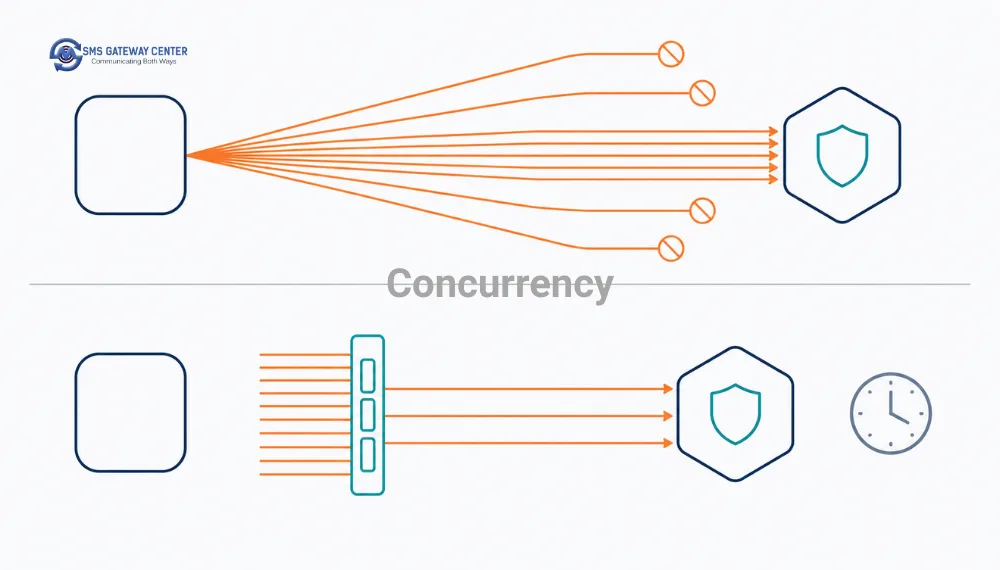
Pick concurrency conservatively. The right ceiling depends on the throughput provisioned on your account, so start low, watch your acceptance rate and latency, and raise it deliberately. If you find yourself needing high sustained concurrency to keep up, HTTP is the wrong transport and you want a persistent SMPP bind instead. The tuning considerations are covered in SMPP rate limits and throughput tuning, and connectivity requirements in the SMPP connectivity docs.
Batch Sends Versus Per-Message Sends
| Approach | sendMethod | Per-recipient text | Best for | Trade-off |
|---|---|---|---|---|
| Saved group on the platform | group | No | Recurring sends to a stable list | The list lives on the platform, not in your database |
| File upload | file | Depends on the file | Large one-off campaigns | Asynchronous, needs a separate status check |
| One request per recipient, limited | quick | Yes | Transactional traffic of any volume | More HTTP calls, full per-message control |
For transactional traffic, which is most of what a Node service sends, the last row is correct. Each message needs its own text, its own DLT template, its own idempotency key and its own retry state, and batching removes all four.
Do Not Block the Event Loop
If you are reading a large recipient file, stream it. Loading a 200 MB CSV with readFileSync and mapping it in one synchronous pass stops your process from serving anything else, including health checks, and your orchestrator will restart the container mid-batch.
import { createReadStream } from 'node:fs';
import { createInterface } from 'node:readline';

const rl = createInterface({ input: createReadStream('recipients.csv'), crlfDelay: Infinity });

const limit = pLimit(8);
const inFlight = [];

for await (const line of rl) {
  const [mobile, name] = line.split(',');
  inFlight.push(limit(() => sendOne(client, { mobile, text: render(name) })));
  if (inFlight.length >= 5_000) {
    await Promise.allSettled(inFlight.splice(0, inFlight.length));
  }
}

await Promise.allSettled(inFlight);
The periodic drain matters. Without it you accumulate an unbounded array of pending promises and reintroduce the memory problem you were avoiding, even though the limiter is correctly capping actual concurrency.
8. Message Length, Encoding and Segments
A GSM-7 SMS holds 160 characters. One character outside the GSM-7 alphabet, including a curly apostrophe pasted from a document, switches the entire message to UCS-2 at 70 characters and multiplies your cost. In JavaScript the trap is that String.length counts UTF-16 code units, so an emoji outside the Basic Multilingual Plane counts as 2, and none of it corresponds to SMS segments, because GSM-7 has extension characters that consume two septets each.
// src/sms/segments.js
const GSM7_BASIC =
  '@£$¥èéùìòÇ\nØø\rÅåΔ_ΦΓΛΩΠΨΣΘΞÆæßÉ !"#¤%&\'()*+,-./0123456789:;<=>?' +
  '¡ABCDEFGHIJKLMNOPQRSTUVWXYZÄÖÑܧ¿abcdefghijklmnopqrstuvwxyzäöñüà';

const GSM7_EXTENDED = '^{}\\[~]|€';

export function measure(text) {
  const chars = [...text]; // code points, not UTF-16 units
  const isGsm7 = chars.every((c) => GSM7_BASIC.includes(c) || GSM7_EXTENDED.includes(c));

  if (!isGsm7) {
    const units = chars.length;
    return { encoding: 'UCS-2', units, segments: units <= 70 ? 1 : Math.ceil(units / 67) };
  }

  const units = chars.reduce((n, c) => n + (GSM7_EXTENDED.includes(c) ? 2 : 1), 0);
  return { encoding: 'GSM-7', units, segments: units <= 160 ? 1 : Math.ceil(units / 153) };
}
Note [...text] rather than text.split(''). Spreading iterates code points and handles surrogate pairs correctly; split('') does not, and will happily tell you a single emoji is two characters.
Run this before every send and log the result. Reconciling predicted segments against the billed length and cost fields in the delivery report is the fastest way to catch an encoding regression before it shows up on an invoice. There is also a browser-based SMS length calculator for one-off checks.
When the content is genuinely non-Latin, set msgType to unicode instead of text.
9. India Specific: DLT Entity IDs, Templates and Pre-Send Validation
If any recipients are Indian numbers, this section decides whether your integration works.
Commercial SMS to Indian subscribers must originate from a registered principal entity, use a registered header, and match a template registered on a DLT platform. The operator’s scrubbing engine compares your submitted text against the registered template before delivery, and a single character of drift, including a trailing space, gets the message scrubbed. The chain is explained in the PE-TM binding walkthrough.
Two extra parameters on every India-bound send:
fields.dltEntityId = process.env.SGC_DLT_ENTITY_ID;
fields.dltTemplateId = template.dltTemplateId;
Validate Before You Send
Most teams discover a mismatch hours later from a delivery report. There is a pre-flight endpoint: POST https://unify.smsgateway.center/SMSApi/validateTemplate, documented at Validate Template. It takes senderid, the fully rendered msg and the dltTemplateId.
export class DltTemplateMismatchError extends Error {
  readonly retryable = false;
}

export async function validateTemplate(client, { senderId, renderedMessage, dltTemplateId }) {
  const res = await client.post('/SMSApi/validateTemplate', {
    senderid: senderId,
    msg: renderedMessage,
    dltTemplateId,
  });

  if (res.status === 'success') return true;

  if (String(res.statusCode) === '188') {
    throw new DltTemplateMismatchError(
      `Rendered message does not match DLT template ${dltTemplateId}: ${res.reason}`,
    );
  }

  throw new SmsApiError(res.reason || 'Template validation failed', String(res.statusCode));
}
188 is the documented mismatch code, returned as {"status":"error","statusCode":"188","reason":"message template mismatch"}.
Wire this into CI, not just runtime. Render every template in your repo with representative values, validate each, and fail the build on a mismatch. Drift caught at merge costs nothing. The same drift caught in production costs you every OTP sent between deploy and detection.
Rendering Templates Without Corrupting Them
DLT variable syntax is {#var#}. A registered template might read:
Dear {#var#}, your order {#var#} has been shipped and will arrive by {#var#}. Team ACME
const PLACEHOLDER = '{#var#}';

export function renderDltTemplate(template, values) {
  const expected = template.split(PLACEHOLDER).length - 1;
  if (expected !== values.length) {
    throw new Error(`Template expects ${expected} variables, ${values.length} given.`);
  }

  let out = '';
  let rest = template;
  for (const value of values) {
    const i = rest.indexOf(PLACEHOLDER);
    out += rest.slice(0, i) + value;
    rest = rest.slice(i + PLACEHOLDER.length);
  }
  return out + rest;
}
Substitute positionally in a single pass rather than using String.replace with a global regex. If a substituted value happens to contain something that looks like a placeholder or a $& replacement pattern, replace will do something surprising, and $& in particular is a real hazard because it expands to the matched substring.
Never call .trim(), .normalize(), or an HTML escaper on the rendered output before sending. Every one of those can create a mismatch against a template you registered without that transformation.
Templates can also be created programmatically via POST https://unify.smsgateway.center/SMSApi/template/create, documented at Create Message Template. Approval is asynchronous, so model it as a provisioning workflow with its own states, not as an inline call during a send.
10. OTP in Node.js: Generate and Verify
The reflex is crypto.randomInt(100000, 999999), store in Redis with a TTL, send as a normal SMS, compare on submission. That works, and it also means you now own expiry, replay protection, resend throttling, attempt limiting and timing-safe comparison. Most implementations get at least two of those wrong.
The API exposes a dedicated OTP endpoint at https://unify.smsgateway.center/SMSApi/otp, which handles generation, delivery, expiry and verification server side. The same URL serves both operations, switched by sendMethod.
Generate
Per the Generate OTP docs: sendMethod=generate, plus mobile, msgType, msg containing the literal $otp$ placeholder which the platform substitutes, medium=sms, codeType (num, alpha or alphanum), codeExpiry in seconds (default 300), codeLength, senderid and output.
export class OtpService {
  constructor(private readonly client: SmsClient, private readonly senderId: string) {}

  async generate(mobile: string, messageTemplate: string, { length = 6, expirySeconds = 300 } = {}) {
    const res = await this.client.post('/SMSApi/otp', {
      sendMethod: 'generate',
      mobile,
      msgType: 'text',
      msg: messageTemplate, // must contain the literal $otp$
      medium: 'sms',
      codeType: 'num',
      codeExpiry: expirySeconds,
      codeLength: length,
      senderid: this.senderId,
    });

    if (res.status !== 'success') {
      throw new SmsApiError(res.reason || 'OTP generation failed', String(res.statusCode));
    }

    return {
      createdAt: Number(res.createTime),
      expiresAt: Number(res.expiryTime),
      resendAllowedAt: Number(res.retryAfter),
    };
  }

  async verify(mobile: string, otp: string) {
    const res = await this.client.post('/SMSApi/otp', { sendMethod: 'verify', mobile, otp });
    return res.status === 'success';
  }
}
A successful generate returns statusCode 300:
{
  "status": "success",
  "mobile": "91777xxxxxxx",
  "transactionId": "0",
  "statusCode": "300",
  "type": "new",
  "reason": "OTP successfully generated.",
  "createTime": "1700117933163",
  "expiryTime": "1700118233163",
  "retryAfter": "1700117993163"
}
A successful verify returns statusCode 301 with "reason": "OTP has been Verified Successfully."
Surface retryAfter, Do Not Invent a Timer
retryAfter is a millisecond epoch giving the earliest permitted resend. Send it to the client as a countdown instead of hardcoding thirty seconds in your frontend. Hardcoded timers drift from server policy and produce the worst outcome available: an enabled Resend button that fails.
app.post('/auth/otp', async (req, res) => {
  const otp = await otpService.generate(req.body.mobile, OTP_TEMPLATE);
  const now = Date.now();

  res.json({
    expires_in: Math.max(0, Math.round((otp.expiresAt - now) / 1000)),
    resend_in: Math.max(0, Math.round((otp.resendAllowedAt - now) / 1000)),
  });
});
OTP Is the One Send You Do Not Queue
Everywhere else the advice is to queue. Not here: a queued OTP that leaves the queue eight seconds later is an OTP the user has already abandoned. Send inline, but defend the request with a shorter timeout than your normal sends and a circuit breaker so a gateway outage does not take your login page with it.
async function sendLoginOtp(mobile) {
  if (breaker.isOpen()) throw new OtpChannelUnavailableError('SMS channel temporarily unavailable.');

  try {
    return await otpService.generate(mobile, OTP_TEMPLATE); // client configured with 5s timeout
  } catch (err) {
    breaker.recordFailure();
    throw new OtpChannelUnavailableError('Could not send the code, please try again.', { cause: err });
  }
}
Worth knowing before you make SMS your only OTP channel: SMS fails observably and reports back, which is why it stays the safest primary channel in India. The failure-mode comparison against WhatsApp is in SMS API vs WhatsApp Business API.
11. Receiving Delivery Reports in Express
A 200 with status: success means accepted, not delivered. Closing that gap needs a second, asynchronous inbound flow.
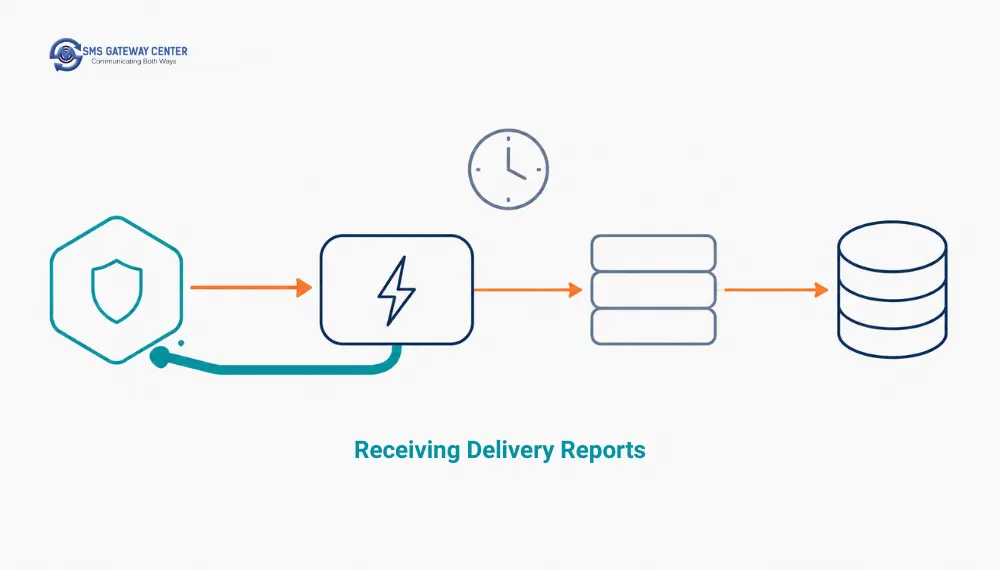
Register a callback with POST https://unify.smsgateway.center/SMSApi/webhook/create, passing smswebhook (your URL) and smswebhookrate (DLR throughput, default 10), documented at Create Webhook.
await client.post('/SMSApi/webhook/create', {
  smswebhook: 'https://api.example.com/webhooks/sms-dlr',
  smswebhookrate: 10,
});
Success looks like:
{
  "response": {
    "api": "webhook",
    "action": "create",
    "status": "success",
    "msg": "Webhook added successfully.",
    "code": "200"
  }
}
Set smswebhookrate to something your receiver can actually sustain. It is a promise about your own capacity, not a throughput upgrade. Registering 100 when your service handles 20 per second while also serving users is a self-inflicted outage.
The Receiver
The rule is acknowledge first, process later.
// src/webhooks/dlr.js
import express from 'express';
import { Queue } from 'bullmq';
import { timingSafeEqual } from 'node:crypto';

const dlrQueue = new Queue('sms-dlr', { connection: { url: process.env.REDIS_URL } });
const router = express.Router();

function safeEqual(a = '', b = '') {
  const bufA = Buffer.from(a);
  const bufB = Buffer.from(b);
  return bufA.length === bufB.length && timingSafeEqual(bufA, bufB);
}

// Capture the raw body. Do not let a JSON parser run before you have stored it.
router.post(
  '/sms-dlr',
  express.raw({ type: '*/*', limit: '1mb' }),
  async (req, res) => {
    if (!safeEqual(req.query.token, process.env.SGC_WEBHOOK_SECRET)) {
      return res.sendStatus(403);
    }

    // Persist verbatim and acknowledge. A worker parses it out of band.
    await dlrQueue.add(
      'dlr.received',
      {
        receivedAt: Date.now(),
        contentType: req.get('content-type') ?? null,
        query: req.query,
        raw: req.body.toString('utf8'),
      },
      { removeOnComplete: 1000, removeOnFail: 5000 },
    );

    res.json({ ok: true });
  },
);

export default router;
Three deliberate choices.
express.raw with type: '*/*'. You do not yet know the content type the platform will send, and a JSON body parser that encounters form-encoded input silently produces an empty object, destroying the payload before you ever see it. Capture the bytes first.
Store raw, parse later. This single decision turns an unanticipated payload format into a replayable record rather than a lost delivery report. Build the parser from what actually arrives, and cross-check status semantics against the delivery reports knowledge base article and the per-status explainers such as IN_RETRY and ABSENT_SUB.
timingSafeEqual, not ===. Comparing secrets with === leaks length and prefix information through timing. It is a cheap fix.
Make the downstream worker idempotent too. Any webhook system can deliver the same event twice, so key on message identifier plus status and upsert, making a duplicate a no-op rather than a double-counted metric.
12. Polling Delivery Reports with Async Iterators
Webhooks are the primary signal. Polling is the reconciliation backstop that catches anything lost while your receiver was down. Mature integrations run both.
Polling SMSApi/reports/status | Webhook push | |
|---|---|---|
| Latency to know | Poll interval | Near real time |
| Infrastructure | A cron and outbound access | A public HTTPS endpoint you must keep up |
| During your outage | Nothing lost, you catch up | Gaps possible |
| Cost at scale | Many requests returning nothing new | One request per state change |
| Role | Backstop | Primary |
The endpoint is https://unify.smsgateway.center/SMSApi/reports/status with method=getDlr, documented at SMS Delivery Report. Parameters are fromdate, todate, pageLimit, optional mobileNo or uuId, and startCursor for pagination.
An async generator is the natural shape, because it gives the caller backpressure for free:
export async function* fetchDeliveryReports(client, { from, to, pageLimit = 100 }) {
  let cursor;

  while (true) {
    const params = {
      method: 'getDlr',
      fromdate: from,
      todate: to,
      pageLimit,
      ...(cursor ? { startCursor: cursor } : {}),
    };

    const res = await client.post('/SMSApi/reports/status', params);
    const rows = res.reports_dlrList ?? [];
    if (rows.length === 0) return;

    for (const row of rows) yield row;

    cursor = rows.at(-1)?.cursorId;
    if (!cursor || rows.length < pageLimit) return;
  }
}

// Consumer controls the pace. Nothing is buffered in memory.
for await (const dlr of fetchDeliveryReports(client, { from: '2026-08-01', to: '2026-08-05' })) {
  await upsertDeliveryStatus(dlr);
}
Each row in reports_dlrList carries country, amount, msgType, cost, deliveryTime, length, channel, msgId, cause, mobileNo, uuId, dltTemplateId, globalErrorCode, cursorId, network, senderName, flashMsg, submitTime, text and status.
Persist cost and length next to the status. Comparing billed segments against what your measure() function predicted is how you catch an encoding regression before finance does.
13. Errors, Retries and Idempotency
Classify Before Retrying
| Class | Examples | Retry | Backoff | Action |
|---|---|---|---|---|
| Transport | DNS failure, ECONNREFUSED, TLS failure, TimeoutError | Yes | Exponential with full jitter | Bounded attempts, needs an idempotency key |
| Transient application | Gateway 5xx, throttling, temporary operator unavailability | Yes | Exponential with full jitter | Retry, then park for review |
| Permanent | Invalid sender ID, DLT mismatch (188), malformed recipient, insufficient balance | No | None | Fail immediately, alert, do not consume retry budget |
The authoritative code lists are at API Response Error Codes and Delivery Error Codes, and both are fetchable programmatically via POST /SMSApi/info/responsecodes and POST /SMSApi/info/deliverycodes. Pull them at deploy time and cache, rather than hardcoding a list that goes stale.
const PERMANENT_CODES = new Set(['188']); // template mismatch, extend from the published list

export function isRetryable(errOrResult) {
  if (errOrResult instanceof SmsTransportError) return true;
  if (errOrResult?.name === 'TimeoutError') return true;
  if (errOrResult instanceof SmsApiError) return !PERMANENT_CODES.has(errOrResult.statusCode);
  return false;
}
Keep the permanent and transient sets in configuration populated from the published lists, not scattered through the codebase. Deeper treatment of retry-window sizing against message time-to-live is in SMS API retry strategy: handling failed messages.
Full Jitter
export function backoffMs(attempt, { baseMs = 2_000, capMs = 300_000 } = {}) {
  const exponential = Math.min(capMs, baseMs * 2 ** (attempt - 1));
  return Math.floor(Math.random() * exponential); // full jitter
}
The jitter matters more than the curve. If a thousand queued messages fail together and all retry after exactly four seconds, you have built a thundering herd that guarantees the second attempt also fails.
Idempotency
The expensive scenario is mundane. Your worker POSTs a send, the gateway accepts and dispatches, the response is lost, your AbortSignal.timeout fires, and the retry sends the same OTP again.
export class IdempotentSender {
  constructor(redis, client, ttlSeconds = 86_400) {
    this.redis = redis;
    this.client = client;
    this.ttl = ttlSeconds;
  }

  async send(message, businessKey) {
    // Derived from the business event, so every retry produces the SAME key.
    const key = `sms:idem:${createHash('sha256')
      .update(`${businessKey}|${message.mobile}|${message.text}`)
      .digest('hex')}`;

    const cached = await this.redis.get(key);
    if (cached) return JSON.parse(cached);

    // SET NX claims the key atomically, so two workers cannot both send.
    const claimed = await this.redis.set(`${key}:lock`, '1', 'EX', 120, 'NX');
    if (!claimed) throw new SmsTransportError('Concurrent send in progress for this key.');

    const result = await this.client.post('/SMSApi/send', toFields(message));

    if (result.status === 'success') {
      await this.redis.set(key, JSON.stringify(result), 'EX', this.ttl);
    }

    return result;
  }
}
The critical detail is where businessKey comes from. It must be stable across retries: an order ID, an invoice number, a session identifier. A randomUUID() generated inside the send function defeats the whole mechanism, because every retry gets a fresh key.
The platform’s duplicatecheck parameter is a useful second layer, but it is a platform behaviour with a window you do not control. Own your own.
14. Queue Workers with BullMQ and Graceful Shutdown
// src/queue/sms.worker.js
import { Worker, Queue } from 'bullmq';

export const smsQueue = new Queue('sms-send', { connection: { url: process.env.REDIS_URL } });

const worker = new Worker(
  'sms-send',
  async (job) => {
    const { message, businessKey } = job.data;

    try {
      const result = await sender.send(message, businessKey);

      if (result.status === 'success') {
        await recordTransaction(businessKey, message.mobile, result.transactionId);
        return { transactionId: result.transactionId };
      }

      const err = new SmsApiError(result.reason, String(result.statusCode));
      if (!isRetryable(err)) {
        // Stop BullMQ retrying something that will never succeed.
        throw new UnrecoverableError(`Permanent failure ${result.statusCode}: ${result.reason}`);
      }
      throw err;
    } catch (err) {
      if (!isRetryable(err)) throw new UnrecoverableError(err.message);
      throw err;
    }
  },
  {
    connection: { url: process.env.REDIS_URL },
    concurrency: 8,
    limiter: { max: 50, duration: 1_000 }, // queue-level rate cap
  },
);
Two things carry most of the value.
UnrecoverableError is BullMQ‘s signal to stop retrying immediately. Without it, a message with an invalid sender ID occupies a worker slot five times across ten minutes and lands in the failed set anyway.
The limiter gives you a rate cap that survives horizontal scaling, because it is enforced through Redis. Per-process p-limit does not: run six replicas with concurrency: 8 and you are actually running 48.
Graceful Shutdown
This is the piece almost every Node SMS integration is missing, and it costs real messages on every deploy.
let shuttingDown = false;

async function shutdown(signal) {
  if (shuttingDown) return;
  shuttingDown = true;
  logger.info({ signal }, 'shutting down');

  server.close();                 // stop accepting new HTTP
  await worker.close();           // finish in-flight jobs, stop taking new ones
  await smsQueue.close();
  await client.close();           // drain the undici agent
  await redis.quit();

  process.exit(0);
}

process.on('SIGTERM', () => shutdown('SIGTERM'));
process.on('SIGINT', () => shutdown('SIGINT'));
When Kubernetes or your process manager sends SIGTERM, the default behaviour kills the process immediately. Any send that had been dispatched but whose response had not returned is now in the worst possible state: the gateway may have accepted it, but you have no record. worker.close() waits for in-flight jobs to settle. Combined with the idempotency key from section 13, a redelivered job after restart is safe.
Also handle the two events that kill a Node process silently:
process.on('unhandledRejection', (reason) => {
  logger.fatal({ reason }, 'unhandled rejection');
  shutdown('unhandledRejection');
});
A forgotten await on a send is an unhandled rejection, and on modern Node that terminates the process by default.
15. Testing Without Sending Real SMS
You cannot write meaningful tests against an integration that bills per assertion. Intercept HTTP instead.
// test/sms-client.test.js
import { describe, it, expect, afterEach } from 'vitest';
import nock from 'nock';
import { SmsClient, SmsTransportError } from '../src/sms/client.js';

const BASE = 'https://unify.smsgateway.center';
const client = new SmsClient(BASE, 'test-key');

afterEach(() => nock.cleanAll());

describe('SmsClient', () => {
  it('returns the transaction id on success', async () => {
    nock(BASE).post('/SMSApi/send').reply(200, {
      status: 'success',
      mobile: '919999999999',
      invalidMobile: '',
      transactionId: 'txn-123',
      statusCode: '200',
      reason: 'success',
    });

    const res = await client.post('/SMSApi/send', { mobile: '919999999999', msg: 'Hello' });
    expect(res.transactionId).toBe('txn-123');
  });

  it('sends the api key as a header and never in the body', async () => {
    let capturedBody;
    let capturedHeaders;

    nock(BASE)
      .post('/SMSApi/send', (body) => {
        capturedBody = body;
        return true;
      })
      .reply(function (_uri, _body) {
        capturedHeaders = this.req.headers;
        return [200, { status: 'success', statusCode: '200' }];
      });

    await client.post('/SMSApi/send', { mobile: '919999999999', msg: 'Hello' });

    expect(capturedHeaders.apikey).toBe('test-key');
    expect(JSON.stringify(capturedBody)).not.toContain('password');
  });

  it('surfaces a 188 template mismatch as a non-retryable result', async () => {
    nock(BASE).post('/SMSApi/validateTemplate').reply(200, {
      status: 'error',
      statusCode: '188',
      reason: 'message template mismatch',
    });

    const res = await client.post('/SMSApi/validateTemplate', { msg: 'wrong' });
    expect(res.status).toBe('error');
    expect(String(res.statusCode)).toBe('188');
  });

  it('converts a connection failure into SmsTransportError', async () => {
    nock(BASE).post('/SMSApi/send').replyWithError({ code: 'ECONNREFUSED' });

    await expect(client.post('/SMSApi/send', { mobile: '91999', msg: 'x' }))
      .rejects.toBeInstanceOf(SmsTransportError);
  });
});
Four tests, four distinct failure modes, zero messages sent. The second is the one people skip and the one that catches a real regression, because it asserts the credential travels in a header and never appears in the body.
Add a segment-counting test with a known GSM-7 extension character and a known emoji, and a DLT rendering test asserting the rendered output is byte-identical to the registered template with variables substituted. Then run validateTemplate against a staging account as a CI integration test: the unit test catches renderer bugs, the integration test catches template drift on the DLT portal, which no unit test can see.
16. Observability and Scaling Notes
Log four numbers, not one. Submit latency at p95, submit acceptance rate, time from submit to final DLR, and delivered rate. The first two describe your integration. The last two describe the route. Confusing them sends you debugging your own code when the problem is an operator.
Redact message bodies. They contain OTPs, order values and names, which is personal data under most regimes.
import pino from 'pino';

export const logger = pino({
  redact: {
    paths: ['*.password', '*.apikey', '*.otp', '*.msg', 'req.headers.apikey'],
    censor: '[redacted]',
  },
});
Watch socket metrics, not just request counts. If your undici agent’s connections cap is lower than your effective concurrency, requests queue inside the agent and your measured latency climbs for reasons that have nothing to do with the gateway.
Know when HTTP is wrong. HTTP submit carries per-request overhead a persistent binary session does not. For sustained high volume rather than bursts, a persistent SMPP bind is the correct transport. See SMPP connectivity and the throughput tuning guide.
17. Production Readiness Checklist
| Item | Why it matters | Done |
|---|---|---|
Every fetch call carries an AbortSignal.timeout | fetch has no default timeout and will hang forever | ☐ |
undici Agent configured with keep-alive and a connection cap | Avoids per-message TLS handshakes and caps sockets | ☐ |
Concurrency bounded by a limiter, never raw Promise.all | Prevents throttling and socket exhaustion | ☐ |
Promise.allSettled used for batches | One failure must not discard the other results | ☐ |
| API key auth via header, not userid and password in the body | Rotatable, revocable, per service | ☐ |
| Recipient numbers normalised to E.164 with libphonenumber-js | Regex validation of international numbers fails | ☐ |
| Segments and encoding computed before send | Catches accidental UCS-2 cost doubling | ☐ |
DLT template validated in CI via validateTemplate | Catches drift at merge, not in production | ☐ |
| Idempotency key derived from a stable business event | Prevents duplicate sends on ambiguous timeouts | ☐ |
Failures classified before retrying, UnrecoverableError on permanent | Stops retry storms | ☐ |
| Backoff uses full jitter | Prevents thundering herd on recovery | ☐ |
transactionId persisted against the business record | Without it you cannot correlate a DLR | ☐ |
| DLR ingestion running, webhook plus polling backstop | HTTP 200 is not delivery | ☐ |
| Webhook receiver captures raw body and acknowledges before processing | Prevents payload loss and backpressure | ☐ |
Webhook secret compared with timingSafeEqual | === leaks timing information | ☐ |
| SIGTERM handler closes worker, queue and agent | Deploys otherwise drop in-flight sends | ☐ |
unhandledRejection handled | A missing await otherwise kills the process silently | ☐ |
| Message bodies and credentials redacted in logs | OTPs in logs are a breach | ☐ |
| Per-recipient send rate limit | Blocks SMS pumping via resend buttons | ☐ |
Ready to send your first message? Create an account, generate an API key from the control panel, and run the snippet from section 4 against your own sender ID. Sending to Indian numbers means registering your DLT entity and templates first. Get started or browse the full API reference.
18. Common Mistakes and How to Fix Them
No timeout on fetch. The single most common Node-specific bug here. A stalled request hangs forever and the promise never settles. Always attach AbortSignal.timeout().
Promise.all over a large recipient array. Unbounded concurrency plus first-rejection-wins. Use a limiter and allSettled.
A fresh connection per message. Without a keep-alive agent you pay TLS setup on every send. Configure undici.Agent once and reuse it.
Retrying a timeout without an idempotency key. A timeout is ambiguous: the message may already be in flight. Retrying blind is how a customer gets two OTPs.
Generating the idempotency key inside the retry path. Every retry gets a new key and the mechanism does nothing. Derive it from the business event upstream.
Using String.length for SMS length. It counts UTF-16 code units, not code points and not segments. Use a proper counter and iterate with spread.
String.replace for DLT variable substitution. A value containing $& expands to the matched substring and corrupts your message into a template mismatch. Substitute positionally.
Trimming or normalising a rendered DLT template. Any transformation after rendering and before sending can cause a scrubbing rejection. Render, validate, send, unchanged.
A JSON body parser in front of the DLR webhook. If the payload is form-encoded, a JSON parser yields an empty object and the report is gone. Capture the raw body.
No SIGTERM handler. Every deploy kills in-flight sends with no record of whether they were accepted.
Throwing on 4xx before reading the body. The rejection reason and status code you need for classification are in that body.
19. FAQs
How do I send an SMS in Node.js? POST to https://unify.smsgateway.center/SMSApi/send with a URLSearchParams body containing sendMethod=quick, mobile, msg, senderid, msgType=text and output=json, authenticating with an apikey header. Attach AbortSignal.timeout() to the fetch call, then read transactionId from the JSON response. Section 4 has a complete working example.
Do I need axios, or is native fetch enough? Native fetch on Node 18+ is enough. Use undici directly when you want to configure the connection pool, since it is the client that backs fetch anyway. Choose axios if you are already using its interceptors, but set validateStatus: () => true so you can read error bodies, and configure a keep-alive agent yourself.
Why does my fetch call hang forever? Because fetch in Node has no default timeout. If the server accepts the connection and stops responding, the promise never settles. Pass signal: AbortSignal.timeout(15000) on every request and catch err.name === 'TimeoutError' separately from gateway rejections.
Is Promise.all safe for sending bulk SMS? No, for two reasons. It opens one connection per recipient simultaneously, which exhausts sockets and triggers throttling, and it rejects on the first failure, discarding the results of everything else in flight. Use a concurrency limiter such as p-limit together with Promise.allSettled.
How many concurrent SMS requests should I send? Start low, around 8 to 16, measure acceptance rate and p95 latency, and raise deliberately. The correct ceiling depends on the throughput provisioned on your account. If you need high sustained concurrency, move to a persistent SMPP bind rather than scaling HTTP concurrency.
Why did my SMS return success but never arrive? Success means the platform accepted it for delivery. Non-delivery afterwards is a downstream event: DLT scrubbing rejection, handset unreachable, DND registration or an operator failure. Fetch the delivery report from SMSApi/reports/status and read the cause and globalErrorCode fields.
How do I handle DLT templates in Node.js? Store the registered template text with its dltTemplateId, substitute variables positionally into {#var#} placeholders without any other string transformation, validate the rendered output via POST /SMSApi/validateTemplate before sending, and pass dltEntityId and dltTemplateId on the send. Section 9 has the renderer and validator.
What does status code 188 mean? It is the template mismatch response, returned as {"status":"error","statusCode":"188","reason":"message template mismatch"}. Your rendered message does not match the registered DLT template. Compare character by character including trailing whitespace and punctuation.
How do I send OTP SMS in Node.js? Use https://unify.smsgateway.center/SMSApi/otp with sendMethod=generate, supplying mobile, msg containing the literal $otp$ placeholder, codeLength, codeExpiry, codeType and senderid. Verify against the same URL with sendMethod=verify and the submitted otp. Generation returns status code 300, verification returns 301.
Should OTP sends go through the queue? No. Queue everything else, but send OTP inline so the user is not waiting on queue latency. Use a shorter timeout, around five seconds, and a circuit breaker that fails fast when the channel is degraded.
How do I receive delivery reports in Express? Register a webhook via POST /SMSApi/webhook/create with smswebhook and smswebhookrate. In Express, mount express.raw({ type: '*/*' }) on that route so the payload is captured verbatim, verify a shared secret with timingSafeEqual, push the raw body onto a queue, and return 200 immediately. Parse in a worker.
How do I avoid duplicate sends when a request times out? Derive an idempotency key from a stable business identifier such as an order ID, claim it in Redis with SET NX before sending, and cache the successful result against it. A timeout is ambiguous about whether the message was accepted, so the key is what makes the retry safe.
How do I stop losing messages during a deploy? Handle SIGTERM: stop accepting new HTTP, call worker.close() so in-flight jobs settle, close the queue, drain the undici agent, then exit. Without this the process dies immediately and any dispatched-but-unacknowledged send is lost.
How do I test an SMS integration without sending real messages? Intercept HTTP with nock and assert on four cases: success, a permanent rejection such as 188, a transport failure, and that the API key travels as a header rather than in the body. Section 15 has all four ready to copy.