TABLE OF CONTENTS
- The Short Answer
- TL;DR
- What RCS Actually Changes, at the Protocol and Billing Level
- Two API Generations Inside One Product
- Bots: The Identity Layer SMS Does Not Have
- Templates: Create, List, Delete, and the Approval Clock
- The Three Send Methods and Why the Response Union Collapsed
- The Correlation Chain and Its Two Renames
- The Delivery Report: Read and Click Are New Terminal States
- The Inbox: Two-Way RCS Is a Polling Problem
- The Summary Endpoint and Reconciliation
- Endpoint Reference Table
- Success Codes Across the RCS Families
- RCS Against SMS: A Field-Level Comparison
- Fallback Is the Migration Path, Not Replacement
- Your First RCS Send in Six Steps
- Working Code: cURL, Python, PHP, Node.js
- Ten Mistakes That Cost a Week
- A Decision Matrix for Channel Choice
- Production Readiness Checklist
- Unspecified Behaviour and How to Code Around It
- FAQs
The Short Answer
The RCS API on SMSGatewayCenter is a different API from the SMS API, not a channel flag on the same one. Sends go to https://unify.smsgateway.center/RCSApi/send rather than SMSApi/send, they require a botId instead of a senderid, the message body is a JSON payload naming an approved templateCode rather than free text, and the format parameter is spelled format here where the SMS API spells it output. Reporting lives on a second, newer base path entirely, https://unify.smsgateway.center/rest/rcs/v1/, which uses page and limit paging, accepts an apikey header, and returns a flat envelope with no response wrapper. Three distinct response envelope shapes exist across the RCS endpoints, so a single parser will not cover them. The practical migration is not a cutover: you keep your SMS path, add an RCS path, and route between them, because RCS only reaches handsets where the recipient has RCS available and enabled, and the delivery report tells you exactly when it did not with globalErrorCode 5007 and cause “RCS Not Enabled”.
TL;DR
- Base path:
https://unify.smsgateway.center/RCSApi/send, POST,application/x-www-form-urlencoded. Documented at Send RCS Message API (Quick). - Three send methods, same endpoint:
sendMethod=quickwithmobile,sendMethod=groupwithgroup,sendMethod=bulkuploadwithphoneHeaderandcustomUploadovermultipart/form-data. - Unlike the SMS send, all three documented RCS send responses carry the same seven keys.
status,mobile,invalidMobile,transactionId,statusCode,reason,msgId. Parse one shape. format=json, notoutput=json, on everyRCSApi/endpoint. Therest/rcs/v1/endpoints flip back tooutput=json. Getting this wrong is the most common first-hour failure.- You need a bot before you need anything else.
GET https://unify.smsgateway.center/rest/rcs/v1/botslists them.botIdis an unquoted integer there and a form field everywhere else. - The template name is the template code.
RCSApi/template/createreturnstemplateName,RCSApi/template/listreturns the same value asname, and you send it ascontentMessage.templateMessage.templateCode. - Placeholders are square brackets,
[name]and[otp], not the DLT{#var#}syntax you use on SMS. - The delivery report is a REST endpoint,
GET https://unify.smsgateway.center/rest/rcs/v1/dlr, withpageandlimitup to 200, not cursor paging. - RCS delivery rows carry
readTimeandclickedTime. SMS has no equivalent. This is the single largest reporting difference. identifieron send becomescampaignNameon the report. Same value, two names, and it is the only caller-supplied correlation token on any send surface on this platform.- Two-way RCS is polling.
GET https://unify.smsgateway.center/rest/rcs/v1/inboxis documented as read-only withpageandlimit. - Store
transactionIdanduuIdas text. Nineteen digits exceeds what a 64-bit float represents exactly, and several JSON parsers will silently mangle them. - Run both channels. Multi-Channel Fallback is the mechanism, and its behaviour is described in What are trigger error codes in multi-channel fallback.
What RCS Actually Changes, at the Protocol and Billing Level
If you already operate an SMS integration, the useful way to understand RCS is by what it removes and what it adds to the contract you already know.
SMS is a store-and-forward transport with a hard 160 GSM-7 character unit, a sender header, and a binary-ish delivery outcome. Everything you build on top of it, segment accounting, template approval, delivery reconciliation, follows from those three facts. RCS is an IP-based messaging service standardised by the GSMA under the Universal Profile, delivered over data rather than the signalling channel, rendered by the handset’s native messaging app, and identified by a verified business agent rather than an alphanumeric header.
Four consequences matter to your code.
One. The message is structured, not a string. On the SMS API you pass msg as text and the platform counts segments for you. On RCS you pass msg as a JSON document. In the documented form it looks like this:
{
  "contentMessage": {
    "templateMessage": {
      "templateCode": "WELCOME_TEMPLATE"
    }
  },
  "ttl": "86400s"
}
There is no character count to compute, no GSM-7 versus Unicode branch, and no concatenation arithmetic. Everything you built around SMS length and credit counting has no analogue on this path. That is a subtraction, and it is a large one.
Two. Identity moves from a six-character header to a bot. Where SMS sends carry senderid, RCS sends carry botId. The bot is a registered agent with a name and a logo, and the handset renders it as a verified brand rather than as a string of capitals. Practically, this means your sender-identity provisioning work moves from the sender ID lifecycle into bot provisioning, and a bot you do not own cannot be used, since the documentation states plainly that the botId must belong to the account you authenticate as.
Three. Delivery has more terminal states. An SMS is submitted, then delivered or failed. An RCS message is submitted, then delivered, then possibly read, then possibly clicked. The delivery report row exposes all four as separate timestamps. Your outbound message table, if you built it along the lines described in The Outbound Message Table, needs two more nullable timestamp columns and needs to stop treating “delivered” as terminal.
Four. The message can fail for a reason SMS never has. The documented sample delivery row on the RCS Delivery Report REST API page shows globalErrorCode 5007 with cause “RCS Not Enabled” and deliveryStatus “FAILED”. A recipient whose handset or network does not have RCS available is not a bad number and not a transient error. It is a permanent routing fact about that recipient for that moment, and it is the reason the migration section of this reference argues for fallback rather than cutover.
On billing, the documented delivery row carries amount as the quoted string "0.0000". Because that sample row is a failed send, it establishes only that a failed RCS message is priced at zero, which is what you would expect and what the SMS side does too. For live per-message and per-conversation rates, read RCS pricing and the wallet figure in your own portal rather than hardcoding anything, exactly as the guidance in Bulk SMS Pricing in India recommends for the SMS channel.
Two API Generations Inside One Product
This is the structural fact that makes RCS integrations go wrong, and it is visible only if you read the endpoint URLs side by side.
There are two families. The first uses the base path https://unify.smsgateway.center/RCSApi/ and covers sending and template management. It behaves like the rest of the SMSGatewayCenter platform: POST with form-encoded bodies, credentials in the body, no paging.
The second uses the base path https://unify.smsgateway.center/rest/rcs/v1/ and covers bots, delivery reports, the inbox, and summary. It behaves like a modern REST API: GET only, query parameters, an apikey header as an alternative to sending your password, page-and-limit paging, and a legacy alias without the v1 segment that is also accepted.
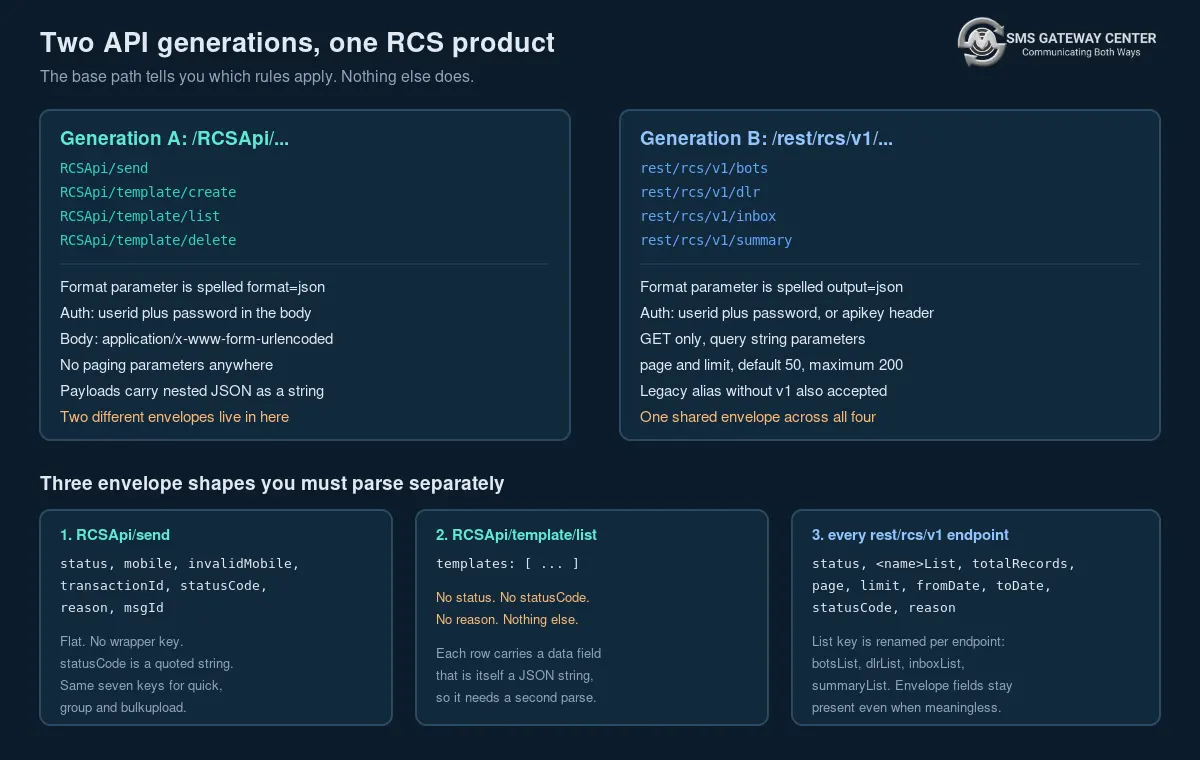
The differences that will actually break your first build:
| Dimension | /RCSApi/... | /rest/rcs/v1/... |
|---|---|---|
| HTTP method | POST for send, create and delete; GET for template list | GET |
| Format parameter name | format | output |
| API key header supported | Not documented | Yes, header apikey, and password becomes optional |
userid required | Yes | Yes, even when using the apikey header |
| Body encoding | application/x-www-form-urlencoded, or multipart/form-data for file upload | Query string |
| Paging | None | page and limit, default 50, maximum 200 |
| Date filtering | None | fromDate and toDate, with from and to accepted as aliases |
| Response envelope | Two different shapes | One shared shape |
Write two client classes. One speaks form-encoded POST and reads format; the other speaks GET and reads output. Trying to unify them behind a single request() helper produces a function with a boolean flag that nobody remembers to set, and the failure mode is a 200 response with an unexpected body rather than a clean error.
On envelopes, there are three shapes, not two, because the two RCSApi/ families disagree with each other.
RCSApi/send, RCSApi/template/create and RCSApi/template/delete return a flat object carrying status, statusCode and reason:
{
  "reason": "Accepted for processing.",
  "templateName": "my_text_template",
  "status": "success",
  "statusCode": "200"
}
RCSApi/template/list returns an object with a single templates key and nothing else at all:
{
  "templates": [ { "name": "Flight_Booking", "type": "carousel", "status": 1 } ]
}
No status. No statusCode. No reason. If your HTTP client wrapper asserts on payload["status"] == "success" before returning, template listing will throw on every successful call.
Every rest/rcs/v1/ endpoint returns a third shape: status, a list key named after the resource, totalRecords, page, limit, fromDate, toDate, statusCode and reason. The list key is renamed per endpoint, so it is botsList, dlrList, inboxList or summaryList. Write one unwrapper for this family, parameterised on the list key, and do not reuse it on the RCSApi/ family.
A detail worth noticing in that third shape: the bots endpoint returns page, limit, fromDate and toDate in its envelope even though it documents no date filtering and its sample shows fromDate and toDate as empty strings. The envelope is shared across the family regardless of which fields are meaningful for a given resource. Read totalRecords and the named list; treat the rest of the envelope as advisory.
Bots: The Identity Layer SMS Does Not Have
Nothing else works until you know your bot id.
GET https://unify.smsgateway.center/rest/rcs/v1/botsRequired parameters are userid and output=json, plus either password or the apikey header. action defaults to list and only list is supported in v1. The documented response:
{
  "status": "success",
  "botsList": [
    {
      "botId": 3,
      "name": "YourBot",
      "status": 1,
      "logoUrl": "https://example.com/bots/logo.png",
      "isSandbox": 0
    }
  ],
  "totalRecords": 1,
  "page": 1,
  "limit": 1,
  "fromDate": "",
  "toDate": "",
  "statusCode": "200",
  "reason": "success"
}
Four things to take from this row.
botId is an unquoted integer here. On RCSApi/send it is a form field and therefore a string on the wire, and the delivery report describes its botId filter as a “numeric RCS bot id”. The value is small and there is no precision hazard, but if you are round-tripping the bots list into a config file and back into a send, normalise to string once at the boundary so you are not comparing 3 to "3" in a lookup table.
status is the integer 1, and the notes state that only active bots are returned. This is the second distinct meaning of a field called status in the RCS API, after the string "success" on the send response, and there will be a third and fourth before this reference is finished. Never write a generic is_ok(payload) helper that keys on the name status alone.
isSandbox is 0 here, and the notes say 1 means the bot is a sandbox bot. This is the RCS counterpart to the account-level sandbox described on the demo page, and it is the cleanest way to build the kind of test harness argued for in Testing Code That Sends Messages. Gate on it explicitly: in your configuration loader, refuse to start a production process whose configured bot has isSandbox equal to 1, and refuse to start a staging process whose bot has isSandbox equal to 0. That single assertion prevents the whole class of incident where a load test bills real messages.
logoUrl is the brand asset the handset renders. It has no effect on your send path but it is worth surfacing in any internal admin screen, because a bot with a broken logo URL looks unverified to the recipient and nobody in engineering will notice.
Cache the bots list. It changes when someone provisions a new agent, which is a manual, human-paced event. Refresh it on deploy and on a daily schedule; do not call it before every send.
Templates: Create, List, Delete, and the Approval Clock
RCS templates are managed on the RCSApi/ generation, and the family is create, list and delete. There is no documented update endpoint, which means editing a template is a delete-and-recreate operation and your deployment tooling should treat template definitions as immutable artefacts named by version.
Creating a template
POST https://unify.smsgateway.center/RCSApi/template/create
Content-Type: application/x-www-form-urlencoded
Parameters are userid, password, botId, and templateData, where templateData is a JSON string. The documented sample:
{
  "name": "my_text_template",
  "type": "text_message",
  "templateState": "Create",
  "fallbackText": "",
  "category": "TRANSACTIONAL",
  "textMessageContent": "Hello [name], your OTP is [otp].",
  "suggestions": []
}
Supported type values documented in the notes are text_message, rich_card and carousel.
The response is short and it is the most important thing on this page:
{
  "reason": "Accepted for processing.",
  "templateName": "my_text_template",
  "status": "success",
  "statusCode": "200"
}
“Accepted for processing” is not “approved”. A statusCode of "200" here means the platform took your submission, in exactly the way a 200 from an SMS send means the message was accepted for submission rather than delivered. Build your template deployment as a two-phase operation: submit, then poll template/list until the template appears with status equal to 1, and only then flip the feature flag that lets production traffic reference it. Treating the create response as completion will produce sends against a template code the platform does not yet recognise.
Note the placeholder syntax. [name] and [otp], square brackets, no hash marks. If you are carrying DLT variable-substitution code over from the SMS side, where the syntax is {#var#} as covered in the DLT template registration guide, that code will not fire on RCS content and your substitution will silently no-op, shipping a message that says “Hello [name]” to a real customer. Write a separate substitution function with its own tests, and have it assert that zero unreplaced [ characters remain in the rendered output before the send call is made.
fallbackText appears in the create payload with an empty string in the sample. The field name is self-describing and the sensible engineering assumption is that it is the text used when rich rendering is unavailable, but the sample does not populate it and the notes do not describe its behaviour. Populate it anyway with a complete, standalone SMS-length message that makes sense on its own, because a field that might be a fallback and is empty can only ever hurt you, and a field that might be a fallback and contains a good message cannot.
Listing templates
GET https://unify.smsgateway.center/RCSApi/template/list?userid=...&password=...&botId=...botId is required, so templates are scoped per bot rather than per account. If you run several bots you will call this once per bot.
The response rows look like this, abbreviated:
{
  "templates": [
    {
      "data": "{\"templateModel\":{\"name\":\"Flight_Booking\",\"type\":\"carousel\", ... }}",
      "creationTime": 1784978480698,
      "botName": "YourBot",
      "name": "Flight_Booking",
      "updationTime": 1784978480698,
      "category": "Promotional",
      "type": "carousel",
      "status": 1
    }
  ]
}
Three traps in this row.
data is double-encoded JSON. It is a string whose contents are a JSON document, so reading the carousel structure requires a second parse of a value your first parse already returned. In Python that is json.loads(row["data"]); in PHP json_decode($row['data'], true); in Node JSON.parse(row.data). Wrap it in its own try-catch and treat a parse failure as a skipped row rather than a fatal error, because one malformed template should not break the listing of the others.
category changes case between request and response. You submit "TRANSACTIONAL" in the create payload and the list response returns "Promotional" in title case. Compare categories case-insensitively, and normalise on read.
The notes state it explicitly: “Use the template name as templateCode when sending RCS.” This closes what would otherwise be the ugliest gap in the family, because template/create never returns a separate code and RCSApi/send demands templateCode. One value, three field names: templateName on create, name on list, templateCode inside the send payload. Write a single adapter function that reads the canonical value out of any of the three and returns it, and use it everywhere.
creationTime and updationTime are unquoted millisecond epochs. Both hold the same value in both documented sample rows, so a template that has never been edited reports an update time equal to its creation time rather than a null or a zero. That is a friendlier convention than the “0 means never” pattern used by campaign records elsewhere on the platform, but it means you cannot detect “never edited” from the timestamps alone; compare them for equality if you need that signal.
status here is the integer 1, the third distinct meaning of that field name in this API.
Deleting a template
POST https://unify.smsgateway.center/RCSApi/template/deleteParameters are userid, password, botId and templateName. The success response:
{
  "reason": "Template deleted successfully.",
  "status": "success",
  "statusCode": "200"
}
The safe way to call this is with the exact name string you read back from template/list, never a value you constructed or remembered. Read the list, find the row, take its name verbatim, pass that, then read the list again and confirm the row is gone. That round-trip costs one extra GET and removes any question about what the delete key is keyed on.
Deletion is irreversible from the API’s point of view, and the notes confirm that deleted templates cannot be used in send requests. Before deleting, query your own outbound table for recent sends referencing that template code. If any are still awaiting a terminal delivery state, wait. The delivery report joins on templateName, and you do not want to remove the row your reporting is about to look up.
Rich cards and carousels
The documented template/list sample shows the two structured types in full, and they are worth reading because they tell you what the create payload can hold.
A rich_card template carries orientation (the sample shows "VERTICAL"), height (the sample shows "MEDIUM_HEIGHT"), and a standAlone object containing cardTitle, cardDescription, mediaUrl and a suggestions array.
A carousel template carries height (the sample shows "SHORT_HEIGHT"), width (the sample shows "SMALL_WIDTH"), and a carouselList array whose entries each carry cardTitle, cardDescription, mediaUrl and their own suggestions.
Suggestions in both cases look like this:
{
  "suggestionType": "reply",
  "displayText": "View QR",
  "postback": "View QR_[message_id]",
  "preference": 1
}
The postback value is what comes back to you when the recipient taps the button, and the sample shows a [message_id] placeholder appended to a human-readable label. Design your postbacks as machine-parseable tokens with a stable prefix, because your inbox reader will be pattern-matching on them and a postback of “Learn More” tells you nothing about which send it belongs to. A shape like ORDERCONF_TRACK_[message_id] gives you an action, a context and a correlation hook in one string.
Both structured types carry createdViaApi: true in the sample, so templates created through the portal and templates created through the API are distinguishable in the listing. If you are moving an existing portal-managed template estate under version control, that flag is how you audit the migration.
mediaUrl points at a publicly reachable asset. Host it somewhere with a stable URL and a long cache lifetime, and never at a signed URL that expires, because the template outlives the send.
The Three Send Methods and Why the Response Union Collapsed
All three send methods POST to the same endpoint.
POST https://unify.smsgateway.center/RCSApi/sendCommon required parameters across all three: userid, password, sendMethod, msgType (use text for template-based content), format (json), botId, and msg. Optional on all three: identifier, a campaign identifier for your records.
The per-method parameters:
sendMethod | Additional required parameters | Encoding |
|---|---|---|
quick | mobile, one or more numbers with country code, comma-separated | application/x-www-form-urlencoded |
group | group, a saved group name | application/x-www-form-urlencoded |
bulkupload | phoneHeader naming the column that holds numbers, and customUpload=true | multipart/form-data |
The group parameter is documented as a saved group name, which connects the RCS send path directly to the contact and group model reachable through SMSApi/group/read and SMSApi/contact/read. Your audience data does not need to be duplicated for RCS.
Now the part that will surprise anyone who has parsed the SMS send response. On the SMS API, SMSApi/send returns a union of four different key sets discriminated by a sendMethod you have to remember yourself, because the response does not echo it: the quick shape carries mobile and invalidMobile, the group shape carries group instead and drops both, and the file shape drops all three.
The RCS API does not do this. All three documented RCS send pages publish the identical response:
{
  "status": "success",
  "mobile": "919999999999",
  "invalidMobile": "",
  "transactionId": "3983571817594375469",
  "statusCode": "200",
  "reason": "success",
  "msgId": ""
}
Seven keys, the same seven, on quick, on group and on bulkupload. That is a genuinely better contract and it means one response model covers the whole send surface.
Two caveats on how far to trust it. The mobile field is populated with a single number even on the group and file samples, which is not information a group send can meaningfully return; and msgId is an empty string in all three. The defensive read, which is correct whichever way the live behaviour goes, is: bind status, statusCode, reason and transactionId as required fields, and bind mobile, invalidMobile and msgId as optional fields that may be empty, absent, or hold a single value on a multi-recipient send. Never derive your recipient list from the response. You know who you sent to; you put them in the request. Persist that list yourself at submission time, as The Outbound Message Table argues, and use transactionId to join the delivery report back onto it.
invalidMobile deserves a line of its own. When populated it is your only signal that some recipients in a batch were rejected before submission. Log it at warning level with the full request recipient count alongside, so that a batch of 500 that returns three invalid numbers is visible in your metrics rather than quietly becoming a 497-message send that reconciles short.
On ttl: the documented sample uses "86400s", a string with a trailing s, inside the msg payload rather than as a form parameter. Set it deliberately. An OTP with a 24-hour time to live is wrong; set it to the OTP validity window and let the network stop trying afterwards. A promotional card with a 60-second time to live is also wrong. This parameter is one of the few real levers RCS gives you over delivery behaviour and most integrations leave it at whatever the first sample showed.
The Correlation Chain and Its Two Renames
Five identifiers thread an RCS send, and two of them change name in transit. This is the single richest source of quiet bugs in the family, because a rename does not throw; it just returns nothing and your join comes back empty.
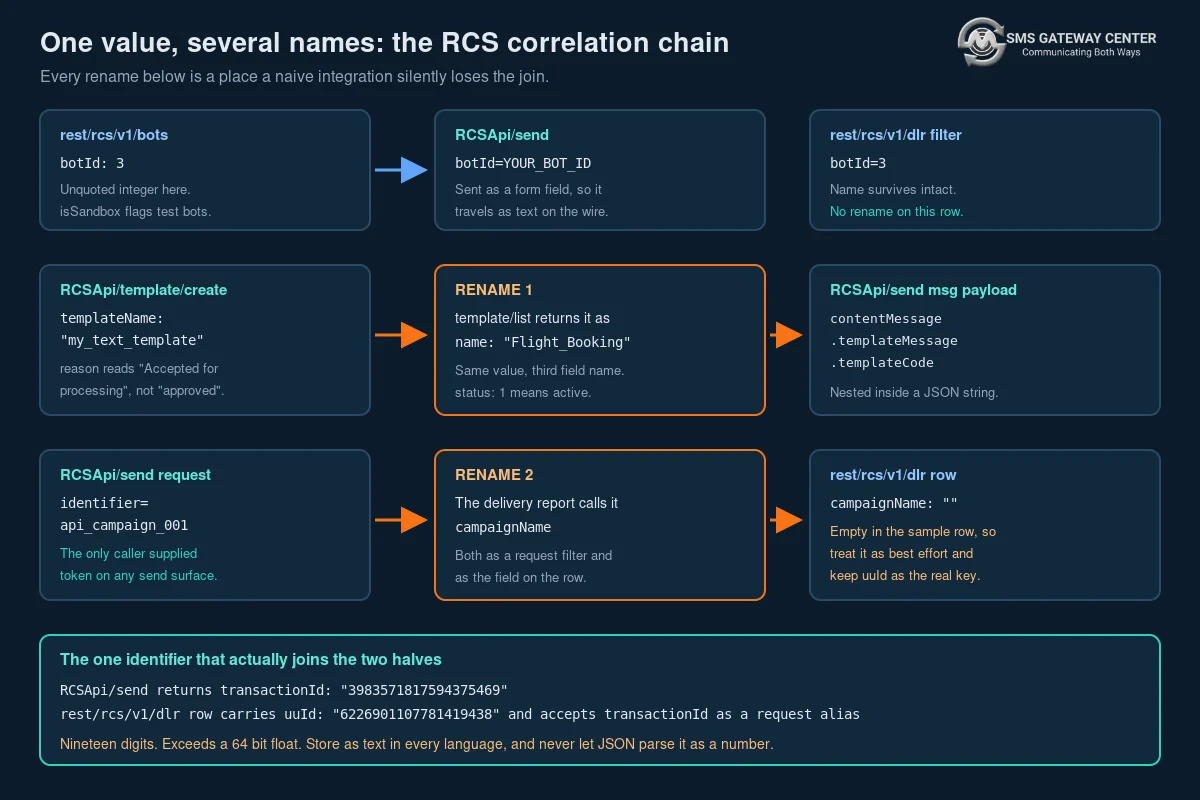
botId survives intact. It is botId in the bots list, botId in the send request, botId in the delivery report filter, and botId in the inbox and summary filters. No adapter needed.
The template identifier renames once. Created as templateName, listed as name, sent as templateCode, and filtered on the delivery report as templateName again. Four appearances, three names.
The correlation token renames once. You send identifier. The delivery report filters on campaignName and returns a field called campaignName. There is no endpoint documented anywhere that calls it identifier after the send.
That second rename is worth dwelling on, because identifier is unusual and valuable. Every other send surface on this platform gives you no way to attach your own reference to a send. The SMS API has no equivalent parameter. The OTP endpoints return transactionId as the literal string "0", so they offer no correlation at all. RCS is the one place you can stamp a send with a value your own system chose.
Use it, and use it structurally. Put a value in identifier that encodes what the send was and where it came from, something like svc-orders.shipment-confirm.v3.2026-09-11, and now the delivery report can be filtered by service, by message purpose and by template version without a join against your own database. That is a materially better operational position than the SMS side, where the same question requires you to have persisted every transactionId yourself.
Two constraints to design within. The documented sample row returns campaignName as an empty string, so do not assume every row will carry the value back. And the filter is documented as filtering by “campaign name”, with no statement about whether matching is exact or partial. Keep your identifiers free of characters that behave specially in a substring match, keep them unique enough that a partial match would still be correct, and keep uuId as the real primary key for reconciliation. identifier is a fast index, not the source of truth.
uuId and transactionId are the same concept under two names. The send returns transactionId. The delivery report row carries uuId and accepts transactionId as a documented request alias for the uuId filter. Both sample values are nineteen digits. Nineteen digits is above the range a double-precision float represents exactly, which means a JavaScript JSON.parse will round it and hand you a different number, silently. Store it as text in your database, keep it as a string in every language, and if you are on Node use a JSON parser configured to preserve large integers as strings, or read the field out of the raw body before parsing. This is the same hazard documented for SMS transaction identifiers in the Node.js integration tutorial, and it bites exactly as hard on RCS.
The Delivery Report: Read and Click Are New Terminal States
GET https://unify.smsgateway.center/rest/rcs/v1/dlrThe legacy alias /rest/rcs/dlr is documented as also supported. Prefer the versioned path.
Required: userid, output=json, and either password or the apikey header. Optional filters: action (defaults to list, only list supported in v1), fromDate and toDate (aliases from and to, accepting YYYY-MM-DD or full date-time), mobileNo, uuId (alias transactionId), botId, campaignName, templateName, globalErrorCode (alias status), globalErrorCodes for a comma-separated set, page, and limit with a default of 50 and a documented maximum of 200.
Note that status is a documented request alias for globalErrorCode. That is the fourth distinct meaning of the token status in this API, and this one is the worst, because a developer who passes status=success intending to filter for successful messages is passing a non-numeric value to a numeric error-code filter. Always spell it globalErrorCode in your code. The alias exists; using it is a trap you can simply decline.
The documented row:
{
  "uuId": "6226901107781419438",
  "botName": "YourBot",
  "mobileNo": "919876543210",
  "msgId": "Zr6dILs7iZt1pvO",
  "message": "{\"contentMessage\":{\"templateMessage\":{\"templateCode\":\"WELCOME_TEMPLATE\"}},\"ttl\":\"86400s\"}",
  "amount": "0.0000",
  "msgTypeLabel": "RICH",
  "directionLabel": "A2P",
  "globalErrorCode": 5007,
  "deliveryStatus": "FAILED",
  "cause": "RCS Not Enabled",
  "channelLabel": "API",
  "campaignName": "",
  "submitTime": 1788421063350,
  "submitTimeFormatted": "2026-09-03 13:07:43",
  "deliveryTime": 1788421066059,
  "deliveryTimeFormatted": "2026-09-03 13:07:46",
  "readTime": 0,
  "readTimeFormatted": "",
  "clickedTime": 0,
  "clickedTimeFormatted": ""
}
Read this row by type, not just by name, because the types are not consistent with the SMS delivery row and reusing an SMS parser here will produce wrong numbers rather than errors.
mobileNo is a quoted string here. On the SMS delivery row it is an unquoted number. This is an improvement and it removes a real precision hazard, but it means the two rows cannot share a deserialiser.
amount is a quoted string, "0.0000", with four decimal places. On the SMS delivery row amount is an unquoted float. Parse to a decimal type, not a float, and never to an integer. Four decimal places implies sub-paisa pricing granularity, so a currency column with two decimals will lose money over a large volume.
globalErrorCode is an unquoted integer. This is your machine-readable delivery contract. cause is prose intended for humans. Branch on the number, log the prose, never parse the prose. The full numeric catalogue is available and free to read from the Delivery Error Codes list, and diffing it nightly is one of the cheapest contract tests you can run against this platform.
deliveryStatus is the field carrying "FAILED". Note that it is not called status. The delivery outcome on the SMS row is called status; here it is deliveryStatus, and status at the envelope level means whether the API call itself succeeded. Two fields, one concept each, and the names have been swapped relative to the SMS API. This is the highest-value single line in this reference for anyone porting SMS reporting code.
msgTypeLabel is "RICH" and directionLabel is "A2P". The Label suffix on both, and on channelLabel, is a strong hint that unlabelled numeric twins exist somewhere in the platform, exactly as the summary endpoint publishes both direction as an integer and directionLabel as a string. Store the label. If a numeric twin appears on this row in future it will be additive, and a label is the more stable thing to have persisted.
message is double-encoded JSON, the same trap as data on the template list. It is a string containing the exact msg payload you submitted. Two consequences. First, parsing it takes a second pass. Second, and more usefully, it means the delivery report is self-describing: you can recover what was actually sent from the report row alone, without joining to your own send log. That is genuinely valuable for incident forensics and it is not something the SMS delivery report gives you.
The four timestamps are the reason to be here. submitTime, deliveryTime, readTime and clickedTime are unquoted millisecond epochs, each with a preformatted string twin whose name ends in Formatted. Zero means the event did not occur; the corresponding Formatted field is an empty string.
Treat them as a monotonic funnel and store all four as nullable columns, mapping zero to null on ingest. That gives you, in one table, submitted-to-delivered latency, delivered-to-read latency, and read-to-clicked conversion, per message, without any instrumentation of your own. No SMS integration on any platform can produce the second and third of those.
Two cautions on the arithmetic. In the documented sample, deliveryTime is populated with a real timestamp on a row whose deliveryStatus is FAILED, which means the field marks the terminal state, whatever that state was, rather than a successful delivery specifically. Compute delivery latency only on rows whose globalErrorCode indicates success, and clamp every interval at zero, because the SMS side of this platform has a documented sample where the delivery timestamp precedes the submit timestamp on the same row and there is no reason to assume the RCS clocks are better synchronised. A negative latency in a dashboard is a bug report from a customer; a clamped zero is a rounding artefact nobody notices.
The Formatted twins carry no timezone. Ingest the epoch, not the string, and render in your own timezone at display time. Keep the string only for support tickets, where matching what the portal shows a customer is worth more than correctness.
Paging is page-and-limit, not cursors. Set limit=200, start at page=1, and stop when the number of rows returned is less than limit or when page multiplied by limit reaches or exceeds totalRecords. Both conditions, not one, because totalRecords on a live feed can move while you are paging.
That mutability is the real weakness of offset paging here. If new rows land while you are on page 3, rows shift and you can skip or duplicate. Two defences, both cheap. First, always bound your query with an explicit fromDate and toDate over a window that has closed, so the underlying set is stable while you read it. Second, make your ingest idempotent on uuId plus mobileNo, with an upsert rather than an insert, so a duplicated row is harmless and a re-run of yesterday’s window is free. Ingest the same way you would ingest SMS delivery data, appending facts rather than mutating a status column, which is the pattern argued for at length in Observability for Messaging Pipelines.
The documented error response is worth handling by name:
{
  "status": "error",
  "dlrList": [],
  "statusCode": "403",
  "reason": "RCS API access is not enabled for this account."
}
An empty dlrList with statusCode "403" is an entitlement problem, not an empty day. Alert on it. A poller that treats 403 as “no messages yesterday” will report perfect silence for as long as the entitlement stays off.
The Inbox: Two-Way RCS Is a Polling Problem
GET https://unify.smsgateway.center/rest/rcs/v1/inboxLegacy alias /rest/rcs/inbox. Required: userid, output=json, and either password or the apikey header. Optional: action, fromDate, toDate, mobileNo (documented as five to twenty digits with country code), botId, page, limit.
The documented row:
{
  "incomingId": "451",
  "botId": 3,
  "mobileNo": "919876543210",
  "msgId": "abc-123",
  "type": "text",
  "typeLabel": "FREE TEXT",
  "message": "Hi, is my order shipped?",
  "receivedAt": 1752480000000,
  "receivedAtFormatted": "2026-07-14 10:00:00"
}
incomingId is a quoted string while botId on the same row is an unquoted integer. message here is plain text, not double-encoded JSON, unlike the delivery row. receivedAt is an unquoted millisecond epoch with a formatted twin.
typeLabel reads "FREE TEXT", which strongly implies a second inbound type exists for suggestion taps, since suggestions carry a postback value and that value has to arrive somewhere. Design your inbox handler as a dispatch on type with an explicit default branch that logs the unrecognised type and stores the row unprocessed rather than dropping it. When suggestion replies start appearing you will have a record of them from day one instead of discovering the type after a month of silent discards.
The page states the endpoint is read-only and that to reply you use the send API. That is the whole two-way loop: poll inbox, match on mobileNo and botId, send a reply through RCSApi/send. There is no documented inbound webhook for RCS, so build the poller and build it properly.
A poller design that holds up in production, in four parts.
One. Poll on a fixed short interval with an overlapping window. Every thirty seconds, request the last five minutes. The overlap costs you nothing because your writes are idempotent, and it means a single missed tick self-heals on the next one rather than becoming a permanent hole.
Two. Deduplicate on incomingId. It is the only field on the row that reads like a per-message primary key, it is a small integer in a string, and it is documented as belonging to the incoming message. Make it a unique constraint and upsert.
Three. Page to exhaustion inside every tick. Set limit=200 and keep requesting until a short page arrives. A busy bot after a broadcast can produce far more than 200 inbound messages in five minutes, and a poller that reads only the first page will fall permanently behind at exactly the moment the conversation matters.
Four. Track your own lag. On every tick, record the difference between now and the newest receivedAt you saw. That single number tells you whether the poller is keeping up, and it is the metric that will page you before a customer complains that nobody answered.
Results are documented as newest first, so within a page you are reading in descending time order. Do not rely on that ordering to terminate; rely on the page length and your date bound.
The mobile number is your only join key back to a customer, which means an RCS conversation is identified by handset, not by thread. If the same person messages two different bots you will see two unrelated streams. Key your conversation state on the pair (botId, mobileNo), not on mobileNo alone.
The Summary Endpoint and Reconciliation
GET https://unify.smsgateway.center/rest/rcs/v1/summaryLegacy alias /rest/rcs/summary. Same auth and paging model. Optional filters: action, fromDate, toDate, botId, page, limit.
The documented row:
{
  "botName": "YourBot",
  "direction": 1,
  "directionLabel": "A2P",
  "countryName": "India",
  "msgTypeLabel": "RICH",
  "total": 3,
  "success": 0,
  "read": 0,
  "failed": 3,
  "notSent": 0,
  "others": 0,
  "refund": 0,
  "invalid": 0,
  "rcsEnabled": 0,
  "clicked": 0,
  "summaryTime": 1788373800000,
  "summaryTimeFormatted": "2026-09-03 00:00:00"
}
Every counter is an unquoted integer. This is a meaningful difference from the SMS summary endpoint, where the counters come back as quoted strings with a single unquoted exception. If you have a shared summary ingestion path across channels, it needs a per-channel coercion step, and the RCS side is the well-behaved one.
Rows are grouped by bot, direction, country and message type, with summaryTime at midnight in the sample, which reads as daily buckets.
Nine outcome counters sit under total: success, read, failed, notSent, others, refund, invalid, rcsEnabled, clicked. Three of them have no SMS analogue and are worth understanding before you build a dashboard on this.
read and clicked are engagement counters, and they are subsets of success rather than peers of it. A message that was delivered, read and clicked increments all three. Do not sum the outcome counters and expect total; you will overcount every engaged message twice.
rcsEnabled is the interesting one. Given that the delivery report’s headline failure mode is globalErrorCode 5007, “RCS Not Enabled”, a counter by that name is almost certainly your reach measurement: how many of the recipients in this bucket could actually receive RCS. Track it as a ratio against total and watch it over months. That single ratio is the number that tells you whether RCS is becoming your primary channel or remaining a supplement, and it is the number your fallback configuration should be tuned against.
refund implies failed messages are credited back, which is consistent with the failed sample row carrying amount of "0.0000".
Use this endpoint the way you would use any aggregate: as a cross-check, never as a source. It has no recipient granularity, so you cannot answer “did this customer get their message” from it. What you can do, cheaply, every morning, is pull yesterday’s summary and compare total against the row count your own ingest wrote from the delivery report for the same window. Equal is healthy. Your count lower means your ingest dropped rows. Your count higher means you double-inserted. That two-line comparison catches the majority of ingest faults before anyone downstream sees bad numbers, and it costs one API call a day.
Endpoint Reference Table
| Purpose | Method | Endpoint | Format param | Key request fields | Response list key |
|---|---|---|---|---|---|
| Send, one or more numbers | POST | RCSApi/send | format | sendMethod=quick, mobile, botId, msg | none, flat object |
| Send, saved group | POST | RCSApi/send | format | sendMethod=group, group, botId, msg | none, flat object |
| Send, file upload | POST | RCSApi/send | format | sendMethod=bulkupload, phoneHeader, customUpload, botId, msg | none, flat object |
| Create template | POST | RCSApi/template/create | not documented | botId, templateData | none, flat object |
| List templates | GET | RCSApi/template/list | not documented | botId | templates |
| Delete template | POST | RCSApi/template/delete | not documented | botId, templateName | none, flat object |
| List bots | GET | rest/rcs/v1/bots | output | action | botsList |
| Delivery reports | GET | rest/rcs/v1/dlr | output | fromDate, toDate, uuId, botId, campaignName, templateName, globalErrorCode, page, limit | dlrList |
| Inbound messages | GET | rest/rcs/v1/inbox | output | fromDate, toDate, mobileNo, botId, page, limit | inboxList |
| Aggregate counts | GET | rest/rcs/v1/summary | output | fromDate, toDate, botId, page, limit | summaryList |
All paths are relative to https://unify.smsgateway.center/. The four rest/rcs/v1/ endpoints also answer on the same path with the v1 segment removed.
Note the middle three rows. The template endpoints document neither format nor output in their parameter tables, and their samples pass neither. They return JSON regardless. Send nothing rather than guessing, and parse JSON unconditionally on that family.
Success Codes Across the RCS Families
Tabulating the success code or statusCode value across a CRUD family is worth doing on this platform, because the SMS group family contains an endpoint that returns 224 on success while its seven siblings return 200. Any client testing for 200 on that endpoint has a live bug.
The RCS family, side by side:
| Endpoint | Success field | Success value | Notes |
|---|---|---|---|
RCSApi/send | statusCode | "200" | Quoted string. status is "success". |
RCSApi/template/create | statusCode | "200" | reason reads “Accepted for processing.” |
RCSApi/template/list | none | none | No status field of any kind in the response. |
RCSApi/template/delete | statusCode | "200" | reason reads “Template deleted successfully.” |
rest/rcs/v1/bots | statusCode | "200" | Error case documented as "403". |
rest/rcs/v1/dlr | statusCode | "200" | Error case documented as "403". |
rest/rcs/v1/inbox | statusCode | "200" | Error case documented as "403". |
rest/rcs/v1/summary | statusCode | "200" | Error case documented as "403". |
Consistent, with the single exception of template/list, which returns no status field at all. So the RCS family does not repeat the SMS platform’s anomaly, and statusCode == "200" is a safe success test everywhere it exists.
Two rules survive that finding anyway. First, statusCode is a quoted string on every one of these, so compare against "200" and not 200; a loosely typed comparison will pass in PHP and fail in Python. Second, for template/list, test on the presence and type of the templates key instead: a successful call returns an array, and anything else is a failure whatever the HTTP status says.
RCS Against SMS: A Field-Level Comparison
This table is the porting guide. Every row is a place where code written against the SMS API will not work unchanged.
| Concept | SMS API | RCS API |
|---|---|---|
| Send endpoint | SMSApi/send | RCSApi/send |
| Format parameter | output | |
| Sender identity | senderid, alphanumeric header | botId, a registered agent |
| Message body | msg as plain text | msg as a JSON document naming a template code |
| Template variable syntax | {#var#} for DLT | [name] square brackets |
| Send response shape | Four different key sets by sendMethod | One key set for all three methods |
| Platform message id | transactionId | transactionId, same name |
| Caller-supplied reference | none | identifier |
| Reporting base path | SMSApi/reports/status | rest/rcs/v1/dlr |
| Reporting method | GET or POST | GET |
| Reporting paging | Cursor, via cursors.next | Offset, via page and limit |
| Report envelope | Wrapped in response, count is an object | Flat, totalRecords is a scalar |
| Report list key | reports_dlrList | dlrList |
| Delivery outcome field | status | deliveryStatus |
| Numeric error field | globalErrorCode | globalErrorCode, same name |
| Recipient number type | Unquoted number | Quoted string |
| Cost field type | amount unquoted float | amount quoted string, four decimals |
| Read and click tracking | none | readTime and clickedTime on every row |
| Inbound messages | Separate shortcode and webhook surfaces | rest/rcs/v1/inbox, polling |
| Segment and part counting | Central to billing | Not applicable |
| API key auth on reporting | Header on the SMS API | Header apikey on rest/rcs/v1/ |
The two rows to internalise are the delivery outcome field and the paging model. Everything else is a rename you will notice within an hour of testing. Those two produce code that runs, returns 200, and quietly gives you the wrong answer.
Fallback Is the Migration Path, Not Replacement
The framing of “migrating from SMS to RCS” is wrong, and the delivery report proves it. globalErrorCode 5007 with cause “RCS Not Enabled” is not a transient error you retry through. It is the platform telling you that this recipient, right now, cannot receive an RCS message. Retrying the same channel produces the same result.
So the target architecture is both channels, with a rule deciding which one carries a given message. Multi-Channel Fallback is the platform mechanism for exactly this. Its semantics are documented in the knowledge base: trigger error codes control when the platform moves to the next channel, and by default any failure on a channel other than the last can trigger the next step. The detail matters, and the trigger error codes article is the page to read before configuring anything.
Three concrete patterns, in increasing order of engineering effort.
Pattern one: platform-configured fallback, RCS first, SMS second. You configure the chain once and send to it. Simplest to operate, and the right starting point. Because leaving the trigger codes empty means any RCS failure moves the message to SMS, a 5007 falls through to SMS automatically without you writing any routing logic. For time-critical messages, and particularly for OTP, the empty-trigger-codes default is the recommended configuration precisely because you want any failure to advance immediately rather than waiting on a code match.
Pattern two: application-side routing on a reach cache. Send RCS, ingest the delivery report, and record per recipient whether RCS succeeded or returned 5007. On the next send to that recipient, choose the channel from that record. This saves you the failed RCS attempt and its latency, which matters for OTP where the fallback hop is dead time the user spends staring at an empty input field. The cost is a reach table you have to expire, because RCS availability changes when a customer changes handset or their operator enables the service. Expire entries after a few weeks and let them re-learn.
Pattern three: content-aware routing. Some messages are worth RCS and some are not. A rich card with a tracking button is worth the attempt. A one-line balance alert is not, and sending it as RCS buys nothing while adding a failure mode. Tag messages by purpose at the application boundary and route on the tag. This is the pattern that actually controls cost, because it stops you from paying rich-message rates for content that gains nothing from being rich.
Whichever pattern you choose, instrument the split. Your dashboard needs, per day, the count of messages attempted on RCS, the count that fell back, and the reason distribution of the fallbacks. The rcsEnabled counter on the summary endpoint gives you the platform’s own view of the same question, and comparing the two is how you find out that your reach cache has gone stale.
One deliberate exception. Do not put OTP on RCS-first unless you have measured the fallback latency and found it acceptable. The reliability argument in the OTP delivery checklist applies with more force here, because a fallback hop adds a step to a flow where every second measurably reduces completion. RCS is an excellent channel for the confirmation that follows a successful login. It is a questionable first hop for the code itself.
Your First RCS Send in Six Steps
Step one. Confirm entitlement. Call rest/rcs/v1/bots. A statusCode of "403" with the reason about RCS API access means the product is not enabled on the account and no amount of correct code will fix it. This call is also your health check; wire it into your deployment smoke test.
Step two. Pick a bot and record whether it is a sandbox. Take botId from the list. Assert on isSandbox matching your environment before the process finishes starting.
Step three. Create a template and wait for it. POST to RCSApi/template/create with a text_message type first, before attempting a card or carousel. Then poll RCSApi/template/list until the template appears with status of 1. Do not skip the poll.
Step four. Send one message to a number you control. Use sendMethod=quick with a single number. Capture the entire response body verbatim to a log, not just the fields you expect. Record the transactionId and the identifier you sent.
Step five. Read the delivery report for that one message. Call rest/rcs/v1/dlr filtered by uuId equal to the transactionId you recorded. Compare the returned row field by field against what you submitted: does campaignName hold your identifier, does the double-encoded message field match your payload, what is in globalErrorCode. This one comparison, on one message you control, establishes the whole contract empirically and takes an afternoon.
Step six. Only now build the batch path. Move to group or bulkupload, add the poller, add the ingest. Everything after step five is scale; everything before it is contract.
Working Code: cURL, Python, PHP, Node.js
Credentials in every sample below are placeholders. Never put a live password in a query string, and never ship any of this into a browser or a mobile app, because these calls carry account credentials and belong on your server.
cURL, quick send
curl --location --request POST 'https://unify.smsgateway.center/RCSApi/send' \
  --header 'Content-Type: application/x-www-form-urlencoded' \
  --data-urlencode 'userid=YourUsername' \
  --data-urlencode 'password=YOUR_PASSWORD' \
  --data-urlencode 'sendMethod=quick' \
  --data-urlencode 'msgType=text' \
  --data-urlencode 'format=json' \
  --data-urlencode 'botId=YOUR_BOT_ID' \
  --data-urlencode 'mobile=919999999999' \
  --data-urlencode 'msg={"contentMessage":{"templateMessage":{"templateCode":"WELCOME_TEMPLATE"}},"ttl":"86400s"}' \
  --data-urlencode 'identifier=svc-orders.welcome.v1'
Python, send and then reconcile
import json
import time
from decimal import Decimal

import requests

BASE = "https://unify.smsgateway.center"
USERID = "YourUsername"
PASSWORD = "YOUR_PASSWORD"
BOT_ID = "YOUR_BOT_ID"


def send_rcs(mobile, template_code, identifier, ttl_seconds=86400):
    payload = {
        "contentMessage": {"templateMessage": {"templateCode": template_code}},
        "ttl": f"{ttl_seconds}s",
    }
    resp = requests.post(
        f"{BASE}/RCSApi/send",
        data={
            "userid": USERID,
            "password": PASSWORD,
            "sendMethod": "quick",
            "msgType": "text",
            "format": "json",              # note: format, not output
            "botId": BOT_ID,
            "mobile": mobile,
            "msg": json.dumps(payload),
            "identifier": identifier,
        },
        timeout=30,
    )
    resp.raise_for_status()
    body = resp.json()

    # statusCode is a quoted string on every RCSApi endpoint.
    if body.get("statusCode") != "200":
        raise RuntimeError(f"send rejected: {body.get('reason')} ({body.get('statusCode')})")

    invalid = body.get("invalidMobile") or ""
    if invalid:
        # Only signal that recipients were dropped before submission.
        print(f"WARNING invalid recipients: {invalid}")

    # Nineteen digits. Keep it a string, always.
    return str(body["transactionId"])


def fetch_dlr_page(from_date, to_date, page=1, limit=200):
    resp = requests.get(
        f"{BASE}/rest/rcs/v1/dlr",
        params={
            "userid": USERID,
            "password": PASSWORD,
            "output": "json",             # note: output, not format
            "action": "list",
            "fromDate": from_date,
            "toDate": to_date,
            "page": page,
            "limit": limit,
        },
        timeout=60,
    )
    resp.raise_for_status()
    body = resp.json()
    if body.get("statusCode") != "200":
        raise RuntimeError(f"dlr call failed: {body.get('reason')}")
    return body


def iter_dlr(from_date, to_date, limit=200):
    """Page to exhaustion over a closed window."""
    page = 1
    seen = 0
    while True:
        body = fetch_dlr_page(from_date, to_date, page, limit)
        rows = body.get("dlrList") or []
        for row in rows:
            yield row
        seen += len(rows)
        total = body.get("totalRecords") or 0
        # Two termination conditions, not one.
        if len(rows) < limit or seen >= total:
            return
        page += 1
        time.sleep(0.2)


def normalise(row):
    """Map a raw dlr row onto columns you can safely store."""

    def epoch_or_none(value):
        # Zero means the event never happened.
        return int(value) if value else None

    submit = epoch_or_none(row.get("submitTime"))
    delivered = epoch_or_none(row.get("deliveryTime"))
    latency_ms = None
    if submit is not None and delivered is not None:
        latency_ms = max(0, delivered - submit)   # clamp, never trust clock order

    payload = None
    raw = row.get("message")
    if raw:
        try:
            payload = json.loads(raw)             # double-encoded JSON
        except (ValueError, TypeError):
            payload = None

    return {
        "uu_id": str(row["uuId"]),
        "mobile_no": str(row["mobileNo"]),
        "bot_name": row.get("botName"),
        "campaign_name": row.get("campaignName") or None,
        "global_error_code": int(row.get("globalErrorCode", 0)),
        "delivery_status": row.get("deliveryStatus"),
        "cause": row.get("cause"),
        "amount": Decimal(row.get("amount") or "0"),   # quoted string, four decimals
        "submit_time_ms": submit,
        "delivery_time_ms": delivered,
        "read_time_ms": epoch_or_none(row.get("readTime")),
        "clicked_time_ms": epoch_or_none(row.get("clickedTime")),
        "delivery_latency_ms": latency_ms,
        "sent_payload": payload,
    }
Upsert the output of normalise on the pair (uu_id, mobile_no). That makes re-running a window free and makes the overlap in your poller harmless.
PHP, listing templates and handling the missing envelope
<?php
function rcsListTemplates(string $userid, string $password, string $botId): array
{
    $url = 'https://unify.smsgateway.center/RCSApi/template/list?' . http_build_query([
        'userid'   => $userid,
        'password' => $password,
        'botId'    => $botId,
    ]);

    $ch = curl_init($url);
    curl_setopt_array($ch, [
        CURLOPT_RETURNTRANSFER => true,
        CURLOPT_TIMEOUT        => 30,
    ]);
    $raw = curl_exec($ch);
    if ($raw === false) {
        throw new RuntimeException('template/list transport error: ' . curl_error($ch));
    }
    curl_close($ch);

    $body = json_decode($raw, true);

    // This endpoint returns no status, no statusCode and no reason.
    // The only success test available is the shape of the templates key.
    if (!is_array($body) || !isset($body['templates']) || !is_array($body['templates'])) {
        throw new RuntimeException('template/list returned an unexpected shape');
    }

    $out = [];
    foreach ($body['templates'] as $row) {
        $model = null;
        if (!empty($row['data'])) {
            // data is a JSON string inside JSON. One bad row must not kill the list.
            $decoded = json_decode($row['data'], true);
            $model = is_array($decoded) ? $decoded : null;
        }

        $out[] = [
            // The name IS the templateCode you send with.
            'template_code' => $row['name'] ?? null,
            'bot_name'      => $row['botName'] ?? null,
            'type'          => $row['type'] ?? null,
            // Casing differs between what you submit and what comes back.
            'category'      => isset($row['category']) ? strtoupper($row['category']) : null,
            'is_active'     => (int)($row['status'] ?? 0) === 1,
            'created_ms'    => isset($row['creationTime']) ? (int)$row['creationTime'] : null,
            'updated_ms'    => isset($row['updationTime']) ? (int)$row['updationTime'] : null,
            'model'         => $model,
        ];
    }

    return $out;
}
Node.js, the large-integer hazard
// The transactionId and uuId values are nineteen digits.
// JSON.parse will silently round them past Number.MAX_SAFE_INTEGER.
// Pull them out of the raw body BEFORE parsing.

function extractStringField(rawBody, field) {
  const match = rawBody.match(new RegExp(`"${field}"\\s*:\\s*"([^"]+)"`));
  return match ? match[1] : null;
}

async function sendRcs({ mobile, templateCode, identifier }) {
  const params = new URLSearchParams({
    userid: process.env.SGC_USERID,
    password: process.env.SGC_PASSWORD,
    sendMethod: 'quick',
    msgType: 'text',
    format: 'json',                 // format here, output on the rest endpoints
    botId: process.env.SGC_BOT_ID,
    mobile,
    msg: JSON.stringify({
      contentMessage: { templateMessage: { templateCode } },
      ttl: '86400s',
    }),
    identifier,
  });

  const res = await fetch('https://unify.smsgateway.center/RCSApi/send', {
    method: 'POST',
    headers: { 'Content-Type': 'application/x-www-form-urlencoded' },
    body: params,
  });

  const rawBody = await res.text();
  const body = JSON.parse(rawBody);

  if (body.statusCode !== '200') {
    throw new Error(`RCS send rejected: ${body.reason} (${body.statusCode})`);
  }

  return {
    // Read the digits from the raw text, not from the parsed object.
    transactionId: extractStringField(rawBody, 'transactionId'),
    invalidMobile: body.invalidMobile || '',
    reason: body.reason,
  };
}
There is no official Node.js or Java SDK for this platform. The two published SDKs are PHP and Python, listed on the downloads page, and neither is documented as covering the RCS endpoints, so treat the code above as the reference implementation for those languages. A Postman collection for the SMS surface is available and worth importing for the shared authentication patterns, but build the RCS requests by hand from the tables in this reference.
Ten Mistakes That Cost a Week
One. Sending output=json to an RCSApi/ endpoint. The parameter is format on that family. Symptom: a response in an unexpected format, or a parse error your logs attribute to the network.
Two. Sending format=json to a rest/rcs/v1/ endpoint. The parameter is output there, and it is documented as required. Same class of symptom, opposite direction.
Three. Asserting on payload["status"] before returning from your HTTP helper. RCSApi/template/list has no status field. Every successful template listing will throw.
Four. Comparing statusCode to the integer 200. It is the quoted string "200" everywhere it appears. Passes in PHP, fails in Python and TypeScript.
Five. Reading the delivery outcome from a field called status. On the RCS delivery row, the outcome is deliveryStatus. The field named status is the envelope-level call outcome. The names are swapped relative to the SMS API.
Six. Letting JSON.parse touch transactionId. Nineteen digits, silently rounded, and the corrupted value looks entirely plausible. Every subsequent delivery report lookup returns nothing and you spend two days suspecting the platform.
Seven. Treating “Accepted for processing” as an approved template. Poll template/list for status of 1 before routing production traffic at a new template code.
Eight. Carrying {#var#} substitution code over from DLT. RCS placeholders are [name]. Your substitution will no-op and ship the literal placeholder to a customer.
Nine. Retrying a 5007. “RCS Not Enabled” is a fact about the recipient, not a transient failure. Fall back to SMS; do not retry the same channel.
Ten. Summing the summary counters and expecting total. read and clicked are subsets of success, not peers of it.
A Decision Matrix for Channel Choice
Twelve dimensions across the three realistic options. Read the rows that matter to your use case rather than counting the column scores.
| Dimension | SMS only | RCS only | RCS with SMS fallback |
|---|---|---|---|
| Reach | Effectively universal | Limited to RCS-capable handsets, and 5007 tells you where it is not | Effectively universal |
| Integration effort | Lowest, one API | Moderate, two API generations and a bot and template estate | Highest, both paths plus a routing rule |
| Message richness | Text only | Cards, carousels, media, tappable suggestions | Rich where possible, plain where not |
| Brand identity | Six-character alphanumeric header | Verified agent with a name and a logo | Verified where possible |
| Read tracking | None | readTime on every delivery row | Partial, on the RCS half |
| Click tracking | Only via link shorteners | clickedTime on every delivery row | Partial, on the RCS half |
| Inbound handling | Shortcode and webhook surfaces | Polling rest/rcs/v1/inbox | Both, on separate paths |
| Latency for OTP | Single hop, well understood | Single hop when reachable | Two hops on fallback, measurably slower |
| Cost predictability | Segment arithmetic, well documented | Per-message, read from the portal | Mixed, requires per-channel attribution |
| Template governance | DLT registration, {#var#} | Bot-scoped RCS templates, [name], no update endpoint | Two template estates to keep in step |
| Delivery reconciliation | Cursor paging, wrapped envelope | Offset paging, flat envelope | Two ingests into one table |
| Best fit | Alerts, OTP, anything time-critical | Marketing and post-transaction engagement with a known-reachable audience | Almost every production estate |
The honest summary is that the third column wins for most organisations, and the reason is in the reach row rather than the richness row. RCS is worth adding because of what it lets you do with the recipients it reaches, not because it replaces anything.
Production Readiness Checklist
Entitlement and configuration:
rest/rcs/v1/botsreturnsstatusCode"200"from the production environment- The
403reason string about RCS API access is handled distinctly from an empty result isSandboxis asserted against the environment at process startbotIdis loaded from configuration, never hardcoded in a send call- The bots list is cached and refreshed on a schedule, not per send
Authentication:
- The
apikeyheader is used on allrest/rcs/v1/calls rather than a password in a query string useridis sent alongside theapikeyheader, since it remains required- No credential appears in any URL that reaches an access log
- No RCS call is made from browser or mobile client code
Templates:
- Template definitions live in version control as immutable, versioned artefacts
- Deployment polls
template/listforstatusof1before enabling a new template code - Category comparisons are case-insensitive
- The
datafield is parsed in its own try-catch, per row fallbackTextis populated with a standalone message on every template- The
[placeholder]substitution has its own tests and asserts zero unreplaced brackets before send - Deleting a template is preceded by a check for in-flight sends referencing it
mediaUrlvalues point at stable, non-expiring, cacheable assets
Sending:
format=jsonon everyRCSApi/callstatusCodeis compared against the string"200"invalidMobileis logged at warning level with the request recipient counttransactionIdis stored as text everywhereidentifieris populated on every send with a structured, service-scoped valuettlis set per message purpose, not left at a copied default- The recipient list is persisted at submission, never derived from the response
Delivery reporting:
output=jsonon everyrest/rcs/v1/call- Paging terminates on both a short page and the
totalRecordsbound - Queries are bounded to closed date windows
- Ingest upserts on
uuIdplusmobileNo - All four timestamps are stored, with zero mapped to null
- Latency calculations are clamped at zero and computed only on successful rows
- Branching is on
globalErrorCode, never oncause - The outcome is read from
deliveryStatus, notstatus amountis parsed as a decimal, not a float or an integer- The double-encoded
messagefield is parsed defensively
Inbox:
- The poller runs on a short interval with an overlapping window
- Deduplication is on
incomingIdwith a unique constraint - Every tick pages to exhaustion
- Poller lag against the newest
receivedAtis a tracked metric - Unrecognised
typevalues are stored, not discarded - Conversation state is keyed on
(botId, mobileNo)
Operations:
- A daily job compares summary
totalagainst the delivery rows ingested for the same window - The
rcsEnabledratio is tracked over time - Fallback rate and fallback reason distribution are on a dashboard
- The delivery error code catalogue is diffed on a schedule
- OTP routing has been explicitly decided rather than defaulted
Unspecified Behaviour and How to Code Around It
A handful of behaviours in the RCS surface are not pinned down by anything you can read before you write code. Each item below gives you the choice that stays correct whichever way the behaviour actually resolves, so none of them require waiting on an answer before you ship.
One. Bound every report query to a closed window and make the ingest idempotent. Offset paging over a feed that is still receiving rows can shift entries between pages, and nothing tells you whether a page boundary moved under you. Query yesterday rather than today, upsert on uuId plus mobileNo rather than inserting, and re-running a window becomes free. You get the same answer whether the underlying set was stable or not.
Two. Poll for template activation instead of trusting the create response. reason reads “Accepted for processing” and statusCode reads "200", which are two statements about intake rather than about approval. Poll template/list until the row appears with status of 1, then enable the code. This is correct whether approval takes two seconds or two days.
Three. Delete templates by the exact name string you just read back. The delete parameter is called templateName and is described as accepting a name or an identifier, while the sample request passes a placeholder that reads like an encoded id. Read the list, take the name verbatim, pass that, and re-list to confirm the row is gone. The round-trip removes the ambiguity for the cost of one GET.
Four. Populate fallbackText on every template. It appears in the create payload as an empty string and nothing describes when it renders. A well-written standalone message in that field cannot hurt you, and if it is what it sounds like, it saves a recipient from receiving nothing.
Five. Treat mobile, invalidMobile and msgId on the send response as optional. All three send methods publish the same seven-key response with a single number in mobile and an empty msgId, which cannot be the whole story for a group or file send. Bind status, statusCode, reason and transactionId as required and the other three as nullable, and keep your own recipient list. Your reconciliation then works identically whether the group send echoes one number, all of them, or none.
Six. Keep uuId as your primary key and campaignName as an index. The sample delivery row returns campaignName as an empty string, and the filter’s matching semantics are not stated. Choose identifiers that are unique enough that a partial match would still be correct, free of characters that behave specially in a substring search, and never depend on campaignName being populated to find a row.
Seven. Dispatch on the inbox type field with an explicit default branch. The sample shows type of text with typeLabel of “FREE TEXT”, and suggestion postbacks must arrive somewhere. Store rows whose type you do not recognise rather than dropping them, and you will have the data on the day you add handling.
Eight. Clamp every latency at zero and compute it only on successful rows. The sample delivery row carries a populated deliveryTime on a FAILED message, so the field marks the terminal state rather than a delivery. Filter on globalErrorCode before computing, and clamp the subtraction, and your dashboards stay honest regardless of clock skew between the two stamps.
Nine. Normalise botId to a string once, at the boundary. It is an unquoted integer in the bots list and a form field on every send. Convert on read, keep it a string internally, and you never compare 3 to "3" in a routing table.
Ten. Verify the whole contract on one message before building the batch path. Send one RCS message to a handset you hold, capture the raw response body verbatim, then fetch the delivery report filtered by that uuId and compare every field against what you submitted. An afternoon spent on one message establishes the correlation chain, the timestamp semantics and the payload echo empirically, and the result is correct for your account rather than correct in general.
Eleven. Read the price from the portal rather than from a constant. The one documented delivery row is a failed message priced at "0.0000", which establishes only that failures are free. Pull the current rate from your wallet and your rate plan, quote from RCS pricing when you need a published figure, and keep no rate literals in code.
FAQs
Is the RCS API the same as the SMS API with a different channel parameter?
No. It is a separate API on a separate base path. Sends go to https://unify.smsgateway.center/RCSApi/send rather than SMSApi/send, they take botId rather than senderid, the format parameter is spelled format rather than output, and reporting lives on a third base path, https://unify.smsgateway.center/rest/rcs/v1/, with a different paging model and a different envelope.
Do I need a separate account or a separate API key for RCS?
No separate account. The same userid and password work, and the same account API key works as an apikey header on the rest/rcs/v1/ endpoints. What you do need is the RCS product and RCS API access enabled on the account, which is what the documented 403 response with reason “RCS API access is not enabled for this account.” is telling you when you see it.
What is a bot and why can I not just use my sender ID?
RCS replaces the alphanumeric sender header with a registered agent that carries a name and a logo and renders as a verified brand in the handset’s messaging app. Your botId comes from rest/rcs/v1/bots, and the documentation states the bot must belong to the account you authenticate as. Sender IDs continue to apply to your SMS traffic and are unaffected.
Can I send free-form RCS text, or must everything be a template?
The documented send path requires an approved template code inside the msg payload at contentMessage.templateMessage.templateCode. Create templates through RCSApi/template/create and use the returned name as the code. The template can carry [name] style placeholders, so the content is parameterised even though the structure is fixed.
What is the difference between templateName, name and templateCode?
They are the same value under three field names. template/create returns it as templateName, template/list returns it as name, and the send payload wants it as templateCode. The list page states this directly. Write one adapter and use it everywhere.
How do I correlate a send with its delivery report?
Two ways. The reliable one is transactionId from the send response, which appears on the delivery row as uuId and is accepted as a request filter under either name. The convenient one is identifier, which you set on the send and filter on as campaignName. Use uuId as the primary key and identifier as a fast index for grouping by campaign or service.
Does RCS have a delivery webhook, or must I poll?
The documented RCS reporting surface is the GET endpoint rest/rcs/v1/dlr, with page and limit paging up to 200 records. Build the poller, bound it to closed date windows, and make the ingest idempotent on uuId plus mobileNo so overlapping windows are harmless.
Can I see whether a customer read or tapped an RCS message?
Yes, and this is the largest reporting gain over SMS. Every delivery row carries readTime and clickedTime as millisecond epochs, with zero meaning the event did not occur, plus preformatted string twins. That gives you delivered-to-read latency and read-to-click conversion per message with no instrumentation of your own.
Why did my message fail with error code 5007?
globalErrorCode 5007 corresponds to cause “RCS Not Enabled”, meaning the recipient could not receive an RCS message. This is not a transient failure and retrying the same channel will produce the same result. Fall back to SMS, either through Multi-Channel Fallback or through your own routing logic.
How do two-way RCS conversations work?
Poll rest/rcs/v1/inbox, which is documented as read-only, filter by botId and date range, and deduplicate on incomingId. To reply, send through RCSApi/send. Key your conversation state on the pair of bot id and mobile number, because the same handset messaging two different bots produces two unrelated streams.
Do RCS sends use my existing contact groups?
Yes. sendMethod=group takes a saved group name, which is the same group estate you manage through the group and contact endpoints for SMS. You do not need a duplicate audience for RCS.
Is there an official SDK for RCS?
The platform publishes PHP and Python SDKs, listed on the downloads page, and neither is documented as covering the RCS endpoints. There is no official Java, Node.js, Go, .NET or Ruby SDK for any part of this platform. Build against the endpoint tables directly; the request shapes are simple form posts and query strings.
Should I move my OTP traffic to RCS?
Be careful here. RCS reaches only RCS-capable handsets, and the fallback hop when it does not adds latency to a flow where seconds measurably reduce completion. The safer pattern is SMS for the code itself and RCS for the richer confirmation that follows. If you do route OTP through a fallback chain, leaving the trigger error codes empty is the configuration that advances on any failure rather than waiting for a code match.
What is the fastest way to be confident my integration is correct?
Send one message to a handset you control, capture the entire raw response body, then query the delivery report filtered by that uuId and compare the returned row field by field against what you submitted. That single round-trip establishes the correlation chain, the timestamp semantics, the payload echo and the cost field empirically. It takes an afternoon and it is worth more than any amount of reading, including this page.
Suggested CTA
Ready to add RCS alongside your existing SMS traffic? RCS needs the product enabled on your account and a verified bot before the first call will work. Talk to the SMSGatewayCenter team about enabling RCS and provisioning an agent, or read the RCS Messaging product overview and RCS pricing first.
Recent Articles
- Delivery Report Ingestion: Building a System of Record, Not a Dashboard
- Contact Groups and Segments: The Data Model Behind a Group Send
- Campaign Splitting: What Happens When One Send Becomes Several Transactions
- Message Preview and Cost Estimation: Showing Users What They Are About to Send
- OAuth for Messaging Platforms: Letting Customers Connect Their Own SMS Account