Table of Contents
- The Short Answer
- TL;DR
- What the Law Asks of a Messaging System
- Where Personal Data Lives in a Messaging Stack
- What You Can Delete at the Provider by API
- What Only a Request Can Remove
- Filing Processor Erasure Through the Support Ticket API
- The Retention Schedule as Data
- Erase, Redact or Pseudonymise
- The Suppression Paradox
- Consent Evidence After Erasure
- The Erasure Request Data Model
- Finding a Person’s Contacts Without a Search Endpoint
- The Erasure Worker, Step by Step
- Data That Arrives After Erasure
- Retention Jobs You Can Trust
- Legal Holds and Disputes
- Proving It Happened
- Decision Matrix
- Unspecified Behaviour and How to Code Around It
- FAQs
The Short Answer
Erasing someone from a messaging system is three different jobs, and most teams only do the first one.
The first job is your own database: message bodies, recipient numbers, delivery reports, inbound replies, click logs. You control all of it, so you can delete, redact or pseudonymise on a schedule.
The second job is the provider side you can reach by API. On SMSGatewayCenter that means contact rows (SMSApi/contact/delete), pending scheduled bookings (SMSApi/schedule/delete), uploaded WhatsApp media (WAApi/media with a mediaId), groups and smart links. Each of those deletes needs a read-back afterwards, because a success message only tells you the call was accepted.
The third job is everything the provider holds that has no delete endpoint: delivery report rows, inbox rows, activity logs, credit history. Under India’s DPDP Act a Data Fiduciary has to “cause its Data Processor to erase” data it shared, so you need a written request. The Support Ticket API (SMSApi/support/create) lets you file and track that request from code. Put transaction IDs in the ticket, never phone numbers, because tickets can’t be deleted by API either.
The part that trips people up: you can’t erase the fact that someone opted out. If you delete the number, the next import puts them straight back on your list. So keep a keyed hash (HMAC-SHA256) of the normalised number in your suppression table, check every send against it, and erase everything else.
TL;DR
- Write the retention schedule down as rows in a table, one per data class, with a duration, an action (delete, redact or pseudonymise) and the reason. Jobs read the table. People change the table, not the code.
- Erasure has two triggers under DPDP section 8(7): consent withdrawn, or the purpose no longer being served, whichever comes first. A “purpose served” sweep is as important as a request handler.
- Provider deletes you can call:
SMSApi/contact/delete(bycId, POST),SMSApi/schedule/delete(byuuid),WAApi/mediaDELETE (bymediaId), plus group and smart link deletes. Read back after every one. SMSApi/contact/readhas no filter and no paging. To find a person you walk the whole list and match on a normalisedmobileNo. One person can be several rows, one per group.schedule/readreturns no recipient numbers, so you can only find a person’s pending bookings through your own outbound table. A booking with several recipients can’t be edited down to fewer; cancel and rebook.- WhatsApp media can only be deleted within 30 days of upload. Delete it as soon as the send settles. Keep
mediaIdas a string:7074855483357676350becomes7074855483357677000as a JavaScript number. - Everything else needs a request. File it with
SMSApi/support/create, list transaction IDs and date ranges, pollSMSApi/support/readfor status, and keep the ticket ID in your erasure ledger. - Suppression survives erasure as an HMAC, never a plain SHA-256. There are only about four billion Indian mobile numbers, so an unkeyed hash is reversible by brute force.
- Late delivery reports and replies will keep arriving for someone you’ve erased. Redact them at write time by checking the HMAC against an
erased_subjecttable. - Prove it with a ledger that records what was done and when, never who.
What the Law Asks of a Messaging System
If you send messages to people in India, the rule that shapes your retention design is section 8(7) of the Digital Personal Data Protection Act, 2023. Here’s the text from the Gazette copy of the Act:
(7) A Data Fiduciary shall, unless retention is necessary for compliance with any law for the time being in force,
(a) erase personal data, upon the Data Principal withdrawing her consent or as soon as it is reasonable to assume that the specified purpose is no longer being served, whichever is earlier; and
(b) cause its Data Processor to erase any personal data that was made available by the Data Fiduciary for processing to such Data Processor.
Read it as an engineer and three requirements fall out.
There are two triggers, not one. Withdrawal is the obvious one: someone says stop, or deletes their account, and you act. The second trigger is quieter. Once the purpose you collected the number for is done, the clock is already running. A delivery-slot reminder number has served its purpose once the delivery is complete. Nobody files a request for that, so if your only erasure path is a request handler, you’ll never meet the second trigger. You need a scheduled sweep as well.
“Whichever is earlier” means both paths run. A withdrawal on day 3 beats a purpose that would have ended on day 30. A purpose that ends on day 3 beats a withdrawal that never comes.
Your provider is your problem. Clause (b) puts the duty on you to make your processor erase what you gave it. When you send through a messaging platform, the platform holds recipient numbers, message text, delivery reports and inbound replies. Some of that you can delete by API. Some you can’t. Either way, it’s on you to get it done and to be able to show that you did.
Section 8(8) adds that the purpose is deemed no longer served if the person doesn’t approach you or exercise their rights “for such time period as may be prescribed”. The DPDP Rules fill in those periods for some classes of business, and they also set some minimum retention. The commencement dates for different parts of the Rules have been reported differently in different places, so treat specific day counts as configuration you set from the notified text, not constants you hard-code. The design below keeps every period in one table for exactly that reason.
There’s also an exception that matters a lot for messaging: “unless retention is necessary for compliance with any law”. Telecom marketing rules are law. Under the TRAI commercial communications regulations, an opt-out has to stick. TRAI’s press release on the 2025 amendments says a sender can’t even ask for consent again within 90 days of an opt-out. You can’t honour that if you’ve deleted every trace of the person. That tension is the whole of the suppression paradox below, and it’s solvable.
What the Act doesn’t tell you is how long to keep a delivery report or a message body. That’s a business decision you make per data class, write down, and enforce in code.
Where Personal Data Lives in a Messaging Stack
Before you can delete a person you need a map of everywhere they are. In a typical stack built on SMSGatewayCenter, the inventory looks like this.
| Data | Where it lives | Holds personal data because | Who can delete it |
|---|---|---|---|
| Outbound message rows | Your database | recipient number, message body | You |
| Delivery report rows | Your database, plus provider reports (SMSApi/reports/status, WAApi/report, RCS and Telegram delivery reports) | recipient number, sometimes the body | You; provider copy by request |
| Inbound replies | Your database, plus provider inboxes (rest/wa/v1/inbox, rest/rcs/v1/inbox, rest/tg/v1/inbox) | sender number or chat ID, message content | You; provider copy by request |
| Contacts and groups | Provider (SMSApi/contact/*, SMSApi/group/*), often mirrored locally | name, number | You, by API |
| Pending scheduled SMS | Provider (SMSApi/schedule/*) | message body for future recipients | You, by API |
| WhatsApp media | Provider (WAApi/media) | images and documents you uploaded | You, by API, within 30 days of upload |
| Smart link clicks | Provider visitor logs, your click table | IP address, user agent, link-to-person join | Smart link by API; visitor rows by request |
| Consent and suppression | Your database | number, timestamps, notice version | You, with care |
| Account audit trail | Provider activity log, your mirror | IP addresses of your own staff | Your mirror; provider log by request |
| Support tickets | Provider (SMSApi/support/*) | whatever you typed into them | Nobody, by API |
Two rows in that table cause most of the trouble.
The first is the delivery report row. It’s written by the provider, it carries the recipient number, and there’s no endpoint to delete it. Your copy of it is easy. Their copy isn’t.
The second is the support ticket. It’s a natural place to send an erasure request, and the Support Ticket API’s error table lists code 456: “Delete action is not available via API”. So anything you type into a ticket stays there until someone at the provider removes it. Don’t put the numbers you’re trying to erase into the very system you can’t erase from.
If you’ve built the tables from earlier guides, you already have most of the map: the outbound message table, the delivery report store, the inbound inbox tables, the suppression tables, the consent log and the click table. Each one needs a retention rule and an erasure path.
What You Can Delete at the Provider by API
Here’s what you can actually call. Every one of these takes the apikey header with userid, the same as the rest of the API.
| Endpoint | Method | Key | Success shape | What to check afterwards |
|---|---|---|---|---|
SMSApi/contact/delete | POST | id (the contact’s cId) | response.status “success”, code “200” (quoted) | SMSApi/contact/read no longer lists that cId |
SMSApi/group/delete | see the delete group page | group id | success code “224” | SMSApi/group/read no longer lists the group |
SMSApi/schedule/delete | POST or GET | uuid | status “success” | SMSApi/schedule/read no longer lists that uuId |
WAApi/media | DELETE in the sample | mediaId | flat status “success”, mediaId quoted, statusCode “200” | the read by media ID call no longer finds it |
| Smart link delete | see the delete smart link page | link id | see the page | the smart link read no longer lists it |
A few things about these deletes are worth knowing before you write the worker.
contact/delete removes one row, not one person. The read contact sample returns rows with cId, contactName, contactStatus, groupId, mobileNo, groupName and groupType. Each row is a contact inside a group. The same number in three groups is three rows with three cId values. Delete one and the other two are still there. Finding a person’s contacts covers the walk.
schedule/delete cancels a booking, and a booking can hold many people. The schedule read returns uuId, status, total, timestamp, scheduledTimestamp and lastupdatedTimestamp. It doesn’t return recipient numbers. If the person you’re erasing is one of 5,000 recipients in a booking, deleting that booking cancels the message for all 5,000. schedule/update only changes the time, so you can’t edit them out. Either cancel and rebook for everyone else, or (better) don’t book far-future sends with many recipients at the provider in the first place. The scheduling guide explains the handoff horizon that makes this a non-issue.
WhatsApp media has a short window. The delete media page says media “can only be deleted before expiration (within 30 days of upload)”. If an invoice PDF with a customer’s name on it went out as a document message, the clean time to delete it is once the send has settled, not when an erasure request turns up two months later. Put media deletion in the send pipeline’s cleanup step.
The mediaId is too big for a JavaScript number. The parameter table calls it an integer. The sample value is 7074855483357676350. Run Number("7074855483357676350") in Node and you get 7074855483357677000, which is a different ID. Keep it as a string from the upload response to the delete call.
// Node 18+. Keep provider IDs as strings end to end.
const raw = "7074855483357676350";
console.log(Number(raw).toString()); // 7074855483357677000  (wrong ID)
console.log(BigInt(raw).toString()); // 7074855483357676350  (fine, but you never needed a number)

async function deleteMedia(mediaId, { userid, apikey }) {
  if (typeof mediaId !== "string" || !/^\d+$/.test(mediaId)) {
    throw new Error("mediaId must be a digit string");
  }
  const qs = new URLSearchParams({ userid, mediaId, output: "json" });
  const res = await fetch(`https://unify.smsgateway.center/WAApi/media?${qs}`, {
    method: "DELETE",
    headers: { apikey },
  });
  let body = {};
  try { body = JSON.parse(await res.text()); } catch { /* treat as failure below */ }
  return body.status === "success" && body.mediaId === mediaId;
}
The last line checks that the ID echoed back matches the one you sent, as a string. If the provider ever echoes something else, you want to know.
What Only a Request Can Remove
This list is longer than people expect, and it’s where most of a person’s data actually sits at the provider.
- SMS delivery reports.
SMSApi/reports/statuswithmethod=getDlrreturns rows with the recipient number, sender, status, cost and timing. Read-only. - WhatsApp reports.
WAApi/reportrows carrymobileNoandwabaNumber. Read-only. - RCS and Telegram delivery reports. Read-only.
- Inboxes. The WhatsApp, RCS and Telegram inboxes are read-only polls. The SMS inbound push goes to your callback URL, and whatever copy the platform keeps of it is out of your reach.
- Telegram recipients.
rest/tg/v1/recipientslists chat IDs, display names and usernames. Read-only. - Smart link visitor logs. IPs and user agents for each click.
- The Blocked Numbers list and the WhatsApp opt-in list. These are dashboard features without an API. Someone on your team edits them by hand.
- Recurring campaign history. The recurring SMS help page on deleting a recurring campaign says “Historical execution reports” and “Transaction IDs” are preserved after deletion.
- Workflow rows. Deleting a workflow in the Workflow Builder is a soft delete. The help entry on why the row stays says it “sets the workflow status to deleted” and “the row remains in the database”.
- Support tickets. Code 456, as above.
Two lessons from that list.
First, “deleted” in a product UI often means hidden. A soft delete is a perfectly good product choice. It just isn’t erasure, so don’t count a UI delete as an erasure step in your ledger.
Second, you’ll never be able to show a regulator a row-by-row deletion receipt for the provider’s copy. What you can show is that you identified the data, asked for it to be erased in writing, tracked the request to closure, and stopped adding more. That’s what the next section builds.
Filing Processor Erasure Through the Support Ticket API
The Support Ticket API has four calls: SMSApi/support/create (POST), SMSApi/support/reply (POST), SMSApi/support/read (POST or GET) and SMSApi/support/star (POST). It was built for help requests from the mobile app, but it’s exactly what you need for an erasure pipeline: a written request with an ID you can store and a status you can poll.
What create takes:
| Parameter | Rule from the page |
|---|---|
subject | 5 to 200 characters, can’t be a URL, must include letters or numbers |
message | 5 to 10,000 characters |
output | json recommended |
What it returns on success:
{
  "response": {
    "api": "support",
    "action": "create",
    "status": "success",
    "msg": "Support ticket created successfully - Ticket ID: 9320799726018928",
    "code": 200,
    "count": 1,
    "ticket": {
      "ticketId": "9320799726018928",
      "id": 12345,
      "status": "open",
      "timestamp": "2025-12-04T15:14:02+05:30"
    }
  }
}
Save response.ticket.ticketId as text. The page describes it as “UUID format” while the sample is a 16-digit string, so don’t validate it as either. Treat it as an opaque string.
Now the design decisions.
Put transaction IDs in the ticket, not phone numbers. The provider can find a delivery report row by its uuId or transactionId. You have those in your outbound table already. A ticket that says “erase report rows for these 212 transaction IDs between 2026-03-01 and 2026-09-30, and inbox rows for WhatsApp messages with these message IDs” is precise and contains no new copy of the person’s number. A ticket that lists the numbers creates a fresh, undeletable copy of exactly what you’re trying to erase.
Batch requests, one ticket per day. Code 434 is “You already have an open ticket with similar message”. The page doesn’t say how “similar” is measured, so a stream of near-identical tickets, one per request, will start bouncing. Collect the day’s erasure requests and file one ticket. If a ticket for the same purpose is still open, add the new batch with SMSApi/support/reply instead (code 443 is the equivalent “similar reply” check, so lead every message with a unique batch reference such as ERASURE-BATCH 2026-10-23-01).
Chunk long lists. 10,000 characters holds a bit under 500 nineteen-digit IDs once you allow for commas and a short header. If a batch is bigger, split it into several replies on the same ticket, each with its own batch reference and a part number.
Poll for status, and don’t treat “closed” as proof. SMSApi/support/read with ticketId returns the ticket, its status and a replies array with isFromAdmin on each reply. The status values on the page are open, answered and closed. “Answered” means someone replied, not that the erasure happened. “Closed” means the ticket was closed. Your ledger should only move a batch to provider_confirmed when a reply from the provider confirms the erasure, and a person on your side has read it. Automate the polling, not the judgement.
Read status, never code. On this API code is an unquoted integer (200). On SMSApi/contact/delete it’s a quoted string ("200"). And the numbers overlap across families: the support page uses 448 to 456 for star and general errors, while the connected-devices logout calls use the same range for their own errors. A client that branches on code will misread one of them.
Here’s the filing step in Python:
import json
import requests

BASE = "https://unify.smsgateway.center"

def _inner(body):
    """Return the object that carries `status`, whichever envelope came back."""
    if isinstance(body, dict) and isinstance(body.get("response"), dict):
        return body["response"]
    return body if isinstance(body, dict) else {}

def call(path, data, userid, apikey, method="POST", timeout=20):
    payload = {"userid": userid, "output": "json", **data}
    headers = {"apikey": apikey}
    if method in ("GET", "DELETE"):
        # The WAApi/media DELETE sample sends its parameters in the query string.
        r = requests.request(method, f"{BASE}/{path}", params=payload, headers=headers, timeout=timeout)
    else:
        r = requests.post(f"{BASE}/{path}", data=payload, headers=headers, timeout=timeout)
    try:
        return r.json()
    except ValueError:
        return {}

def chunk_ids(ids, header, limit=10_000):
    """Split IDs into messages that each stay under the character limit."""
    parts, current = [], []
    for txn in ids:
        trial = header + "\n" + ",".join(current + [txn])
        if len(trial) > limit and current:
            parts.append(current)
            current = [txn]
        else:
            current.append(txn)
    if current:
        parts.append(current)
    return parts

def file_erasure_batch(batch_ref, txn_ids, date_from, date_to, creds, open_ticket_id=None):
    """File (or extend) the provider-side erasure request. Returns the ticket ID or None."""
    header = (
        f"ERASURE-BATCH {batch_ref}\n"
        f"Please erase delivery report rows, inbox rows and click visitor rows linked to the "
        f"transaction IDs below, sent between {date_from} and {date_to}.\n"
        f"Transaction IDs:"
    )
    # Size the chunks with room for the " (part n of m)" suffix added below.
    parts = chunk_ids(sorted(set(txn_ids)), header + " (part 999 of 999)")
    ticket_id = open_ticket_id
    for n, part in enumerate(parts, start=1):
        message = f"{header} (part {n} of {len(parts)})\n" + ",".join(part)
        if ticket_id is None:
            body = call("SMSApi/support/create",
                        {"subject": f"Personal data erasure request {batch_ref}", "message": message},
                        **creds)
            inner = _inner(body)
            if inner.get("status") != "success":
                return None
            ticket_id = str(inner.get("ticket", {}).get("ticketId", "")) or None
            if ticket_id is None:
                return None
        else:
            body = call("SMSApi/support/reply", {"ticketId": ticket_id, "message": message}, **creds)
            if _inner(body).get("status") != "success":
                return None
    return ticket_id
creds is {"userid": ..., "apikey": ...}. If the function returns None, the batch stays in the ticket_pending state and the next run tries again. Notice that it never looks at code or parses msg.
The Retention Schedule as Data
Retention periods change. Legal reads the Rules again, finance wants seven years of invoices, security wants the audit log for longer. If the periods live in code, each change is a deploy. Put them in a table instead.
CREATE TABLE retention_rule (
  data_class      TEXT PRIMARY KEY,           -- 'otp_code', 'message_body', 'recipient', ...
  keep_for_days   INTEGER NOT NULL CHECK (keep_for_days >= 0),
  action          TEXT NOT NULL CHECK (action IN ('delete', 'redact', 'pseudonymise')),
  clock_starts    TEXT NOT NULL CHECK (clock_starts IN ('created', 'purpose_served', 'last_contact')),
  basis           TEXT NOT NULL,              -- why this period: a law, a contract, a business need
  owner           TEXT NOT NULL,              -- who signs off a change
  updated_at      TEXT NOT NULL
);
Three columns do the real work.
action says what happens when the period ends. Not everything gets deleted. A delivery report row can lose its recipient number and keep its cost and status, so your monthly reconciliation still adds up.
clock_starts says when the period begins. For an OTP it’s creation. For an order update it’s when the order closes, which is the “purpose served” moment from section 8(7). For a marketing contact it’s the person’s last interaction, which is how section 8(8) frames it.
basis is the sentence you’ll need when someone asks why you kept something. “Finance requires invoice-level message cost for statutory audit” is a basis. “We might need it” is not.
Here’s an example configuration. The numbers are placeholders to show the shape. Set your own from your legal and finance requirements.
| data_class | keep_for_days | action | clock_starts | basis (example) |
|---|---|---|---|---|
otp_code | 1 | delete | created | no use after verification |
message_body | 90 | redact | created | customer disputes about what was sent |
recipient | 365 | pseudonymise | purpose_served | delivery evidence for the service relationship |
dlr_row | 365 | pseudonymise | created | cost reconciliation keeps status and amount |
inbound_content | 180 | redact | created | support history |
click_visitor | 30 | delete | created | campaign reporting only |
contact_row | 0 | delete | purpose_served | list membership ends with the purpose |
consent_event | 2555 | pseudonymise | last_contact | proof of consent, see below |
suppression | never | pseudonymise | created | opt-out must keep working |
“never” in that last row is stored as a sentinel in practice (a very large number, or a nullable column with a check). Pick one convention and stick to it.
The job that enforces this reads the table, not a config file, and logs every run: rows considered, rows changed, the rule version it used. When the rule changes, the next run picks it up.
Erase, Redact or Pseudonymise
These three words get used loosely. In the schedule they mean specific operations.
Delete removes the row. Use it when nothing about the row is worth keeping: OTP codes, click visitor rows after the report is built, contact rows once the list’s purpose is over.
Redact keeps the row and blanks the personal fields. A message row keeps its ID, timestamps, channel, template key, part count and cost, and loses its body. You keep billable_units because you stored it at send time. The outbound table guide explains why you should never recompute units from a body you might later redact.
Pseudonymise replaces an identifier with a keyed hash. The recipient column changes from 919876543210 to a 64-character hex string. Rows for the same person still join to each other, and to the suppression table, but nobody reading the table can see the number.
The key is the whole point. A plain SHA-256 of a phone number looks anonymous and isn’t. Indian mobile numbers are ten digits starting with 6, 7, 8 or 9, which is four billion possibilities. Hashing all of them is an afternoon on a laptop. So the “hash” of 919876543210 gives nothing away only if an attacker can’t compute it themselves:
import hashlib, hmac, re

def normalise_msisdn(raw, default_cc="91"):
    d = re.sub(r"\D", "", str(raw or ""))
    if d.startswith("00"):
        d = d[2:]
    if len(d) == 11 and d.startswith("0"):
        d = default_cc + d[1:]
    if len(d) == 10:
        d = default_cc + d
    return d

def hmac_hex(key: bytes, normalised: str) -> str:
    return hmac.new(key, normalised.encode(), hashlib.sha256).hexdigest()

n = normalise_msisdn("+91 98765 43210")            # '919876543210'
print(hashlib.sha256(n.encode()).hexdigest())
# 92b5072176e723878b5e06ff3ca61898e4eb74e8c46642a0f2db800b17364ab0   anyone can compute this
print(hmac_hex(b"example-key-do-not-use", n))
# a94d65c23c26a4276a97ed19be3fd17f943d36989547a9cfc3b59c18c0e2a0ea   needs the key
In the later snippets, hmac_hex receives a key object from a key ring with .secret and .id; pass key.secret where this one takes raw bytes.
Keep the HMAC key in your secrets manager, not in the database next to the hashes. Give it an ID and store that ID beside every pseudonym, because you’ll rotate it one day (more on that in the unspecified behaviour list).
And normalise before you hash. +91 98765 43210, 09876543210, 9876543210 and 919876543210 are the same person. If they hash differently, your suppression check silently misses:
// Normalise to country code + national number, digits only, before hashing.
const crypto = require("node:crypto");

function normaliseMsisdn(raw, defaultCc = "91") {
  let d = String(raw ?? "").replace(/\D/g, "");
  if (d.startsWith("00")) d = d.slice(2);
  if (d.length === 11 && d.startsWith("0")) d = defaultCc + d.slice(1);
  if (d.length === 10) d = defaultCc + d;
  return d;
}

function subjectHmac(raw, key) {
  return crypto.createHmac("sha256", key).update(normaliseMsisdn(raw)).digest("hex");
}

const key = Buffer.from("example-key-do-not-use");
const forms = ["+91 98765 43210", "09876543210", "9876543210", "919876543210"];
console.log(new Set(forms.map((f) => subjectHmac(f, key))).size); // 1
That normaliser is deliberately simple and India-first. If you send internationally, use a proper number-parsing library and keep the output format (E.164 without the plus sign is a good choice) identical in every service that hashes.
The Suppression Paradox
Someone replies STOP. A month later they ask you to delete everything you hold about them. You delete it all, including the suppression row. Next quarter, marketing imports a purchased list that happens to include their number. Your send gate checks the suppression table, finds nothing, and messages them. You’ve now breached the opt-out rule you were trying to respect, and you can’t even see that you did it.
The fix is to treat the opt-out as something you keep for compliance with law (the section 8(7) exception) while removing everything that identifies the person in readable form. In practice:
- Keep the suppression row, but replace the number with its HMAC.
- Make the send gate compute the HMAC of every recipient and check it against the table.
- Drop the free-text fields (name, reason typed by an agent, source campaign name) from the row.
- Keep the channel, the scope (all marketing, one brand) and the date, because those decide whether a send is allowed.
The suppression guide builds an append-only suppression_event table with an address column. After erasure that column holds the HMAC and a new address_kind value says so:
-- address_kind was 'msisdn' | 'tg_chat_id'; add the pseudonymised forms.
-- (In Postgres, replace the CHECK constraint; in SQLite, rebuild the table.)
-- 'msisdn_hmac'      address holds HMAC-SHA256 hex of the normalised MSISDN
-- 'tg_chat_id_hmac'  address holds HMAC-SHA256 hex of the chat ID as a decimal string

ALTER TABLE suppression_event ADD COLUMN hmac_key_id TEXT;  -- which key produced the hash
The gate then checks both forms, because most rows will still hold plain numbers:
def is_suppressed(db, channel, raw_msisdn, keyring):
    n = normalise_msisdn(raw_msisdn)
    candidates = [("msisdn", n)] + [
        ("msisdn_hmac", hmac_hex(key.secret, n)) for key in keyring.active_and_retired()
    ]
    for kind, value in candidates:
        if db.suppressed(channel=channel, address_kind=kind, address=value):
            return True
    return False
keyring.active_and_retired() matters. If you rotated the HMAC key last year, older erased entries were hashed with the old key. You can’t rehash them (you deleted the numbers), so the gate has to try every key that still has entries. That’s why a retired HMAC key is never destroyed while any row references its hmac_key_id.
Do you have to keep the provider-side Blocked Numbers entry too? If you added the number to the dashboard’s Blocked Numbers list, that list holds the plain number and has no API. You have two reasonable options. Keep it there, as a suppression record held for compliance, and note that in your erasure ledger. Or remove it by hand and rely entirely on your own gate. The second is cleaner on paper but means the provider no longer blocks a send that slips past your gate. Pick one, write it into the retention schedule, and do the same thing every time.
Consent Evidence After Erasure
Section 6(10) of the Act puts the burden of proving notice and consent on the Data Fiduciary. The consent log exists for that: an append-only consent_event table plus a notice_version table with a SHA-256 of each notice text.
When someone withdraws and asks to be erased, you’ll want two things that pull in opposite directions. You want the data gone. You also want to be able to answer a complaint that says “you messaged me without consent in March”.
The way through is the same pseudonymisation. Keep each consent event with the MSISDN replaced by its HMAC, keep purpose, action, origin, capture_point, notice_id and occurred_at, and drop anything else. If a complaint arrives, the complainant gives you their number, you compute the HMAC, and the history appears. Without the number, the history is unreadable.
How long to keep pseudonymised consent events is a legal call, and it goes in retention_rule with a written basis like any other class. The engineering point is that this decision is independent of the erasure request. Erasure changes the form of the record. The retention rule decides its lifetime.
There’s one thing you must not do: keep consent evidence in readable form “just in case”. That’s the exact pattern section 8(7) is written against.
The Erasure Request Data Model
You need to track each request through several systems, retry the parts that fail, and show the result later without storing the person’s number in the tracking table. Four tables do it.
-- One row per erasure request or purpose-served sweep hit.
CREATE TABLE erasure_request (
  request_id     TEXT PRIMARY KEY,                 -- your own reference, e.g. 'ER-2026-10-0042'
  subject_hmac   TEXT NOT NULL,                    -- HMAC of the normalised number
  hmac_key_id    TEXT NOT NULL,
  trigger        TEXT NOT NULL CHECK (trigger IN ('withdrawal', 'purpose_served', 'account_closed')),
  received_at    TEXT NOT NULL,
  status         TEXT NOT NULL DEFAULT 'received' CHECK (status IN
                   ('received', 'held', 'local_done', 'provider_api_done',
                    'ticket_pending', 'ticket_filed', 'provider_confirmed', 'closed')),
  batch_ref      TEXT,                             -- which provider ticket batch carried it
  closed_at      TEXT
);

-- One row per thing that has to happen for a request.
CREATE TABLE erasure_task (
  request_id     TEXT NOT NULL REFERENCES erasure_request(request_id),
  system         TEXT NOT NULL,                    -- 'local:outbound', 'provider:contact', 'provider:schedule', ...
  target_ref     TEXT NOT NULL,                    -- a cId, a uuId, a mediaId, a table name. Never a phone number.
  action         TEXT NOT NULL CHECK (action IN ('delete', 'redact', 'pseudonymise', 'request')),
  status         TEXT NOT NULL DEFAULT 'pending' CHECK (status IN
                   ('pending', 'done', 'failed', 'not_applicable')),
  attempts       INTEGER NOT NULL DEFAULT 0,
  last_error     TEXT,
  done_at        TEXT,
  PRIMARY KEY (request_id, system, target_ref)
);

-- Ingest paths check this to redact late arrivals.
CREATE TABLE erased_subject (
  subject_hmac   TEXT NOT NULL,
  hmac_key_id    TEXT NOT NULL,
  erased_at      TEXT NOT NULL,
  PRIMARY KEY (subject_hmac, hmac_key_id)
);

-- Provider ticket batches.
CREATE TABLE erasure_batch (
  batch_ref      TEXT PRIMARY KEY,                 -- 'ERASURE-BATCH 2026-10-23-01'
  ticket_id      TEXT,                             -- opaque string from support/create
  filed_at       TEXT,
  last_polled_at TEXT,
  ticket_status  TEXT,                             -- last seen 'open' | 'answered' | 'closed'
  confirmed_at   TEXT,                             -- set by a person after reading the reply
  confirmed_by   TEXT
);
A few choices in there are deliberate.
target_ref never holds a phone number. It holds the provider’s ID for the thing you deleted, or the name of the local table you redacted. That way the task table can live as long as you need it to as evidence.
(request_id, system, target_ref) is the primary key, so re-running the planner for a request can’t create duplicate tasks. An INSERT ... ON CONFLICT DO NOTHING makes planning idempotent.
The held status exists for legal holds. A request on hold doesn’t progress until the hold is lifted, and the hold reason lives elsewhere.
confirmed_at and confirmed_by sit on the batch, and they’re filled in by a person. Polling can tell you a ticket was answered. Only a human can tell you the answer says “done”.
Finding a Person’s Contacts Without a Search Endpoint
SMSApi/contact/read takes your credentials and output. That’s it. No mobile filter, no group filter, no limit or offset. It returns every contact row in the account as response.contactList[i].contact, and response.count is the number of rows.
So to find one person you read everything and filter locally. Three details make that harder than it sounds.
One person, many rows. Each row has its own cId and a groupId. The same mobileNo in four groups is four rows. You need all four cId values.
The number format isn’t guaranteed to match yours. The sample shows mobileNo as "919999999999", country code plus ten digits. Contacts uploaded from a spreadsheet years ago might not follow that. Normalise both sides with the same function you use for hashing.
Every field is a string. cId, groupId and contactStatus are all quoted in the sample. Keep cId as a string when you pass it back as id.
def find_contact_ids(raw_msisdn, creds):
    """Return every cId whose mobileNo normalises to the same number. Raises on a failed read."""
    target = normalise_msisdn(raw_msisdn)
    body = call("SMSApi/contact/read", {}, **creds)
    inner = _inner(body)
    if inner.get("status") != "success":
        raise RuntimeError("contact read failed")
    ids = []
    for row in inner.get("contactList") or []:
        contact = row.get("contact") if isinstance(row, dict) else None
        if not isinstance(contact, dict):
            continue
        if normalise_msisdn(contact.get("mobileNo")) == target:
            ids.append(str(contact.get("cId")))
    return ids
On a big account this read is heavy, and you’ll be calling it twice per person (once to find, once to confirm). Don’t do it per request. Run erasure in batches: read the contact list once, build a map from normalised number to cId list, process every pending request against that map, delete, then read once more to confirm.
There’s a better long-term fix: stop treating provider contact lists as your source of truth. If your own database holds the list and you send with explicit recipient lists, there’s nothing at the provider to erase. The contact groups guide weighs group sends against explicit lists; erasure is one more point on the explicit-list side.
The Erasure Worker, Step by Step
Here’s the whole flow for one batch of requests. Each step writes its result to erasure_task before moving on, so a crash at any point resumes cleanly.
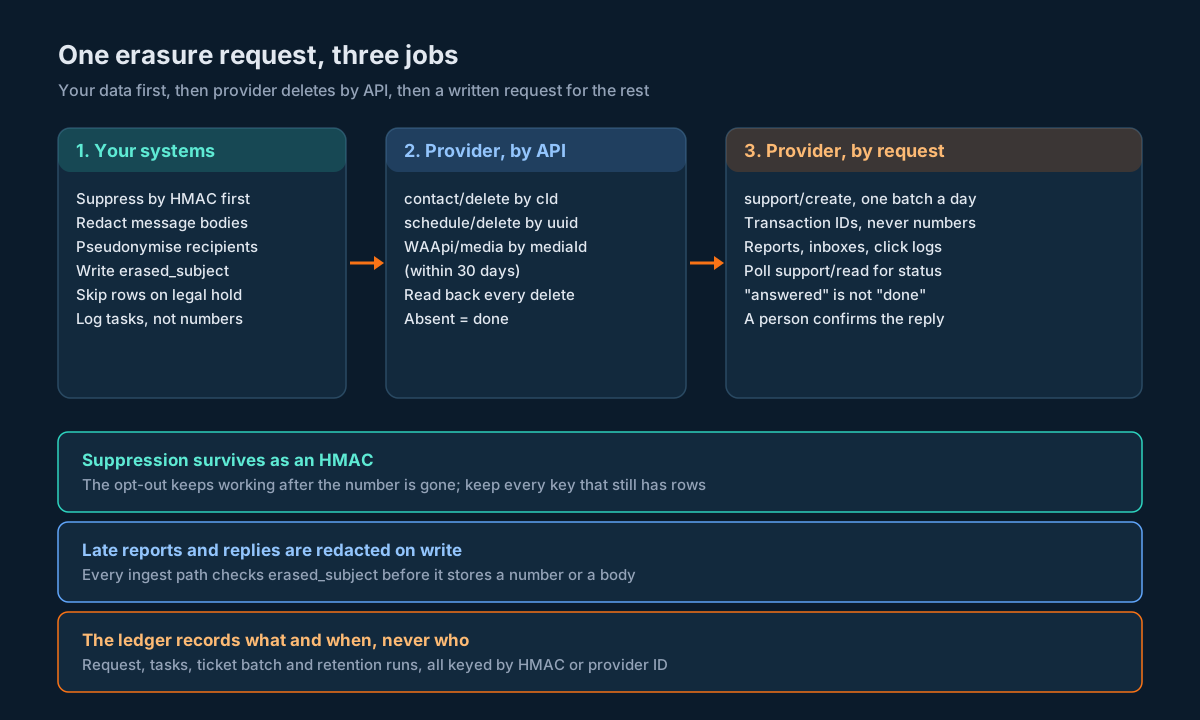
Step 1. Accept the request and hash the number straight away. Compute the HMAC, write erasure_request and erased_subject, and drop the plain number from memory. From here on, the worker only uses the HMAC and the number it reads back from your own tables.
Step 2. Check for a legal hold. If the subject is under hold, set the request to held and stop. Nothing else happens until the hold is released.
Step 3. Plan the tasks. Look up the subject in your own tables by HMAC (or by the plain number in rows that haven’t been pseudonymised yet) and insert one erasure_task per thing to do: local tables to redact, provider cId values to delete, pending booking uuId values to cancel, mediaId values to delete, and transaction IDs for the provider ticket.
Step 4. Stop new sends first. Add the suppression entry (as an HMAC) before you delete anything. If you delete first and suppress second, a send can sneak through in the gap.
Step 5. Cancel pending bookings. For each pending provider booking that includes the subject, call SMSApi/schedule/delete with uuid. If the booking has other recipients, rebook it for them without the subject before you cancel, and record both IDs.
Step 6. Delete provider contacts and media. Call SMSApi/contact/delete for each cId and WAApi/media DELETE for each mediaId still inside its 30-day window.
Step 7. Read back. Re-read contacts and schedules and confirm the IDs are gone. Anything still present goes back to pending with an incremented attempt count.
Step 8. Redact and pseudonymise locally. Apply the actions from retention_rule to every row of the subject’s data in your own tables.
Step 9. Queue the provider request. Add the subject’s transaction IDs to today’s batch. File it with the ticket function from the support ticket section.
Step 10. Close when confirmed. When a person marks the batch confirmed, every request in it moves to closed.
Here are steps 5 to 7 as code, using the call and _inner helpers from the support ticket section.
def run_provider_deletes(request_id, db, creds):
    """Steps 5 to 7: cancel bookings, delete contacts and media, then confirm by reading back."""
    tasks = db.pending_tasks(request_id, systems=("provider:schedule", "provider:contact", "provider:media"))
    for t in tasks:
        if t.system == "provider:schedule":
            body = call("SMSApi/schedule/delete", {"uuid": t.target_ref}, **creds)
            ok = _inner(body).get("status") == "success"
        elif t.system == "provider:contact":
            body = call("SMSApi/contact/delete", {"id": t.target_ref}, **creds)
            ok = _inner(body).get("status") == "success"
        else:
            body = call("WAApi/media", {"mediaId": t.target_ref}, method="DELETE", **creds)
            inner = _inner(body)
            ok = inner.get("status") == "success" and str(inner.get("mediaId")) == t.target_ref
        db.record_attempt(t, ok)

    # Read back. A "success" reply is not proof; absence from a fresh read is.
    contacts = _inner(call("SMSApi/contact/read", {}, **creds))
    schedules = _inner(call("SMSApi/schedule/read", {}, **creds))
    if contacts.get("status") != "success" or schedules.get("status") != "success":
        return False  # can't confirm anything; leave tasks as they are and retry the read later
    live_cids = {str((r.get("contact") or {}).get("cId")) for r in contacts.get("contactList") or []}
    live_uuids = {str((r.get("schedule") or {}).get("uuId")) for r in schedules.get("scheduleList") or []}

    for t in db.tasks(request_id, status="done"):
        still_there = (
            (t.system == "provider:contact" and t.target_ref in live_cids) or
            (t.system == "provider:schedule" and t.target_ref in live_uuids)
        )
        if still_there:
            db.reopen(t, "present on read-back")
    return True
The status check before the read-back is the line people leave out. If the contact read fails, contactList is missing, live_cids is empty, and every delete looks confirmed. Failing reads must never count as proof of absence. A task marked done means the delete call was accepted; the request itself only moves to provider_api_done after a read-back that succeeded and came back clean.
Data That Arrives After Erasure
You’ve erased someone. Two days later a delivery report webhook arrives for a message you sent them last week. Then they reply to an old WhatsApp conversation. Neither is unusual, and both will put their number straight back into your database unless the ingest path knows to stop it.
Handle it at write time. Every ingest path (delivery report webhook, report polling, inbox polling, SMS inbound callback, click sync) does the same check before it stores a row:
def guard_inbound_row(row, keyring, db):
    """Called by every ingest path before insert."""
    n = normalise_msisdn(row.get("mobile") or row.get("mobileNo") or row.get("phoneno") or "")
    if not n:
        return row
    for key in keyring.active_and_retired():
        h = hmac_hex(key.secret, n)
        if db.is_erased(h, key.id):
            row = dict(row)
            for field in ("mobile", "mobileNo", "phoneno"):
                if field in row:
                    row[field] = None
            for field in ("msg", "message", "content", "text"):
                if field in row:
                    row[field] = None
            row["subject_hmac"], row["hmac_key_id"] = h, key.id
            return row
    return row
Delivery reports for erased subjects still update status and cost on the outbound row (by transaction ID), so your invoice reconciliation stays whole. They just never write the number or the body again.
Inbound messages need one more decision. If an erased person messages you, they’ve approached you again. A STOP still has to be honoured, and the suppression entry already covers it. Anything else is a new conversation. Route it, but don’t stitch it back to the old history: the old history is pseudonymised, and the new message starts a new record. If the person later asks to be erased again, you run a second request against the new data.
Store the field names your ingest paths actually receive. The SMS inbound callback template uses phoneno and content. WhatsApp report rows use mobileNo. The guard above checks several names because one guard serves every path; keep that list in sync with the parsers in the inbox guide.
Retention Jobs You Can Trust
The erasure worker handles one person. The retention job handles everyone, every night, and it’s the one that quietly satisfies the “purpose no longer served” trigger. It’s also the job most likely to delete the wrong thing, so build it carefully.
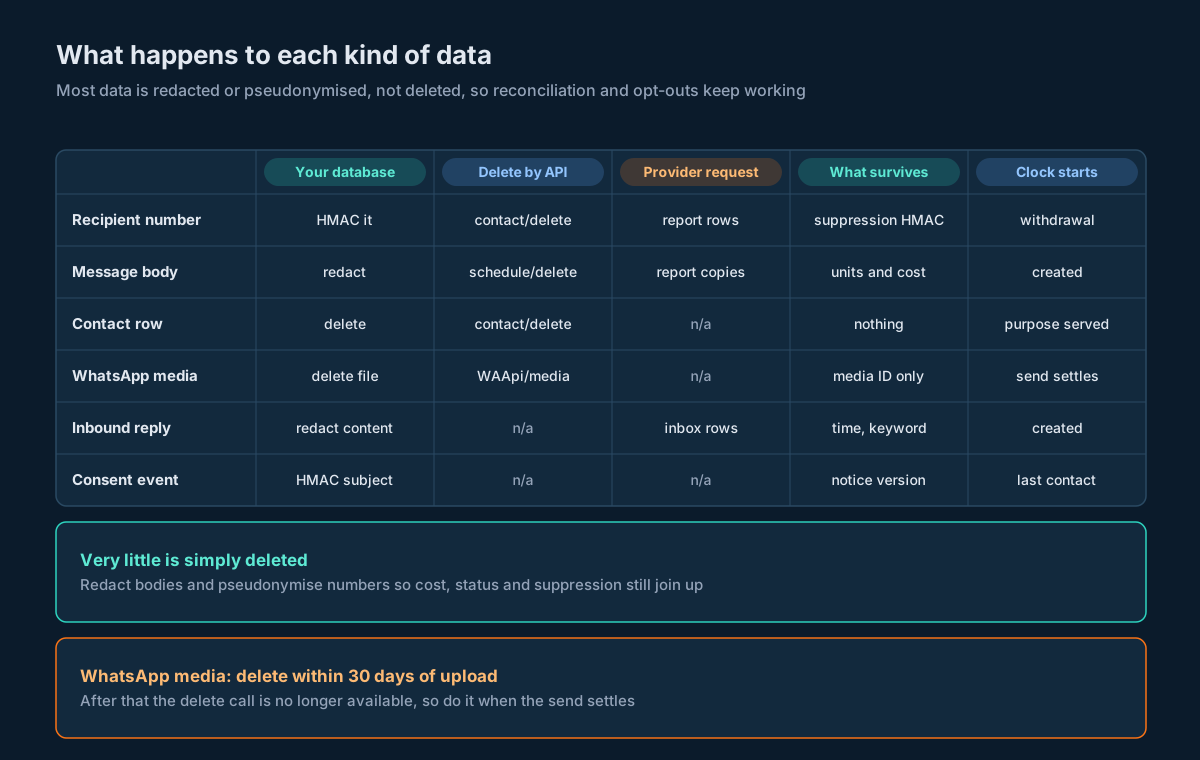
Partition by time and drop partitions where you can. For the big tables (outbound messages, delivery reports) a monthly partition that ages out is a metadata operation instead of a mass delete. The outbound table guide covers the partitioning. Use it for delete rules. redact and pseudonymise rules still need row updates, so run them in batches.
Batch, commit, repeat. Update a few thousand rows per transaction, commit, sleep briefly, continue. One giant update holds locks for hours and blocks the send path that writes to the same table.
Make every run idempotent. A redaction sets the body to NULL and stamps redacted_at. The next run’s WHERE clause skips rows with redacted_at set. Run the job twice by mistake and nothing changes.
-- Example: redact message bodies older than the rule allows, in batches.
-- :keep_days comes from retention_rule where data_class = 'message_body'.
UPDATE outbound_message
SET body = NULL,
    redacted_at = CURRENT_TIMESTAMP
WHERE id IN (
  SELECT id FROM outbound_message
  WHERE redacted_at IS NULL
    AND created_at < datetime('now', '-' || :keep_days || ' days')
    AND legal_hold_id IS NULL
  LIMIT 5000
);
Dry-run first, then compare. Before each run, count the rows the job is about to touch, per rule. If today’s count is ten times yesterday’s, stop and page someone. A typo in a rule (keep_for_days of 3 instead of 30) shows up as a huge spike, and that’s your one chance to catch it before the data’s gone.
Never let the job touch suppression rows. Suppression has its own rule (pseudonymise, never delete). Put a hard-coded exclusion in the job as well as the rule, so a bad row in retention_rule can’t delete your opt-out list.
Log what you did, not who you did it to. Each run writes one row per rule: rule version, rows matched, rows changed, start and end time, and whether it stopped early. That’s your evidence that retention runs. It contains no personal data at all.
Run the “purpose served” sweep alongside. The time-based rules handle old rows. The sweep handles relationships that ended: orders closed, accounts deleted, campaigns finished. For each one it opens an erasure_request with trigger = 'purpose_served', and from there it’s the same pipeline as a customer request.
Legal Holds and Disputes
Sometimes you must not delete. A customer disputes a charge and says they never got the OTP. A regulator asks about a campaign. Litigation is threatened. In each case the relevant records have to survive until the matter’s over, even if a retention rule or an erasure request says otherwise.
That’s the “unless retention is necessary for compliance with any law” clause again, and it needs a mechanism, not a promise.
CREATE TABLE legal_hold (
  hold_id       TEXT PRIMARY KEY,
  subject_hmac  TEXT,              -- a person, or NULL for a scope-wide hold
  scope         TEXT NOT NULL,     -- 'subject' | 'campaign:<key>' | 'date_range:<from>/<to>'
  reason        TEXT NOT NULL,     -- short, no personal data
  placed_by     TEXT NOT NULL,
  placed_at     TEXT NOT NULL,
  released_at   TEXT
);
Rows covered by a hold get its hold_id in a legal_hold_id column, and both the retention job and the erasure worker skip them (look back at the AND legal_hold_id IS NULL line above). An erasure request for a held subject goes to held and waits.
Two rules keep this from turning into a loophole. Holds are placed and released by named people, never by code. And every open hold shows up on a weekly report, so a hold that should have been released six months ago gets noticed.
When the hold’s released, the normal rules apply at the next run. Anything that was already past its retention date gets processed straight away, and a pending erasure request picks up where it stopped.
Proving It Happened
When someone asks “did you delete my data?”, or an auditor asks “how do you know retention runs?”, you want an answer that doesn’t require keeping the data you deleted.
Your evidence is four things:
- The erasure request row, with its HMAC, trigger, timestamps and final status. Give the person their
request_idwhen you acknowledge the request; that’s what they’ll quote back. - The task rows, showing each system touched, the provider ID used, the action, and when it finished.
- The batch row, with the provider ticket ID, the dates it was filed and confirmed, and who confirmed it.
- The retention run log, showing that the scheduled rules ran and what they changed.
None of those contain a phone number or a message body. Someone holding the person’s number can compute the HMAC and find their request. Nobody else can tell whose it was.
Protect the ledger from quiet edits. The account security audit trail guide builds a SHA-256 hash chain over activity log rows, with an insertion-order column so rows written in the same second still verify. The same technique works here: chain the erasure_request status changes and the retention run rows, and verify the chain on a schedule. The OWASP Logging Cheat Sheet makes the same two points from the security side: give the log writer the least privilege it needs, and keep personal data out of logs in the first place.
One more thing to prove: that the guard on your ingest paths works. Once a month, take an erased test subject (a number you own, put through the full pipeline), send it a message, let the report and a reply come back, and check that neither the number nor the text landed in your tables.
Decision Matrix
Use this when you’re deciding what to do with a specific kind of data.
| Situation | Do this | Not this |
|---|---|---|
| Person withdraws consent and asks for erasure | Suppress by HMAC first, then run the full pipeline | Delete everything including the suppression row |
| Order or service relationship ends | Open a purpose_served request from the sweep | Wait for the customer to ask |
| Person is in a pending multi-recipient provider booking | Rebook for the others, then cancel the original | Cancel without rebooking, or leave them in |
| WhatsApp media with personal content was sent | Delete it once the send settles, inside 30 days | Leave it until an erasure request arrives |
| Provider holds delivery reports you can’t delete | File a ticket with transaction IDs, track to confirmation | Paste phone numbers into the ticket |
| Delivery report arrives for an erased subject | Update status and cost by transaction ID, drop number and body | Store it as normal and clean up later |
| Erased person messages you again | Honour STOP via suppression; treat anything else as new | Re-link to their old pseudonymised history |
| You need consent proof after erasure | Keep consent events with the number as HMAC | Keep a readable copy “just in case” |
| Dispute or regulator enquiry | Place a legal hold; erasure waits | Pause the retention job for everyone |
| Rotating the HMAC key | Keep the old key while any row uses its hmac_key_id | Destroy the old key after rotation |
| Provider shows “deleted” in a UI | Check whether it’s a soft delete before counting it | Record it as erasure in the ledger |
| Retention job count jumps tenfold | Stop the job and check the rule | Let it run and investigate tomorrow |
Unspecified Behaviour and How to Code Around It
Some behaviour in this area isn’t pinned down by anything you can read: how long the provider keeps report rows, exactly what a delete does underneath, how the ticket system decides two messages are “similar”. Each item below gives you the choice that stays safe whichever way the answer goes. None of them need you to wait for an answer before you ship.
One. Assume provider-side report and inbox rows exist until someone confirms in writing that they don’t. Keep every request at ticket_filed until a person marks the batch confirmed. If the provider keeps reports for a short window, the ticket costs you nothing. If it keeps them for years, the ticket is the only thing that gets them removed.
Two. Re-read contacts after every delete and loop until no row matches. Whether contact/delete removes one membership row or every row for that number, the read-back answers the question for you. Delete by cId, read, delete whatever still matches, and stop when the read comes back clean.
Three. Send transaction IDs to the provider, never phone numbers. Whether or not support tickets are ever purged, a ticket that holds no numbers has nothing to purge. The provider can find report rows by uuId or transactionId; your outbound table has them already.
Four. Send the WhatsApp media delete the way the sample does, then read it back. The delete media page says POST in its intro and uses DELETE with query parameters in its sample. Use the sample’s form, then call read by media ID. If the media’s still there, retry with the other method once and log which one worked. Whichever the API accepts, the read-back tells you whether the file is gone.
Five. Keep mediaId and ticketId as strings everywhere. The table calls mediaId an integer and the sample is nineteen digits. The ticket ID is described as UUID format and the sample is sixteen digits. Strings survive both descriptions, any JSON parser and any database column type.
Six. Never leave an erased subject inside a provider booking. You can’t read the recipients of a booking, and you can’t remove one recipient from it. So treat any booking that includes the subject as contaminated: rebook for the others, cancel the original, confirm with schedule/read. For the future, keep far-ahead multi-recipient sends in your own scheduler, where you can edit the list.
Seven. Redact late arrivals at write time, whatever the provider does with its own copy. It doesn’t matter how long the provider keeps sending reports for old messages, or whether a reply arrives months later. The guard on your ingest paths makes your copy correct either way.
Eight. Branch on status, not code, on every erasure-related call. code is a quoted string on contact delete, an integer on support calls, and the support error range 448 to 456 overlaps the range used by the connected-devices logout calls. status is “success” on all of them when things worked.
Nine. Count a UI delete as erasure only when the help text says the row is gone. The Workflow Builder delete is documented as a soft delete. Recurring campaign deletion is documented as preserving execution reports and transaction IDs. If a delete’s behaviour isn’t described, put that data class in the provider ticket as well. An extra line in a ticket is cheap; a missed copy isn’t.
Ten. Batch tickets daily and lead every message with a unique batch reference. Code 434 rejects “similar” open tickets and 443 rejects “similar” replies, and neither defines similar. A unique first line (ERASURE-BATCH 2026-10-23-01) plus a part number makes each message different in the way most similarity checks look at first. If a 434 still comes back, reply on the open ticket instead of creating a new one.
Eleven. Store the HMAC key ID with every pseudonym and never destroy a key that’s still referenced. You can’t rehash erased data because you no longer have the input. The gate has to try every key that has live rows. A key ID column makes that cheap and makes it safe to rotate.
Twelve. Decide once what happens to the dashboard Blocked Numbers entry, and do the same thing every time. There’s no API to read or change that list. Whether you keep the entry as a compliance record or remove it by hand, write the choice into retention_rule and have the erasure checklist include the manual step, so it’s never decided case by case.
FAQs
Does erasing someone mean deleting their opt-out?
No. Keep the opt-out as a pseudonymised suppression entry (an HMAC of the normalised number) and check every send against it. Deleting it means the next list import can message them again, which breaks the opt-out rule you were trying to honour.
Can I just hash phone numbers with SHA-256 and call them anonymous?
No. There are only about four billion possible Indian mobile numbers, so anyone can hash them all and reverse an unkeyed SHA-256. Use HMAC-SHA256 with a secret key held outside the database, and store the key ID with each hash.
Is there an API to delete delivery reports on SMSGatewayCenter?
Not directly. The report endpoints are read-only. Delete your own copy, then file a provider-side erasure request through SMSApi/support/create listing the transaction IDs and dates, and track it with SMSApi/support/read.
How do I find all of a person’s contacts if contact/read has no search?
Read the whole contact list, normalise every mobileNo with the same function you use for hashing, and collect every cId that matches. One person can be several rows, one per group. Delete each cId, then read again to confirm.
What happens if I delete a scheduled booking that has other recipients?
It cancels the message for everyone in it. schedule/update only changes the time, so you can’t remove one person. Rebook for the others first, then cancel the original. Better still, keep long-range multi-recipient schedules in your own scheduler.
When should I delete WhatsApp media?
As soon as the send has settled. The delete media page says media can only be deleted within 30 days of upload, so waiting for an erasure request can leave you unable to delete it at all.
Do I need to wait for a customer request to erase data?
No. Section 8(7) of the DPDP Act also triggers erasure “as soon as it is reasonable to assume that the specified purpose is no longer being served”. Run a scheduled sweep that opens erasure requests when orders close, accounts end or campaigns finish.
How long should I keep message bodies and delivery reports?
That’s a business and legal decision per data class. Store each period in a retention_rule table with a written basis, and let your jobs read it. Many teams redact bodies well before they pseudonymise delivery rows, because reconciliation needs status and cost long after nobody needs the text.
What if a customer disputes a message after I’ve erased them?
Ask for their number, compute the HMAC, and look up the pseudonymised history: consent events, delivery status, timestamps. If a dispute is already open when the erasure request arrives, place a legal hold and the request waits until the matter’s resolved.
Does logging out every device or rotating my API key erase anything?
No. Those change who can get into the account, not the message data you’ve already sent through it. Recipient data needs the deletes and the provider request described above.
Build erasure into your messaging stack from day one.
Try the SMS, WhatsApp, RCS and Telegram APIs in the SMSGatewayCenter sandbox, wire up the delete and support ticket endpoints, and check your erasure pipeline end to end before a real request arrives. Questions about your setup? Get in touch.
More from our blog
SMS Account Security Audit Trail: Activity Logs, Login Alerts and Connected Devices via API
Building an SMS and WhatsApp Preference Centre: Purposes, Channels, Frequency and the Send Gate
API Key Rotation for an SMS API: Rotating a Single-Slot Key Without Dropping Messages
SMS Message Encryption: What It Hides, What It Doesn’t, and How to Get the Wire Format Right
SMS Click Tracking and Attribution: Joining Smart Link Clicks to Messages and Recipients