Table of Contents
- The Short Answer
- TL;DR
- What Counts as Proof of Consent
- Three Rulebooks, One Record
- Where Consent Lives on Each Channel
- The Consent Event Table
- Versioning the Notice
- Capture Points: Forms, Keywords, Chat and Counter
- Double Opt-In Over SMS
- Folding Events Into Current State
- The Send Gate: Consent and Suppression Together
- Withdrawal as Easy as the Grant
- Keeping the WhatsApp Opt-In List in Step
- Reading CONSENT_FAILED and Other Signals
- Evidence Packs: Answering a Complaint
- Retention and Keeping Only What You Need
- Four Code Samples, Four Traps
- Decision Matrix
- Launch Checklist
- Unspecified Behaviour and How to Code Around It
- FAQs
The Short Answer
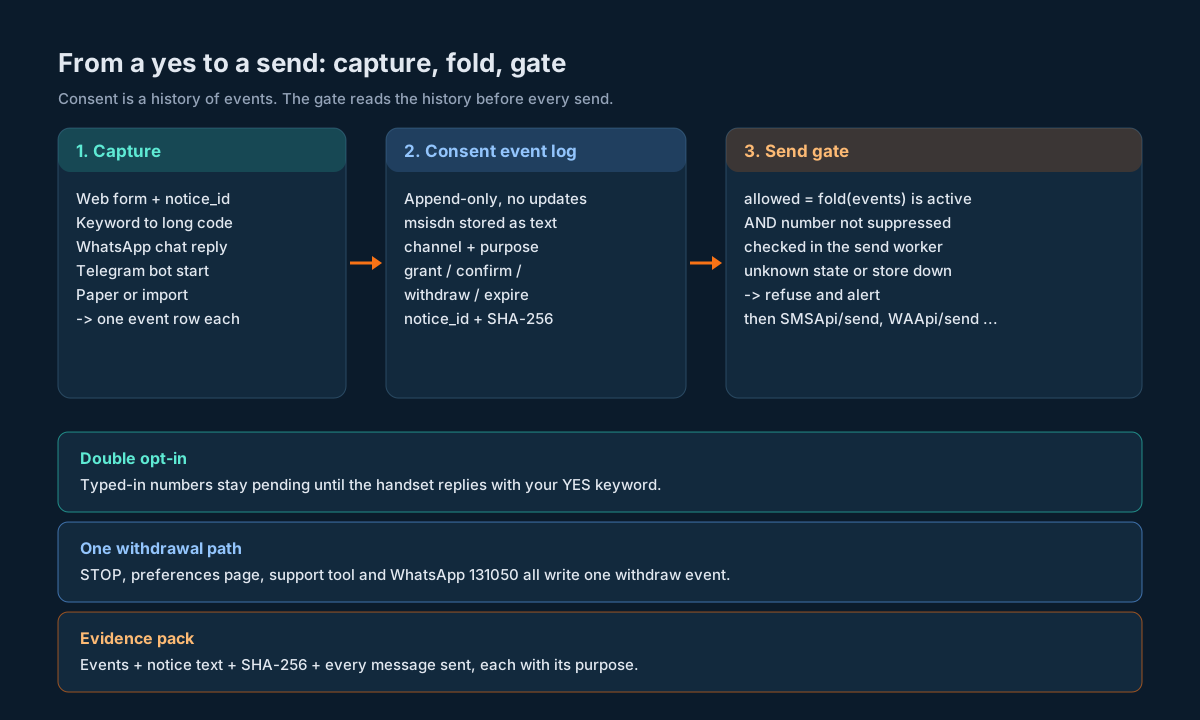
Store consent as an append-only log of events, one row per grant or withdrawal, per phone number, per channel, per purpose. Every grant row points at the exact notice text the person saw (saved once, addressed by its hash), records how they said yes (form tick, keyword, chat button, signed paper) and carries enough context to replay the moment later. Your send gate folds those events into a current answer and checks it next to your suppression list before every send. That’s the whole design.
Why go to the trouble? Because the messaging platform doesn’t hold your consent for you. On SMSGatewayCenter there’s a WhatsApp opt-in list in the dashboard and a Blocked Numbers list, but no API to write either, and nothing at all for RCS or Telegram. Indian SMS adds DLT consent templates and a CONSENT_FAILED rejection on top. And India’s Digital Personal Data Protection Act puts the burden on you: where consent is the basis of processing and it’s questioned in a proceeding, you have to prove the notice was given and consent was given. A boolean column can’t do that. An event log with the notice attached can.
TL;DR
- A flag is not evidence. Keep
consent_eventrows (grant, withdraw, confirm, expire) and derive the current state. Never update a row in place. - Save the notice, not just the tick. Each grant points to a
notice_versionrow holding the full text and its SHA-256. If the wording changes, that’s a new version. - Scope consent by channel and purpose. “Order updates on SMS” and “offers on WhatsApp” are different grants. One checkbox for everything is weak consent and weaker evidence.
- Double opt-in for anything typed in by hand. A web form can’t prove the number belongs to the person who typed it. A reply from the handset can.
- One gate, two inputs. Send only if the folded consent says yes for that channel and purpose AND the suppression list from our opt-out guide says not blocked. Unknown means no.
- Withdrawal must be as easy as the grant. If someone opted in with a keyword, a keyword gets them out. If they ticked a box, one click undoes it.
- WhatsApp’s dashboard opt-in list is a copy, not the source. Sync it from your log. There’s no API for it, so it’s an operator task with a reconciliation report.
CONSENT_FAILEDis a DLT verdict, not a bug. Stop retrying, mark the number, and fix the consent record or the template category.- Build the evidence pack as a query, not a scramble. One number in, every event, notice text, hash and source out.
What Counts as Proof of Consent
Picture the complaint. A customer says they never agreed to your offers on WhatsApp. What do you need to show?
You need to show four things, and they line up neatly with columns:
- What they were told. The notice text, word for word, as it was on that day. Not the current version of your signup page. The one they saw.
- What they did. A clear affirmative action: ticked an unticked box, sent a keyword, tapped a button in chat, signed a form. Pre-ticked boxes and “by continuing you agree” don’t qualify as an action.
- When and where. Timestamp in UTC (plus the zone you displayed), the capture point (web form id, long code and keyword, WABA number, store id), and enough request context to tie it to a real session.
- That it was them. For a typed-in phone number, a confirmation from that handset. For an inbound keyword or a WhatsApp chat, the inbound message itself already comes from the number.
And then the fifth thing, which people forget: that nothing later cancelled it. If they replied STOP last month, your grant from last year is history, not permission. That’s why the record has to be a timeline.
Here’s what usually exists instead: a marketing_opt_in BOOLEAN on the customer row, updated by three different code paths, with no idea which one set it or when. It answers “can I send right now?” badly and “can you prove it?” not at all.
Three Rulebooks, One Record
You’re not designing for one regulator. In India, a business messaging customers usually lives under three sets of rules at once, and the nice thing is that one well-built record satisfies all three.
The DPDP Act: the burden is yours
The Digital Personal Data Protection Act, 2023 sets the bar for consent in section 6. Consent has to be “free, specific, informed, unconditional and unambiguous with a clear affirmative action”. Section 6(4) gives the person the right to withdraw at any time, “with the ease of doing so being comparable to the ease with which such consent was given”. Section 6(6) says that after withdrawal the business must, within a reasonable time, stop processing and get its processors to stop too.
Then section 6(10), the one that shapes the schema. Where consent is the basis of processing and a question arises in a proceeding, the business is obliged to prove that a notice was given and that consent was given in accordance with the Act and its rules. Put plainly: if it’s ever disputed, you carry the proof.
The Act commences provision by provision on dates the government notifies, and its rules phase in on their own timeline. Check MeitY’s data protection framework page for what’s in force when you read this. The design below doesn’t depend on the date. It’s the record you’d want either way.
TRAI’s TCCCPR: consent, opt-out and timing for commercial messages
The telecom side is TRAI’s commercial communication regulations (TCCCPR overview), amended in February 2025 (press release 11/2025). Points that land directly in your data model:
- Promotional messages must carry an opt-out option.
- After a customer opts out, you can’t ask them for consent again for 90 days. They can opt back in themselves at any time.
- Consent tied to an ongoing transaction is valid for 7 days.
- Implicit consent for transactional and service messages lasts only for the duration of the contract or relationship.
That’s four different expiry rules. Your record needs a purpose, an expires_at and a way to tell “they asked us” from “we asked them”.
On the DLT side, promotional and service-explicit content templates are linked to registered consent templates (our walkthrough of registering a consent template on DLT shows the fields: template name, brand name and the scope of consent, with no variables allowed). TRAI is also piloting a central Digital Consent Acquisition system on DLT. The pilot started in December 2025 with eleven banks, whose customers get an SMS from short code 127000 linking to a page where they can keep, change or revoke consents. No nationwide date has been announced. If you’re not one of those banks, there’s no new registration step today, but the direction is clear: being able to show where each consent came from is going to matter more, not less.
WhatsApp: opt-in before business-initiated messages
WhatsApp Busienss API requires an opt-in before you start conversations with business-initiated messages. Accepted collection points include SMS, website forms, a WhatsApp thread, IVR flows and in person or on paper (how opt-in works on SMSGatewayCenter). The opt-in has to name your business and the channel. And a customer can stop marketing messages from inside WhatsApp, which surfaces to you as error 131050 on a later send (see the WhatsApp error code list). That’s a withdrawal event you didn’t capture yourself, and your log has to take it in.
The overlap
All three want the same thing from you: a specific, affirmative, provable grant, scoped to a purpose, easy to withdraw, and honoured quickly when withdrawn. Build for the strictest reading and you’re covered on the others.
Where Consent Lives on Each Channel
Before designing your table, it helps to know which parts of consent the platform can see and which parts only you can see.
| SMS (India, DLT) | RCS | Telegram | ||
|---|---|---|---|---|
| Who has to hold the grant | You, plus DLT consent templates for promotional and service-explicit | You, plus Meta’s opt-in rules | You | The user, by starting your bot |
| Platform-side list | Blocked Numbers (dashboard) | Opt-in list per WABA number, and Blocked Numbers (dashboard) | None | None |
| API to write that list | No | No | n/a | n/a |
| Rejection you’ll see | CONSENT_FAILED, NCPR_FAIL, DND_PREFERENCE_NUMBER, BLOCK_NUMBER | 131050 (stopped marketing), BLOCK_NUMBER | Nothing consent-specific | Nothing consent-specific |
| Withdrawal arrives as | STOP keyword on your long code, or a complaint | STOP in chat, 131050, or your own unsubscribe link | A reply in the RCS inbox | User blocks the bot or stops replying |
| Your record’s role | Authoritative | Authoritative, synced to the dashboard list | Authoritative | Authoritative for purpose; the chat proves contact |
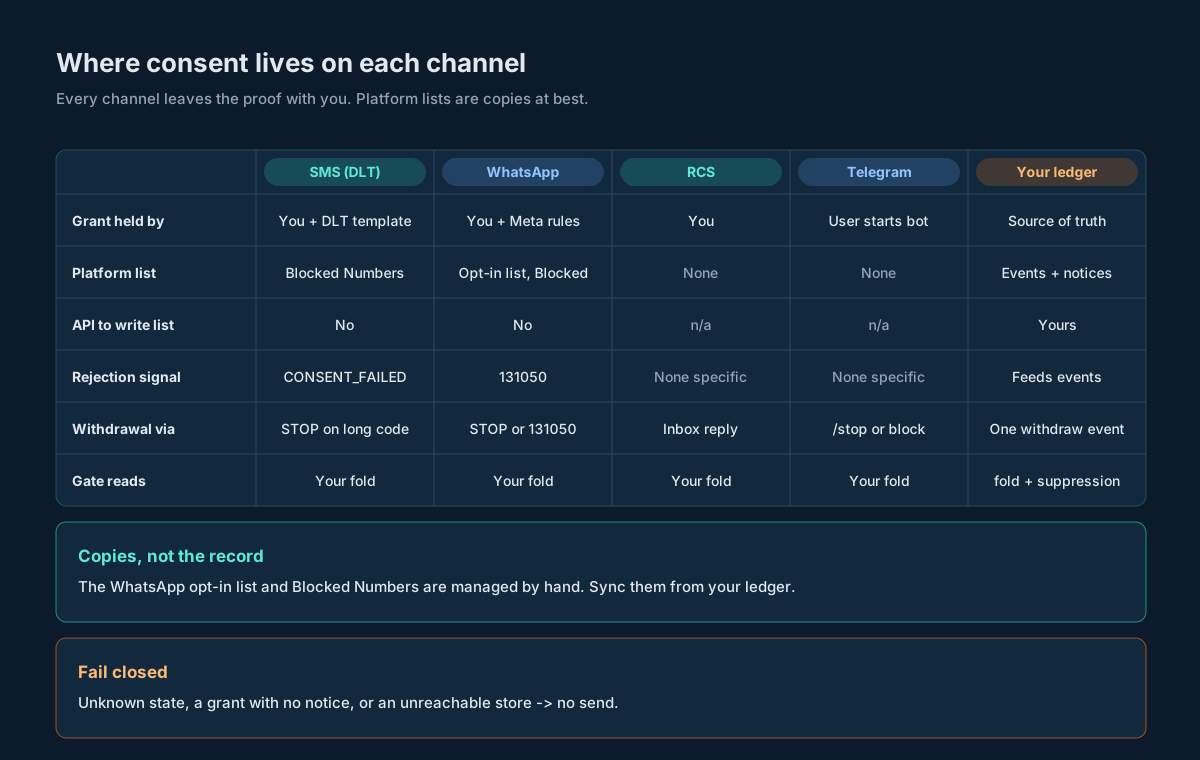
A few notes on that table, channel by channel.
SMS. DLT checks consent for the template category, not for your customer’s actual history with you. When it rejects, you get CONSENT_FAILED (what it means). Separately, promotional and service-explicit traffic doesn’t reach numbers on the national do-not-disturb register. None of that replaces your own record. It’s a second check that sits downstream of yours.
WhatsApp. The dashboard has an Add Opt-In page: pick the WABA number, paste numbers with their country code, save. The Manage page shows each number as opted in or opted out, and you can mark one opted out with the thumbs-down button or delete it. There’s no API for any of that, which is exactly why your log stays the source and the dashboard list becomes something you reconcile against (see Keeping the WhatsApp Opt-In List in Step).
RCS. Nothing on the platform side stores RCS consent. If you’re using RCS for promotional content alongside SMS, treat its consent the same way you treat SMS consent: a separate channel value with its own grants.
Telegram. A bot can’t start a conversation; the user has to message it first (Telegram bots FAQ). That gives you proof of contact for free, and the chatId model in our Telegram API guide ties the chat to a person. It doesn’t give you consent for every purpose. Someone who started your bot to track a parcel hasn’t agreed to a weekly offers digest. Record the purpose.
The Consent Event Table
Here’s the core schema. It’s Postgres, but nothing in it needs anything exotic.
CREATE TABLE notice_version (
    notice_id      TEXT PRIMARY KEY,          -- e.g. 'web-signup-v3'
    sha256         CHAR(64) NOT NULL UNIQUE,  -- hash of body_text, UTF-8
    body_text      TEXT NOT NULL,             -- exactly what was shown
    language       TEXT NOT NULL,             -- 'en', 'hi', ...
    channels       TEXT[] NOT NULL,           -- channels the notice names
    purposes       TEXT[] NOT NULL,           -- purposes the notice names
    published_at   TIMESTAMPTZ NOT NULL,
    retired_at     TIMESTAMPTZ
);

CREATE TABLE consent_event (
    event_id       BIGSERIAL PRIMARY KEY,
    msisdn         TEXT NOT NULL,             -- E.164 digits, no '+', stored as text
    channel        TEXT NOT NULL,             -- 'sms' | 'whatsapp' | 'rcs' | 'telegram'
    purpose        TEXT NOT NULL,             -- 'service_updates' | 'offers' | ...
    action         TEXT NOT NULL,             -- 'grant' | 'confirm' | 'withdraw' | 'expire'
    origin         TEXT NOT NULL,             -- 'customer' | 'business' | 'platform'
    capture_point  TEXT NOT NULL,             -- 'web:signup-form', 'longcode:919223344556:ACME', ...
    notice_id      TEXT REFERENCES notice_version(notice_id),
    occurred_at    TIMESTAMPTZ NOT NULL,      -- when the person acted
    recorded_at    TIMESTAMPTZ NOT NULL DEFAULT now(),
    expires_at     TIMESTAMPTZ,               -- set for time-limited grants
    evidence       JSONB NOT NULL,            -- raw request, inbound message, form id
    dedupe_key     TEXT NOT NULL UNIQUE,
    CHECK (action IN ('grant','confirm','withdraw','expire')),
    CHECK (action <> 'grant' OR notice_id IS NOT NULL)
);

CREATE INDEX consent_event_lookup
    ON consent_event (msisdn, channel, purpose, occurred_at DESC);

-- Nobody updates or deletes history.
REVOKE UPDATE, DELETE ON consent_event FROM app_writer;
Some choices in there that matter more than they look:
msisdn is text. Same reason as transaction ids: long digit strings and floats don’t mix, and leading zeros or a stray + will make two rows for one person. Normalise to digits with country code at the door and store that.
purpose is separate from channel. “Service updates on SMS” and “offers on SMS” are two grants. The DLT world already thinks this way (transactional, service-implicit, service-explicit, promotional, see SMS types); your record should too.
origin tells you who started it. A customer texting your keyword is customer. You sending a “reply YES to get offers” message is business. A 131050 from WhatsApp is platform. This is how you enforce TRAI’s 90-day rule: a business-originated consent request inside 90 days of a withdrawal is blocked, a customer-originated opt-in isn’t.
occurred_at versus recorded_at. Paper forms get typed in a week later. Imports arrive in batches. You want both: when the person acted, and when your system learned about it.
A grant can’t exist without a notice. The CHECK makes it impossible to save a grant that doesn’t say what the person agreed to. Withdrawals don’t need one.
evidence is the raw stuff. The inbound SMS parameters, the form POST minus anything secret, the WhatsApp message id, the scanned form’s storage key. Keep it boring and complete.
dedupe_key stops double inserts. Retried webhooks and double-clicked forms are normal. Build the key from the things that make an event unique (number, channel, purpose, action, capture point, a request id or the inbound message’s own timestamp) and let the unique index do the work.
No updates, ever. If a row is wrong, you add a correcting event and keep the wrong one. That’s annoying exactly once, and it’s what makes the log believable.
Versioning the Notice
The notice is the part most teams lose. Marketing edits the signup page, the old wording is gone, and now every grant from before the edit points at text nobody can reproduce.
Fix it with content addressing. Whenever a notice goes live (web form label, keyword confirmation message, chat button prompt, IVR script, printed form), save its exact text and its SHA-256 in notice_version. Capture code doesn’t send the text around, it sends the notice_id, and the server checks the id is current for that capture point.
Here’s a real example, computed rather than made up. This notice body:
Yes, send me offers from Acme on WhatsApp. Reply STOP in this chat at any time to stop. v3hashes (UTF-8, no trailing newline) to:
2a570bf72174e7a69da982bd39abe5b3f248fb3aad5b1fac0615809a5ce5bbd6Change a single character and you get a different hash, and therefore a different notice_id. That’s the point. Two rules keep it working:
- The hash covers the exact bytes shown. Not the template with placeholders, the rendered text in the shown language. If your form shows the brand name from config, render it, then hash.
- Front-end and back-end agree on the id, not the text. The form posts
notice_id=web-signup-v3. The server rejects a grant whose notice id is retired or doesn’t cover the channel and purpose being granted.
Notice that the example names the business, one channel, one purpose and the way out. If you want offers on SMS too, that’s a second checkbox with its own notice. A notice that says “we may contact you” covers nothing specific, and section 6(1) asks for specific.
Capture Points: Forms, Keywords, Chat and Counter
Every place a person can say yes is a capture point, and each one leaves different evidence. Name them explicitly (capture_point is a stable string, not free text) and decide up front what each one stores.
| Capture point | Proves the number? | What goes in evidence | Needs confirmation? |
|---|---|---|---|
| Web or app form with an unticked box | No | Form id, notice id, request id, timestamp, hashed IP and user agent | Yes |
| Inbound SMS keyword to your long code | Yes | The inbound push parameters as received | No |
| WhatsApp chat (button tap or typed reply) | Yes | Inbound message id, WABA number, message text | No |
| Telegram bot command or button | Yes, for the chat | chatId, update id, command text | No |
| IVR keypress | Yes, if the call came from that number | Call id, caller number, prompt version, digit pressed | No |
| Paper or in-store form | No | Scan storage key, staff id, store id | Yes |
| Bulk import from an older system | No | Source file name, row number, original consent date and wording if known | Treat as unproven until confirmed |
Two rows in there deserve a second look.
Forms don’t prove the number. Anyone can type anyone’s phone number into a form. The tick proves someone agreed; it doesn’t prove the owner of that number agreed. That’s what double opt-in fixes.
Imports are the riskiest grants you’ll ever hold. If the old system kept a boolean and nothing else, you’ve got no notice and no action to point to. Import them as grant events with capture_point = 'import:legacy-crm' and a notice row that honestly says what’s known (even if that’s “wording not retained”), and keep them out of promotional sends until each number has confirmed through a fresh opt-in.
For inbound SMS keywords, the capture code sits inside your keyword router. If you’re building that router, our two-way SMS keyword guide covers normalising the text, routing commands and dedupe; a JOIN or YES command simply ends in a consent event instead of a reply.
Double Opt-In Over SMS
Double opt-in turns “someone typed this number” into “the person holding this phone agreed”. The flow:
- The form posts. You save a
grantevent withcapture_point = 'web:signup-form'. Its state is pending, not active. - You send one confirmation SMS from a registered template, something like “Reply ACME YES to get Acme offers on WhatsApp. Ignore this to skip.” It goes out through
SMSApi/sendlike any other message. - The customer replies to your long code. The platform matches your approved keyword and forwards the inbound push to your callback URL with parameters such as
phoneno,content,keywordand, if your callback template includes it,time(epoch milliseconds). - You match the reply to the pending grant for that number and write a
confirmevent pointing at the same notice. - Only now does the fold report the grant as active.
Here’s what the two events look like with real, computed timestamps. The form was submitted at 2026-10-09 10:15:00 IST (1791521100000 ms) and the reply landed at 10:16:30 IST (1791521190000 ms):
[
  {"msisdn": "919812345678", "channel": "whatsapp", "purpose": "offers",
   "action": "grant", "origin": "customer",
   "capture_point": "web:signup-form", "notice_id": "web-signup-v3",
   "occurred_at": "2026-10-09T04:45:00Z",
   "evidence": {"form_id": "signup", "request_id": "c1f0e2"}},
  {"msisdn": "919812345678", "channel": "whatsapp", "purpose": "offers",
   "action": "confirm", "origin": "customer",
   "capture_point": "longcode:919223344556:ACME", "notice_id": "web-signup-v3",
   "occurred_at": "2026-10-09T04:46:30Z",
   "evidence": {"phonecode": "919223344556", "phoneno": "919812345678",
                "keyword": "ACME", "content": "ACME YES", "time": "1791521190000"}}
]
A few things to get right:
Give the pending grant a short window. If no reply arrives in, say, 48 hours, write an expire event. A pending grant that hangs around forever invites someone to “fix” it later by marking it active.
Send one confirmation, not a sequence. Chasing an unconfirmed number with reminders is a string of business-originated consent requests to someone who didn’t answer the first one. That’s how numbers end up reported as spam.
Confirm on a keyword, not on “any reply”. “STOP” is a reply too. Your router should treat STOP as a withdrawal with the highest priority, and only the specific YES command as confirmation.
Link-click confirmation is weaker than a reply. You can put a one-time link in the SMS instead. But link scanners and preview bots open links on their own, so make the landing page require a button press, and save the token, the press time and the request context. Prefer the reply where you can.
Folding Events Into Current State
The send gate never reads raw events. It reads the result of folding them, per (msisdn, channel, purpose). The rules are short:
- Order events by
occurred_at, then byevent_idto break ties. - Start in state
none. - A
grantmoves topendingif its capture point needs confirmation, otherwise toactive. - A
confirmmovespendingtoactive. Aconfirmwith no pending grant does nothing (log it as a warning). - A
withdrawmoves anything towithdrawnand recordswithdrawn_at. - An
expiremovespendingoractivetoexpired. - After the fold, an
activestate whose grant has anexpires_atin the past isexpired.
The fold also returns two dates you’ll need: last_withdrawn_at, for the 90-day rule, and the notice_id of the grant that made it active, for evidence.
You can fold in the query for low volumes, or keep a consent_state table that a single writer updates in the same transaction as the event insert. If you do keep a state table, treat it as a cache. You should be able to drop it and rebuild it from events at any time, and a nightly job that does exactly that and diffs the result is a cheap way to catch bugs.
What about the 90-day rule? It applies to you asking. Before sending any message whose purpose is to request consent, check last_withdrawn_at for that number and purpose. If it’s less than 90 days ago, don’t send. A withdrawal at 2026-10-09 10:15 IST means the earliest a business-originated request can go is 2027-01-07 10:15 IST (1799297100000 ms). If the customer texts JOIN on their own before then, that’s a customer-originated grant and it’s fine.
The Send Gate: Consent and Suppression Together
Every outbound message passes one function before it reaches the API:
allowed(msisdn, channel, purpose) =
      consent_state(msisdn, channel, purpose) == 'active'
  AND NOT suppressed(msisdn, channel)
Two inputs, both required. Consent comes from the fold above. Suppression comes from the table described in our opt-out and suppression guide: DND holds, blocked numbers, hard opt-outs from any source. You might ask why both, since a withdrawal shows up in each. Because they fail differently. Suppression catches numbers you must never message regardless of consent (a legal hold, a complaint, a reported abuse). Consent catches numbers you never had permission for in the first place. Either one saying no is enough.
Three rules make the gate safe:
Unknown is no. If the fold returns none, pending or a state you don’t recognise, the answer is no. If the consent store is unreachable, the answer is no. A delayed campaign is recoverable. A message sent without permission isn’t.
Check at send time, not at audience-build time. Campaign audiences are often built hours or days before the send. Someone who withdraws in between must not get the message. Run the gate again in the worker that calls the API, and for scheduled SMS bookings, purge pending bookings on withdrawal as described in the suppression guide.
Service messages need a purpose too. Order updates, OTPs and account alerts usually rest on the customer relationship rather than an opt-in, but put that in the log as well: a grant with origin = 'business', capture_point = 'contract:<id>', a notice row for your terms, and expires_at set when the relationship ends. Then the gate stays one rule for everything, and you’ll notice when a “service” purpose starts carrying offers.
Withdrawal as Easy as the Grant
Section 6(4) of the DPDP Act puts it in one line: withdrawing should be about as easy as giving. Map each capture point to an exit of the same effort.
| They opted in by | They should be able to leave by | What you write |
|---|---|---|
| Ticking a box on a form | One click in their account, or a link in your messages | withdraw, origin = customer, capture_point = 'web:preferences' |
| Texting a keyword | Texting STOP (or your opt-out keyword) to the same number | withdraw, capture_point = 'longcode:<number>:<keyword>' |
| Tapping a button in WhatsApp | Typing STOP in the chat, or WhatsApp’s own marketing stop | withdraw, origin = customer or platform |
| Starting a Telegram bot | A /stop command or an “unsubscribe” button | withdraw, capture_point = 'telegram:<bot>' |
| Signing a paper form | Telling staff, calling, or any digital route | withdraw with the staff id or call id in evidence |
Three things decide whether withdrawal actually works in practice.
Every route writes the same event. The STOP handler in your keyword router, the preferences page, the support agent’s tool and the 131050 handler all call one function that inserts a withdraw event and writes to the suppression table in the same transaction. If any of them only updates a flag somewhere, you’ll eventually send to someone who left.
Withdraw broadly when the scope is unclear. “STOP” on your SMS long code almost certainly means “stop texting me”, not “stop offers but keep the order updates”. Withdraw every non-essential purpose on that channel. If someone wants service updates back, they’ll tell you, and you’ll record that as a fresh customer-originated grant.
Act on it fast. Section 6(6) says a reasonable time. Your users would say “now”. The gate checks state at send time, so a withdrawal takes effect on the very next send as long as the event is written synchronously. Anything already handed to the platform (a scheduled SMS booking, a queued campaign batch) needs its own cleanup, covered in the suppression guide.
Keeping the WhatsApp Opt-In List in Step
The dashboard’s WhatsApp opt-in list is useful: operators can see it, and it’s tied to the WABA number. But it’s managed by hand, there’s no API to write it, and it doesn’t know about purposes. So treat it as a downstream copy of your log, and reconcile.
A workable routine:
- Export from your side. Nightly, fold every
(msisdn, 'whatsapp', purpose)and produce two lists per WABA number: numbers with any active WhatsApp purpose, and numbers whose WhatsApp consent was withdrawn since the last run. - Apply changes in the dashboard. An operator pastes new opt-ins on the Add Opt-In page (country code included, comma or newline separated) and marks withdrawals as opted out with the thumbs-down on the Manage page.
- Record that it was done. Write an
ops_syncrow with the run id, counts, operator and time. It’s not a consent event, it’s an operational record, so it goes in its own table. - Reconcile the other way. If an operator marks someone opted out in the dashboard first (because a customer rang up), that’s a real withdrawal. Have the operator log it through your support tool so it becomes a
withdrawevent too. Never let the dashboard list and your log quietly disagree.
Prefer marking a number opted out over deleting it. An opted-out row is evidence that you knew and acted. A deleted row is just gone.
Your gate doesn’t read the dashboard list. It reads your fold. The dashboard is there so the platform side and your operators see the same picture you do.
Reading CONSENT_FAILED and Other Signals
Some withdrawals and refusals reach you as delivery statuses or send errors rather than as messages from the customer. Each one should become an event, a suppression entry or both, and none of them should be retried blindly.
| Signal | Channel | What it tells you | What to write |
|---|---|---|---|
CONSENT_FAILED | SMS | DLT rejected the message: no valid consent recorded for this type of message or sender | Mark the (msisdn, purpose) as blocked for that template category; open a task to check the consent template link or the template’s category |
NCPR_FAIL, DND_PREFERENCE_NUMBER | SMS | The number is on the do-not-disturb register for this category | A DND hold in suppression, not a consent withdrawal |
BLOCK_NUMBER | SMS, WhatsApp | The number is on your account’s Blocked Numbers list | Nothing new; check your suppression table already has it, and if not, find out why |
| 131050 | The person stopped marketing messages from your business inside WhatsApp | withdraw for WhatsApp marketing purposes, origin = 'platform' | |
| STOP in an inbound message | Any | The person wants out | withdraw with the inbound message as evidence |
CONSENT_FAILED deserves a closer look because it’s easy to misread. It doesn’t mean your consent record is wrong. It means the DLT check didn’t find consent for what you tried to send, which usually points to the template side: the content template isn’t linked to the right consent template, or a promotional message went out under a service-explicit template. Fix the link or the category. Don’t retry the same message, and don’t “correct” your consent log to match, because your log is about what the customer agreed to, not about what DLT has on file.
For SMS delivery reports in general, the delivery report ingestion guide explains how to get statuses into your own tables reliably. Add a small consumer on top that watches for the statuses above and writes events.
Evidence Packs: Answering a Complaint
When a complaint arrives, you want to answer with a document, not a meeting. An evidence pack is a single query over your tables that, given one phone number, returns:
- Every consent event for that number, in order, with channel, purpose, action, origin, capture point and both timestamps.
- For every grant and confirm, the full notice text, its language and its SHA-256, so anyone can rehash the text and check it matches.
- The raw
evidencefor each event (with secrets already stripped at capture time). - The current folded state per channel and purpose, and when each became what it is.
- Every message sent to that number in the period in question, from your outbound message table, with the purpose each was sent under.
- Every suppression entry and every consent-related delivery status received.
Item 5 is the one that closes the loop. It lets you show not just that consent existed, but that each message was sent while it was active and for the purpose it covered. If your outbound table doesn’t carry a purpose column yet, add one: the outbound message table design has the rest of the columns you’ll want next to it.
Two habits make packs trustworthy:
Rehash on export. The export code recomputes SHA-256 over each notice body and refuses to produce a pack if any hash doesn’t match. That catches anyone who “tidied up” old notice text.
Export the same way every time. A fixed JSON layout plus a human-readable PDF or HTML rendering of the same data. Version the exporter so you can say which version produced a given pack.
Retention and Keeping Only What You Need
There’s a tension here. Proof needs history. Privacy law wants you to keep only what you need for as long as you need it. Resolve it by being deliberate about what each table holds.
Keep the consent event and notice tables for as long as you might have to prove a send. That’s at least as long as you keep outbound message records, plus whatever period complaints and proceedings can reach back. Set that period with your legal team and write it down in the table comment.
Keep evidence lean from day one. Store what proves the event, not everything you happened to receive. Hash IP addresses and user agents with a keyed hash rather than storing them raw. Never store passwords, OTP values, API keys or payment data in evidence, even by accident: strip them in the capture function, not later.
When someone asks you to erase their data, you’ll usually still need a minimal record that they opted out, otherwise you can’t keep honouring it. Keep the withdrawal events and the suppression entry, and remove or redact the parts that aren’t needed to show that. Decide this with your legal team before the first request arrives.
Don’t let the dashboard become a second archive. The WhatsApp opt-in list and Blocked Numbers are operational. Your log is the record.
Four Code Samples, Four Traps
Each sample is short and each one is about a different way consent code goes wrong. They assume the tables from The Consent Event Table.
Python: capture a grant without trusting the browser
The trap: taking the notice text, or worse a “consented: true”, from the client. The browser sends a notice_id; the server decides whether that id is live and covers what’s being granted.
import hashlib, json, re
from datetime import datetime, timezone
from flask import Flask, request, jsonify
import psycopg

app = Flask(__name__)
DB = "postgresql://app_writer@localhost/consent"

def normalise_msisdn(raw: str, default_cc: str = "91") -> str | None:
    digits = re.sub(r"\D", "", raw or "")
    if len(digits) == 10:
        digits = default_cc + digits
    return digits if 11 <= len(digits) <= 15 else None

@app.post("/consent/grant")
def grant():
    f = request.form
    msisdn = normalise_msisdn(f.get("mobile", ""))
    channel, purpose, notice_id = f.get("channel"), f.get("purpose"), f.get("notice_id")
    if f.get("agree") != "on" or not msisdn:      # unticked box or junk number
        return jsonify(ok=False, reason="no_affirmative_action"), 400
    now = datetime.now(timezone.utc)
    req_id = request.headers.get("X-Request-Id", "")
    key = hashlib.sha256(f"{msisdn}|{channel}|{purpose}|grant|web|{req_id}".encode()).hexdigest()
    with psycopg.connect(DB) as conn, conn.cursor() as cur:
        cur.execute(
            """SELECT 1 FROM notice_version
               WHERE notice_id = %s AND retired_at IS NULL
                 AND %s = ANY(channels) AND %s = ANY(purposes)""",
            (notice_id, channel, purpose))
        if cur.fetchone() is None:
            return jsonify(ok=False, reason="notice_not_current"), 409
        cur.execute(
            """INSERT INTO consent_event
               (msisdn, channel, purpose, action, origin, capture_point,
                notice_id, occurred_at, evidence, dedupe_key)
               VALUES (%s,%s,%s,'grant','customer','web:signup-form',%s,%s,%s,%s)
               ON CONFLICT (dedupe_key) DO NOTHING""",
            (msisdn, channel, purpose, notice_id, now,
             json.dumps({"form_id": "signup", "request_id": req_id}), key))
    # Pending until the handset confirms; queue the confirmation SMS elsewhere.
    return jsonify(ok=True, state="pending"), 202
Note what’s not in evidence: the raw IP, the full user agent, cookies. If you want them for fraud checks, store a keyed hash.
Node.js: a fold that fails closed
The trap: a fold that treats anything it doesn’t understand as “probably fine”. This one returns none for an unknown action and orders ties deterministically.
'use strict';
const NEEDS_CONFIRM = (cp) => cp.startsWith('web:') || cp.startsWith('paper:') || cp.startsWith('import:');

function fold(events, nowMs) {
  const sorted = [...events].sort((a, b) =>
    (a.occurredAt - b.occurredAt) || (a.eventId - b.eventId));
  let s = { state: 'none', noticeId: null, expiresAt: null, lastWithdrawnAt: null };
  for (const e of sorted) {
    switch (e.action) {
      case 'grant':
        s = { ...s, state: NEEDS_CONFIRM(e.capturePoint) ? 'pending' : 'active',
              noticeId: e.noticeId, expiresAt: e.expiresAt ?? null };
        break;
      case 'confirm':
        if (s.state === 'pending') s = { ...s, state: 'active' };
        break;
      case 'withdraw':
        s = { ...s, state: 'withdrawn', lastWithdrawnAt: e.occurredAt };
        break;
      case 'expire':
        if (s.state === 'pending' || s.state === 'active') s = { ...s, state: 'expired' };
        break;
      default:
        return { ...s, state: 'none' };        // unknown action: fail closed
    }
  }
  if (s.state === 'active' && s.expiresAt !== null && s.expiresAt <= nowMs) {
    s = { ...s, state: 'expired' };
  }
  return s;
}

module.exports = { fold };
Run it against the double opt-in example and you get pending after the grant alone, active once the confirm is added, and withdrawn if a STOP at the same millisecond carries a higher event id.
Java: a gate that says no when it can’t tell
The trap: catching an exception from the consent store and carrying on with the send. The gate’s only safe failure is “not allowed”.
import java.time.Duration;
import java.util.concurrent.*;

public final class SendGate {
    public interface ConsentStore { String state(String msisdn, String channel, String purpose) throws Exception; }
    public interface SuppressionStore { boolean suppressed(String msisdn, String channel) throws Exception; }

    private final ConsentStore consent;
    private final SuppressionStore suppression;
    private final ExecutorService pool = Executors.newFixedThreadPool(4);
    private final Duration timeout = Duration.ofMillis(300);

    public SendGate(ConsentStore c, SuppressionStore s) { this.consent = c; this.suppression = s; }

    public boolean allowed(String msisdn, String channel, String purpose) {
        try {
            Future<String> st = pool.submit(() -> consent.state(msisdn, channel, purpose));
            Future<Boolean> sup = pool.submit(() -> suppression.suppressed(msisdn, channel));
            String state = st.get(timeout.toMillis(), TimeUnit.MILLISECONDS);
            boolean blocked = sup.get(timeout.toMillis(), TimeUnit.MILLISECONDS);
            return "active".equals(state) && !blocked;
        } catch (Exception e) {
            return false;   // timeout, store down, interrupted: never send on doubt
        }
    }
}
Log the refusals with their reason. A spike in “store unavailable” refusals is an incident; a spike in “withdrawn” refusals is a campaign aimed at the wrong list.
PHP: an evidence export that checks its own notices
The trap: exporting notice text that someone edited after the fact. The exporter rehashes every notice body and refuses to produce the pack if a hash doesn’t match.
<?php
function evidencePack(PDO $db, string $msisdn): array {
    $ev = $db->prepare(
        'SELECT e.*, n.body_text, n.sha256, n.language
           FROM consent_event e
           LEFT JOIN notice_version n ON n.notice_id = e.notice_id
          WHERE e.msisdn = ?
          ORDER BY e.occurred_at, e.event_id');
    $ev->execute([$msisdn]);
    $rows = $ev->fetchAll(PDO::FETCH_ASSOC);

    foreach ($rows as $r) {
        if ($r['body_text'] !== null && hash('sha256', $r['body_text']) !== $r['sha256']) {
            throw new RuntimeException('Notice ' . $r['notice_id'] . ' does not match its hash');
        }
    }
    return [
        'exporter_version' => '1.0.0',
        'msisdn'           => $msisdn,          // text, never cast to int
        'generated_at'     => gmdate('c'),
        'events'           => $rows,
    ];
}

header('Content-Type: application/json');
echo json_encode(evidencePack($pdo, $_GET['msisdn'] ?? ''), JSON_PRETTY_PRINT | JSON_UNESCAPED_SLASHES);
Lock this endpoint down hard. It’s a complete history of one person, so it belongs behind staff authentication and an access log of its own.
Decision Matrix
| Situation | Do this | Why |
|---|---|---|
| Number typed into a web or app form | Save a pending grant, confirm from the handset | The form can’t prove who owns the number |
| Customer texts your keyword or messages your WhatsApp first | Save an active grant straight away | The inbound message already comes from the number |
| Notice wording changes | New notice_version row; old grants keep pointing at the old one | Proof is about what was shown that day |
| You want to send offers to service-only customers | Ask once, with a new notice, unless they withdrew in the last 90 days | A service relationship isn’t consent for promotions |
| Customer replies STOP | Withdraw all non-essential purposes on that channel, add suppression | The intent is broad; narrow it only if they say so |
| WhatsApp send fails with 131050 | withdraw WhatsApp marketing purposes with origin = platform | They said no inside WhatsApp |
SMS fails with CONSENT_FAILED | Stop retrying, fix the template link or category | DLT is checking the template side, not your log |
| Legacy import with only a boolean | Import as unproven, exclude from promotions until reconfirmed | No notice, no action, no proof |
| Consent store is slow or down | Refuse the send and alert | Unknown means no |
| A complaint arrives | Run the evidence pack for the number | Answer with records, not recollection |
Launch Checklist
consent_eventandnotice_versionexist, withUPDATEandDELETErevoked for the application role- Every live notice (form, keyword reply, chat prompt, IVR, paper) has a
notice_versionrow and its SHA-256 - Forms post a
notice_id, never the notice text, and the server rejects retired or non-matching ids - Phone numbers are normalised to digits with country code and stored as text
- Typed-in numbers go through double opt-in with a short expiry on pending grants
- Consent is recorded per channel and per purpose, with
originset on every event - Service and transactional messages rest on a recorded business-origin grant tied to the relationship
- The send gate checks folded consent and suppression at send time, and refuses on any doubt
- STOP, the preferences page, support tools and the 131050 handler all write the same
withdrawevent - Business-originated consent requests check the 90-day window after a withdrawal
- The WhatsApp dashboard opt-in list is synced from your log with a recorded nightly run
CONSENT_FAILED, DND statuses andBLOCK_NUMBERfeed events or suppression, never automatic retries- The outbound message table records the purpose each message was sent under
- The evidence pack exporter rehashes notices and is behind staff authentication
- A nightly job rebuilds folded state from events and diffs it against the cached state
- Retention periods for events, notices and evidence are written down and agreed
Unspecified Behaviour and How to Code Around It
Some of what touches consent isn’t pinned down anywhere you can read today: exact list behaviours, how long certain states last, which events reach you. Each item below gives you the choice that stays safe whichever way the real behaviour turns out, and none of them needs you to wait for an answer.
One. Treat the WhatsApp dashboard opt-in list as advisory, never as your gate. You can’t read it from code, so you can’t prove what it held at a given moment. Your gate reads your fold; the dashboard list is kept in step for operators. If the two ever disagree, the stricter one wins until a human looks.
Two. Mark opted-out numbers rather than deleting them, on every list you touch. Whether a deleted entry leaves any trace on the platform side doesn’t matter if you never delete. An opted-out row is evidence; a missing row isn’t.
Three. Assume a CONSENT_FAILED number stays failed until you change something. Whether DLT re-evaluates on the next send or caches the verdict, a blind retry either fails again or succeeds for the wrong reason. Fix the template link or category first, then send one test to a number you control.
Four. Treat a 131050 as a withdrawal for every WhatsApp marketing purpose, not just the template that failed. Whether WhatsApp scopes the stop to your business, a category or a template, the broad reading is never the one that gets you a complaint.
Five. Don’t count on any consent signal being pushed to you. Withdrawals inside WhatsApp, DLT’s view of consent and the pilot consent system’s records may never arrive as an event in your system. Design so that the signals you do get (a failed send, an inbound STOP) are enough to stop the next message, and run a periodic check of failure statuses per number.
Six. Store the inbound message exactly as received, alongside your parsed version. Whether the keyword is included in content varies between sources, and whether time is present depends on your callback template. With the raw parameters saved, your evidence holds up whatever the parser did.
Seven. Give every pending grant an expiry you chose. Nothing tells you how long a confirmation reply can lag. A 48-hour window you set, followed by an expire event, removes the question. A reply after expiry starts a new grant.
Eight. Record notices per language, and hash what was rendered. If your form switches language by browser setting, each language is its own notice version. Then it doesn’t matter which one a given customer saw; the event says.
Nine. Keep imported consents out of promotions until they’re reconfirmed. Whether an old system’s “opted in” flag would stand up is unknowable after the fact. Excluding them costs some reach; including them stakes your sender reputation on someone else’s records.
Ten. Plan for a central consent registry without waiting for its spec. If the DLT consent system rolls out nationally, you’ll probably need to map your grants to it. Records that already carry purpose, channel, capture point, notice and timestamps map to almost anything. Records that carry a boolean map to nothing.
Eleven. Use your own clock for recorded_at and the person’s action time for occurred_at, and keep both in UTC. Whether a source sends local time, epoch milliseconds or no time at all, storing both lets you sort, prove and explain without guessing zones later.
FAQs
Is a checkbox on my signup form enough consent for promotional SMS?
Not on its own. An unticked box the person ticks is a clear affirmative action, which is good. But it doesn’t prove the number belongs to them, so confirm from the handset, and the notice next to the box has to name your business, the channel and the purpose.
Do I need consent to send OTPs and order updates?
They usually rest on the customer relationship rather than an opt-in. Record that too: a business-origin grant tied to the account or order, with an end date. That keeps one gate for everything and stops “service” messages drifting into offers.
Can I use one consent for SMS, WhatsApp and RCS?
You can ask for all three in one notice if it names all three, but record them as separate grants. People withdraw per channel, and WhatsApp wants an opt-in that names WhatsApp.
How long does consent last?
It depends on the basis. A grant you record stays until it’s withdrawn, unless you set an expiry. Consent tied to an ongoing transaction is valid for 7 days under TRAI’s 2025 amendment, and implicit service consent lasts for the duration of the relationship. Put the expiry in expires_at and let the fold handle it.
Someone opted out last month. Can I text them asking to opt back in?
No. After an opt-out, a business can’t request consent again for 90 days. If they come back on their own, by texting your keyword or ticking a box, that’s a fresh grant and it’s fine.
Does SMSGatewayCenter store my customers’ consent for me?
No. The dashboard has a WhatsApp opt-in list per WABA number and a Blocked Numbers list, both managed by hand. Your own log is the record, and you sync those lists from it.
What does CONSENT_FAILED mean?
DLT rejected the message because no valid consent was recorded for that type of message or sender. Check that your content template is linked to the right consent template and is in the right category, rather than retrying.
Is double opt-in legally required?
The rules ask you to prove consent, not to use a particular method. Double opt-in is how you prove the number’s owner agreed when the number was typed in by someone. For keyword and chat opt-ins, the inbound message already does that job.
What should I store as evidence for a web form opt-in?
The form id, the notice_id, a request id, the timestamp, and keyed hashes of IP and user agent if you need them. Not passwords, not OTPs, not payment details, and not the raw IP unless you have a reason you can explain.
How do I handle a STOP that arrives on SMS for a customer who also gets WhatsApp?
Withdraw the SMS purposes. Whether it covers WhatsApp too is a judgement call; the safe default is to ask once on WhatsApp whether they still want messages there, or simply withdraw both if your audience would expect that.
Can I edit a consent event that was recorded wrongly?
No. Write a correcting event (a withdraw or a new grant) with a note in evidence explaining why, and keep the original. An editable log isn’t evidence.
How do I prove which version of my notice someone saw?
Each grant points at a notice_id, and that row holds the exact text and its SHA-256. Anyone can rehash the text and check it matches. Change a single character and the hash changes, so edits after the fact show up.
What happens with Telegram, where the user starts the chat?
Starting your bot proves contact, not consent for every purpose. Record the purpose they came for, and ask before adding others.
What’s the fastest way to answer a consent complaint?
Run the evidence pack for the number: every event, every notice with its hash, the raw evidence, the current state and every message sent with its purpose. If that’s a single query, the answer takes minutes.
Have us review your consent flow
If you’re putting a consent log in front of SMS, WhatsApp, RCS or Telegram sends and want to test the whole loop (form, confirmation SMS, keyword reply, send gate) before going live, start in the SMSGatewayCenter sandbox or talk to us about your setup.
Checkout other posts
Two-Way SMS Keyword Design: Routing, Auto-Replies and Conversation State on a Long Code
Contract Testing a Messaging API: A Nightly Drift Harness That Never Sends a Message