Table of Contents
- The Short Answer
- TL;DR
- Two Base Paths, One Product
- The Ten Operation Reference
- The Send Contract and Why It Is the Outlier
- Five Response Envelopes in One Family
- The Success Code Tabulation
- The Error Payload That Changes Type
- The Media Lifecycle, Start to Finish
- Template Management End to End
- Two Approval States, Not One
- The Delivery Row Compared Four Ways
- The Nineteen Digit Number That Breaks JavaScript
- The Inbox, and What It Costs You
- Analytics and the Right Denominator
- Your First Send in Six Steps
- Four Languages, Four Traps
- Ten Mistakes That Cost Real Money
- Choosing WhatsApp Over SMS, RCS or Telegram
- The Production Checklist
- Unspecified Behaviour and How to Code Around It
- FAQs
The Short Answer
The WhatsApp Business API on SMSGatewayCenter is ten operations spread across two API generations, and the single most important thing to know before you write any code is that they do not share a response envelope. The older generation lives on https://unify.smsgateway.center/WAApi/ and covers four resources: send, media, template and report. The newer generation lives on https://unify.smsgateway.center/rest/wa/v1/ and covers inbox and analytics. Both generations take output=json. Both accept the apikey request header, which is what you should use, with userid sent alongside it every time. Two of the ten operations report success through a field that is not called statusCode, or that is an integer rather than a string, so branch on the top level status string and nothing else. WAApi/media and WAApi/template are the only genuinely REST-shaped resources on the whole platform: one URL each, with the HTTP method selecting the operation, POST to create, GET to read, DELETE to remove. And the delivery report returns uuId as an unquoted nineteen digit JSON number, which loses precision the moment a JavaScript client calls JSON.parse on it.
TL;DR
- Two base paths serve one product.
WAApi/is the older generation,rest/wa/v1/the newer one. Both useoutput, neverformat. WAApi/mediaandWAApi/templateeach expose one URL where the HTTP verb is the operation. POST creates, GET reads, DELETE removes. Noactionparameter is involved.- Five distinct response envelopes exist inside this one family. A generic list unwrapper written for one of them will fail on the other four.
WAApi/sendreportsstatusCodeas an unquoted integer200and names its text fielddescription.WAApi/reportnames its code fieldcode, also an unquoted integer. The other eight return a quoted"200"instatusCode.- On error the payload key comes back as an empty array, even on the endpoints that return an object on success. Parse loosely, read
status, return early on failure, and bind the typed payload only after that check. uuIdon a delivery row is an unquoted nineteen digit number.mobileNoandwabaNumberare unquoted too. Any of these will be silently corrupted by a standard JavaScript parse.submitTimeis a quoted string on the same row wheredeliveryTimeandreadTimeare unquoted integers.- Template creation and template deletion both return
"Accepted for processing."Neither is complete when the call returns. Media deletion, by contrast, returns"success"and is done. - A template carries two independent approval states,
whatsAppStatusandsystemStatus. Both must be satisfied before the template is usable. - Placeholders in a WhatsApp template are
{{1}},{{2}},{{3}}, numbered and doubled. That is a different syntax from every other channel on the platform. - Inbox rows carry a
chargesfield, so inbound traffic is a billable line item you should be reconciling. rest/wa/v1/analyticscaps its date range at 365 days. That is twelve times wider than the 31 day cap on the SMS dashboard, so WhatsApp is the one channel where you can pull a full year in a single call.
Two Base Paths, One Product
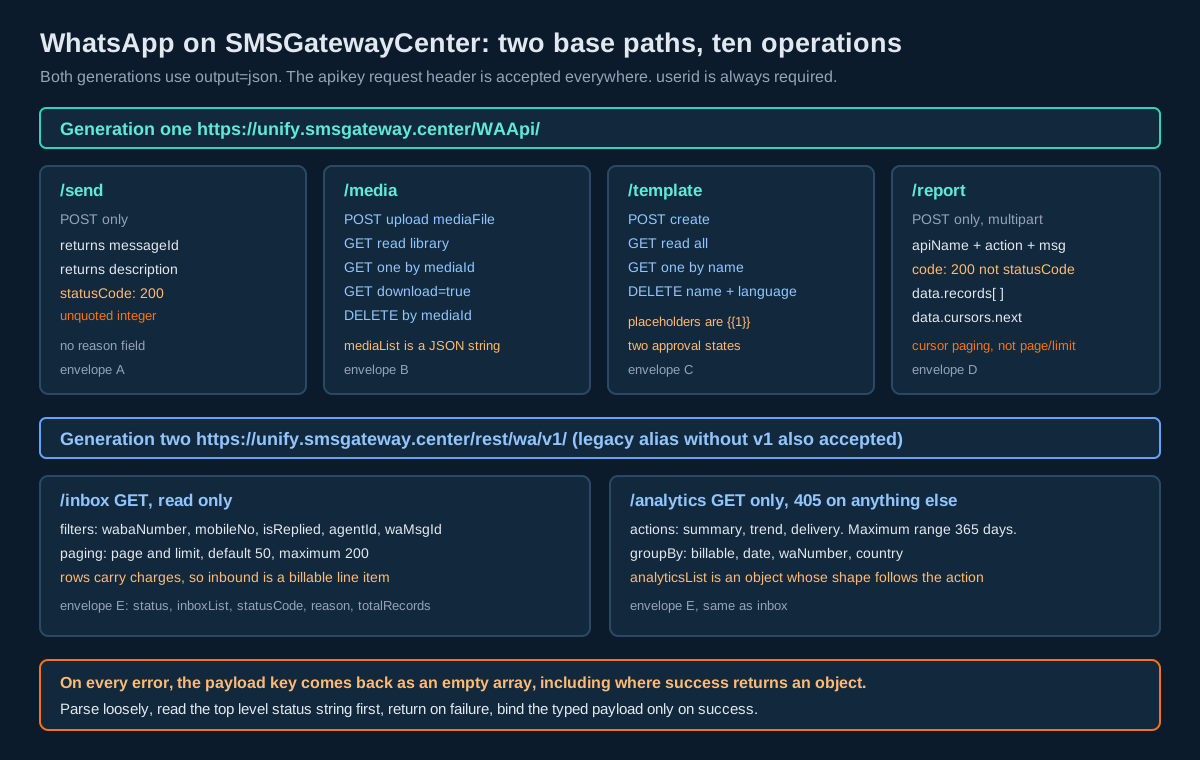
Before you design a client, establish which generation each call belongs to, because the generation determines the envelope, the paging model and the error shape.
Generation one sits under WAApi/. It carries send, media, template and report. It is form encoded or multipart, it uses cursor paging where it pages at all, and its samples are written as PHP cURL blocks. Generation two sits under rest/wa/v1/, with a legacy alias that drops the v1 segment. It carries the inbox and analytics, both GET only, both offset paged on page and limit, and both documenting the apikey header variant explicitly in their own samples.
That split will look familiar if you have worked with RCS on this platform, where an older RCSApi/ generation coexists with a newer rest/rcs/v1/ one. There is one difference worth internalising. On RCS the two generations disagree about what the response format parameter is called: the old one wants format, the new one wants output. On WhatsApp both generations want output. So you can set output=json once in a shared request builder for this channel and never think about it again, which is not true of RCS.
The practical consequence is that a WhatsApp client should be organised as two transports, not one. Transport A speaks form encoding and multipart to WAApi/. Transport B speaks query parameters to rest/wa/v1/. Both share an auth decorator that sets the apikey header and appends userid. Everything below that split is generation specific.
Authentication, said once
Send your API key in the apikey request header and include userid as a parameter alongside it. Do not put a password in a query string, and do not copy a sample that does. On this platform a key is an authorization and never an identity, which is why userid remains mandatory even when the header is present. The full set of mechanisms, including the Basic Auth session token and the OAuth flow, is on the authentication page, and there is a walkthrough of key generation in Create and Use Your SMSGatewayCenter API Key.
The Ten Operation Reference
| Operation | Path | Method | Key parameters | Payload key |
|---|---|---|---|---|
| Send a message | WAApi/send | POST | wabaNumber, mobile, msg, sendMethod, msgType, templateName | flat, no payload key |
| Upload media | WAApi/media | POST | wabaNumber, mediaType, identifier, description, file part | mediaId, mediaUrl |
| Read media library | WAApi/media | GET | none beyond auth | mediaList |
| Read one media item | WAApi/media | GET | mediaId | mediaList |
| Download media | WAApi/media | GET | mediaId, download | mediaList or the binary |
| Delete media | WAApi/media | DELETE | mediaId | mediaId |
| Create template | WAApi/template | POST | wabaNumber, templateName, category, body, language, msgType | templateName |
| Read templates | WAApi/template | GET | wabaNumber, optional templateName | templateList |
| Delete template | WAApi/template | DELETE | wabaNumber, templateName, language | templateName |
| Delivery report | WAApi/report | POST | wabaNumber, fromDate, toDate, pageLimit | data.records |
| Inbox | rest/wa/v1/inbox | GET | output, optional filters | inboxList |
| Analytics | rest/wa/v1/analytics | GET | output, action, start, end | analyticsList |
Twelve rows for ten operations, because media and template each collapse several operations onto one URL. That collapsing is the design decision that most often trips people who have integrated the SMS side of this platform first, where every operation has its own path segment such as group/create and group/delete. On WhatsApp there is no /create or /delete segment to look for. If you send a GET where you meant a DELETE, you will get a successful read back and conclude that the delete silently failed.
The Send Contract and Why It Is the Outlier
POST https://unify.smsgateway.center/WAApi/send takes userid, msg, wabaNumber, mobile, sendMethod as one of quick, group or file, msgType as text or media, templateName and output. It responds with this shape, documented on the send page:
{
    "status": "success",
    "messageId": "1234567890",
    "mobile": "919999999999",
    "statusCode": 200,
    "description": "Message sent successfully"
}
Three details in that block matter more than they look.
First, statusCode is 200 with no quotation marks. Everywhere else in the WhatsApp family, and on almost every endpoint on the wider platform, that field is the string "200". If your client models it as a string, deserialisation of this one response fails. If it models it as an integer, the other nine responses fail. Model it as a raw JSON value, or do not model it at all and branch on status instead.
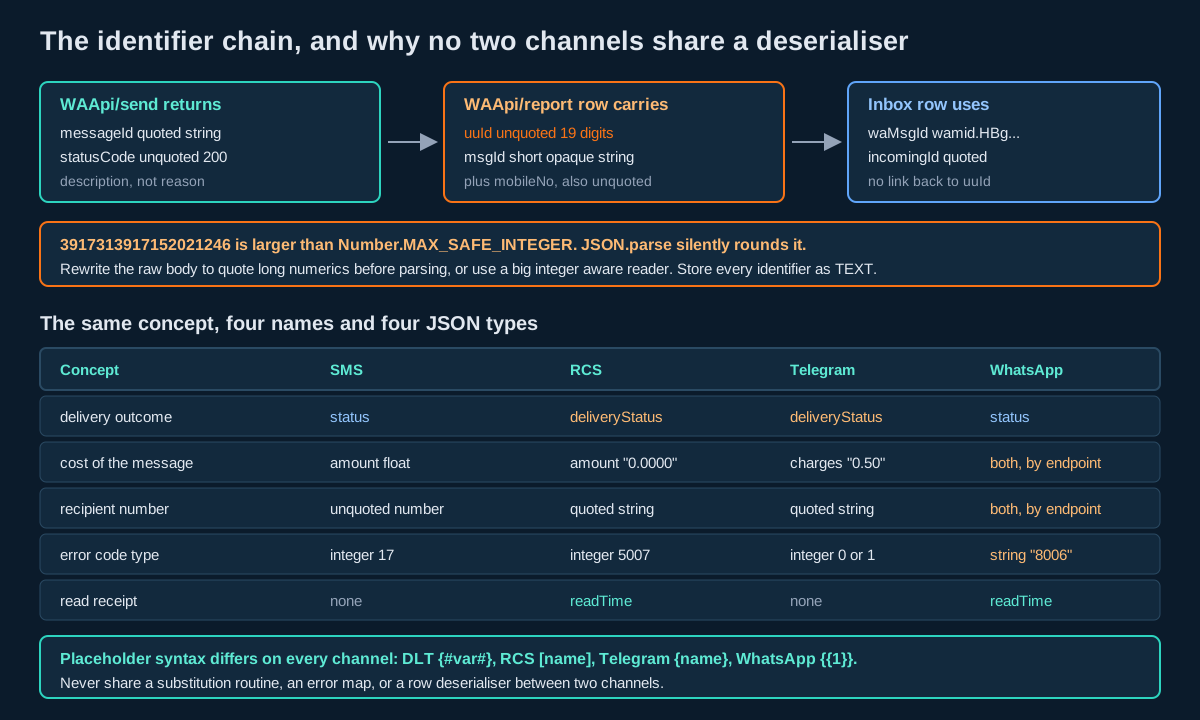
Second, the human readable field is called description. On SMS and RCS the same concept is reason. On Telegram it is message. Four channels, four names for one idea, which is precisely why a shared getErrorText(response) helper written against one channel returns null on the others.
Third, the identifier is messageId, not transactionId and not uuId. The delivery report, which is the only place you will later learn what happened to this message, keys its rows on uuId and msgId. Persist what you receive here, then reconcile against the report rows by the recipient number and the submit timestamp until you have confirmed empirically which field lines up with which. The section on the delivery row below sets out the composite key that stays safe regardless.
A fourth point applies to India specifically. WhatsApp template messages are not governed by the DLT regime that constrains SMS in India, but the commercial rules around opt-in and template categorisation are set by Meta and are worth reading directly at Meta’s template fundamentals documentation. The SMS side of your stack still needs DLT, and the TRAI commercial communications regulations remain the governing instrument there.
Five Response Envelopes in One Family
Here is every envelope this family can return, side by side. Write one adapter per envelope and route by the operation you invoked, never by inspecting the response to guess which one you received.
Envelope A, the send response. Flat, no payload key, statusCode an unquoted integer, text in description.
Envelope B, the media responses. status, then either mediaId and mediaUrl for a write, or mediaList for a read, then statusCode as a quoted "200" and reason.
Envelope C, the template responses. status, then either templateName for a write or templateList for a read, then quoted statusCode and reason.
Envelope D, the delivery report. Nested two levels deep and named unlike anything else on the platform:
{
    "apiName": "report",
    "action": "waReport",
    "status": "success",
    "msg": "success",
    "code": 200,
    "data": {
        "cursors": { "next": 19382015, "start": 18366779 },
        "pages": { "current": 1, "last": 1 },
        "records": [ ],
        "counts": { "total": 8, "current": 6 }
    }
}
Compare that against the SMS delivery report envelope and you will see the same six concepts with every single name and type changed. SMS calls the API name api; here it is apiName. SMS calls the count block count; here it is counts, plural, and it sits inside data rather than at the top. SMS names the row array reports_dlrList and puts it at the top level; here it is data.records. SMS returns code as the string "200"; here it is the integer 200. SMS cursors are opaque hexadecimal strings; here they are integers, and the documentation tells you to pass 1 for the first page. Nothing about a working SMS report ingester survives the move to WhatsApp except the general shape of the loop.
Envelope E, the REST generation. status, the named list key, statusCode as a quoted "200", reason, then totalRecords, page, limit, and the echoed fromDate and toDate expanded to full timestamps. This is the same envelope the RCS and Telegram REST families use, so an adapter written for one of those three works here with only the list key changed.
The Success Code Tabulation
| Operation | Field name | Value on success | JSON type |
|---|---|---|---|
WAApi/send | statusCode | 200 | unquoted integer |
WAApi/media upload | statusCode | "200" | quoted string |
WAApi/media read | statusCode | "200" | quoted string |
WAApi/media delete | statusCode | "200" | quoted string |
WAApi/template create | statusCode | "200" | quoted string |
WAApi/template read | statusCode | "200" | quoted string |
WAApi/template delete | statusCode | "200" | quoted string |
WAApi/report | code | 200 | unquoted integer |
rest/wa/v1/inbox | statusCode | "200" | quoted string |
rest/wa/v1/analytics | statusCode | "200" | quoted string |
Two of the ten break the pattern, and they break it in two different ways: send keeps the field name but changes the type, report changes the field name and the type together. The safe branch, on this channel and on every other channel this platform offers, is the top level status string. It is "success" or "error" on all ten, it is always a string, and it is the only field you can test without knowing which operation produced the response.
The Error Payload That Changes Type
This is the trap that costs the most debugging time, and it is worth understanding rather than merely working around.
The inbox returns its rows as an array, so its error response is unsurprising:
{
  "status": "error",
  "inboxList": [],
  "statusCode": "403",
  "reason": "WhatsApp product is not enabled for this account."
}
Analytics is the interesting one. On success analyticsList is an object, and the documentation states so explicitly: its shape depends on the action you selected. On error, that same key comes back as an empty array:
{
  "status": "error",
  "analyticsList": [],
  "statusCode": "400",
  "reason": "Date range cannot exceed 365 days."
}
For a dynamically typed client in PHP, Python or JavaScript this is a nuisance. For a statically typed client in Go, Rust, Java or C# it is a production incident, because the type of analyticsList differs between the two branches. Your struct binds cleanly against the success case in every test you write, then throws a JSON type error in production the first time a range validation fails. What the operator sees in the log is a deserialisation stack trace, not the sentence “Date range cannot exceed 365 days”, and the actual cause is invisible.
The fix is a two stage parse, and it is the shape every client on this platform should adopt:
// Stage one: parse loosely and read only the top level status.
JsonNode envelope = mapper.readTree(rawBody);
if (!"success".equals(envelope.path("status").asText())) {
    throw new WhatsAppApiException(
        envelope.path("statusCode").asText(),
        envelope.path("reason").asText());
}
// Stage two: only now bind the typed payload.
AnalyticsSummary payload =
    mapper.treeToValue(envelope.get("analyticsList"), AnalyticsSummary.class);
Three lines of discipline, and the failure message the operator reads is the one the API actually sent. The same pattern belongs in the Spring Boot client described in Messaging in Java and Spring Boot, and it is a strictly better default than configuring the deserialiser to be permissive, because permissiveness hides the next schema change too.
A related discipline applies to fields you did not ask for. Analytics returns dateLabel alongside date, and the delivery grouping rows return a label that duplicates billingModel. Bind only the fields you actually use, configure your deserialiser to ignore unknown properties, and never build a feature on a field whose purpose you cannot state in one sentence. Presentation helpers in a response are a convenience for a dashboard, not a contract you should depend on.
The Media Lifecycle, Start to Finish
WhatsApp is the only channel on this platform with a first class media library, and it has no analogue on SMS, RCS or Telegram. The lifecycle is four operations on one URL.
Upload. POST to WAApi/media as multipart, with wabaNumber, mediaType as one of image, video or document, an identifier you choose, a description, and the file itself. The response gives you back both an identifier and a URL:
{
    "status": "success",
    "mediaId": "2054629440705480684",
    "mediaUrl": "https://unify.smsgateway.center/media/471mxxxxx0705480684.jpg",
    "statusCode": "200",
    "reason": "success"
}
Note that mediaId is nineteen digits and arrives quoted here, which is the correct treatment. Store it as text and keep it that way, because the delivery report treats long numerics differently and you do not want two representations of the same class of value in one schema. The reasoning is set out in The Outbound Message Table.
Read. GET the same URL with no extra parameters for the whole library, or with mediaId for one item. Both return the identical envelope, and both put the rows in mediaList. Here is the part that will break a naive client:
{
   "status":"success",
   "mediaList":"[{\"identifier\":\"PDF\",\"creationTime\":1681543055938,\"description\":\"pdf\",\"mediaType\":\"document\",\"mediaId\":\"3816394210554235591\",\"wabaNumber\":917039670396,\"status\":\"active\"}]",
   "statusCode":"200",
   "reason":"success"
}
mediaList is a string, not an array. It holds a JSON document that has been encoded a second time. You parse the envelope, read mediaList as a string, and parse that string again to get your rows. Double encoding also appears on the RCS template data field and on the RCS delivery message field, so if you already handle RCS you have a helper for this. If you do not, write one now and name it clearly, because the failure mode when you forget is a type error several frames away from the cause.
Inside the decoded rows, wabaNumber is an unquoted number while mediaId is a quoted string, on the same row.
Download. GET the same URL with mediaId and download. Setting download=true fetches the file. Setting download=false returns the metadata block shown above. Because one URL and one verb serve both behaviours, the flag is the only thing standing between your code and a binary body arriving where you expected JSON, so set it explicitly on every call rather than relying on a default.
Delete. DELETE the same URL with mediaId. The response is short and, importantly, final:
{
    "status": "success",
    "mediaId": "7074855483357676350",
    "statusCode": "200",
    "reason": "success"
}
That reason of "success" is worth contrasting against template deletion below, which returns "Accepted for processing." instead. Media deletion completes when the call returns. Template deletion does not. Two operations, same family, same verb, different completion semantics, distinguishable only by reading the reason string.
One asymmetry to design around: upload requires wabaNumber, but read, download and delete do not. Writes are scoped to a WhatsApp Business Account number, reads are scoped to the account. If you operate several WABA numbers on one account, the library you read back is the union across all of them, and the row’s own wabaNumber field is how you tell them apart. Filter client side.
The portal path to the same capability, for anyone on your team who would rather click than curl, is documented in WhatsApp Business API Media Management.
Template Management End to End
WAApi/template is one URL and three verbs.
POST creates. Required: wabaNumber, msgType as text or media, category as one of UTILITY, MARKETING or AUTHENTICATION, body, templateName, and language as a code such as en. Optional: header at up to 60 characters and permitting one variable, headerSample, bodySample, footer at up to 60 characters and permitting no variables at all, templateDescription, buttons as a JSON payload, and mediaType when msgType is media.
The buttons payload takes two documented shapes. Quick replies look like this:
[
  { "text": "RESOLVED", "type": "QUICK_REPLY" },
  { "text": "NO",       "type": "QUICK_REPLY" },
  { "text": "YES",      "type": "QUICK_REPLY" }
]
Call to action buttons look like this:
[
  { "phone_number": "+1(650) 555-1111", "text": "your-phone-button-text", "type": "PHONE_NUMBER" },
  { "text": "your-url-button-text", "type": "URL", "url": "https://www.website.com" }
]
Note the key naming inside that payload. phone_number is snake case, while every parameter outside it is camel case. That is because the buttons array is passed through to Meta’s own template format rather than being translated, so build it to Meta’s rules, not to the surrounding platform’s conventions.
Placeholders are {{1}}, {{2}} and {{3}}. Numbered, positional, wrapped in double curly braces. This is the fourth placeholder syntax on the platform, after DLT’s {#var#} on Indian SMS, RCS’s [name], and Telegram’s single brace {name}. There is no shared substitution routine that can serve two of these correctly, and attempting one is how a marketing message goes out with a literal {{1}} in the body. Write four, name them for their channel, and unit test each against a value containing the delimiter characters of the other three.
Both the header and the body accept variables. The footer does not. If you need a variable in the closing line, it belongs in the body.
GET reads. Pass wabaNumber for the whole set, or wabaNumber plus templateName for one. Both calls return the same shape, and this matters: the single read still returns an array.
{
    "status": "success",
    "templateList": [
        {
            "template": {
                "footer": "By XYZ Brand",
                "header": "This is {{1}} header",
                "body": "Your account {{1}} is having {{2}} on {{3}}"
            },
            "creationTime": 1740835233326,
            "templateName": "test1",
            "whatsAppStatus": "pending",
            "systemStatus": "pending",
            "mediaType": "text",
            "language": "en",
            "category": "UTILITY"
        }
    ],
    "statusCode": "200",
    "reason": "success"
}
The row is partially double wrapped, which is unusual. The message components sit inside a nested template object. The metadata, meaning creationTime, templateName, both status fields, mediaType, language and category, sits at the row level outside that wrapper. Elsewhere on this platform, when a row is double wrapped the whole row is inside the wrapper. Here it is split, so a generic unwrapper that returns row.template and stops will hand you the text and throw away the approval state.
One casing detail. Submit templateName as Test1 and it returns as test1. Lower case the name in your own store at the point of creation, and always send the string you read back rather than the string you submitted.
DELETE removes. It needs wabaNumber, templateName and language. The presence of language in the delete key tells you something the create page does not: a template name is unique per language, not globally. If you maintain the same template in English and Hindi, you are maintaining two objects that share a name, and deleting one does not touch the other.
{
    "status": "success",
    "templateName": "test1",
    "statusCode": "200",
    "reason": "Accepted for processing."
}
Accepted, not deleted. Re-read the list to confirm the row is gone before you mark anything complete in your own system.
If your team creates templates through the portal instead, the click path is written up in How to Create a WhatsApp Business API Template.
Two Approval States, Not One
whatsAppStatus and systemStatus are two independent fields on every template row, and in the documented sample both read pending. No other channel on this platform exposes a dual approval state. RCS templates carry a single integer status. SMS templates carry DLT identifiers issued elsewhere. Here there are two gates, and a template is usable only when both are satisfied.
Treat them as a compound state in your own schema. Store both columns. Make your send path read both. The failure you are avoiding is a template that Meta has approved but that has not yet cleared the platform side, which will read as approved to any client that checks only the field with WhatsApp in its name.
The polling loop that follows from this is straightforward:
def template_is_ready(session, waba, name):
    r = session.get(
        "https://unify.smsgateway.center/WAApi/template",
        params={"userid": USERID, "wabaNumber": waba,
                "templateName": name, "output": "json"},
        headers={"apikey": API_KEY},
        timeout=20,
    )
    env = r.json()
    if env.get("status") != "success":
        raise RuntimeError(env.get("reason", "unknown"))
    rows = env.get("templateList") or []
    if not rows:
        return False                      # single read still returns an array
    row = rows[0]
    return (row.get("whatsAppStatus") == "approved"
            and row.get("systemStatus") == "approved")
Two things in that function are deliberate. The empty list check exists because a single template read returns an array, so a missing template gives you [] rather than a null row. And the function requires both states rather than either, because a partial approval is not an approval.
The exact string values that indicate an approved state are best read from your own account rather than assumed. Create one template, poll this function every thirty seconds while watching the raw values, and record what you observe. That takes an afternoon and produces a constant you can trust for the lifetime of the integration.
The Delivery Row Compared Four Ways
POST https://unify.smsgateway.center/WAApi/report takes wabaNumber, fromDate and toDate in YYYY-MM-DD HH:MM:SS form, pageLimit, output, and optionally mobileNo and startCursor. Full second granularity on the date range is a genuine advantage: the SMS report accepts date granularity only, so a WhatsApp reconciler can pull a precise window rather than a whole day.
Here is a documented row verbatim:
{
    "msgType": "text",
    "deliveryTime": 1691165382000,
    "billingModel": "SIC",
    "msgId": "tnNwDCgP1WhfLwn",
    "cause": "Read By User",
    "readTime": 1691165389000,
    "mobileNo": 919xxxxxxxxx,
    "uuId": 3917313917152021246,
    "wabaNumber": 9170396xxxxx,
    "globalErrorCode": "8006",
    "cursorId": 18366779,
    "submitTime": "1691165380316",
    "status": "DELIVERED"
}
Read the types before the names. submitTime is a quoted string. deliveryTime and readTime, on the same row, describing the same class of value, are unquoted integers. globalErrorCode is a quoted string here, where the same field is an unquoted integer on SMS, RCS and Telegram. mobileNo, uuId and wabaNumber are all unquoted numbers.
The row also shows a subtlety in the status model. status reads DELIVERED while cause reads Read By User and readTime is populated. So read is not a terminal value of status; it is signalled by readTime being non zero. If you are counting reads, count populated readTime values, not status strings.
billingModel carries a code describing which commercial category the message was billed under. Store it verbatim as text and group by it when reconciling, because it is the join key between your message log and your invoice. Do not attempt to expand the abbreviation in your own reporting; the code as sent is what will match.
Now the four way comparison, which is the part you cannot get anywhere else.
| Concept | SMS | RCS | Telegram | |
|---|---|---|---|---|
| Endpoint | SMSApi/reports/status | rest/rcs/v1/dlr | rest/tg/v1/dlr | WAApi/report |
| HTTP method | GET or POST | GET | GET | POST only |
| Paging model | opaque hex cursor | page and limit | page and limit | integer cursor |
| Row array key | reports_dlrList | rcsDlrList style list key | dlrList style list key | data.records |
| Delivery outcome field | status | deliveryStatus | deliveryStatus | status |
| Outcome casing | upper case | upper case | lower case | upper case |
| Platform identifier | uuId quoted string | uuId quoted string | uuId quoted string | uuId unquoted number |
| Provider identifier | msgId, not unique | msgId opaque string | msgId short string | msgId opaque string |
| Recipient field | mobileNo unquoted | mobileNo quoted | chatId quoted | mobileNo unquoted |
| Cost field | amount float | amount string, 4dp | charges string, 2dp | see analytics and inbox |
| Error code type | integer | integer | integer, binary | quoted string |
| Free text cause | cause | cause | vendorErrorCode | cause |
| Read receipt | none | readTime | none | readTime |
| Click signal | none | clickedTime | none | none |
| Explicit terminality flag | none | none | isFinal | none |
| Date granularity | date only | full timestamp | full timestamp | full timestamp |
| Billing category on the row | none | none | none | billingModel |
Fifteen rows of difference across four channels, and not one column is a superset of another. This is the empirical basis for the rule that ends the diagram: never share a row deserialiser between two channels on this platform. Write four narrow mappers that each produce the same internal delivery_event record, and let the differences live in the mappers rather than leaking into your domain model. The design for that shared record is worked through in Observability for Messaging Pipelines.
The Nineteen Digit Number That Breaks JavaScript
"uuId": 3917313917152021246 is nineteen digits and it is not quoted.
JavaScript’s Number.MAX_SAFE_INTEGER is 9007199254740991, sixteen digits. Anything larger cannot be represented exactly as a double. JSON.parse does not warn you. It returns a number that looks plausible, differs from the original in its last few digits, and reconciles against nothing. The same applies to mobileNo and wabaNumber on this row, and to cursorId, though that last one is small enough today to be safe by luck rather than design.
There are two correct responses and one incorrect one.
The incorrect response is to parse normally and convert to a string afterwards. By then the damage is done.
The first correct response is to rewrite the raw body before parsing, quoting long numeric literals so they arrive as strings:
const raw = await response.text();

// Quote any bare integer of 16 or more digits before parsing.
const safe = raw.replace(/:\s*(\d{16,})(?=\s*[,}])/g, ': "$1"');
const body = JSON.parse(safe);

// body.data.records[0].uuId is now the exact string "3917313917152021246"
That regular expression is deliberately anchored on the colon and the following delimiter so it cannot touch digits inside a quoted string. Test it against a row where the message text itself contains a long number.
The second correct response, available in newer runtimes, is a reviver that intercepts the source text of each value before it becomes a number. Whichever you choose, apply it at the transport layer so no caller can forget.
And in every language, store identifiers as TEXT or VARCHAR in the database, never as BIGINT. Nineteen digits fits in a signed 64 bit integer, so the database will accept it, and you will have introduced a silent conversion at the boundary for no benefit. The identifiers are opaque tokens. You never do arithmetic on them. The same warning applies to SMS and RCS transaction identifiers, which are eighteen or nineteen digits, and it is covered in the Node.js context in the Node.js integration tutorial.
The Inbox, and What It Costs You
GET https://unify.smsgateway.center/rest/wa/v1/inbox is read only. It filters on wabaNumber, mobileNo, isReplied as 0 or 1, agentId, waMsgId up to 50 characters, and a fromDate and toDate range that accepts either a bare date or a full timestamp, with from and to as aliases. Paging is page and limit, default 50, maximum 200. Results come back newest first.
A row:
{
  "incomingId": "8801",
  "wabaNumber": "9170396xxxxx",
  "mobileNo": "919876543210",
  "waMsgId": "wamid.HBgMOTEXAMPLE",
  "messageType": "text",
  "messageTypeId": 1,
  "profileName": "Rahul",
  "message": "Hi, I need help with my order",
  "mediaUrl": "",
  "isReplied": 0,
  "repliedMedium": "",
  "timestamp": 1752480000000,
  "charges": "0.00",
  "agentName": "NA"
}
Four observations.
charges is present on an inbound row. Neither the RCS inbox nor the Telegram inbox carries a cost field. Inbound WhatsApp traffic is a billable line item on this platform, which means your reconciliation job needs to sum inbox charges as well as outbound ones, and your capacity planning needs to account for reply volume rather than treating it as free. Sum charges by date and compare against your invoice.
waMsgId is Meta’s own identifier, prefixed wamid.. It is a different namespace from the msgId on a delivery row and a different namespace again from the messageId your send returned. Nothing on the inbox row links back to an outbound uuId. If you need to thread a reply to the message that prompted it, correlate on mobileNo plus a time window, and keep the window narrow enough that two conversations with the same person cannot collide.
agentName is the string "NA" when no agent is assigned, not an empty string and not null. Test for the literal, or normalise it at the mapper, because a truthiness check will treat "NA" as a real assignment.
message is plain text. On the RCS inbox the equivalent field is double encoded JSON. Same concept, two representations, one more reason the mappers stay separate.
Unlike SMS, this channel has no outbound push. The SMS side of the platform can push delivery receipts to a webhook, a mechanism covered in Real-Time DLR Webhooks and in the WhatsApp webhooks integration guide. For the endpoints documented here, both delivery status and inbound messages are retrieved by polling. Size your poller accordingly: a loop on the inbox every thirty to sixty seconds with limit=200 and a high water mark on incomingId keeps latency acceptable without hammering the endpoint.
Analytics and the Right Denominator
GET https://unify.smsgateway.center/rest/wa/v1/analytics is GET only, and the documentation states that any other method returns 405. It takes an action of summary, trend or delivery, a start and end in YYYY-MM-DD form with a maximum range of 365 days, an optional wabaNumber, a reptype of day or month for trend, and a groupBy of billable, date, waNumber or country for delivery.
The 365 day cap is the widest on the platform by a factor of nearly twelve. The SMS dashboard and the Telegram analytics endpoint both cap at 31 days. If you are building a year over year view, WhatsApp is the one channel where you do not have to stitch twelve calls together.
action=summary returns six labelled metrics:
"metrics": [
  { "label": "Submitted", "value": 1250 },
  { "label": "Delivered", "value": 980 },
  { "label": "Read",      "value": 640 },
  { "label": "Failed",    "value": 45  },
  { "label": "Pending",   "value": 120 },
  { "label": "Rejected",  "value": 15  }
]
Submitted is the number you want as the denominator of a delivery rate. The reason is a failure mode worth stating plainly: if you compute delivered over delivered plus failed, and your delivery reports stop arriving, both terms freeze and the ratio holds steady at a healthy looking value while nothing at all is being delivered. Submitted is the only denominator that moves the instant sending continues and confirmation stops. Here, submitted is handed to you directly.
Note also that Submitted at 1250 is larger than Delivered plus Read plus Failed plus Pending plus Rejected, which sum to 1800. That is because Read is a subset of Delivered rather than a peer of it. Summing the six labels double counts. Chart them as a funnel, not as a pie.
action=delivery returns rows with requested, delivered, read, failed, notSent and amount, grouped by whichever groupBy you passed. amount here is an unquoted float, 45.5. On the inbox, cost is charges, a quoted string. So cost has two names and two JSON types within the WhatsApp family alone, and the discipline of never sharing a money parser applies within a channel, not only between channels. Parse both through a decimal type, never a float, before any arithmetic touches them.
Your First Send in Six Steps
One. Generate an API key and note your wabaNumber. The key goes in the apikey header on every call. The WABA number is the approved WhatsApp Business Account number you send from, in international format with no plus sign.
Two. Create a template and record its name in lower case. POST to WAApi/template with category, body, templateName, language and msgType. Use {{1}} style placeholders and supply a bodySample with realistic values, because the sample is what Meta reviews.
Three. Poll until both approval states are satisfied. GET the same URL with your templateName. Read whatsAppStatus and systemStatus from the row and require both. Do not send until both are clear.
Four. Upload any media the template header needs. POST the file to WAApi/media with wabaNumber, mediaType, identifier and description. Store the returned mediaId as text.
Five. Send one message to a number you control. POST to WAApi/send with wabaNumber, mobile, msg, sendMethod=quick, msgType, templateName and output=json. Persist messageId, the recipient, and your own submit timestamp before you do anything else with the response.
Six. Pull the delivery report for a narrow window and match the row. POST to WAApi/report with wabaNumber, a fromDate and toDate bracketing your send by a few minutes, and pageLimit=20. Apply the long number protection before parsing. Compare the returned uuId, msgId, mobileNo and submitTime against what you stored. That single comparison, done once by hand, tells you exactly which identifier reconciles against which, and it is worth more than any amount of reading.
Four Languages, Four Traps
Four short samples, each demonstrating a different failure mode rather than repeating the same request.
cURL: the multipart upload, with the header auth
curl --location --request POST 'https://unify.smsgateway.center/WAApi/media' \
  --header 'apikey: YourApiKey' \
  --form 'userid="YourUsername"' \
  --form 'wabaNumber="9170396xxxxx"' \
  --form 'output="json"' \
  --form 'mediaType="image"' \
  --form 'identifier="SpringSaleBanner"' \
  --form 'description="Spring sale header image"' \
  --form 'mediaFile=@"/path/to/banner.jpg"'
The trap: the file part is mediaFile, and it is the one parameter you will not find in the parameter table on the upload page. It appears only in the sample code. Sample code on this platform is a primary source and deserves the same reading as the table above it.
JavaScript: the identifier that arrives already corrupted
const res = await fetch('https://unify.smsgateway.center/WAApi/report', {
  method: 'POST',
  headers: { apikey: process.env.SGC_API_KEY },
  body: new URLSearchParams({
    userid: process.env.SGC_USERID,
    wabaNumber: '9170396xxxxx',
    fromDate: '2026-09-16 00:00:00',
    toDate:   '2026-09-16 23:59:59',
    pageLimit: '100',
    output: 'json',
  }),
});

const raw  = await res.text();
const safe = raw.replace(/:\s*(\d{16,})(?=\s*[,}])/g, ': "$1"');
const body = JSON.parse(safe);

if (body.status !== 'success') {
  throw new Error(`${body.code}: ${body.msg}`);
}
for (const row of body.data.records) {
  // row.uuId is an exact string. row.submitTime is already a string.
  // row.deliveryTime is a number. Normalise before storing.
  await store({
    platformId:  row.uuId,
    providerId:  row.msgId,
    recipient:   String(row.mobileNo),
    submittedAt: Number(row.submitTime),
    deliveredAt: row.deliveryTime || null,
    readAt:      row.readTime || null,
    outcome:     row.status,
    errorCode:   row.globalErrorCode,
    billing:     row.billingModel,
  });
}
The trap: String(row.mobileNo) runs after the rewrite, not instead of it. Converting a corrupted number to a string preserves the corruption perfectly.
Python: the double encoded media list
import json, requests

r = requests.get(
    "https://unify.smsgateway.center/WAApi/media",
    params={"userid": USERID, "output": "json"},
    headers={"apikey": API_KEY},
    timeout=20,
)
env = r.json()
if env.get("status") != "success":
    raise RuntimeError(f'{env.get("statusCode")}: {env.get("reason")}')

# mediaList is a STRING containing JSON. Parse it a second time.
items = json.loads(env["mediaList"]) if env.get("mediaList") else []
for item in items:
    print(item["mediaId"], item["mediaType"], item["identifier"], item["status"])
The trap: env["mediaList"] looks like a list in every log line you will read, because a JSON string of an array prints with square brackets. It is a string. Iterating it gives you characters.
Java: the payload that changes type on failure
String raw = client.get(ANALYTICS_URL, params);      // returns the body as text
JsonNode env = mapper.readTree(raw);

if (!"success".equals(env.path("status").asText())) {
    // analyticsList is [] here. Do not touch it.
    throw new WhatsAppApiException(
        env.path("statusCode").asText(),
        env.path("reason").asText());
}

// Only now is analyticsList guaranteed to be an object.
AnalyticsSummary summary =
    mapper.treeToValue(env.get("analyticsList"), AnalyticsSummary.class);
The trap: binding the whole envelope to a typed class in one step passes every test you write against a success fixture, then throws on the first 400 in production, and the exception the operator reads is about JSON types rather than about the date range.
There is a WhatsApp Postman collection available from the downloads section of the developer documentation, which is the fastest way to confirm a request shape before you write any of the above. There is no official Java, Node.js, Go or .NET SDK for this platform; the PHP and Python SDKs cover the SMS surface.
Ten Mistakes That Cost Real Money
One. Branching on statusCode. Two of ten operations do not return it in the form you expect. Branch on status.
Two. Sharing a deserialiser with another channel. Fifteen fields differ across the four delivery rows. A shared mapper produces wrong data rather than an error, which is worse.
Three. Parsing the report body with a plain JSON.parse. Nineteen digit identifiers corrupt silently and reconcile against nothing.
Four. Treating template creation as complete when the call returns. It returns "Accepted for processing." Poll until both approval states clear.
Five. Checking only whatsAppStatus. There are two gates. A template approved by one and not the other will fail at send time.
Six. Iterating mediaList directly. It is a string containing JSON. Parse it twice.
Seven. Sending a GET where you meant a DELETE. On media and template the method is the operation. A misdirected GET returns 200 and changes nothing.
Eight. Reusing a placeholder substitution routine across channels. WhatsApp is {{1}}, Telegram is {name}, RCS is [name], Indian SMS is {#var#}. Four routines.
Nine. Ignoring inbox charges. Inbound rows carry a cost. If your reconciliation only sums outbound, your figures will drift from your invoice by exactly the volume of replies you receive.
Ten. Summing the six analytics metrics. Read is a subset of Delivered. The total is not the sum.
Choosing WhatsApp Over SMS, RCS or Telegram
| Dimension | SMS | RCS | Telegram | |
|---|---|---|---|---|
| Addressing | phone number | phone number | chat ID from opt-in | phone number |
| Recipient must opt in first | no | no | yes | yes, per Meta policy |
| Template approval required | yes in India, via DLT | yes, platform side | no | yes, Meta plus platform |
| Approval states to track | DLT identifiers | one integer | none | two independent fields |
| Placeholder syntax | {#var#} | [name] | {name} | {{1}} |
| Media library | no | no | no | yes, four operations |
| Rich buttons | no | yes, in template | yes, replyMarkup | yes, in template |
| Read receipts | no | yes | no | yes |
| Click tracking | via smart links | clickedTime | no | no |
| Inbound available | yes, shortcode | yes, polling | yes, polling | yes, polling |
| Inbound billable | no | no | no | yes, charges on the row |
| Outbound delivery push | yes, one webhook | no | no | no |
| Agent assignment exposed | no | no | seat count only | agentId and agentName |
| Analytics range cap | 31 days | not stated | 31 days | 365 days |
| Report date granularity | date only | full timestamp | full timestamp | full timestamp |
| Billing category on the row | no | no | no | yes, billingModel |
| Scheduling parameter | yes | no | no | yes |
Reading that table as a decision: choose WhatsApp when you need rich media with a media library behind it, when read receipts matter to the business case, when you have a shared agent inbox and want the agent attribution in your data, and when your reporting needs a full year in one call. Choose SMS when reach matters more than richness, when you cannot rely on opt in, or when you need a delivery push rather than a poll. Choose RCS when you want click attribution. Choose Telegram when your audience already lives there and the per message cost matters more than reach.
In practice most production systems use more than one and fall back between them. That configuration is a platform feature rather than something you build, and the semantics are documented on the multi channel fallback page. The commercial overview of the channel itself sits on the WhatsApp Business API product page.
The Production Checklist
apikeyheader set on every call,useridsent alongside it, no password anywhere in a URL- Two transports implemented, one per generation, sharing an auth decorator
output=jsonset once in the shared request builder- Branching on the top level
statusstring only, never onstatusCodeorcode - Two stage parse in place: read
status, return on failure, bind the payload only on success - Long numeric protection applied at the transport layer before any parse
- All identifiers stored as
TEXT, neverBIGINT mediaListdouble decode implemented and named clearlydownloadflag set explicitly on every media GET- Media upload scoped by
wabaNumber, reads filtered client side by the row’s ownwabaNumber - Template names stored lower case, taken from the read response not the submission
- Both
whatsAppStatusandsystemStatuspersisted and both required before send - Template identity modelled as name plus language, not name alone
- Template delete followed by a confirming re-read
{{1}}substitution routine separate from the other three channels and unit tested against the other delimitersbuttonspayload built to Meta’s snake case field namesfootervalidated as variable free before submissionheaderandfooterlength capped at 60 characters client side- Delivery report window expressed with full timestamps, not whole days
- Cursor paging loop driven by
data.cursors.nextfed back asstartCursor - Loop terminated on
data.pages.currentreachingdata.pages.last submitTimestring anddeliveryTimeinteger normalised to one type at the mapper- Read counted from populated
readTime, not from thestatusstring billingModelstored verbatim as text and used as the invoice join keyglobalErrorCodestored as text, with no shared error map across channels- Inbox poller running with
limit=200and a high water mark onincomingId - Inbox
chargessummed into the same reconciliation as outbound cost agentNamevalue of"NA"normalised to null at the mapper- Reply threading correlated on
mobileNoplus a narrow time window - Analytics delivery rate computed with Submitted as the denominator
- Analytics funnel charted as a funnel, with Read understood as a subset of Delivered
amountandchargesboth parsed through a decimal type, never a float- Deserialiser configured to ignore unknown properties
- No feature built on a response field whose purpose you cannot state
- 403 responses treated as configuration and never retried
- One end to end reconciliation performed by hand before go live
- Alerting on the ratio of report rows ingested to messages submitted, not on the delivered to failed ratio
Unspecified Behaviour and How to Code Around It
Some behaviours on this surface are not pinned down by anything you can read, and you will not find them out by staring at a schema. Each item below gives the choice that stays correct whichever way the behaviour resolves, so none of them require you to wait for an answer before shipping.
One. Reconcile on the composite, not on any single identifier. A send returns messageId. A report row carries uuId and msgId. An inbox row carries waMsgId. Rather than guessing which pair lines up, key your own outbound table on the tuple of recipient number, your own submit timestamp, and wabaNumber, and store every identifier you receive as additional columns. Match report rows on that tuple within a small window. The tuple is stable regardless of which identifier turns out to be canonical, and once you have confirmed the mapping empirically you can promote the winning column to the primary match with a one line change.
Two. Send one recipient per call when you need per message accounting. The send response returns a single messageId and a single mobile. Whether a comma separated list fans out into several billable rows or is recorded as one unit is not something you want to discover during a billing dispute. Loop in your own code, one call per recipient, and every message gets its own identifier, its own row and its own cost line.
Three. Confirm template state by reading, never by assuming a string. Both approval fields read pending in the documented sample, and the values that indicate a cleared state are best learned from your own account. Create one template, poll every thirty seconds, log the raw values as they change, and pin the constants you observe. One afternoon of watching gives you a correct constant for the life of the integration.
Four. Set download explicitly on every media read. One URL and one verb serve both the metadata read and the binary fetch, distinguished only by that flag. Passing it on every call means a change to whatever the default is cannot turn a JSON parse into a stream of image bytes.
Five. Treat template delete as asynchronous and confirm it. The response says accepted, not deleted. Issue the delete, wait, re-read the list filtered to that name and language, and only then mark it gone in your own store. The round trip costs one GET and removes the ambiguity entirely.
Six. Filter the media library client side by wabaNumber. Reads are account scoped while writes are WABA scoped. If you operate one WABA number today, nothing goes wrong. If you add a second, the library read starts returning both. Filtering on the row’s own wabaNumber from day one means adding the second number changes nothing in your code.
Seven. Normalise every timestamp to UTC at the mapper, and record the offset you assumed. The report row mixes a quoted string timestamp with unquoted integer ones, and the timezone the platform uses when it expands a date range is not something you should infer. Convert everything to UTC epoch milliseconds at the point of ingestion, store the assumed offset as a column, and a later correction becomes an update statement rather than a migration.
Eight. Bound your delivery report window by time, not by page count. Cursor paging tells you current and last, but a long lived poller that trusts the page count and nothing else will loop indefinitely if the window keeps growing while it reads. Fix the window to a closed interval that has already ended, page until current equals last, then move the window forward. The loop terminates by construction.
Nine. Treat read as a subset of delivered in every aggregate you build. The summary metrics do not sum to the submitted total, and the delivery rows publish read alongside delivered. Model your funnel so that read implies delivered, and your totals stay correct whether or not the platform later changes how it counts.
Ten. Store billingModel and globalErrorCode as opaque text with no local enumeration. Both carry codes whose full value space you have not seen. An enum with a default branch of “unknown” loses the actual value. Text preserves it, and you can add the mapping later from data you already have rather than from data you threw away.
Eleven. Poll the inbox on incomingId order rather than on timestamp. Rows come back newest first and incomingId appears to increment. A high water mark on the identifier is immune to clock skew and to two messages sharing a millisecond, both of which will eventually happen to a timestamp based cursor.
Twelve. Apply the long numeric rewrite at the transport, not at the call site. Any endpoint on this family could return an unquoted long value in a field that is quoted today. Doing the rewrite once, in the layer that turns a response body into a parsed object, means a future change on any endpoint cannot corrupt anything, and no future caller has to remember.
FAQs
Which base path do I use for WhatsApp?
Both. https://unify.smsgateway.center/WAApi/ serves send, media, template and report. https://unify.smsgateway.center/rest/wa/v1/ serves inbox and analytics, with a legacy alias that drops the v1 segment. Both take output=json.
How do I authenticate?
Send your API key in the apikey request header and include userid as a parameter on every call. The header is accepted on every endpoint of this family. Never put a password in a query string.
Why does my client throw a JSON type error only in production?
Because on error the payload key comes back as an empty array, including on the endpoints that return an object on success. Parse the envelope loosely, check the top level status string, return early on failure, and bind the typed payload only after that check passes.
Why do my delivery report identifiers not match anything?
uuId is an unquoted nineteen digit number and exceeds the safe integer range in JavaScript, so a plain JSON.parse rounds it. Rewrite the raw body to quote long numeric literals before parsing, or use a big integer aware reader, and store the result as text.
How do I delete a WhatsApp template?
Send a DELETE to WAApi/template with wabaNumber, templateName and language. The response reads accepted rather than deleted, so re-read the template list to confirm the row is gone.
Why does my template have two status fields?
Because it passes through two independent approvals. whatsAppStatus reflects the Meta side and systemStatus reflects the platform side. Require both before sending.
What placeholder syntax do WhatsApp templates use?
Numbered double curly braces: {{1}}, {{2}}, {{3}}. Provide a bodySample and a headerSample with realistic values, since the sample is what gets reviewed.
Can I put a variable in the footer?
No. The footer is fixed text of up to 60 characters. The header accepts one variable and the body accepts several.
Is mediaList an array?
No. It is a string containing a JSON array, so it needs a second parse. The rows inside it carry mediaId as a quoted string and wabaNumber as an unquoted number.
How do I get delivery status pushed to my server?
For the endpoints described here, delivery status and inbound messages are both retrieved by polling. The SMS side of the platform supports an outbound webhook for delivery receipts; on WhatsApp, run a poller against WAApi/report with a closed time window and cursor paging.
Does inbound WhatsApp traffic cost money?
Inbox rows carry a charges field, so inbound is a billable line item. Sum it into the same reconciliation as your outbound cost rather than treating replies as free.
What is the widest date range I can query?
Analytics accepts up to 365 days in a single call, which is the widest range on the platform. The delivery report takes an explicit fromDate and toDate at full second granularity and pages with cursors rather than a range cap.
Which denominator should I use for a delivery rate?
Submitted. The analytics summary returns it directly. Using delivered over delivered plus failed produces a ratio that freezes at a healthy value when reports stop arriving, which hides exactly the outage you need to detect.
Can I reuse my SMS integration code for WhatsApp?
Only the transport. The envelope, the identifier types, the delivery row field names, the placeholder syntax and the error code types all differ. Write a separate mapper per channel that produces one shared internal record, and keep the differences inside the mappers.
Ready to put this on the wire?
Talk to the SMSGatewayCenter team about enabling WhatsApp Business API access on your account, or start with the developer documentation and send your first template message today.
Recent Articles
- Telegram Messaging API: Eight Endpoints, the Chat ID Model, and the Error Shape That Breaks Typed Clients
- RCS Messaging API: Complete Reference and Migration Path from SMS
- Delivery Report Ingestion: Building a System of Record, Not a Dashboard
- Contact Groups and Segments: The Data Model Behind a Group Send
- Campaign Splitting: What Happens When One Send Becomes Several Transactions