Table of Contents
- The Short Answer
- TL;DR
- What a Split Campaign Actually Is
- The Three Levels of Identity
- What the API Can and Cannot Do With a Split
- Reading a Campaign
- The Send Response Is a Union, Not a Shape
- The Group Send Blind Spot
- Updating and Deleting a Split Campaign
- Three Spellings of One Concept
- Aggregating a Split Campaign Correctly
- Which Report Resolves Which Level
- Schema Changes You Need
- The Reconciliation Playbook
- Billing and Cost Under a Split
- Decision Matrix
- Build Order
- Ten Mistakes
- Pre-Launch Checklist
- What This Article Deliberately Does Not Claim
- FAQs
The Short Answer
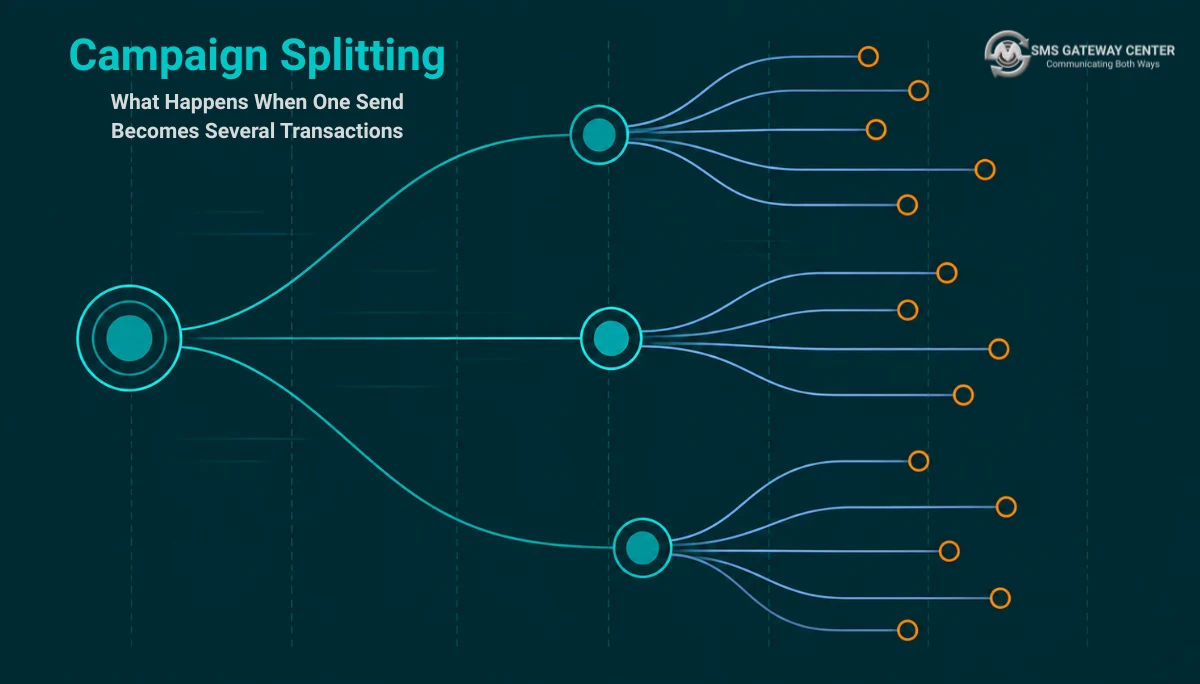
When you enable split campaigns, one logical send stops being one transaction and becomes several, each with its own transaction identifier, each firing at a different time, and only the first of which your code ever observes synchronously. The identifier that ties them together is campaignid, and it is the only key that addresses the campaign as a whole. If your database has one row per send and one status column keyed on the transaction identifier you received at submit time, that model is wrong the moment splitting is switched on, because the value you stored describes one batch out of several and the rest of the campaign will never call you back.
The practical consequence is not a crash. It is silence. Your integration keeps working, your first batch reports normally, and your delivery rate looks catastrophic for hours because the denominator you are dividing by is the campaign total while the numerator only covers the batches that have actually fired. Nothing errors. The numbers are just wrong, and they correct themselves later in a way that hides the bug.
TL;DR
- A split campaign is configured in the portal, not through the send API. There is no documented parameter on
SMSApi/sendthat creates one. Your code cannot opt in or out, so it must be correct either way. - Identity is three levels deep:
campaignidaddresses the campaign,transactionId(returned asuuIdin reports) addresses one batch, andmsgIdaddresses one physical message to one recipient. OnlymsgIdis safely unique per row. SMSApi/campaign/readis the only endpoint that enumerates the batches of a campaign. It is documented verbatim as fetching “details of split campaign”.SMSApi/campaign/updateaccepts exactly one mutable field,scheduletime. You can move a campaign in time. You cannot change its batch size, its interval, its body or its recipients through the API.SMSApi/campaign/deleteis keyed oncampaignid, so it addresses the whole remaining campaign. There is no documented way to delete a single pending batch through the API.- The send response shape varies by
sendMethod, and there is no discriminator field inside the response telling you which shape you got. A group send returnsgroupand no recipient information at all. - Provider identifiers run to nineteen digits and exceed the largest integer JavaScript can represent exactly. Store every one of them as text.
- Delivery rate must be computed against submitted batches, never against the campaign total, until the last batch has fired.
What a Split Campaign Actually Is
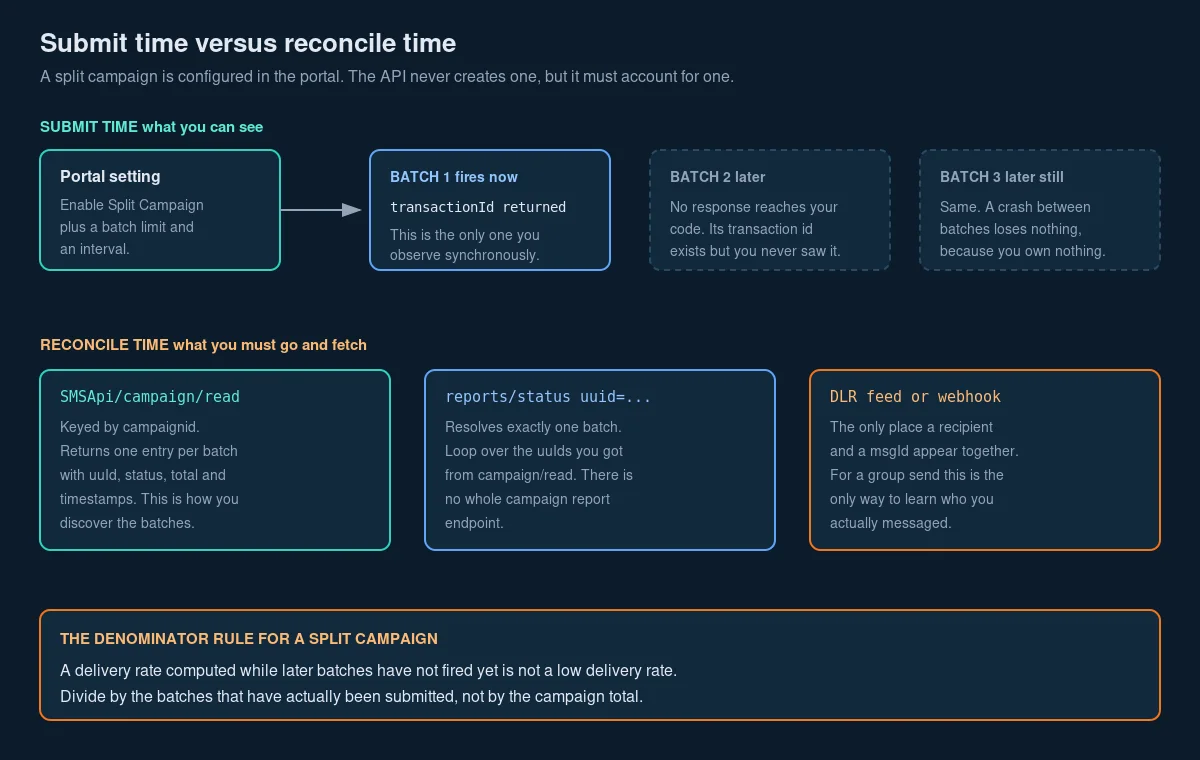
Split campaigns are a portal feature. On the Split SMS Campaigns product page the mechanism is described plainly: you upload a large recipient file, you toggle “Enable Split Campaign”, you set a batch limit, and you choose an interval from a dropdown. The documentation states that the first batch “will deliver instantly or at scheduled time” and each subsequent batch fires after the chosen interval has elapsed.
That is worth restating in engineering terms, because the marketing framing hides the part that matters. Splitting is a server-side scheduler that takes one recipient list and emits several submissions on a timer. It is not client-side chunking. You are not making several API calls. You make zero additional API calls, and the platform makes the additional submissions on your behalf, hours or days after your process has exited.
The portal supports splitting across all three send methods: comma-separated numbers in a simple send, one or more groups in a group send, and every variety of file upload. Three quite different submission shapes, one splitting behaviour.
The reason teams reach for it is bounded human capacity rather than gateway throughput. If fifty thousand people receive a promotional offer at the same instant, the inbound calls land at the same instant too. Spreading the send spreads the callbacks. That is a legitimate reason, and it is a different reason from the ones that motivate rate limiting and backpressure, which is about protecting the gateway rather than protecting your sales desk. The two techniques look similar from a distance and solve unrelated problems.
The part nobody documents in engineering terms
Here is the asymmetry that makes this article necessary. The API can read a split campaign, reschedule a split campaign and delete a split campaign. The API cannot create one. Every capability you have is downstream of a decision somebody made in a browser.
That means the split is not a property of your request. It is a property of the account or the campaign configuration, invisible in your request and invisible in your immediate response, and it changes the number of transactions your one logical send produces. An integration that assumes one send equals one transaction is not making a wrong assumption about the API. It is making a wrong assumption about who is in control.
The Three Levels of Identity
Most integrations against this platform, including several written on this blog, have modelled identity with two levels: the transaction you submitted and the messages inside it. That model is incomplete. There are three.
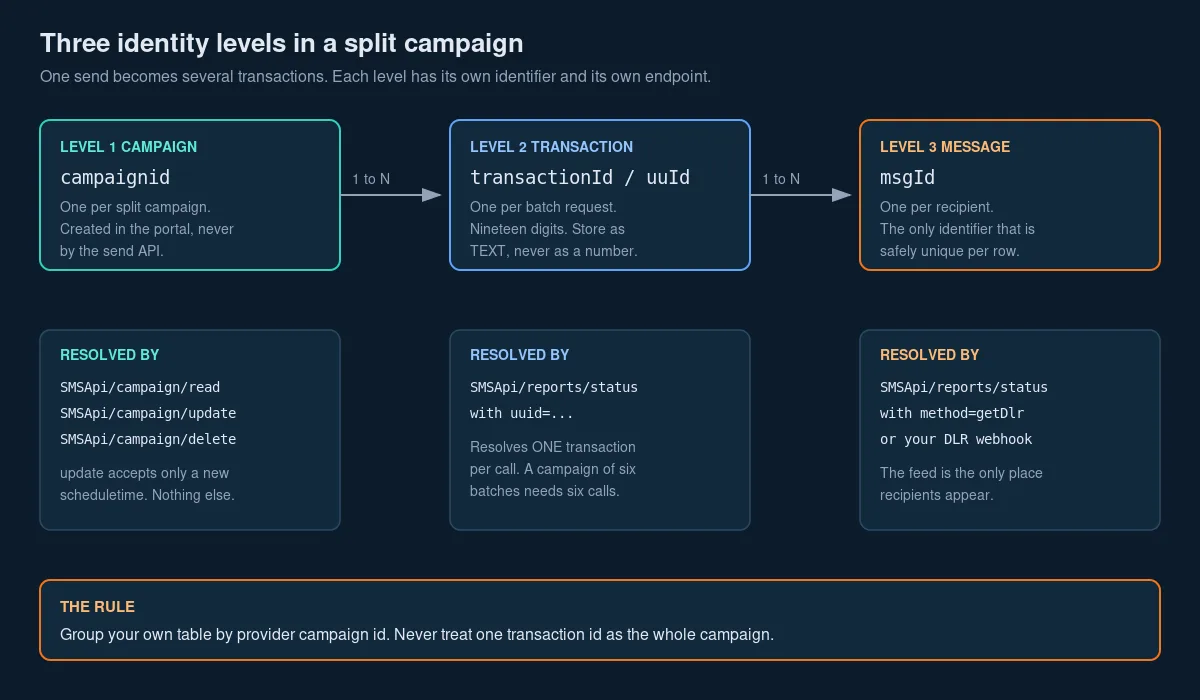
Level one, the campaign. Identified by campaignid. This is the only identifier that means “the whole thing the user asked for”. It is accepted by SMSApi/campaign/read, SMSApi/campaign/update and SMSApi/campaign/delete, and by nothing else. It never appears in a send response.
Level two, the transaction. Identified by transactionId in a send response and by uuId in every report. Same value, two spellings, and the spelling changes depending on which side of the wire you are reading. One transaction corresponds to one submission, which under splitting means one batch. This is the level your existing code almost certainly conflates with the campaign.
Level three, the message. Identified by msgId. One row per recipient per send. This is the only identifier that is one to one with a physical SMS, and therefore the only safe primary key for a per-recipient table. The outbound message table design article treats this level in depth and remains the canonical schema reference; this article extends it upward by one level.
All three are text, not numbers
Every identifier on this platform is a long decimal string. The documented samples run to nineteen digits for transaction identifiers, and the campaign endpoint samples show seventeen digits for campaignid. Both exceed Number.MAX_SAFE_INTEGER, which is sixteen digits. Any language that parses JSON into IEEE 754 doubles by default will silently corrupt these values, and the corruption is subtle: the string looks almost right, differing only in the last two or three digits, so it passes eyeballing and fails lookups.
// Node.js. This is data loss, and it does not throw.
JSON.parse('{"transactionId": 8359251506264886974}').transactionId
// 8359251506264887000

// The values arrive quoted in the documented samples, which saves you
// only until something in your pipeline normalises them.
JSON.parse('{"transactionId": "8359251506264886974"}').transactionId
// '8359251506264886974'   correct
Column type TEXT or VARCHAR, never BIGINT, never NUMERIC. This is the same rule that applies at the message level, and splitting simply gives you one more identifier to get wrong.
What the API Can and Cannot Do With a Split
| Operation | Endpoint | Available via API | Notes |
|---|---|---|---|
| Create a split campaign | none | No | Configured in the portal only |
| Set batch size | none | No | Portal only |
| Set the interval between batches | none | No | Portal only |
| List the batches of a campaign | SMSApi/campaign/read | Yes | Requires campaignid |
| Read one batch in detail | SMSApi/reports/status | Yes | Requires uuid, one batch per call |
| Reschedule the campaign | SMSApi/campaign/update | Yes | Only scheduletime is mutable |
| Change the message body | none | No | Not exposed |
| Change the recipient list | none | No | Not exposed |
| Delete one pending batch | none | No | Not exposed |
| Delete the whole campaign | SMSApi/campaign/delete | Yes | Requires campaignid |
| Discover that splitting is on | none | No | Infer it from the batch count |
That last row deserves emphasis. There is no flag anywhere in a send response that tells you a split is in force. You discover it by calling campaign/read and observing more than one entry, which requires you to already hold a campaignid, which the send response does not give you. In a pure API integration where nobody has visited the portal, splitting is not something you detect. It is something you are told about by a colleague, or something you deduce from a delivery curve with steps in it.
The correct posture is therefore defensive rather than conditional. Do not write code that branches on whether splitting is enabled. Write code that is correct when a campaign has N batches, and let N equal one in the ordinary case.
Reading a Campaign
SMSApi/campaign/read accepts POST or GET. The documentation describes the campaignid parameter verbatim as “Enter the campaign ID to fetch details of split campaign”, which is the platform stating in its own words that campaign and split campaign are the same object.
curl -X POST "https://unify.smsgateway.center/SMSApi/campaign/read" \
  -H "apikey: YOUR_API_KEY" \
  -H "Content-Type: application/x-www-form-urlencoded" \
  --data-urlencode "userid=YOUR_USER_ID" \
  --data-urlencode "campaignid=83147103413249843" \
  --data-urlencode "output=json"
The response wraps its payload in the standard envelope and returns a list:
{
  "response": {
    "api": "campaign",
    "action": "read",
    "status": "success",
    "msg": "success",
    "code": "200",
    "count": 1,
    "campaignList": [
      {
        "campaign": {
          "uuId": "5718742519829975000",
          "status": "pending",
          "total": "1",
          "timestamp": "1562974594713",
          "scheduledTimestamp": "1564529760000",
          "lastupdatedTimestamp": "0"
        }
      }
    ]
  }
}
Four things in that shape will bite you.
The list is wrapped twice. campaignList is an array whose elements are objects keyed campaign, so a batch lives at response.campaignList[i].campaign. This double wrapping is consistent across the platform’s list endpoints and is easy to miss when you are writing the parser from the parameter table rather than from the sample.
total is a quoted string. So are timestamp, scheduledTimestamp and lastupdatedTimestamp. Coerce on ingest, once, at the boundary. Do not scatter parseInt through your reporting layer.
lastupdatedTimestamp of "0" means never. It is not an epoch of 1 January 1970. It is the platform’s sentinel for absence, the same convention that produces a transactionId of "0" on the OTP endpoints and an empty refresh_token on an OAuth refresh. Normalise sentinels to null at the boundary, or your “last updated” column will report a date in 1970 for every campaign that has never been touched.
status is an open enumeration. The sample shows pending. Treat any unrecognised value as unknown and surface it rather than mapping it into a bucket you have already defined. A closed enum here is a future incident.
def parse_campaign_batches(payload):
    """Flatten the double-wrapped campaign list into plain batch records."""
    resp = payload["response"]
    if resp.get("status") != "success":
        raise RuntimeError(f"campaign/read failed: {resp.get('msg')} ({resp.get('code')})")

    batches = []
    for wrapper in resp.get("campaignList", []):
        c = wrapper["campaign"]
        batches.append({
            "uu_id": str(c["uuId"]),                 # text, always
            "status": c.get("status"),                # open enumeration
            "total": int(c["total"]),                 # quoted string on the wire
            "created_ms": _epoch(c.get("timestamp")),
            "scheduled_ms": _epoch(c.get("scheduledTimestamp")),
            "updated_ms": _epoch(c.get("lastupdatedTimestamp")),
        })
    return batches


def _epoch(value):
    """Millisecond epoch as a quoted string, with '0' meaning never."""
    if value in (None, "", "0", 0):
        return None
    return int(value)
Note what campaign/read does not give you: no message body, no sender identifier, no recipient list, no cost. It is a manifest of batches and nothing more. To learn anything about the content of a batch you must go to the report endpoints with the uuId you just extracted.
The Send Response Is a Union, Not a Shape
This is the finding that most often turns a working integration into a broken one, and splitting makes it worse because it multiplies the number of responses in play.
There is one send endpoint, https://unify.smsgateway.center/SMSApi/send, and its response body is not one shape. It is a union whose member is selected by the sendMethod you passed, and the response contains no field identifying which member you received.
A quick send to comma-separated numbers returns:
{
  "status": "success",
  "mobile": "919999999999",
  "invalidMobile": "",
  "transactionId": "6305583318236810379",
  "statusCode": "200",
  "reason": "success"
}
A group send returns:
{
  "status": "success",
  "group": "63",
  "transactionId": "8359251506264886974",
  "statusCode": "200",
  "reason": "success"
}
And the send sample on the authentication documentation, using a Basic Auth session token, returns a third key set including a msgId field and an eighteen-digit transaction identifier.
Three documented shapes, one endpoint. The only field common to all three is transactionId, and even that is absent from the OTP path, where it is documented as the literal string "0" and carries no information at all, a hazard covered in the OTP delivery reliability checklist.
The engineering rule follows directly. Parse the send response against the sendMethod you sent, not against a single struct. Treat every field except status, statusCode and transactionId as optional. If you are using a statically typed language, model this as a sum type keyed on the request, and if you are using a dynamically typed one, resist the temptation to write response.mobile anywhere that a group send can reach.
def parse_send_response(body, send_method):
    common = {
        "status": body["status"],
        "status_code": str(body["statusCode"]),
        "transaction_id": str(body.get("transactionId", "")) or None,
        "reason": body.get("reason"),
    }
    if send_method == "quick":
        common["accepted_mobiles"] = _csv(body.get("mobile"))
        common["invalid_mobiles"] = _csv(body.get("invalidMobile"))
    elif send_method == "group":
        # No recipient information is returned. This is not an error.
        common["group_ids"] = _csv(body.get("group"))
        common["accepted_mobiles"] = None
        common["invalid_mobiles"] = None
    return common
The Group Send Blind Spot
Look again at that group response. There is no mobile. There is no invalidMobile. There is a group identifier and a transaction identifier, and that is the entire extent of what the platform tells you about who is going to receive this message.
For a quick send you at least learn which numbers were accepted and which were rejected, because invalidMobile enumerates the rejects while status can still read success. For a group send you learn nothing. The recipient list lives in the platform’s contact groups, it can change between the moment you compose the campaign and the moment a later batch fires, and your application never sees it.
Combine that with splitting and the blind spot widens considerably:
- You submit a group send with splitting enabled.
- You receive one transaction identifier for batch one, and no recipient information.
- Batches two and three fire hours later, generating transaction identifiers you never observe, against a group whose membership may have changed since you composed the campaign.
- Your outbound message table has, at best, one row describing an intention. It cannot have per-recipient rows, because you were never told the recipients.
There is exactly one way out, and it is the delivery report feed. The DLR feed returns mobileNo, msgId, uuId, senderName, submitTime, deliveryTime, status and cause per message. For a split group send, that feed is not a monitoring nicety. It is your only source of truth about what actually happened, and an integration that treats DLRs as optional telemetry has no record of its own sends. Set up the webhook as described in the real-time DLR webhooks guide and the webhook setup knowledge base entry, and treat the feed as a system of record rather than as a dashboard input.
Updating and Deleting a Split Campaign
Both endpoints are keyed on campaignid and both are documented as POST.
Update
https://unify.smsgateway.center/SMSApi/campaign/update takes campaignid and scheduletime, in the format YYYY-MM-DD HH:MM:SS. The parameter descriptions are narrow and specific: campaignid is the “Identifier to update your campaign time”, and scheduletime is “Your new time to update the campaign time”.
curl -X POST "https://unify.smsgateway.center/SMSApi/campaign/update" \
  -H "apikey: YOUR_API_KEY" \
  -H "Content-Type: application/x-www-form-urlencoded" \
  --data-urlencode "userid=YOUR_USER_ID" \
  --data-urlencode "campaignid=83147103413249843" \
  --data-urlencode "scheduletime=2026-09-10 09:30:00" \
  --data-urlencode "output=json"
{
"response": {
"api": "campaign",
"action": "update",
"status": "success",
"msg": "Schedule time updated successfully.",
"code": "200"
}
}The introductory prose on that documentation page says the endpoint lets you “adjust details like timestamps or content”. The parameter table contains no content parameter. Trust the parameter table. Time is the only mutable dimension exposed here, and an integration built on the prose sentence will discover this the hard way.
Delete
https://unify.smsgateway.center/SMSApi/campaign/delete takes campaignid and output, and nothing else.
{
  "response": {
    "api": "campaign",
    "action": "delete",
    "status": "success",
    "msg": "Schedule deleted successfully",
    "code": "200"
  }
}
Two observations that matter more than they look.
The msg field says “Schedule”, not “Campaign”. So does the update response. The campaign family shares its human-readable strings with the schedule family. This is a reliable signal that campaigns and schedules are the same underlying object with two views onto it, and it is an absolute prohibition on parsing msg. Branch on response.api plus response.action plus response.code, which are stable and machine-oriented, and log msg for humans only.
Delete is campaign-wide. There is no uuid parameter on the delete endpoint. Whatever batches remain pending, all of them go. If a stakeholder asks you to cancel just the last two batches of a six-batch campaign, the API cannot do it. The Split SMS Campaigns page states that already-sent batches cannot be undone and directs users to the portal or support for partial control, which is consistent with what the API exposes.
That asymmetry is worth designing around. If partial cancellation is a real requirement for your business, splitting is the wrong tool and you should chunk client-side instead, submitting each chunk as its own scheduled send so that each one is independently cancellable. You trade the platform’s convenience for granular control, and the decision matrix below sets out when that trade is worth making.
Three Spellings of One Concept
Scheduling appears at three points in this API and is spelled differently at each one.
| Where | Parameter | Format | Notes |
|---|---|---|---|
SMSApi/send, all send methods | scheduleTime | YYYY-MM-DD HH:MM:SS | Camel case, with seconds |
SMSApi/campaign/update | scheduletime | YYYY-MM-DD HH:MM:SS | All lower case, with seconds |
WAApi/send (WhatsApp) | scheduletime | YYYY-MM-DD HH:MM | All lower case, no seconds |
Three spellings, two formats, one concept. There is no version boundary or product boundary that explains the split, and no timezone is stated for any of them.
The defence is a single serialisation helper per endpoint family rather than a shared one, plus a contract test that submits a scheduled send and reads it back to confirm the platform interpreted the string the way you meant. Do not build a global format_schedule_time() and use it everywhere; it will be right two times out of three and the third case will fail silently by scheduling to the top of the minute or by being rejected as an unknown parameter, which several endpoints on this platform do quietly rather than loudly.
This is the same class of problem as userid versus userId, which differ between the SMS API and the logout endpoint, and it belongs in the same place in your code: a thin, ugly, well-commented adapter layer at the boundary, not spread through your domain logic.
Aggregating a Split Campaign Correctly
Here is the concrete failure. A campaign of sixty thousand recipients is split into six batches of ten thousand at three-hour intervals. Twenty minutes after the first batch fires, someone opens the dashboard.
The naive query divides delivered messages by the campaign total. Ten thousand submitted, eight thousand nine hundred delivered so far, denominator sixty thousand, and the dashboard says fourteen point eight percent delivered. Somebody escalates. An engineer starts checking sender identifiers and DLT template bindings. Nothing is wrong. Fifteen hours later the number is ninety-one percent and everyone forgets about it until the next campaign.
The fix is to make the denominator honest about time.
-- Correct: rate against what has actually been submitted so far.
SELECT
    c.provider_campaign_id,
    COUNT(*) FILTER (WHERE m.dlr_status = 'DELIVERED')          AS delivered,
    COUNT(*) FILTER (WHERE m.dlr_status = 'FAILED')             AS failed,
    COUNT(*) FILTER (WHERE m.dlr_status IS NULL)                AS awaiting_dlr,
    COUNT(*)                                                     AS submitted,
    ROUND(100.0 * COUNT(*) FILTER (WHERE m.dlr_status = 'DELIVERED')
          / NULLIF(COUNT(*), 0), 2)                              AS delivered_pct_of_submitted,
    b.batches_fired,
    b.batches_total
FROM outbound_message m
JOIN campaign_batch    cb ON cb.uu_id = m.uu_id
JOIN campaign          c  ON c.provider_campaign_id = cb.provider_campaign_id
JOIN (
    SELECT provider_campaign_id,
           COUNT(*) FILTER (WHERE status <> 'pending') AS batches_fired,
           COUNT(*)                                     AS batches_total
    FROM campaign_batch
    GROUP BY provider_campaign_id
) b ON b.provider_campaign_id = c.provider_campaign_id
GROUP BY c.provider_campaign_id, b.batches_fired, b.batches_total;
Three rules fall out of that query and they generalise beyond this platform.
Group by the campaign identifier, not the transaction identifier. Your own table needs a provider_campaign_id column, populated from campaign/read, and every campaign-level number must aggregate across it.
Never divide by the campaign total until every batch has fired. Report delivered_pct_of_submitted alongside batches_fired / batches_total, so a partial campaign reads as partial rather than as failing. This is the split-campaign form of the denominator bug described in observability for messaging pipelines, and it has the same shape: the wrong denominator produces a number that is neither obviously right nor obviously wrong.
Count pending DLRs separately from failures. A message with no delivery report yet is not a failed message. Under splitting the awaiting-DLR bucket is large and legitimate for hours at a stretch, and folding it into failures is how a healthy campaign gets paged on.
Which Report Resolves Which Level
| You want | Endpoint | Key | Returns |
|---|---|---|---|
| The batches of a campaign | SMSApi/campaign/read | campaignid | Batch manifest with uuId, status, total, timestamps |
| Everything about one batch | SMSApi/reports/status | uuid | Per-message rows for that one transaction |
| Per-message rows across a window | SMSApi/reports/status with method=getDlr | date range, optional uuId or mobileNo | Paged DLR rows including msgId, mobileNo, cause, cost |
| Totals for a period | SMSApi/reports/smsSummary | date range plus groupby | Aggregate counters, no identifiers at all |
| A whole day, zipped | SMSApi/report/day | one date | Bulk export, one day per call |
| Anything scheduled and not yet fired | SMSApi/schedule/read | none beyond auth | No date filter, no pagination, no status filter |
Two entries there need commentary.
There is no campaign-level report endpoint. reports/status resolves one uuId per call. To report on a six-batch campaign you make one campaign/read call to get the six identifiers, then six reports/status calls. Budget for that fan-out, cache the manifest, and do not put this loop on a page-load path.
schedule/read takes no filter at all. No date range, no pagination, no status. It returns what it returns. That makes it usable as a small safety net for discovering pending work you have lost track of, and unusable as a primary index at any real volume. As covered previously, you cannot cancel or amend your own scheduled campaign unless you persisted its identifier at submission time, and splitting raises the cost of that oversight from one lost send to a whole campaign you cannot stop.
Schema Changes You Need
If you already have the outbound message table from the schema design article, you need one new table and one new column. If you do not, read that article first; this section assumes it.
-- Level one. One row per campaign the user asked for.
CREATE TABLE campaign (
    id                     BIGSERIAL PRIMARY KEY,
    provider_campaign_id   TEXT UNIQUE,              -- campaignid, TEXT, may be NULL
    internal_ref           TEXT NOT NULL UNIQUE,     -- your own key, always present
    account_id             TEXT NOT NULL,
    created_at             TIMESTAMPTZ NOT NULL DEFAULT now(),
    manifest_fetched_at    TIMESTAMPTZ,
    batches_expected       INT,                      -- from campaign/read count
    notes                  TEXT
);

-- Level two. One row per batch, discovered from campaign/read.
CREATE TABLE campaign_batch (
    id                     BIGSERIAL PRIMARY KEY,
    provider_campaign_id   TEXT NOT NULL REFERENCES campaign (provider_campaign_id),
    uu_id                  TEXT NOT NULL UNIQUE,     -- transactionId, nineteen digits, TEXT
    provider_status        TEXT,                     -- open enumeration, store raw
    declared_total         INT,                      -- 'total', quoted string on the wire
    created_ms             BIGINT,                   -- NULL when the sentinel '0' arrives
    scheduled_ms           BIGINT,
    updated_ms             BIGINT,
    first_seen_at          TIMESTAMPTZ NOT NULL DEFAULT now(),
    last_seen_at           TIMESTAMPTZ NOT NULL DEFAULT now()
);

CREATE INDEX ON campaign_batch (provider_campaign_id);

-- Level three. Your existing per-recipient table gains a link upward.
ALTER TABLE outbound_message
    ADD COLUMN uu_id TEXT REFERENCES campaign_batch (uu_id);

CREATE INDEX ON outbound_message (uu_id);
Four design decisions in there are deliberate and worth defending.
internal_ref is NOT NULL and provider_campaign_id is nullable. You always have your own key. You may never learn the provider’s, because nothing in a send response returns it. A schema that requires the provider identifier cannot represent the ordinary case.
provider_status stores the raw string. Map it in the query layer, not on ingest. When the platform introduces a status you have not seen, you want it in your database rather than coerced into unknown and lost.
Timestamps are millisecond epochs as BIGINT, with NULL for the "0" sentinel. Do not convert to TIMESTAMPTZ on ingest, because no timezone is documented for these values and an unlabelled conversion is an assumption you cannot verify. Store the raw epoch, convert at the presentation edge where the assumption is visible.
declared_total is what the platform said, not what you counted. Keeping the platform’s claim and your own count in separate columns is what makes the discrepancy visible. If they disagree, that is a finding, and a schema that overwrites one with the other destroys the evidence.
The Reconciliation Playbook
Run this as a scheduled job, not as a request handler.
Step one, on submit, persist your own intention. Write a campaign row with internal_ref before you call the API. Write the transaction identifier from the send response into campaign_batch as the first known batch, with provider_campaign_id still null. This gives you a record even if everything downstream fails.
Step two, obtain the campaign identifier. This is the hard part in a pure API integration, because no send response returns it. In practice you get it from the portal, from an operations runbook, or by correlating on submission time. Record how you obtained it. If you have no route to it at all, you have no campaign-level reconciliation and you should chunk client-side instead, where you generate the grouping key yourself.
Step three, fetch the manifest. Call campaign/read and upsert one campaign_batch row per entry, keyed on uu_id. Set batches_expected on the campaign from count. Refresh the manifest on every reconciliation pass, because batch statuses change as later batches fire.
Step four, pull per-message rows for each batch. For each uu_id whose status is no longer pending, call reports/status and upsert into outbound_message keyed on msgId. Upsert, not insert, because you will fetch overlapping windows and you must be idempotent. This is the same reasoning as in message idempotency, applied to reads rather than writes.
Step five, alert on the oldest stuck batch, not on the rate. The most useful signal for a split campaign is the age of the oldest batch still in pending past its scheduled_ms. That number goes up monotonically when something is wrong and returns to zero when it is not. A delivery rate, by contrast, moves for a dozen reasons and cannot distinguish a stalled scheduler from a bad recipient list.
Step six, close the campaign explicitly. A campaign is complete when every batch has a non-pending status and every message row has a terminal delivery status or has aged past your DLR window. Record the closure timestamp. Without an explicit close, “how did that campaign do” is a question with no defined answer, and every report you write will silently include campaigns still in flight.
Billing and Cost Under a Split
Splitting does not change what you pay. The product documentation is explicit that no additional fee applies and that cost is based solely on the credits consumed, exactly as for a regular campaign.
What splitting changes is when you pay, and that has real consequences.
Billing on this platform fires at submission, not at delivery. The published terms state that “the applicable per-SMS rate will be deducted from your wallet while sending SMS” and that “credits are non-refundable once SMS is successfully submitted to the operator”. Under splitting, submission happens in instalments, so your wallet drains in instalments too.
Three practical implications:
A campaign can run out of money halfway through. Batch one succeeds, your balance is consumed by other traffic in the intervening hours, and batch four fails on insufficient funds at three in the morning with nobody watching. Check SMSApi/account/readstatus before a scheduled campaign is due, not just before you submit it, and alert on balance falling below the cost of the remaining batches.
Your cost forecast must multiply correctly. The cost of a campaign is recipients times segments times rate, and the segment count depends on the rendered body, not the template. A single curly apostrophe flips a message from GSM-7 to Unicode and can triple its part count, which multiplies straight through every batch. Price the body with SMSApi/info/msg rather than counting characters yourself, and read how SMS length and credits are counted before you show any user a number.
Deleting a campaign does not refund the batches already submitted. Only pending batches are cancelled. Any user interface that offers a cancel button on a running split campaign should say precisely that, because the alternative is a support ticket asking where the money went. The rate slabs behind these calculations are set out in the bulk SMS pricing breakdown.
Decision Matrix
| Requirement | Platform splitting | Client-side chunking | Neither, send in one go |
|---|---|---|---|
| Spread inbound call volume over hours | Yes | Yes | No |
| Zero additional integration work | Yes | No | Yes |
| Survives your process crashing mid-campaign | Yes, the platform holds the schedule | No, unless you persist the queue | Not applicable |
| Cancel one specific pending batch | No | Yes | Not applicable |
| Change the body between batches | No | Yes | No |
| Different recipient segment per batch | No | Yes | No |
| One grouping key you control from the start | No, campaignid is provider-assigned | Yes, you mint it | Yes, one transaction |
| Per-batch cost visibility before sending | No | Yes, preview each chunk | Yes |
| Requires portal configuration | Yes | No | No |
| Reconciliation complexity | High, three levels | Medium, two levels plus your key | Low |
| Time-critical delivery, for example OTP | Never | Never | Yes |
| Recommended for a 50,000-recipient promotion where sales must handle callbacks | Yes | Only if you need per-batch control | No |
The honest summary: platform splitting is the right default when the requirement is “spread this out” and nothing more. Client-side chunking wins the moment you need per-batch control, per-batch content, or a grouping key you own. And splitting is never appropriate for time-critical traffic, because a one-time password that arrives three hours late is not a delayed one-time password, it is a failed authentication.
Build Order
- Add the
campaignandcampaign_batchtables and theuu_idforeign key onoutbound_message. Every identifier column isTEXT. - Change your send-response parser into a union keyed on
sendMethod. Delete every unconditional read ofresponse.mobile. - Add a boundary normaliser that converts the
"0"sentinel and empty strings to null before anything else touches the payload. - Persist your own
internal_refbefore the send call, not after it. - Write the
campaign/readparser against the double-wrapped list shape, coercing quoted numerics once. - Build the reconciliation job: refresh the manifest, then loop
reports/statusper non-pendinguu_id, upserting onmsgId. - Ingest the DLR feed, by webhook where possible, and make it authoritative for per-recipient rows. For group sends it is your only source.
- Replace every delivery-rate query with the submitted-denominator form, and surface
batches_fired / batches_totalnext to it. - Add the oldest-pending-batch-age metric and alert on it. Do not alert on delivery rate for split campaigns.
- Add a pre-fire balance check that runs before each scheduled batch is due, comparing balance against the cost of remaining batches.
- Write a contract test that submits with
testMessage=true, reads back throughcampaign/readandreports/status, and asserts your parsers still match the live shapes. Run it nightly. The reasoning is in testing code that sends messages. - Document, in your own runbook, how an operator obtains a
campaignidfor a campaign your service submitted. If that procedure does not exist, campaign-level reconciliation does not exist either.
Ten Mistakes
- Treating the transaction identifier as the campaign identifier. It names one batch. Under splitting it names a fraction of the work.
- Storing identifiers as integers. Nineteen digits, and seventeen for campaign identifiers, both beyond exact representation as a double.
- Dividing delivered by the campaign total before every batch has fired. Produces an alarming number that is arithmetically meaningless.
- Reading
response.mobileafter a group send. The field does not exist in that response shape. - Parsing
msgto determine what happened. The campaign endpoints return schedule wording. Branch onapi,actionandcode. - Converting
lastupdatedTimestampof"0"to a date. It means never, and it renders as 1970. - Sharing one schedule-time formatter across SMS send, campaign update and WhatsApp send. Three spellings, two formats.
- Assuming
campaign/updatecan change the message body. The prose implies it. The parameter table refutes it. - Offering a cancel button that implies a refund. Delete stops pending batches only, and submitted credits are non-refundable.
- Using splitting for one-time passwords or any time-critical alert. The whole mechanism is a deliberate delay.
Pre-Launch Checklist
Schema and types
provider_campaign_id,uu_idandmsg_idare allTEXTinternal_refisNOT NULL UNIQUEand written before the send callprovider_campaign_idis nullable and the code path where it is null is testeddeclared_totaland your own counted total are separate columns- Millisecond epochs stored as
BIGINT, not converted on ingest - Index on
campaign_batch (provider_campaign_id)andoutbound_message (uu_id)
Parsing
- Send-response parser is a union keyed on
sendMethod - Group-send path never reads
mobileorinvalidMobile campaignListdouble wrapping handled at[i].campaign- All quoted numerics coerced once, at the boundary
"0"and""normalised to null before domain code sees themstatustreated as an open enumeration, raw value retained- No code path branches on the text of
msg - JSON parsing verified not to coerce long identifiers to doubles
Reconciliation
- Manifest refreshed on every pass, not cached indefinitely
reports/statusloop is peruu_idand upserts onmsgId- Reconciliation runs on a schedule, not in a request handler
- Overlapping windows are safe because every write is an upsert
- Campaign closure is explicit and timestamped
- DLR feed treated as authoritative for per-recipient rows
- Webhook endpoint is idempotent and returns quickly
Reporting and alerting
- Delivery rate uses submitted as the denominator
batches_fired / batches_totaldisplayed alongside every campaign rate- Awaiting-DLR counted separately from failed
- Oldest-pending-batch age is a monitored metric
- No alert fires on delivery rate for a campaign with pending batches
- Dashboards group by
provider_campaign_id, never byuu_idalone
Operations
- Balance checked before each scheduled batch is due, not only at submit
- Alert when balance falls below the cost of remaining batches
- Runbook documents how to obtain a
campaignid - Runbook states that delete is campaign-wide and cannot target one batch
- User-facing cancel copy states that sent batches are not refunded
- Splitting explicitly prohibited for one-time passwords and time-critical alerts
- Nightly contract test asserts parsers against live response shapes
- Someone owns the portal configuration and changes to it are recorded
What This Article Deliberately Does Not Claim
Nine things about split campaigns that this article will not assert, because they are not documented on SMSGatewayCenter’s own pages and guessing would be worse than a gap.
- The permitted batch size range. Two live SMSGatewayCenter pages describe different minimums. Read the value from the portal at the moment you configure the campaign and do not hard-code it.
- The available interval options. Same reason. The dropdown is the authority.
- Whether a send response ever contains
campaignid. No documented sample includes it. This article assumes it does not and describes the consequences of that assumption rather than asserting the platform’s internals. - Whether
campaign/updatereschedules the first batch only, or shifts every remaining batch by the same offset. The parameter is documented as “your new time to update the campaign time” and no sample distinguishes the two behaviours. Test it on your own account before relying on either. - What happens to a split campaign whose account runs out of credit mid-run. Whether remaining batches fail, pause or are cancelled is not documented.
- Whether group membership is resolved at composition time or at each batch’s fire time. This materially changes who receives batch six of a group send and it is not stated anywhere.
- The retention window for campaign records. How long
campaign/readwill still resolve acampaignidis not published. - Whether splitting interacts with
duplicatecheck. Whether deduplication runs across the whole recipient list or within each batch is undocumented, and the two behaviours produce different recipient counts. - Any throughput, latency or per-batch timing precision figure. None is published, and inventing one would be exactly the kind of number that gets quoted back in a contract negotiation.
FAQs
What is a split SMS campaign?
A split campaign takes one large recipient list and submits it in several smaller batches at fixed intervals rather than all at once. It is configured in the SMSGatewayCenter portal by enabling the split option, setting a batch limit and choosing an interval. The first batch fires immediately or at the scheduled time, and each subsequent batch fires after the interval elapses.
Can I create a split campaign through the API?
No. There is no documented parameter on SMSApi/send that enables splitting or sets a batch size or interval. Splitting is configured in the portal. The API can read, reschedule and delete a split campaign, but it cannot create one.
What is the difference between campaignid and transactionId?
campaignid identifies the whole campaign and is the only key accepted by the campaign read, update and delete endpoints. transactionId identifies one batch, one submission. Under splitting, one campaignid corresponds to several transaction identifiers. The same value appears as uuId in report responses.
Why does my delivery rate look terrible right after I send?
Almost certainly because you are dividing delivered messages by the campaign total while only the first batch has actually been submitted. Divide by messages submitted so far and display the fired-batch count alongside, and the number becomes meaningful.
How do I find all the batches in a campaign?
Call SMSApi/campaign/read with the campaignid. It returns a campaignList array with one entry per batch, each carrying a uuId, a status, a total and timestamps. That is the only endpoint that enumerates batches.
Can I cancel just one batch?
Not through the API. SMSApi/campaign/delete is keyed on campaignid and addresses every remaining batch. If per-batch cancellation is a genuine requirement, chunk client-side instead so that each chunk is an independently addressable scheduled send.
Can I change the message text of a campaign that has not finished sending?
Not through the API. SMSApi/campaign/update accepts only campaignid and scheduletime. The introductory prose on that documentation page mentions content, but the parameter table does not include a content field.
Does splitting cost extra?
No. The product documentation states that no additional fee applies and that cost is based solely on the SMS credits consumed. What changes is the timing: because billing fires at submission, your wallet is debited in instalments as each batch goes out.
Why does my group send response not list the recipients?
Because the group-send response shape does not include mobile or invalidMobile. It returns the group identifier and a transaction identifier only. For a group send, the delivery report feed is the only place recipients appear, which makes DLR ingestion mandatory rather than optional.
Should I use splitting for OTP messages?
No. Splitting is a deliberate delay mechanism and one-time passwords are the most latency-sensitive traffic on the platform. The OTP endpoints are also a separate path with their own constraints, including a transaction identifier that is documented as the literal string zero and therefore carries no correlation value.
How do I know whether splitting is even switched on?
There is no flag in any send response. You infer it by holding a campaignid, calling campaign/read and observing more than one entry. The right response to this is not to detect splitting but to write code that is correct for N batches, with N equal to one in the ordinary case.
Is splitting the same as rate limiting?
No, and conflating them causes real design errors. Rate limiting shapes your request rate to stay inside what the gateway will accept, over seconds and minutes. Splitting spreads delivery over hours to manage the human response to a campaign. They solve unrelated problems and you may well need both.
What should I alert on for a split campaign?
The age of the oldest batch still pending past its scheduled time. That metric rises monotonically when the scheduler is stuck and sits at zero when it is not. Delivery rate is a poor alerting signal here because it legitimately looks bad for hours.
Do I need the campaign endpoints if I never split anything?
Probably not today, but the cost of building for N batches instead of one is a table and a join, and the cost of retrofitting it after someone enables splitting in the portal without telling engineering is a week of confusing dashboards. Build it once.
Ready to Build Split Campaigns?
Building a bulk messaging integration that needs to handle split campaigns, delivery reconciliation and per-batch reporting correctly? Talk to the SMSGatewayCenter team about your volumes and campaign patterns, or read the full API documentation to see the campaign and report endpoints in detail.