Table of Contents
- The Short Answer
- TL;DR
- What Encryption Actually Hides
- The Three Switches in the Portal
- The Wire Format, Byte by Byte
- The Two Endpoints: SMSApi/encrypt and SMSApi/decrypt
- Encrypt Locally, Not Over the API
- Sending an Encrypted Message
- The Plus Sign That Breaks Everything
- Key Length and Which Cipher You Get
- Four Implementations, Four Traps
- Proving Interop With a Canary
- Length, Segments and Cost
- Reading Encrypted Reports Back
- Key Storage and the Key Ring
- Rotating a Key Without Losing History
- What the Format Doesn’t Protect
- Encryption and the Rest of Your Pipeline
- Decision Matrix
- Pre-Launch Checklist
- Unspecified Behaviour and How to Code Around It
- FAQs
The Short Answer
SMS message encryption on SMSGatewayCenter keeps the text of your messages out of the platform’s database, system logs, portal screens and downloaded reports. It doesn’t hide the text from the mobile operator or the person reading the SMS, and it can’t: the platform decrypts each message just before it hands it to the operator, because a handset can’t do anything with ciphertext.
The format is simple once you see it. Take 16 ASCII hex characters as the IV, AES-CBC encrypt the UTF-8 text with PKCS#7 padding and your secret token as the key, glue the IV to the front of the ciphertext, and base64 the lot. Do that in your own code, send it as msg with encrypt=true, and form-encode the body properly, because a base64 + that turns into a space is the single most common way this breaks.
TL;DR
- What it protects: message text at rest on the platform (database, logs, reports, exports). TLS already protects it on the wire.
- What it doesn’t: the operator network and the handset get plaintext. Encryption doesn’t make SMS end-to-end private.
- Format:
base64( IV as 16 ASCII hex chars || AES-CBC-PKCS7(UTF-8 text) ). The IV is random per message, so the same text never encrypts the same way twice. - Key: the secret token you generate under My Account, Security, Text Encryption. It’s separate from your
apikeyand must stay separate. - Key length: with a 16-character token everything agrees on AES-128. With 24 or 32 characters, the PHP and Java samples silently disagree. Pin the behaviour with a canary.
- Endpoints:
SMSApi/encryptandSMSApi/decrypt, POST only, key in anencryptKeyheader. Use them to prove interop, not as your production encryptor. - Sending: encrypted
msgplusencrypt=trueonSMSApi/send. URL-encode the body so+,/and=survive. - Length: ciphertext is far longer than the text (a 160-character message becomes 256 characters of base64). Estimate segments and cost on the plaintext.
- Rotation: old messages stay encrypted under the old key forever, even if you switch encryption off. Keep every key you’ve ever used, tagged with an id.
- Integrity: CBC without a MAC is malleable. TLS covers transport; don’t build anything that reports padding errors to strangers.
What Encryption Actually Hides
Start with the threat model, because it decides whether this feature is worth turning on at all.
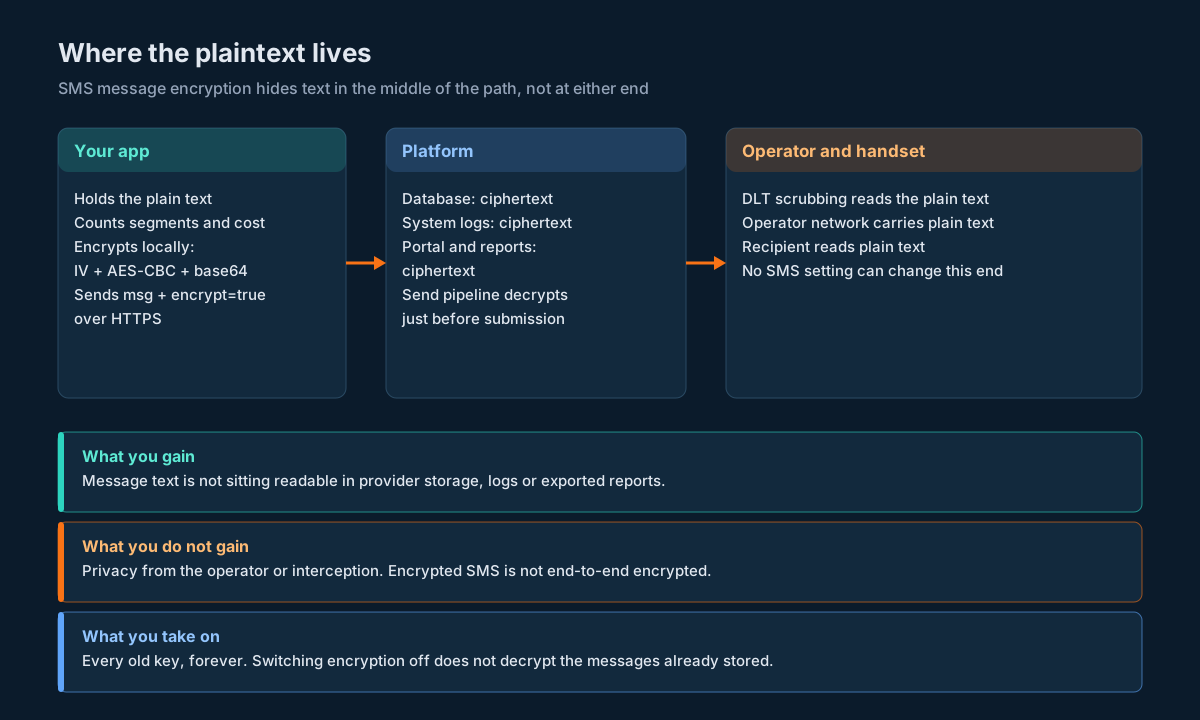
A message you send goes through six places. Your own application and database. The HTTPS request to the platform. The platform’s send pipeline. The platform’s storage: database rows, system logs, the portal’s delivery report screens and any report you download. The operator network, including DLT scrubbing, which matches the content against your registered template. And finally the handset.
Here’s where the plaintext is visible with encryption off and on:
| Place | Encryption off | Encryption on (System Message Encryption) |
|---|---|---|
| Your app and your database | Plaintext, unless you encrypt it yourself | Your choice; you hold the plaintext before you encrypt |
| HTTPS request to the platform | Protected by TLS | Protected by TLS, and the body carries ciphertext |
| Platform send pipeline | Plaintext | Decrypted just before submission to the operator |
| Platform database and system logs | Plaintext | Ciphertext |
| Portal screens and downloaded reports | Plaintext | Ciphertext; you need the secret token to read them |
| Operator network and DLT scrubbing | Plaintext | Plaintext |
| Recipient’s handset | Plaintext | Plaintext |
Put plainly: encryption shrinks the number of places where your message text sits around readable. It’s a data-at-rest control on the provider side. If your worry is a database dump, a log shipped somewhere it shouldn’t go, or a portal user exporting a report full of account balances, it helps. If your worry is the operator, or SMS interception, it doesn’t change anything, and nothing an SMS provider does can.
That’s also why the right comparison isn’t “encrypted SMS versus WhatsApp’s end-to-end encryption”. It’s “my message bodies stored readable at my provider versus stored as ciphertext”. For banks, lenders, insurers and healthcare providers sending balances, loan amounts or appointment details, the second framing is usually the one your auditor cares about.
The provider says the secret token itself is stored encrypted and only decrypted when you log in, and that its team can’t view the actual key (that’s from the portal setup guide). Keep in mind what that does and doesn’t mean. The send pipeline has to decrypt your messages, so the platform’s systems can use the key. What you’re buying is that message text isn’t sitting in plaintext in storage and logs.
The Three Switches in the Portal
Encryption is turned on in the portal, not over the API. The path is My Account, then Security, then the Text Encryption tab. There are three settings and a button:
| Setting | What it does |
|---|---|
| Enable Message Encryption | The master switch. It has to be Yes before you can generate a secret token. |
| System Message Encryption | Encodes message content throughout the system, including the database and the delivery report screens. If this is on, you don’t need the next one. |
| DLR Message Encryption | Leaves the database alone but scrambles message text when you view or download a report. Use it only if System Message Encryption is off. |
| Generate | Creates your secret token (the encryption key). |
Two things about this setup matter for your code later.
First, the token you get from Generate is a different secret from your API key. You’ll send both on the same request, but they do different jobs: the API key authenticates you, the encryption token encrypts and decrypts text. The KB entry on using the same API key for encryption is explicit that they must stay separate. Store them as two secrets, rotate them separately, and never derive one from the other.
Second, turning encryption off is a support request, and it isn’t retroactive. According to the KB entry on disabling message encryption, messages stored while encryption was on stay encrypted; to read them you still need the token. So the day you enable this, you’ve signed up to keep that key for as long as you might ever want to read those reports.
The Wire Format, Byte by Byte
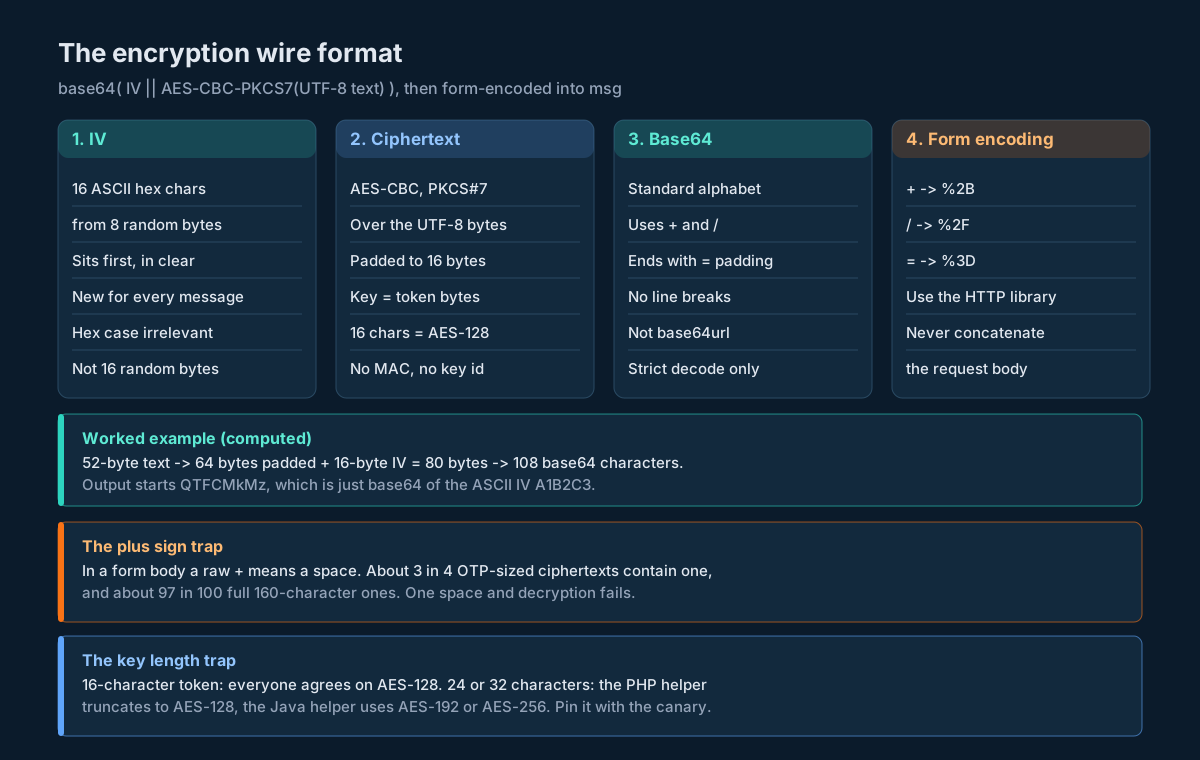
Every encrypted message, whether you produce it or the platform does, has the same shape:
base64( IV || ciphertext )

IV          16 bytes: 16 ASCII hex characters, e.g. "A1B2C3D4E5F60718"
ciphertext  AES-CBC over the UTF-8 bytes of the text, PKCS#7 padded to a multiple of 16
key         the secret token's characters as raw bytes (16 characters = AES-128)
The odd part is the IV. A normal AES-CBC implementation uses 16 random bytes. This format uses 8 random bytes, writes them as 16 hex characters, and uses those 16 ASCII characters as the IV bytes. You can see it directly in the platform’s sample output. Decode the first 16 bytes of the sample response on the encrypt endpoint page and you get the ASCII string B475FF9471F853CC. The decrypt page’s sample input starts with C3002CA07C54FA56. Both samples carry the same 149-byte message, and both decode to 176 bytes: a 16-byte IV plus 160 bytes of ciphertext, which is exactly 149 bytes padded up to the next multiple of 16.
That tells you three practical things:
- The IV is in the clear, at the front. You don’t store or send it separately. To decrypt, you slice off the first 16 bytes.
- The IV is random per message. The two samples encrypt the same text and produce completely different output. You can’t search, deduplicate or join on ciphertext. If you need to find “the same message” later, store a keyed hash of the plaintext alongside it.
- Hex case doesn’t matter for decryption. The platform’s IVs are uppercase hex; the PHP helper on the developer script page writes lowercase. Either way the decryptor just takes the first 16 bytes as they are.
Here’s a worked example you can check your own code against. All values were computed, not typed by hand. The key is a made-up example; never use it for real.
key        k7Rq2mX9pL4vT8wZ
IV         A1B2C3D4E5F60718   (fixed here only so the output is reproducible)
text       Your login code is 482913. It expires in 10 minutes.
output     QTFCMkMzRDRFNUY2MDcxONuZdEP5royv1vW1pAoR+xsWd9aO/I59U5BCpaNNMSM+mXfQKA5g1fBjmgYkI0ma2qsTZ/l5BSUj+OWfIKi3bX8=
The text is 52 bytes, which pads to 64. Add the 16-byte IV and you have 80 bytes, which base64 turns into 108 characters. Notice the output starts with QTFCMkMz: that’s just the base64 of the ASCII IV A1B2C3. Every ciphertext from this format starts with base64 of hex digits, which is handy when you need to recognise one (more on that in Reading Encrypted Reports Back).
Also notice the output contains three + and two / characters. Hold that thought.
The Two Endpoints: SMSApi/encrypt and SMSApi/decrypt
The platform gives you two helper endpoints. Both are POST only, and both take the encryption token in a request header called encryptKey.
SMSApi/encrypt | SMSApi/decrypt | |
|---|---|---|
| URL | https://unify.smsgateway.center/SMSApi/encrypt | https://unify.smsgateway.center/SMSApi/decrypt |
| Method | POST | POST |
| Auth | userid and password, or the apiKey header | same |
| Key | encryptKey header | encryptKey header |
| Body | msg (plain text), output (json or plain, default plain) | msg (ciphertext), output |
Returns in msg | ciphertext | plain text |
A successful response looks like this (from the encrypt page, ciphertext shortened):
{
    "status": "success",
    "msg": "QjQ3NUZGOTQ3MUY4NTNDQ+poe2RJgCv6vDI7275TwWB7u6EpTIEBk4mRfsVx...",
    "transactionId": "5274122124458018037",
    "statusCode": "900",
    "reason": "success"
}
Read it the same way you read every other response on this API. Check status, take msg if it says success, and stop there. Don’t branch on statusCode (it’s "900" here, not the "200" you see on sends), and don’t parse reason. The transactionId is a quoted 19-digit number; nothing is sent by this call, so you don’t need to keep it, but if you log it, keep it as text. A JavaScript Number can’t hold 19 digits exactly.
Send your API key as a header like everywhere else, with userid alongside it. And send the request with a proper form body, because the encrypt sample on the page puts the message straight into a hand-built application/x-www-form-urlencoded string, while the decrypt sample switches to a multipart array. Both work in PHP’s cURL, but the moment you port the urlencoded version to another language and paste ciphertext into it, you’ll hit the bug in The Plus Sign That Breaks Everything.
Encrypt Locally, Not Over the API
It’s tempting to call SMSApi/encrypt before every send. Don’t. Think about what that call does: it ships the plain text to the platform over HTTPS so the platform can hand back ciphertext, which you then ship back to the platform. The plain text has already crossed the wire and been processed by the platform once, which is precisely the exposure you turned encryption on to reduce. You’ve also doubled your request count and added a dependency to every send.
Encrypt in your own process instead. It’s a dozen lines in any language (see Four Implementations, Four Traps), it costs microseconds, and your plain text only ever leaves your system inside the encrypted msg.
So what are the two endpoints for? Proving that your code and the platform agree. Call each one once with a known string when you set up a key, compare the results with your local implementation, and you’ve tested the one thing that can silently go wrong: whether both sides interpret the key and the format the same way. That’s the canary in Proving Interop With a Canary. The decrypt endpoint is also handy as an occasional manual check when you’re staring at a report and want to know whether a string is yours.
Sending an Encrypted Message
With encryption enabled and a token generated, a send looks like any other SMSApi/send call, with two differences: msg carries ciphertext, and you add encrypt=true. The encrypt=true flag comes from the portal setup guide; it’s how the platform knows to decrypt msg before submission rather than send your base64 to a customer’s phone.
Everything else stays as you know it from the send API guide: sendMethod, mobile, senderid, msgType, output, and your DLT parameters if you pass them. Set msgType for the plaintext, not the ciphertext. The ciphertext is pure ASCII, but if the message you encrypted is in Hindi, it’s still a unicode message once the platform decrypts it.
Here’s a complete send in Python. It uses the helper module from Four Implementations, Four Traps.
import os
import requests

from sgc_crypto import encrypt

SEND_URL = "https://unify.smsgateway.center/SMSApi/send"


def send_encrypted(mobile: str, text: str, senderid: str, msg_type: str = "text") -> dict:
    token = os.environ["SGC_ENCRYPT_TOKEN"]          # the Text Encryption secret
    body = {
        "userid": os.environ["SGC_USERID"],
        "sendMethod": "quick",
        "mobile": mobile,
        "msg": encrypt(token, text),                  # ciphertext, never the text
        "encrypt": "true",
        "senderid": senderid,
        "msgType": msg_type,                          # describes the plaintext
        "output": "json",
    }
    # data=dict makes requests form-encode every value: + -> %2B, / -> %2F, = -> %3D
    r = requests.post(SEND_URL, data=body,
                      headers={"apikey": os.environ["SGC_APIKEY"]}, timeout=15)
    reply = r.json()
    if reply.get("status") != "success":
        raise RuntimeError("send rejected")
    return reply
The response is the normal send response, with transactionId as a quoted 18 or 19 digit string. Save it as text, exactly as you would for an unencrypted send.
Before you send anything real with this, send one message to a phone you own and look at it. If you see readable text, the platform decrypted it. If you see a wall of base64, something about the flag or the key didn’t line up, and you’ve just found out on your own phone rather than your customer’s. That check is part of the canary below.
The Plus Sign That Breaks Everything
Base64 uses 64 characters, and two of them are + and /, with = for padding. The SMS API takes form-encoded bodies. In application/x-www-form-urlencoded, a literal + means a space.
So if you build the body by hand, like this:
userid=you&msg=QTFCMkMzRDRFNUY2MDcxONuZdEP5royv1vW1pAoR+xsWd9aO/I59...&encrypt=truethe server reads pAoR xsWd9aO where you wrote pAoR+xsWd9aO. The ciphertext is now corrupt, decryption fails, and the error you get back (if you get a clear one) won’t say “you forgot to URL-encode”. Our example token contains three + characters, and that’s normal. In a simulation of 40,000 random encryptions, about three in four ciphertexts of a 52-character OTP message contained at least one +, and about 97 in 100 ciphertexts of a full 160-character message did. This isn’t an edge case. It’s nearly every message.
Two rules fix it:
- Never concatenate a body string. Let your HTTP library encode a dictionary or form object:
requestswithdata=,URLSearchParamsin Node,http_build_queryin PHP,FormBodyorUrlEncodedFormEntityin Java. They all turn+into%2B,/into%2Fand=into%3D. - Use standard base64, not base64url. The URL-safe alphabet swaps
+and/for-and_(RFC 4648 section 5). The platform’s own output uses the standard alphabet, so a URL-safe token won’t decode on the other side.
And while you’re in RFC 4648: section 3.1 says encoders must not insert line breaks unless the spec asks for them. Some encoders do anyway, which matters for Java in a moment.
Key Length and Which Cipher You Get
AES has three key sizes: 16, 24 and 32 bytes. The sample helpers on the developer script page accept a secret token of any of those lengths. Here’s the problem: the two languages don’t do the same thing with them.
The PHP helper always calls OpenSSL with AES-128-CBC. PHP’s openssl_encrypt documents that a passphrase longer than the cipher expects is silently truncated (PHP manual). So a 32-character token in PHP quietly becomes AES-128 with the first 16 characters. The Java helper builds a SecretKeySpec from all the bytes, so the same 32-character token becomes AES-256.
Same token, same text, same IV, different output (computed):
token      k7Rq2mX9pL4vT8wZc3Hn6Yb1Df5Gj0Ks   (32 characters, example only)
text       Hello
PHP-style  QTFCMkMzRDRFNUY2MDcxOBYNyRklv9qlcgKj1xlL2Is=
Java-style QTFCMkMzRDRFNUY2MDcxOND0B4vUR+QSQG8fc9DdmAE=
With a 16-character token, there’s only one possible interpretation and everything agrees. With a longer token, you have to find out which behaviour the platform uses before you encrypt anything you care about, and the only reliable way is to ask the platform itself, using the two endpoints. The Python helper below takes a mode argument for exactly this: it refuses a 24 or 32 character token until you’ve pinned truncate16 or full.
One more thing to check while you’re looking at your token: what characters it uses. If it’s made only of hex digits (the example in the script page is 256c6edda5e945d5), each character carries 4 bits, so 16 hex characters give you 64 bits of key, not 128. That’s still far beyond casual guessing, but it’s worth knowing when someone asks you what key strength you’re running.
Four Implementations, Four Traps
Each sample below implements the same format and round-trips the worked example from The Wire Format, Byte by Byte. Each one is there to show a different way the format goes wrong in that language. The Python, Node.js and Java versions were run against the worked example; the PHP version mirrors the platform’s own helper with its traps removed.
Python: the reference, and strict decoding
The trap in Python is being too forgiving. base64.b64decode without validate=True silently skips characters that aren’t in the alphabet, including the spaces a broken form body leaves behind. Validate, and check the length before you touch the cipher.
import base64
import secrets

from cryptography.hazmat.primitives import padding
from cryptography.hazmat.primitives.ciphers import Cipher, algorithms, modes


def cipher_key(secret: str, mode: str = "pinned") -> bytes:
    """Turn the secret token into AES key bytes.

    16 characters: AES-128, no ambiguity.
    24 or 32 characters: the PHP helper truncates to 16 (AES-128), the Java
    helper uses all of them (AES-192/256). Pin the mode with the canary.
    """
    k = secret.encode("utf-8")
    if len(k) == 16:
        return k
    if len(k) not in (24, 32):
        raise ValueError(f"token must be 16, 24 or 32 bytes, got {len(k)}")
    if mode == "truncate16":
        return k[:16]
    if mode == "full":
        return k
    raise ValueError("run the canary and pin mode='truncate16' or mode='full'")


def encrypt(secret: str, text: str, mode: str = "pinned") -> str:
    iv = secrets.token_hex(8).upper().encode("ascii")  # 16 ASCII hex chars
    padder = padding.PKCS7(128).padder()
    data = padder.update(text.encode("utf-8")) + padder.finalize()
    enc = Cipher(algorithms.AES(cipher_key(secret, mode)), modes.CBC(iv)).encryptor()
    return base64.b64encode(iv + enc.update(data) + enc.finalize()).decode("ascii")


def decrypt(secret: str, token: str, mode: str = "pinned") -> str:
    raw = base64.b64decode("".join(token.split()), validate=True)
    if len(raw) < 32 or (len(raw) - 16) % 16:
        raise ValueError("not a ciphertext in this format")
    dec = Cipher(algorithms.AES(cipher_key(secret, mode)), modes.CBC(raw[:16])).decryptor()
    unpadder = padding.PKCS7(128).unpadder()
    data = unpadder.update(dec.update(raw[16:]) + dec.finalize()) + unpadder.finalize()
    return data.decode("utf-8")
Save it as sgc_crypto.py; the send example above imports it. It needs the cryptography package.
Node.js: the IV is 16 characters, not 16 random bytes
The Node trap is muscle memory. Everyone writes crypto.randomBytes(16) for an IV. Here that produces ciphertext the platform can’t read, because the platform expects the 16 IV bytes to be ASCII hex characters. Generate 8 random bytes, hex them, and use the 16 characters as the IV. The other trap: aes-128-cbc throws if the key isn’t exactly 16 bytes, which is good, so don’t “fix” it by padding the key.
import crypto from "node:crypto";

function keyFor(secret) {
  const key = Buffer.from(secret, "utf8");
  if (key.length !== 16) throw new Error(`use a 16 character token, or pin the mode first`);
  return key;
}

export function encrypt(secret, text) {
  const iv = Buffer.from(crypto.randomBytes(8).toString("hex").toUpperCase(), "ascii");
  const c = crypto.createCipheriv("aes-128-cbc", keyFor(secret), iv);
  return Buffer.concat([iv, c.update(text, "utf8"), c.final()]).toString("base64");
}

export function decrypt(secret, token) {
  const raw = Buffer.from(token.replace(/\s+/g, ""), "base64");
  if (raw.length < 32 || (raw.length - 16) % 16 !== 0) throw new Error("not a ciphertext in this format");
  const d = crypto.createDecipheriv("aes-128-cbc", keyFor(secret), raw.subarray(0, 16));
  return Buffer.concat([d.update(raw.subarray(16)), d.final()]).toString("utf8");
}

// Sending: URLSearchParams encodes + / = for you
// const body = new URLSearchParams({ userid, sendMethod: "quick", mobile, msg: encrypt(tok, text),
//   encrypt: "true", senderid, msgType: "text", output: "json" });
// await fetch("https://unify.smsgateway.center/SMSApi/send", { method: "POST", body, headers: { apikey } });
Buffer.from(x, "base64") is lenient too: it skips characters it doesn’t recognise. The length check after decoding is what catches a mangled token.
Java: the wrong Base64 class, and the platform charset
The Java helper on the developer script page calls Base64.encodeToString(bytes, Base64.DEFAULT). That’s Android’s android.util.Base64, which won’t compile on a server JVM, and its DEFAULT flag inserts a line break every 76 characters. The helper’s .trim() only removes the trailing one. It also decodes with new String(bytes), which uses the platform’s default charset, so a Hindi message decrypted on a server whose default isn’t UTF-8 comes back as mojibake. Use java.util.Base64 and say UTF-8 every time.
import java.nio.ByteBuffer;
import java.nio.charset.StandardCharsets;
import java.security.SecureRandom;
import java.util.Base64;
import javax.crypto.Cipher;
import javax.crypto.spec.IvParameterSpec;
import javax.crypto.spec.SecretKeySpec;

public final class SmsCipher {
    private static final SecureRandom RNG = new SecureRandom();

    private static SecretKeySpec key(String secret) {
        byte[] k = secret.getBytes(StandardCharsets.UTF_8);
        if (k.length != 16) throw new IllegalArgumentException("use a 16 character token, or pin the mode first");
        return new SecretKeySpec(k, "AES");
    }

    public static String encrypt(String secret, String text) throws Exception {
        byte[] r = new byte[8];
        RNG.nextBytes(r);
        StringBuilder hex = new StringBuilder();
        for (byte b : r) hex.append(String.format("%02X", b));
        byte[] iv = hex.toString().getBytes(StandardCharsets.US_ASCII);
        Cipher c = Cipher.getInstance("AES/CBC/PKCS5Padding");
        c.init(Cipher.ENCRYPT_MODE, key(secret), new IvParameterSpec(iv));
        byte[] body = c.doFinal(text.getBytes(StandardCharsets.UTF_8));
        // java.util.Base64.getEncoder() never inserts line breaks
        return Base64.getEncoder().encodeToString(ByteBuffer.allocate(16 + body.length).put(iv).put(body).array());
    }

    public static String decrypt(String secret, String token) throws Exception {
        byte[] raw = Base64.getMimeDecoder().decode(token);   // tolerates line breaks from old encoders
        if (raw.length < 32 || (raw.length - 16) % 16 != 0) throw new IllegalArgumentException("not a ciphertext in this format");
        Cipher c = Cipher.getInstance("AES/CBC/PKCS5Padding");
        c.init(Cipher.DECRYPT_MODE, key(secret), new IvParameterSpec(raw, 0, 16));
        return new String(c.doFinal(raw, 16, raw.length - 16), StandardCharsets.UTF_8);  // never the platform charset
    }
}
PKCS5Padding in Java’s naming is the same PKCS#7 padding everyone else uses on 16-byte blocks. The decoder is deliberately the MIME one, so tokens produced by an older Android-style encoder still decode.
PHP: silent key truncation, and errors that hide
The PHP trap is the one from Key Length and Which Cipher You Get: openssl_encrypt with AES-128-CBC quietly truncates a longer key instead of failing. The helper on the developer script page also catches exceptions and returns an object whose error you have to remember to check, and its error path passes isset($initVector) (a boolean) where the IV belongs. Fail loudly instead.
<?php

function sgc_key(string $secret): string
{
    if (strlen($secret) !== 16) {
        throw new InvalidArgumentException('use a 16 character token, or pin the mode first');
    }
    return $secret;
}

function sgc_encrypt(string $secret, string $text): string
{
    $iv = strtoupper(bin2hex(random_bytes(8)));          // 16 ASCII hex characters
    $body = openssl_encrypt($text, 'AES-128-CBC', sgc_key($secret), OPENSSL_RAW_DATA, $iv);
    if ($body === false) {
        throw new RuntimeException('encryption failed');
    }
    return base64_encode($iv . $body);
}

function sgc_decrypt(string $secret, string $token): string
{
    $raw = base64_decode(preg_replace('/\s+/', '', $token), true);   // strict mode
    if ($raw === false || strlen($raw) < 32 || (strlen($raw) - 16) % 16 !== 0) {
        throw new InvalidArgumentException('not a ciphertext in this format');
    }
    $text = openssl_decrypt(substr($raw, 16), 'AES-128-CBC', sgc_key($secret), OPENSSL_RAW_DATA, substr($raw, 0, 16));
    if ($text === false) {
        throw new RuntimeException('decryption failed');
    }
    return $text;
}

// Sending: http_build_query encodes + / = correctly
// $body = http_build_query(['userid' => $user, 'sendMethod' => 'quick', 'mobile' => $mobile,
//     'msg' => sgc_encrypt($token, $text), 'encrypt' => 'true', 'senderid' => $sender,
//     'msgType' => 'text', 'output' => 'json']);
OPENSSL_RAW_DATA matters. Without it, openssl_encrypt returns its own base64, and you’d base64 the IV plus a base64 string, which is a different format entirely.
Proving Interop With a Canary
Your local code and the platform have to agree on four things: how the token becomes a key, how the IV is laid out, the padding, and the base64 alphabet. If any of them differ, nothing tells you until a customer gets gibberish or a report won’t open. So test it, once per token, before the token goes near production traffic. It takes four checks.
import os
import requests

from sgc_crypto import decrypt, encrypt

BASE = "https://unify.smsgateway.center/SMSApi/"
PROBE = "Canary 7f3a: \u0928\u092e\u0938\u094d\u0924\u0947 + / = & %"   # ASCII, Devanagari and the risky characters


def call(endpoint: str, msg: str) -> str:
    r = requests.post(BASE + endpoint,
                      data={"userid": os.environ["SGC_USERID"], "msg": msg, "output": "json"},
                      headers={"apikey": os.environ["SGC_APIKEY"],
                               "encryptKey": os.environ["SGC_ENCRYPT_TOKEN"]},
                      timeout=15)
    reply = r.json()
    if reply.get("status") != "success":
        raise RuntimeError(f"{endpoint} refused the canary")
    return reply["msg"]


def run_canary(token: str, mode: str = "pinned") -> None:
    mine = encrypt(token, PROBE, mode)
    assert call("decrypt", mine) == PROBE, "platform can't read my ciphertext"
    theirs = call("encrypt", PROBE)
    assert decrypt(token, theirs, mode) == PROBE, "I can't read the platform's ciphertext"
    assert theirs != call("encrypt", PROBE), "platform IV is not random"
    print("canary passed; now send one encrypted SMS to your own phone and read it")
What each check proves:
- Local encrypt, platform decrypt. The platform reads what you’ll send.
- Platform encrypt, local decrypt. You can read what the platform stores and puts in reports.
- Two platform encryptions differ. The IV really is random per call, so you shouldn’t expect to match ciphertexts anywhere.
- One real SMS to a phone you own, sent with
encrypt=true. This is the only check that covers the send path itself: the flag, the decrypt-before-submit step, and the DLT template match on the decrypted text.
If your token is 24 or 32 characters, run the first two checks with mode="truncate16" and then with mode="full". Exactly one should pass. Write that mode down next to the key (see Key Storage and the Key Ring) and never guess it again.
The probe string deliberately includes Devanagari and every character that tends to break things: +, /, =, & and %. If the canary survives those, real messages will too.
Run the canary again whenever you generate a new token, change HTTP libraries, or move the code to a new runtime. It’s cheap, and it’s the difference between knowing and hoping.
Length, Segments and Cost
Ciphertext is much longer than the text it carries. The IV adds 16 bytes, padding adds 1 to 16 more, and base64 inflates everything by a third. All of these were computed with the formula 4 * ceil((16 + 16 * (floor(bytes / 16) + 1)) / 3):
| Plain text | UTF-8 bytes | Ciphertext length (characters) |
|---|---|---|
| 52-character OTP message | 52 | 108 |
| 160 GSM characters (one full segment) | 160 | 256 |
| 306 GSM characters (two segments) | 306 | 448 |
| 70 Devanagari characters (one Unicode segment) | 210 | 320 |
| 1,000 characters | 1,000 | 1,368 |
The Devanagari row is the surprise. UTF-8 spends three bytes per Devanagari character, so a 70-character Hindi message that fits in a single Unicode segment becomes 320 characters of ciphertext.
None of this should change what you’re billed for, because the operator receives the decrypted text and segments are counted on what’s actually delivered. But your own code has to count the right string. Run your preview and cost estimate on the plain text, before you encrypt it. If you run a length check or a segment counter on msg after encryption, you’ll reject valid messages and quote customers two or three times the real cost. The character limits explainer covers how GSM-7 and Unicode segments are counted.
Then confirm it. After your first few encrypted sends, compare your estimated segment count with the part count the delivery report gives you for those messages. If they match, your estimator is counting the right thing. If the report shows more parts than the plain text needs, stop and look before you scale up.
Reading Encrypted Reports Back
With System Message Encryption or DLR Message Encryption on, message text in the portal’s report screens and in downloaded reports comes out as ciphertext. You’ll need your decrypt function wherever a person or a job reads those reports.
Don’t assume every text field is encrypted, though. Messages sent before you switched encryption on are plaintext. Messages sent after you switch it off are plaintext. If you pull message text back over an API and keep it in your own delivery report store, you can end up with a mix. So decrypt on shape, not on assumption.
The format has a very recognisable shape: strict base64, a decoded length of 16 plus a multiple of 16, and a first 16 bytes made entirely of hex digits. Plain text practically never has all three.
import base64
import binascii
import string

HEX = set(string.hexdigits.encode())


def looks_encrypted(value: str) -> bool:
    """True if value has the exact shape of this encryption format."""
    compact = "".join(value.split())
    if len(compact) < 44 or len(compact) % 4:
        return False
    try:
        raw = base64.b64decode(compact, validate=True)
    except (binascii.Error, ValueError):
        return False
    return (len(raw) - 16) % 16 == 0 and len(raw) >= 32 and all(b in HEX for b in raw[:16])
Use it as a router: if looks_encrypted is true, decrypt with the key that was active when the message was sent; if it’s false, treat the value as plain text. If it looks encrypted but won’t decrypt with that key, flag the row. Don’t loop through other keys to “find one that works” (the next two sections explain why).
When you decrypt for display, do it at the last moment, in memory, for the person who’s allowed to see it. Writing the decrypted text back into a column next to the ciphertext undoes the reason you encrypted.
Key Storage and the Key Ring
You’ll end up with more than one encryption token over the life of an account. You rotate, someone leaks one into a log, a contractor leaves. Every old token is still the only way to read the messages and reports produced while it was active. So treat tokens as a key ring from day one, not as a single environment variable you overwrite.
Keep the token values in your secret manager, never in source control and never in the same secret as your API key. Then keep a small table of metadata that points at them:
CREATE TABLE message_encryption_key (
    key_id        text PRIMARY KEY,          -- your own label, e.g. 'k2026-10'
    secret_ref    text NOT NULL,             -- where the token lives in your secret manager
    cipher_mode   text NOT NULL,             -- 'aes128' for 16 characters, or the pinned 'truncate16' / 'full'
    status        text NOT NULL,             -- 'pending', 'active', 'retired'
    canary_passed timestamptz,
    activated_at  timestamptz,
    retired_at    timestamptz
);

ALTER TABLE outbound_message
    ADD COLUMN encryption_key_id text REFERENCES message_encryption_key (key_id);
The column on your outbound table is the important part. If you followed the outbound message table design, you already store transactionId as text for every send. Add the key id beside it, set at the moment you encrypt. Later, when you’re reading a report row or a stored ciphertext, you look up the key by id instead of guessing.
Why not guess? Because the format has no key identifier and no authentication tag, and CBC with PKCS#7 padding gives you a false “success” surprisingly often. Decrypt with the wrong key and the last block is random bytes; the chance those happen to form valid padding is about 1 in 255 (computed as the sum of 256 to the power of minus k for k from 1 to 16). Try three wrong keys on a few thousand rows and you’ll “successfully” decrypt dozens of them into garbage, and nothing will tell you which.
Keep the label in your own system. Don’t store a hash of the token as its id: a token that’s only 16 hex characters is weaker than it looks, and a hash in a widely readable table gives an attacker something to grind against. A label like k2026-10 carries no information about the key.
Rotating a Key Without Losing History
Rotation on this platform means generating a new token in the portal. Two facts shape how you do it. Old ciphertext stays readable only with the old token. And nothing tells you exactly when, between your click and your next send, the platform starts expecting the new one.
So rotate in a way that doesn’t depend on that moment:
- Pick a quiet window. Pause encrypted sends, or let them queue in your own system.
- Drain or rebook scheduled encrypted messages. Anything you booked on the platform with a future
scheduleTimewas encrypted under the current token. Read the pending list withSMSApi/schedule/readand either let it finish or cancel withSMSApi/schedule/deleteand rebook after rotation. The scheduling article covers that endpoint family. - Save the old token under its key id and mark it retired, before you touch the portal. If you generate first and save second, a crash between the two loses history.
- Generate the new token, store it under a new key id as
pending, and run the canary against it. - Flip it to active only when the canary and the handset check pass, then resume sends.
Retired tokens stay in the ring for as long as you keep any report or record that might contain their ciphertext, and that includes reports someone downloaded to a laptop two years ago. If you ever decide to switch encryption off entirely, the same rule applies: switching off stops new encryption, it doesn’t decrypt the past.
What the Format Doesn’t Protect
This format gives you confidentiality. It doesn’t give you integrity. There’s no MAC, no signature and no authentication tag, and CBC mode is malleable: someone who can change the ciphertext can flip chosen bits in the decrypted text (by flipping bits in the IV or the previous block) without knowing the key. They can’t read your message, but they can tamper with it in ways you won’t detect from the ciphertext alone.
In practice, here’s what that means for you:
- TLS does the integrity work in transit. Always call the API over HTTPS, keep your TLS stack current (the TLS 1.3 upgrade guide covers the client side), and don’t disable certificate checks to “get it working”.
- Don’t build a padding oracle. If you expose anything that accepts ciphertext from outside and decrypts it, such as an internal report viewer or a support tool, return the same generic error for every failure. A tool that says “bad padding” for one input and “bad UTF-8” for another lets an attacker decrypt messages one byte at a time without the key.
- Protect what you store with your own controls. If you keep ciphertext in your own database, the platform format isn’t what’s protecting it from tampering; your database permissions and audit logging are. If you need tamper evidence on your side, wrap the stored value in your own authenticated encryption (AES-GCM, for example) with a key the messaging platform never sees. That’s separate from, and in addition to, the platform format.
And one property of the IV worth knowing: it carries 64 bits of randomness, because it’s 8 random bytes written as hex. With a 64-bit random IV, the chance of any repeat across n messages under one key is about n squared over 2 to the 65th. That’s about 0.03 percent at 100 million messages and about 2.7 percent at a billion (computed). A repeated IV in CBC reveals whether two messages share the same opening block, nothing more. If you’re anywhere near those volumes on one token, that’s one more reason to rotate on a schedule.
Encryption and the Rest of Your Pipeline
Encryption touches more of your sending code than the one line that calls encrypt. Go through these before you switch it on.
| Part of your pipeline | What changes | What to do |
|---|---|---|
| Idempotency and duplicate detection | The same text never produces the same ciphertext | Build your idempotency key from the plain text (or a keyed hash of it) before encrypting |
| Preview, segment count, cost | Ciphertext is 2 to 3 times longer | Count and price the plain text; see Length, Segments and Cost |
| DLT template matching | The match happens on the decrypted text | Your template rules don’t change; test with the handset check |
| Smart links and click tracking | The platform can’t rewrite a link inside ciphertext unless it decrypts first | Create the short link first and put it in the plain text before you encrypt; see the click tracking article |
| Logging | Your own logs are now the leakiest place | Log the key id and transactionId, never the plain text or the token |
| Search and support tools | You can’t search ciphertext | Search on recipient, time and transactionId; decrypt the hits for authorised staff |
| Contract tests | The send body changes shape | Add the canary to your contract test suite so a library upgrade can’t silently break encoding |
| Other channels | The encrypt and decrypt endpoints sit under SMSApi/ | Plan this as an SMS feature; the WhatsApp, RCS and Telegram send calls take no encrypt flag |
The logging row deserves a second look. Teams switch on provider-side encryption, then keep logging full request bodies at debug level in their own services. Now the platform holds ciphertext and your log cluster holds plaintext. Check what your HTTP client middleware writes before you claim the benefit.
Decision Matrix
| Your situation | Turn on encryption? | Which setting | Notes |
|---|---|---|---|
| Bank, lender, insurer or healthcare provider sending balances, amounts or appointment details | Yes | System Message Encryption | Keeps message text out of provider storage and logs |
| You mainly worry about people exporting reports from the portal | Yes | DLR Message Encryption, or System | DLR mode leaves the database as is but scrambles views and downloads |
| OTP only, codes expire in minutes | Optional | System Message Encryption if your auditors ask | Low value at rest, but it costs little once the code exists |
| Marketing and promotional broadcasts | Usually no | None | The text is public by design; encryption adds failure modes for no gain |
| You need privacy from the operator or interception | Encryption won’t do it | None | SMS can’t give you that; use an end-to-end encrypted channel |
| You can’t commit to keeping old keys for years | Not yet | None | Old reports become unreadable without the old token |
| Your stack can’t run the canary or a handset check | Not yet | None | Fix the test path first |
Pre-Launch Checklist
- Encryption enabled under My Account, Security, Text Encryption, with System or DLR Message Encryption chosen deliberately
- Token generated and stored in your secret manager, separate from the API key
- Token length checked; for 24 or 32 characters, cipher mode pinned by the canary
- Local encrypt and decrypt implemented with the 16-character ASCII hex IV, PKCS#7 padding and standard base64
- Request bodies built by your HTTP library, never by string concatenation
- Canary passed: local to platform, platform to local, two platform encryptions differ
- One encrypted SMS with
encrypt=truereceived as readable text on a phone you own - Segment counting and cost estimates run on the plain text
encryption_key_idstored on every outbound row; no trial decryption anywhere- Report readers decrypt on shape and fall back to plain text for older rows
- Debug logs checked for plain text bodies and tokens
- Rotation runbook written, including draining scheduled encrypted messages
- Retention for retired tokens agreed with whoever owns your report archive
Unspecified Behaviour and How to Code Around It
Some behaviours of the encrypted send path aren’t pinned down by anything you can read ahead of time. Each item below gives you the choice that stays safe whichever way the platform behaves, and none of them needs you to wait for an answer before you ship.
One. Let the canary pick the cipher for any token longer than 16 characters. The two sample helpers disagree on what a 24 or 32 character token means. Running your ciphertext through SMSApi/decrypt in both modes tells you which one the platform uses, and you only need to ask once per token.
Two. Send encrypt=true on every encrypted send, and treat ciphertext on a handset as an incident. The flag is what tells the platform to decrypt. Your handset check proves the send path works for your account today. Keep a second test number in your monitoring that receives one encrypted message a day; if it ever shows base64, stop encrypted sends.
Three. Count segments and cost on the plain text, then confirm against the delivery report. Whatever the platform counts internally, what reaches the operator is the decrypted text, and that’s what a segment is. Your estimate matches it by construction. The reconciliation tells you within a day if anything differs.
Four. Put short links in the plain text before you encrypt. Whether link tracking can rewrite a URL inside an encrypted msg depends on whether that step runs before or after decryption. Creating the short link yourself first makes the order irrelevant.
Five. Never regenerate a token while encrypted bookings are pending. Whether a scheduled message encrypted under the old token still decrypts after rotation isn’t something you want to discover at send time. Drain or rebook first, and the question never comes up.
Six. Decrypt report text on shape, not on a flag. Whether a given report field or API field carries ciphertext can depend on when the message was sent and which setting was on. The shape test in Reading Encrypted Reports Back works for both, and falls back to plain text safely.
Seven. Store the key id with every ciphertext you keep, and never trial-decrypt. The format carries no key identifier. Your own column does, and with it a wrong-key decryption can’t happen by accident.
Eight. Keep every retired token for as long as any report from its period might exist. Switching encryption off doesn’t decrypt old data, and you can’t get a retired token back from anywhere else. Over-retaining a key costs a row in your secret manager; under-retaining one costs the history.
Nine. Read only status from the encrypt and decrypt endpoints. Their success statusCode is "900", not the "200" used elsewhere, and error shapes aren’t something to bet on. status plus msg on success is all your code needs.
Ten. Build every request body with a form encoder, including in tests and scripts. Whether the server would tolerate a raw + in some code path doesn’t matter if your client never sends one.
Eleven. Return one generic error from anything that decrypts input you didn’t produce. Whether a padding failure and a decoding failure would look different to an outsider is a question you avoid by making them look identical.
FAQs
Does SMS encryption make my messages end-to-end encrypted?
No. The platform decrypts each message right before handing it to the operator, and the operator and the recipient’s phone see plain text. What encryption gives you is ciphertext in the provider’s database, logs, portal screens and reports.
Should I call SMSApi/encrypt before every send?
No. That sends your plain text to the platform just to get ciphertext back. Encrypt in your own code and use the encrypt and decrypt endpoints once per token to prove your implementation matches.
Is the encryption token the same as my API key?
No. They’re separate secrets with separate jobs. The API key authenticates requests; the encryption token encrypts and decrypts message text. Store and rotate them separately.
Why does decryption fail on some messages but not others?
Almost always the + problem. If your request body is built by hand, every + in the base64 becomes a space on the server. Let your HTTP library form-encode the body and it goes away.
Does encryption increase my SMS cost?
It shouldn’t. Segments are counted on the text that’s delivered, which is the decrypted text. Just make sure your own estimator counts the plain text, not the much longer ciphertext, and check the first few delivery reports.
What happens to old messages if I turn encryption off?
They stay encrypted. Switching off only affects new messages, so keep the old token if you’ll ever need to read those reports.
Can I search my message history once it’s encrypted?
Not by content. Each message uses a random IV, so the same text never produces the same ciphertext. Search on recipient, time and transaction id, then decrypt the matches for the people allowed to read them.
Does this work for WhatsApp, RCS or Telegram?
It’s an SMS feature. The encrypt and decrypt endpoints live under SMSApi/, and the other channels’ send calls don’t take an encrypt flag.
Which AES key size does it use?
With a 16-character token, AES-128. With a 24 or 32 character token, the two published helpers disagree, so run the canary in both modes and use whichever one the platform accepts.
Sending Sensitive Data by SMS? Encrypt It First
Handling account balances, loan amounts or patient details over SMS? Create a free account, switch on Text Encryption in the portal, and run the canary from this guide against your own token before your first production send. If you’d like a second pair of eyes on your threat model or rotation plan, get in touch with our team.
More from Blog
SMS Click Tracking and Attribution: Joining Smart Link Clicks to Messages and Recipients
Two-Way SMS Keyword Design: Routing, Auto-Replies and Conversation State on a Long Code