Table of Contents
- The Short Answer
- TL;DR
- Five Sender Units at a Glance
- Who Issues, Who Approves, Who Can Change It
- SMS Sender IDs: A Mirror of the DLT Header
- Reading the Sender ID List
- Sender ID and Template Pairing
- WhatsApp: The WABA Number Is Sender and Scope
- RCS: The Bot Is the Sender
- Telegram: One Bot per Account
- Inbound SMS: Long Code Plus Keyword
- One Sender, Many Spellings
- Which Calls Each Sender Unit Scopes
- A Sender Registry Schema
- Resolving the Sender on Every Report and Inbox Row
- Four Code Samples, Four Traps
- Renaming, Retiring and Replacing a Sender
- Ten Mistakes That Break Sender Attribution
- Decision Matrix
- Pre-Launch Checklist
- Unspecified Behaviour and How to Code Around It
- FAQs
The Short Answer
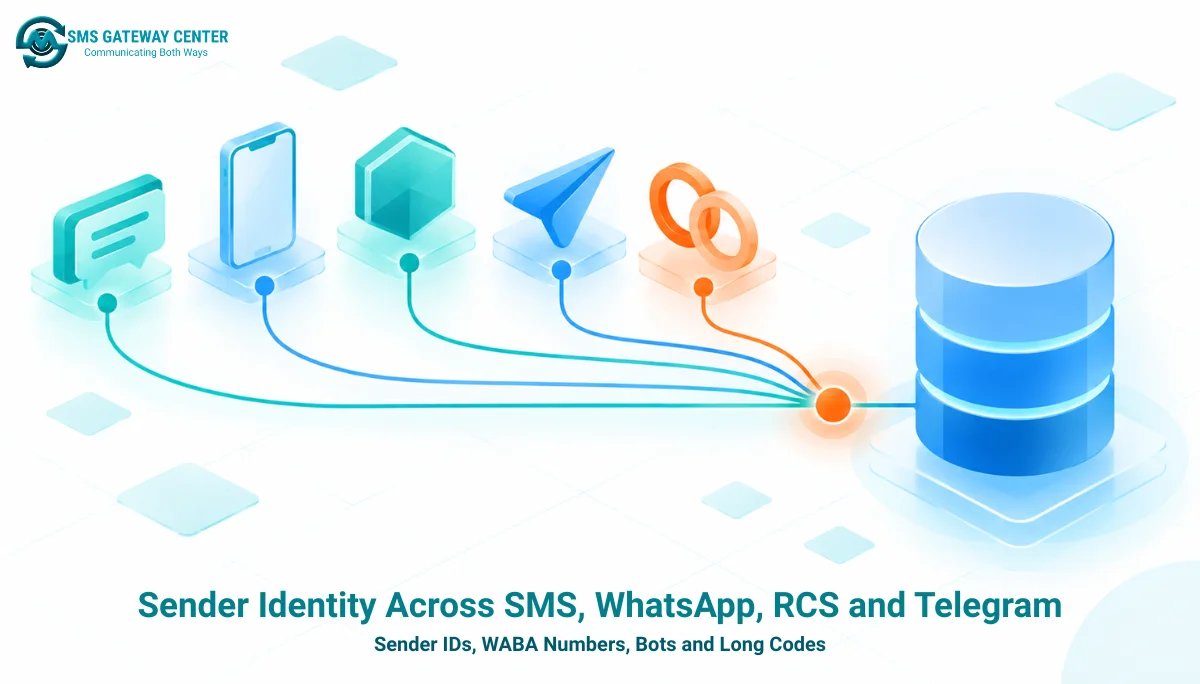
Every channel on SMSGatewayCenter answers “who sent this?” with a different object. SMS uses a sender ID (the DLT header), managed through SMSApi/senderid/create, read, update and delete, sent as senderid and reported back as senderName. WhatsApp uses the WhatsApp Business number, wabaNumber, which is both the sender and the scope for templates, media, reports and inbox reads. RCS uses a bot, addressed by an integer botId on send but reported by botName on delivery rows. Telegram uses the single bot attached to the account, so the send call carries no sender parameter at all. Inbound SMS adds a fifth unit: the long code plus keyword pair that arrives as phonecode and keyword on the push.
The same sender appears under different names and JSON types across endpoints: the WhatsApp number is an unquoted number on report rows, a quoted string on inbox rows, and waNumber on analytics rows. The robust design is a sender registry in your own database with a surrogate key per sender, the channel identity stored as text, and a resolver that maps every report and inbox row back to that key.
TL;DR
- Five sender units: SMS sender ID, WhatsApp
wabaNumber, RCSbotId, the account’s Telegram bot, and the inbound long code pluskeyword. - SMS sender IDs have a full CRUD API under
SMSApi/senderid/. Create takes onlysenderidand returns no identifier; read returnssId,senderName,isEnabledandaddTime, all as quoted strings. isEnabledis not a boolean. The sample value is the string"Pending", and the list response counts senders intotal,pending,activeandrejectedbuckets.counton the sender list is an object, not a number. Do not share a paging helper with endpoints wherecountis an integer.- Sender and template must match on SMS. A mismatch fails the message with
SENDERID_MISMATCH. - WhatsApp’s number changes type by endpoint: unquoted number on
WAApi/reportrows, quoted string on inbox rows, and renamedwaNumberon analytics rows. Store it as text and normalise before comparing. - RCS reports the sender by name, not id. Delivery rows carry
botName; inbox rows carry an integerbotId;rest/rcs/v1/botsmaps one to the other but returns active bots only. - Telegram has one bot per account. Nothing on a Telegram delivery row names the bot, and none needs to.
- Design: a sender registry keyed on your own surrogate, one resolver per channel, and a daily snapshot of every sender list.
Five Sender Units at a Glance
The table puts the sender side of five endpoint families next to each other. Each row maps to a page on the SMSGatewayCenter developer API, so any cell can be checked against its source.
| Property | SMS sender ID | WhatsApp number | RCS bot | Telegram bot | Inbound long code |
|---|---|---|---|---|---|
| What the recipient sees | Header such as SMSGAT | Business profile of the number | Branded bot | Bot name and handle | Your long code (you are the recipient) |
| Parameter on send | senderid | wabaNumber | botId | None | Not applicable |
| Local identifier | sId (quoted string) | The number itself | botId (integer) | None exposed | phonecode plus keyword |
| Managed through API | Create, read, update, delete | Read-only use; no create | List only (rest/rcs/v1/bots) | Setup get and save | Portal |
| Approval signal | isEnabled string, e.g. "Pending" | Not exposed | Only active bots are listed | Not applicable | Not applicable |
| Name on delivery rows | senderName | wabaNumber (unquoted number) | botName | Not present | Not applicable |
| Name on inbox rows | Not applicable | wabaNumber (quoted string) | botId (integer) | Not present | phonecode, keyword |
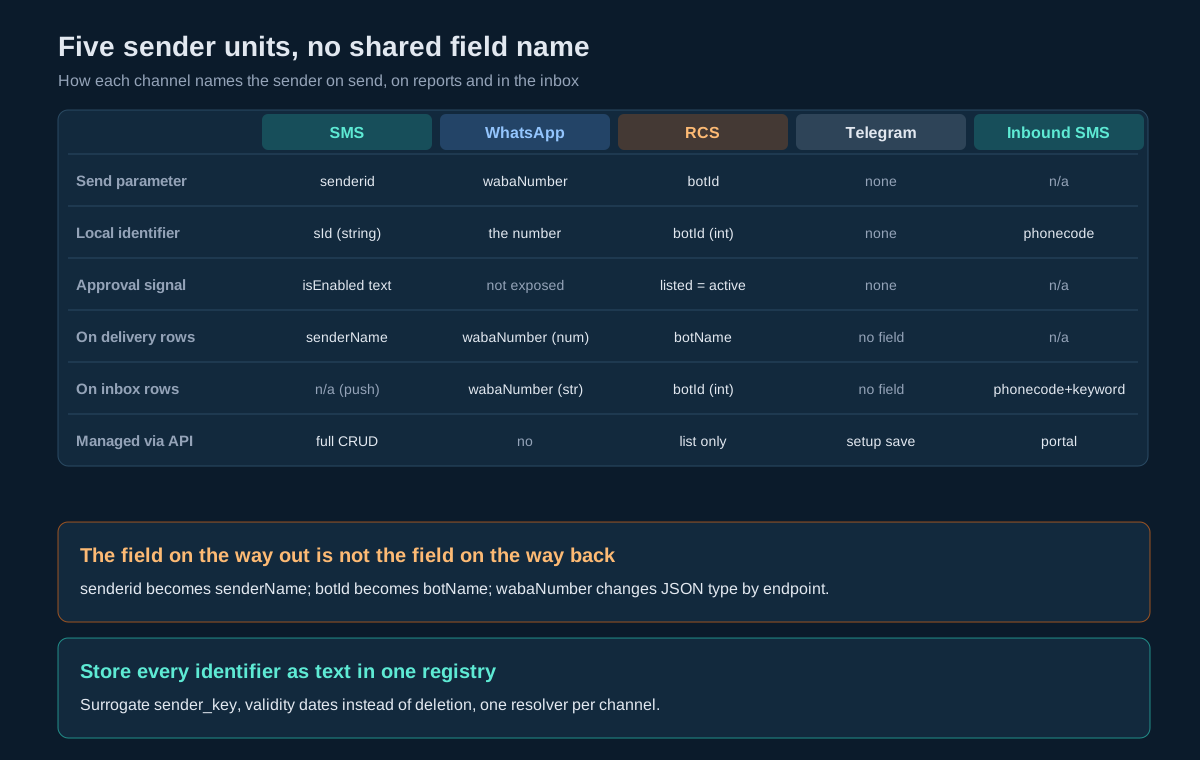
Read the last two rows first. Most attribution bugs start there: the field that identifies the sender on the way out is not the field that identifies it on the way back.
Who Issues, Who Approves, Who Can Change It
| Sender unit | Issued by | Approved by | Changeable through the API |
|---|---|---|---|
| SMS sender ID | You register the header on an operator DLT portal | The DLT portal, then the platform record | Yes: create, update and delete under SMSApi/senderid/ |
| WhatsApp number | Provisioned onto your account | Meta and the platform during onboarding | No; you use it, you do not manage it through the developer API |
| RCS bot | Provisioned onto your account | Launched and activated before it appears in the bot list | No; list only |
| Telegram bot | You create it with BotFather and save its token | No approval step | Yes: rest/tg/v1/setup with save |
| Inbound long code and keyword | Allocated by plan; keyword configured in the portal | Not applicable | No |
Two practical consequences. First, only SMS sender IDs and the Telegram bot can be created from your own code, so any “add a sender” feature in your product covers those two and routes everything else to an onboarding workflow. Second, the Telegram bot is the only sender with no approval gate, so a wrong token is live the moment you save it.
Telegram’s own BotFather documentation covers creating the bot and its token; the platform side is the setup endpoint described in the Telegram messaging API guide.
SMS Sender IDs: A Mirror of the DLT Header
In India, a commercial SMS header must be registered on an operator DLT portal before it can carry traffic. The platform’s sender ID record mirrors that registration: the update page describes the operation as a way to reflect changes “made or updated in DLT portals”. Register on DLT first; manage the platform copy through the API second. The DLT registration guide walks through the portal side.
The four endpoints
| Operation | Endpoint | Method | Parameters beyond auth and output | Success msg |
|---|---|---|---|---|
| Create | https://unify.smsgateway.center/SMSApi/senderid/create | POST (page also states GET) | senderid | SenderId created successfully. |
| Read | https://unify.smsgateway.center/SMSApi/senderid/read | POST or GET | none | success |
| Update | https://unify.smsgateway.center/SMSApi/senderid/update | POST only | senderid, id | SenderId updated successfully. |
| Delete | https://unify.smsgateway.center/SMSApi/senderid/delete | POST only | id | Senderid deleted successfully |
All four return code as the quoted string "200" nested under response, with api set to "senderid". Note the capitalisation of the word in the msg strings drifts between operations, which is one more reason to branch on status and never on msg.
Format rules to enforce before calling create
The create page describes Indian sender IDs as alphanumeric, up to six characters. Enforce that in your own validator before the call: uppercase letters and digits, one to six characters. A header that passes a six-character check is valid under any stricter reading, and the check turns a portal rejection into an immediate form error.
import re

SENDER_ID = re.compile(r"^[A-Z0-9]{1,6}$")

def validate_sender_id(value: str) -> str:
    v = value.strip().upper()
    if not SENDER_ID.fullmatch(v):
        raise ValueError("sender ID must be 1 to 6 letters or digits")
    return v
What the create does not return
The response to create confirms success and carries no sId. The only way to learn the identifier you need for update and delete is to read the list and match on senderName.
Reading the Sender ID List
{
  "response": {
    "api": "senderid",
    "action": "read",
    "status": "success",
    "msg": "success",
    "code": "200",
    "count": {
      "total": 1,
      "pending": 1,
      "active": 0,
      "rejected": 0
    },
    "senderidList": [
      {
        "senderid": {
          "sId": "179",
          "senderName": "TESTIN",
          "isEnabled": "Pending",
          "addTime": "1563033651005"
        }
      }
    ]
  }
}
Five things in that response decide how you parse it.
countis an object with four buckets. On the SMS delivery reportcountis also an object but withtotalandcurrent; on the template read it is an integer; on account status it counts keys. A shared helper that readscountas a number will throw here.- Rows are double wrapped. Each element of
senderidListholds asenderidobject, so the name sits atresponse.senderidList[i].senderid.senderName. The word “senderid” is therefore a request parameter, a list prefix and a wrapper key all at once. isEnabledis a status string. Despite the name, the sample value is"Pending", and the bucket names suggestactiveandrejectedstates as well. Treat it as an enumeration, not a boolean.- Everything is a quoted string, including
sIdand the epoch-millisecondaddTime. - There is no paging. The whole list comes back in one response.
Sender ID and Template Pairing
On SMS, the sender ID and the template are registered together on DLT. The platform enforces the pair at send time: the knowledge base entry for SENDERID_MISMATCH states the message was not sent because the sender ID does not match the one the template is registered with.
The pairing is visible from the API. Each row of SMSApi/template/read carries senderIds, a single string despite its plural name. One approved template can be linked to several sender IDs, as the knowledge base entry on using one template across multiple sender IDs confirms, provided each mapping exists on DLT and in your account.
The pre-send check is therefore a set membership test, not an equality test:
def allowed_senders(template_row: dict) -> set[str]:
    raw = template_row.get("senderIds", "") or ""
    return {s.strip().upper() for s in raw.split(",") if s.strip()}

def check_pair(template_row: dict, senderid: str) -> None:
    if senderid.upper() not in allowed_senders(template_row):
        raise ValueError(f"{senderid} is not mapped to template {template_row.get('mtId')}")
Splitting on commas is defensive: the published sample shows one value, and a list with one element is still a list. The full template model, including mtId and dltTemplateId, is covered in message template management across four channels.
WhatsApp: The WABA Number Is Sender and Scope
On WhatsApp the sender is the WhatsApp Business number, passed as wabaNumber. It does more work than any other sender field on the platform, because it also scopes most WhatsApp operations:
| Operation | How wabaNumber is used |
|---|---|
WAApi/send | Required: the number the message comes from |
WAApi/template read | Required: templates are listed per number |
WAApi/template create | Required; delete identifies the template by name and language |
WAApi/media upload | Required; media reads are account-wide |
WAApi/report | Required filter; echoed on every row |
rest/wa/v1/analytics | Optional filter; groupBy=waNumber groups rows by number |
rest/wa/v1/inbox | Optional filter; present on every row |
The type of the value changes with the endpoint that returns it:
| Where it appears | Field name | JSON type | Sample |
|---|---|---|---|
WAApi/report row | wabaNumber | Unquoted number | 9170396xxxxx |
rest/wa/v1/inbox row | wabaNumber | Quoted string | "9170396xxxxx" |
rest/wa/v1/analytics delivery row | waNumber | Quoted string | "9170396xxxxx" |
A twelve-digit Indian number fits safely in a JavaScript number, so the unquoted report value does not lose precision today. It still breaks equality: 9170396000001 === "9170396000001" is false. Normalise every occurrence to a digit string at the parser boundary and compare strings only. The report row also emits uuId as an unquoted nineteen-digit number, which does lose precision; the WhatsApp Business API wire contract covers that trap and the lossless parsing fix.
To build the list of numbers that are actually carrying traffic, call rest/wa/v1/analytics with action=delivery and groupBy=waNumber over a recent range. Each row names one number that sent messages in that window.
RCS: The Bot Is the Sender
On RCS the sender is a bot. The bot list endpoint is GET https://unify.smsgateway.center/rest/rcs/v1/bots (legacy alias /rest/rcs/bots), with userid, output=json and either password or the apikey header. Its only action is list.
{
  "status": "success",
  "botsList": [
    {
      "botId": 3,
      "name": "YourBot",
      "status": 1,
      "logoUrl": "https://example.com/bots/logo.png",
      "isSandbox": 0
    }
  ],
  "totalRecords": 1,
  "page": 1,
  "limit": 1,
  "fromDate": "",
  "toDate": "",
  "statusCode": "200",
  "reason": "success"
}
The notes on the page state three rules: only active bots (status equal to 1) are returned; use botId from this list in the send and template APIs; isSandbox of 1 marks a sandbox bot. On error, botsList becomes an empty array with a 403 and a reason such as “RCS API access is not enabled for this account.”
The complication is on the way back. The RCS delivery row identifies the sender by botName, a string, and carries no botId. The RCS inbox row identifies it by botId, an unquoted integer, and carries no name. The only bridge between the two is the bot list, and the bot list omits inactive bots. A delivery row from a bot that has since been deactivated cannot be mapped back through a live lookup. Snapshot the bot list daily into your registry, so a name that disappears from the live list still resolves from history.
Keep sandbox bots out of production routing by filtering on isSandbox at selection time, not by naming convention. The RCS messaging API reference covers the send payload that consumes botId.
Telegram: One Bot per Account
Telegram is the simplest case because there is only one sender. The account holds a single bot, configured through rest/tg/v1/setup: get (GET) returns the configuration; save (POST) accepts botName, botHandle and botToken. The token is write-only: it goes in and never comes back out on a read.
Three consequences:
- The send call has no sender parameter.
rest/tg/v1/sendaddresses recipients bychatIdorphoneNumber; the bot is implied by the account. - Delivery and inbox rows carry no bot field. None is needed while the account holds exactly one bot, and your registry should record which bot handle was configured on which dates so historical rows stay attributable after a token rotation or a bot change.
- Brands that need separate Telegram identities need separate accounts. Plan the account structure before you plan the bots.
Because the token cannot be read back, store it in your own secrets manager at the moment you save it, and treat a save as a deployment: a wrong token takes effect immediately and no approval step catches it.
Inbound SMS: Long Code Plus Keyword {#long-code-keyword}
The fifth sender unit points the other way. When a customer replies to a long code or texts a keyword, the platform forwards the message to your URL as an HTTP GET with six query parameters: phonecode, keyword, phoneno, content, location and carrier. phonecode and keyword are optional in the published contract; phoneno is the customer’s number and content is the text.
For routing, the pair of long code and keyword is your inbound “sender unit”: it tells you which campaign, brand or workflow a reply belongs to. Keywords are configured in the portal, as described in creating a new keyword for two-way SMS, and the full push contract is covered in receiving messages on four channels.
Normalise both values before routing: uppercase the keyword, strip whitespace, and treat a missing phonecode as “the account’s default long code” only if you hold exactly one. With more than one long code and no phonecode, route on keyword alone and send unmatched messages to a review queue rather than guessing.
One Sender, Many Spellings
| Channel | Where | Field name | JSON type |
|---|---|---|---|
| SMS | Send request | senderid | Form field |
| SMS | Sender list row | senderName (plus sId) | Quoted string |
| SMS | Sender list wrapper | senderidList[i].senderid | Object |
| SMS | Template row | senderIds | Quoted string, plural name |
| SMS | Delivery report row | senderName | Quoted string |
| SMS | Delivery summary | groupby=senderid | Request value |
| Send, template, media, report requests | wabaNumber | Form field | |
| Report row | wabaNumber | Unquoted number | |
| Inbox row | wabaNumber | Quoted string | |
| Analytics row | waNumber | Quoted string | |
| RCS | Send and template list requests | botId | Form or query field |
| RCS | Bot list row | botId and name | Integer and string |
| RCS | Template list row | botName | Quoted string |
| RCS | Delivery report row | botName | Quoted string |
| RCS | Inbox row | botId | Unquoted integer |
| Telegram | Setup | botName, botHandle, botToken | Strings; token write-only |
| Inbound SMS | Push query string | phonecode, keyword | Query parameters |
Seventeen places, more than ten spellings, and at least four JSON representations. The fix is not to memorise the table but to encode it once: one small resolver per channel that reads the right field at the right nesting level, converts it to your canonical form, and returns your registry key.
Which Calls Each Sender Unit Scopes
| Operation | SMS sender ID | WhatsApp number | RCS bot | Telegram bot |
|---|---|---|---|---|
| Send | Required (senderid) | Required | Required | Implied |
| Template list | Not a filter; pairing visible as senderIds | Required | Required | Account-wide |
| Template create | Not a parameter | Required | Inside templateData | Portal only |
| Media upload | Not applicable | Required | Not applicable | Not applicable |
| Delivery report query | Not among the query filters; echoed as senderName on each row | Required | Echoed as botName on each row | Account-wide |
| Summary or analytics | groupby=senderid on the SMS summary | Filter and groupBy=waNumber | Group delivery rows by botName yourself | Account-wide |
| Inbox | Not applicable (push) | Optional filter | Echoed as botId | Account-wide |
The asymmetry to design around: WhatsApp report queries require a number, so a job that reconciles all WhatsApp traffic has to loop over every number you hold. The SMS report query is account-wide and carries the sender on each row, so the same job makes one pass and groups afterwards. If your list of WhatsApp numbers is incomplete, the WhatsApp side of that job is silently incomplete too; the analytics groupBy=waNumber call described above is how you detect it.
A Sender Registry Schema
The registry is the table every send path reads to pick a sender and every ingestion path reads to attribute a row. PostgreSQL shown; the decisions carry to any relational store.
CREATE TABLE sender (
    sender_key        TEXT PRIMARY KEY,        -- your stable key, e.g. 'acme_alerts_sms'
    channel           TEXT NOT NULL CHECK (channel IN ('sms','whatsapp','rcs','telegram','sms_inbound')),
    brand             TEXT NOT NULL,           -- the business unit this sender speaks for

    -- channel identity, stored as text exactly as normalised
    sms_sender_id     TEXT,                    -- 'SMSGAT', uppercase
    sms_s_id          TEXT,                    -- sId, quoted string from the list
    waba_number       TEXT,                    -- digits only, never numeric
    rcs_bot_id        TEXT,                    -- integer stored as text
    rcs_bot_name      TEXT,                    -- the name delivery rows carry
    tg_bot_handle     TEXT,
    inbound_long_code TEXT,
    inbound_keyword   TEXT,                    -- uppercase

    -- state
    raw_status        TEXT,                    -- isEnabled, bot status, etc., verbatim
    is_sandbox        BOOLEAN NOT NULL DEFAULT FALSE,
    usable            BOOLEAN NOT NULL DEFAULT FALSE,   -- derived by the sync job only
    valid_from        TIMESTAMPTZ NOT NULL DEFAULT now(),
    valid_to          TIMESTAMPTZ,                      -- set when retired, never delete
    last_seen_at      TIMESTAMPTZ
);

CREATE UNIQUE INDEX ux_sms_sender  ON sender (sms_sender_id)  WHERE channel = 'sms' AND valid_to IS NULL;
CREATE UNIQUE INDEX ux_waba        ON sender (waba_number)    WHERE channel = 'whatsapp' AND valid_to IS NULL;
CREATE UNIQUE INDEX ux_rcs_bot     ON sender (rcs_bot_id)     WHERE channel = 'rcs' AND valid_to IS NULL;
CREATE INDEX        ix_rcs_name    ON sender (rcs_bot_name)   WHERE channel = 'rcs';
CREATE UNIQUE INDEX ux_inbound     ON sender (inbound_long_code, inbound_keyword) WHERE channel = 'sms_inbound' AND valid_to IS NULL;

CREATE TABLE sender_template (          -- SMS pairing, mirrored from template senderIds
    sender_key   TEXT REFERENCES sender(sender_key),
    template_key TEXT NOT NULL,
    PRIMARY KEY (sender_key, template_key)
);
Six decisions, and why:
- Surrogate key plus brand. Attribution questions are asked in business terms (“what did the alerts brand send?”), and a brand can own senders on several channels.
- Every identifier is text.
sIdarrives quoted,wabaNumberarrives both quoted and unquoted, andbotIdis an integer on one endpoint and absent on another. Text columns absorb all of it without loss. - Validity intervals, not deletion. Delivery rows arrive for weeks after a send. A retired sender must still resolve, so rows are closed with
valid_to, never deleted. rcs_bot_nameis indexed but not unique. RCS delivery rows resolve by name. If a name is ever reused after a bot is replaced, the validity interval disambiguates by time.usableis derived. Only the sync job sets it, from the live lists: sender IDisEnabledindicating active, bot present inbotsListwithisSandboxmatching the environment.- The SMS pairing lives in its own table. It mirrors
senderIdsfrom the template read and backs the pre-send pair check.
The outbound side of this design is the outbound message table: store sender_key on every outbound row at submit time, and attribution never depends on a report field at all for messages you sent yourself.
Resolving the Sender on Every Report and Inbox Row
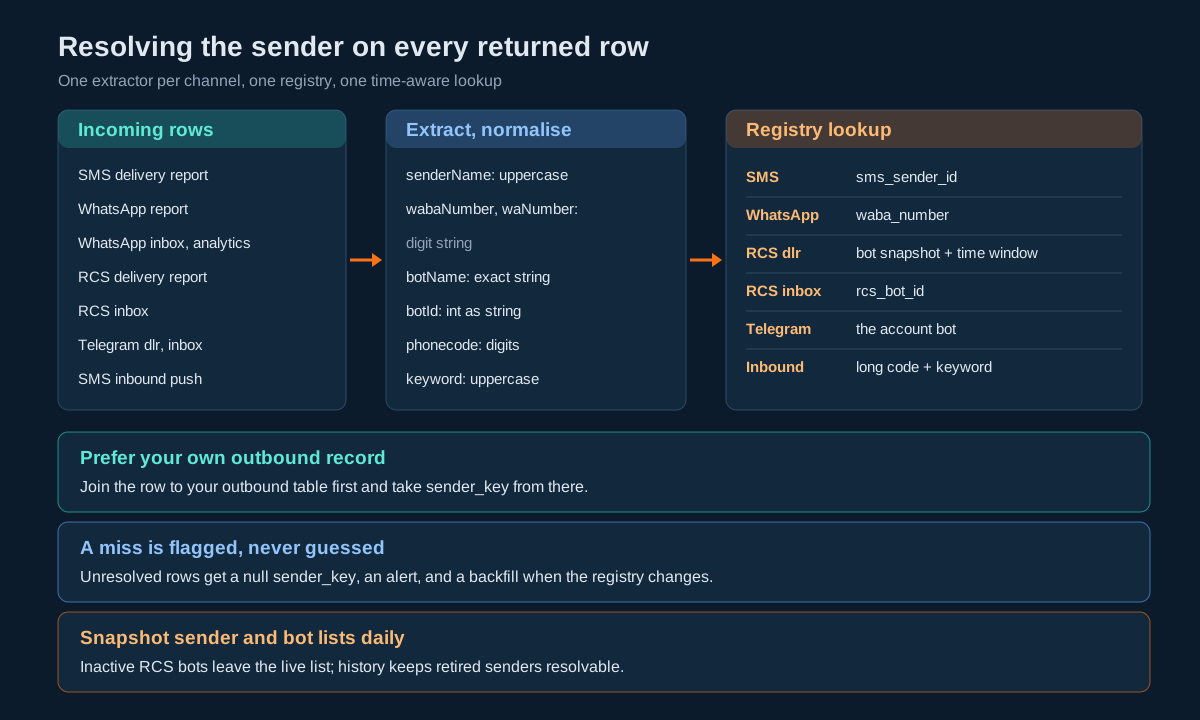
The resolution procedure, one channel at a time:
Step 1. Prefer your own record. If the row can be joined to your outbound table (by uuId or the composite key your ingestion uses), take sender_key from the outbound row and stop. This covers most outbound traffic.
Step 2. Extract the channel’s sender field.
| Row | Field to read | Normalise to |
|---|---|---|
| SMS delivery report | senderName | Uppercase, trimmed |
| WhatsApp report | wabaNumber | Digit string |
| WhatsApp inbox | wabaNumber | Digit string |
| WhatsApp analytics | waNumber | Digit string |
| RCS delivery report | botName | Exact string |
| RCS inbox | botId | Integer as string |
| Telegram dlr or inbox | None | The account’s configured bot |
| SMS inbound push | phonecode, keyword | Digits; uppercase keyword |
Step 3. Look up the registry by identity and time. Match the normalised value against the channel’s identity column, restricted to rows where the event timestamp falls between valid_from and valid_to. Time matters for RCS names and for any sender that was retired and re-created.
Step 4. Handle a miss explicitly. Write the row with sender_key null and a sender_unresolved flag, and alert. Never guess from brand keywords in the message text.
Step 5. Backfill. When the sync job adds a sender (for example a WhatsApp number discovered through analytics), re-run resolution over unresolved rows in the retention window.
Four Code Samples, Four Traps
Every sample authenticates with the apikey header plus userid, which keeps passwords out of request bodies and access logs.
Python: SMS sender create returns no sId, and count is an object
import os
import requests

BASE = "https://unify.smsgateway.center/SMSApi/senderid"
USERID = os.environ["SGC_USERID"]
HEADERS = {"apikey": os.environ["SGC_APIKEY"]}

def _call(action: str, **fields) -> dict:
    r = requests.post(f"{BASE}/{action}",
                      data={"userid": USERID, "output": "json", **fields},
                      headers=HEADERS, timeout=30)
    r.raise_for_status()
    resp = r.json().get("response", {})
    if resp.get("status") != "success":
        raise RuntimeError(f"senderid/{action} failed: {resp}")
    return resp

def list_senders() -> tuple[dict, list[dict]]:
    resp = _call("read")
    buckets = resp.get("count") or {}          # an object: total, pending, active, rejected
    rows = [item["senderid"] for item in resp.get("senderidList", [])]
    return buckets, rows

def create_sender(name: str) -> dict:
    name = name.strip().upper()
    _call("create", senderid=name)
    _, rows = list_senders()
    matches = [r for r in rows if r.get("senderName", "").upper() == name]
    if len(matches) != 1:
        raise LookupError(f"expected one row for {name}, found {len(matches)}")
    row = matches[0]
    return {"sms_s_id": row["sId"], "sms_sender_id": name,
            "raw_status": row.get("isEnabled"), "added_ms": row.get("addTime")}
The traps: the identifier needed for update and delete only exists on the list, and count is a four-key object that a generic paging helper would misread.
Node.js: the WhatsApp number arrives as three types
// Normalise any wabaNumber / waNumber value to a digit string.
function normWaba(value) {
  if (value === null || value === undefined) return null;
  const s = String(value).replace(/\D/g, "");
  return s.length ? s : null;
}

// Report rows: quote wabaNumber, mobileNo and uuId before JSON.parse, so
// no numeric conversion ever happens.
function parseReportBody(text) {
  const safe = text.replace(
    /"(wabaNumber|mobileNo|uuId)"\s*:\s*(\d+)/g,
    (_m, key, digits) => `"${key}":"${digits}"`
  );
  return JSON.parse(safe);
}

function senderFromWhatsAppRow(row) {
  return normWaba(row.wabaNumber ?? row.waNumber);
}
The trap: strict equality between a number and a string is always false, so a registry lookup keyed on strings silently misses every report row unless the value is normalised first. Quoting the fields before parsing also protects the nineteen-digit uuId on the same row.
Java: RCS delivery rows name the bot, the bot list gives the id
import com.fasterxml.jackson.databind.JsonNode;
import com.fasterxml.jackson.databind.ObjectMapper;
import java.net.URI;
import java.net.URLEncoder;
import java.net.http.*;
import java.nio.charset.StandardCharsets;
import java.util.*;

public final class RcsBots {
    private static final ObjectMapper M = new ObjectMapper();
    private static final HttpClient HTTP = HttpClient.newHttpClient();

    /** Returns botName -> botId for currently active bots. Merge into a persisted snapshot. */
    public static Map<String, String> activeBots(String userid, String apikey) throws Exception {
        String qs = "userid=" + URLEncoder.encode(userid, StandardCharsets.UTF_8)
                  + "&output=json&action=list";
        HttpRequest req = HttpRequest.newBuilder(
                URI.create("https://unify.smsgateway.center/rest/rcs/v1/bots?" + qs))
            .header("apikey", apikey).GET().build();
        JsonNode root = M.readTree(HTTP.send(req, HttpResponse.BodyHandlers.ofString()).body());
        if (!"success".equals(root.path("status").asText())) {
            throw new IllegalStateException("bot list failed: " + root.path("reason").asText());
        }
        Map<String, String> byName = new HashMap<>();
        for (JsonNode b : root.path("botsList")) {       // bind only after success
            if (b.path("isSandbox").asInt() == 1) continue;
            byName.put(b.path("name").asText(), String.valueOf(b.path("botId").asLong()));
        }
        return byName;
    }
}
The trap: a live lookup misses every bot that is no longer active, so this method feeds a snapshot table rather than answering resolution queries directly. The error payload flips botsList to an empty array, which is why the status is read before the list is bound.
PHP: routing inbound SMS on long code plus keyword
<?php
// Registry loaded from your database: [longCode][KEYWORD] => sender_key
function route_inbound(array $q, array $registry, ?string $defaultLongCode): array {
    $phone   = preg_replace('/\D/', '', $q['phoneno'] ?? '');
    $content = (string)($q['content'] ?? '');
    $keyword = strtoupper(trim((string)($q['keyword'] ?? '')));
    $code    = preg_replace('/\D/', '', (string)($q['phonecode'] ?? ''));

    if ($code === '' && $defaultLongCode !== null) {
        $code = $defaultLongCode;               // only safe with exactly one long code
    }
    if ($code !== '' && isset($registry[$code][$keyword])) {
        return ['sender_key' => $registry[$code][$keyword], 'phone' => $phone, 'content' => $content];
    }
    foreach ($registry as $lc => $byKeyword) {  // keyword-only fallback
        if ($keyword !== '' && isset($byKeyword[$keyword])) {
            return ['sender_key' => $byKeyword[$keyword], 'phone' => $phone, 'content' => $content];
        }
    }
    return ['sender_key' => null, 'phone' => $phone, 'content' => $content, 'review' => true];
}

$result = route_inbound($_GET, $registry, count($registry) === 1 ? array_key_first($registry) : null);
http_response_code(200);
The trap: phonecode and keyword are optional in the push, so a router that assumes both are present drops real replies. Unmatched messages go to a review queue, and the handler still returns 200 so the push is acknowledged.
Renaming, Retiring and Replacing a Sender
SMS sender ID. Change the header on the DLT portal first. Then call SMSApi/senderid/update with the sId as id and the new senderid, re-read the list, and check the new name and its isEnabled state. Templates are registered against headers on DLT, so update the pairing on DLT and re-sync the sender_template table before sending with the new name. To retire, close the registry row with valid_to, stop routing to it, and only then call delete. The knowledge base entry on deleting a sender ID by mistake notes that a deleted sender cannot be used until it is added again and that past messages are unaffected.
WhatsApp number. A number change is an onboarding event, not an API call. Templates are scoped per number, so a new number starts with its own template set; plan template approval for the new number before cutting traffic over, and run both numbers in parallel until the old one’s report window has closed.
RCS bot. A new bot gets a new botId and appears in botsList once active. Templates are listed per bot, so the same template-approval lead time applies. Keep the old bot’s row open in the registry until its delivery rows stop arriving.
Telegram bot. A save with a new token swaps the account’s bot immediately. Record the old and new handles with validity dates so history stays attributable, and tell subscribers: Telegram chats belong to a bot, so users who started the old bot have not started the new one.
Ten Mistakes That Break Sender Attribution
- Comparing a WhatsApp number as a number on one side and a string on the other. Normalise to a digit string at the parser boundary.
- Treating
isEnabledas a boolean. It holds a status string such as"Pending". A truthy check marks a pending sender as enabled. - Reading
counton the sender list as an integer. It is an object withtotal,pending,activeandrejected. - Resolving RCS delivery rows through a live bot lookup. Inactive bots drop out of
botsList. Resolve from a snapshot. - Sending with a sender ID that is not paired with the template. The message fails with
SENDERID_MISMATCH. Check the pair before the send. - Deleting a registry row when a sender is retired. Late delivery rows then cannot be attributed. Close it with a validity date instead.
- Letting sandbox bots into production routing. Filter on
isSandbox, not on a naming convention. - Looping WhatsApp report queries over a hard-coded number list. A number missing from the list means its traffic never reaches your reports. Cross-check with analytics grouped by
waNumber. - Assuming
phonecodeandkeywordare always present on inbound SMS. Both are optional in the push. Route with fallbacks and a review queue. - Rotating the Telegram token without recording it. The token is write-only and the rows carry no bot field, so the registry is the only record of which bot sent what, when.
Decision Matrix
| If you need to… | SMS | RCS | Telegram | |
|---|---|---|---|---|
| Add a new sender from your own code | SMSApi/senderid/create, after DLT registration | Not available; onboarding | Not available; provisioning | rest/tg/v1/setup save |
| Know a sender is usable | isEnabled indicates active | Number is onboarded and templates approved | Present in botsList with the right isSandbox | Setup get returns your bot |
| Run two brands side by side | Two headers | Two numbers | Two bots | Two accounts |
| Attribute a delivery row | senderName | wabaNumber | botName via snapshot | The account’s bot |
| Attribute an inbox row | phonecode plus keyword | wabaNumber | botId | The account’s bot |
| List all senders | SMSApi/senderid/read | Analytics groupBy=waNumber plus your configuration | rest/rcs/v1/bots (active only) | Setup get |
| Test safely | Sandbox account | Test numbers you control | A bot with isSandbox of 1 | A test account’s bot |
| Change a sender’s name | DLT first, then update | New number | New bot | save with new details |
For how senders feed into the wider multi-channel picture, including which channel to fall back to when a sender cannot reach a recipient, see multi-channel fallback.
Pre-Launch Checklist
Registry
- Every sender has a surrogate
sender_keyand abrand. - Every channel identifier is stored as text, normalised (uppercase header, digit-only number).
- Senders are retired with
valid_to, never deleted. - Outbound rows record
sender_keyat submit time.
SMS
- Sender IDs are validated as one to six uppercase letters or digits before create.
sIdis captured by reading the list after every create.isEnabledis compared against an allowlist of active values, never tested for truthiness.- Every send checks that
senderidis in the template’ssenderIds.
wabaNumberandwaNumberare normalised to digit strings before comparison.- Report bodies are parsed with numeric identifiers quoted first.
- Report jobs loop over every number, and the list is cross-checked against analytics grouped by
waNumber.
RCS
- The bot list is snapshotted daily, including
name,botIdandisSandbox. - Delivery rows resolve
botNamethrough the snapshot with a time window. - Sandbox bots are excluded from production routing.
Telegram
- The bot token is written to your secrets manager when saved.
- Bot handle changes are recorded with dates.
Inbound SMS
- Keywords are uppercased and trimmed before routing.
- Missing
phonecodeorkeywordfalls back gracefully to a review queue. - The handler returns 200 after enqueueing, whatever the routing result.
Operations
- Unresolved report rows raise an alert and are backfilled when the registry changes.
- Every sender list response is stored raw for a rolling window.
Unspecified Behaviour and How to Code Around It
The behaviours below are not pinned down by anything you can read ahead of time. Each item gives the choice that stays safe whichever way the behaviour turns out, and none of them require you to wait for an answer.
One. Treat only observed “active” values of isEnabled as usable. The sample shows "Pending", and the count buckets suggest active and rejected states. Keep an allowlist populated from senders that have actually delivered, and treat every other value as not usable. An unknown value then fails closed: a delay, not a rejected campaign.
Two. Pass the sId as the id for update and delete, then re-read. The update and delete calls take an id, and sId is the only identifier the list returns. Confirm the change by re-reading and checking the row with that sId. The confirmation read keeps the operation correct however the identifier is resolved internally.
Three. Enforce the six-character rule even if the platform accepts more. The create page describes Indian sender IDs as up to six alphanumeric characters. A six-character validator never produces a header that some stricter check will reject, and it costs nothing if the limit is looser elsewhere.
Four. Split senderIds on commas even when you have only seen one value. The field name is plural and a template can map to several headers. A split that finds one value returns a one-element set; a split that finds several returns all of them. Either way the pair check is correct.
Five. Snapshot the RCS bot list before you need history. Deactivated bots drop out of the live list, and delivery rows name bots rather than numbering them. A daily snapshot of botId, name and isSandbox turns “which bot was this?” into a join.
Six. Resolve RCS names within a time window. Whether a bot name can be reused after a bot is replaced is not something to rely on either way. Match botName against snapshot rows whose validity covers the delivery timestamp, and ambiguity cannot arise.
Seven. Quote WhatsApp numeric identifiers before parsing, even if they fit today. A twelve-digit number is safe in a double, a nineteen-digit uuId is not, and a future field on the same row might be either. Quoting every digit run for known identifier keys before JSON.parse is correct whatever the lengths turn out to be.
Eight. Build the WhatsApp number list from two sources. Keep numbers in configuration and also derive them from analytics grouped by waNumber. Any number that appears in one source but not the other raises an alert. Two independent sources catch an omission that either alone would hide.
Nine. Route inbound SMS without assuming phonecode is present. With one long code, default to it; with several, route on keyword and queue the rest for review. The router is correct whether the platform always sends phonecode or only sometimes does.
Ten. Treat a Telegram save as irreversible for reads. The token cannot be read back, so capture it in your secrets manager in the same transaction that calls save, and record the handle and date in the registry. You then never need the platform to tell you which token is live.
Eleven. Close registry rows instead of deleting platform senders first. Delivery rows can arrive after a sender is removed. Set valid_to in your registry, wait for the report window to pass, then call the platform delete. Attribution survives however long late rows keep arriving.
Twelve. Store raw sender list responses for a rolling window. When a send fails with a sender-related cause, the stored list shows exactly what state the sender was in at the time. A cheap daily blob replaces a guess with a lookup.
FAQs
What is a sender ID on SMSGatewayCenter?
It is the header shown as the sender of an SMS, such as SMSGAT. In India it must be registered on an operator DLT portal first; the platform record is then managed through SMSApi/senderid/create, read, update and delete.
How do I get the ID of a sender I just created?
The create response returns no identifier. Call SMSApi/senderid/read, find the row whose senderName matches, and store its sId as text.
Is isEnabled true or false?
Neither. It is a status string; the published sample value is "Pending". Compare it against known values rather than testing it as a boolean.
Why does my SMS fail with SENDERID_MISMATCH?
The sender ID you used is not the one registered with the template. Check the template’s senderIds and send with a header that appears there.
Can one template be used with several sender IDs?
Yes, if each sender ID is mapped to the template on DLT and in your account.
What identifies the sender on WhatsApp?
The WhatsApp Business number, passed as wabaNumber. It is required on send, template and media writes, and report queries.
Why does wabaNumber come back as a number on reports and a string on the inbox?
The two endpoints serialise it differently, and analytics renames it waNumber. Normalise every occurrence to a digit string before comparing.
How do I list my RCS bots?
Call GET rest/rcs/v1/bots with output=json. Only active bots are returned, and isSandbox of 1 marks a sandbox bot.
How do I know which RCS bot a delivery row came from?
The delivery row carries botName. Map it to a botId through a stored snapshot of the bot list, because inactive bots are not returned by the live list.
Can I run several Telegram bots on one account?
No. The account holds one bot, configured through rest/tg/v1/setup. Separate Telegram identities need separate accounts.
Can I read my Telegram bot token back?
No. It is write-only. Store it in your own secrets manager when you save it.
How do I tell which campaign an inbound SMS belongs to?
Route on the long code (phonecode) and keyword from the push. Both are optional, so fall back to keyword-only routing and a review queue.
Should I delete a sender ID I no longer use?
Close it in your own registry first, wait until its delivery reports have stopped arriving, then delete it on the platform. A deleted sender cannot be used until it is added again.
Where should the sender be recorded for attribution?
On your outbound message row at submit time. Report fields are the fallback, not the primary source.
If you are planning a multi-brand or multi-channel rollout and want a second pair of eyes on the sender design, talk to the SMSGatewayCenter team.
Every message traced to the brand that sent it
Build your sender registry against the SMSGatewayCenter developer API and test create, sync and resolution in the sandbox before live traffic.
Recent Articles
- Message Template Management Across SMS, RCS, WhatsApp and Telegram: One API Comparison
- Reconciling a Messaging Invoice Across Four Channels: Credits, Currency and the Rate Plan API
- Receiving Messages on Four Channels: Inbox API Contracts Compared
- WhatsApp Business API Wire Contract: Ten Endpoints, Two Base Paths, Five Envelopes
- Telegram Messaging API: Eight Endpoints, the Chat ID Model, and the Error Shape That Breaks Typed Clients