Table of Contents
- The Short Answer
- TL;DR
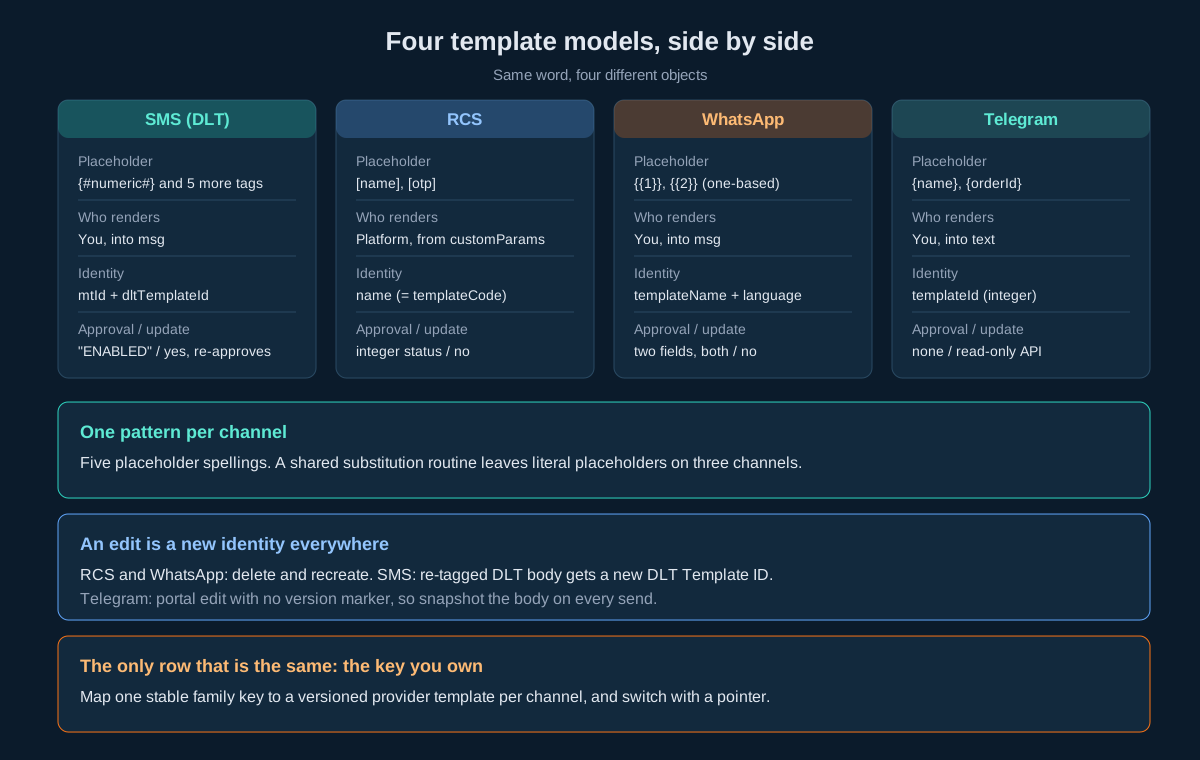
- Four Template Models at a Glance
- What a Template Actually Is on Each Channel
- Placeholder Syntax: Five Spellings, No Shared Code
- Who Renders the Variables
- The SMS Template Lifecycle Over the API
- DLT Variable Tags and What They Change in Your Code
- Validating an SMS Body Before You Send
- The RCS Template Lifecycle
- The WhatsApp Template Lifecycle
- The Telegram Template Model
- Identity: Why an Edit Is a New Template
- Approval State: A String, an Integer, Two Fields or Nothing
- Response Envelopes Across the Template Endpoints
- A Portable Template Registry Schema
- Rendering Safely in Four Languages
- The Template Change Workflow
- Ten Template Mistakes That Reach Production
- Decision Matrix
- Pre-Launch Checklist
- Unspecified Behaviour and How to Code Around It
- FAQs
The Short Answer
You cannot manage SMS, RCS, WhatsApp and Telegram templates with one piece of code, because the four channels disagree on every property that matters. They use five different placeholder spellings (DLT typed tags such as {#numeric#}, the legacy DLT {#var#}, RCS [name], WhatsApp {{1}} and Telegram {name}). They identify a template four different ways (a local mtId plus a regulator dltTemplateId, an RCS name, a WhatsApp name plus language pair, and a Telegram integer templateId). They report approval as a string, an integer, two independent string fields, or not at all. And only SMS has an update endpoint; on RCS and WhatsApp an edit is a delete and a recreate, and on SMS a re-tagged DLT template comes back with a new DLT Template ID anyway.
The design that works on all four is simple to state: key your own system on a stable template identifier you own, store every provider identity as a versioned row beneath it, render variables with a tokenizer rather than a regex replace, gate sending on an approval state you normalise yourself, and never retire an old version until every scheduled send that references it has drained.
TL;DR
- Five placeholder syntaxes. SMS DLT typed tags (
{#numeric#},{#alphanumeric#},{#url#},{#urlott#},{#cbn#},{#email#}) replace the generic{#var#}under the TRAI direction of 18 November 2025. RCS uses[name], WhatsApp{{1}}, Telegram{name}. A substitution routine written for one channel silently no-ops on the other three. - Two rendering models. On SMS, WhatsApp and Telegram you send the finished text. On RCS you send the template name plus a
customParamsJSON string and the platform renders. - Only SMS has an update call.
SMSApi/template/updatetakes anidand re-enters approval. RCS and WhatsApp have create, read and delete only. Telegram templates are read-only over the API. - Create calls do not return the identifier you need next.
SMSApi/template/createreturns nomtId. RCS and WhatsApp create calls return “Accepted for processing.”, which means queued, not approved. Always read back after a write. - Names change on the way in. WhatsApp lowercases a submitted template name; RCS returns categories in a different case from the one submitted. Never key a local table on the string you sent.
- Approval is four different shapes. SMS
statusis a string such as"ENABLED". RCSstatusis an integer. WhatsApp haswhatsAppStatusandsystemStatus, and both must clear. Telegram has no approval field. - Deletes differ in timing. SMS template delete is synchronous. WhatsApp template delete is asynchronous (“Accepted for processing.”). Re-list after every delete.
- Error payloads differ. The Telegram
getaction flips itstemplateobject to an empty array on error;validateTemplatedrops every key exceptstatus,statusCodeandreason. Parse loosely, branch on the top-levelstatusstring, bind types only on success. - Render with a tokenizer.
preg_replace,String.prototype.replace,re.subandMatcher.replaceAllall interpret special characters in the replacement value. A value ofRs $100can reach the handset asRs 0.
Four Template Models at a Glance
The table below is the whole comparison on one screen. Every row is expanded in its own section further down.
| Property | SMS (DLT) | RCS | Telegram | |
|---|---|---|---|---|
| Base path | SMSApi/template/ | RCSApi/template/ | WAApi/template | rest/tg/v1/templates |
| Operations over the API | create, read, update, delete, plus SMSApi/validateTemplate | create, list, delete | create, read (list and single), delete | list, get |
| Operation selector | URL path | URL path | HTTP method on one URL | action query parameter |
| Placeholder | {#numeric#} and five other typed tags; legacy {#var#} | [name], [otp], [custom_param_1] | {{1}}, {{2}} | {name}, {orderId} |
| Who renders | You | The platform, from customParams | You, into msg | You, into text |
| Local identity | mtId (quoted string) | name | templateName plus language | templateId (unquoted integer) |
| External identity | dltTemplateId (regulator) | none separate | none separate | none |
| Update endpoint | Yes, by id, re-enters approval | No | No | No (portal only) |
| Approval field | status, string, e.g. "ENABLED" | status, integer | whatsAppStatus and systemStatus | none |
| Create returns the id | No | Name echoed as templateName | No | Not creatable over the API |
| Delete timing | Synchronous | Not stated | Asynchronous | Not deletable over the API |
What a Template Actually Is on Each Channel
The word “template” names four different objects on this platform, and treating them as one is the root of most template bugs.
On SMS in India, a template is a regulatory contract. The Principal Entity registers a content template on an operator DLT portal and receives a DLT Template ID. Every message sent under that ID must match the registered text character for character, with variables only where the template allows them. The platform’s own SMSApi/template/ family stores a local copy of that body, with a small local identifier mtId, the DLT ID, the template type (for example "Service Implicit") and the sender IDs it may be used with. The template does not render anything. It is a pattern your finished message must match. See the DLT template rejection guide for the business side of registration.
On RCS, a template is a stored, rendered message. You create it against a bot with a JSON templateData payload (name, type, category, content and suggestions). At send time you pass the template name as templateCode and the variable values as customParams, and the platform builds the card. Three types exist: text_message, rich_card and carousel. The RCS API reference covers the send side in full.
On WhatsApp, a template is a Meta-approved message definition scoped to a business number. It has a category (UTILITY, MARKETING or AUTHENTICATION), a language, a body with positional {{1}} variables, optional header and footer, and optional buttons. Meta approves it; the platform also tracks its own approval state. Outside the 24-hour customer service window, a template is the only way to start a conversation. Meta’s own template overview describes the category rules.
On Telegram, a template is a saved compose form. It is a stored body with {name} style fields plus optional media, button JSON and a reply-markup flag. There is no approval, no regulator and no provider-side rendering. The templates endpoint exists so your application can load a saved compose payload and prefill it.
The practical consequence: on SMS the template constrains what you send, on RCS it is what you send, on WhatsApp it is both, and on Telegram it is a convenience. Any abstraction that hides these differences behind one sendTemplate(name, vars) call will be wrong on at least one channel.
Placeholder Syntax: Five Spellings, No Shared Code
| Channel | Placeholder form | Named or positional | Where it may appear | Source of truth |
|---|---|---|---|---|
| SMS DLT (current) | {#numeric#}, {#alphanumeric#}, {#url#}, {#urlott#}, {#cbn#}, {#email#} | Typed, positional | Body only | The registered DLT template |
| SMS DLT (legacy) | {#var#} | Untyped, positional | Body only | The registered DLT template |
| RCS | [name], [otp], [orderid], [amount], [date], [tracking_id], [custom_param_1] | Named | Text, card titles, card descriptions, suggestion text, postbacks, URLs | RCSApi/template/list row data |
{{1}}, {{2}} | Positional | Body; header allows at most one variable; footer allows none | WAApi/template read row | |
| Telegram | {name}, {orderId} | Named | Body (and caption for media types) | rest/tg/v1/templates?action=get |
Three things in that table cause production incidents.
The DLT tags are typed now, and the type is enforced against your data. Under the TRAI direction on variable tagging of 18 November 2025, each variable in a DLT content template must declare what it holds. Operators are phasing in enforcement, first logging mismatches and then rejecting them. The DLT variable tags guide lists the six tags and their limits. From a developer’s point of view, the key change is that the placeholder now carries a validation rule, so your renderer has to validate values, not just substitute them. That is covered in its own section below.
RCS names are bare in customParams. The template text says [name]; the send payload’s customParams object is keyed on names without brackets. Code that passes {"[name]": "Asha"} sends a card with a literal [name] in it.
WhatsApp positions are one-based and dense. {{1}} is the first variable. There is no {{0}}. A renderer that builds an array and indexes from zero shifts every value by one position, and because every value is still a plausible string, the message looks fine in a quick test until a name lands where an order number should be.
A regex that matches \{[^}]+\} catches Telegram fields, WhatsApp double braces (as nested matches) and DLT tags all at once, and treats them as the same thing. Write one pattern per channel and anchor it exactly:
import re

PLACEHOLDER = {
    "sms_dlt": re.compile(r"\{#(numeric|alphanumeric|url|urlott|cbn|email|var)#\}"),
    "rcs": re.compile(r"\[([A-Za-z0-9_]+)\]"),
    "whatsapp": re.compile(r"\{\{([1-9][0-9]*)\}\}"),
    "telegram": re.compile(r"\{([A-Za-z_][A-Za-z0-9_]*)\}"),
}
Note that the Telegram pattern also matches the inner part of a WhatsApp {{1}} if applied to WhatsApp text, and it would match {#var#} if the hash characters were allowed. That is exactly why the patterns must be chosen by channel before parsing, never inferred from the text.
Who Renders the Variables
This is the difference that decides the shape of your send path.
| Channel | What you send | Where the values go | What the platform checks |
|---|---|---|---|
| SMS | The finished text in msg, plus dltTemplateId and dltEntityId | Already substituted into msg | That msg matches the registered template for that ID and sender |
| RCS | templateCode (the template name) plus customParams | A JSON string inside the msg JSON string | Renders the stored template |
templateName plus the text in msg, with optional header and footer | Substituted into msg by you | Sends under the named template | |
| Telegram | The finished text in text | Already substituted | Nothing template-related |
On SMS, rendering is your responsibility and the platform is the judge. You fill the template and send the result. If the result does not match the registered DLT template for the dltTemplateId and sender ID you supplied, it is rejected. The OTP delivery checklist walks through how a trailing space or a changed full stop becomes a template mismatch in practice.
On RCS, rendering is the platform’s job and your job is the payload. The send body is a JSON string in the msg form field. Inside it, customParams is itself a JSON string, not a nested object. The published example is:
{
  "contentMessage": {
    "templateMessage": {
      "templateCode": "WELCOME_TEMPLATE",
      "customParams": "{\"custom_var\":\"John\",\"amount\":\"999\"}"
    }
  },
  "ttl": "86400s"
}
That is three encoding layers: form encoding around a JSON string, around a JSON string. Build each layer with a real serialiser and never by string concatenation. The RCS variables guide confirms that API senders pass values as customParams.
On WhatsApp, you render and name. WAApi/send requires both templateName and msg. The send call has no per-variable parameter, so the finished body goes in msg. Send the body with every {{n}} replaced, byte for byte identical to the approved body elsewhere. Session messages, sent inside the customer service window, omit templateName entirely.
On Telegram, the template is a prefill. Load the body with action=get, substitute {name} fields yourself, and send the result as text through the send endpoint. Mind the limits: 4096 characters for a text body and 1024 for a media caption. A template that fits at authoring time can overflow once a long value is substituted.
The SMS Template Lifecycle Over the API
The SMS family is the only one with all four CRUD operations, and it is also the one where the create call gives you the least back.
Create. POST https://unify.smsgateway.center/SMSApi/template/create with message and output. That is the whole required parameter set: no name, no DLT ID, no sender ID, no template type. The response carries no identifier:
{
    "response": {
        "api": "template",
        "action": "create",
        "status": "success",
        "msg": "Template created successfully and given for approval",
        "code": "200"
    }
}
Read. POST https://unify.smsgateway.center/SMSApi/template/read with output only. It returns every template on the account; there is no filter by ID, name or status. The row is double wrapped, with the body three levels deep at response.templateList[i].template.template:
{
  "template": {
    "mtId": "39",
    "identifier": "bank details without statement",
    "template": "{#var#}{#var#}\nA/c Name: {#var#}{#var#}\nA/c No: {#var#}\nBranch: {#var#}{#var#}\nIFSC Code: {#var#}\nYour Brand",
    "msgType": "text",
    "dltTemplateId": "10070142034xxxxxxxx",
    "dltTemplateType": "Service Implicit",
    "senderIds": "SENDER",
    "status": "ENABLED",
    "lastUpdated": "1687764018447"
  }
}
Every value is a quoted string, including mtId and the epoch millisecond lastUpdated. senderIds is plural in name but a single string in the sample; split it on commas defensively. identifier is a human label, not a key.
Update. POST https://unify.smsgateway.center/SMSApi/template/update with message, id and output. POST only. The response message is “Template updated successfully and given for approval.”, so an update sends the template back through approval. Until it clears, do not send against the new body.
Delete. POST https://unify.smsgateway.center/SMSApi/template/delete with id and output. POST only. Returns “Template deleted successfully.” with code "200".
Because create returns nothing you can key on, the working pattern is create, then read, then find your row:
curl -s -X POST 'https://unify.smsgateway.center/SMSApi/template/create' \
  -H 'apikey: YOUR_API_KEY' \
  -H 'Content-Type: application/x-www-form-urlencoded' \
  --data-urlencode 'userid=YourUsername' \
  --data-urlencode 'message=Dear {#alphanumeric#}, your OTP is {#numeric#}. Do not share it. - YourBrand' \
  --data-urlencode 'output=json'

curl -s -X POST 'https://unify.smsgateway.center/SMSApi/template/read' \
  -H 'apikey: YOUR_API_KEY' \
  -H 'Content-Type: application/x-www-form-urlencoded' \
  --data-urlencode 'userid=YourUsername' \
  --data-urlencode 'output=json'
Then scan templateList for the row whose template body equals the text you submitted, and if more than one matches, take the one with the highest lastUpdated. Store its mtId as text. Use the apikey header rather than a password parameter on every call; userid still travels alongside it because on this platform a key authorises a request but does not identify the account.
The sample request on the create page uses ###123### as its placeholder, and the page introduction mentions {OTP}. Neither is a DLT placeholder. Register bodies using the DLT tag syntax your registered template uses.
DLT Variable Tags and What They Change in Your Code
The six typed tags turn a DLT placeholder from “any text goes here” into “text of this shape goes here”. Operators check the value you send against the tag.
| Tag | Use it for | Rule your renderer must enforce |
|---|---|---|
{#numeric#} | OTPs, amounts, account and order numbers made only of digits | Digits 0 to 9 only; up to 40 characters |
{#alphanumeric#} | Names, reference IDs, ticket numbers | Letters and numbers; up to 40 characters; no link |
{#url#} | Website and landing page links | Up to 120 characters; must match a whitelisted URL CTA |
{#urlott#} | App download and OTT links, such as WhatsApp links | Up to 120 characters; must match a CTA registered under OTT or APK |
{#cbn#} | Callback numbers | 3 to 14 digits; must match a whitelisted number CTA; keep “+91” in the fixed text |
{#email#} | Email addresses | Valid email format; up to 40 characters |
Four consequences for code.
One. Validate every value against its tag before you render. An OTP with a space in it, an amount formatted as 1,299.00 in a {#numeric#} slot, or a customer name that happens to contain a URL will all fail. Catch them before the send, where you can return a clear error, not after, where you pay for a rejection.
Two. Adjacency is now restricted. Only {#alphanumeric#} may appear back to back without fixed text between. Legacy templates are full of {#var#}{#var#} runs (the read sample above has five of them) because registrants used adjacent variables to buy extra length. When those templates are re-tagged, adjacent pairs must become adjacent {#alphanumeric#} tags or be split by fixed text.
Three. Re-tagging produces a new DLT Template ID. The variable tag migration guide says the DLT portal issues a new Template ID for the updated template, which must then be updated in the account and in any application that sends through the API. Your code must treat the DLT ID as a versioned attribute of a template, not as its permanent identity.
Four. Amount formatting belongs in fixed text. Put the currency marker and any separators in the registered template (“Rs {#numeric#}”) and send digits only. If you need paise, register two numeric slots with a fixed full stop between them.
A minimal validator:
import re

TAG_RULES = {
    "numeric":      re.compile(r"^[0-9]{1,40}$"),
    "alphanumeric": re.compile(r"^(?!.*(https?://|www\.))[A-Za-z0-9 ]{1,40}$"),
    "email":        re.compile(r"^[^@\s]{1,64}@[^@\s]+\.[A-Za-z]{2,}$"),
    "cbn":          re.compile(r"^[0-9]{3,14}$"),
}

def check_value(tag: str, value: str) -> None:
    if tag in ("url", "urlott"):
        if len(value) > 120:
            raise ValueError(f"{tag} value longer than 120 characters")
        return  # whitelist match is checked against your stored CTA list
    if tag == "email" and len(value) > 40:
        raise ValueError("email value longer than 40 characters")
    rule = TAG_RULES.get(tag)
    if rule is None:
        raise ValueError(f"unknown DLT tag {tag}")
    if not rule.match(value):
        raise ValueError(f"value {value!r} does not satisfy {{#{tag}#}}")
Whether {#alphanumeric#} accepts spaces and punctuation depends on operator implementation; the rule above allows spaces, which covers names, and rejects links. Tighten or loosen it once you have observed your own rejections in delivery reports.
Validating an SMS Body Before You Send
SMSApi/validateTemplate checks a message against a registered template without sending it. It is POST only and requires application/x-www-form-urlencoded.
| Parameter | Required | Meaning |
|---|---|---|
senderid | Yes | Sender ID registered with the template |
msg | Yes | The message text to check |
dltTemplateId | Yes | The DLT Template ID to check against |
output | No | json recommended |
Success is a flat object, not wrapped in response:
{
  "status": "success",
  "template": "Your Instant Demo account is live  This is a Demo Test message  {#var#} Demo Message SMSGatewayCenter",
  "dltTemplateId": "xxxx16194317445xxxx",
  "senderId": "SMSGAT",
  "statusCode": "200",
  "reason": "success",
  "text": "Your Instant Demo account is live. This is a Demo Test message. {#var#} Demo Message SMSGatewayCenter"
}
A mismatch returns three keys only:
{
  "status": "error",
  "statusCode": "188",
  "reason": "message template mismatch"
}
Five details matter when you wire this in.
- The request says
senderid; the response sayssenderId. Do not reuse one struct for both directions. - The
templateecho is normalised. Full stops come back as spaces. Never compare that field to your stored body; comparestatusonly. - The error drops
template,dltTemplateId,senderIdandtext. A typed response class that requires them throws on exactly the response that explains the failure. - Validate the finished message, the exact string you are about to send, not the template skeleton with placeholders still in it. Operators judge the finished message. The examples on the validation page pass the skeleton, which proves the template is registered but not that your rendered values fit.
- Status code
188is the mismatch code. Log it with thedltTemplateIdand the rendered text so a failure can be reproduced without guessing which values were substituted.
For reverse lookups, SMSApi/preview returns the matched dltTemplateId and part count for a finished message, and is covered in the preview and cost estimation guide.
The RCS Template Lifecycle
RCS templates belong to a bot. There are three operations over the API and no update.
Create. POST https://unify.smsgateway.center/RCSApi/template/create, form encoded, with botId and templateData, where templateData is a JSON string:
curl -s -X POST 'https://unify.smsgateway.center/RCSApi/template/create' \
  -H 'apikey: YOUR_API_KEY' \
  -H 'Content-Type: application/x-www-form-urlencoded' \
  --data-urlencode 'userid=YourUsername' \
  --data-urlencode 'botId=YOUR_BOT_ID' \
  --data-urlencode 'templateData={"name":"my_text_template","type":"text_message","templateState":"Create","fallbackText":"","category":"TRANSACTIONAL","textMessageContent":"Hello [name], your OTP is [otp].","suggestions":[]}'
The response is flat and tells you only that the request was queued:
{
  "reason": "Accepted for processing.",
  "templateName": "my_text_template",
  "status": "success",
  "statusCode": "200"
}
Accepted is not approved. A new template starts as Pending in the portal and is not usable for live sends until it is enabled.
List. GET https://unify.smsgateway.center/RCSApi/template/list with botId required. The response is a bare object with no status envelope at all:
{
  "templates": [
    {
      "data": "{\"name\":\"Flight_Booking\",\"type\":\"carousel\",...}",
      "creationTime": 1784978480698,
      "botName": "YourBot",
      "name": "Flight_Booking",
      "updationTime": 1784978480698,
      "category": "Promotional",
      "type": "carousel",
      "status": 1
    }
  ]
}
data is a JSON string holding the full template definition; decode it a second time to read the text and placeholders. status is an unquoted integer. creationTime and updationTime are unquoted epoch milliseconds. Because there is no status string at the top level, a generic “is this response a success” helper that looks for one will misreport every successful list call as a failure. Treat the presence of a templates array as success for this endpoint only.
Delete. POST https://unify.smsgateway.center/RCSApi/template/delete. Delete by the exact name string you read back from the list, then list again to confirm the row is gone. The round trip costs one GET and removes any doubt about which key the endpoint matched on.
Send. The template’s name becomes templateCode in the send payload. The platform’s own wording: “Use the template name as templateCode when sending RCS.”
The portal recognises five template states: Pending, Enabled, Rejected, Disabled and Deleted, and describes deleted templates as unrecoverable. The RCS template status guide says only enabled templates should be used for sending. The list row reports state as an integer, so you need a mapping from integer to state; the section on approval state below gives a safe way to build one.
The WhatsApp Template Lifecycle
WhatsApp templates live on one URL, https://unify.smsgateway.center/WAApi/template, and the HTTP method selects the operation: POST creates, GET reads, DELETE deletes. The WhatsApp wire contract reference covers the family’s envelopes in detail; here is what matters for template management.
Create (POST). Required: wabaNumber, msgType, category (UTILITY, MARKETING or AUTHENTICATION), body, templateName, language. Optional: header (maximum 60 characters, at most one variable), headerSample, bodySample, footer (maximum 60 characters, no variables), templateDescription, buttons (a JSON string) and mediaType. The response reason is “Accepted for processing.”. Supply bodySample whenever the body has variables: Meta reviews templates with sample values, and a variable with no plausible sample is a common reason for rejection. Meta’s template categorization rules decide whether a template filed as UTILITY stays there.
Read (GET). The list read and the single-template read publish identical samples, so a single read returns an array, not an object. Index it; do not bind it to a single-row type. A row looks like this:
{
  "template": { "footer": "...", "header": "...", "body": "Hi {{1}}, your order {{2}} has shipped." },
  "creationTime": 1740835233326,
  "templateName": "test1",
  "whatsAppStatus": "pending",
  "systemStatus": "pending",
  "mediaType": "text",
  "language": "en",
  "category": "UTILITY"
}
The body sits one level down inside a nested template object, next to header and footer.
The name you get back is not always the name you sent. Submit Test1 and the read returns test1. Normalise every WhatsApp template name to lower case before you store it or compare it, and prefer lower-case snake case names from the start so there is nothing to normalise.
Delete (DELETE). Pass the template name and language. Language is part of identity: a template called order_update in en and one in hi are two templates, and deleting one leaves the other. The response is “Accepted for processing.”, so the deletion completes later. Re-read and confirm the row has gone before creating a replacement with the same name and language.
Send. WAApi/send takes templateName and the finished text in msg, plus optional header and footer. Render every {{n}} yourself.
The Telegram Template Model
Telegram templates are read-only over the API. GET https://unify.smsgateway.center/rest/tg/v1/templates supports two actions:
action | Returns |
|---|---|
list (default) | All active templates: templateId, templateName, msgType, mediaUrl |
get with templateId | One template’s full compose payload: body, mediaPayloadJson, buttonsJson, useReplyMarkup and, for some message types, location, contact or poll fields |
The list response uses the shared REST envelope:
{
  "status": "success",
  "templatesList": [
    { "templateId": 12, "templateName": "Order Confirmation", "msgType": "text", "mediaUrl": "" }
  ],
  "totalRecords": 1,
  "page": 1,
  "limit": 1,
  "statusCode": "200",
  "reason": "success"
}
The get response puts the template in an object:
{
  "status": "success",
  "template": {
    "templateId": 12,
    "templateName": "Order Confirmation",
    "msgType": "text",
    "body": "Hi {name}, your order #{orderId} has shipped!",
    "mediaUrl": "",
    "mediaPayloadJson": "",
    "buttonsJson": "",
    "useReplyMarkup": 0
  },
  "statusCode": "200",
  "reason": "success"
}
On a get error, such as a missing or unknown templateId, template becomes an empty array and statusCode carries values such as 400 or 404. That is the object-to-array flip that runs through every Telegram endpoint, described in the Telegram API reference. A strongly typed client that declares template as an object throws on the error body before you can read reason.
Four more points for Telegram:
templateIdis an unquoted integer;templateNameis a display string with spaces (“Order Confirmation”) and is not a key.mediaPayloadJsonandbuttonsJsonare JSON strings. Decode them a second time.- The list returns active templates only. A template that disappears from the list has been disabled or removed in the portal; handle that as “not sendable”, not as an error.
- Pass credentials in the
apikeyheader rather than in the query string. The published samples putpasswordin the URL of a GET request, which writes it into every proxy and access log on the path.
Identity: Why an Edit Is a New Template
Every channel has at least one way in which changing a template changes its identity, and none of them tells you so in the response.
| Channel | Identity | What happens on an edit | What you must do |
|---|---|---|---|
| SMS | mtId locally; dltTemplateId at the regulator | SMSApi/template/update keeps the call keyed on id and re-enters approval. A body change registered on the DLT portal comes back with a new DLT Template ID | Store dltTemplateId per version; never assume it is permanent |
| RCS | name, which is also the templateCode used to send | No update endpoint; edit means delete and create | Create the new version under a new name; switch senders; then delete the old one |
templateName plus language | No update endpoint; edit means delete and create; delete is asynchronous | Create under a new name (for example with a _v2 suffix), wait for approval, switch, then delete | |
| Telegram | templateId (integer) | Edited in the portal; the API gives no version marker | Snapshot the body you rendered with every send |
Two design rules follow.
Rule one: own the key. Give every logical template a stable identifier in your own system, such as order_shipped, and never use a provider name or ID as that key. Map it to one active provider version per channel. When WhatsApp approves order_shipped_v3, you move a pointer; you do not rename anything that the rest of your code depends on.
Rule two: version by creating, not by mutating. Because two of the four channels cannot edit in place, and the third changes its regulator ID when edited, the only workflow that behaves the same everywhere is: create a new version alongside the old, wait for approval, switch traffic, drain, then retire. Even on SMS, where update exists, creating a new template and switching is safer than updating the live one, because an update pulls the live template back into approval and anything sent against it in the meantime is at risk.
The outbound message table design explains why every outbound row should reference the exact template version it was sent under. Template versioning is what makes that reference meaningful.
Approval State: A String, an Integer, Two Fields or Nothing
| Channel | Field | Type | Values seen in published samples | Sendable when |
|---|---|---|---|---|
| SMS | status on the read row | Quoted string | "ENABLED" | status is ENABLED and dltTemplateId is populated |
| RCS | status on the list row | Unquoted integer | 1 | The integer maps to Enabled |
whatsAppStatus and systemStatus | Quoted strings | "pending" for both | Both fields report approval | |
| Telegram | none | none | none | The template appears in action=list |
WhatsApp is the one that catches teams out. There are two independent approval fields: one reflects Meta’s decision, the other the platform’s own state. A template Meta has approved can still be held by the platform, and the reverse. Gate on both.
You cannot enumerate every value these fields may take, so build the normaliser as an allowlist:
SENDABLE = {
    ("sms", "status"): {"ENABLED"},
    ("rcs", "status"): {1},
    # Fill these from the values you observe on templates you know are live:
    ("whatsapp", "whatsAppStatus"): set(),
    ("whatsapp", "systemStatus"): set(),
}

def is_sendable(channel: str, row: dict) -> bool:
    if channel == "telegram":
        return True  # presence in action=list is the only signal
    if channel == "whatsapp":
        return (row.get("whatsAppStatus", "").lower() in SENDABLE[("whatsapp", "whatsAppStatus")]
                and row.get("systemStatus", "").lower() in SENDABLE[("whatsapp", "systemStatus")])
    key = (channel, "status")
    return row.get("status") in SENDABLE[key]
The allowlist approach fails closed: an unfamiliar value makes a template unsendable rather than sendable. Store the raw provider value next to your normalised state so that when a new value appears you can see it, add it to the right set, and re-run the check.
Response Envelopes Across the Template Endpoints
| Endpoint | Top-level shape | Success signal | Code field and type | Error behaviour |
|---|---|---|---|---|
SMSApi/template/create, read, update, delete | Wrapped in response | response.status is "success" | code, quoted "200" | Parse loosely |
SMSApi/validateTemplate | Flat | status is "success" | statusCode, quoted | Drops every key except status, statusCode, reason |
RCSApi/template/create | Flat | status is "success" | statusCode, quoted | Parse loosely |
RCSApi/template/list | Bare {"templates": [...]} | Presence of templates | none | Parse loosely |
WAApi/template | Flat | status is "success" | statusCode, quoted | Parse loosely |
rest/tg/v1/templates | Flat REST envelope | status is "success" | statusCode, quoted | Payload key becomes [] |
Five envelopes for one concept. The pattern that survives all of them is the two-stage parse used throughout this series:
- Parse the body into a loose map, never straight into a typed class.
- Find the status:
response.statusfor the SMS family,statusfor everything else, and the presence oftemplatesfor the RCS list. - If it is not a success, return an error carrying the raw body and stop.
- Only on success, bind the payload to a typed structure for that endpoint.
Never branch on code or statusCode values, and never parse the text of msg or reason. On this platform the SMS group delete returns a code other than 200 on success; the only field whose meaning has held across every family is the status string.
A Portable Template Registry Schema
The schema below holds all four channels without pretending they are the same. It is PostgreSQL; the ideas carry to any relational store.
-- One row per logical template, keyed on a name you own and never change.
CREATE TABLE template_family (
    family_key      text PRIMARY KEY,            -- e.g. 'order_shipped'
    description     text NOT NULL,
    created_at      timestamptz NOT NULL DEFAULT now()
);

-- One row per provider-side template version.
CREATE TABLE template_version (
    id                  bigserial PRIMARY KEY,
    family_key          text NOT NULL REFERENCES template_family(family_key),
    channel             text NOT NULL CHECK (channel IN ('sms','rcs','whatsapp','telegram')),
    version             integer NOT NULL,
    scope_ref           text,          -- RCS botId, WhatsApp wabaNumber; NULL for SMS and Telegram
    provider_name       text,          -- RCS name, WhatsApp templateName (lower-cased), Telegram templateName
    provider_language   text,          -- WhatsApp only
    provider_local_id   text,          -- SMS mtId, Telegram templateId, both stored as text
    dlt_template_id     text,          -- SMS only; nineteen digits, never numeric
    dlt_entity_id       text,          -- SMS only
    sender_ids          text[],        -- SMS only
    placeholder_syntax  text NOT NULL CHECK (placeholder_syntax IN ('dlt_typed','dlt_var','rcs_bracket','wa_positional','tg_brace')),
    placeholders        jsonb NOT NULL,-- ordered: [{"name":"otp","tag":"numeric"}, ...]
    body_snapshot       text NOT NULL, -- exactly as read back from the provider
    approval_raw        jsonb,         -- the provider's own fields, verbatim
    approval_state      text NOT NULL DEFAULT 'submitted'
                        CHECK (approval_state IN ('draft','submitted','sendable','rejected','disabled','retiring','retired','unknown')),
    submitted_at        timestamptz,
    sendable_at         timestamptz,
    retired_at          timestamptz,
    UNIQUE (family_key, channel, version)
);

-- Exactly one active version per family and channel. Switching is one UPDATE.
CREATE TABLE template_active (
    family_key   text NOT NULL REFERENCES template_family(family_key),
    channel      text NOT NULL,
    version_id   bigint NOT NULL REFERENCES template_version(id),
    switched_at  timestamptz NOT NULL DEFAULT now(),
    PRIMARY KEY (family_key, channel)
);

-- Every outbound message records the version it was rendered from.
-- ALTER TABLE outbound_message ADD COLUMN template_version_id bigint REFERENCES template_version(id);
Seven decisions, and why each one holds up:
family_keyis yours. Every provider identifier on this platform can change when content changes. A key you own is the only thing application code can depend on across an edit.- Provider identifiers are text.
mtIdis a quoted string,dltTemplateIdruns to nineteen digits, andtemplateIdis an integer on Telegram. Text holds all three without precision loss and without a per-channel column type. provider_nameis stored lower-cased for WhatsApp. The platform lower-cases it on the way in; storing what you sent guarantees a mismatch on the first read.placeholder_syntaxis explicit. The renderer chooses its pattern from this column, never from the text. That prevents the Telegram pattern from being applied to WhatsApp text and quietly half-matching.body_snapshotis what the provider returned, not what you submitted. For validation and support tickets you need the text the provider holds.approval_rawsits next toapproval_state. When a provider introduces a value your normaliser does not know, the state goes tounknownand the raw value tells you what arrived.template_activeis a separate table. Switching versions is one atomic row update, and the history of switches is queryable. Senders read the active pointer; they never pick “the newest approved row”, which would switch traffic the moment an approval landed, before anyone had checked it.
Rendering Safely in Four Languages
Every mainstream regex replace function treats some characters in the replacement value as instructions. Template values are customer data: names, addresses, amounts, promo codes. Sooner or later one of them contains a $ or a backslash. Each sample below shows a different channel and a different trap, and all four use the same fix: find placeholders with a pattern, but build the output from pieces, so the value is never interpreted.
Python: DLT typed tags, and the backslash trap
re.sub(pattern, value, text) interprets backslash escapes in value. A value such as C:\new inserts a newline; \1 raises an error. The tokenizer below validates each value against its DLT tag and never passes a value to re.sub.
import re

DLT = re.compile(r"\{#(numeric|alphanumeric|url|urlott|cbn|email|var)#\}")

def render_dlt(template: str, values: list[str]) -> str:
    out, pos, i = [], 0, 0
    for m in DLT.finditer(template):
        if i >= len(values):
            raise ValueError("fewer values than placeholders")
        tag, value = m.group(1), values[i]
        if tag != "var":
            check_value(tag, value)      # from the DLT tag section above
        out.append(template[pos:m.start()])
        out.append(value)                # appended, never interpreted
        pos, i = m.end(), i + 1
    if i != len(values):
        raise ValueError("more values than placeholders")
    out.append(template[pos:])
    return "".join(out)

msg = render_dlt(
    "Dear {#alphanumeric#}, your OTP is {#numeric#}. Do not share it. - YourBrand",
    ["Asha", "482913"],
)
Count mismatches raise rather than leaving a placeholder in the text. A literal {#numeric#} reaching a handset is a template mismatch on SMS and an embarrassment everywhere else.
JavaScript: WhatsApp positional variables, and the dollar trap
String.prototype.replace treats $&, $`, $' and $$ in a replacement string as patterns. A promo code of SAVE$$ arrives as SAVE$. Passing a function as the replacement disables that interpretation. WhatsApp positions are one-based, so index values[n - 1].
const WA = /\{\{([1-9][0-9]*)\}\}/g;

function renderWhatsApp(body, values) {
  const seen = new Set();
  const text = body.replace(WA, (_, n) => {
    const idx = Number(n) - 1;
    if (idx >= values.length) throw new Error(`no value for {{${n}}}`);
    seen.add(idx);
    return String(values[idx]);          // function return is taken literally
  });
  if (seen.size !== values.length) throw new Error("unused values supplied");
  return text;
}

// Two-stage parse of a WAApi/template GET response
function templateRows(raw) {
  const doc = JSON.parse(raw);
  if (doc.status !== "success") throw new Error(`template read failed: ${raw}`);
  return doc;                            // bind rows only after the status check
}
The same template body may reuse a position ({{1}} twice). The seen set counts distinct positions, so reuse is allowed while unused values are still caught.
PHP: RCS customParams, and the preg_replace trap
preg_replace reads $n and \n in the replacement as back-references, with n up to two digits. A value of Rs $100 becomes Rs 0, because $10 refers to a group that does not exist and is replaced with nothing. For RCS you do not substitute at all: you build customParams, and the only hazard left is encoding. Each JSON layer needs its own json_encode.
<?php
function rcsSendPayload(string $templateCode, array $vars): string {
    $params = [];
    foreach ($vars as $name => $value) {
        $params[trim($name, '[]')] = (string) $value;   // key without brackets
    }
    $msg = [
        'contentMessage' => [
            'templateMessage' => [
                'templateCode' => $templateCode,
                'customParams' => json_encode($params, JSON_UNESCAPED_UNICODE),   // inner layer: a string
            ],
        ],
        'ttl' => '86400s',
    ];
    return json_encode($msg, JSON_UNESCAPED_UNICODE);                   // outer layer
}

// If you must substitute text in PHP, use a callback:
function renderTelegramStyle(string $body, array $vars): string {
    return preg_replace_callback('/\{([A-Za-z_][A-Za-z0-9_]*)\}/', function ($m) use ($vars) {
        if (!array_key_exists($m[1], $vars)) {
            throw new RuntimeException("missing value for {$m[1]}");
        }
        return (string) $vars[$m[1]];
    }, $body);
}
Send the result of rcsSendPayload() as the msg form field with format=json, botId, sendMethod and msgType=text. Form-encode it with http_build_query or CURLOPT_POSTFIELDS as an array, never by string concatenation.
Java: Telegram template get, and the replaceAll trap
Matcher.replaceAll and String.replaceAll throw IllegalArgumentException on a value containing $ followed by something that is not a valid group reference, and treat backslash as an escape. Matcher.quoteReplacement neutralises both. The parse below also survives the Telegram object-to-array flip on error.
import com.fasterxml.jackson.databind.JsonNode;
import com.fasterxml.jackson.databind.ObjectMapper;
import java.util.Map;
import java.util.regex.Matcher;
import java.util.regex.Pattern;

public final class TelegramTemplates {
    private static final ObjectMapper MAPPER = new ObjectMapper();
    private static final Pattern FIELD = Pattern.compile("\\{([A-Za-z_][A-Za-z0-9_]*)\\}");

    public static String body(String rawJson) throws Exception {
        JsonNode doc = MAPPER.readTree(rawJson);             // loose parse first
        if (!"success".equals(doc.path("status").asText())) {
            throw new IllegalStateException("template get failed: " + rawJson);
        }
        JsonNode tpl = doc.path("template");                 // object on success, [] on error
        if (!tpl.isObject()) throw new IllegalStateException("unexpected template shape");
        return tpl.path("body").asText();
    }

    public static String render(String body, Map<String, String> vars) {
        Matcher m = FIELD.matcher(body);
        StringBuilder out = new StringBuilder();
        while (m.find()) {
            String v = vars.get(m.group(1));
            if (v == null) throw new IllegalArgumentException("missing value for " + m.group(1));
            m.appendReplacement(out, Matcher.quoteReplacement(v));
        }
        m.appendTail(out);
        String text = out.toString();
        if (text.length() > 4096) throw new IllegalArgumentException("rendered text exceeds 4096 characters");
        return text;
    }
}
For a media template the limit is 1024, because the text becomes a caption. Choose the limit from msgType.
The Template Change Workflow
This is the procedure that behaves the same on all four channels, including the two that cannot edit in place.
- Draft the new version in your registry. Insert a
template_versionrow withapproval_state = 'draft', the next version number and the intended body. Run the renderer against a set of realistic values, including long names, amounts with no separators and values containing$and backslash. - Create it at the provider under a new name. On RCS and WhatsApp, use a versioned name such as
order_shipped_v3. On SMS, register the new body on the DLT portal first to obtain its DLT Template ID, then create it withSMSApi/template/create. On Telegram, create or edit it in the portal. - Read back and capture identity. SMS: read the list, match on the exact body, take the newest
lastUpdated, storemtIdanddltTemplateId. RCS: list bybotId, match onname. WhatsApp: read, match on lower-cased name and language. Telegram: list, match ontemplateName, thengetbytemplateId. Storebody_snapshotfrom the read, not from your draft. - Poll approval until sendable, with back-off. Poll every few minutes at first, then hourly. Stop and alert on a rejected state. Keep
approval_rawupdated on every poll. - Switch the active pointer. One update to
template_active. New sends render from the new version from that moment; anything already queued keeps the version it was rendered with. - Drain, then retire. Wait until no queued message, retry, scheduled campaign or fallback step references the old version. Then delete it at the provider, re-read to confirm it has gone (WhatsApp deletes asynchronously), and mark the row
retired.
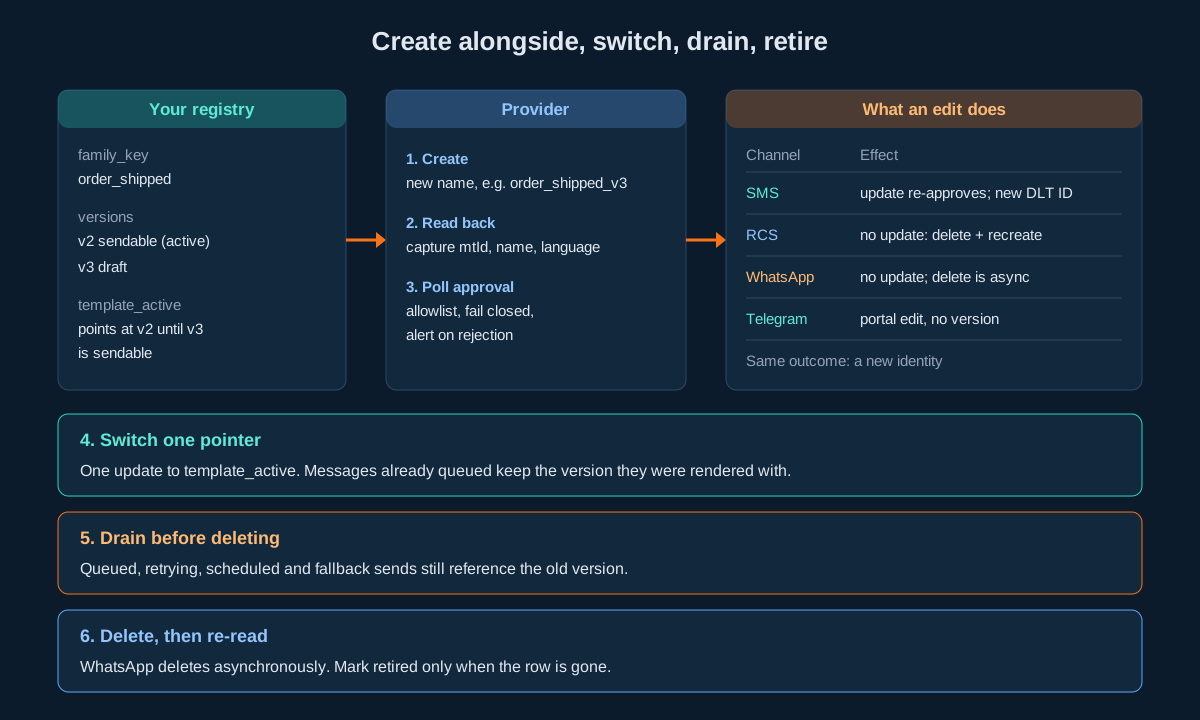
Step six is where most outages come from. A scheduled SMS campaign or a delayed WhatsApp send created last week still references the old template. Delete that template and those sends fail at dispatch time, often at night. Scheduled SMS campaigns cannot be read back with their body or template, as covered in the campaign splitting guide, so record the template version on your own side when you schedule.
Ten Template Mistakes That Reach Production
- One substitution function for every channel.
{#numeric#},[otp],{{1}}and{otp}need four patterns. A shared function leaves literal placeholders in three of them. - Keying on the name you submitted. WhatsApp returns
test1forTest1. The first lookup after create fails, and a retry creates a duplicate. - Treating “Accepted for processing.” as approval. RCS and WhatsApp create calls queue the template. Sending against it immediately fails.
- Checking only one WhatsApp approval field.
whatsAppStatusandsystemStatusare independent. Both must clear. - Updating a live SMS template in place.
SMSApi/template/updateputs the template back into approval. Create a new one and switch. - Deleting the old version on switch day. Scheduled sends and retries still reference it. Drain first.
- Regex replace with customer data.
Rs $100becomesRs 0in PHP,SAVE$$becomesSAVE$in JavaScript, and Java throws. Tokenize. - Formatting amounts inside a
{#numeric#}slot.1,299.00fails a digits-only tag. Put separators in the fixed text. - Nesting
customParamsas an object. It is a JSON string inside themsgJSON string. An object where a string is expected sends placeholders unrendered or fails the send. - Binding the Telegram
getresponse to an object type. On errortemplateis[], and the deserialiser throws before you can readreason.
Decision Matrix
| Situation | SMS | RCS | Telegram | |
|---|---|---|---|---|
| Change wording of a live template | Register new DLT body, create new, switch | Create _vN, wait for Enabled, switch | Create _vN, wait for both approvals, switch | Edit in portal; snapshot bodies on send |
| Add a variable | New DLT registration with the right tag | New template with [new_name] | New template, new {{n}}, new bodySample | Edit in portal |
| Fix a typo only | Still a new DLT body and ID | Recreate | Recreate | Portal edit |
| Find the id after create | Read all, match body, newest lastUpdated | List by botId, match name | Read, match lower-cased name plus language | List, match name, then get |
| Check before sending | SMSApi/validateTemplate on the finished text | Status integer maps to Enabled | Both approval fields | Present in action=list |
| Where values go on send | Rendered into msg | customParams JSON string | Rendered into msg | Rendered into text |
| Remove a template | SMSApi/template/delete by id | RCSApi/template/delete by name | DELETE with name and language | Portal |
| Confirm removal | Response is synchronous | Re-list | Re-read after a delay | Absent from list |
| Length limit to enforce | Part count; up to 255 parts | Card field limits | Header and footer 60 characters | 4096 text, 1024 caption |
| Multi-language | One DLT template per language body | One template per language | Same name, different language | One template per language |
Pre-Launch Checklist
Registry and identity
- Every logical template has a
family_keyyou own, independent of any provider name - Provider identifiers stored as text, including
mtId,dltTemplateIdandtemplateId - WhatsApp names stored lower-cased; comparisons are case-insensitive on RCS categories and WhatsApp names
placeholder_syntaxstored per version and used to pick the rendererbody_snapshottaken from the provider read, not from your draftapproval_rawstored beside the normalised state- Active version held in a pointer table, switched in one update
- Every outbound row references the template version it was rendered from
- Versioned provider names (
_v2,_v3) on RCS and WhatsApp; no name reused after delete
Rendering and validation
- One placeholder pattern per channel, anchored exactly
- Output built by concatenating pieces; no regex replace with a value string
- Count mismatches between values and placeholders raise an error
- DLT values checked against their tag before render
- Amount separators and currency marks in fixed text, digits only in
{#numeric#} - Adjacent DLT placeholders only where both are
{#alphanumeric#} - Finished SMS text checked with
SMSApi/validateTemplateagainst thedltTemplateIdand sender ID you will use - WhatsApp positions indexed from one
- RCS
customParamskeyed without brackets and encoded as a JSON string - Telegram rendered length checked against 4096 or 1024 depending on
msgType - Test values include
$,$$,$&, backslash, a URL, a 40-character name and an empty string
Lifecycle and operations
- Every create followed by a read that captures identity
- Approval polled with back-off; rejections alert a human
- Unknown approval values fail closed
- Every delete followed by a re-read
- No template deleted while a queued, retrying, scheduled or fallback send references it
- Responses parsed loosely, branched on the
statusstring, typed only on success apikeyheader used on every call; no passwords in query strings- Template read calls cached; they return whole accounts and have no filter on SMS
- A nightly job re-reads every active template and alerts if one has disappeared or changed state
- DLT migration from
{#var#}to typed tags tracked per template, with the new DLT Template IDs recorded
Unspecified Behaviour and How to Code Around It
A handful of template behaviours are not pinned down by anything you can read before you integrate. Each item below gives the choice that stays correct whichever way the behaviour turns out, and none of them requires waiting for an answer.
One. Find a new SMS template by its exact body and the newest lastUpdated. The create call returns no mtId and the read call has no filter. Read the full list, compare the template field byte for byte with what you submitted, and if several rows match, take the highest lastUpdated. Store the mtId you find. If no row matches, the platform normalised your text; stop and inspect rather than retrying the create.
Two. Only send against an SMS template whose dltTemplateId is populated and whose status is ENABLED. The create call accepts only a body, so the DLT ID arrives on the row by some later step. A template without a DLT ID cannot pass operator scrubbing, whatever its local status says. Gate on both fields together.
Three. Build the RCS status mapping from observation and fail closed. The list row carries an integer, and the portal names five states. Record the integer you see on a template the portal shows as Enabled, add it to your allowlist, and treat every other integer as not sendable. A new integer then blocks sends instead of letting them through.
Four. Populate the WhatsApp approval allowlist from a template you have watched go live. The samples show pending for both fields. Note the pair of values on your first approved template and allow exactly that pair, lower-cased. When a template sits in an unfamiliar combination, it stays unsendable and approval_raw shows you why.
Five. Never reuse a WhatsApp name and language pair. WhatsApp deletion completes asynchronously, and recreating a deleted name while the delete is in flight is a race you do not need to run. Versioned names make the question irrelevant: _v4 never collides with a _v3 that is still being removed.
Six. Never reuse a deleted RCS template name either. Deleted RCS templates cannot be recovered, and whether their names are released for reuse is not something to depend on. Versioned names cost nothing and remove the dependency.
Seven. Snapshot the Telegram body you rendered, on every send. A portal edit may or may not keep the same templateId. Storing the body you actually sent next to the message row means a later edit cannot change what your records say was delivered.
Eight. Key RCS customParams on the placeholder name without brackets, and prove it with one send to your own handset. The template holds [name]; the published payload keys look like custom_var and amount. Send one message with every variable set to a distinctive value and check the handset. One test settles the mapping for every template of that type.
Nine. Send WhatsApp msg as the approved body with every {{n}} substituted, and nothing else changed. Whether the platform matches msg against the approved body or builds the message from the values it extracts, a body identical to the approved one apart from the variables is correct under both. Do not trim, re-wrap or add a signature.
Ten. Compare template names and categories case-insensitively on RCS and WhatsApp. Both return values in a different case from the one submitted. A case-insensitive comparison is correct whether the flip is deliberate normalisation or incidental.
Eleven. Treat any SMS template status other than ENABLED as not sendable. Other values may appear, but only ENABLED appears in the samples. An allowlist of one is safe no matter how many other states turn up.
Twelve. Parse every template error response loosely. Most template endpoints publish only a success sample. Across the rest of the platform, error bodies either drop keys, flip objects to empty arrays or keep their shape. The two-stage parse from the envelopes section is correct under all three, so it needs no knowledge of which one a given endpoint uses.
FAQs
Can I use one template across SMS, RCS, WhatsApp and Telegram?
Not at the provider level. Each channel stores its own template with its own placeholder syntax, identity and approval. You can have one logical template in your own registry that maps to four provider templates, which is the design recommended above.
What is the difference between {#var#} and {#numeric#}?{#var#} is the legacy untyped DLT placeholder. {#numeric#} is one of six typed tags introduced by the TRAI direction of 18 November 2025. A typed tag tells operators what the value must look like, and messages whose values do not match are rejected once enforcement is fully on.
Does editing a DLT template change its DLT Template ID?
Yes, when the change is registered on the DLT portal. The migration guidance for variable tags says the portal issues a new Template ID for the updated template, and it must be updated in your account and in any application that sends through the API.
Is there an update endpoint for RCS or WhatsApp templates?
No. Both families offer create, read and delete. To change a template, create a new one under a versioned name, wait for approval, switch your senders, then delete the old one.
Why does SMSApi/template/create not return a template ID?
The response confirms that the template was created and given for approval, and carries no identifier. Read the list afterwards and match on the exact body to find the mtId.
How do I know when a WhatsApp template is approved?
Read it with a GET on WAApi/template and check both whatsAppStatus and systemStatus. Both must report approval before you send.
What does “Accepted for processing.” mean?
The request was queued. On RCS and WhatsApp create it means the template is waiting for review. On WhatsApp delete it means deletion will complete later. In both cases, re-read to see the outcome.
Where do variable values go when sending an RCS template?
In customParams, a JSON string inside the msg JSON string, next to templateCode, which is the template’s name.
Can I create Telegram templates through the API?
No. rest/tg/v1/templates offers list and get only. Create and edit Telegram templates in the portal, then read them over the API to prefill a send.
Why does my PHP template renderer turn Rs $100 into Rs 0?preg_replace reads $10 in the replacement as a back-reference to group ten, which does not exist, so it is replaced with nothing. Use preg_replace_callback or build the string from pieces.
Should I validate the template or the finished message?
The finished message. SMSApi/validateTemplate accepts any text; passing the placeholder skeleton only proves the template exists, while passing the rendered text proves the message you are about to send will match.
Why does the validation response spell senderId differently from the request?
The request parameter is senderid and the response field is senderId. Use separate request and response types.
Do WhatsApp template names keep the case I submit?
No. A name submitted as Test1 reads back as test1. Use lower-case snake case names from the start.
How should I handle a template that disappears from the Telegram list?
Treat it as disabled or removed: mark the version not sendable, alert, and fall back to the next version or channel. Presence in action=list is the only availability signal Telegram gives.
Lets Build
Building a sender that has to work across SMS, RCS, WhatsApp and Telegram? Try the API in the sandbox before you register a single template, or talk to our team about template migration to DLT variable tags.