Table of Contents
- The Short Answer
- TL;DR
- Four Template Types and What Each One Is For
- The Limits That Actually Bind
- What the Platform Hands Back
- Your Own Card Model: Store Intent, Not Wire JSON
- Counting Characters the Way the Limit Counts
- Template Names Are Your Version Numbers
- Variables Across Titles, Buttons and URLs
- Postbacks as a Tiny Grammar
- The Media Pipeline: Ratios, Sizes and Thumbnails
- Carousels: Order, Height and Truncation
- The Approval Lifecycle and the Integer Status
- One Model, One Fallback Text
- Working Code: Validator, Read-Back Parser and Postback Matcher
- Four Traps in Four Languages
- Decision Matrix: Card, Carousel, Media or Text
- From Model to First Send in Seven Steps
- Pre-Submit Checklist
- Unspecified Behaviour and How to Code Around It
- FAQs
The Short Answer
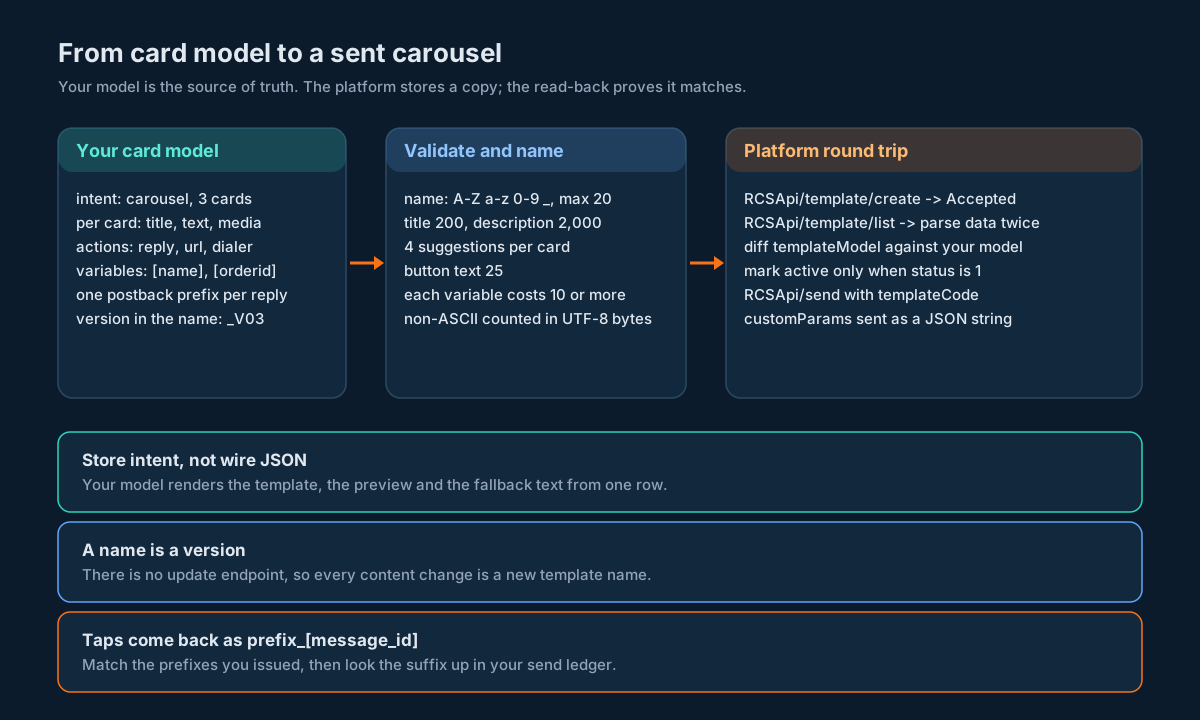
Treat every RCS rich card and carousel as a record in your own system, not as JSON you hand-craft for each campaign. Keep one card model (titles, descriptions, media, buttons, variables, postback prefixes), validate it against the platform’s limits before you submit, give each version its own template name, create it with RCSApi/template/create, read it back with RCSApi/template/list and diff what was stored against what you meant, and only send with RCSApi/send once the template’s status reads 1. When a button is tapped, the postback comes back as your prefix plus a _[message_id] suffix, so match it against the prefixes you issued and look the suffix up in your send ledger.
The limits that catch people are small and easy to check in code: a template name of up to 20 letters, digits or underscores; titles up to 200 characters; descriptions up to 2,000; up to 4 suggestions per card and 10 cards per carousel; button text up to 25 characters; and every variable costing 10 characters of the field it sits in. Count non-ASCII text by UTF-8 bytes and you’ll never be surprised by an emoji.
TL;DR
- SMSGatewayCenter RCS supports four template types: Text Message, Rich Card Stand Alone, Rich Card Carousel and Media. The API names three of them as
text_message,rich_cardandcarousel. - Every RCS send references an approved template by name.
RCSApi/sendtakescontentMessage.templateMessage.templateCode, optionalcustomParamsandttl. The card content itself lives in the template. RCSApi/template/listreturns each template with adatafield that’s a JSON string. Parse it a second time to gettemplateModel, which holdsstandAlonefor a rich card orcarouselListfor a carousel.- There’s no update endpoint, only create, list and delete. A content change is a new template with a new name, so put the version in the name and keep it under 20 characters.
- Create replies “Accepted for processing.” with the template name and no identifier. Confirm by reading it back.
customParamsis a JSON string inside themsgJSON, not a nested object. Let a JSON library encode it.- Postbacks always end in
_[message_id], filled in at send time. Design the editable part as a short code you issued (P01,P02) and keep the meaning in your database. - Budget text by UTF-8 bytes and count each
[variable]as at least 10 characters. Check again at send time with the real values. - Render the fallback text from the same model, so the SMS version never drifts from the card.
Four Template Types and What Each One Is For
Every RCS message on SMSGatewayCenter goes out from a template, and every template belongs to one bot. The template also has to match that bot’s message type: Promotional, OTP, Transactional or Multi-Use. You pick one of four content types when you create it, as the RCS template types guide lists:
| Template type | What it holds | Limits | API type |
|---|---|---|---|
| Text Message | Plain text with optional suggested replies or action buttons | Up to 2,500 characters, up to 11 suggestions | text_message |
| Rich Card Stand Alone | One card: image, video or PDF, a title, a description and buttons | Title 200, description 2,000, up to 4 suggestions | rich_card |
| Rich Card Carousel | Several cards the recipient swipes through, each with its own media, title, description and buttons | Up to 10 cards, each with the card limits | carousel |
| Media | One file (image, audio, video or PDF) with body text above or below it | Body 2,000 characters, file up to 100 MB | not named on the create page |
The last column matters more than it looks. The Create RCS Template API names text_message, rich_card and carousel as supported type values, and shows a full sample only for text_message. So in practice you have two ways to make a card: build it in the portal under RCS, RCS Templates, or create it through the API using the field names you see when the platform reads a card back. Both end up in the same place, and both are read back the same way, which is what the rest of this guide leans on.
A practical way to think about the four:
- Text Message is for anything that’s mostly words: OTPs, alerts, short confirmations with one or two reply buttons.
- Rich Card is one thing with a picture and a call to action: an order confirmation with a “Track” button, a single offer, a boarding reminder.
- Carousel is a short list of comparable things: three plans, five products, a trip with one card per leg.
- Media is a file that matters on its own: an invoice PDF, a short video, an audio clip.
If you’re coming from SMS, the RCS Messaging API reference walks through bots, send methods, delivery reports and the inbox. This guide picks up where that one stops: what to do with the card content itself once you have more than a handful of templates.
The Limits That Actually Bind
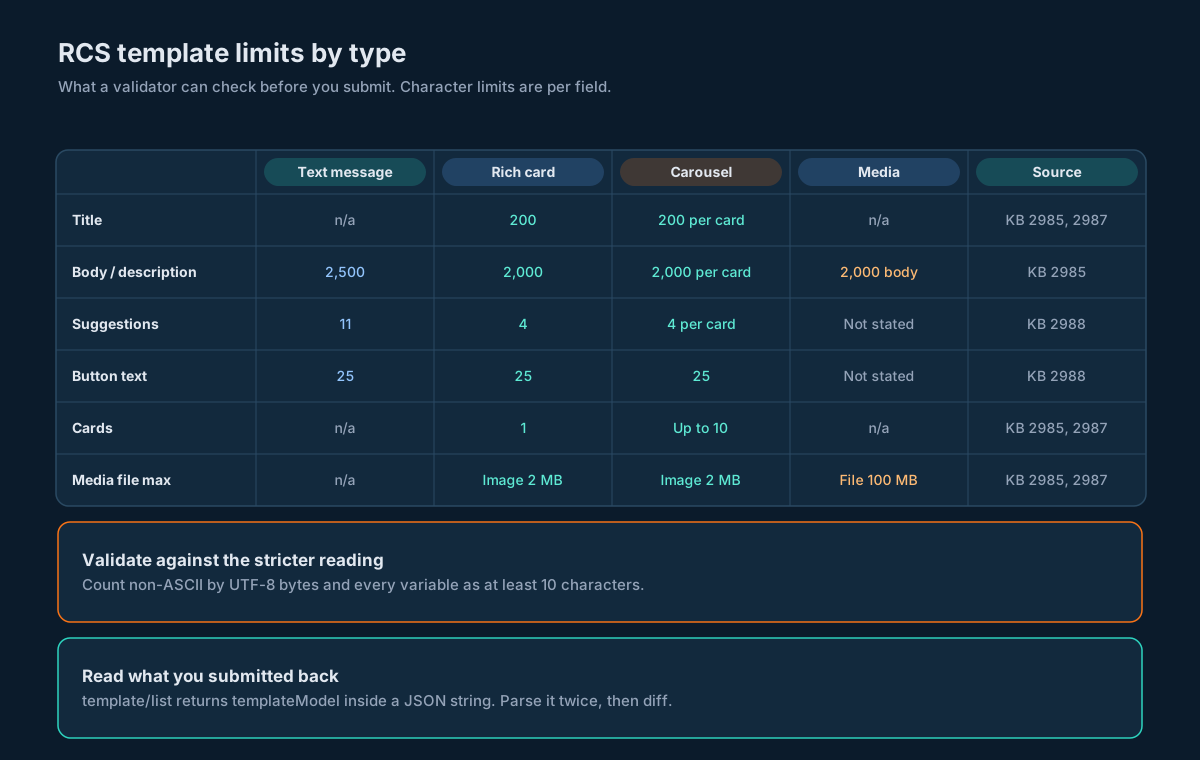
Here’s every limit that a validator can check before you submit, pulled from the rich card layout and media requirements, the suggestions and buttons guide and the template creation guide.
| What | Limit | Notes |
|---|---|---|
| Template name | Up to 20 characters, letters, digits and underscores only | No spaces, no special characters |
| Text message body | 2,500 characters | |
| Card title | 200 characters | Applies to every card in a carousel |
| Card description | 2,000 characters | Same |
| Media template body | 2,000 characters | |
| Suggestions on a text message | 11 | |
| Suggestions per rich card or carousel card | 4 | |
| Button text | 25 characters | |
| URL in a URL button | 2,048 characters | |
| Cards in a carousel | Up to 10 | |
| Each variable | Uses 10 characters of the field’s limit | Applies in text, buttons, postbacks and URLs |
| Card image | JPEG, JPG, PNG, GIF, up to 2 MB | |
| Card video | Video up to 10 MB, plus a thumbnail (JPEG, JPG or PNG) up to 100 KB, about 40 KB recommended | |
| Card PDF | PDF only, up to 100 MB | |
| Media template file | JPEG, JPG, PNG, GIF, MP3, MP4, PDF, MPEG, up to 100 MB | |
| RCS Media Library upload | Images, video, audio, PDF and Word, up to 10 MB each | Stricter than the card PDF and media template limits |
| Vertical card, short media | 3:1 image, ideally 1440 x 480 px | The form shows the exact ratio for other combinations |
One catch before you turn this into code: the Media Library cap is 10 MB while card PDFs and media template files allow 100 MB. If your pipeline uploads through the library, the 10 MB cap is the one you’ll hit, so use it. And Google’s own rich cards guide recommends a 7:2 ratio for short vertical media, while the platform’s form asks for 3:1. Crop to what the form asks for, because that’s what accepts or rejects your upload.
What the Platform Hands Back
The fastest way to understand the card shape is to look at what RCSApi/template/list returns. It’s a GET with userid, credentials and botId, and each row looks like this (the carousel row from the published sample):
{
  "data": "{\"templateModel\":{\"name\":\"Flight_Booking\",\"type\":\"carousel\",\"height\":\"SHORT_HEIGHT\",\"width\":\"SMALL_WIDTH\",\"botId\":\"YOUR_BOT_ID\",\"carouselList\":[{\"cardTitle\":\"Your Trip is Confirmed\",\"cardDescription\":\"Mumbai to Dubai\",\"mediaUrl\":\"https://example.com/media/flight.jpg\",\"suggestions\":[{\"suggestionType\":\"reply\",\"displayText\":\"View QR\",\"postback\":\"View QR_[message_id]\",\"preference\":1}]}],\"createdViaApi\":true}}",
  "creationTime": 1784978480698,
  "botName": "YourBot",
  "name": "Flight_Booking",
  "updationTime": 1784978480698,
  "category": "Promotional",
  "type": "carousel",
  "status": 1
}
A few things jump out once you’ve stared at it for a minute.
data is a string, not an object. You parse the response, then parse data again, and only then do you reach templateModel. Forget the second parse and every field you look for is undefined.
The card fields are consistent across the two card types. A carousel keeps its cards in carouselList; a rich card keeps its single card in standAlone. Each card has cardTitle, cardDescription, mediaUrl and a suggestions array, and each suggestion has suggestionType, displayText, postback and preference. Layout sits on the model: height (SHORT_HEIGHT, MEDIUM_HEIGHT in the samples), width on carousels (SMALL_WIDTH in the sample) and orientation on rich cards (VERTICAL in the sample).
creationTime and updationTime are epoch milliseconds. 1784978480698 is 2026-07-25 11:21:20 UTC, which is 16:51:20 in India. Thirteen digits fit comfortably in a JavaScript number or a Java long, so no special handling is needed there.
status is an integer, and the list page says 1 means active. category comes back as Promotional, while the create sample sends TRANSACTIONAL. Compare categories case-insensitively.
name is the value you pass as templateCode when you send. That’s the only link between the template you designed and the message that goes out.
Your Own Card Model: Store Intent, Not Wire JSON
The tempting approach is to keep a folder of template JSON and copy it into each create call. It works for three templates. By thirty you’ve got near-duplicates with slightly different button labels, no idea which one is live, and a fallback SMS that says something the card no longer says.
The fix is to keep a small model in your own database and generate everything else from it: the create payload, the preview, the fallback text and the postback map. Here’s a shape that works:
CREATE TABLE rcs_template (
  template_name   TEXT PRIMARY KEY,          -- the platform name, includes the version
  family          TEXT NOT NULL,             -- e.g. 'FLTCONF', shared by all versions
  version         INTEGER NOT NULL,
  bot_id          TEXT NOT NULL,
  kind            TEXT NOT NULL,             -- 'text_message' | 'rich_card' | 'carousel' | 'media'
  category        TEXT NOT NULL,             -- must match the bot's use case
  layout          TEXT NOT NULL,             -- JSON: orientation, height, width, ratio
  body            TEXT,                      -- text_message body, NULL for cards
  fallback_text   TEXT,                      -- rendered from the model, stored for audit
  state           TEXT NOT NULL,             -- 'draft' | 'submitted' | 'active' | 'retired'
  platform_status INTEGER,                   -- last integer read from template/list
  submitted_at    TIMESTAMPTZ,
  activated_at    TIMESTAMPTZ,
  UNIQUE (family, version)
);

CREATE TABLE rcs_card (
  template_name TEXT NOT NULL REFERENCES rcs_template(template_name),
  position      INTEGER NOT NULL,            -- 0 for a rich card, 0..9 for a carousel
  title         TEXT NOT NULL DEFAULT '',
  description   TEXT NOT NULL DEFAULT '',
  media_asset   TEXT,                        -- your asset id, not a URL you typed
  PRIMARY KEY (template_name, position)
);

CREATE TABLE rcs_suggestion (
  template_name TEXT NOT NULL,
  position      INTEGER NOT NULL,            -- card position, or -1 for a text message
  slot          INTEGER NOT NULL,            -- 0..3 on a card, 0..10 on a text message
  kind          TEXT NOT NULL,               -- 'reply' | 'url' | 'dialer' | ...
  label         TEXT NOT NULL,               -- max 25 after the variable rule
  prefix        TEXT,                        -- postback prefix you issued, reply buttons
  url           TEXT,
  action        TEXT,                        -- what the tap means in your system
  PRIMARY KEY (template_name, position, slot),
  UNIQUE (prefix)
);
The family and version pair turns “which flight confirmation is live?” into a query. The platform only knows names; your table knows that FLTCONF_V03 replaced FLTCONF_V02 and when.
rcs_suggestion.prefix is globally unique. It’s the short code that comes back when someone taps a reply button, so it has to point at exactly one template, card and action. Keeping the meaning in action means the postback itself can stay short and boring.
state is yours and platform_status is theirs. You move a template to active only after a read-back shows status 1 and the stored content matches your model. Until then it’s submitted, and nothing sends it.
If you already keep templates for other channels, this sits next to them rather than replacing them, and the send itself still lands in your outbound message table with the template name and version on the row. The template management comparison across four channels covers the cross-channel side; this table is the RCS-specific detail that a generic template row doesn’t have room for.
Counting Characters the Way the Limit Counts
“200 characters” sounds unambiguous until someone puts an emoji in a title. Google’s rich cards guide is blunt about it: special characters, emoji and multi-byte character sets count as two to four characters or more. Your validator has to pick a counting rule, and the safe one is UTF-8 bytes.
Here’s why that rule works. For plain English text, UTF-8 bytes and characters are the same number, so you lose nothing. For an emoji, UTF-8 uses four bytes, which matches the top of Google’s range. For Hindi, each Devanagari code point is three bytes, so a six-letter greeting like “namaste” written in Devanagari costs 18. If the platform actually counts code points, you’ve been stricter than you needed to be and the card still goes through. If it counts something closer to bytes, you were right. Either way nothing gets rejected at submit time.
The numbers are worth seeing once, because every language gets them different:
| Text | Code points | UTF-16 units (Java length(), JavaScript .length) | UTF-8 bytes |
|---|---|---|---|
View QR | 7 | 7 | 7 |
| Party popper emoji + ” Offer” | 7 | 8 | 10 |
| “namaste” in Devanagari | 6 | 6 | 18 |
Then add the variable rule. The variables guide and the buttons guide both say each variable uses 10 characters of the field’s limit. A short placeholder like [name] is six characters on the page but costs 10. A long one like [custom_param_1] is 16 on the page. Count it as 16, not 10, and you’re safe whichever way the platform reads it. So the template-time cost of a field is: UTF-8 bytes of the literal text, plus the larger of the placeholder’s length and 10 for each variable.
That’s only half the check. A button labelled Hi [name] costs 13 at template time and passes. At send time, a 20-character name turns it into a 23-character label, still fine, but a 30-character company name won’t be. The variables guide warns that a long value can make the message fail validation. So validate twice: once when the template is created, with the variable rule, and once per send, with the real values substituted.
Template Names Are Your Version Numbers
The RCS template family has three endpoints: create, list and delete. There’s no update. The portal has an Edit action, but your code can’t call it. So from your system’s point of view, a template’s content is fixed once you submit it. Changing a word means a new template.
That makes the name do two jobs: it’s the templateCode you send with, and it’s your version number. A naming scheme that fits the 20-character rule:
FAMILY_Vnn
FLTCONF_V03      (11 characters)
DIWALI26_V01     (12 characters)
PLANCMP_V12      (11 characters)
Keep the family to about 14 characters and you’ve got room for _V and two digits. Letters, digits and underscores only, so no hyphens, dots or spaces. Name it after the use case, which is also what the template creation guide suggests.
A rollout then looks like this:
- Create
FLTCONF_V04whileFLTCONF_V03keeps sending. - Poll
RCSApi/template/listuntilFLTCONF_V04shows status1and itstemplateModelmatches your model. - Flip a pointer in your database from V03 to V04. Sends pick up the new
templateCodefrom that pointer, never from a hard-coded string. - Leave V03 alone for as long as taps on old messages might still arrive, then retire it.
Step 4 is easy to skip. A recipient can tap a button on yesterday’s carousel today. If you deleted V03 and reused its postback prefixes in V04, that tap now means the wrong thing. Keep prefixes unique across versions (the UNIQUE (prefix) constraint above does this) and retire old versions on a schedule rather than on deploy.
Deleting is permanent. RCSApi/template/delete takes botId and templateName, and the statuses guide says deleted templates can’t be recovered. Run deletes from a reviewed list, not from a loop that guesses.
Variables Across Titles, Buttons and URLs
Variables work in text messages, card titles, card descriptions, suggestion text, the editable part of postbacks, and URLs. The portal inserts named ones like [name], [otp], [orderid], [amount], [date] and [tracking_id], plus numbered custom fields such as [custom_param_1]. The create API sample uses the same square-bracket style: "Hello [name], your OTP is [otp]."
At send time you fill them through customParams, and this is where people trip. Per the RCS API guide, customParams is a JSON string inside the msg JSON, not a nested object:
{
  "contentMessage": {
    "templateMessage": {
      "templateCode": "WELCOME_TEMPLATE",
      "customParams": "{\"custom_var\":\"John\",\"amount\":\"999\"}"
    }
  },
  "ttl": "86400s"
}
Build it with a JSON library: serialise the parameter map to a string, put that string in the customParams field, then serialise the whole msg. Hand-escaping quotes in a shell script is how a stray apostrophe in someone’s name takes down a campaign.
Treat the variable set as part of the template. Your model can extract every [variable] from every field, so it can also refuse a send that’s missing one. That one check catches the most common card bug there is: a carousel goes out with a literal [orderid] in the third card’s URL because somebody added the variable in the portal and not in the code.
For URL buttons, keep the base fixed and put the variable at the end, as in https://yourdomain.com/offers/[custom_param_1]. That keeps the domain inspectable at review time and makes the click easy to attribute. If you track clicks through short links, the SMS click tracking guide covers the attribution side.
Postbacks as a Tiny Grammar
Every suggestion has a postback, and the platform appends a fixed _[message_id] suffix to whatever you type, filling it in at send time. You only edit the first part. The published samples show human-readable first parts, View QR_[message_id] and Learn More_[message_id], and they’ll work, but they’re a poor key. “Learn More” tells you nothing about which template or which card it came from.
Make the editable part a short code you issued, and keep its meaning in your database:
| Prefix | Template | Card | Action |
|---|---|---|---|
P01 | FLTCONF_V03 | 0 | show boarding QR |
P02 | FLTCONF_V03 | 1 | offer seat upgrade |
P03 | PLANCMP_V12 | 2 | choose the annual plan |
When a tap comes back as P02_ followed by the message identifier, you look up P02 and know the template, card and action, and you look up the suffix and know which send it was. Then stick to two rules:
- Match against prefixes you issued, longest first, followed by an underscore. Don’t split on the last underscore. You don’t control the format of whatever fills
[message_id], so treating it as opaque is the only parse that can’t break. - Never reuse a prefix. Not across cards, not across versions. A tap on an old message has to keep its old meaning.
Short uppercase codes also stay readable in a log line, which you’ll appreciate the first time you debug a tap.
Taps and replies show up in RCS Bot Incoming in the portal, and the API side is the RCS inbox endpoint, rest/rcs/v1/inbox, which you poll with botId, a date range, page and limit up to 200. The four-channel inbox guide covers polling and paging. For cards, the extra step is simple: run every inbound message through the prefix matcher. A match is a tap; anything else is free text from a person.
The Media Pipeline: Ratios, Sizes and Thumbnails
Most rejected cards are image problems, and almost all of them are preventable before upload.
Card layout has three settings in the portal: orientation (vertical or horizontal), media height (short or medium) and alignment (which side the image sits on in a horizontal card). The required aspect ratio depends on the combination, and the form shows the exact size for your selection. The one combination spelled out in writing is vertical plus short, which needs a 3:1 image, ideally 1440 x 480 pixels.
So build the pipeline around a ratio table you fill in from the form, not from memory:
| Orientation | Height | Ratio | Ideal size | Where it came from |
|---|---|---|---|---|
| Vertical | Short | 3:1 | 1440 x 480 | Rich card layout guide |
| Vertical | Medium | read from the form | read from the form | Portal template form |
| Horizontal | Short or Medium | read from the form | read from the form | Portal template form |
The pipeline itself is short:
- Crop to the exact ratio, then resize. Check it with integer arithmetic (
width * h == height * w), never with a float comparison. If the media doesn’t match the slot, Google’s guide says the client zooms and crops centrally, which is how a product photo loses its product. - Re-encode to the allowed type. Card images are JPEG, JPG, PNG or GIF. A WebP that a designer dropped in a folder needs converting, not renaming.
- Enforce the size cap after encoding. 2 MB for a card image, 10 MB for a card video, 100 KB for the video thumbnail with about 40 KB recommended. Measure the encoded file, not the source.
- Generate the thumbnail yourself for every video. It’s what shows while the video loads, and it’s what a failed download falls back to.
- Store the asset by your own id. The
rcs_card.media_assetcolumn holds your id; the URL or Media Library identifier the platform uses is a property of that asset. If you re-host an image, one row changes instead of every template that uses it.
PDFs deserve a caution. The platform accepts PDFs on cards (up to 100 MB) and in media templates, but Google’s guide notes that PDF in rich cards is currently available only in India on the Google Messages client. If your audience is all in India and on Google Messages, fine. If not, put the PDF behind a URL button on an image card instead.
The RCS Media Library lets you upload once and reuse across templates and campaigns, identified by a media ID or an identifier you choose. Use your asset id as that identifier and the mapping stays obvious. Remember its 10 MB per-file cap.
Carousels: Order, Height and Truncation
A carousel is the card type where the content model pays off most, because it’s the one where small inconsistencies are visible.
Cards are scaled to the tallest one. Google’s guide says every card in a carousel is scaled to match the height of the tallest card, up to a maximum (542 DP for small width, 592 DP for medium). One card with a long description makes every other card taller and emptier. Write carousel cards to a shared length budget, not just a shared limit.
Overflow is truncated in a fixed order. When content exceeds the maximum height, the client cuts in this order: description to one line, title to one line, suggestions removed, description removed, title removed. Google also provides an expandable full-screen view for carousel cards, so the text isn’t lost, but the first impression is the truncated one. Put the deciding fact in the title.
Carousels are vertical cards only. Google’s guide is explicit about it. Don’t offer horizontal layout in your carousel editor.
The first card should be the best option. That’s Google’s advice too, and it’s easy to encode: order cards by a position column, and make the recommended plan or the next flight leg position 0.
Use two to ten cards. The platform allows up to 10. A one-card carousel is just a rich card with a swipe affordance that goes nowhere, so the validator refuses it and tells the author to pick Rich Card instead.
Keep each card self-contained. Each card has its own media, title, description and up to four buttons. A button on card 3 that only makes sense after reading card 1 will be tapped by someone who never saw card 1.
Width matters too. Google lists two fixed carousel widths, small at 180 DP and medium at 296 DP. The published platform sample shows SMALL_WIDTH. At 180 DP, a 25-character button label is already tight, so write carousel buttons shorter than the limit.
The Approval Lifecycle and the Integer Status
A new template starts as Pending and is usable for live sends only once it’s Enabled. The template statuses guide lists six states: Pending, Enabled, Rejected, Paused, Disabled and Deleted. The list API reports status as an integer and says 1 means active.
That gives you a clean rule: a template is sendable when the list call shows status equal to the integer 1, and nothing else counts. Not the string "1", not a missing field, not a number you’ve never seen. When a status you don’t recognise shows up, the template waits and someone gets an alert. The cost of being wrong in that direction is a delayed campaign; the cost of being wrong in the other direction is a live send against a template that isn’t approved.
The create call doesn’t help you here. It replies like this:
{
  "reason": "Accepted for processing.",
  "templateName": "my_text_template",
  "status": "success",
  "statusCode": "200"
}
“Accepted” means received, not approved, and there’s no identifier to poll. So your state machine moves draft to submitted on that reply, then polls RCSApi/template/list for the bot, finds the row by name, diffs its templateModel against your model, and only then moves to active. If the portal’s status looks stale, the statuses guide mentions a Sync templates action that refreshes approval status from the RCS network.
The diff step catches things a status never will: a title trimmed by an editor, a suggestion dropped, a postback prefix typed differently in the portal. If the diff isn’t empty, the template stays submitted and the difference goes to whoever owns the content. It’s the same idea as a contract test against the messaging API, pointed at your own content instead of the response shape.
Sandbox accounts have one extra wrinkle. Users on an RCS Sandbox Account can’t create templates; a reseller shares templates with them by setting Allow Sandbox on each one, as the sandbox sharing guide explains. Build your test suite on those shared templates and the same read-back code works in both places.
One Model, One Fallback Text
Not every phone that gets your carousel can show it, and not every send should wait for RCS. The create payload has a fallbackText field (empty in the published sample), and if you run fallback to SMS yourself, you need a text version of every card anyway.
Generate it from the same model, every time:
- For a rich card: title, then description, then any URL buttons as “label: url”.
- For a carousel: one numbered line per card in position order, each with its title and description, with URL buttons indented under the card they belong to.
- Reply buttons don’t translate. A reply chip needs a tap; SMS has no tap. Drop them, or turn the most important one into an instruction (“Reply UPGRADE to add a seat”) only if your SMS inbound flow handles that keyword.
- Substitute variables with the same values you’re sending in
customParams.
Stored next to the template, that text is also the audit record of what the card said in words. When the card changes, the text changes, because both come from one row. If you’re designing the routing between channels, the multi-channel fallback design guide covers when to fall back and how to keep one message from turning into three. And remember that an SMS fallback in India still needs its own DLT-approved template; the RCS card’s wording doesn’t carry over.
Working Code: Validator, Read-Back Parser and Postback Matcher
Here’s the whole model in one Python module with no dependencies outside the standard library. It validates a template against the limits above, counts text the safe way, extracts variables, checks a send with real values, parses the list response (including the second parse of data), decides whether a template is sendable, diffs the stored copy against your model, builds the msg field for RCSApi/send, matches postbacks and renders fallback text.
It’s been run against the published template/list sample and a set of good and bad templates, and every assertion in the usage block below passes.
"""A small RCS card model: validate before submit, parse the read-back,
diff it against what you meant, and build the send payload."""
import json
import re
from dataclasses import dataclass, field
from typing import Optional

NAME_RE = re.compile(r"^[A-Za-z0-9_]{1,20}$")
VAR_RE = re.compile(r"\[[A-Za-z0-9_]+\]")
VAR_COST = 10  # each variable uses 10 characters of a field's limit

LIMITS = {
    "text": 2500, "title": 200, "description": 2000, "media_body": 2000,
    "button": 25, "url": 2048,
    "suggestions_text": 11, "suggestions_card": 4, "cards": 10,
}
MEDIA_MAX_BYTES = {"image": 2 * 1024 * 1024, "video": 10 * 1024 * 1024,
                   "thumbnail": 100 * 1024, "pdf": 100 * 1024 * 1024}
IMAGE_TYPES = {"jpeg", "jpg", "png", "gif"}


@dataclass
class Suggestion:
    kind: str                 # "reply", "url", "dialer", ...
    text: str                 # button label, max 25
    prefix: Optional[str] = None   # postback prefix you issue, e.g. "P07"
    url: Optional[str] = None


@dataclass
class Media:
    kind: str                 # "image", "video", "pdf"
    ext: str
    size_bytes: int
    width: int = 0
    height: int = 0
    thumb_bytes: int = 0


@dataclass
class Card:
    title: str
    description: str
    media: Optional[Media] = None
    suggestions: list = field(default_factory=list)


@dataclass
class Template:
    name: str
    kind: str                 # "text_message", "rich_card", "carousel"
    category: str             # must match the bot's use case
    text: str = ""
    cards: list = field(default_factory=list)
    suggestions: list = field(default_factory=list)  # text_message only
    ratio: Optional[tuple] = None  # (w, h) the portal form asks for


def cost(s: str) -> int:
    """Template-time cost: UTF-8 bytes, with every [variable] counted as
    at least VAR_COST. For plain ASCII this is just the character count."""
    total, pos = 0, 0
    for m in VAR_RE.finditer(s):
        total += len(s[pos:m.start()].encode("utf-8"))
        total += max(len(m.group(0)), VAR_COST)
        pos = m.end()
    return total + len(s[pos:].encode("utf-8"))


def rendered_cost(s: str, values: dict) -> int:
    """Send-time cost: the text after substitution, in UTF-8 bytes."""
    out = VAR_RE.sub(lambda m: str(values.get(m.group(0)[1:-1], m.group(0))), s)
    return len(out.encode("utf-8"))


def _check_text(errs, where, s, limit):
    if cost(s) > limit:
        errs.append(f"{where}: cost {cost(s)} > {limit}")


def _check_suggestions(errs, where, sugs, limit, issued):
    if len(sugs) > limit:
        errs.append(f"{where}: {len(sugs)} suggestions > {limit}")
    for i, sg in enumerate(sugs):
        _check_text(errs, f"{where}.s{i}.text", sg.text, LIMITS["button"])
        if sg.kind == "reply":
            if not sg.prefix or not re.fullmatch(r"[A-Z][A-Z0-9]{1,7}", sg.prefix):
                errs.append(f"{where}.s{i}: reply needs a prefix like P07")
            elif sg.prefix in issued:
                errs.append(f"{where}.s{i}: prefix {sg.prefix} reused")
            else:
                issued.add(sg.prefix)
        if sg.kind == "url" and (not sg.url or cost(sg.url) > LIMITS["url"]):
            errs.append(f"{where}.s{i}: url missing or too long")


def _check_media(errs, where, md, ratio):
    if md is None:
        return
    cap = MEDIA_MAX_BYTES.get(md.kind)
    if cap is None:
        errs.append(f"{where}: unknown media kind {md.kind}")
        return
    if md.size_bytes > cap:
        errs.append(f"{where}: {md.size_bytes} bytes > {cap}")
    if md.kind == "image" and md.ext.lower() not in IMAGE_TYPES:
        errs.append(f"{where}: image type {md.ext} not allowed")
    if md.kind == "video" and not (0 < md.thumb_bytes <= MEDIA_MAX_BYTES["thumbnail"]):
        errs.append(f"{where}: video needs a thumbnail up to 100 KB")
    if md.kind == "image" and ratio:
        w, h = ratio
        if md.width * h != md.height * w:
            errs.append(f"{where}: {md.width}x{md.height} is not {w}:{h}")


def validate(t: Template) -> list:
    errs, issued = [], set()
    if not NAME_RE.match(t.name):
        errs.append("name: letters, digits, underscore, max 20")
    if t.kind == "text_message":
        _check_text(errs, "text", t.text, LIMITS["text"])
        _check_suggestions(errs, "text", t.suggestions, LIMITS["suggestions_text"], issued)
    elif t.kind in ("rich_card", "carousel"):
        want = 1 if t.kind == "rich_card" else None
        n = len(t.cards)
        if want and n != 1:
            errs.append("rich_card: exactly one card")
        if t.kind == "carousel" and not (2 <= n <= LIMITS["cards"]):
            errs.append(f"carousel: {n} cards, use 2 to 10")
        for i, c in enumerate(t.cards):
            w = f"card{i}"
            if not (c.title or c.description or c.media):
                errs.append(f"{w}: needs media, a title or a description")
            _check_text(errs, f"{w}.title", c.title, LIMITS["title"])
            _check_text(errs, f"{w}.description", c.description, LIMITS["description"])
            _check_suggestions(errs, w, c.suggestions, LIMITS["suggestions_card"], issued)
            _check_media(errs, w, c.media, t.ratio)
    else:
        errs.append(f"kind {t.kind} not handled")
    return errs


def variables(t: Template) -> set:
    """Every [variable] the template uses, across all fields."""
    parts = [t.text] + [s.text for s in t.suggestions] + [s.url or "" for s in t.suggestions]
    for c in t.cards:
        parts += [c.title, c.description]
        parts += [s.text for s in c.suggestions] + [s.url or "" for s in c.suggestions]
    return {m.group(0)[1:-1] for p in parts for m in VAR_RE.finditer(p)}


def check_send(t: Template, values: dict) -> list:
    """Send-time checks: every variable filled, rendered fields in limits."""
    errs = [f"missing value for {v}" for v in sorted(variables(t) - set(values))]
    for i, c in enumerate(t.cards):
        for fld, lim in (("title", LIMITS["title"]), ("description", LIMITS["description"])):
            if rendered_cost(getattr(c, fld), values) > lim:
                errs.append(f"card{i}.{fld}: rendered value too long")
        for j, s in enumerate(c.suggestions):
            if rendered_cost(s.text, values) > LIMITS["button"]:
                errs.append(f"card{i}.s{j}: rendered button too long")
    if t.text and rendered_cost(t.text, values) > LIMITS["text"]:
        errs.append("text: rendered value too long")
    return errs


def parse_list(body: str) -> dict:
    """RCSApi/template/list: `data` is a JSON string holding templateModel."""
    out = {}
    for row in json.loads(body).get("templates", []):
        model = None
        try:
            model = json.loads(row.get("data") or "{}").get("templateModel")
        except (TypeError, ValueError):
            pass
        out[row.get("name")] = {
            "status": row.get("status"),
            "type": row.get("type"),
            "category": str(row.get("category", "")).lower(),
            "created_ms": row.get("creationTime"),
            "model": model,
        }
    return out


def sendable(row: Optional[dict]) -> bool:
    """Fail closed: only the observed active value counts."""
    return bool(row) and row["status"] == 1 and row["model"] is not None


def _strip_suffix(postback: str) -> str:
    return postback[:-len("_[message_id]")] if postback.endswith("_[message_id]") else postback


def diff(t: Template, row: dict) -> list:
    """Compare what the platform stored with what you meant to submit."""
    m, d = row.get("model") or {}, []
    if row.get("type") != t.kind:
        d.append(f"type {row.get('type')} != {t.kind}")
    if row.get("category") != t.category.lower():
        d.append(f"category {row.get('category')} != {t.category.lower()}")
    if t.kind == "rich_card":
        stored = [m.get("standAlone") or {}]
    elif t.kind == "carousel":
        stored = m.get("carouselList") or []
    else:
        stored = []
    if len(stored) != len(t.cards):
        d.append(f"cards {len(stored)} != {len(t.cards)}")
    for i, (c, s) in enumerate(zip(t.cards, stored)):
        if s.get("cardTitle") != c.title:
            d.append(f"card{i}.title differs")
        if s.get("cardDescription") != c.description:
            d.append(f"card{i}.description differs")
        sugs = s.get("suggestions") or []
        if len(sugs) != len(c.suggestions):
            d.append(f"card{i}: {len(sugs)} suggestions != {len(c.suggestions)}")
        for j, (mine, theirs) in enumerate(zip(c.suggestions, sugs)):
            if theirs.get("displayText") != mine.text:
                d.append(f"card{i}.s{j}.text differs")
            if mine.prefix and _strip_suffix(str(theirs.get("postback", ""))) != mine.prefix:
                d.append(f"card{i}.s{j}.postback prefix differs")
    return d


def send_msg(template_code: str, values: dict, ttl_s: int = 86400) -> str:
    """The `msg` field for RCSApi/send. customParams is a JSON *string*."""
    tm = {"templateCode": template_code}
    if values:
        tm["customParams"] = json.dumps({k: str(v) for k, v in values.items()})
    return json.dumps({"contentMessage": {"templateMessage": tm}, "ttl": f"{ttl_s}s"})


def match_postback(text: str, issued: dict):
    """issued maps prefix -> (template, card, action). Returns
    (prefix, suffix) only for a prefix you issued, else None."""
    for prefix in sorted(issued, key=len, reverse=True):
        head = prefix + "_"
        if text.startswith(head) and len(text) > len(head):
            return prefix, text[len(head):]
    return None


def fallback_text(t: Template, values: dict, limit: int = 1000) -> str:
    """One plain-text rendering of the same model for fallback."""
    sub = lambda s: VAR_RE.sub(lambda m: str(values.get(m.group(0)[1:-1], "")), s)
    lines = [sub(t.text)] if t.text else []
    for i, c in enumerate(t.cards, 1):
        head = f"{i}. {sub(c.title)}" if len(t.cards) > 1 else sub(c.title)
        lines.append(" - ".join(x for x in (head, sub(c.description)) if x.strip()))
        lines += [f"  {sub(s.text)}: {sub(s.url)}" for s in c.suggestions if s.kind == "url" and s.url]
    out = "\n".join(l for l in lines if l.strip())
    return out if len(out) <= limit else out[: limit - 3] + "..."
Using it looks like this. These lines are lifted from the test run, so the values are real:
img = Media("image", "jpg", 180_000, 1440, 480)
t = Template("FLTCONF_V03", "carousel", "Transactional", ratio=(3, 1), cards=[
    Card("Hi [name], your trip is confirmed", "Booking [orderid]. Mumbai to Dubai.", img,
         [Suggestion("reply", "View QR", "P01"),
          Suggestion("url", "Manage booking", url="https://example.com/b/[orderid]")]),
    Card("Add a seat upgrade", "Extra legroom from the next leg.", img,
         [Suggestion("reply", "Upgrade", "P02")]),
])
assert validate(t) == []
assert variables(t) == {"name", "orderid"}
assert check_send(t, {"name": "Asha"}) == ["missing value for orderid"]

assert cost("[name]") == 10              # a short variable still costs 10
assert cost("[custom_param_1]") == 16    # a long one costs its own length
assert cost("\U0001F389 Offer") == 10    # the emoji is 4 bytes

rows = parse_list(list_body)             # body of RCSApi/template/list
assert sendable(rows["TestSoftware"])    # status is the integer 1
assert not sendable({"status": "1", "model": {}})   # the string "1" fails closed

issued = {"P01": ("FLTCONF_V03", 0, "view_qr"), "P02": ("FLTCONF_V03", 1, "upgrade")}
assert match_postback("P01_6305583318236810379", issued) == ("P01", "6305583318236810379")
assert match_postback("Hi, is my order shipped?", issued) is None
And the fallback text it renders for that carousel with {"name": "Asha", "orderid": "ORD1042"}:
1. Hi Asha, your trip is confirmed - Booking ORD1042. Mumbai to Dubai.
  Manage booking: https://example.com/b/ORD1042
2. Add a seat upgrade - Extra legroom from the next leg.
A bad template shows what the validator reports. A carousel named Flight Booking v3! with one card, a 201-character title, a 3 MB WebP at 1200 x 500, five reply buttons with 26-character labels and a lowercase prefix gets errors for the name, the card count, the title, the suggestion count, the button length, the prefix, the file size, the image type and the ratio. Nine problems, found before anything leaves your network.
Notice two things in the code. sendable() compares status to the integer 1 and nothing else. And match_postback() tries the longest issued prefix first, so P012_... never gets read as P01 with a suffix of 2_....
Four Traps in Four Languages
Each of these is short, runs as written, and shows one mistake that’s easy to make with RCS cards. Credentials go in the apikey header with userid alongside, which works on every SMSGatewayCenter endpoint.
cURL and jq: customParams is a string inside a string
#!/usr/bin/env bash
# Trap: customParams is a JSON string inside the msg JSON. Let jq encode it.
set -euo pipefail
params=$(jq -nc --arg name "Asha" --arg orderid "ORD1042" \
  '{name: $name, orderid: $orderid}')
msg=$(jq -nc --arg code "FLTCONF_V03" --arg params "$params" \
  '{contentMessage: {templateMessage: {templateCode: $code, customParams: $params}}, ttl: "86400s"}')
echo "$msg"
[ "${DRY_RUN:-1}" = 1 ] && exit 0
curl --silent --request POST 'https://unify.smsgateway.center/RCSApi/send' \
  --header "apikey: ${SGC_APIKEY}" \
  --data-urlencode "userid=${SGC_USERID}" \
  --data-urlencode 'sendMethod=quick' \
  --data-urlencode 'msgType=text' \
  --data-urlencode 'format=json' \
  --data-urlencode "botId=${SGC_BOT_ID}" \
  --data-urlencode 'mobile=919999999999' \
  --data-urlencode "msg=${msg}" \
  --data-urlencode 'identifier=fltconf_v03_2026_10'
The script prints the msg it would send (set DRY_RUN=0 and the three environment variables to send for real). Run it and the customParams value comes out as "{\"name\":\"Asha\",\"orderid\":\"ORD1042\"}", a properly escaped string. Feed that value back through jq and you get the object {"name":"Asha","orderid":"ORD1042"}. jq’s --arg does the escaping, so an apostrophe or a quote in a name can’t break the payload.
Node.js: parse data twice, and don’t trust .length
// Trap: `data` is a JSON string. Parse it a second time, and count limits in
// UTF-8 bytes, not String.length (which counts UTF-16 code units).
export function models(listBody) {
  const out = new Map();
  for (const row of JSON.parse(listBody).templates ?? []) {
    let model = null;
    try { model = JSON.parse(row.data ?? "{}").templateModel ?? null; } catch { /* keep null */ }
    out.set(row.name, { status: row.status, type: row.type, model });
  }
  return out;
}
export const cost = (s) => Buffer.byteLength(s, "utf8");

const body = JSON.stringify({ templates: [{ name: "TestSoftware", type: "rich_card", status: 1,
  data: JSON.stringify({ templateModel: { standAlone: { cardTitle: "Enterprise SMS Gateway Software" } } }) }] });
const m = models(body).get("TestSoftware");
console.log(typeof JSON.parse(body).templates[0].data);       // "string"
console.log(m.model.standAlone.cardTitle);
console.log("\u{1F389}".length, cost("\u{1F389}"));            // 2 4
Output: string, then Enterprise SMS Gateway Software, then 2 4. The first line is the reminder that data arrives as text. The last line is the one that bites: JavaScript’s .length says the party popper emoji is 2 long, while it’s 4 bytes in UTF-8. Validate with Buffer.byteLength.
Java: String.length() counts UTF-16 units
import java.nio.charset.StandardCharsets;

// Trap: String.length() counts UTF-16 code units. Budget by UTF-8 bytes,
// and keep creationTime (epoch milliseconds) in a long.
public class CardCost {
    static int cost(String s) {
        return s.getBytes(StandardCharsets.UTF_8).length;
    }

    public static void main(String[] args) {
        String party = "\uD83C\uDF89 Offer";            // emoji + " Offer"
        String hindi = "\u0928\u092E\u0938\u094D\u0924\u0947";
        System.out.println(party.length() + " " + party.codePointCount(0, party.length()) + " " + cost(party));
        System.out.println(hindi.length() + " " + cost(hindi));
        long created = 1784978480698L;
        System.out.println(java.time.Instant.ofEpochMilli(created));
    }
}
Output: 8 7 10, then 6 18, then 2026-07-25T11:21:20.698Z. Same text, three different answers depending on what you count. length() gives 8, code points give 7, UTF-8 gives 10. For the Devanagari word, length() says 6 and UTF-8 says 18. Use the UTF-8 count for limits, and keep creationTime in a long.
Python: measure the value, not the serialised JSON
import json

title = "\U0001F389 Diwali offer for [name]"
wire = json.dumps({"cardTitle": title})          # ensure_ascii=True by default
print(len(title), len(title.encode("utf-8")))    # what you meant to measure
print(len(json.dumps(title)))                    # what you measure by mistake
print(json.loads(wire)["cardTitle"] == title)    # the wire form is still correct
Output: 25 28, then 38, then True. Python’s json.dumps escapes non-ASCII as \uXXXX by default, so measuring the serialised title gives 38 for a 25-character title. The wire form is still correct; it’s only the measurement that’s wrong. Count limits on the string before you serialise it.
Decision Matrix: Card, Carousel, Media or Text
| You’re sending | Use | Why | Watch out for |
|---|---|---|---|
| A one-time password | Text Message on an OTP bot | Words, not pictures; the bot’s use case must match | Keep the code in the text, not in an image |
| One order, booking or payment confirmation with one next step | Rich Card | One topic, one image, up to four buttons | A clear title; the deciding fact must survive truncation |
| Two to ten comparable options (plans, products, legs of a trip) | Carousel | Swipeable, each option self-contained | Equal-length cards; best option first; vertical only |
| A document that matters on its own (invoice, statement, ticket) | Media template, or a Rich Card with a URL button | The file is the message | PDF on cards is limited to India on Google Messages |
| Long policy or terms text | Text Message | Up to 2,500 characters | Link out for anything longer |
| A question with two or three short answers | Text Message with reply suggestions | Up to 11 chips, cheap to build | Reply chips need prefixes and an inbox reader |
| A promotion with one hero product | Rich Card on a Promotional bot | One image, one call to action | Consent and timing rules still apply |
When in doubt between a rich card and a carousel, ask whether the recipient is choosing between things. If they aren’t, it’s a rich card.
From Model to First Send in Seven Steps
- Pick the bot and check its use case. List bots with the RCS Bots API and note whether the bot is Promotional, OTP, Transactional or Multi-Use. The template’s category must match.
- Write the model. One
rcs_templaterow with family, version and layout, onercs_cardrow per card, onercs_suggestionrow per button with a fresh prefix for every reply button. - Validate. Run the validator: name, lengths with the UTF-8 and variable rules, suggestion counts, card count, media type, size and ratio. Fix everything it reports before anything is submitted.
- Create the template. Through the portal, or with
RCSApi/template/create(userid, credentials,botId,templateData). Move the row tosubmittedwhen you get “Accepted for processing.” - Read it back and diff. Poll
RCSApi/template/listfor the bot, parsedata, comparetemplateModelwith your model, and wait forstatusto be1. Move toactiveonly when both are true. - Send one message to a phone you control. Call
RCSApi/sendwithsendMethod=quick,msgType=text,format=json,botId,mobileand amsgbuilt by your code. Save thetransactionIdfrom the reply as text. - Tap every button and watch it come back. Poll the inbox, run each message through the prefix matcher, and confirm every reply prefix resolves to the right card and action and every suffix resolves to the send in step 6. Then check the RCS delivery report for the same message.
Pre-Submit Checklist
- Template name matches
^[A-Za-z0-9_]{1,20}$and includes a version. - Template category matches the bot’s use case.
- Every title is 200 or less, every description 2,000 or less, counted in UTF-8 bytes with each variable as at least 10.
- Text message body is 2,500 or less by the same rule.
- No card has more than 4 suggestions; no text message has more than 11.
- Every button label is 25 or less, and still 25 or less with realistic variable values.
- Every reply button has a unique prefix that’s never been used before, in any version.
- Every URL button has a fixed base and is 2,048 or less.
- Carousel has between 2 and 10 cards, all vertical, best option first, similar text lengths.
- Every card has at least one of media, title or description.
- Every image is JPEG, JPG, PNG or GIF, at the form’s exact ratio, 2 MB or less after encoding.
- Every video is 10 MB or less with a thumbnail of 100 KB or less.
- No PDF on a card unless the whole audience is in India on Google Messages.
- Every variable used in any field is supplied in
customParamsat send time. - Fallback text is rendered from the model and stored with it.
- Read-back diff is empty and
statusis the integer1before the template is marked active.
Unspecified Behaviour and How to Code Around It
A handful of behaviours around RCS cards aren’t pinned down by anything you can read today. Each item below gives you the choice that stays safe whichever way the platform behaves, and none of them needs you to wait for an answer before you ship.
One. Treat only the integer 1 as sendable. The list call reports status as a number and says 1 is active; the portal uses six named states. Map nothing else. A template whose status is anything other than the integer 1 waits, and an unfamiliar value raises an alert. Fail closed costs you a delay, never a bad send.
Two. Create one card of each layout in the portal, read it back, and use that as your API shape. The read-back gives you the exact field names and values the platform stores (standAlone, carouselList, cardTitle, height, width, orientation, suggestionType). Build API creates from that, then diff every new template’s read-back against your model. If the shapes ever drift, the diff tells you on the first template, not the fiftieth.
Three. Budget non-ASCII text by UTF-8 bytes. Whether the limit counts code points or something closer to bytes, a field that fits in UTF-8 bytes fits under both readings. You give up a little room in Hindi or emoji-heavy copy, and you never get a rejection for it.
Four. Count each variable as the larger of its own length and 10, then check again with real values. That covers both readings of “uses 10 characters”, and the second check catches the long name that a template-time check can’t see.
Five. Match postbacks by the prefixes you issued, and treat the suffix as opaque. You don’t control what fills [message_id] or what characters it contains. A prefix lookup followed by an underscore works whatever the suffix looks like; splitting on the last underscore doesn’t.
Six. Look the suffix up against every identifier you store for a send. Save the transactionId from the send reply, and the message identifiers from delivery report rows as they arrive. When a tap comes in, search all of them for that mobile number. Whichever one the platform uses, you find the send.
Seven. Run every inbound message through the matcher, whatever its type label. The inbox row carries type and typeLabel (text and FREE TEXT in the sample). Don’t filter on them before matching. A tap that matches an issued prefix is a tap; anything else is a person typing, and both paths are correct whatever label the tap arrives with.
Eight. Name customParams keys exactly like the template’s variables, without the brackets, and prove it with one test send. The template uses [name]; the parameter map uses name. Send one message to your own phone and check the rendered card before any campaign uses a new template. If a placeholder shows up literally, the keys don’t match.
Nine. Use 10 MB as the upload cap when your pipeline goes through the Media Library. Card PDFs and media template files allow more, but the library caps each file at 10 MB. The stricter cap works on both paths.
Ten. Offer only the layout values you’ve seen read back. The samples show VERTICAL, SHORT_HEIGHT, MEDIUM_HEIGHT and SMALL_WIDTH. Before your editor offers horizontal cards, medium-width carousels or an alignment choice, create one in the portal and read its stored values. Your editor’s options then match the platform’s, by construction.
Eleven. Take the per-message cost from the delivery report, not from an assumption about card types. RCS delivery rows carry an amount for each message. Reconcile on that, so a carousel and a text message are each charged at whatever they actually cost. The invoice reconciliation guide shows the ledger side.
Twelve. Save both inbox timestamps and sort by the epoch. Inbox rows carry receivedAt in epoch milliseconds and receivedAtFormatted as a string with no zone. Store both as received, order and window on the epoch, and compare the two on your own traffic. If they ever disagree, you still have the raw values to sort it out.
FAQs
Can I update an RCS template through the API?
No. The RCS template API has create, list and delete only. Changing content means creating a new template with a new name, which is why the version belongs in the name. The portal has an Edit action, but there’s no API call for it.
What’s the maximum number of cards in an RCS carousel?
Ten. Each card can have its own media, a title of up to 200 characters, a description of up to 2,000 characters and up to four suggestions. Use at least two; a single card is better sent as a rich card.
How many buttons can a rich card have?
Up to four suggestions per rich card or carousel card, and up to 11 on a text message. Button text can be up to 25 characters, and a variable in the label costs 10 of those.
Why does templateModel come back undefined when I read my templates?
Because data is a JSON string. Parse the list response, then parse each row’s data field again, and templateModel is inside that second result.
How do I pass variable values when sending an RCS card?
Put them in customParams inside msg.contentMessage.templateMessage, as a JSON string that maps each variable name to its value, for example "{\"name\":\"Asha\",\"orderid\":\"ORD1042\"}". Build it with a JSON library rather than by hand.
How do I know which message a button tap came from?
The postback ends with a _[message_id] suffix that the platform fills in at send time. Make the part you control a short unique code, look it up to get the template, card and action, and look the suffix up in your send records to get the exact message.
What image size should I use for a vertical rich card with short media?
A 3:1 image, ideally 1440 x 480 pixels, in JPEG, JPG, PNG or GIF, up to 2 MB. For other orientation and height combinations, the template form shows the exact ratio for your selection.
Can I send a PDF in a rich card?
Yes, the platform accepts PDFs on cards up to 100 MB. Google’s guide notes that PDF in rich cards currently works only in India on the Google Messages client, so for a wider audience, link to the PDF from a URL button instead.
When is a new template ready to send?
When RCSApi/template/list shows it with status equal to 1, and its stored content matches what you submitted. “Accepted for processing.” from the create call only means it was received.
Do emoji count as one character in RCS limits?
Not safely. Google’s guidance says emoji and multi-byte characters count as two to four characters or more. Budget by UTF-8 bytes, where an emoji is 4, and you’ll stay inside the limit whichever way it’s counted.
Building RCS cards into your own product?
Open a sandbox account and run the validator from this guide against your first carousel, or talk to the SMSGatewayCenter team about bots, templates and pricing for your use case. Current RCS rates are on the RCS pricing page.
More from our blog
Voice Call API Wire Contract: OBD Calls, Voice OTP, Audio Library, Schedules and Delivery Reports
SMS Account Security Audit Trail: Activity Logs, Login Alerts and Connected Devices via API
Building an SMS and WhatsApp Preference Centre: Purposes, Channels, Frequency and the Send Gate