Table of Contents
- The Short Answer
- TL;DR
- What a Preference Centre Actually Controls
- Three Layers of “No” and Who Owns Each
- Purposes, Channels and the Matrix
- Mapping Purposes to DLT Categories
- The Rows a Customer Can’t Switch Off
- The Data Model: Preferences Write Events, Not Flags
- Frequency Caps, Pauses and Quiet Hours
- Getting the Customer There: Signed Links
- Easy Out, Careful In
- Saving a Change: Diff, Version, Idempotency
- The Send Gate With Preferences In It
- Changes That Hit Messages Already Queued
- Channel Specifics: SMS, WhatsApp, RCS, Telegram
- Mirroring to the Platform Where You Can
- Four Code Samples, Four Traps
- Decision Matrix
- Launch Checklist
- Unspecified Behaviour and How to Code Around It
- FAQs
The Short Answer
A preference centre is a page where a customer says what you may send them, on which channel and how often. The trap is building it as a fresh table of on/off flags. Do that and you now have three places that answer “may I message this person?”: your consent log, your suppression list and the new flags. Sooner or later they disagree, and a send goes out that shouldn’t.
Build it as a writer instead. Every toggle the customer changes becomes an event in the consent log (for “yes, send me offers on WhatsApp”) or the suppression log (for “stop everything”). Frequency caps, pauses and quiet hours are the only genuinely new records. Your send gate then reads all of it in one place and refuses anything it can’t prove is allowed.
On SMSGatewayCenter the preference centre is something you host. The platform gives you a dashboard Blocked Numbers list and a dashboard WhatsApp opt-in list, plus whatever the operator’s DND registry enforces on SMS. None of those are written from your code, and none of them know about purposes like “offers” or “reminders”. So your own records are the authority, and the page is how customers change them.
TL;DR
- Don’t add a third source of truth. The page writes consent events and suppression events. It reads back the folded state. Only frequency, pause and quiet hours get their own table.
- Model a purpose by channel matrix, not one big “marketing” switch. A person can want delivery updates on WhatsApp and offers by SMS only.
- Map every purpose to a DLT category. Service-implicit content can’t be switched off from the page, promotional and service-explicit content can, and the operator’s DND registry sits above both.
- Show locked rows honestly. OTPs and transaction alerts appear as “always on, here’s why”, never as a toggle that does nothing.
- Reach the page through a signed, expiring link sent in your messages. Opting out needs nothing more. Opting in to more needs a confirmation on the channel itself.
- Save only what changed. Diff the submitted form against current state and write one event per changed cell, with a version check so two tabs can’t overwrite each other.
- Gate every send on all of it: consent active, not suppressed, not paused, under the cap, inside the customer’s hours. Unknown values fail closed.
- Purge what’s already queued when someone opts out, and know which channels can’t recall a booking.
What a Preference Centre Actually Controls
Strip away the UI and there are four kinds of choice on the page.
Purpose. What the message is about: delivery updates, appointment reminders, offers, newsletters, surveys. This is the axis customers care most about, and it’s the one the operator and the messaging platform don’t know about at all.
Channel. SMS, WhatsApp, RCS, Telegram. Same person, four different addresses, four different rulebooks.
Volume. How often. “At most two offers a week”, or “pause everything until the 30th”. This is the only part that isn’t a consent decision, which is why it gets its own table.
Timing. When. “Not before 9 in the morning my time.” On SMS the platform already holds promotional traffic outside its posting window if you’ve switched that on, but a customer’s own hours are usually narrower, and the platform doesn’t know what they are.
A preference centre that handles all four well is mostly plumbing. The visible page is maybe ten percent of the work. The rest is making sure each choice lands in the right record and that the send path reads it.
If you’ve already built the consent log from Consent Capture and Evidence for SMS, WhatsApp, RCS and Telegram and the suppression table from Opt-Out and Suppression Across SMS, WhatsApp, RCS and Telegram, most of the storage exists already. What follows is the customer-facing surface on top and the gate underneath.
Three Layers of “No” and Who Owns Each
Before you design a single toggle, be clear about which refusals you control and which you don’t. There are three layers, and the page only writes to one of them.
Layer one: the operator. In India, a subscriber can register with the national do-not-disturb registry, fully or for selected categories, through their operator (the old 1909 route is described in How to Register and De-Register from the NCPR Database). That choice lives with the operator, not with you. You find out about it when a send comes back as NCPR_FAIL or DND_PREFERENCE_NUMBER. Your preference centre can’t override it, and a customer ticking “yes, send me offers” on your page doesn’t change what the operator lets through.
Layer two: the platform. On SMSGatewayCenter there’s a Blocked Numbers list (per number, per product: SMS, WhatsApp, Voice) and a per-WABA WhatsApp opt-in list. Both are managed in the dashboard. They’re a useful backstop, but they hold numbers, not purposes.
Layer three: you. Your consent log, your suppression log, and the preference rows this page adds. This is the only layer that knows the difference between “no offers” and “no reminders”, and the only one your code can write.
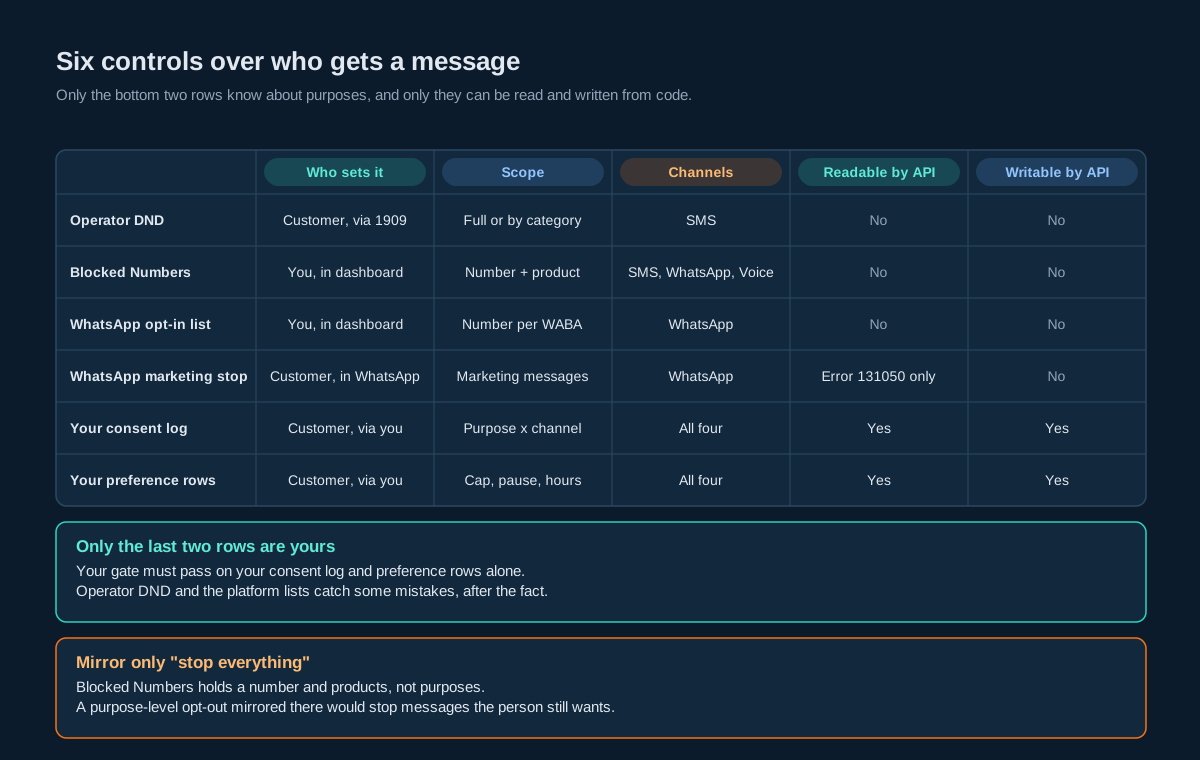
The practical rule that falls out of this: your gate has to pass layer three on its own. Layers one and two will catch some mistakes, but a send that only stopped because the operator blocked it is still a send you shouldn’t have made, and on most channels it still costs you something.
Purposes, Channels and the Matrix
The single biggest design decision is the shape of the grid. Two common shapes fail.
One master switch (“receive marketing messages”) is too blunt. People who are happy to get delivery updates on WhatsApp but hate promotional SMS will hit the only button available, and you lose both.
One switch per channel, no purposes, is just as bad. It can’t express “WhatsApp for my orders, nothing else”, which is exactly what a lot of people want.
The shape that works is a matrix: purposes down the side, channels across the top.
| Purpose | SMS | RCS | Telegram | |
|---|---|---|---|---|
| Security codes and transaction alerts | Always on | Always on | Always on | Always on |
| Order and delivery updates | On | On | Off | Off |
| Appointment reminders | On | Off | Off | Off |
| Offers and promotions | Off | On | Off | Off |
| Newsletter | Off | Off | Off | On |
Five rules make the grid usable.
Keep purposes few and concrete. Five to eight rows. “Offers and promotions” is something a person can decide about. “Engagement communications” isn’t.
Give purposes stable keys. The label can change (“Offers” becomes “Deals and offers”) without touching stored choices. Store offers, display whatever the copy team likes.
Only show channels you actually use for that purpose. If you never send reminders on Telegram, don’t render that cell. An empty toggle invites people to switch on something that will never arrive.
Only show channels you hold an address for. A Telegram column needs a chatId, which you only get after the person has started your bot. Show a “connect” link instead of a toggle until then.
Add a “stop everything” control that’s as easy to find as any toggle. This one doesn’t write consent events for every cell. It writes a single suppression event with scope all, which is what the opt-out design already expects.
Mapping Purposes to DLT Categories
On SMS in India, every message goes out against a registered DLT template, and each template has a category. That category decides two things the preference centre has to respect: whether the operator’s DND registry applies, and whether the customer can reasonably switch it off.
Your SMS templates already carry the category. SMSApi/template/read returns it per template as dltTemplateType, alongside mtId and dltTemplateId:
{
  "template": {
    "mtId": "39",
    "identifier": "bank details without statement",
    "dltTemplateId": "10070142034xxxxxxxx",
    "dltTemplateType": "Service Implicit",
    "status": "ENABLED"
  }
}
So the mapping is a join, not guesswork: purpose to template, template to category. Keep it as a table in your own database (purpose_template) and check it in CI. If someone attaches a promotional template to the “order updates” purpose, the build should fail, because that template will be held by DND for some recipients and the customer’s “on” toggle can’t fix that.
| DLT category | Operator DND applies | Customer can switch off on your page | Typical purposes |
|---|---|---|---|
| Service implicit | No | No, shown as locked | Security codes, transaction alerts, delivery of something they ordered |
| Service explicit | Yes | Yes | Reminders, account notices sent with explicit consent |
| Promotional | Yes | Yes | Offers, newsletters, surveys |
The DND column comes straight from the platform’s own explanation: promotional and service-explicit messages aren’t delivered to DND-registered numbers, service-implicit ones are. For a refresher on the categories themselves, see Service Implicit SMS and Service Explicit SMS.
Build two consequences in from day one.
First, a “yes” on your page for a service-explicit or promotional purpose is necessary but not sufficient. If the operator says no, the send fails as NCPR_FAIL or DND_PREFERENCE_NUMBER. Record that in a separate hold table (as the suppression design does), not as an opt-out, and don’t keep retrying.
Second, if a customer switches offers off, leave them alone about it. TRAI’s 2025 amendment to the commercial communications rules says a customer who opts out can’t be asked for consent again for 90 days, though they’re free to opt back in themselves at any time. So the page can show the switch, but nothing in your system should prompt them to flip it back inside that window.
The Rows a Customer Can’t Switch Off
Some messages have to go out whatever the page says. A one-time password for a login the customer just started. A debit alert. A delivery code. Hiding these rows entirely makes the page look dishonest the first time an OTP arrives after someone switched “everything” off. Showing them as working toggles is worse, because the switch does nothing.
Show them locked, with a one-line reason:
Security codes and transaction alerts (always on): we send these only when you’ve done something on your account, like logging in or making a payment.
Then keep the definition narrow. The temptation is to file anything you’d like to send into the locked row. Resist it. A locked row should only contain messages triggered by an action the customer took or a transaction on their account, sent on a service-implicit template. If a message in that row would make sense to send to someone who didn’t just do anything, it belongs in an unlocked row.
“Stop everything” has one wrinkle here. A suppression with scope all should stop every purpose you can stop, and the page should say plainly that security codes will still arrive while they have an active account. If they don’t want those either, the answer is closing the account or turning off SMS-based login, not a hidden exception in the gate.
The Data Model: Preferences Write Events, Not Flags
Here’s the whole storage picture. Two tables already exist if you’ve followed the consent and suppression designs. The rest is new.
-- Already exists (consent design): one row per grant or withdrawal.
-- consent_event(event_id, msisdn, channel, purpose, action, origin,
--               capture_point, notice_id, occurred_at, ...)
-- action: 'grant' | 'confirm' | 'withdraw' | 'expire'

-- Already exists (opt-out design): one row per suppress or lift.
-- suppression_event(id, channel, address, address_kind, scope, action, source, ...)
-- scope: 'all' | 'marketing' | 'brand:<key>'

-- New: the non-consent choices, one current row per person.
CREATE TABLE contact_preference (
    person_id        TEXT PRIMARY KEY,
    version          INTEGER NOT NULL DEFAULT 1,      -- optimistic lock
    timezone         TEXT NOT NULL DEFAULT 'Asia/Kolkata',
    quiet_start      TIME,                             -- null = no quiet hours
    quiet_end        TIME,
    paused_until     TIMESTAMPTZ,                      -- null = not paused
    updated_at       TIMESTAMPTZ NOT NULL DEFAULT now()
);

CREATE TABLE frequency_cap (
    person_id        TEXT NOT NULL,
    purpose          TEXT NOT NULL,
    max_per_window   INTEGER NOT NULL CHECK (max_per_window > 0),
    window_days      INTEGER NOT NULL CHECK (window_days IN (1, 7, 30)),
    PRIMARY KEY (person_id, purpose)
);

-- Append-only history of the non-consent choices, for support and audit.
CREATE TABLE preference_change (
    change_id        BIGSERIAL PRIMARY KEY,
    person_id        TEXT NOT NULL,
    field            TEXT NOT NULL,          -- 'paused_until', 'quiet_start', 'cap:offers', ...
    old_value        TEXT,
    new_value        TEXT,
    capture_point    TEXT NOT NULL,          -- 'web:preference-centre', 'support:agent-17', ...
    notice_id        TEXT,                   -- version of the page copy the person saw
    occurred_at      TIMESTAMPTZ NOT NULL DEFAULT now()
);
Why split it this way? Because the two kinds of record answer different questions.
Consent events answer “did this person agree, when, and to what wording?” They need to survive for as long as you might have to prove it, and they need the exact notice the person saw. A toggle on the preference page is a capture point like any other: it writes grant or withdraw with capture_point = 'web:preference-centre' and the notice_id of the page copy that was live.
Preference rows answer “how should I behave right now?” Pause, quiet hours and caps don’t need proof of agreement. They change often, and only the current value matters to the gate. Keep a change history anyway, because support will want to see “they paused on the 3rd, not us”.
What you shouldn’t store is a prefs JSON blob with offers_sms: true in it. That’s the third list. The page reads the current consent state by folding events, exactly as the gate does, and renders the grid from that.
Frequency Caps, Pauses and Quiet Hours
These three are the reason people visit a preference centre instead of replying STOP. Get them right and you keep customers you’d otherwise lose.
Frequency caps. Cap per purpose, not per channel. “Two offers a week” should mean two offers, whether they arrive by SMS or WhatsApp. Count at the moment your gate approves a send, not when the platform reports delivery, because delivery reports arrive late and some never arrive. A message the gate approved and then failed to deliver still counts. That errs toward sending less, which is the right direction.
Pick the window in the customer’s time zone. A “daily” cap that resets at midnight UTC resets at 5:30 in the morning in India. A message at 5:20 and another at 5:40 then fall on different UTC days, so a cap of one a day lets both through, twenty minutes apart.
Pauses. “Pause everything until the 30th” is a single paused_until timestamp. It stops every unlocked purpose and leaves consent alone, so nothing has to be re-granted when it ends. Store it as an instant, computed from the date they chose at the end of that day in their time zone.
Quiet hours. These are the customer’s window, and they stack with whatever the platform does. On SMS, the Store and Forward OWH setting holds promotional and service-explicit messages outside the account’s posting hours and releases them later, while transactional traffic goes immediately. A customer’s own quiet hours are usually stricter, and the platform doesn’t know about them. So your gate holds the message itself, and the stricter window wins.
Quiet hours shouldn’t hold locked rows. An OTP for a login at 11 at night has to arrive at 11 at night.
| Choice | Stored as | Applies to | Ends |
|---|---|---|---|
| Frequency cap | frequency_cap row | One purpose, all channels | When changed |
| Pause | paused_until | Every unlocked purpose | At the instant stored |
| Quiet hours | quiet_start, quiet_end, timezone | Every unlocked purpose | When changed |
| Stop everything | suppression_event, scope all | Every unlocked purpose, every channel | Only when the person lifts it |
Getting the Customer There: Signed Links
Most people reach a preference centre from a message, not from your account settings. So you need a link that identifies the person without a login, can’t be guessed, and can’t be replayed forever.
The usual shape is an HMAC-signed token in the path:
https://prefs.example.com/p/<token>
token = base64url(person_ref[8] | channel[1] | expires_at[4] | HMAC-SHA256(key, first 13 bytes)[:10])
The details matter more than the crypto.
Keep it short. On SMS every character counts against the segment, and a long token can push a 160-character message into two parts. An 8-byte random person reference (not their phone number), a 1-byte channel, a 4-byte expiry and a 10-byte truncated MAC come to 23 bytes, which is 31 characters of base64url. The sample in the code section produces exactly that. Check the full message with the SMS length calculator before you lock the template.
Whitelist the domain on DLT. A URL in an Indian SMS has to match what’s registered for the template, using the {#url#} variable tag. If your preference link lives on a domain you haven’t whitelisted, the message fails at the operator. The same steps that cover link tracking and DLT whitelisting apply here.
Don’t track it. Running the preference link through a click tracker adds a redirect and, more importantly, makes “opened the preference page” look like engagement in your campaign stats. Use your own short domain and keep it out of attribution.
Expire it, but generously. Thirty days is reasonable for a link in a promotional message. When an expired link is opened, don’t show an error with nothing else. Show the opt-out option anyway, plus a way to request a fresh link. A person who wants out shouldn’t be blocked by your token policy.
Never put the phone number in the URL. Links get forwarded, screenshotted and logged by browsers and proxies. A random reference leaks nothing on its own.
Easy Out, Careful In
The signed link proves that someone opened a link sent to a number. It doesn’t prove it’s the number’s owner. Forwarded messages, shared phones and a previous owner of a recycled number all break that assumption.
So treat changes asymmetrically.
Anything that sends less needs only the link. Switching a purpose off, pausing, tightening a cap, adding quiet hours, stopping everything. The worst case is that someone other than the owner reduces messages to that number. That’s annoying, not harmful, and the law points the same way: India’s DPDP Act says withdrawing consent should be as easy as giving it (section 6(4)). Asking for a login to opt out fails that test.
Anything that sends more needs proof on the channel itself. Switching a purpose on, adding a channel, lifting a pause early, removing a cap. Here the worst case is messaging someone who never agreed. So the page records a pending grant and sends a confirmation on that channel (“Reply YES to get offers by SMS”), and the grant only counts once the confirmation comes back. That’s the double opt-in pattern from the consent design, and the event log already has a confirm action for it.
A logged-in session in your app is a stronger identity than the link, but it’s still not proof that the person controls a given phone number today. Use the same rule for both entry points. It keeps the code simple and the evidence consistent.
Saving a Change: Diff, Version, Idempotency
The save path is where most preference centres quietly corrupt their own history. The page posts the whole grid, the server writes the whole grid, and now the consent log says the person “granted” offers on SMS again today, when all they did was switch on quiet hours. Months later, that’s the record you’ll be showing a regulator.
Five steps avoid it.
One. Load current state and its version together. When the page renders, include the contact_preference.version and a hash of the folded consent state in a hidden field. These are what the save compares against.
Two. Diff the submitted grid against current state, cell by cell. Only cells that changed produce events. An unchanged “on” produces nothing. Mature preference platforms give the same advice: send only what the person changed, so the history shows their choices and not your form resubmitting itself.
Three. Split the diff by direction. Cells going off become withdraw events immediately. Cells going on become pending grants and trigger a confirmation on that channel (see the previous section). Pause, quiet hours and caps go to contact_preference and preference_change.
Four. Write in one transaction with a version check. UPDATE contact_preference SET ..., version = version + 1 WHERE person_id = $1 AND version = $2. If no row is updated, someone saved in another tab or a support agent changed something. Re-render with the fresh state and say so, rather than overwriting.
Five. Make the submit idempotent. Put a one-time form token in the page and store it with the change. A double click or a mobile browser retry then lands once. The idempotency patterns used for sends work just as well for form posts.
One exception to the version check: a “stop everything” submit should never fail on a version conflict. If two writes race and one of them is a stop, the stop wins. Write the suppression event first, outside the version check, then deal with the rest of the form.
The Send Gate With Preferences In It
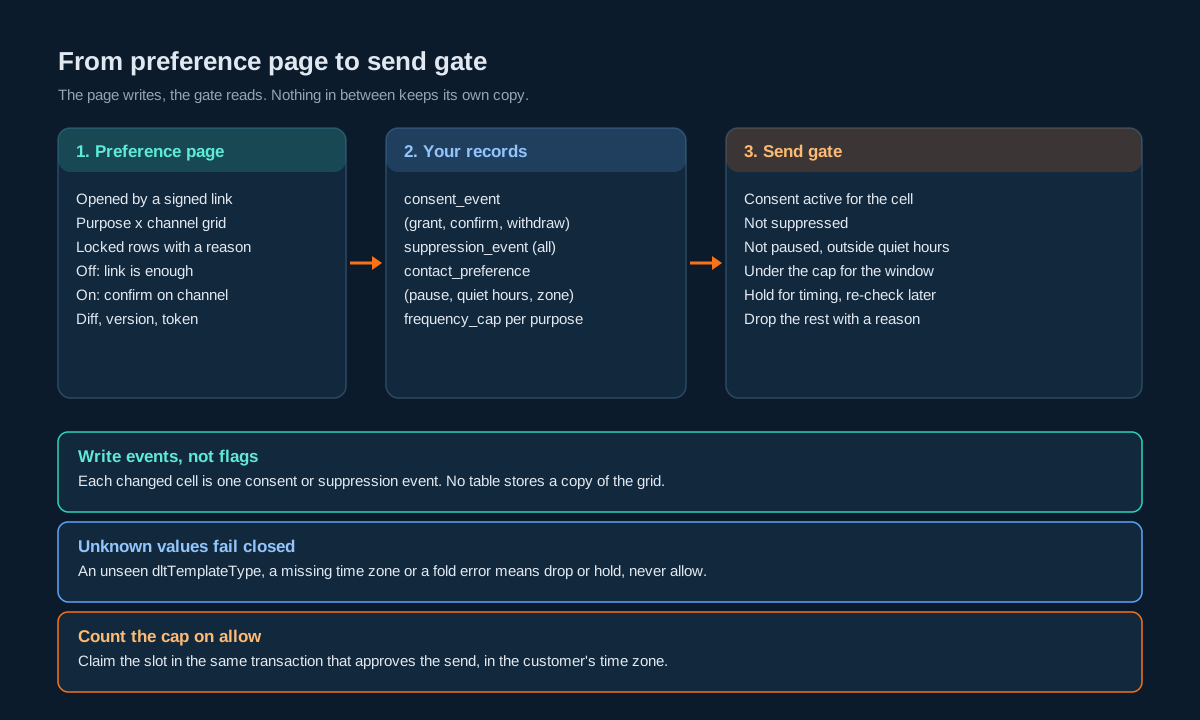
Everything above is only useful if one function in front of every send reads it. The gate takes a candidate send and answers allow, hold or drop.
allow  if  purpose is locked (service implicit), and the person has an active account
       or  consent(person, purpose, channel) is active
       and not suppressed(channel, address, scope covering purpose)
       and not paused(person, now)
       and now is outside quiet hours(person)
       and count(person, purpose, window) < cap
hold   if  only the pause or quiet-hours check failed   -> re-evaluate when the window ends
drop   otherwise                                         -> record the reason
Get these behaviours right.
Fail closed on anything you can’t read. If the consent fold errors, the preference row is missing a time zone, or the template’s category isn’t one you recognise, the answer is drop (or hold, for timing), never allow. A message delayed by a bug is a support ticket. A message sent against someone’s wishes is a complaint.
Hold, then re-check. A message held for quiet hours goes back through the whole gate when the window ends, not straight to the send call. The person might have opted out at 8 in the morning, and the 9 o’clock release has to see that.
Record why. Every drop and hold writes a reason (no_consent, suppressed, cap_reached, quiet_hours). Your support team will ask “why didn’t she get the reminder?” and that column answers it in seconds. The observability metrics you already have can then count drops by reason, which is the cheapest way to spot a broken mapping.
Count on allow. Increment the cap counter in the same transaction that approves the send, so two workers can’t both approve the “last” message of the week.
Changes That Hit Messages Already Queued
A preference change at 10:02 doesn’t help if a campaign was handed to the platform at 10:00 for delivery at 11:00. You need to know where each pending message lives and what you can still do about it.
Messages still in your own queue are easy. They pass through the gate again when they’re picked up, and the gate sees the new state.
SMS booked on the platform can be cancelled. SMSApi/schedule/delete takes the uuid of the booking. The catch is that SMSApi/schedule/read doesn’t return recipient numbers, so you can only find the right booking if you saved the uuid against the recipients when you booked it. The outbound message table is the natural place. On a withdrawal or a stop, look up pending bookings for that person and purpose, and cancel them.
If a booking covers many recipients and only one opted out, you can’t remove one number from it. Cancel and rebook without them, or (simpler) don’t book group sends far ahead in the first place.
WhatsApp messages sent with a future scheduletime have no read or cancel call. Once handed over, they’ll go. The answer is to keep bookings in your own scheduler until close to send time, a “handoff horizon”. Scheduling Messages Across Four Channels covers that in detail, and a preference centre is one more reason to keep the horizon short.
RCS and Telegram take no schedule parameter on send, so anything pending is in your queue and the gate handles it.
Tell the customer the truth on the confirmation screen: “You won’t get any more offers from us. A message that was already on its way in the next few minutes might still arrive.” Size “few minutes” to your actual handoff horizon.
Channel Specifics: SMS, WhatsApp, RCS, Telegram
The matrix looks uniform. The channels underneath aren’t.
SMS. The address is the mobile number. Every purpose maps to a DLT template and therefore a category, and the operator’s DND registry sits on top for promotional and service-explicit content. STOP replies arrive on your long code through the inbound push, if you run one, and should land in the suppression log the same way a page click does (the two-way keyword design routes opt-out words first, before anything else). TRAI’s 2025 amendment also expects promotional messages to carry an opt-out option, and a link that lands on a working opt-out is a natural way to offer one.
WhatsApp. Same number, different rules. Business-initiated messages need opt-in, which you already track per purpose. WhatsApp also lets the person stop marketing messages from inside the app, and a send that hits that state fails with Meta error 131050. Treat 131050 as a withdraw for every marketing purpose on WhatsApp for that number, with origin = 'platform', and show it on the page next time they visit. Don’t flip it back on just because they ticked something on your page. They switched it off in WhatsApp, so the confirmation has to happen in WhatsApp.
RCS. The address is again the number, but whether a given handset can receive RCS is decided per send. The preference cell means “RCS is acceptable for this purpose”. If you use RCS with an SMS fallback, the fallback has to pass the gate as an SMS send for the same purpose. A person who said “RCS yes, SMS no” for offers shouldn’t get the fallback.
Telegram. The address is a chatId, which you only have once the person has started your bot. A cell for Telegram stays as a “connect” link until then. Telegram has no platform-side blocked list, so your suppression log is the only thing standing between a “stop” and the next send.
| Channel | Address the gate checks | Platform backstop | Opt-out signal to ingest |
|---|---|---|---|
| SMS | Mobile number | Operator DND, Blocked Numbers | STOP on your long code |
| Mobile number | Blocked Numbers, opt-in list (dashboard) | Error 131050, replies in the inbox | |
| RCS | Mobile number | None for opt-out | Replies in the RCS inbox |
| Telegram | chatId | None for opt-out | Replies in the Telegram inbox |
Mirroring to the Platform Where You Can
The platform lists are a backstop. They’re worth keeping in step for the cases that fit them, but don’t try to force purposes into them.
Mirror “stop everything” to Blocked Numbers. A suppression with scope all on SMS or WhatsApp maps cleanly to a Blocked Numbers entry for that number and product. Blocked sends then fail as BLOCK_NUMBER, and blocked messages aren’t charged. That’s a useful second line if a bug ever lets something past your gate.
Don’t mirror purpose-level choices. Blocked Numbers is per number and per product. “No offers on SMS, but reminders are fine” has no representation there. Blocking the number would stop the reminders too.
Keep the WhatsApp opt-in list in step with the log. It’s per WABA number and managed in the dashboard. Treat your consent log as the source and the dashboard list as a copy you reconcile. Never read the dashboard list back as evidence.
Lift carefully. When a person lifts a “stop everything” (on your page, with confirmation on the channel), remove the mirrored Blocked Numbers entry as well. If you forget, your gate allows and the platform blocks, and the customer who just opted back in never hears from you. Run a scheduled reconciliation that compares your scope-all suppressions against an export of the Blocked Numbers list and flags drift in both directions.
Mirroring is dashboard and export work, so do it in a nightly batch with a person checking the diff. Your gate doesn’t wait for it.
Four Code Samples, Four Traps
Each sample is short and does one job. Each one also shows a mistake that’s easy to make and hard to spot in review.
Python: the signed preference link
Trap: comparing MACs with ==, and refusing expired links outright. A plain equality check can leak timing information. An expired link that shows only an error blocks someone who just wants out.
import base64, hashlib, hmac, struct, time

KEY = b"replace-with-32-random-bytes-from-your-secret-store"
CHANNELS = {"sms": 1, "whatsapp": 2, "rcs": 3, "telegram": 4}

def b64u(b: bytes) -> str:
    return base64.urlsafe_b64encode(b).rstrip(b"=").decode()

def unb64u(s: str) -> bytes:
    return base64.urlsafe_b64decode(s + "=" * (-len(s) % 4))

def issue(person_ref: bytes, channel: str, days: int = 30, now: int | None = None) -> str:
    """person_ref: 8 random bytes you map to the person, never the phone number."""
    now = int(time.time()) if now is None else now
    payload = person_ref + struct.pack(">BI", CHANNELS[channel], now + days * 86400)
    mac = hmac.new(KEY, payload, hashlib.sha256).digest()[:10]
    return b64u(payload + mac)

def verify(token: str, now: int | None = None):
    now = int(time.time()) if now is None else now
    try:
        raw = unb64u(token)
    except Exception:
        return None
    if len(raw) != 23:
        return None
    payload, mac = raw[:13], raw[13:]
    good = hmac.new(KEY, payload, hashlib.sha256).digest()[:10]
    if not hmac.compare_digest(mac, good):   # never `mac == good`
        return None
    person_ref = payload[:8]
    channel_id, expires = struct.unpack(">BI", payload[8:])
    return {"person_ref": person_ref.hex(), "channel_id": channel_id,
            "expired": now > expires}       # expired still opens the opt-out
With an 8-byte reference, this produces a 31-character token such as P5oSwHvkXYEBav1bAIk_bPROJodtB2Y. Behind a short domain the whole link stays around 50 characters. When verify returns expired: True, render the opt-out controls anyway and offer a fresh link for everything else. Rotate KEY the way you’d rotate any secret, and accept the previous key for one link lifetime after a rotation.
Node.js: the send gate as a pure function
Trap: trusting a category string you’ve never seen. If dltTemplateType comes back spelled differently from what you expected, a permissive gate treats it as allowed. This one drops it, and the drop reason tells you exactly what to fix.
// Pure gate: no I/O. The caller loads state; this decides.
// Allowlist of dltTemplateType values you have actually seen in SMSApi/template/read.
// "Service Implicit" is the value in the published sample. Add the others only
// after your own templates return them, spelled exactly as returned.
const KNOWN_TYPES = new Map([
  ["Service Implicit", "locked"],
  // ["<value seen for your service-explicit templates>", "consent"],
  // ["<value seen for your promotional templates>", "consent"],
]);

function decide(send, state, nowMs) {
  // 1. Category: unknown values fail closed.
  const kind = KNOWN_TYPES.get(send.dltTemplateType);
  if (send.channel === "sms" && kind === undefined) return { verdict: "drop", reason: "unknown_category" };
  const locked = send.channel === "sms" ? kind === "locked" : send.lockedPurpose === true;

  if (locked) return state.accountActive ? { verdict: "allow" } : { verdict: "drop", reason: "no_account" };

  // 2. Consent and suppression, both required.
  if (state.consent?.[send.purpose]?.[send.channel] !== "active") return { verdict: "drop", reason: "no_consent" };
  if (state.suppressedAll || (state.suppressedMarketing && send.marketing)) return { verdict: "drop", reason: "suppressed" };

  // 3. Timing: hold, never drop.
  if (state.pausedUntilMs && nowMs < state.pausedUntilMs) return { verdict: "hold", until: state.pausedUntilMs, reason: "paused" };
  if (state.quietUntilMs && nowMs < state.quietUntilMs) return { verdict: "hold", until: state.quietUntilMs, reason: "quiet_hours" };

  // 4. Cap: the counter is incremented by the caller in the same transaction as the allow.
  const cap = state.caps?.[send.purpose];
  if (cap && state.sentInWindow?.[send.purpose] >= cap) return { verdict: "drop", reason: "cap_reached" };

  return { verdict: "allow" };
}
module.exports = { decide };
Keeping decide free of I/O means you can test every row of your matrix in milliseconds. Feed it a table of states and expected verdicts in CI, including at least one unknown category and one suppressed marketing purpose.
SQL: counting a frequency cap without a race
Trap: reading the count, checking it, then incrementing it in a second statement. Two workers can both read “1 of 2” and both send. Do the check and the increment in one statement and treat “no row returned” as “cap reached”.
CREATE TABLE cap_counter (
    person_id    TEXT NOT NULL,
    purpose      TEXT NOT NULL,
    window_start DATE NOT NULL,      -- start of the window in the customer's time zone
    sent         INTEGER NOT NULL,
    PRIMARY KEY (person_id, purpose, window_start)
);

-- Claim one slot. $3 is the window start computed in the customer's zone,
-- for example date_trunc('week', now() AT TIME ZONE 'Asia/Kolkata')::date.
INSERT INTO cap_counter (person_id, purpose, window_start, sent)
VALUES ($1, $2, $3, 1)
ON CONFLICT (person_id, purpose, window_start)
DO UPDATE SET sent = cap_counter.sent + 1
WHERE cap_counter.sent < $4          -- $4 = max_per_window
RETURNING sent;                      -- zero rows back: cap reached, drop the send
Run it in the same transaction that records the gate’s allow. With a cap of two, the first two calls return 1 and 2, and every call after that returns nothing until the next window.
Java: quiet hours in the customer’s zone
Trap: LocalTime.now() uses the server’s zone, and quiet hours usually cross midnight. A check written as t >= start && t < end is never true for a 21:00 to 09:00 window.
import java.time.*;

public final class QuietHours {
    /** Returns the instant the quiet window ends, or null if `now` is outside it. */
    static Instant quietUntil(Instant now, String zone, LocalTime start, LocalTime end) {
        if (start == null || end == null) return null;
        ZonedDateTime local = now.atZone(ZoneId.of(zone));   // the customer's zone, never ZoneId.systemDefault()
        LocalTime t = local.toLocalTime();
        boolean overnight = start.isAfter(end);              // 21:00 -> 09:00 crosses midnight
        boolean inside = overnight ? (!t.isBefore(start) || t.isBefore(end))
                                   : (!t.isBefore(start) && t.isBefore(end));
        if (!inside) return null;
        LocalDate endDate = (overnight && !t.isBefore(start)) ? local.toLocalDate().plusDays(1)
                                                              : local.toLocalDate();
        return ZonedDateTime.of(endDate, end, local.getZone()).toInstant();
    }
}
For a customer in Asia/Kolkata with quiet hours from 21:00 to 09:00, a send at 2026-10-19T16:00:00Z (21:30 their time) is held until 2026-10-20T03:30:00Z, which is 09:00 the next morning for them. A send at 2026-10-20T04:00:00Z (09:30) goes straight through. Hand the returned instant to your scheduler, and run the whole gate again when it fires.
Decision Matrix
| If you need to… | Do this | Not this |
|---|---|---|
| Let someone stop offers but keep delivery updates | Purpose by channel matrix, withdraw for offers only | One “marketing” switch |
| Let someone stop everything | One suppression_event with scope all, mirrored to Blocked Numbers | A withdraw for every cell |
| Show OTPs and transaction alerts | Locked row with a one-line reason | Hidden row, or a toggle that does nothing |
| Let someone add a channel or purpose | Pending grant plus a confirmation on that channel | Trust the link or the session alone |
| Reduce frequency | frequency_cap row, counted on allow | Counting delivery reports |
| Pause for a holiday | paused_until instant | Withdrawing and re-granting consent |
| Respect a customer’s night | Quiet hours in their zone, held by your gate | Relying on the platform posting window |
| Handle WhatsApp error 131050 | withdraw for WhatsApp marketing purposes, origin platform | Retrying, or treating it as a delivery fault |
Handle NCPR_FAIL or DND_PREFERENCE_NUMBER | Hold table, no retry | Recording an opt-out |
| Save the form | Diff, version check, idempotency token | Rewriting every cell on every save |
| Cancel queued SMS after an opt-out | SMSApi/schedule/delete by the uuid you saved | Hunting through schedule/read, which has no recipients |
Launch Checklist
- Purposes have stable keys and five to eight rows at most.
- Every purpose maps to templates in
purpose_template, and CI fails if a promotional template sits under a locked purpose. - Locked rows show a reason and contain only action-triggered, service-implicit messages.
- “Stop everything” is as visible as any toggle and writes one scope-
allsuppression. - Toggles write consent events with
capture_point = 'web:preference-centre'and the livenotice_id. - No table anywhere stores a copy of the consent grid.
- Turning things on creates a pending grant and a confirmation on that channel.
- Turning things off works from the link alone, including an expired link.
- Saves diff against current state, check the version, and carry an idempotency token.
- A stop always wins a version conflict.
- The preference link domain is whitelisted on DLT and excluded from click tracking.
- The full SMS with the link fits the segment count you budgeted for.
- The gate fails closed on unknown categories, missing time zones and fold errors.
- Held messages go back through the whole gate when the hold ends.
- Cap counters increment in the same transaction as the allow, windowed in the customer’s zone.
- Withdrawals and stops cancel pending SMS bookings by saved
uuid. - WhatsApp bookings stay in your scheduler until the handoff horizon.
- Error 131050 becomes a WhatsApp marketing
withdraw. - A nightly job reconciles scope-
allsuppressions against the Blocked Numbers export. - Nothing prompts a person to opt back in within 90 days of opting out.
Unspecified Behaviour and How to Code Around It
Some of the behaviour a preference centre depends on isn’t pinned down by anything you can read today. Each item below gives the choice that stays safe whichever way the answer turns out, and none of them require waiting for one.
One. Accept only the dltTemplateType values you’ve seen. The published template sample shows "Service Implicit" and nothing else. Read your own templates, add each value you see to the allowlist exactly as spelled, and let anything new fail closed. A new spelling then costs you a dropped send with a clear reason, not a promotional message sent as if it were locked.
Two. Treat operator DND as something you learn from failures. There’s no call that tells you a number’s registry preferences before you send. Send, record NCPR_FAIL and DND_PREFERENCE_NUMBER in a hold table, and stop sending that category to that number until something changes. The design works whether or not you ever get a lookup.
Three. Mirror only “stop everything” to Blocked Numbers. The list holds a number and products, nothing about purpose. Whatever else it can or can’t do, a scope-all mirror is always correct, and a purpose-level mirror is always wrong.
Four. Never read the WhatsApp opt-in list back as evidence. It’s maintained by hand in the dashboard. Your consent log is the record. If the two disagree, the log wins and the dashboard gets fixed.
Five. Save the uuid of every SMS booking against its recipients and purpose. SMSApi/schedule/read returns bookings without numbers. With your own mapping, cancelling the right booking after an opt-out is a lookup, however the read evolves.
Six. Assume a WhatsApp booking can’t be recalled. There’s no read or cancel for future scheduletime sends. Keep bookings in your scheduler until shortly before send time. If a cancel ever appears, you lose nothing by having waited.
Seven. Apply the stricter of your quiet hours and the account’s posting window. The account’s posting hours are set in the dashboard profile, so your code never sees them. Your gate holds to the customer’s window, which in practice is the narrower one, and the platform’s own hold is a second layer either way.
Eight. Confirm opt-outs on screen, not with another message. Whether a follow-up “you’ve been unsubscribed” SMS counts as one more contact under each category’s rules is a question you don’t have to answer if you don’t send one. The confirmation page is enough.
Nine. Treat 131050 as covering every marketing purpose on WhatsApp. The error says the person stopped marketing messages, not which of your purposes. Withdrawing all of them is correct whether WhatsApp means one purpose or every one.
Ten. Count caps on allow, not on delivery. Delivery reports can be late, partial or missing. Counting at approval is correct under all three and errs toward fewer messages.
Eleven. Keep the opt-out working when your own systems aren’t. If the consent store is down, the page should still accept a stop and queue it for writing. Losing an opt-in is an inconvenience. Losing an opt-out is a complaint.
FAQs
Is a preference centre the same as an unsubscribe page?
No, it’s a superset. An unsubscribe page has one button. A preference centre lets people keep the messages they want and drop the rest, which is why it’s worth building. It still needs a “stop everything” control that works as simply as an unsubscribe page would.
Can SMSGatewayCenter host the preference centre for me?
Not as a hosted page you link to. The platform gives you the Blocked Numbers list and the WhatsApp opt-in list in the dashboard, which work at the number level. Purpose-level choices, frequency and quiet hours live in your own system, and the page is yours to host.
Do customers need to log in to change their preferences?
Not to send less. A signed link in the message is enough for opting out, pausing or tightening a cap. To send more, such as switching a purpose back on, ask for a confirmation on that channel.
Can a customer switch off OTPs?
Not from the preference page. Security codes and transaction alerts go out because the customer did something, and they’re sent on service-implicit templates. Show them as a locked row with the reason. If someone wants none of them, the route is turning off SMS-based login or closing the account.
If a customer turns offers back on, does that override DND?
No. The operator’s registry still decides what reaches a DND-registered number for promotional and service-explicit content. Your “on” is necessary, not sufficient.
How fast does an opt-out have to take effect?
Immediately at your gate. Messages still in your queue are caught at once. Pending SMS bookings should be cancelled in the same job. A WhatsApp message already handed over may still arrive, so keep that handoff window short and say so on the confirmation screen.
Should the preference link be a tracked smart link?
No. Use your own whitelisted short domain. Tracking it adds a redirect and makes preference visits look like campaign engagement.
What happens to frequency caps when someone switches channels?
Nothing, if you cap by purpose. Two offers a week stays two offers a week whether they go by SMS, WhatsApp or both.
Where do I store the time zone?
On the preference row, defaulting to your main market (Asia/Kolkata for India) and editable on the page. Quiet hours, pauses and cap windows are all computed from it.
Start Building Compliant Opt-In Flows
Building opt-in, opt-out and preference handling on top of SMS, WhatsApp, RCS or Telegram? Start with the developer API reference, try the flows in the free demo account, or talk to our team about your integration.
More from our Blog
API Key Rotation for an SMS API: Rotating a Single-Slot Key Without Dropping Messages
SMS Message Encryption: What It Hides, What It Doesn’t, and How to Get the Wire Format Right
SMS Click Tracking and Attribution: Joining Smart Link Clicks to Messages and Recipients
Two-Way SMS Keyword Design: Routing, Auto-Replies and Conversation State on a Long Code