Table of Contents
- The Short Answer
- TL;DR
- What “Stop” Has to Mean in Your Code
- Four Channels, Four Ways People Say Stop
- The Layers That Already Block Some Sends
- The Platform’s Blocked Numbers List
- Designing the Suppression Table
- Scope: Everything, Marketing, or One Brand
- Catching STOP on a Long Code
- Catching Opt-Outs in the Three Inboxes
- Reading Replies Without Getting Clever
- The Send-Time Gate
- Opt-Outs and Messages Already Scheduled
- Group Sends and Campaigns
- Delivery Failures Are Not Opt-Outs
- India: DND, DLT Categories and the 90-Day Rule
- Mirroring to the Platform List
- Code: Four Samples, Four Traps
- Decision Matrix
- Launch Checklist
- Unspecified Behaviour and How to Code Around It
- FAQs
The Short Answer
If you send on more than one channel, your opt-out handling has to live in your own database. There’s no API call on SMSGatewayCenter that adds a number to a suppression list, so the thing that actually stops a send is a check your code runs right before it submits anything.
The platform does give you a second safety net. The Blocked Numbers feature in the dashboard stops SMS, WhatsApp and Voice to any number you add, and credits aren’t deducted for messages it blocks. But you manage it by hand in the portal, and it doesn’t cover RCS or Telegram. Use it as a backstop, not as your list.
So the setup that works looks like this. Catch every “stop” wherever it arrives: the long code push for SMS, and the inbox endpoints for WhatsApp, RCS and Telegram. Write each one as an event in a suppression table keyed on channel, address and scope. Check that table at send time and fail closed if you can’t. And when someone opts out, go and delete any SMS bookings that are already waiting on the platform for them, because a check at send time can’t stop a message you handed over yesterday.
Keep India’s DND (NCPR) results out of that table. They’re a different thing with different rules, and mixing them up either blocks people who wanted your messages or lets through people who didn’t.
TL;DR
| Question | Answer |
|---|---|
| Is there an API to add a number to a suppression or block list? | No. The Blocked Numbers list is managed in the dashboard. Your own table is the one your code can write to. |
| What does the platform’s Blocked Numbers list cover? | SMS, WhatsApp and Voice, chosen per number. Not RCS, not Telegram. |
| Am I charged for messages the block list stops? | The help pages say credits aren’t deducted for blocked messages. |
| Where does an SMS “STOP” arrive? | As a push (an HTTP GET) to your URL from a long code keyword, with phonecode, keyword, phoneno, content, location and carrier. |
| Where do WhatsApp, RCS and Telegram opt-outs arrive? | In rest/wa/v1/inbox, rest/rcs/v1/inbox and rest/tg/v1/inbox. You poll them; limit tops out at 200 and there’s no cursor. |
| What’s the suppression key? | The E.164 phone number for SMS, WhatsApp and RCS. The chatId (and the phone number, if you send by phoneNumber) for Telegram. |
| Can I cancel an SMS that’s already scheduled? | Yes, with SMSApi/schedule/delete and the booking’s uuid. Then read the schedule list back to confirm it’s gone. |
| Can I cancel a scheduled WhatsApp message? | Not through the API. Don’t book WhatsApp marketing far ahead. |
Is an NCPR_FAIL delivery status an opt-out? | No. It’s India’s DND registry doing its job. Record it separately. |
| How long before I can ask an Indian subscriber to opt back in? | TRAI’s 2025 amendment says not before 90 days from the opt-out. They can opt in themselves at any time. |
What “Stop” Has to Mean in Your Code
When someone opts out, they’re not asking you to remove a row from one list. They’re asking you to stop messaging them. Those sound the same until you look at where messages actually come from in a real system.
A message to one person can start in a campaign tool, a CRM workflow, a cron job that sends reminders, a support agent’s console, a split campaign booked last week, a WhatsApp template someone scheduled for Friday morning, or an RCS fallback that kicks in when SMS fails. If the opt-out only lands in the list one of those reads, the others keep going. From the customer’s side, you ignored them.
So “stop” has three jobs in code:
- Record it once, in one place, with enough detail that you could show later when and how it happened.
- Block every future send to that person in the scope they asked for, no matter which part of your system starts it.
- Reach back into the past and cancel anything already handed to the platform that hasn’t gone out yet.
Most opt-out code gets the first one right, half gets the second, and almost nobody does the third. The third is where complaints come from, because the person replied STOP on Tuesday and got a promotion on Wednesday that was booked on Monday.
There’s also a fourth job that’s easy to forget: don’t undo it by accident. A contact import that re-adds the number to a group, a sync from a CRM that doesn’t know about the opt-out, a well-meaning cleanup that deletes “old” block entries. Any of these brings the person back. The fix is structural. Opt-outs are events you append, and only a newer opt-in event can lift one.
Four Channels, Four Ways People Say Stop
Each channel hands you the opt-out in a different shape, and on some of them the person can stop you without telling you at all.
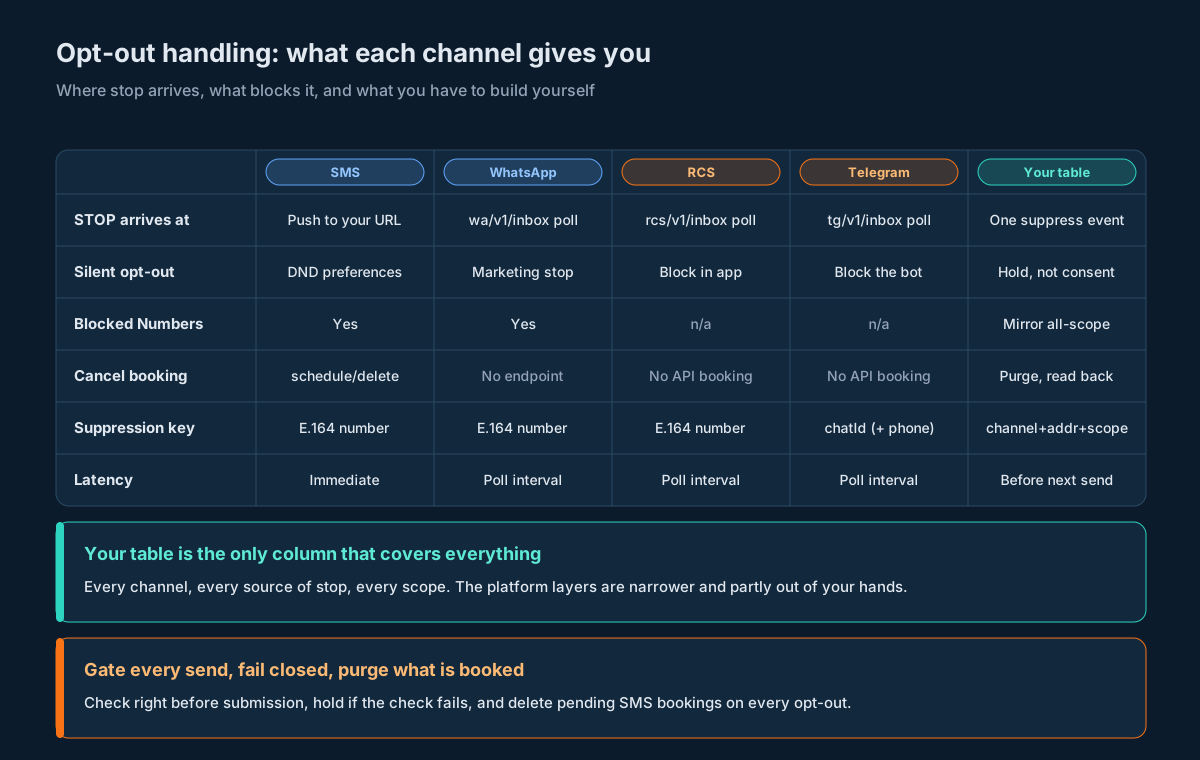
| SMS | RCS | Telegram | ||
|---|---|---|---|---|
| Where a typed “STOP” lands | Your URL, pushed from a long code keyword | rest/wa/v1/inbox (poll) | rest/rcs/v1/inbox (poll) | rest/tg/v1/inbox (poll) |
| Can they stop you without telling you? | Yes, through DND preferences with their operator | Yes, by stopping marketing or blocking you in the app | Yes, by blocking the business in their messaging app | Yes, by blocking or stopping the bot |
| Platform Blocked Numbers list | Yes | Yes | No | No |
| Cancel a message already booked | SMSApi/schedule/delete | No API for it | No API booking to cancel | No API booking to cancel |
| What you key suppression on | E.164 number | E.164 number | E.164 number | chatId, plus phone if you send by phoneNumber |
A few things to take from that.
SMS is the only push. A reply to your long code arrives at your endpoint as soon as it’s received. The other three sit in an inbox until you ask for them, so your opt-out latency on those channels is your polling interval. If you poll every ten minutes, someone can reply STOP on WhatsApp and still get the next message your system sends inside that ten minutes. Shorten the interval for the inboxes you actually market on.
Silent opt-outs are real on every channel. On SMS in India, a person can register DND preferences with their operator and you’ll only find out through delivery failures. On WhatsApp, Meta lets people stop marketing messages from a business, and the send then fails with error 131050 (“This recipient has chosen to stop receiving marketing messages on WhatsApp from your business”) per Meta’s WhatsApp error code reference. On RCS and Telegram the person can block you in the app. None of these arrive as a nice “opt-out” event in your inbox. They show up, if at all, as failures, which is why the section on delivery failures matters.
Telegram is keyed differently. You send Telegram with a chatId or a phoneNumber on rest/tg/v1/send. If a person opts out on Telegram, the reliable key is their chatId. If you also send to them by phone number, write a second suppression row keyed on the number, or the next phone-addressed send slips past. The rest/tg/v1/recipients endpoint gives you chatId, telegramUserId, displayName, firstName and username for people who’ve messaged your bot, which helps you join the two.
The Layers That Already Block Some Sends
Before you build anything, it helps to know what’s already stopping messages, so you don’t build on top of it by mistake or assume it covers more than it does.
| Layer | Who runs it | What it stops | What it doesn’t stop |
|---|---|---|---|
| NCPR / DND scrubbing | Indian operators, applied on the SMS route | Promotional SMS and service-explicit SMS to numbers whose DND preferences block them | Transactional SMS and service-implicit SMS; any non-SMS channel; your own opt-outs |
| Platform Blocked Numbers | You, in the dashboard | SMS, WhatsApp and Voice to numbers you add, per product | RCS and Telegram; anything you haven’t added yet |
| WhatsApp marketing stop | Meta, set by the user | Marketing templates from your business to that user | Utility and authentication templates; other channels |
| In-app blocking | The person, in RCS or Telegram apps | Everything from your business on that app | Every other channel |
| Your suppression table | You, in code | Whatever you check it for | Nothing, if a send path skips the check |
Read that last row twice. Every other layer is narrow and partly outside your control. Your own table is the only one that sees all four channels and every opt-out source, but it only works on send paths that actually call it.
The DND layer is the one people most often mistake for an opt-out system. It isn’t yours, it doesn’t know about the person who replied STOP to you, and it doesn’t touch messages sent under a service-implicit or transactional template. The knowledge base entry on DND errors puts it plainly: messages approved under the Service Explicit or Promotional category “are not delivered to numbers registered under DND”, while Service Implicit content can reach them. So if a person who’s on DND replies STOP to your order updates, DND won’t help you honour it. Your table has to.
The Platform’s Blocked Numbers List
The Blocked Numbers feature is worth using, but you need to know its shape before you lean on it.
What it does, from the feature overview and the step-by-step guide:
- You pick products per entry: SMS, WhatsApp, Voice, or any combination. At least one is required.
- Numbers go in international format with the plus and country code, like
+919876543210. No spaces or dashes. - You can paste many at once, separated by commas or new lines. The guide recommends batches of 100 or fewer.
- Each entry has a status. With it on, blocking starts straight away. With it off, the number is listed but not blocked.
- It applies to bulk campaigns, WhatsApp Business API messages, voice campaigns, scheduled campaigns and API-based messaging.
- Credits aren’t deducted for messages it blocks.
- A blocked send shows up in reports as
BLOCK_NUMBER(what that status means). - If you edit an entry so it matches another existing entry, the two are merged and their products combined (announcement post).
- You can export the list.
What that means for your design:
- It’s a dashboard tool. There’s no endpoint in the developer API to add, read or remove entries. Your code can’t write an opt-out into it the moment one arrives. Someone, or some process run by a person, has to paste numbers in.
- It stops two of your four messaging channels. RCS and Telegram aren’t in the product list, so a block there does nothing for those sends.
- It’s per account. If you run several brands or sub-users (see the multi-brand architecture guide), an entry in one account doesn’t protect sends from another.
- Deleting an entry re-opens the number. The announcement says it directly: “Once deleted, messages can be sent to these numbers again.” The help pages also suggest reviewing the list and removing outdated entries. That’s fine for numbers you blocked because they bounced. For opt-outs, don’t. An opt-out doesn’t go stale.
So the platform list is a good backstop for the moments your own gate is skipped: a portal send by someone on the marketing team, an old integration nobody remembered, a script run by hand. It’s not where your opt-outs should live. The mirroring section covers how to keep it in step.
Designing the Suppression Table
Here’s the table that does the real work. It’s append-only. You never update or delete a row to lift a suppression; you write a newer event that lifts it.
CREATE TABLE suppression_event (
    id              BIGSERIAL PRIMARY KEY,
    channel         TEXT NOT NULL,          -- 'sms' | 'whatsapp' | 'rcs' | 'telegram' | 'all'
    address         TEXT NOT NULL,          -- E.164 '+919876543210', or a Telegram chatId as text
    address_kind    TEXT NOT NULL,          -- 'msisdn' | 'tg_chat_id'
    scope           TEXT NOT NULL,          -- 'all' | 'marketing' | 'brand:<key>'
    action          TEXT NOT NULL,          -- 'suppress' | 'lift'
    source          TEXT NOT NULL,          -- 'sms_keyword' | 'wa_inbox' | 'rcs_inbox' | 'tg_inbox'
                                            -- | 'web_form' | 'support' | 'import' | 'opt_in'
    evidence        JSONB NOT NULL,         -- the raw inbound row or request, verbatim
    received_at     TIMESTAMPTZ NOT NULL,   -- when YOUR system received it
    effective_at    TIMESTAMPTZ NOT NULL,   -- usually = received_at
    reask_after     TIMESTAMPTZ,            -- earliest date you may ask for consent again
    actor           TEXT,                   -- user id for manual changes, NULL for automatic
    dedupe_key      TEXT NOT NULL UNIQUE    -- stops the same inbound reply being recorded twice
);

CREATE INDEX suppression_lookup
    ON suppression_event (address, channel, scope, effective_at DESC);
And the current state is a view over it: for each (channel, address, scope), the latest event wins.
CREATE VIEW suppression_current AS
SELECT DISTINCT ON (channel, address, scope)
       channel, address, scope, action, source, effective_at, reask_after
FROM   suppression_event
ORDER  BY channel, address, scope, effective_at DESC, id DESC;
A few choices in there are deliberate.
Addresses are normalised before they’re stored. Phone numbers go in as E.164 with the plus. That matches what the Blocked Numbers list wants, so you can export straight into it, and it means 9876543210, +91 98765 43210 and 919876543210 don’t become three different people. Do the normalising in one function and call it from every write and every check. Telegram chatId values go in as text, never as numbers.
evidence keeps the raw input. If anyone ever asks when and how a person opted out, the answer is the actual reply they sent, with the time you received it. Don’t summarise it. Store the GET parameters or the inbox row exactly as they arrived.
received_at is your clock. The SMS push carries no timestamp, so your receive time is the only one you’ve got. For inbox rows, keep whatever time the row carries in evidence too, but use your own receive time for ordering. Mixing clocks is how an opt-out ends up sorted before the opt-in it was meant to override.
dedupe_key stops double counting. Polling overlaps and push retries mean you’ll see the same reply more than once. The key is built from the source and the content of the reply (the inbox section shows how). A unique constraint turns the second write into a no-op.
channel = 'all' exists. When someone says “stop messaging me” to a support agent, that’s not channel-specific. A single row with channel all is checked by every send, which is simpler than writing four rows and hoping none gets missed.
This table sits next to your outbound message table. If you followed the outbound message table design, every send already has a row with the channel, recipient and template key, which is everything the gate needs to ask the question.
Scope: Everything, Marketing, or One Brand
Not every “stop” means the same thing, and getting scope wrong hurts in both directions. Too narrow and you keep messaging someone who wanted out. Too wide and a person who unsubscribed from offers stops getting their OTP and can’t log in.
Three scopes cover nearly every real case:
| Scope | What it blocks | Typical source |
|---|---|---|
marketing | Promotional and service-explicit sends, WhatsApp marketing templates, RCS and Telegram promotions | STOP in reply to a promotion; an unsubscribe link; WhatsApp’s own marketing stop |
all | Everything except messages the person triggers themselves right now, like an OTP they just requested | “Stop messaging me” to support; STOP in reply to a service message; an account closure |
brand:<key> | Everything from one brand, nothing from the others | STOP to a brand-specific sender or bot when you run several brands |
Each send carries a purpose (otp, transactional, service, marketing) and, if you run several brands, a brand key. The gate’s question is then simple: is there an active suppression for this address, on this channel or all, whose scope covers this purpose and brand?
The one exception worth thinking hard about is the OTP. A person who’s opted out of everything and then taps “send me a code” is asking for that message, right now. Blocking it locks them out. Most teams let a user-triggered OTP through any suppression and nothing else. Whatever you decide, make it an explicit rule in the gate with a test, not an accident of how purposes happen to be labelled.
If you’re in India, scope also lines up with the DLT categories. Promotional and service-explicit content needs the person’s consent; transactional and service-implicit content runs on implicit consent tied to the relationship. TRAI’s February 2025 amendment says that implicit consent for transactional and service messages lasts only “for the duration or discharge of the contract”, so when an account closes, that’s an all suppression, not a marketing one. The India section has the rest.
Catching STOP on a Long Code
On SMS, replies come in through a long code. You set up a keyword on it (the keyword setup guide walks through the portal steps), give it your URL, and each matching inbound message arrives as an HTTP GET with these parameters:
| Parameter | What it carries |
|---|---|
phonecode | The long code the person texted |
keyword | The keyword that matched |
phoneno | The sender’s number |
content | The message text |
location | The sender’s circle or region |
carrier | The sender’s operator |
That’s all of it. There’s no message ID, no timestamp and no signature. Three things follow.
Record your own receive time. It’s the only time you have. Store it before you do anything else with the request.
Build your own dedupe key. With no message ID, hash the things you do have: phoneno, phonecode, content, and your receive time rounded down to the minute. If the same reply arrives twice within a minute, it’s recorded once. If the person genuinely sends STOP twice an hour apart, you get two rows, which is harmless because the latest still says suppress.
Treat the endpoint as public. Without a signature, anyone who finds the URL can post to it. For opt-outs that’s less dangerous than it sounds (the worst a forged request does is stop messages to a number), but it still means you should use a long random path, keep it out of logs and client code, and rate-limit by source. Don’t let anything that arrives on this endpoint lift a suppression. Opt-ins should come through a channel where you can be sure who’s asking.
How the keyword is set up matters too. If your long code routes everything under one keyword, content will be the whole reply (“STOP”, “stop pls”, “Unsubscribe me”) and your parser decides. If you’ve set up STOP as its own keyword, the routing has already done half the work, but keep the parser anyway: people type “Stop.” with a full stop, or “STOP ALL”, and you want both handled the same way. The inbound messaging guide covers this push in more detail, including what it doesn’t carry.
Respond fast. Write the raw request to a queue or a table, return 200, and do the parsing and suppression writes after. An opt-out handler that times out because it was busy calling three other systems is how replies get lost.
Catching Opt-Outs in the Three Inboxes
WhatsApp, RCS and Telegram work the other way around. Replies collect in an inbox and you read them with rest/wa/v1/inbox, rest/rcs/v1/inbox and rest/tg/v1/inbox. They’re read-only polls: you can’t mark rows as processed, limit goes up to 200, and there’s no cursor that says “give me everything after the last row I saw”.
So the polling loop has to do the bookkeeping itself:
- Poll a window, not “what’s new”. Ask for a time range that starts a little before the end of your last successful poll. Overlapping by a few minutes costs some duplicate rows and saves you from missing replies that landed while your last poll was running.
- Page until a page comes back short. If a page has 200 rows, there may be more. Keep going until you get fewer than you asked for.
- Dedupe on a key built from the row. Use whatever stable identifier the row carries for that channel, combined with the channel name. If a channel’s row has nothing you’d trust as unique, fall back to a hash of the sender, the text and the row’s own time. Capture a real row from each inbox in a test account and pick the fields from that, rather than guessing.
- Store the row verbatim in
evidencebefore you parse it. - Advance your high-water mark only after the writes commit. If the process dies halfway, the next run re-reads the same window and the dedupe key absorbs the repeats.
A note on RCS: in the inbox sample, the message field is a JSON string that itself contains JSON, so you’ll need to decode it twice to get the text the person typed. Decode it once into evidence as it came, then extract the text for the parser.
On Telegram, also look out for the commands people use with bots. /stop is a common convention. It means nothing to Telegram itself, but users try it, so your parser should treat it as a stop.
How often to poll comes down to how fast you need opt-outs to bite. If you send marketing on a channel, poll its inbox at least as often as your shortest gap between messages to one person. A daily newsletter can live with a five-minute poll. A flow that sends three messages ten minutes apart can’t.
Reading Replies Without Getting Clever
The parser decides whether a reply is an opt-out. It’s tempting to make it smart. Don’t. A clever parser that misreads “please stop” as a question is a complaint; a dumb parser that treats a borderline reply as a stop costs you one subscriber.
A workable rule set:
- Trim, collapse whitespace, strip trailing punctuation, and upper-case.
- If the whole message is one of your stop words, it’s an opt-out. A common English set is
STOP,STOPALL,STOP ALL,UNSUBSCRIBE,CANCEL,END,QUIT, plus/STOPfor Telegram. Add the words your audience actually uses in other languages, including transliterated ones. - If the message starts with a stop word followed by other words (“STOP SENDING”, “stop these msgs”), it’s an opt-out.
- If a stop word appears somewhere in a longer message (“can you stop the delivery, I’m not home”), it’s ambiguous. Don’t suppress automatically. Route it to a person, and in the meantime pause marketing to that number. A paused promotion is cheap; a missed opt-out isn’t.
- Opt-in words (
START,SUBSCRIBE,UNSTOP) don’t lift anything on their own. Log them and send the person through your normal opt-in flow, where you can record proper consent.
Don’t try to infer scope from wording beyond that. “STOP” in reply to a promotion means marketing on that channel. “STOP” in reply to a service message, or “STOP ALL”, means all. Anything a person says to support goes in as whatever they actually asked for, entered by the agent with their user ID in actor.
Should you reply with a confirmation? It’s polite, and on some channels expected. But it’s still a message, so it has to clear the same rules as any other. On WhatsApp, the person’s reply opens a customer service window, so a free-form confirmation is fine. On SMS in India, anything you send needs a DLT template that matches, so you’ll need a confirmation template registered under a category that fits. If you don’t have one, skip the confirmation. The suppression is what matters.
The Send-Time Gate
Everything above is about writing opt-outs down. The gate is where they actually stop something. It’s one function, and every send path in your system calls it immediately before it submits to the platform. Not when the campaign is built, not when the job is queued. Right before the HTTP request.
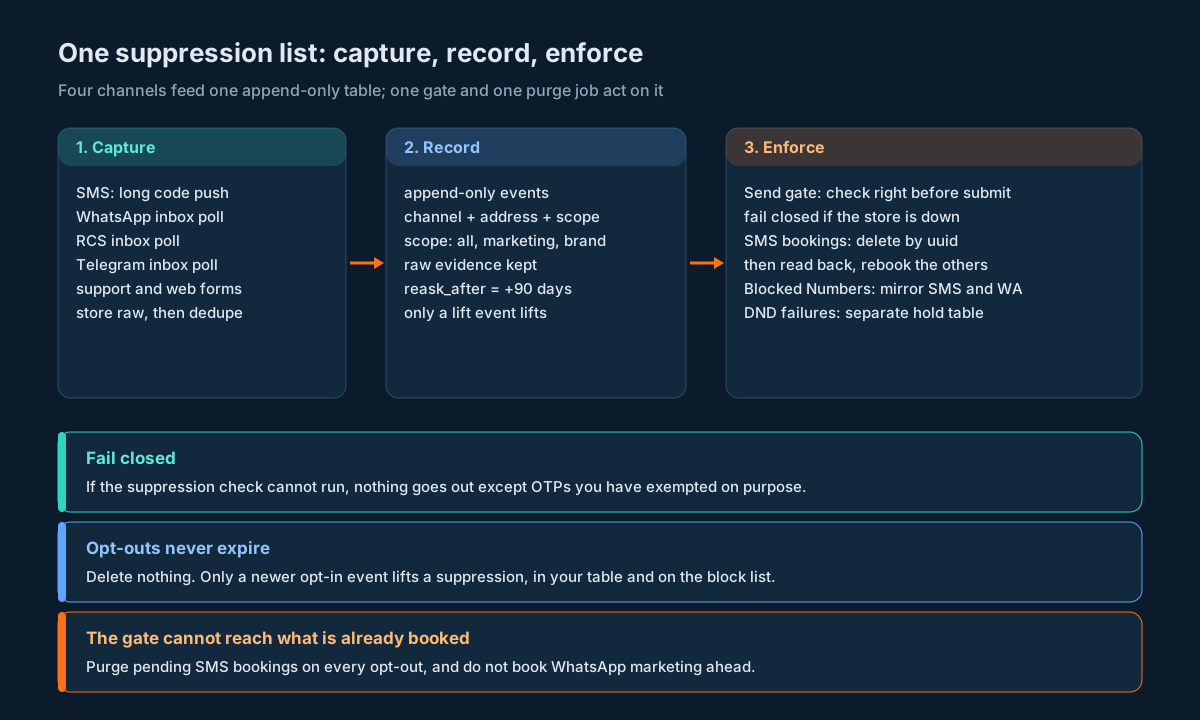
The rules for the gate:
Check at the last moment. A campaign built at 09:00 and sent at 09:40 has forty minutes in which someone can opt out. If you only filtered at build time, you’ll message them. Filter at build time too if you like, for accurate counts, but the check that counts is the one just before submission.
Fail closed. If the suppression store can’t be reached, times out, or returns something you can’t read, the answer is “don’t send”. Hold the message and retry later. This feels harsh until you compare the two failure modes: a delayed promotion versus a message to someone who said stop. For OTPs, you might choose differently, since a stuck OTP is its own kind of harm. If so, write that down as an explicit exception and keep it narrow.
Check the batch, not just the person. For a group or bulk send, run the whole recipient list through the gate and remove anyone suppressed before you submit. One suppressed number in a list of ten thousand is still a message you shouldn’t send.
Record the decision. When the gate blocks a send, mark the outbound row with the suppression event ID that blocked it. That’s how you’ll answer “why didn’t this customer get the reminder?” without guessing.
Normalise the same way as the writer. The gate must call the same normalisation function as every place that writes suppressions. If the writer stores +919876543210 and the gate checks 919876543210, nothing is ever blocked and nothing looks broken.
Where the platform’s own Blocked Numbers list fits: it sits after your gate, on the platform side, for SMS and WhatsApp. If your gate works, it never fires. If a send path skips your gate, it catches what it can.
Opt-Outs and Messages Already Scheduled
This is the part most systems get wrong. The gate only sees messages at the moment you submit them. Anything you’ve already handed to the platform with a future send time has passed your gate already, and it’ll go out unless you go back and cancel it.
The scheduling guide covers each channel’s scheduling contract in detail. For opt-outs, what matters is this:
| Channel | Booked on the platform? | Can you cancel it? | What your opt-out handler does |
|---|---|---|---|
| SMS | Yes, with scheduleTime on SMSApi/send | Yes, SMSApi/schedule/delete with uuid | Find the bookings that include the person, delete them, read back, rebook the rest |
| SMS split campaign | Yes | Only the whole campaign, with SMSApi/campaign/delete | Decide case by case; usually delete and rebuild without the person |
Yes, with scheduletime on WAApi/send | No API for it | Nothing; prevent the problem by not booking ahead | |
| RCS | No API scheduling | n/a | Nothing; your own scheduler goes through the gate |
| Telegram | No API scheduling | n/a | Nothing; your own scheduler goes through the gate |
Finding the bookings
The schedule list from SMSApi/schedule/read gives you, for each pending booking, a uuId, a status, a total (how many recipients it covers), and three epoch timestamps. It doesn’t tell you who the recipients are. So you can’t ask the platform “which bookings include this number?”. You have to know.
That means saving the recipient list for every scheduled booking at the moment you make it, keyed on the transactionId the send returns. It’s the same value that later shows up as uuid (on update and delete) and uuId (on read). Keep it as text; it’s eighteen or nineteen digits and a double will corrupt it.
Cancelling
For each booking that includes the person:
- Call
SMSApi/schedule/deletewithuuidset to that booking’s ID. - Call
SMSApi/schedule/readand check that theuuIdis no longer listed as pending. Don’t rely on the delete’s success message. A read-back tells you what’s actually true. - If the booking covered more than one recipient (
totalabove 1), rebook the others in a new scheduled send without the person, through the gate like any other send. There’s no endpoint to remove one recipient from a booking;SMSApi/schedule/updateonly changes the time. - Record the new
transactionIdagainst the rebooked recipients.
If the delete comes too close to the send time, you’re in a race you can’t see the end of. Pick a cutoff (say, ten minutes before the scheduled time) after which your handler doesn’t try to cancel, and log the message as “opt-out received after cutoff”. Being honest about that is better than a cancel that may or may not have worked.
Keeping the problem small
The cleanest fix is to have fewer bookings sitting on the platform. The scheduling guide recommends keeping scheduled messages in your own database and handing SMS to the platform only shortly before it’s due. For opt-outs that pays off twice: fewer bookings to hunt down, and most messages still pass through your gate at handoff. For WhatsApp, where a booking can’t be cancelled at all, don’t book marketing ahead. Send it from your own scheduler when it’s due.
Group Sends and Campaigns
Platform contact groups are convenient: you submit a group ID and the platform expands it. But the expansion happens on the platform side, after your gate. Your gate never sees the individual numbers.
The contact groups guide makes the point that platform groups carry no consent field and that one person can sit in several groups as several contact records. Removing them from one group doesn’t remove them from the others. So for any campaign where messaging an opted-out person would be a real problem (which is all marketing), there are two safe options:
- Expand the list yourself and send to explicit numbers through the gate. You lose the convenience of a group ID, and you gain a send you can fully account for.
- Keep groups, but sync opt-outs into them. When someone opts out, remove every contact record with their number from every group you have. Then rely on the platform Blocked Numbers list as a second net for the ones you missed. This works, but it depends on two separate syncs, and you won’t know one failed until someone complains.
The first option is the one that scales. Use groups for things where a mistake is cheap.
Split campaigns are similar. Once booked, you can move or delete the whole campaign with SMSApi/campaign/update and SMSApi/campaign/delete, but not edit its recipients. If an opt-out arrives for someone in a large split campaign, your choices are to delete and rebuild it, or accept that the person may receive it and rely on the Blocked Numbers backstop (SMS only) to catch them. Neither is great, which is another reason to keep marketing bookings short-lived.
Delivery Failures Are Not Opt-Outs
When a message fails, the delivery report tells you why. Some of those reasons sound a lot like opt-outs, and it’s tempting to write them into the suppression table. Don’t, or at least not in the same way.
| Status | What it means | What to do with it |
|---|---|---|
NCPR_FAIL | India’s DND / NCPR check stopped it (explainer) | Record a DND hit for that number and category. Stop sending promotional SMS to it for a while. Don’t touch other channels or transactional SMS. |
DND_PREFERENCE_NUMBER | The person’s DND preferences block this sender or category (explainer) | Same as above, scoped to the category. |
BLOCK_NUMBER | The number is on a block list (explainer) | If you didn’t expect it, check your Blocked Numbers list. If it’s there, your gate should have caught it first. That’s a bug in your sync. |
BLACK_LISTED | The number is blacklisted (explainer) | Stop sending to it on SMS until you know why. |
Why keep these apart from opt-outs?
They change on their own. A person can change their DND preferences with their operator at any time. If you turned an NCPR_FAIL into a permanent opt-out, you’d never message them again even after they’d changed it. A DND hit should expire and be re-tested, much like a soft bounce.
They’re channel- and category-specific. DND applies to SMS, and only to promotional and service-explicit content. An opt-out you write from a DND failure would wrongly block their order updates, or their WhatsApp messages.
They aren’t evidence of a request. Your suppression table is a record of what people asked for. A delivery failure isn’t a request. If you mix the two, you can no longer answer “did this person opt out, and when?” from the table.
So keep a small, separate table for delivery-derived holds, with the status, the channel, the category, when you first saw it and when to try again. The gate checks both. The delivery report ingestion guide shows how to get these statuses into your system reliably in the first place.
The one exception is when a failure clearly says the person stopped you. If WhatsApp marketing sends to someone keep failing with a marketing-stop reason, treat that as a marketing suppression on WhatsApp for that number, with source set to the failure. It’s the closest thing to a request the channel will give you.
India: DND, DLT Categories and the 90-Day Rule
If you send SMS in India, three rule sets sit on top of whatever your own policy says. They come from TRAI’s Telecom Commercial Communications Customer Preference Regulations (TCCCPR), amended in February 2025.
DND preferences are the subscriber’s, held by their operator. People register their preferences (block everything promotional, or block by category) with their operator; the NCPR registration guide describes how. The scrub happens on the SMS route. You don’t query it before you send, you find out from delivery statuses like NCPR_FAIL. The NCPR scrubbing explainer covers the compliance side in full. What matters for your code is the earlier point: it’s a separate layer, it can change, and it isn’t a record of anything the person said to you.
DLT category decides who DND touches. The template category you registered decides whether DND applies. Promotional and service-explicit content isn’t delivered to numbers whose DND preferences block it. Service-implicit and transactional content is. So the same person can be reachable for an order update and unreachable for an offer, from the same sender, on the same day. Your purposes (marketing, service, transactional, otp) should map to your registered template categories so the gate and the DND layer agree about what kind of message something is.
The 2025 amendment added rules your opt-out code has to carry. From TRAI’s press release of 12 February 2025:
| Rule | What it means in code |
|---|---|
| Operators must provide a mandatory opt-out option in promotional messages | People will opt out through the operator as well as through you. You’ll see those as DND failures, not inbox replies. |
| A sender shall not seek consent from a customer who opted out “before ninety (90) days from the date of such opt-out” | Set reask_after to the opt-out time plus 90 days. Any flow that asks for consent (a re-engagement campaign, an “opt back in?” message) checks it. |
| The customer can opt in at any time | A person-initiated opt-in lifts the suppression immediately, 90 days or not. Only your asking is restricted. |
| Consent given to complete an ongoing transaction is valid only for 7 days | Messages sent on that basis need an expiry. After seven days they need fresh consent or a different basis. |
| Implicit consent for transactional and service messages lasts only for the duration of the contract | When a customer relationship ends, write an all-scope suppression for service and transactional messages, not just marketing. |
| Promotional SMS only within posting hours | Not an opt-out rule, but your gate is a good place to enforce it too. Promotional sends outside the window are held or rejected, depending on your account settings. |
A worked example of the 90-day rule: a person opts out on 5 October 2026. The earliest you can ask them to opt back in is 3 January 2027. Compute it in code, with an explicit time zone, rather than by hand; the PHP sample in the code section does exactly this.
The amendment also tightened enforcement on senders. It says that once a sender crosses the complaint threshold (now five complaints in ten days), outgoing services on all their telecom resources are barred for 15 days on the first violation, and for repeat violations those resources are disconnected for a year and the sender blacklisted. An opt-out that doesn’t stop the next promotion is exactly what produces complaints, so a working suppression list isn’t just good manners.
Mirroring to the Platform List
Since the Blocked Numbers list can only be changed in the dashboard, keeping it in step with your table is an operational job, not a code path. Here’s a routine that keeps it honest without much effort.
What to mirror. Only suppress rows whose scope is all and whose channel is sms, whatsapp or all. Marketing-only suppressions shouldn’t go in: the block list stops everything on a product, including the transactional messages the person still expects. Brand-scoped suppressions go only into that brand’s account.
How often. Daily is plenty for most senders, since the list is a backstop. If you have send paths that bypass your gate (people sending from the portal by hand, say), make it more often.
How.
- Export from your table the numbers to mirror that aren’t yet marked as mirrored, in
+<country code><number>format. - Paste them in batches of up to 100, with the right products ticked and the status on.
- Mark them as mirrored in your system, with the date and who did it.
- Once a week, export the platform list and diff it against your table. Numbers in yours and not theirs: paste again. Numbers in theirs and not yours: find out who added them and whether your table is missing an opt-out.
What not to do. Don’t remove a block entry for an opt-out because it looks old. Only remove it when your table has a newer lift event for that number, which means the person opted back in. If you block numbers for other reasons too (bad numbers, test numbers), keep a note in your own system of which entries are opt-outs, since the platform list doesn’t record a reason.
Code: Four Samples, Four Traps
Each sample is short and shows one thing that goes wrong in real opt-out code. They assume the suppression_event table from earlier. Auth on the platform calls uses userid plus the apikey header, which works on every endpoint.
Python: the SMS push has no ID and no timestamp
The trap: treating the inbound GET like a webhook with its own identity. It has none, so your receive time and your own dedupe key are all you’ve got.
import hashlib
import json
import re
from datetime import datetime, timezone

from flask import Flask, request

app = Flask(__name__)
STOP_WORDS = {"STOP", "STOPALL", "STOP ALL", "UNSUBSCRIBE", "CANCEL", "END", "QUIT"}

def to_e164(raw: str, default_cc: str = "91") -> str | None:
    digits = re.sub(r"\D", "", raw or "")
    if len(digits) == 10:                      # national number, no country code
        digits = default_cc + digits
    if len(digits) < 11 or len(digits) > 15:
        return None
    return "+" + digits

def classify(text: str) -> str:
    t = re.sub(r"[\s]+", " ", (text or "").strip().upper()).rstrip(".!")
    if t in STOP_WORDS:
        return "stop"
    first = t.split(" ", 1)[0] if t else ""
    if first in STOP_WORDS:
        return "stop"
    if any(w in t.split(" ") for w in ("STOP", "UNSUBSCRIBE")):
        return "ambiguous"
    return "other"

@app.get("/inbound/sms/<secret_path>")
def inbound_sms(secret_path):
    received_at = datetime.now(timezone.utc)          # the only clock we have
    raw = {k: request.args.get(k, "") for k in
           ("phonecode", "keyword", "phoneno", "content", "location", "carrier")}

    minute = received_at.strftime("%Y-%m-%dT%H:%M")
    dedupe_key = "sms:" + hashlib.sha256(
        "|".join([raw["phoneno"], raw["phonecode"], raw["content"], minute]).encode()
    ).hexdigest()

    address = to_e164(raw["phoneno"])
    verdict = classify(raw["content"])
    if address and verdict == "stop":
        db.execute(
            """INSERT INTO suppression_event
               (channel, address, address_kind, scope, action, source,
                evidence, received_at, effective_at, reask_after, dedupe_key)
               VALUES ('sms', %s, 'msisdn', 'marketing', 'suppress', 'sms_keyword',
                       %s, %s, %s, %s + interval '90 days', %s)
               ON CONFLICT (dedupe_key) DO NOTHING""",
            (address, json.dumps(raw), received_at, received_at, received_at, dedupe_key),
        )
        enqueue("purge_scheduled", address)            # see the Java sample
    elif address and verdict == "ambiguous":
        enqueue("review_reply", {"address": address, "raw": raw})
    return "", 200
Two details worth copying. The dedupe key includes the minute, so a retried push is absorbed but a second STOP an hour later is still recorded. And the slow work (purging bookings) goes on a queue, so the endpoint answers immediately.
Node.js: a gate that fails open is not a gate
The trap: wrapping the suppression lookup in a try and sending anyway when it throws. This version fails closed, with one explicit exception for OTPs the user just asked for.
// purpose: 'otp' | 'transactional' | 'service' | 'marketing'
const SCOPES_FOR = {
  marketing:     ['all', 'marketing'],
  service:       ['all'],
  transactional: ['all'],
  otp:           [],           // user-triggered OTPs pass suppression by policy
};

async function canSend(db, { channel, address, purpose, brand }) {
  const scopes = [...SCOPES_FOR[purpose]];
  if (scopes.length && brand) scopes.push(`brand:${brand}`);
  if (scopes.length === 0) return { ok: true, reason: 'otp-exempt' };

  try {
    const { rows } = await db.query({
      text: `SELECT scope, source, effective_at
               FROM suppression_current
              WHERE address = $1
                AND channel IN ($2, 'all')
                AND scope = ANY($3)
                AND action = 'suppress'
              LIMIT 1`,
      values: [address, channel, scopes],
      query_timeout: 500,            // ms; a slow answer is no answer
    });
    if (rows.length) return { ok: false, reason: 'suppressed', by: rows[0] };
    return { ok: true };
  } catch (err) {
    // Fail closed: hold the message and retry, never send blind.
    return { ok: false, reason: 'gate-unavailable', retry: true };
  }
}

// Bulk: filter the whole list right before submission.
async function filterRecipients(db, channel, purpose, brand, addresses) {
  const keep = [];
  for (const address of addresses) {
    const v = await canSend(db, { channel, address, purpose, brand });
    if (v.retry) throw new Error('suppression gate unavailable; hold batch');
    if (v.ok) keep.push(address);
  }
  return keep;
}
For big lists, swap the loop for one query that joins the batch against suppression_current. The point stands either way: if the lookup can’t run, the batch waits.
Java: delete the booking, then prove it’s gone
The trap: trusting the delete’s success message, or trying to find the person’s bookings in the platform’s schedule list, which has no recipient numbers in it. This sample reads booking IDs from your own table, deletes each, and confirms with a read-back.
import com.fasterxml.jackson.databind.JsonNode;
import com.fasterxml.jackson.databind.ObjectMapper;
import java.net.URI;
import java.net.URLEncoder;
import java.net.http.*;
import java.nio.charset.StandardCharsets;
import java.util.*;

public class SchedulePurge {
    private static final String BASE = "https://unify.smsgateway.center/SMSApi/schedule/";
    private final HttpClient http = HttpClient.newHttpClient();
    private final ObjectMapper json = new ObjectMapper();
    private final String userId, apiKey;

    public SchedulePurge(String userId, String apiKey) { this.userId = userId; this.apiKey = apiKey; }

    private JsonNode post(String action, Map<String, String> params) throws Exception {
        StringJoiner form = new StringJoiner("&");
        params.forEach((k, v) -> form.add(k + "=" + URLEncoder.encode(v, StandardCharsets.UTF_8)));
        HttpRequest req = HttpRequest.newBuilder(URI.create(BASE + action))
            .header("apikey", apiKey)
            .header("Content-Type", "application/x-www-form-urlencoded")
            .POST(HttpRequest.BodyPublishers.ofString(form.toString()))
            .build();
        return json.readTree(http.send(req, HttpResponse.BodyHandlers.ofString()).body());
    }

    /** uuIds still pending on the platform, read as TEXT. */
    private Set<String> pendingIds() throws Exception {
        JsonNode list = post("read", Map.of("userid", userId, "output", "json"))
            .path("response").path("scheduleList");
        Set<String> ids = new HashSet<>();
        for (JsonNode row : list) {
            JsonNode s = row.path("schedule");
            if ("pending".equalsIgnoreCase(s.path("status").asText())) ids.add(s.path("uuId").asText());
        }
        return ids;
    }

    /** bookingIds come from YOUR booking table: every booking that includes the opted-out number. */
    public Map<String, Boolean> purge(List<String> bookingIds) throws Exception {
        for (String id : bookingIds) {
            post("delete", Map.of("userid", userId, "uuid", id, "output", "json"));  // don't parse msg
        }
        Set<String> stillPending = pendingIds();
        Map<String, Boolean> gone = new LinkedHashMap<>();
        for (String id : bookingIds) gone.put(id, !stillPending.contains(id));
        return gone;   // false -> alert; true and total > 1 -> rebook the other recipients
    }
}
The booking IDs are strings all the way through. They’re eighteen or nineteen digits, and asLong() on a double-parsed value is how you end up deleting nothing and reporting success. After this runs, any booking that covered more than one recipient gets rebooked for the others, through the gate.
PHP: the 90-day date in an explicit time zone
The trap: computing “90 days later” with the server’s default zone, or with time() + 90 * 86400. Pin the zone, use calendar arithmetic, and store the result in UTC.
<?php
const IST = 'Asia/Kolkata';

function reaskAfter(string $optOutUtc): DateTimeImmutable {
    $local = (new DateTimeImmutable($optOutUtc, new DateTimeZone('UTC')))
        ->setTimezone(new DateTimeZone(IST))
        ->setTime(0, 0)               // count from the date of opt-out
        ->modify('+90 days');
    return $local->setTimezone(new DateTimeZone('UTC'));
}

function transactionConsentExpires(string $givenUtc): DateTimeImmutable {
    return (new DateTimeImmutable($givenUtc, new DateTimeZone('UTC')))->modify('+7 days');
}

function mayAskForConsent(PDO $db, string $address, DateTimeImmutable $nowUtc): bool {
    $q = $db->prepare(
        "SELECT reask_after FROM suppression_current
          WHERE address = ? AND action = 'suppress' AND reask_after IS NOT NULL
          ORDER BY reask_after DESC LIMIT 1");
    $q->execute([$address]);
    $row = $q->fetch(PDO::FETCH_ASSOC);
    if (!$row) return true;
    return $nowUtc >= new DateTimeImmutable($row['reask_after'], new DateTimeZone('UTC'));
}

// Opt-out on 5 October 2026 (IST) -> earliest re-ask 3 January 2027 (IST)
echo reaskAfter('2026-10-05T04:30:00Z')->setTimezone(new DateTimeZone(IST))->format('Y-m-d'), "\n";
// Transaction consent given 5 October 2026 -> expires 12 October 2026
echo transactionConsentExpires('2026-10-05T04:30:00Z')->format('Y-m-d'), "\n";
mayAskForConsent is for your own outreach. It never blocks a person who opts back in on their own; that path writes a lift event and skips this check.
Decision Matrix
| Situation | Do this | Why |
|---|---|---|
| STOP reply to a promotion, any channel | suppress, scope marketing, that channel; set reask_after | They asked to stop offers there, not everything everywhere |
| STOP reply to a service or transactional message | suppress, scope all, that channel | They’re telling you the relationship messages aren’t wanted either |
| “Stop messaging me” to support, or STOP ALL | suppress, scope all, channel all; mirror to Blocked Numbers | The request covers every channel |
| Ambiguous reply (“can you stop the delivery”) | Pause marketing on that channel, route to a person | Cheap to pause, expensive to miss |
| Account closed | suppress, scope all, channel all | Implicit consent ended with the contract |
NCPR_FAIL or DND_PREFERENCE_NUMBER | Delivery hold on promotional SMS, re-test later | DND belongs to the subscriber and can change |
| Repeated WhatsApp marketing failures with a marketing-stop reason | suppress, scope marketing, WhatsApp | The closest thing to a request the channel gives |
| Opt-out with SMS bookings pending | Delete by uuid, read back, rebook the others | A send-time gate can’t reach what’s already booked |
| Opt-out with a WhatsApp booking pending | Log it; shorten WhatsApp booking horizon | No API to cancel it |
| Person texts START or opts in on your site | Write a lift event with the evidence | Only a newer event lifts a suppression |
| Your own re-engagement campaign | Exclude anyone whose reask_after is in the future | 90-day rule on asking again |
| Suppression store unreachable at send time | Hold and retry; OTPs per your written exception | Fail closed |
Launch Checklist
- [ ] Every send path (API sends, campaign tool, CRM workflows, cron jobs, agent consoles, fallbacks) calls the same gate right before submission.
- [ ] The gate fails closed, and the OTP exception (if any) is written down and tested.
- [ ] One normalisation function is used by every writer and the gate; phone numbers are E.164 with the plus, Telegram
chatIdvalues are text. - [ ] The long code keyword for STOP points at a long random URL, and the handler stores the raw GET with your receive time before anything else.
- [ ] The WhatsApp, RCS and Telegram inboxes are polled with overlapping windows, paged until a short page, and deduped on a stored key.
- [ ] The poll interval on each marketing channel is shorter than your shortest gap between two messages to one person.
- [ ] Suppression rows are append-only; only a
liftevent lifts one. - [ ] Every scheduled SMS booking has its recipient list saved against the
transactionId, as text. - [ ] The opt-out handler deletes pending SMS bookings, confirms with
SMSApi/schedule/read, and rebooks other recipients through the gate. - [ ] WhatsApp marketing isn’t booked ahead on the platform.
- [ ] Marketing campaigns use explicit recipient lists, not platform groups, or the group sync is monitored.
- [ ] Delivery-derived holds (
NCPR_FAIL,DND_PREFERENCE_NUMBER,BLOCK_NUMBER,BLACK_LISTED) live in their own table with a re-test date. - [ ]
reask_afteris set on every suppression and checked by every consent-seeking flow. - [ ]
all-scope suppressions on SMS and WhatsApp are mirrored to Blocked Numbers on a schedule, and the list is exported and diffed weekly. - [ ] A test number in each account is suppressed, and a monthly test send confirms the gate and the block list both stop it.
Unspecified Behaviour and How to Code Around It
A handful of things in this design can’t be pinned down by reading anything before you build. For each one, here’s the choice that stays safe whichever way the platform actually behaves, so none of them needs an answer before you ship.
One. Make your own table the authority, and treat Blocked Numbers as a copy. There’s no way for code to read or write the platform list, so it can’t be the thing your gate asks. If the two ever disagree, yours wins and the weekly diff tells you which entries to fix.
Two. Paste numbers in the +<country code> format and prove the block with one send. The block list asks for international format; the send APIs may accept other shapes. Whether a block on +919876543210 also matches a send to 919876543210 isn’t something you can check by reading. Suppress a number you own, send to it in the exact format your system uses, and confirm it comes back as BLOCK_NUMBER. If it doesn’t, your gate is still there.
Three. Assume the block list does nothing for RCS and Telegram. Its product choices are SMS, WhatsApp and Voice. Even if broader coverage arrives later, a gate that checks your own table on every channel doesn’t need to know.
Four. Assume a booked WhatsApp message will go out. There’s no API to read or cancel it. Keep marketing in your own scheduler until it’s due and the question never comes up.
Five. Rebook rather than edit a multi-recipient SMS booking. SMSApi/schedule/update changes the time and nothing else. Delete, confirm by read-back, rebook without the person. It works the same however the platform stores recipients internally.
Six. Confirm every delete by reading the schedule list back. The delete response tells you the request was accepted. The read tells you the booking is no longer pending. Only the second one is the fact you need, and it doesn’t depend on how the delete reports itself.
Seven. Stop cancelling at a cutoff before the send time. Nobody can tell you what a delete does to a booking that’s already started going out. With a cutoff you never ask; you log “too late” and the message is accounted for.
Eight. Dedupe inbound replies with your own keys. The SMS push has no message ID, and inbox polls overlap by design. A unique key built from what you do receive makes the result the same whether the platform delivers a reply once or three times.
Nine. Read each inbox row’s identifying fields from a captured sample, not from memory. Field sets differ between WhatsApp, RCS and Telegram rows, and RCS double-encodes its message text. Capture a real row per channel in a test account, store rows verbatim, and parse from evidence. If a field changes, you re-parse instead of losing opt-outs.
Ten. Never write delivery failures into the consent record. Whether a given status reflects a person’s choice, an operator’s scrub or a dead number varies. Keeping holds in their own table with a re-test date is correct for all three.
Eleven. Treat repeated WhatsApp marketing failures as a soft marketing stop. Whether Meta’s marketing-stop error reaches your delivery data in a form you can match exactly is uncertain. Pausing WhatsApp marketing to a number after a run of marketing failures is safe either way: a real opt-out is honoured, and a temporary failure only costs a few promotions.
Twelve. Skip the confirmation reply when you can’t send it cleanly. On SMS in India it needs a matching DLT template; on WhatsApp it needs the service window. If the conditions aren’t met, record the suppression and send nothing. The suppression is the obligation; the confirmation is a courtesy.
FAQs
Is there an API to add a number to SMSGatewayCenter’s blocked list? No. Blocked Numbers is managed in the dashboard. Your code writes opt-outs into your own suppression table and checks it before every send; the platform list is a backstop you keep in step by hand or on a schedule.
Does the Blocked Numbers list cover RCS and Telegram? No. It covers SMS, WhatsApp and Voice, chosen per number. RCS and Telegram sends rely entirely on your own gate.
Am I charged for a message the block list stops? No. The help pages say credits aren’t deducted for blocked messages. A message your own gate stops is never submitted, so it isn’t charged either.
How do I receive STOP replies on SMS? Set up a keyword on a long code and point it at your URL. Each reply arrives as a GET with phonecode, keyword, phoneno, content, location and carrier. Store it with your own receive time, dedupe it, and write the suppression.
How do I catch opt-outs on WhatsApp, RCS and Telegram? Poll rest/wa/v1/inbox, rest/rcs/v1/inbox and rest/tg/v1/inbox with overlapping time windows, page through up to 200 rows at a time, dedupe, and run each reply through the same parser.
Will an opt-out stop messages I’ve already scheduled? Only if you cancel them. Delete each pending SMS booking for that person with SMSApi/schedule/delete, check with SMSApi/schedule/read that it’s gone, and rebook any other recipients. WhatsApp bookings can’t be cancelled through the API, so don’t book marketing there in advance.
Should NCPR_FAIL go into my suppression list? Not as an opt-out. It means India’s DND layer stopped a promotional or service-explicit SMS. Record it as a delivery hold on that channel and category, and re-test later, since people can change their DND preferences.
If someone opts out on WhatsApp, should I stop SMS too? Not automatically. A STOP to a WhatsApp promotion is a marketing opt-out on WhatsApp. If they ask you to stop everything, or reply STOP ALL, suppress every channel.
Can a person who opted out still get OTPs? That’s your call, and most teams say yes for an OTP the person has just requested. Make it an explicit rule in the gate with a test, so it doesn’t happen by accident or get lost.
How soon can I ask someone to opt back in? In India, not before 90 days from their opt-out, under TRAI’s 2025 amendment. They can opt back in themselves at any time, and that lifts the suppression straight away.
How do I lift a suppression? Write a newer lift event with the evidence of the opt-in. Don’t delete the original row. That way you can always show what happened and in what order.
What happens to a person who’s in several contact groups? Removing them from one group doesn’t stop group sends from the others. For marketing, expand recipients yourself and send explicit lists through the gate, or remove them from every group and rely on the block list as a backstop.
How fast does an opt-out need to take effect? Before your next message to that person. On SMS the push arrives at once; on the other channels it’s as fast as you poll. Set the poll interval shorter than the gap between your messages.
Do I need a separate list per brand? If you run several brands or accounts, scope suppressions by brand where the person stopped one brand, and use all where they asked you to stop everything. The platform block list is per account, so mirror into the right one.
Make “stop” mean stop on every channel.
Create a free SMSGatewayCenter account, set up a STOP keyword on a long code, and try the gate, the schedule purge and the Blocked Numbers backstop against your own number in the Sandbox before your next campaign. Running SMS, WhatsApp, RCS and Telegram together and want to talk through consent and opt-out handling for your volumes? Get in touch.