- Executive Summary
- TL;DR
- The Question Most Teams Ask Wrong
- Capability Comparison at the Protocol Level
- The 24-Hour Session Window Is the Real Architectural Difference
- Template Governance: DLT and Meta Are Not the Same Problem
- Reach and Failure Modes
- Sending on Both Channels: Real Code
- Building a Channel Router in Practice
- Fallback Orchestration: SMS as the Floor, Not the Alternative
- Idempotency Across Two Channels
- The Decision Matrix by Message Class
- Pros and Cons
- Migration Anti-Patterns
- FAQs
Executive Summary
Use the SMS API when delivery must be guaranteed to any handset regardless of app installation, network type, or user consent state, and use the WhatsApp Business API when the message benefits from rich content, buttons, or a two-way conversation and the recipient is a known WhatsApp user. Most production systems need both, and the correct place to decide is a routing layer that evaluates each individual message against session state and message class, not a one-time platform choice made during procurement.
The failure mode this article exists to prevent is teams treating channel selection as a static configuration value. Once WhatsApp is integrated, product teams tend to route everything through it because it looks better, and then discover that a password reset sent as a template message to a user who uninstalled WhatsApp six months ago never arrives and produces no actionable failure signal in time. The inverse failure is routing a rich order-tracking flow through SMS and paying for four concatenated segments to deliver a link that a WhatsApp card would have carried natively with a tappable button.
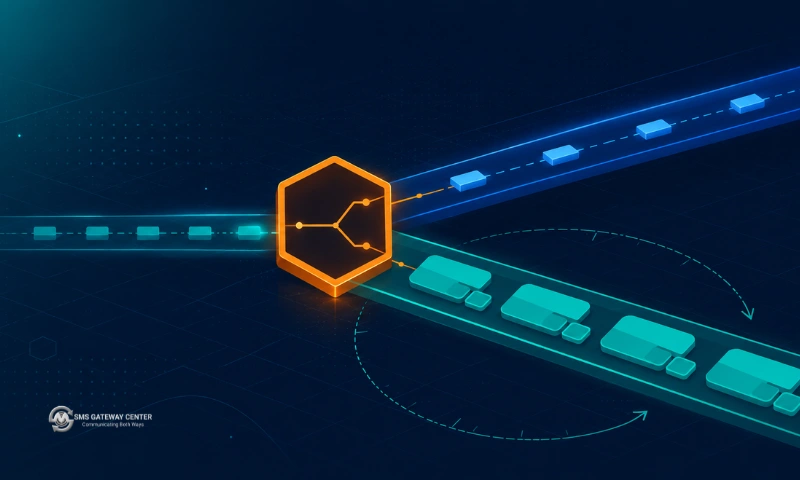
This article treats the choice as an engineering problem. It covers the session window state machine, the two different template approval regimes you have to satisfy, real send code against both endpoints on the same gateway, error-code-driven fallback, and cross-channel idempotency.
TL;DR
- SMS reaches every phone. WhatsApp reaches every phone that has WhatsApp installed, registered, and connected to data. These are different guarantees and only one of them is suitable as a system floor.
- WhatsApp splits messages into two classes: template messages, which you can send at any time but only from pre-approved templates, and free-form session messages, which you can only send inside a 24-hour window opened by the user. SMS has no equivalent state machine.
- India adds DLT registration on top of SMS. WhatsApp adds Meta template approval. Both are approval queues, but they gate different things and neither substitutes for the other.
- On SMSGatewayCenter both channels sit behind the same account and the same parameter conventions:
POST https://unify.smsgateway.center/SMSApi/sendfor SMS andPOST https://unify.smsgateway.center/WAApi/sendfor WhatsApp. - Do not build channel selection into your application code. Build a router that takes message class plus session state and returns a channel, so the policy can change without a deploy.
- Fallback should be triggered by specific delivery error codes, not by any failure. Falling back on every failure duplicates messages and inflates cost.
The Question Most Teams Ask Wrong
“Should we use SMS or WhatsApp?” is the wrong question because it presumes a single answer applies to your whole message volume. A typical mid-size e-commerce backend emits at least six distinct message classes in a week: login OTP, order confirmation, shipment dispatch, delivery attempt failure, cart abandonment, and a weekly promotional push. Those six have almost nothing in common in terms of urgency, richness, consent basis, or acceptable failure rate.
The right question is: for this specific message, what is the cost of it not arriving, and what is the cost of it arriving in a lower-fidelity form?
That framing produces a clean split. Messages where non-arrival breaks a user flow (OTP, password reset, transaction alerts, fraud warnings) belong on the channel with the highest unconditional reach, which is SMS. Messages where arrival is desirable but not load-bearing, and where richness increases conversion (cart recovery, catalogue pushes, support threads, appointment rescheduling), belong on WhatsApp.
If you want the business-level view of this comparison covering pricing models, engagement benchmarks, and industry-specific recommendations, read the companion piece WhatsApp Business API vs SMS API: The Ultimate Comparison Guide. This article stays at the implementation layer and assumes you have already decided both channels are on the table.
Capability Comparison at the Protocol Level
| Dimension | SMS API | WhatsApp Business API |
|---|---|---|
| Transport | Store-and-forward over the operator SS7 or SMPP path | HTTPS to the Business Platform, then IP delivery to the app |
| Prerequisite on the handset | A SIM and signal | App installed, number registered, data or Wi-Fi connectivity |
| Message body limit | 160 GSM-7 characters per segment, 70 for Unicode, concatenated beyond that | Substantially longer bodies in a single message, no segment billing |
| Rich content | None natively, links only | Images, video, documents, headers, footers, buttons, list menus |
| Unsolicited sends | Permitted subject to local regulation and DND rules | Only via pre-approved templates |
| Two-way | Requires a long code, short code, or virtual number | Native and bidirectional by default |
| Sender identity | Alphanumeric header, six characters in India | A verified business phone number (WABA number) |
| Content pre-approval | DLT template registration in India | Meta template approval, globally |
| Delivery signal | DLR with an operator-sourced cause code | Sent, delivered, and read states |
| Read receipts | Not available | Available |
| Regulatory regime | TRAI and DLT in India, per-country elsewhere | Meta Business Platform policy, globally uniform |
The line that matters most in that table is the second one. SMS has a single prerequisite that is satisfied by definition for anyone you have a mobile number for. WhatsApp has three, and you cannot verify any of them before you attempt a send. That asymmetry is why SMS remains the correct floor for anything critical, and no amount of WhatsApp engagement advantage changes it.
The 24-Hour Session Window Is the Real Architectural Difference
Most comparison articles list rich media and cost and stop there. The difference that actually changes your code is that WhatsApp is stateful and SMS is not.
WhatsApp messages fall into two categories:
Template messages. Pre-registered message bodies with variable placeholders, approved by Meta before use. You can send these at any time to any opted-in number. This is the only way to initiate contact.
Free-form session messages. Arbitrary content, sendable only inside a 24-hour window that opens when the user sends you a message and closes 24 hours after their most recent inbound message. Any inbound message from the user re-opens or extends the window.
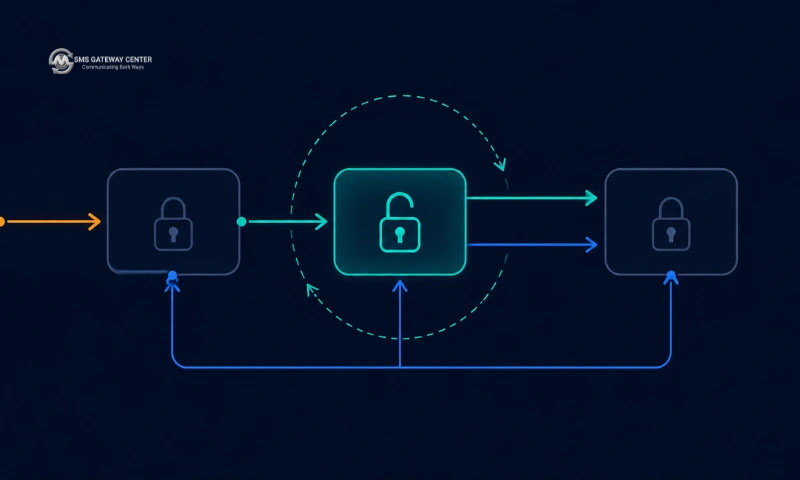
This means your WhatsApp integration has to track per-recipient session state. Your SMS integration does not. Concretely:
- You need a store keyed by recipient number holding the timestamp of the last inbound message.
- Before every free-form send you check whether
now - last_inbound < 24h. If not, you either fall back to a template or fall back to SMS. - Inbound webhook processing is not optional for WhatsApp the way it can be for one-way SMS blasts, because inbound events are what maintain your session state.
On the SMSGatewayCenter WhatsApp endpoint this distinction surfaces directly in the request. The documented behaviour is that you include templateName for a template send, and for a session-based send you omit templateName and send the open message body. From the Send WhatsApp Business Message API reference:
If you are sending Session based message, then send open message and remove
templateNameparameter. If its in session then the message will get delivered.
That single sentence encodes the whole state machine into one optional parameter, which is convenient but also easy to get wrong. If your code omits templateName for a recipient whose window has closed, the send does not become a template send automatically. It fails. Your router has to know the session state before it builds the payload.
A minimal session store
CREATE TABLE wa_session (
  msisdn        VARCHAR(20) PRIMARY KEY,
  last_inbound  TIMESTAMP NOT NULL,
  updated_at    TIMESTAMP NOT NULL DEFAULT CURRENT_TIMESTAMP
);

CREATE INDEX idx_wa_session_last_inbound ON wa_session (last_inbound);
Update last_inbound on every inbound WhatsApp event. Read it before every free-form send. Treat a missing row as a closed window. That is the entire mechanism, and it is the piece teams most often bolt on after their first month of production incidents.
Template Governance: DLT and Meta Are Not the Same Problem
Both channels put an approval queue between you and your users, but they gate different things and the operational shape is different.
| Aspect | India DLT (SMS) | Meta template approval (WhatsApp) |
|---|---|---|
| What is registered | Entity, header (sender ID), and message template | Message template, tied to a WABA |
| Scope | India only | Global |
| Variable syntax | {#var#} | Positional or named placeholders |
| Enforcement point | Operator scrubbing at submission time | Meta, at template approval and send time |
| Typical rejection cause | Content mismatch against the registered template | Policy category mismatch, promotional content in a utility template |
| Change cost | Re-registration through the DLT portal | Re-submission of the template |
| Failure signal | A template-mismatch delivery status | Template rejection or send-time error |
The practical consequence for a dual-channel system is that the same business message needs two separate approvals with two different sets of rules, and they will not stay in sync. Your marketing team changes the shipment-dispatch wording, and you now have a DLT template and a Meta template that say different things. Whichever channel the router picks, the user sees a different message.
The mitigation is to hold a single canonical message definition in your own system with both external template identifiers attached to it, and to refuse to send if either identifier is missing or stale:
{
  "message_key": "order.dispatched",
  "canonical_body": "Your order no. {{order_id}} has been dispatched. Expected to arrive within {{days}} day. Track: {{url}}",
  "sms": {
    "dltTemplateId": "1207xxxxxxxxxxxxxx",
    "senderid": "SMSGWC",
    "status": "approved"
  },
  "whatsapp": {
    "templateName": "demo_order",
    "wabaNumber": "9170396xxxxx",
    "status": "approved"
  }
}
On the SMS side you can verify the rendered body against the registered DLT template before submitting, using the validateTemplate endpoint at POST https://unify.smsgateway.center/SMSApi/validateTemplate, which returns status code 188 with reason message template mismatch when the body does not match. Running that check in CI against every template in your registry catches drift before it reaches production. There is no exact equivalent pre-flight check on the WhatsApp side, so template state there has to be reconciled from the Create WhatsApp Template API and your own records.
For the full DLT registration walkthrough including entity, header, and template steps, see the DLT SMS overview. For Meta’s own template category rules, the authoritative source is the WhatsApp Business Platform documentation.
Reach and Failure Modes
The channels fail differently, and the difference matters more than the raw delivery percentages that most comparison pages quote.
SMS fails observably and late. A message sits in the SMSC store-and-forward queue, and you get a DLR back with a cause code that tells you something actionable: the subscriber was absent, the operator was unreachable, the number is blacklisted, the template did not match. Those codes map to concrete remediation. ABSENT_SUB means retry later. TEMPLATE_CHECK_FAILED means fix your template and never retry as-is. The delivery report API and the DLR concepts explainer cover how to consume these.
WhatsApp fails silently and early, or not at all. If the number is not on WhatsApp, you find out at send time. If the number is on WhatsApp but the device is offline, the message sits at Meta and is delivered whenever the device reconnects, which could be days. There is no “absent subscriber, give up” equivalent. A message stuck in sent but never delivered is indistinguishable from a message that will be delivered in six hours.
This asymmetry has a direct design implication: you cannot use WhatsApp delivery status as a timeout signal for a time-critical flow. If you send an OTP over WhatsApp and wait for a delivered status before deciding to fall back to SMS, you will either wait too long or fall back too eagerly. Time-critical messages should go to SMS first, full stop. The rich channel is for messages where a multi-hour delivery delay is acceptable.
For the SMS side of this, the cause-code-to-action mapping is covered in depth in SMS API Retry Strategy: How to Handle Failed Message Delivery, and the transport-level equivalents are in SMPP Error Codes: Full Reference and Fixes.
Sending on Both Channels: Real Code
Both endpoints live on the same gateway host and share authentication conventions, which makes a dual-channel abstraction straightforward. The SMS endpoint is POST https://unify.smsgateway.center/SMSApi/send and the WhatsApp endpoint is POST https://unify.smsgateway.center/WAApi/send, both accepting application/x-www-form-urlencoded bodies with userid and password (or an API key header).
cURL: SMS with DLT parameters
curl -X POST 'https://unify.smsgateway.center/SMSApi/send' \
  --data-urlencode 'userid=YourUsername' \
  --data-urlencode 'password=********' \
  --data-urlencode 'sendMethod=quick' \
  --data-urlencode 'msgType=text' \
  --data-urlencode 'mobile=919xxxxxxxxx6' \
  --data-urlencode 'senderid=SMSGWC' \
  --data-urlencode 'msg=Your order no. 88214 has been dispatched. Expected to arrive within 2 day. Click to view status https://exmpl.co/t/88214 - Demo Message. SMS Gateway Center' \
  --data-urlencode 'dltEntityId=1101xxxxxxxxxxxxxx' \
  --data-urlencode 'dltTemplateId=1207xxxxxxxxxxxxxx' \
  --data-urlencode 'duplicatecheck=true' \
  --data-urlencode 'output=json'
cURL: WhatsApp template message
curl -X POST 'https://unify.smsgateway.center/WAApi/send' \
  --data-urlencode 'userid=YourUsername' \
  --data-urlencode 'password=********' \
  --data-urlencode 'sendMethod=quick' \
  --data-urlencode 'msgType=text' \
  --data-urlencode 'mobile=919xxxxxxxxx6' \
  --data-urlencode 'wabaNumber=9170396xxxxx' \
  --data-urlencode 'templateName=demo_order' \
  --data-urlencode 'msg=Your order no. {#var#} has been dispatched. Expected to arrive within {#var#} day. Click to view status {#var#} - Demo Message. SMS Gateway Center' \
  --data-urlencode 'header=Order DEMO' \
  --data-urlencode 'footer=www.smsgatewaycenter.com' \
  --data-urlencode 'output=json'
Note what changed and what did not. sendMethod, msgType, mobile, msg, and output are identical across both. The SMS-specific parameters are senderid, dltEntityId, and dltTemplateId. The WhatsApp-specific ones are wabaNumber, templateName, header, and footer. That overlap is what makes a shared adapter clean.
PHP: a dual-channel sender
<?php

final class MessagingClient
{
    private const SMS_URL = 'https://unify.smsgateway.center/SMSApi/send';
    private const WA_URL  = 'https://unify.smsgateway.center/WAApi/send';

    public function __construct(
        private string $userid,
        private string $password
    ) {}

    public function sendSms(
        string $mobile,
        string $msg,
        string $senderid,
        string $dltEntityId,
        string $dltTemplateId
    ): array {
        return $this->post(self::SMS_URL, [
            'userid'        => $this->userid,
            'password'      => $this->password,
            'sendMethod'    => 'quick',
            'msgType'       => 'text',
            'mobile'        => $mobile,
            'senderid'      => $senderid,
            'msg'           => $msg,
            'dltEntityId'   => $dltEntityId,
            'dltTemplateId' => $dltTemplateId,
            'duplicatecheck'=> 'true',
            'output'        => 'json',
        ]);
    }

    public function sendWhatsAppTemplate(
        string $mobile,
        string $msg,
        string $wabaNumber,
        string $templateName,
        ?string $header = null,
        ?string $footer = null
    ): array {
        $payload = [
            'userid'       => $this->userid,
            'password'     => $this->password,
            'sendMethod'   => 'quick',
            'msgType'      => 'text',
            'mobile'       => $mobile,
            'wabaNumber'   => $wabaNumber,
            'templateName' => $templateName,
            'msg'          => $msg,
            'output'       => 'json',
        ];
        if ($header !== null) { $payload['header'] = $header; }
        if ($footer !== null) { $payload['footer'] = $footer; }

        return $this->post(self::WA_URL, $payload);
    }

    /**
     * Session send. templateName is deliberately absent.
     * Only call this when you have verified the 24h window is open.
     */
    public function sendWhatsAppSession(
        string $mobile,
        string $msg,
        string $wabaNumber
    ): array {
        return $this->post(self::WA_URL, [
            'userid'     => $this->userid,
            'password'   => $this->password,
            'sendMethod' => 'quick',
            'msgType'    => 'text',
            'mobile'     => $mobile,
            'wabaNumber' => $wabaNumber,
            'msg'        => $msg,
            'output'     => 'json',
        ]);
    }

    private function post(string $url, array $fields): array
    {
        $curl = curl_init();
        curl_setopt_array($curl, [
            CURLOPT_URL            => $url,
            CURLOPT_RETURNTRANSFER => true,
            CURLOPT_CUSTOMREQUEST  => 'POST',
            CURLOPT_TIMEOUT        => 20,
            CURLOPT_HTTP_VERSION   => CURL_HTTP_VERSION_1_1,
            CURLOPT_POSTFIELDS     => http_build_query($fields),
            CURLOPT_HTTPHEADER     => [
                'Content-Type: application/x-www-form-urlencoded',
            ],
        ]);

        $response = curl_exec($curl);
        $errno    = curl_errno($curl);
        curl_close($curl);

        if ($errno !== 0) {
            throw new RuntimeException("Transport error: {$errno}");
        }

        return json_decode($response, true) ?? [];
    }
}
Node.js: WhatsApp media message with a dynamic button
import { setTimeout as delay } from 'node:timers/promises';

const WA_URL = 'https://unify.smsgateway.center/WAApi/send';

async function sendWhatsAppMedia({
  userid,
  password,
  mobile,
  wabaNumber,
  templateName,
  msg,
  mediaUrl,
  mediaType = 'image',
  buttonUrlPath,
}) {
  const body = new URLSearchParams({
    userid,
    password,
    sendMethod: 'quick',
    msgType: 'media',
    mobile,
    wabaNumber,
    templateName,
    msg,
    mediaUrl,
    mediaType,
    output: 'json',
  });

  if (buttonUrlPath) body.append('buttonUrlPath', buttonUrlPath);

  const res = await fetch(WA_URL, {
    method: 'POST',
    headers: { 'Content-Type': 'application/x-www-form-urlencoded' },
    body,
  });

  if (!res.ok) {
    throw new Error(`HTTP ${res.status}`);
  }

  return res.json();
}

// Example: product image with a tappable deep link on the CTA button.
const result = await sendWhatsAppMedia({
  userid: process.env.SGC_USER,
  password: process.env.SGC_PASS,
  mobile: '919xxxxxxxxx6',
  wabaNumber: '9170396xxxxx',
  templateName: 'demo_order',
  msg: 'Your order no. {#var#} has been dispatched. Expected to arrive within {#var#} day. Click to view status {#var#}',
  mediaUrl: 'https://cdn.example.in/products/88214.jpg',
  mediaType: 'image',
  buttonUrlPath: '/track/88214',
});

console.log(result);
The mediaUrl, mediaType, and buttonUrlPath parameters have no SMS equivalent. This is the concrete shape of the “rich content” advantage: an image, a headline, and a tappable action in one message, against an SMS that would carry the same information as a bare URL split across multiple billed segments.
Python: the router in miniature
import os
import time
from dataclasses import dataclass
from urllib.parse import urlencode

import requests

SMS_URL = "https://unify.smsgateway.center/SMSApi/send"
WA_URL = "https://unify.smsgateway.center/WAApi/send"
SESSION_WINDOW_SECONDS = 24 * 60 * 60

HEADERS = {"Content-Type": "application/x-www-form-urlencoded"}


@dataclass(frozen=True)
class MessageSpec:
    key: str                 # e.g. "auth.otp" or "order.dispatched"
    critical: bool           # non-arrival breaks a user flow
    rich: bool               # benefits from media or buttons
    body: str


def _post(url: str, fields: dict) -> dict:
    resp = requests.post(url, data=urlencode(fields), headers=HEADERS, timeout=20)
    resp.raise_for_status()
    return resp.json()


def send_sms(mobile: str, spec: MessageSpec, senderid: str,
             dlt_entity_id: str, dlt_template_id: str) -> dict:
    return _post(SMS_URL, {
        "userid": os.environ["SGC_USER"],
        "password": os.environ["SGC_PASS"],
        "sendMethod": "quick",
        "msgType": "text",
        "mobile": mobile,
        "senderid": senderid,
        "msg": spec.body,
        "dltEntityId": dlt_entity_id,
        "dltTemplateId": dlt_template_id,
        "duplicatecheck": "true",
        "output": "json",
    })


def send_whatsapp(mobile: str, spec: MessageSpec, waba_number: str,
                  template_name: str | None) -> dict:
    fields = {
        "userid": os.environ["SGC_USER"],
        "password": os.environ["SGC_PASS"],
        "sendMethod": "quick",
        "msgType": "text",
        "mobile": mobile,
        "wabaNumber": waba_number,
        "msg": spec.body,
        "output": "json",
    }
    # Omitting templateName makes this a session send.
    if template_name:
        fields["templateName"] = template_name
    return _post(WA_URL, fields)


def session_open(last_inbound_ts: float | None) -> bool:
    if last_inbound_ts is None:
        return False
    return (time.time() - last_inbound_ts) < SESSION_WINDOW_SECONDS


def route(spec: MessageSpec, mobile: str, last_inbound_ts: float | None,
          registry: dict) -> str:
    """Return the channel to attempt first."""
    if spec.critical:
        return "sms"
    entry = registry.get(spec.key, {})
    wa = entry.get("whatsapp", {})
    if wa.get("status") != "approved":
        return "sms"
    if spec.rich or session_open(last_inbound_ts):
        return "whatsapp"
    return "sms"
Java: HttpClient send
import java.net.URI;
import java.net.http.HttpClient;
import java.net.http.HttpRequest;
import java.net.http.HttpResponse;
import java.net.URLEncoder;
import java.nio.charset.StandardCharsets;
import java.time.Duration;
import java.util.Map;
import java.util.stream.Collectors;

public final class GatewayClient {

    private static final String SMS_URL = "https://unify.smsgateway.center/SMSApi/send";
    private static final String WA_URL  = "https://unify.smsgateway.center/WAApi/send";

    private final HttpClient http = HttpClient.newBuilder()
            .connectTimeout(Duration.ofSeconds(10))
            .build();

    public String send(String url, Map<String, String> fields) throws Exception {
        String form = fields.entrySet().stream()
                .map(e -> URLEncoder.encode(e.getKey(), StandardCharsets.UTF_8)
                        + "=" + URLEncoder.encode(e.getValue(), StandardCharsets.UTF_8))
                .collect(Collectors.joining("&"));

        HttpRequest req = HttpRequest.newBuilder()
                .uri(URI.create(url))
                .timeout(Duration.ofSeconds(20))
                .header("Content-Type", "application/x-www-form-urlencoded")
                .POST(HttpRequest.BodyPublishers.ofString(form))
                .build();

        HttpResponse<String> res = http.send(req, HttpResponse.BodyHandlers.ofString());
        return res.body();
    }

    public String sendWhatsAppTemplate(String mobile, String msg) throws Exception {
        return send(WA_URL, Map.of(
                "userid", System.getenv("SGC_USER"),
                "password", System.getenv("SGC_PASS"),
                "sendMethod", "quick",
                "msgType", "text",
                "mobile", mobile,
                "wabaNumber", "9170396xxxxx",
                "templateName", "demo_order",
                "msg", msg,
                "output", "json"
        ));
    }

    public String sendSms(String mobile, String msg) throws Exception {
        return send(SMS_URL, Map.of(
                "userid", System.getenv("SGC_USER"),
                "password", System.getenv("SGC_PASS"),
                "sendMethod", "quick",
                "msgType", "text",
                "mobile", mobile,
                "senderid", "SMSGWC",
                "msg", msg,
                "dltEntityId", "1101xxxxxxxxxxxxxx",
                "dltTemplateId", "1207xxxxxxxxxxxxxx",
                "output", "json"
        ));
    }
}
Postman
Import both collections rather than hand-building requests. The SMS collection is at Download SMS API Postman Collection and the WhatsApp collection is at Download WhatsApp Business API Postman Collection. Set userid, password, wabaNumber, and senderid as environment variables so you can flip between a sandbox and production account without editing each request.
Building a Channel Router in Practice
Everything above collapses into one function that takes a message and returns a channel. Keep it out of your feature code.
Step 1: Classify the message. Attach two boolean properties to every message key at definition time: critical (non-arrival breaks a user flow) and rich (media or buttons materially improve the outcome). These are product decisions, not runtime ones.
Step 2: Check for hard overrides. Critical messages go to SMS unconditionally. Do not let engagement metrics override this.
Step 3: Check template availability. If the WhatsApp template for this message key is not in an approved state, the WhatsApp path does not exist. Fall through to SMS.
Step 4: Check session state. Look up last_inbound for the recipient. An open window permits free-form sends and is a strong signal the user is an active WhatsApp user.
Step 5: Check recipient preference and opt-in. A stored channel preference beats all heuristics. If the user has explicitly asked for SMS, honour it.
Step 6: Send, and record the attempt against your idempotency key.
Step 7: Evaluate the delivery outcome and decide whether the fallback rule fires.
The route() function in the Python sample above implements steps 1 through 4 in fifteen lines. Steps 5 through 7 are where most of the real complexity lives, and step 7 is the subject of the next section.
Fallback Orchestration: SMS as the Floor, Not the Alternative
The naive fallback is “if WhatsApp fails, send SMS.” That is wrong, and it is expensive.
Consider a WhatsApp send that fails because the template was rejected overnight. Falling back to SMS delivers the message, which is fine. Now consider a WhatsApp send that returns a transient gateway error, gets retried by your queue, succeeds on the retry, and also triggers your fallback. The user gets the message twice and you paid for both.
The fix is to make fallback conditional on specific error codes rather than on failure in general. SMSGatewayCenter exposes this as a configurable behaviour in Multi-Channel Fallback, and the trigger error codes knowledge base entry describes the semantics:
Trigger error codes let you control when the platform moves to the next channel. By default, any failure on a channel (except the last) can trigger the next step. You can narrow this to specific delivery error codes only.
That default is the permissive one. Narrowing it is almost always the right move for a production system.
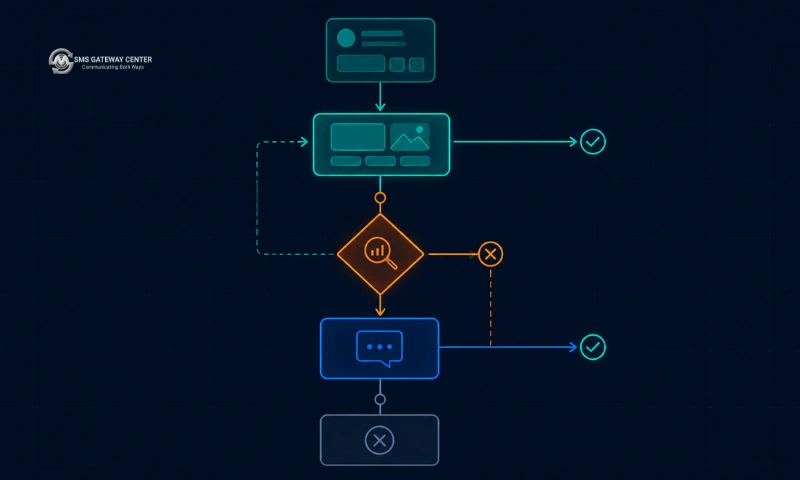
A workable classification of outcomes into fallback decisions:
| Outcome class | Example | Fallback? | Retry same channel? |
|---|---|---|---|
| Recipient not reachable on this channel | Number not registered on WhatsApp | Yes, immediately | No |
| Content rejected by the channel | Template rejected or mismatched | Yes, if the other channel’s template is valid | No |
| Transient gateway or network error | Timeout, 5xx | No | Yes, with backoff |
| Rate limited | Throttled by the platform | No | Yes, after the window |
| Permanently blocked recipient | Blacklisted, opted out | No | No |
| Delivered but unread | sent with no delivered after N hours | Only for non-critical messages, and only once | No |
The last row is the one that needs a policy decision from your product team rather than a default. A shipment update that has sat in sent for six hours probably warrants an SMS. A promotional push does not.
Two rules that prevent most fallback incidents:
- Fallback fires at most once per message. Record a
fallback_usedflag against the idempotency key. Never chain. - The final channel in the chain never falls back. This is why SMS belongs at the end, not the beginning, of any chain that includes it.
For the retry mechanics underneath this (backoff, jitter, dead-lettering, and per-code retry eligibility) the deeper treatment is in SMS API Retry Strategy: How to Handle Failed Message Delivery.
Idempotency Across Two Channels
Single-channel idempotency is straightforward: generate a key, deduplicate on it, and use the gateway’s duplicatecheck parameter as a second line of defence. Cross-channel idempotency is harder, because the same logical message now has two possible physical sends and two different gateway-side message identifiers.
Use a two-level key:
logical_key   = sha256(tenant_id + message_key + recipient + business_event_id)
physical_key  = logical_key + ":" + channel + ":" + attempt_number
Deduplicate sends on physical_key. Deduplicate the user-visible outcome on logical_key. Before any send, check whether any physical attempt under this logical key has already reached a terminal success state. If yes, do not send on any channel.
The subtle bug this prevents: a WhatsApp send succeeds, the delivery webhook is delayed, your fallback timer fires and sends the SMS, and then the WhatsApp delivered event arrives. Without a logical-key check the user has already received both. With it, the SMS send is rejected at dispatch time because the logical key is already terminal.
The gateway-side duplicatecheck=true parameter on the SMS endpoint helps but does not solve this, because it only sees SMS traffic. Cross-channel deduplication has to live in your application.
Register a webhook to receive delivery events in near real time rather than polling, using POST https://unify.smsgateway.center/SMSApi/webhook/create as documented in the Create Webhook API. Polling the delivery report endpoint on a schedule is a reasonable reconciliation backstop but a poor primary mechanism, because the polling interval directly becomes your fallback latency floor.
The Decision Matrix by Message Class
This is the table to copy into your own routing configuration and adapt.
| Message class | Primary channel | Fallback | Reasoning |
|---|---|---|---|
| Login OTP / 2FA | SMS | None needed | Reach is the entire requirement. A WhatsApp OTP that arrives after the code expires is worse than useless. See OTP SMS |
| Password reset | SMS | None needed | Same as above, and often the user is locked out of the device the app is on |
| Payment or fraud alert | SMS | None needed | Regulatory expectation plus time criticality |
| Order confirmation | WhatsApp template | SMS on unreachable | Rich receipt with an image performs better, but the user must get it |
| Shipment dispatched | WhatsApp template with media and button | SMS on unreachable | The tracking button is the whole value |
| Delivery attempt failed | SMS | None | Time-critical, the courier is at the door |
| Appointment reminder | WhatsApp template | SMS at T minus 2 hours if undelivered | Rich reminder with a reschedule button, SMS as the safety net |
| Cart abandonment | WhatsApp template | None | Non-critical, do not pay twice for a marketing nudge |
| Promotional campaign | WhatsApp template | None | Non-critical, and SMS promotional sends carry their own DND and regulatory overhead |
| Customer support reply | WhatsApp session message | None | The window is open by definition, since the user just messaged you |
| Survey / NPS | WhatsApp template with buttons | None | Buttons collapse the response friction |
| Service outage notice | SMS | WhatsApp as a supplement, not a fallback | Broadcast reach matters, and outages often mean users are already having connectivity trouble |
The pattern in that table: anything where the user is waiting for the message right now goes to SMS. Anything where the user will look at it when convenient goes to WhatsApp. Latency tolerance is a better discriminator than message content.
Pros and Cons
SMS API
Pros
- Universal reach with no app, no account, and no data connection required
- Works during degraded connectivity, which is exactly when outage and fraud alerts matter most
- Delivery codes are operator-sourced and actionable
- Simple stateless integration, no session tracking
- Well-understood regulatory framework in India via DLT
Cons
- No rich content, no buttons, no read receipts
- Segment-based billing punishes long messages and Unicode
- Sender identity is a six-character header with limited brand presence in India
- Two-way requires separate infrastructure (long code or virtual number)
- Link-based CTAs suffer from link truncation and phishing wariness
WhatsApp Business API
Pros
- Rich media, headers, footers, and interactive buttons in a single message
- Native two-way conversation with no extra number to provision
- Read receipts give real engagement signal
- Verified business identity rather than a six-character string
- Long message bodies without per-segment cost
Cons
- Requires the app installed, registered, and connected
- Stateful: the 24-hour window has to be tracked and enforced in your code
- Template approval adds a second, non-substitutable governance queue
- No reliable timeout signal, which disqualifies it for time-critical flows
- A rejected or paused template silently removes an entire message class from the channel
Migration Anti-Patterns
Moving OTP to WhatsApp to save cost. The saving is real and the risk is not worth it. A percentage of your users will not have WhatsApp reachable at the moment they need to log in, and those users hit your support queue. Support contact cost per incident dwarfs the per-message saving.
Treating WhatsApp as an SMS replacement rather than an addition. Every team that decommissions SMS entirely rebuilds it within a year, usually after an incident. Keep the SMS path warm even at low volume.
Building channel selection into feature code. Fifteen services each with their own if (user.prefersWhatsApp) branch is fifteen places to change when the policy changes. One router, called by all of them.
Skipping inbound webhook processing on WhatsApp. Without inbound events you cannot maintain session state, which means you can never send a free-form message, which means you have paid for a conversational channel and are using it as a one-way template broadcast.
One template registry per channel. Two registries drift. One canonical definition with two external identifiers attached does not.
Falling back on every failure. Duplicate messages, double cost, and user annoyance. Narrow the trigger set to codes that genuinely mean “this channel cannot deliver this message.”
FAQs
Q: Can I send OTPs over WhatsApp Business API?
Technically yes, using an approved authentication-category template. Architecturally you should not make it the only path. WhatsApp gives no reliable timeout signal, so if the message does not arrive you cannot detect it fast enough to fall back within the OTP validity period. Send the OTP over SMS. If you want WhatsApp OTP as a user-selectable option, offer it as a preference and keep SMS as the default.
Q: What exactly is the 24-hour window and when does it reset?
The window opens when the user sends a message to your WhatsApp business number and stays open for 24 hours from their most recent inbound message. Each new inbound message resets the clock. While it is open you can send free-form content. When it is closed you can only send pre-approved templates.
Q: Do I need DLT registration if I only use WhatsApp?
DLT applies to SMS traffic in India. If you send no SMS you do not need DLT registration for WhatsApp traffic. But if you are running any fallback to SMS, that fallback traffic is SMS traffic and needs DLT-registered entity, header, and template like any other send.
Q: Can the same message body be used for both channels?
You should keep one canonical body and derive both from it, but the registered versions will not be byte-identical. DLT uses {#var#} placeholders and enforces exact-match scrubbing at the operator. Meta templates use their own placeholder convention and category rules. Keep the canonical definition in your system, generate both, and validate the SMS side with the validateTemplate endpoint so drift surfaces in CI.
Q: How do I know whether a number is on WhatsApp before sending?
You generally do not, reliably, ahead of time. Design for the send attempt to be the check. Cache the outcome per recipient so a number that has failed as unreachable on WhatsApp routes straight to SMS on the next attempt, and re-test occasionally, since users do install the app.
Q: Should fallback go WhatsApp to SMS, or SMS to WhatsApp?
Almost always WhatsApp to SMS. SMS is the higher-reach channel, so it belongs last in the chain as the terminal step. Chains ending in WhatsApp have a floor that can fail, which defeats the purpose of having a chain.
Q: How is billing different between the two channels?
SMS is billed per segment, so a 300-character Unicode message costs several times a short GSM-7 one. WhatsApp is billed on a conversation basis rather than per message, so a long rich message and a short one within the same conversation cost the same. For current rates on either channel, see the pricing page or contact the team, since rates vary by destination and volume.
Q: What happens if my WhatsApp template gets rejected after it was approved?
Every message class bound to that template loses its WhatsApp path immediately. This is why your router should check template status at send time rather than assuming an approved template stays approved. Build an alert on template status changes, and make sure the SMS equivalent for that message key is registered and current so the fallback actually works when you need it.
Q: Can I use RCS instead of choosing between these two?
RCS gives you rich cards and branded sender identity over the carrier network rather than an app, which puts it in an interesting middle position. Handset and carrier support are still uneven, so it is best treated as an additional channel in a fallback chain rather than a replacement for either. See RCS Messaging for the current picture.
Run both channels from one account. SMSGatewayCenter serves SMS, WhatsApp Business API, RCS, and voice from a single account with a shared authentication model and a common parameter convention, so your router talks to one gateway instead of three vendors. Start with the SMS API getting started guide, pull both Postman collections, and have a working dual-channel send in an afternoon. Sign up or talk to the team about routing and fallback configuration for your message classes.