Table of Contents
- The Short Answer
- TL;DR
- What Opens, Resets and Closes the Window
- Two Clocks: the Service Window and the Free Entry Point Window
- Where the Window Shows Up on the Platform
- The Timestamp Trap: Seconds on the Webhook, Milliseconds in the Inbox
- The Window Key Is a Pair of Numbers
- The State Machine
- The Data Model: Store Messages, Derive the Window
- Recording Inbound Messages in Python
- Asking the Inbox When You Have No State
- The Send Router: Session Reply, Template or Hold
- Leave a Margin at the Edge
- Sending a Session Reply on WAApi/send
- When a Session Send Fails
- Agent Queues and Replies That Wait Overnight
- What the Window Does to Your Bill
- Decision Matrix
- Launch Checklist
- Unspecified Behaviour and How to Code Around It
- FAQs
The Short Answer
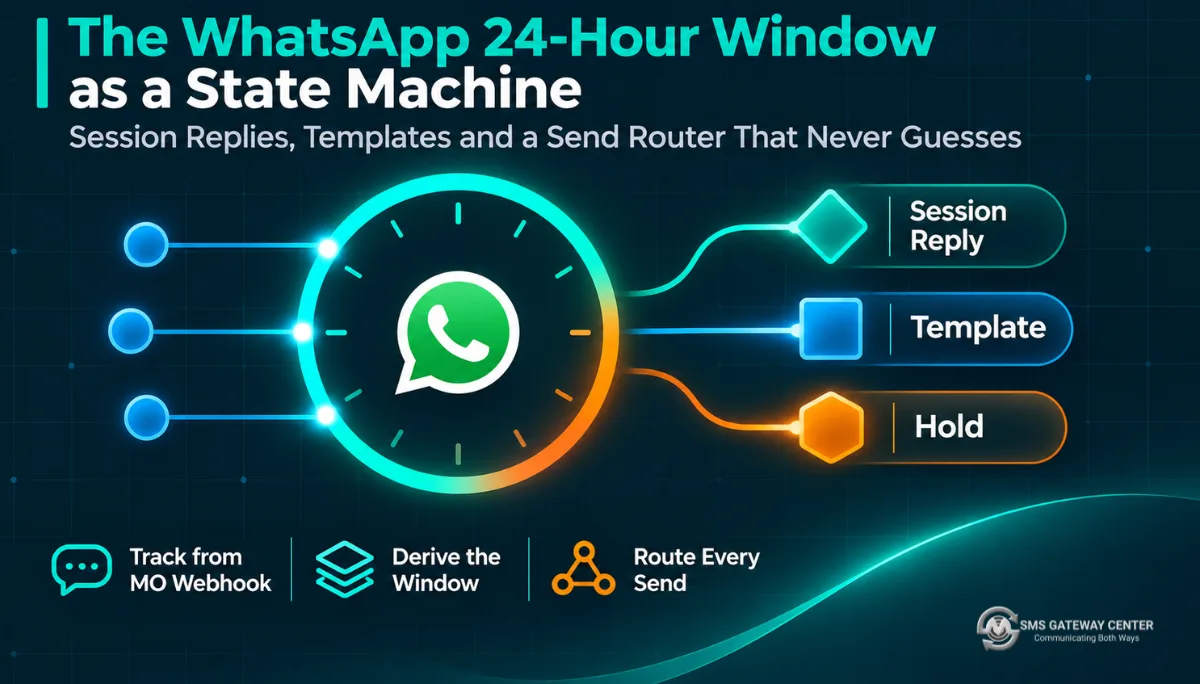
When a customer messages your WhatsApp number, a 24-hour customer service window opens. While it’s open you can send ordinary free-form messages, which this platform calls session messages: you send them through WAApi/send with no templateName. When it closes, only approved templates go through. Every new message from the customer resets the timer to a fresh 24 hours. Your own replies don’t.
Don’t confuse this with the old 24-hour conversation pricing. Meta replaced that with per-message pricing on 1 July 2025, but the window itself didn’t go anywhere. It still decides whether a free-form message is allowed at all, and under per-message pricing it also decides whether a utility template is free or charged.
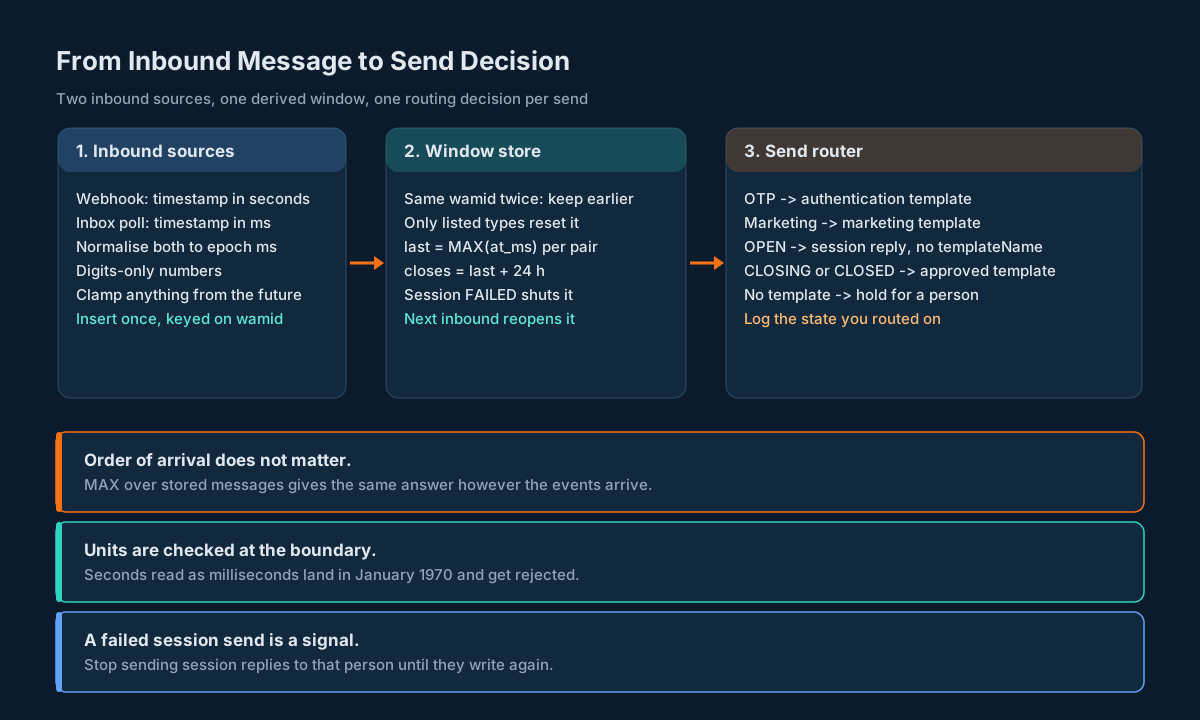
So the window isn’t something you open and close. It’s a fact you derive: “the newest message this customer sent to this business number, plus 24 hours.” Build it that way. Store every inbound message once, keyed on its WhatsApp message id, from both the MO webhook and the inbox API. Convert the webhook’s timestamp (a string of seconds) and the inbox’s timestamp (a number of milliseconds) to one unit before they touch each other. Compute the window as MAX(at_ms) + 24 h per business and customer pair. Then put one router in front of every send that picks a session reply when the window is open with a safety margin, an approved template when it isn’t, and a hold when there’s no template to use.
TL;DR
- The rule: a customer message (or call) opens a 24-hour window and every later one resets it. Outside the window you can only send templates.
- Your replies don’t count. Track the customer’s last inbound message, never your last send.
- Units differ. The MO webhook
timestampis a string of seconds ("1682397841"). The inboxtimestampis a number of milliseconds (1752480000000). Mix them and your window lands in January 1970. - Key the window on a pair: your WABA number and the customer’s number, both as digit strings.
- Derive, don’t count.
last_inbound_ms = MAX(at_ms)over stored messages gives the same answer whatever order events arrive in and however many times they’re replayed. - Leave a margin. Treat the last 30 minutes as closed, because you can’t see whether the check happens when the platform accepts your request or when the message is delivered.
- Route every send through one function: OTPs go as authentication templates, marketing as marketing templates, everything else as a session reply when the window is OPEN and a template when it isn’t.
- A failed session send shuts the window in your store until the customer writes again. Don’t retry it as another session message.
- Cost follows the window under Meta’s per-message pricing: session replies and utility templates inside an open window are free, marketing and authentication templates are always charged. Your account’s rates are in the Rate Plan.
What Opens, Resets and Closes the Window
Meta’s own wording is short. When a WhatsApp user messages you or calls you, a 24-hour timer called a customer service window starts. If they message or call again before it runs out, the timer resets to 24 hours. While it’s open you can send service messages, meaning text, media, interactive lists and reply buttons, location, contacts and the rest, without approval. Once it closes, you can only send pre-approved templates. The rule is on Meta’s service messages page, and the platform’s 24-hour customer care window entry says the same thing in one paragraph.
What that means in practice:
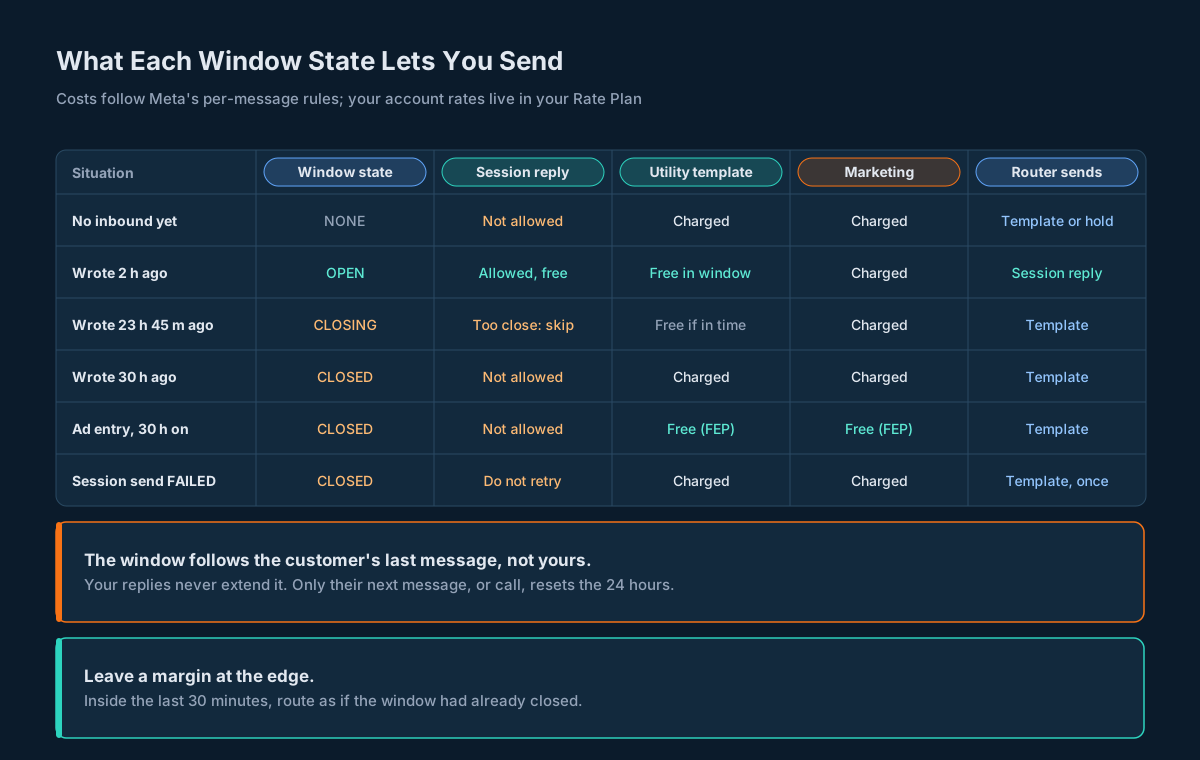
Only the customer moves the clock. Meta’s pricing example is precise about this: at hour 26 the window closes because “24 hours have passed since the user last messaged you.” You can send ten replies at hour 23 and the window still closes at hour 24. A system that stores “last message in this conversation” without asking who sent it will be wrong on every busy thread.
A template doesn’t open a window. A reply to it does. A business-initiated template goes out regardless of the window. If the customer answers, by typing or by tapping a quick reply button, that answer is an inbound message and the window opens from that moment. The template versus session messages entry describes this flow: start with a template, then keep the conversation going with session messages.
The window is per conversation partner, not per account. It exists between one business phone number and one WhatsApp user. A customer who wrote to your support number has an open window there and a closed one on your marketing number. More on that in the window key section.
There’s also a small caveat on Meta’s side worth building around: Meta lists a known issue where, in rare cases, you receive a message and still can’t respond within the window. That’s one more reason a failed session send has to be handled as a normal outcome rather than an exception. See When a Session Send Fails.
Two Clocks: the Service Window and the Free Entry Point Window
There’s a second clock, and it’s easy to confuse with the first.
| Customer service window | Free entry point (FEP) window | |
|---|---|---|
| Opened by | Any customer message or call | A customer arriving from a Click to WhatsApp ad or a Facebook Page call-to-action button, on the Android or iOS app, and you replying within 24 hours |
| Starts | When the customer’s message arrives | When you send that reply |
| Lasts | 24 hours from the customer’s latest message | 72 hours |
| What it changes | What you’re allowed to send | What Meta charges for what you send |
| After it closes | Templates only | Normal per-message pricing |
Meta’s pricing page is explicit that the two are independent: if the service window closes while the FEP window is still open, you can only send templates, but those templates are free until the 72 hours run out.
For engineering, that split is the useful part. The service window is a permission. Get it wrong and your message fails. The FEP window is a price. Get it wrong and your cost forecast is off, but nothing breaks. So the router below never uses the FEP window to decide whether to send something. It only reads it, when it can, to label the expected cost. And since the entry point conditions include the device type the customer used, which you can’t see, the safe default is to assume a message is charged unless you’ve seen the referral data that marks an ad entry. The platform’s free messages entry lists the same three free cases.
Where the Window Shows Up on the Platform
There’s no “window status” endpoint to ask. The window is something you work out from inbound messages, and you send differently depending on the answer. Four surfaces are involved.
| Surface | What it gives you | Role in the window |
|---|---|---|
| MO webhook (configured in the portal, report type MO) | One push per customer message: messages[].id, from, type, timestamp as a string of seconds, and metadata.display_phone_number for your number | Primary source. Resets the window in near real time |
GET rest/wa/v1/inbox | Rows with waMsgId, wabaNumber, mobileNo, messageType, timestamp as a number of milliseconds; newest first; filters for wabaNumber, mobileNo, fromDate, toDate; limit up to 200 | Backfill and on-demand probe when your store has no row for someone |
POST WAApi/send | Sends a template when templateName is present, a session message when it’s left out | Where the router’s decision turns into a request |
POST WAApi/report | Delivery rows with status (for example DELIVERED, READ, FAILED), cause, globalErrorCode, submitTime, deliveryTime, readTime | Tells you a session send failed, which feeds back into the window |
The send page states the session rule in one line: if you’re sending a session based message, send an open message and remove the templateName parameter, and if it’s in session the message will get delivered. The send reference, the inbox reference and the reports reference have the full parameter tables. The MO response format entry shows the webhook body, and Receiving Messages on Four Channels compares the inbox contracts across channels if you’re building one inbound pipeline for all of them.
The Timestamp Trap: Seconds on the Webhook, Milliseconds in the Inbox
The two inbound sources describe the same event with different units and different JSON types.
| Source | Field | Sample | JSON type | Unit |
|---|---|---|---|---|
| MO webhook | messages[].timestamp | "1682397841" | string | seconds |
| Inbox API | inboxList[].timestamp | 1752480000000 | number | milliseconds |
Here’s what each sample means, and what happens when you read one in the other’s unit:
| Value | Read correctly | Read in the wrong unit |
|---|---|---|
"1682397841" (webhook) | 2023-04-25 10:14:01 IST | As milliseconds: 1970-01-20 16:49:57 IST |
1752480000000 (inbox) | 2025-07-14 13:30:00 IST | As seconds: roughly the year 57,500, which most date libraries refuse |
The first mistake is the dangerous one, because it doesn’t throw. A seconds value stored as milliseconds says the customer last wrote in January 1970, so every window looks closed, and your router quietly sends paid templates to people who are mid-conversation. The reverse mistake would keep every window open forever, which is worse, but at least it tends to crash.
Two habits fix it for good:
- Convert at the parser, never later. The webhook parser multiplies by 1,000. The inbox parser doesn’t. Nothing downstream ever sees a raw
timestamp. - Range-check the result. Any epoch millisecond value you’ll see in production falls between 1,577,836,800,000 (1 January 2020) and 4,102,444,800,000 (1 January 2100). A seconds value is about a thousand times too small to pass. One
ifturns a silent bug into a loud one.
If you parse the inbox with a generic JSON library, the number type is safe here: 1752480000000 is well under the 9,007,199,254,740,991 limit for exact doubles. The IDs on other WhatsApp endpoints aren’t, which is a separate problem covered in Lossless JSON Parsing for Messaging APIs.
The Window Key Is a Pair of Numbers
A window belongs to one business number and one customer. Key it on both:
- Business:
metadata.display_phone_numberon the webhook,wabaNumberin the inbox and onWAApi/send. - Customer:
messages[].fromon the webhook,mobileNoin the inbox,mobileonWAApi/send.
Then normalise both to digits only, once, at the parser. A display number can come with spaces or a plus sign, and the inbox filter asks for digits only. If one side of your join has +91 70396 00000 and the other has 917039600000, every lookup misses and every window looks closed.
If you run several WABA numbers, keying on the customer alone is the bug to watch for. Someone who replied to your delivery number an hour ago hasn’t opened anything on your sales number. A router that sees “this customer has an open window” and sends a session message from the wrong number gets a failure, and you’ll spend a while working out why only some of them fail.
The State Machine
For one business and customer pair, at a given moment, the window is in exactly one of four states.
| State | Condition | What you can send |
|---|---|---|
NONE | You’ve never stored a message from this customer on this number | Templates only |
OPEN | now < last_inbound + 24 h - margin | Session messages and templates |
CLOSING | last_inbound + 24 h - margin <= now < last_inbound + 24 h | Technically session messages, but route as closed |
CLOSED | now >= last_inbound + 24 h, or a session send failed after the last inbound message | Templates only |
Transitions are simple because only two kinds of event exist:
- A customer message arrives (any type on your reset list). The pair moves to
OPEN, from any state, includingCLOSEDafter a failure. - Time passes.
OPENdrifts intoCLOSING, thenCLOSED. No event fires for this. You compute it whenever you need it.
A third event, a session send fails, forces CLOSED early. It’s covered in When a Session Send Fails.
Notice what isn’t an event: your own sends. Nothing you send moves the clock, which is why the state can be computed from inbound data alone.
Don’t run a timer per conversation that fires at the 24-hour mark. You’d need to cancel and restart it on every inbound message, survive restarts, and handle late events that arrive after it fired. Computing the state from stored data on demand avoids all of that. If you want a “windows closing soon” list for agents, run a query every few minutes, as shown below.
The Data Model: Store Messages, Derive the Window
Store the inputs and derive the window. One row per customer message, keyed on the WhatsApp message id, plus a small table for failed session sends. The window itself is a view.
-- One row per customer message, from the webhook or the inbox poll.
CREATE TABLE wa_inbound (
    wamid      TEXT PRIMARY KEY,           -- the customer's message id
    business   TEXT NOT NULL,              -- your WABA number, digits only
    customer   TEXT NOT NULL,              -- their number, digits only
    at_ms      BIGINT NOT NULL,            -- epoch ms, earliest seen
    msg_type   TEXT NOT NULL,
    resets     SMALLINT NOT NULL,          -- 1 if the type moves the window
    referral   SMALLINT NOT NULL DEFAULT 0,
    source     TEXT NOT NULL               -- 'webhook' or 'inbox'
);
CREATE INDEX wa_inbound_pair ON wa_inbound (business, customer, at_ms);

-- A session send that came back FAILED shuts the window until they write again.
CREATE TABLE wa_session_failure (
    send_ref   TEXT PRIMARY KEY,
    business   TEXT NOT NULL,
    customer   TEXT NOT NULL,
    failed_ms  BIGINT NOT NULL
);

-- The window is derived, never stored as a counter.
CREATE VIEW wa_window AS
SELECT i.business,
       i.customer,
       MAX(i.at_ms)                    AS last_inbound_ms,
       MAX(i.at_ms) + 86400000         AS closes_ms,
       (SELECT MAX(f.failed_ms)
          FROM wa_session_failure f
         WHERE f.business = i.business
           AND f.customer = i.customer) AS last_failure_ms
  FROM wa_inbound i
 WHERE i.resets = 1
 GROUP BY i.business, i.customer;
Why this shape:
wamidas the primary key makes ingestion idempotent. The webhook can retry, a backfill can replay yesterday, and the inbox poll can return a row you already got from the webhook. Each lands once. The same idea is behind Message Idempotency at Scale, applied to inbound instead of outbound.at_mskeeps the earliest time seen for a message. If the webhook and the inbox disagree by a second or two on the same message, the earlier value closes the window slightly sooner, which is the safe direction.resetsis decided at insert time from the message type, so the view doesn’t need to know the reset list.MAX(at_ms)doesn’t care about order. An old message arriving late can’t shrink the window, and a replay can’t extend it.
The view answers every question with one query. This one lists each pair’s state with a 30-minute margin:
-- Who can still get a session reply, with half an hour to spare?
SELECT business, customer, closes_ms,
       CASE
         WHEN last_failure_ms >= last_inbound_ms THEN 'CLOSED'
         WHEN :now >= closes_ms THEN 'CLOSED'
         WHEN :now >= closes_ms - :margin THEN 'CLOSING'
         ELSE 'OPEN'
       END AS state
  FROM wa_window;
Run against three stored messages, a text at 13:30, a button tap at 14:30 and a reaction at 15:30 on 14 July 2025 (IST), at 14:00 the next day, it returns closes_ms of 1752570000000 (2025-07-15 14:30:00 IST) and CLOSING. The reaction didn’t move the clock, and the button tap did.
If you keep a central outbound table, as in The Outbound Message Table, add one column to it: window_state_at_send, the state your router saw when it made the decision. When a session reply fails, that column tells you in one glance whether the router was wrong or the platform was.
Recording Inbound Messages in Python
Here’s the whole module: parsers for both sources, the unit guard, idempotent recording, the state function and the router. It uses sqlite3 so you can run it as-is. The SQL ports to PostgreSQL with BIGINT columns.
"""Track the WhatsApp customer service window and route outbound sends.

The window is a fold over inbound messages: for each (business, customer)
pair it closes 24 hours after the newest message the customer sent.
Everything here is order-independent and safe to replay.
"""
import re
import sqlite3
from dataclasses import dataclass
from typing import List, Optional

WINDOW_MS = 24 * 60 * 60 * 1000
DEFAULT_MARGIN_MS = 30 * 60 * 1000
MAX_FUTURE_MS = 5 * 60 * 1000

# Plausible epoch-millisecond range: 2020-01-01 to 2100-01-01 UTC.
MS_MIN = 1577836800000
MS_MAX = 4102444800000

# Inbound types allowed to move the window. Anything else is ignored
# until you have seen it in your own traffic and decided it counts.
RESETTING_TYPES = frozenset({
    "text", "button", "interactive", "image", "video", "audio",
    "document", "location", "contacts", "sticker",
})

SCHEMA = """
CREATE TABLE IF NOT EXISTS wa_inbound (
    wamid      TEXT PRIMARY KEY,
    business   TEXT NOT NULL,
    customer   TEXT NOT NULL,
    at_ms      INTEGER NOT NULL,
    msg_type   TEXT NOT NULL,
    resets     INTEGER NOT NULL,
    referral   INTEGER NOT NULL DEFAULT 0,
    source     TEXT NOT NULL
);
CREATE INDEX IF NOT EXISTS wa_inbound_pair
    ON wa_inbound (business, customer, at_ms);
CREATE TABLE IF NOT EXISTS wa_session_failure (
    business   TEXT NOT NULL,
    customer   TEXT NOT NULL,
    failed_ms  INTEGER NOT NULL,
    send_ref   TEXT NOT NULL PRIMARY KEY
);
"""


def digits(value) -> str:
    """Phone numbers become digit strings at one boundary."""
    return re.sub(r"\D", "", str(value))


def check_ms(value: int) -> int:
    """Reject a value that is not epoch milliseconds."""
    if not MS_MIN <= value < MS_MAX:
        raise ValueError(f"not epoch milliseconds: {value}")
    return value


@dataclass(frozen=True)
class Inbound:
    wamid: str
    business: str
    customer: str
    at_ms: int
    msg_type: str
    referral: bool
    source: str


def parse_webhook(body: dict) -> List[Inbound]:
    """Read customer messages from an MO webhook body.

    Handles the flat shape (metadata, messages, contacts) and Meta's
    entry[].changes[].value wrapper. timestamp is a string of seconds.
    """
    values = []
    if isinstance(body.get("entry"), list):
        for entry in body["entry"]:
            for change in entry.get("changes", []):
                values.append(change.get("value", {}))
    else:
        values.append(body)
    out = []
    for value in values:
        business = digits(value.get("metadata", {})
                          .get("display_phone_number", ""))
        for msg in value.get("messages", []) or []:
            out.append(Inbound(
                wamid=str(msg["id"]),
                business=business,
                customer=digits(msg["from"]),
                at_ms=check_ms(int(msg["timestamp"]) * 1000),
                msg_type=str(msg.get("type", "")),
                referral="referral" in msg,
                source="webhook",
            ))
    return out


def parse_inbox_row(row: dict) -> Inbound:
    """Read one rest/wa/v1/inbox row. timestamp is a number of ms."""
    return Inbound(
        wamid=str(row["waMsgId"]),
        business=digits(row["wabaNumber"]),
        customer=digits(row["mobileNo"]),
        at_ms=check_ms(int(row["timestamp"])),
        msg_type=str(row.get("messageType", "")),
        referral=False,
        source="inbox",
    )


def record(db: sqlite3.Connection, ev: Inbound, received_ms: int) -> None:
    """Store an inbound message once. Safe to call from both sources."""
    at_ms = min(ev.at_ms, received_ms + MAX_FUTURE_MS)
    resets = 1 if ev.msg_type in RESETTING_TYPES else 0
    db.execute(
        "INSERT INTO wa_inbound (wamid, business, customer, at_ms,"
        " msg_type, resets, referral, source)"
        " VALUES (?, ?, ?, ?, ?, ?, ?, ?)"
        " ON CONFLICT (wamid) DO UPDATE SET"
        " at_ms = MIN(wa_inbound.at_ms, excluded.at_ms),"
        " referral = MAX(wa_inbound.referral, excluded.referral)",
        (ev.wamid, ev.business, ev.customer, at_ms, ev.msg_type,
         resets, int(ev.referral), ev.source))


def record_session_failure(db, business, customer, failed_ms, send_ref):
    """A session send came back FAILED: treat the window as shut."""
    db.execute(
        "INSERT OR IGNORE INTO wa_session_failure"
        " (business, customer, failed_ms, send_ref) VALUES (?, ?, ?, ?)",
        (digits(business), digits(customer), failed_ms, send_ref))


def last_inbound_ms(db, business, customer) -> Optional[int]:
    row = db.execute(
        "SELECT MAX(at_ms) FROM wa_inbound"
        " WHERE business = ? AND customer = ? AND resets = 1",
        (digits(business), digits(customer))).fetchone()
    return row[0]


def window_state(db, business, customer, now_ms,
                 margin_ms=DEFAULT_MARGIN_MS) -> str:
    """NONE, OPEN, CLOSING or CLOSED for one pair at now_ms."""
    last = last_inbound_ms(db, business, customer)
    if last is None:
        return "NONE"
    failed = db.execute(
        "SELECT MAX(failed_ms) FROM wa_session_failure"
        " WHERE business = ? AND customer = ?",
        (digits(business), digits(customer))).fetchone()[0]
    if failed is not None and failed >= last:
        return "CLOSED"
    closes = last + WINDOW_MS
    if now_ms >= closes:
        return "CLOSED"
    if now_ms >= closes - margin_ms:
        return "CLOSING"
    return "OPEN"


@dataclass(frozen=True)
class Route:
    kind: str      # "session", "template" or "hold"
    reason: str


def route(intent: str, state: str, template: Optional[str]) -> Route:
    """Pick how to send. intent: reply, notify, marketing or otp."""
    if intent == "otp":
        return Route("template", "authentication template, short TTL")
    if intent == "marketing":
        return Route("template", "marketing always goes as a template")
    if state == "OPEN":
        return Route("session", "window open with margin to spare")
    if template:
        return Route("template", f"window {state.lower()}, use {template}")
    return Route("hold", f"window {state.lower()}, no approved template")
What’s easy to miss in there:
RESETTING_TYPESis an allowlist. A message type you haven’t listed is stored but doesn’t move the window. If a new type shows up in your logs, look at what it is, decide, and add it. An unknown type then costs you a template you might not have needed, not a failed session send.record()clamps future timestamps to five minutes past the time you received the event. A sender clock that runs ahead would otherwise hold a window open after it really closed.ON CONFLICT ... MIN(...)keeps the earlier timestamp when the samewamidarrives from both sources, and keeps the referral flag if either source carried it.- The failure check compares against the last inbound message. A failure older than the customer’s latest message doesn’t count, so the next message reopens the window without any cleanup job.
These tests cover the edges. They run with plain python3 test_wawindow.py:
import sqlite3

import wawindow as w

H = 60 * 60 * 1000
T0 = 1752480000000  # 2025-07-14 13:30:00 IST, the inbox sample value


def fresh():
    db = sqlite3.connect(":memory:")
    db.executescript(w.SCHEMA)
    return db


def flat(wamid, ts_seconds, mtype="text", extra=None):
    msg = {"from": "919876543210", "id": wamid, "type": mtype,
           "timestamp": str(ts_seconds)}
    if mtype == "text":
        msg["text"] = {"body": "hi"}
    msg.update(extra or {})
    return {"metadata": {"phone_number_id": "1234",
                         "display_phone_number": "91 70396 00000"},
            "messaging_product": "whatsapp", "messages": [msg],
            "contacts": [{"profile": {"name": "R"}, "wa_id": "919876543210"}]}


def inbox(wamid, ms, mtype="text"):
    return {"incomingId": "8801", "wabaNumber": "917039600000",
            "mobileNo": "919876543210", "waMsgId": wamid,
            "messageType": mtype, "timestamp": ms}


B, C = "917039600000", "919876543210"


def test_webhook_seconds_and_wrapped():
    ev = w.parse_webhook(flat("wamid.A", 1682397841))[0]
    assert ev.at_ms == 1682397841000 and ev.business == B
    wrapped = {"object": "whatsapp_business_account",
               "entry": [{"changes": [{"value": flat("wamid.B", 1682397841),
                                       "field": "messages"}]}]}
    assert w.parse_webhook(wrapped)[0].wamid == "wamid.B"


def test_unit_guard():
    try:
        w.check_ms(1682397841)  # seconds passed off as ms
    except ValueError:
        pass
    else:
        raise AssertionError("seconds accepted as ms")
    assert w.parse_inbox_row(inbox("wamid.C", T0)).at_ms == T0


def test_same_message_two_sources_keeps_earlier():
    db = fresh()
    w.record(db, w.parse_inbox_row(inbox("wamid.D", T0 + 2000)), T0 + 9000)
    w.record(db, w.parse_webhook(flat("wamid.D", T0 // 1000))[0], T0 + 9000)
    assert w.last_inbound_ms(db, B, C) == T0
    assert db.execute("SELECT COUNT(*) FROM wa_inbound").fetchone()[0] == 1


def test_out_of_order_never_shrinks():
    db = fresh()
    w.record(db, w.parse_inbox_row(inbox("wamid.new", T0 + 5 * H)), T0 + 6 * H)
    w.record(db, w.parse_inbox_row(inbox("wamid.old", T0)), T0 + 6 * H)
    assert w.last_inbound_ms(db, B, C) == T0 + 5 * H


def test_unlisted_type_does_not_reset():
    db = fresh()
    w.record(db, w.parse_inbox_row(inbox("wamid.E", T0)), T0)
    w.record(db, w.parse_inbox_row(inbox("wamid.F", T0 + 20 * H,
                                         "reaction")), T0 + 20 * H)
    assert w.last_inbound_ms(db, B, C) == T0


def test_boundaries():
    db = fresh()
    assert w.window_state(db, B, C, T0) == "NONE"
    w.record(db, w.parse_inbox_row(inbox("wamid.G", T0)), T0)
    assert w.window_state(db, B, C, T0 + 23 * H) == "OPEN"
    assert w.window_state(db, B, C, T0 + 24 * H - 30 * 60 * 1000) == "CLOSING"
    assert w.window_state(db, B, C, T0 + 24 * H - 1) == "CLOSING"
    assert w.window_state(db, B, C, T0 + 24 * H) == "CLOSED"


def test_future_timestamp_is_clamped():
    db = fresh()
    w.record(db, w.parse_inbox_row(inbox("wamid.H", T0 + 3 * H)), T0)
    assert w.last_inbound_ms(db, B, C) == T0 + w.MAX_FUTURE_MS


def test_failure_closes_until_next_inbound():
    db = fresh()
    w.record(db, w.parse_inbox_row(inbox("wamid.I", T0)), T0)
    w.record_session_failure(db, B, C, T0 + H, "send-1")
    assert w.window_state(db, B, C, T0 + 2 * H) == "CLOSED"
    w.record(db, w.parse_inbox_row(inbox("wamid.J", T0 + 3 * H)), T0 + 3 * H)
    assert w.window_state(db, B, C, T0 + 4 * H) == "OPEN"


def test_router():
    assert w.route("reply", "OPEN", None).kind == "session"
    assert w.route("reply", "CLOSING", "order_update_v3").kind == "template"
    assert w.route("notify", "CLOSED", None).kind == "hold"
    assert w.route("otp", "OPEN", "login_code").kind == "template"
    assert w.route("marketing", "OPEN", "promo_nov").kind == "template"


def test_referral_flag():
    db = fresh()
    ev = w.parse_webhook(flat("wamid.K", T0 // 1000,
                              extra={"referral": {"source_type": "ad"}}))[0]
    assert ev.referral
    w.record(db, ev, T0)
    assert db.execute("SELECT referral FROM wa_inbound").fetchone()[0] == 1


if __name__ == "__main__":
    n = 0
    for name, fn in sorted(globals().items()):
        if name.startswith("test_"):
            fn()
            n += 1
    print(f"{n} tests passed")
Wire the webhook handler so it stores first and answers fast. Parse the body, call record() for each message inside one transaction, commit, and return 200. Anything slower, like routing a reply, happens after the commit from a queue. If the handler is also matching button taps, the classifier from WhatsApp Template Buttons End to End runs on the same stored row, so a tap both resets the window and gets routed by its payload.
Asking the Inbox When You Have No State
The webhook is the live source, but you’ll hit cases where your store has nothing: a new deployment, a webhook outage, a customer who wrote before you started recording. Before you decide NONE means “never wrote”, ask the inbox. It returns rows newest first and filters by both numbers, so limit=1 gives you the latest message in one call.
// Ask the inbox when a customer last wrote to one business number.
// timestamp in the inbox is a NUMBER of milliseconds; the MO webhook
// sends a STRING of seconds. Normalise both to ms before comparing.
const BASE = 'https://unify.smsgateway.center/rest/wa/v1/inbox';
const DAY_MS = 24 * 60 * 60 * 1000;

function ymd(ms) {
  return new Date(ms).toISOString().slice(0, 10);
}

export async function lastInboundMs(wabaNumber, mobileNo, nowMs = Date.now()) {
  const params = new URLSearchParams({
    userid: process.env.SGC_USERID,
    output: 'json',
    action: 'list',
    wabaNumber: String(wabaNumber).replace(/\D/g, ''),
    mobileNo: String(mobileNo).replace(/\D/g, ''),
    // Two days back and one forward: wide enough whatever zone the
    // date-only bounds are read in.
    fromDate: ymd(nowMs - 2 * DAY_MS),
    toDate: ymd(nowMs + DAY_MS),
    page: '1',
    limit: '1', // newest first, so one row is the latest message
  });
  const res = await fetch(`${BASE}?${params}`, {
    headers: { apikey: process.env.SGC_APIKEY },
  });
  const body = await res.json();
  if (body.status !== 'success') {
    throw new Error(`inbox read failed: ${body.reason}`);
  }
  const row = (body.inboxList || [])[0];
  if (!row) return null; // no message in range: treat as no window
  const ms = Number(row.timestamp);
  if (!Number.isSafeInteger(ms) || ms < 1577836800000) {
    throw new Error(`unexpected timestamp unit: ${row.timestamp}`);
  }
  return ms;
}
The date range is deliberately wide. The inbox filters on received date, and date-only bounds start at 00:00:00 and end at 23:59:59, but in which time zone isn’t stated. Two days back and one day forward covers any 24-hour window under any plausible zone, and the timestamp in the row is what you actually use.
Two more details. The function checks the unit of timestamp before trusting it, for the same reason the Python parser does. And it reads status before touching inboxList: an account without WhatsApp enabled gets "status": "error" with a 403 statusCode and an empty list, which would otherwise look exactly like “no messages.”
Feed whatever this returns into the same record() path as everything else, using the row’s waMsgId as the key. Then the probe isn’t a second source of truth, just a late delivery of the first one. For bulk backfill after an outage, page through the inbox for the whole gap with limit=200 and record every row; the wamid key makes it safe to overlap with what the webhook already delivered.
The Send Router: Session Reply, Template or Hold
Every outbound WhatsApp message goes through one function that looks at two things: what the message is for, and the window state for that pair right now.
| Intent | Window OPEN | Window CLOSING, CLOSED or NONE |
|---|---|---|
reply (answering something the customer asked) | Session reply | Approved template if one fits, otherwise hold |
notify (order update, appointment change) | Session reply | Utility template, otherwise hold |
otp | Authentication template | Authentication template |
marketing | Marketing template | Marketing template |
Two rows ignore the window on purpose.
OTPs always go as authentication templates. Meta gives authentication templates a default delivery time-to-live of 10 minutes, against 30 days for everything else. A session message carrying a code can sit undelivered on an offline phone and arrive the next day, long after the code expired and after you may have issued another. The template’s short TTL is what you want for a code. If the window is open, that doesn’t change. OTP Delivery in India covers the rest of the OTP path, and Multi-Channel Fallback Design covers what happens when WhatsApp isn’t the right channel at all.
Marketing always goes as a marketing template. Keeping promotional content on one path means one place for opt-out checks (see Opt-Out and Suppression Across Four Channels), one category on the invoice and one template to review. A promotion slipped into an open support window as a session message skips all three.
The hold outcome is the one teams forget. If the window is closed and you have no approved template that fits, there’s no way to send that message on WhatsApp. Don’t fall back to sending it anyway “to see what happens.” Put it in a queue for a person, or send it on another channel the customer has agreed to, and record why.
Log the state with every decision. When someone asks why a customer got a paid template at 14:05 when they’d written at 14:20 the day before, the answer should be one row away.
Leave a Margin at the Edge
A session reply sent at 23 hours 59 minutes is a coin toss, and you can’t see the coin.
Between your router deciding “open” and WhatsApp checking the window there’s your own queue, the HTTP call to WAApi/send, the platform’s processing and Meta’s. Whether the window is checked when the request is accepted or when the message is delivered isn’t something you can read anywhere, and the delay on a busy account isn’t published. So stop sending session messages a little before the edge.
The module uses 30 minutes. The trade-off is easy to reason about:
- Too small a margin risks failed session sends at the edge. Each one costs a delay, a failure to handle, and a template anyway.
- Too large a margin sends templates to people whose window was still open. Under Meta’s per-message pricing, a utility template inside an open window is free, so for notifications the extra cost of a generous margin can be zero. For replies, it means using a template where a free-form message would have done.
Pick the margin from your own data. Once you have a few weeks of sends, compare window_state_at_send against delivery outcomes and look at how close to the edge your failures start. Shrink the margin until you see them, then back off.
The margin also absorbs the small things: a few seconds’ difference between your clock and Meta’s, rounding of the webhook’s whole seconds, the time a message spent in your own retry queue. Keep server clocks on NTP anyway. A margin can cover drift, not a clock that’s minutes out.
Sending a Session Reply on WAApi/send
A session reply is a normal WAApi/send call without templateName. The message text goes in msg, fully rendered.
#!/usr/bin/env bash
# Session reply: no templateName, fully rendered text in msg.
# Only call this after your window check says OPEN.
set -euo pipefail
curl --silent --show-error --request POST \
  'https://unify.smsgateway.center/WAApi/send' \
  --header "apikey: ${SGC_APIKEY}" \
  --form-string "userid=${SGC_USERID}" \
  --form-string 'wabaNumber=9170396xxxxx' \
  --form-string 'mobile=919876543210' \
  --form-string 'sendMethod=quick' \
  --form-string 'msgType=text' \
  --form-string 'msg=Your order 48213 left our warehouse today. Track it here: https://example.com/t/48213' \
  --form-string 'output=json'
Four things to get right:
- Render the text yourself. Template sends on this platform carry
{#var#}placeholders inmsgthat line up with an approved template. A session message has no template behind it, so send the final text the customer should see. - Use
--form-string, not-F, for anything you didn’t type yourself. With-F, a value starting with@or<is read as a file path. - Send the
apikeyheader withuserid. The header works on every endpoint and keeps the password out of request bodies and logs. - Store the response before anything else. The send page’s sample response returns
status,messageId,mobile, a numericstatusCodeof 200 anddescription. Save the whole body against your outbound row, then look up the result onWAApi/reportonce delivery reports arrive.
For media inside the window, the same call takes msgType=media with mediaType and either mediaId or mediaUrl, as in The WhatsApp Business API Wire Contract. The window rule doesn’t change.
If you send several session messages in a row and their order matters, wait for each one to be delivered before sending the next. Meta doesn’t guarantee that messages arrive in the order you sent them.
When a Session Send Fails
A session send can fail even when your router did everything right: the margin was too thin, a message from the customer you thought you had never existed, or Meta’s rare can’t-respond case hit. Plan for it.
On this platform, the outcome of a send shows up as a row on WAApi/report with a status such as DELIVERED, READ or FAILED, plus cause and globalErrorCode. (Meta’s own code for “more than 24 hours since the customer last replied” is 131047, listed in its error code reference.) When you see FAILED on a send that went out without templateName, do three things:
- Record a session failure for the pair, with the time it happened. In the module that’s
record_session_failure(), and from then onwindow_state()returnsCLOSEDfor that pair until the customer writes again. - Don’t retry it as a session message. A retry that fails the same way just adds a second failure. If the message still matters, send it once through the router, which will now pick a template or hold it.
- Keep
causeandglobalErrorCodewith the outbound row, verbatim. They’re how you’ll tell window failures apart from everything else later, once you’ve seen enough of them.
This works even if you never learn which globalErrorCode means “window closed”. Treating every failed session send as a possible closed window costs at most one template you didn’t need. Treating it as transient and retrying can cost a stream of failures and an annoyed customer.
To pull those failures, poll WAApi/report with fromDate and toDate, pageLimit, and startCursor (start with 1, then pass data.cursors.next), read the outer status first, then walk data.records. Store uuId and mobileNo as text, because they come back as unquoted numbers and uuId is too long for a double. Delivery Report Ingestion covers paging and backfilling report windows.
Agent Queues and Replies That Wait Overnight
Human agents are where windows quietly expire. A customer writes at 18:40 on Friday, the ticket sits in a queue, and an agent picks it up on Saturday at 19:00. The window closed at 18:40. The agent types a reply, hits send, and it fails.
Two changes stop that:
Show the clock in the agent’s view. Every open conversation should carry “window closes at 18:40 Sat” next to it, computed from the same view as the router. Sort the queue by that, not only by arrival time, so a conversation near its edge gets picked up before one that has 20 hours left.
Re-check at send time, not at pick-up time. The router runs when the agent presses send, not when they opened the ticket. If the window closed in the meantime, the agent’s draft can’t go as a session message. Offer the matching template, or tell the agent plainly that the customer has to write again first. Don’t silently swap a carefully written reply for a generic template.
The inbox API gives you most of what you need for this view: filter with isReplied=0 and wabaNumber, and each row’s timestamp tells you when the window closes. One caution: use the inbox’s isReplied flag only for the agent queue, never for the window. The window depends on the customer’s messages alone, and whether isReplied reflects replies sent through the API as well as the portal isn’t something to rely on.
The same applies to anything you schedule. A “we’ll message you tomorrow at 10:00” promise made inside the window may land outside it. Decide the route when the message is due, not when it’s booked. Scheduling Messages Across Four Channels covers why the decision belongs in your own scheduler.
What the Window Does to Your Bill
Since July 2025, Meta charges per message rather than per 24-hour conversation. The window now matters for price in three ways:
| Message | Inside an open service window | Outside it |
|---|---|---|
| Session message (no template) | Free | Not allowed |
| Utility template | Free | Charged |
| Marketing template | Charged | Charged |
| Authentication template | Charged | Charged |
| Any message inside an open free entry point window | Free | (FEP closed) normal rules |
That’s from Meta’s pricing page, and the platform’s per-message pricing entry says the same and points you to the Rate Plan tab for your per-country rates by category.
Two engineering points fall out of the table.
The router’s choices for notify inside the window are both free, a session message or a utility template. Choose on other grounds: a session message is flexible, a template keeps the copy approved and consistent. Outside the window, every utility notification costs one template. So the cheapest notification system isn’t one that sends fewer templates. It’s one that sends the notification while the customer’s window is still open, when that fits the business event.
Your estimate should follow the router, not a flat rate. For each planned send, take the state from the view, the intent and the template category, and price it from your rate plan. Under Meta’s rules, a batch of 10,000 order updates to people who wrote in the last few hours costs nothing; the same batch a week later is 10,000 utility templates. Reconciling a Messaging Invoice Across Four Channels covers matching that estimate against what you’re actually billed.
Meta notes that whenever a template is used, the business accepts the charges of the category applied to it at that time, and it can re-categorise a template. Read categories from your template registry, refreshed from the platform, rather than from what you submitted. Message Template Management Across Four Channels shows how to keep that registry current.
Decision Matrix
| Situation | Window state | Route | Why |
|---|---|---|---|
| Customer asked a question 2 hours ago | OPEN | Session reply | Allowed, free, no approval needed |
| Customer wrote 23 h 45 m ago, agent replying now | CLOSING | Template that fits, or ask them to write again | Inside the 30-minute margin |
| Order shipped, customer wrote yesterday afternoon | Depends on the hour | Session or utility template inside, utility template outside | Both free inside, template charged outside |
| Login code | Any | Authentication template | 10-minute TTL, always charged |
| Weekend offer | Any | Marketing template | One path for promotional content and opt-outs |
Session reply came back FAILED | CLOSED | Template once, or hold | Never retry as a session message |
| Customer never wrote to this number | NONE (after an inbox probe) | Template, or hold | No window exists |
| Customer wrote to your other WABA number | NONE for this number | Template from this number, or reply from the number they used | The window is per pair |
| Ad click, you replied within 24 hours, now 30 hours later | CLOSED (FEP open) | Template, free while the FEP window lasts | FEP changes price, not permission |
Launch Checklist
- MO webhook configured for every WABA number, storing before answering 200.
- Webhook parser multiplies
timestampby 1,000; inbox parser doesn’t; both range-check the result. - Business and customer numbers stored as digit strings, keyed as a pair.
- Inbound messages stored once by
wamid, earliest time kept. RESETTING_TYPESreviewed against the message types in your own logs.- Window derived as
MAX(at_ms) + 24 h, never kept as a timer. - Future timestamps clamped to receive time plus a few minutes.
- Safety margin set (30 minutes to start) and reviewed against delivery outcomes.
- Every send goes through one router with intent and state; the state is logged with the send.
- OTPs always as authentication templates; marketing always as marketing templates.
- A
holdpath exists, with a queue or another consented channel behind it. FAILEDsession sends recorded as failures; no session retries.- Agent view shows each conversation’s closing time and re-checks at send.
- Inbox probe used when the store has no row, with a wide date range.
- Backfill job replays the inbox for any webhook outage.
- Cost estimates use state, intent and template category, not a flat rate.
Unspecified Behaviour and How to Code Around It
Some behaviours around the window aren’t pinned down by anything you can read today. Each item below gives the choice that stays correct either way, so none of them needs an answer before you ship.
One. Gate session sends before the call, and handle a failure after it. Whether an out-of-window session send is refused in the WAApi/send response or accepted and reported later as FAILED isn’t stated. Check the window first, then treat a refusal and a FAILED row the same way: record a session failure and route again. Correct under both behaviours.
Two. Treat every failed session send as a possibly closed window. Which globalErrorCode or cause marks “window closed” isn’t listed. If you shut the window on any session failure, the worst case is one template you didn’t strictly need. Keep the raw codes, and once you’ve seen enough of them you can narrow the rule.
Three. Stop session sends before the edge, not at it. Whether the window is checked at acceptance or at delivery is unknown, and so is the queueing delay. A margin makes both answers irrelevant: if you never send in the last 30 minutes, it doesn’t matter which moment counts.
Four. When two sources disagree on a message’s time, keep the earlier one. The webhook and the inbox could stamp the same wamid a little differently, and which clock each uses isn’t documented. The earlier value closes the window sooner, so it can cost a template but never a failed send.
Five. Let only listed message types move the clock. Meta’s rule says a message from the customer resets the window, but whether every webhook type counts (reactions, system notices, types added later) isn’t spelled out. An allowlist fails closed: an unlisted type delays nothing worse than a template.
Six. Never let a timestamp from the future hold a window open. Clamp each inbound time to your receive time plus five minutes. A sender clock that runs ahead then can’t keep a window alive after it’s really closed.
Seven. Count calls only when you can see them. Meta says a call from the customer also resets the window, and calls don’t show up in the inbox or the MO webhook samples. Ignoring them can only make your window close early. It can never make you send into a closed one.
Eight. Only use the free entry point window for cost estimates, and only when you see referral data. Whether the platform’s MO webhook passes Meta’s referral object through isn’t shown in the sample, and the FEP rules depend on the device the customer used. Price a message as charged unless you’ve seen the referral, and never let FEP change what you’re allowed to send.
Nine. Query the inbox with a wider date range than the window. The time zone of date-only fromDate and toDate isn’t given. Two days back and one forward covers any zone, and you filter on the row’s own timestamp afterwards.
Ten. Leave templateName out for session sends and confirm on the report. The parameter table marks templateName as required while the note under it says to remove it for session messages. Follow the note, store the response, and confirm the outcome from the WAApi/report row rather than from the send response alone.
Eleven. Don’t read the window from isReplied. Whether that flag tracks replies sent through the API as well as the portal isn’t stated. The window depends only on the customer’s messages, which you’re already storing.
Twelve. Send session text fully rendered. There’s no template behind a session message, so nothing fills placeholders for you. Whatever is in msg is what the customer will see.
FAQs
Didn’t per-message pricing remove the 24-hour window?
No. Per-message pricing, which started on 1 July 2025, replaced the old 24-hour conversation charge. The 24-hour customer service window is a separate rule, and it still applies. Meta’s service messages page says that once the window closes you can only send pre-approved templates. Its pricing page says non-template messages can only be sent within an open window, and that utility templates sent inside it are free. So the window now controls what you can send and part of what you pay.
Does my reply extend the 24-hour window?
No. Only the customer’s messages (and calls) reset it. Meta’s own pricing example closes the window at hour 26 because “24 hours have passed since the user last messaged you”, no matter what the business sent in between.
Does sending a template open the window?
No. A template goes out whether the window is open or not. If the customer replies to it, by typing or tapping a quick reply, that reply opens the window from the moment it arrives.
How do I send a session message on SMSGatewayCenter?
Call WAApi/send without templateName, with the full text in msg. Check the window yourself first, because there’s no endpoint that reports it, and confirm the outcome on WAApi/report.
Why do all my windows look closed?
Usually a unit or format bug. Check that the webhook timestamp (string seconds) is multiplied by 1,000 and the inbox timestamp (number milliseconds) isn’t, and that both numbers in your key are digits only on both sides of the lookup.
Is the window per customer or per business number?
Per pair. A customer with an open window on your support number has no window on your sales number until they write to that one too.
Can I send an OTP as a session message if the window is open?
You can, but don’t. Authentication templates get a 10-minute default time-to-live, while other messages get 30 days, so a session OTP can arrive long after it expired. Use the authentication template every time.
Are session messages free?
Yes, under Meta’s per-message pricing, service messages inside an open window carry no Meta charge, and so do utility templates sent inside it. Marketing and authentication templates are always charged. Your account’s rates by category are in the Rate Plan tab.
What’s the free entry point window?
A 72-hour window in which every message, templates included, is free. It opens when a customer reaches you from a Click to WhatsApp ad or a Facebook Page button on the mobile app and you reply within 24 hours. It changes the price, not what you’re allowed to send.
What should I do when a session reply fails?
Record a session failure for that pair so your router treats the window as closed, don’t retry it as a session message, and route the message again, which will pick a template or hold it.
How big should the safety margin be?
Start at 30 minutes and tune it with your own delivery data. The right margin is the smallest one where failed session sends near the edge stop appearing.
Know Which Messages Still Fit Inside the Window
Want session replies that land, templates only when you need them, and a cost forecast that matches the invoice? Set up the WhatsApp Business API on SMSGatewayCenter, point the MO webhook at your own endpoint, and start routing every send through the window. If you’d like help with the setup, talk to the team or try the sandbox first.
More from our blog
WhatsApp Template Buttons End to End: Quick Reply Payloads, Dynamic URL Buttons and Matching the Tap
Missed Call Verification and Lead Capture: Callback Design, Session Matching and the Lead Pipeline
Lossless JSON Parsing for Messaging APIs: 19-Digit IDs, Mixed Types and JSON Inside JSON
RCS Rich Cards and Carousels as a Content Model: Validate, Version and Send Cards Without Surprises