Table of Contents
- TL;DR
- Executive Summary
- What DLT Actually Is, in One Paragraph
- The PE-TM Binding Chain, and Why Your SMS Fails Without It
- Before You Start: The Prerequisites Checklist
- Phase 1: Register as a Principal Entity and Get Your Entity ID
- Phase 2: Register Your Header (Sender ID)
- Phase 3: Register Consent and Content Templates
- Choosing the Right Template Category
- Variables: The Single Biggest Source of Rejections
- Wiring the Approved IDs Into Your SMS API
- Validating a Message Against Its Template Before You Send
- Managing Headers and Templates Programmatically
- Debugging Scrubbing Failures
- Timelines, Costs and What You Cannot Control
- Multi-Operator Registration: Do You Need All Four Portals?
- Decision Matrix: Which Registration Path Fits Your Business
- Pros and Cons of the DLT Regime
- Common Mistakes That Cost Weeks
- FAQs
TL;DR
DLT registration in India is three sequential approvals plus one integration step. You register your business as a Principal Entity on any operator-run DLT portal and receive a Principal Entity ID. You then register a six character alphanumeric header, which becomes the Sender ID recipients see. You then register content templates, each of which returns its own DLT Template ID. Finally you pass the Entity ID and the Template ID as dltEntityId and dltTemplateId on every send request, with message text that matches the approved template character for character apart from the declared variables. Skip or mismatch any of these and the operator scrubbing layer rejects the message before it reaches the handset, regardless of whether your API call returned a success response.
Executive Summary
If you send commercial SMS to Indian mobile numbers, you must complete DLT registration first. There is no workaround, no grace path and no gateway that can send unregistered commercial traffic legitimately. The Telecom Regulatory Authority of India mandated the Distributed Ledger Technology framework under TCCCPR 2018, and every access provider now scrubs inbound commercial traffic against a shared registry at submit time.
Most published guides describe the portal clicks and stop at template approval. That is where the practical problems begin, not where they end. The failure modes that actually consume engineering time in production are the ones that happen after approval: a message that differs from the approved template by one character, a variable that expanded past its d eclared length, a header bound to the wrong template category, or an Entity ID that was never passed on the API request in the first place.
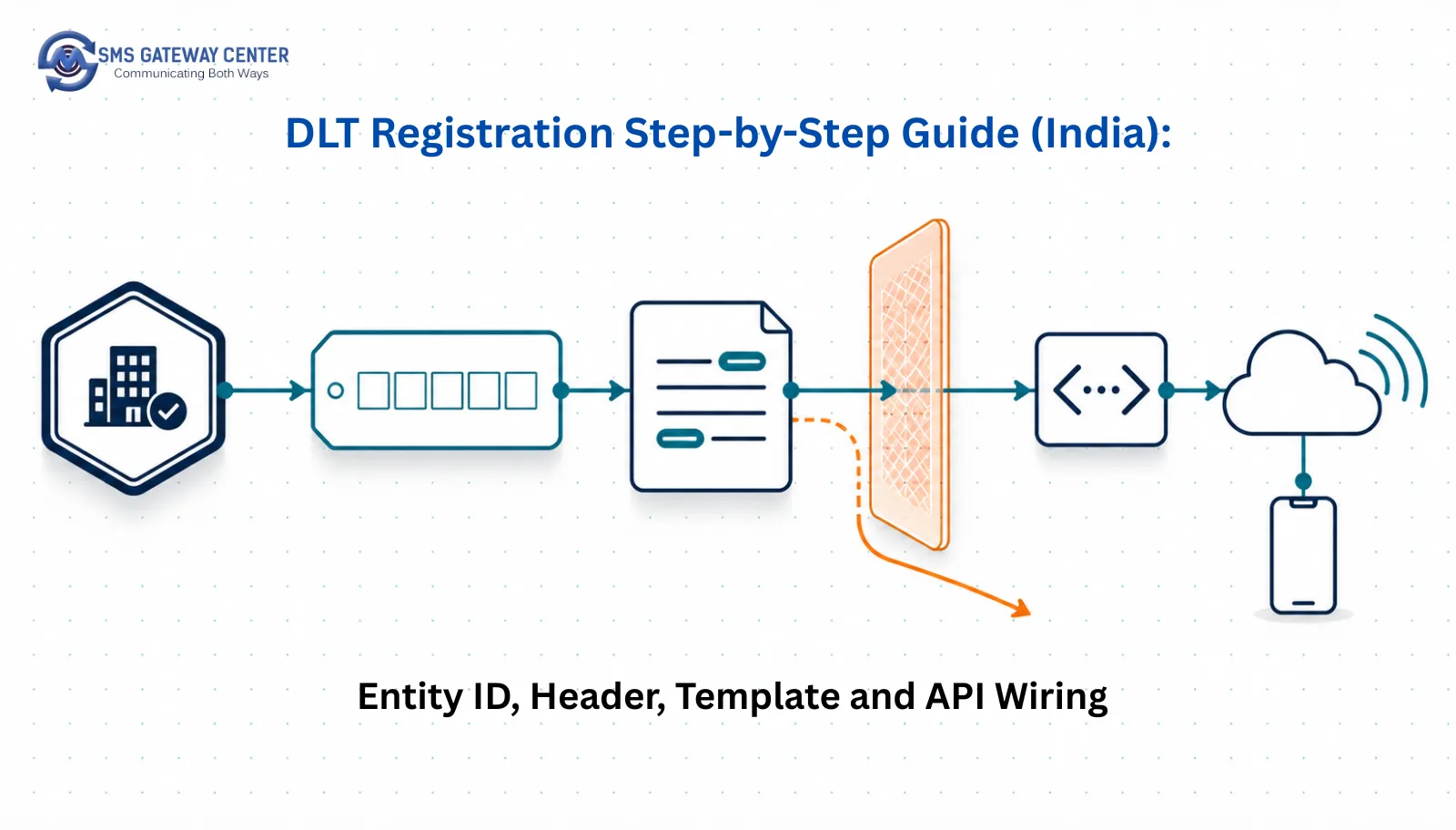
This guide covers the full path. Sections 1 through 10 walk the registration process itself, operator-agnostically, so it applies whether you registered on Airtel, Jio, VI or BSNL. Sections 11 through 14 cover the integration layer with working code against real SMSGatewayCenter endpoints, including a pre-send validation call that catches template mismatches before you burn a credit or a delivery window. Section 14 in particular is a debugging reference you can keep open while you troubleshoot.
Nothing in this guide invents numbers. Where approval timelines or portal fees vary by operator and are not published consistently, this guide says so rather than quoting a figure that will be wrong for your portal.
What DLT Actually Is, in One Paragraph
DLT is a distributed registry operated jointly by India’s access providers, mandated by TRAI under the Telecom Commercial Communications Customer Preference Regulations, 2018, and designed to make commercial messaging traceable end to end. Every business that sends commercial SMS registers once as a Principal Entity. Every sender name is registered as a header. Every message body is registered as a content template. At submit time, each operator matches the incoming message against all three registrations plus the recipient’s consent and preference records. Matches pass. Everything else is dropped at the operator, not at your gateway. The consequence developers care about is that a success response from your SMS API means the gateway accepted the submission, not that the operator will deliver it. Delivery confirmation comes later, asynchronously, through the delivery report layer.
The PE-TM Binding Chain, and Why Your SMS Fails Without It
Registration does not exist as four independent records. It exists as a bound chain. Your Principal Entity is bound to your Telemarketer, which in practice is your messaging provider. Your headers are bound to your Principal Entity. Your content templates are bound to both your Principal Entity and a specific header. If any link in that chain is missing or points somewhere unexpected, the operator drops the message.
This is the single most common structural reason a technically correct API integration produces zero deliveries. The API call is fine. The template ID exists. But the template was registered under a header that was never bound to the telemarketer actually submitting the traffic. SMSGatewayCenter documents this relationship in detail on the PE-TM binding chain process page, and it is worth reading before you file your first registration rather than after your first outage.
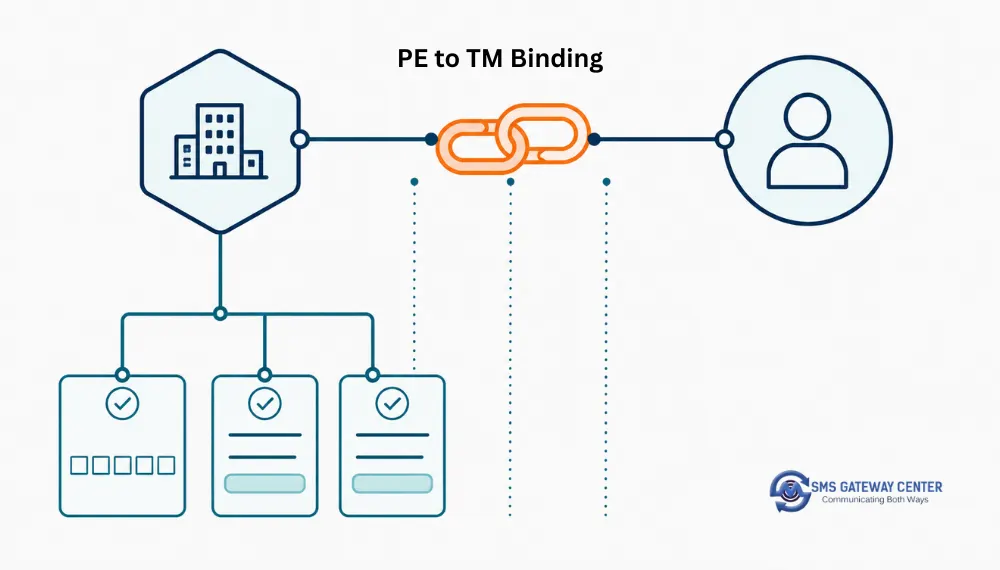
Practical implication: if you switch messaging providers, the binding chain does not follow you automatically. Your Entity ID and your approved templates persist on the DLT portal, but the telemarketer binding has to be re-established for the new provider before traffic flows. Plan a binding window into any provider migration.
Before You Start: The Prerequisites Checklist
Requirements vary by DLT portal, so treat this as the working set rather than a fixed list. Confirm against the specific portal you intend to register on before you begin, because a rejected registration usually restarts the queue rather than resuming it.
| Item | Why the portal asks for it | Notes |
|---|---|---|
| Business registration proof | Establishes the legal entity behind the Principal Entity record | Certificate of Incorporation, partnership deed, or equivalent depending on entity type |
| PAN | Primary tax identity of the entity | Entity PAN, not the director’s personal PAN, for registered companies |
| GST certificate | Secondary business verification | Some portals accept alternatives where GST is not applicable |
| Authorised signatory identity proof | Ties the registration to an accountable person | Usually PAN plus one photo ID |
| Letter of authorisation | Grants the signatory the right to register on the entity’s behalf | On company letterhead, signed and stamped |
| Corporate email domain | Portals frequently reject free email domains | Use an address on your own domain from the start |
| Registered address proof | Matches the entity record | Utility bill or equivalent depending on portal |
Two things worth doing before you touch the portal. First, decide your header candidates in advance, including fallbacks, because header rejection for similarity to an existing registered header is common and re-submitting costs you the queue position. Second, write out every message body you intend to send in the next twelve months. Template registration is the slowest part of the process and it is far cheaper to file twenty templates in one batch than to file one every time marketing invents a new campaign.
Phase 1: Register as a Principal Entity and Get Your Entity ID
Goal of this phase: obtain your Principal Entity ID, a unique identifier that will be attached to every message you send in India for the life of the business.
Step 1.1: Pick a portal
Any of the operator-run DLT portals will do. Airtel, Jio, VI and BSNL each operate one. The registrations are shared across the ecosystem, so registering once on one portal makes your entity visible to the others. Choose based on portal usability and support responsiveness rather than on which operator carries most of your traffic, because your traffic will route across all of them regardless.
Step 1.2: Sign up as an Enterprise
On the portal signup flow, select the Enterprise or Principal Entity path, not the Telemarketer path. Telemarketer registration is for messaging providers and aggregators. If you are a business sending your own messages, you are a Principal Entity. SMSGatewayCenter’s knowledge base covers this decision point in how to begin registering as a Principal Entity for DLT SMS.
Step 1.3: Complete OTP verification
The portal verifies both the mobile number and the email address of the authorised signatory. Use a mobile number and a corporate email that will still be under your control in three years, because changing the registered contact later is a support ticket rather than a settings change.
Step 1.4: Upload documents and submit
Upload the documents from the prerequisites table. Watch the file size and format constraints the portal states, since silent upload failures are a real cause of stalled applications.
Step 1.5: Receive and record your Entity ID
On approval the portal issues your Principal Entity ID, a long numeric string. Record it somewhere your engineering team can reach, because it becomes the dltEntityId parameter on every API send. SMSGatewayCenter explains where this value goes on the platform side in the knowledge base entry on the DLT Principal Entity ID and who needs to provide it.
Phase 2: Register Your Header (Sender ID)
Goal of this phase: obtain an approved six character alphanumeric header that recipients will see as the sender of your messages.
A header in India is six characters, alphanumeric, and it maps directly to what the SMS API calls the senderid parameter. SMSGatewayCenter‘s own documentation for the Create Sender ID API confirms the six character constraint for India.
Header naming rules that get applications rejected
- The header should visibly relate to your registered brand or entity name. Portals reject headers that have no discernible connection to the registering entity.
- Headers too similar to an already registered header of another entity are rejected.
- Generic words that could impersonate a category of sender are rejected.
- Headers are registered per category. A header approved for transactional or service use is not automatically usable for promotional traffic. Read SMSGatewayCenter’s Sender ID policies before choosing, because the category decision constrains what you can send under that header for as long as you use it.
Category selection at header registration
You will be asked to declare a category for the header. The four commercial categories in practice are promotional, transactional, service implicit and service explicit. Getting this wrong is expensive because the category on the header must be consistent with the category on every content template you later bind to it. SMSGatewayCenter maintains a side by side breakdown at Service Explicit vs Service Implicit, which is the distinction most teams get wrong on the first attempt.
The practical shorthand:
| Category | Typical use | Reaches DND numbers | Header style |
|---|---|---|---|
| Promotional | Offers, discounts, campaigns | No | Numeric sender in most cases |
| Service Implicit | OTP, transaction alerts, order status, anything the customer implicitly asked for by transacting | Yes | Six character alphanumeric |
| Service Explicit | Service messages the customer explicitly opted in to receive | Only with recorded explicit consent | Six character alphanumeric |
| Transactional | Reserved in practice for banking and financial institution alerts | Yes | Six character alphanumeric |
If you are registering a header primarily for OTP delivery, service implicit is almost always the correct choice, and SMSGatewayCenter’s knowledge base is explicit on this point in which category to register OTP templates under.
Phase 3: Register Consent and Content Templates
Goal of this phase: obtain a DLT Template ID for every distinct message body you intend to send.
Template registration splits into two kinds.
Consent templates describe how you collect and record permission from a subscriber. These matter primarily for service explicit and promotional traffic, where the operator wants a record of the consent artefact behind the message.
Content templates are the actual message bodies. Each approved content template returns a unique DLT Template ID, and that ID is what you pass as dltTemplateId on the send request.
Step 3.1: Write the template with variables in the right places
Draft the message exactly as it will be sent, replacing every dynamic value with a variable placeholder. The static text around the variables is what gets locked. Everything you might want to change later must be a variable, because editing static text after approval means filing a new template and waiting again.
Step 3.2: Bind the template to a header and category
Select the approved header and the matching category. The template category and the header category must agree.
Step 3.3: Submit and record the Template ID
On approval you receive a DLT Template ID. Store it alongside the message it corresponds to in your own database, keyed so your application can look it up at send time. Hard coding template IDs into application source is a maintenance trap, since templates get revised and re-approved with new IDs.
SMSGatewayCenter’s step by step for this phase is covered in the knowledge base at how to register a message template for DLT SMS compliance, and there is an operator-specific walkthrough with portal screenshots at DLT SMS message content template registration guide for Airtel if you registered on that portal.
Choosing the Right Template Category
This decision is worth its own section because miscategorisation is the leading cause of templates that are approved but never deliver.
| If the message is | Register as | Reasoning |
|---|---|---|
| A one time password for login, payment or verification | Service Implicit | The customer triggered it by an action. It must reach DND numbers. |
| Order confirmed, shipped, out for delivery | Service Implicit | Directly consequent to a transaction the customer initiated. |
| Appointment reminder for a booking the customer made | Service Implicit | Consequent to the customer’s own booking. |
| Payment due or overdue notice on an existing account | Service Implicit | Relates to an existing service relationship. |
| Newsletter, product announcement, feature launch to opted-in subscribers | Service Explicit | Not transaction-consequent, requires recorded opt-in. |
| Discount code, sale announcement, cold outreach | Promotional | Marketing intent, cannot reach DND numbers. |
| Bank account balance, card transaction alert | Transactional | Restricted category, financial institutions. |
A useful test: if the customer would be surprised not to receive this message after the action they just took, it is service implicit. If the customer would only expect it because they signed up for a list, it is service explicit. If they never asked for it at all, it is promotional. Deeper treatment of the two service categories lives on the dedicated Service Implicit SMS and Service Explicit SMS pages.
Variables: The Single Biggest Source of Rejections
DLT templates use variable placeholders for the dynamic parts of a message. On the SMSGatewayCenter platform the variable syntax used for validation is {#var#}, as documented on the Validate DLT Template API reference.
Worked examples straight from that documentation:
| Use case | Template |
|---|---|
| OTP message | Your OTP is {#var#}. Valid for 10 minutes. Do not share. - YourCompany |
| Order confirmation | Your order {#var#} is confirmed. Amount: Rs {#var#}. Thank you - YourStore |
| Appointment reminder | Reminder: Your appointment with Dr. {#var#} on {#var#} at {#var#}. - YourClinic |
| Payment due | Dear {#var#}, your payment of Rs {#var#} is due on {#var#}. Pay now - YourCompany |
Rules that will save you a rejection cycle
Do not put variables adjacent to each other. A template containing {#var#}{#var#} with no separating static text is ambiguous to the matcher and is commonly rejected.
Do not start a template with a variable. Some portals reject templates whose first character is a placeholder, since there is no static anchor for the match.
Declare enough static text. A template that is almost entirely variables is functionally an open pipe and portals treat it as such.
Keep URLs out of variables where possible. Dynamic URLs inside variables draw extra scrutiny. If you need link tracking, register the base domain in the template and vary only the path segment, and consider a first party shortener such as SMSGatewayCenter’s smart link tracking so the registered domain stays constant.
Match the punctuation. The validation layer normalises some punctuation, but you should not rely on that. Write the message your application will actually produce, then register that exact string.
Watch the expanded length. The approved template is matched with variables expanded. A message that fits in one SMS segment during testing with a three character variable may spill into a second segment in production with a thirty character variable. Segment maths and the effect of Unicode characters are covered on the SMS length calculator.
Wiring the Approved IDs Into Your SMS API
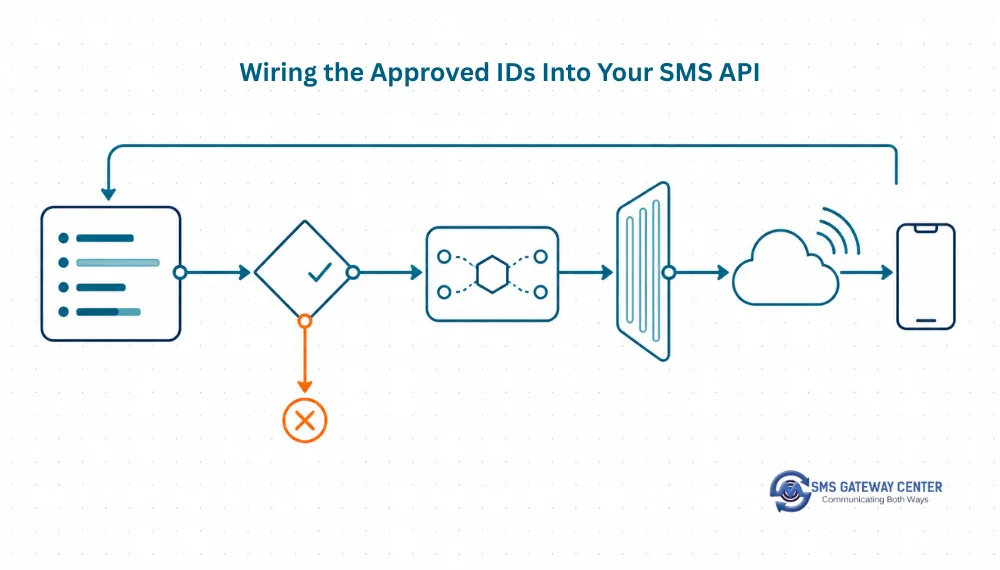
This is the step almost every published DLT guide omits. You now hold three values: your Entity ID, your approved header, and a Template ID per message. They go into the send request.
On SMSGatewayCenter the core send endpoint is POST https://unify.smsgateway.center/SMSApi/send, authenticated either with userid and password parameters or with an apikey HTTP header. For India, DLT-registered sends carry dltEntityId and dltTemplateId alongside the usual senderid, mobile, msg, msgType and sendMethod parameters. Full parameter reference is in the Send SMS API documentation, and if you are integrating from scratch, start with the SMS API getting started guide on the blog for account setup and authentication basics first.
cURL
curl --location 'https://unify.smsgateway.center/SMSApi/send' \
--header 'Content-Type: application/x-www-form-urlencoded' \
--data-urlencode 'userid=YourUsername' \
--data-urlencode 'password=YourPassword' \
--data-urlencode 'output=json' \
--data-urlencode 'sendMethod=quick' \
--data-urlencode 'msgType=text' \
--data-urlencode 'senderid=SMSGAT' \
--data-urlencode 'mobile=9198XXXXXXXX' \
--data-urlencode 'msg=Your OTP is 483920. Valid for 10 minutes. Do not share. - YourCompany' \
--data-urlencode 'dltEntityId=YourPrincipalEntityId' \
--data-urlencode 'dltTemplateId=YourApprovedTemplateId' \
--data-urlencode 'duplicatecheck=true'
Successful submission returns a payload of this shape, as documented in the send reference:
{
    "status": "success",
    "mobile": "9198XXXXXXXX",
    "invalidMobile": "",
    "transactionId": "xxxxxxxxxxxxxxxx",
    "statusCode": "200",
    "reason": "success"
}
Read that response carefully. "status": "success" confirms the gateway accepted the submission. It does not confirm the operator delivered it, and it does not confirm the message survived scrubbing. Keep the transactionId, because that is what you correlate against later when the delivery report arrives.
PHP
<?php

$curl = curl_init();

$postData = array(
  'userid'        => 'YourUsername',
  'password'      => 'YourPassword',
  'output'        => 'json',
  'sendMethod'    => 'quick',
  'msgType'       => 'text',
  'senderid'      => 'SMSGAT',
  'mobile'        => '9198XXXXXXXX',
  'msg'           => 'Your OTP is 483920. Valid for 10 minutes. Do not share. - YourCompany',
  'dltEntityId'   => 'YourPrincipalEntityId',
  'dltTemplateId' => 'YourApprovedTemplateId',
  'duplicatecheck'=> 'true'
);

curl_setopt_array($curl, array(
  CURLOPT_URL            => "https://unify.smsgateway.center/SMSApi/send",
  CURLOPT_RETURNTRANSFER => true,
  CURLOPT_TIMEOUT        => 30,
  CURLOPT_HTTP_VERSION   => CURL_HTTP_VERSION_1_1,
  CURLOPT_CUSTOMREQUEST  => "POST",
  CURLOPT_POSTFIELDS     => http_build_query($postData),
  CURLOPT_HTTPHEADER     => array(
    "Content-Type: application/x-www-form-urlencoded",
    "cache-control: no-cache"
  ),
));

$response = curl_exec($curl);
$err = curl_error($curl);
curl_close($curl);

if ($err) {
  error_log("cURL Error: " . $err);
} else {
  $decoded = json_decode($response, true);
  if (($decoded['status'] ?? '') === 'success') {
    // Persist transactionId against your own message record for DLR correlation.
    error_log("Submitted, txn: " . $decoded['transactionId']);
  } else {
    error_log("Submit rejected: " . ($decoded['reason'] ?? $response));
  }
}
Node.js
const sendDltSms = async ({ mobile, message, templateId }) => {
  const params = new URLSearchParams({
    userid: process.env.SGC_USERID,
    password: process.env.SGC_PASSWORD,
    output: 'json',
    sendMethod: 'quick',
    msgType: 'text',
    senderid: 'SMSGAT',
    mobile,
    msg: message,
    dltEntityId: process.env.SGC_DLT_ENTITY_ID,
    dltTemplateId: templateId,
    duplicatecheck: 'true'
  });

  const res = await fetch('https://unify.smsgateway.center/SMSApi/send', {
    method: 'POST',
    headers: { 'Content-Type': 'application/x-www-form-urlencoded' },
    body: params
  });

  const data = await res.json();

  if (data.status !== 'success') {
    throw new Error(`Submit rejected (${data.statusCode}): ${data.reason}`);
  }

  // transactionId is your correlation key for the delivery report.
  return data.transactionId;
};
Note the pattern: the Entity ID lives in configuration because it never changes, while the Template ID is passed per call because it changes per message type. That split is the correct one. Teams that hard code both end up shipping a release every time a template is revised.
Python
import os
import requests

SEND_URL = "https://unify.smsgateway.center/SMSApi/send"

def send_dlt_sms(mobile: str, message: str, template_id: str) -> str:
    payload = {
        "userid": os.environ["SGC_USERID"],
        "password": os.environ["SGC_PASSWORD"],
        "output": "json",
        "sendMethod": "quick",
        "msgType": "text",
        "senderid": "SMSGAT",
        "mobile": mobile,
        "msg": message,
        "dltEntityId": os.environ["SGC_DLT_ENTITY_ID"],
        "dltTemplateId": template_id,
        "duplicatecheck": "true",
    }

    resp = requests.post(
        SEND_URL,
        data=payload,
        headers={"Content-Type": "application/x-www-form-urlencoded"},
        timeout=30,
    )
    resp.raise_for_status()
    body = resp.json()

    if body.get("status") != "success":
        raise RuntimeError(
            f"Submit rejected ({body.get('statusCode')}): {body.get('reason')}"
        )

    return body["transactionId"]
Java
import java.net.URI;
import java.net.http.HttpClient;
import java.net.http.HttpRequest;
import java.net.http.HttpResponse;
import java.net.URLEncoder;
import java.nio.charset.StandardCharsets;
import java.time.Duration;
import java.util.LinkedHashMap;
import java.util.Map;
import java.util.stream.Collectors;

public class DltSmsSender {

    private static final String SEND_URL =
        "https://unify.smsgateway.center/SMSApi/send";

    public static String send(String mobile, String message, String templateId)
            throws Exception {

        Map<String, String> params = new LinkedHashMap<>();
        params.put("userid", System.getenv("SGC_USERID"));
        params.put("password", System.getenv("SGC_PASSWORD"));
        params.put("output", "json");
        params.put("sendMethod", "quick");
        params.put("msgType", "text");
        params.put("senderid", "SMSGAT");
        params.put("mobile", mobile);
        params.put("msg", message);
        params.put("dltEntityId", System.getenv("SGC_DLT_ENTITY_ID"));
        params.put("dltTemplateId", templateId);
        params.put("duplicatecheck", "true");

        String form = params.entrySet().stream()
            .map(e -> URLEncoder.encode(e.getKey(), StandardCharsets.UTF_8)
                    + "="
                    + URLEncoder.encode(e.getValue(), StandardCharsets.UTF_8))
            .collect(Collectors.joining("&"));

        HttpClient client = HttpClient.newBuilder()
            .connectTimeout(Duration.ofSeconds(10))
            .build();

        HttpRequest request = HttpRequest.newBuilder()
            .uri(URI.create(SEND_URL))
            .timeout(Duration.ofSeconds(30))
            .header("Content-Type", "application/x-www-form-urlencoded")
            .POST(HttpRequest.BodyPublishers.ofString(form))
            .build();

        HttpResponse<String> response =
            client.send(request, HttpResponse.BodyHandlers.ofString());

        // Parse with your JSON library of choice and check status == "success"
        return response.body();
    }
}
Postman
SMSGatewayCenter publishes a ready collection rather than requiring you to build one by hand. Download it from Download SMS Postman collection and import it. Then create an environment with variables for userid, password, senderid, dltEntityId and dltTemplateId so you can switch between staging credentials and production credentials without editing requests. Set the request body type to x-www-form-urlencoded on every DLT-related call, since these endpoints expect form encoding rather than JSON bodies.
Already registered on DLT and ready to send? Create an account and get your API key in minutes, then test your first DLT-compliant send in a sandbox before going live. Sign up for SMSGatewayCenter.
Validating a Message Against Its Template Before You Send
This is the piece that turns DLT from a recurring incident into a solved problem. Rather than sending and discovering the mismatch from a failed delivery report hours later, validate the composed message against its registered template first.
SMSGatewayCenter exposes POST https://unify.smsgateway.center/SMSApi/validateTemplate for exactly this. It takes senderid, msg, dltTemplateId and output, with the same userid/password or apiKey header authentication as the rest of the API, and it requires application/x-www-form-urlencoded content type.
cURL
curl --location 'https://unify.smsgateway.center/SMSApi/validateTemplate' \
--header 'Content-Type: application/x-www-form-urlencoded' \
--data-urlencode 'userid=YourUsername' \
--data-urlencode 'password=YourPassword' \
--data-urlencode 'output=json' \
--data-urlencode 'senderid=SMSGAT' \
--data-urlencode 'msg=Your Instant Demo account is live. This is a Demo Test message. {#var#} Demo Message SMSGatewayCenter' \
--data-urlencode 'dltTemplateId=xxxx16194317445xxxx'
A match returns:
{
  "status": "success",
  "template": "Your Instant Demo account is live  This is a Demo Test message  {#var#} Demo Message SMSGatewayCenter",
  "dltTemplateId": "xxxx16194317445xxxx",
  "senderId": "SMSGAT",
  "statusCode": "200",
  "reason": "success",
  "text": "Your Instant Demo account is live. This is a Demo Test message. {#var#} Demo Message SMSGatewayCenter"
}
Note the template field in that response. Punctuation has been normalised, with periods rendered as spaces. That normalisation is why a message can match despite minor punctuation differences, and it is also why you should not assume all punctuation differences are safe. Test the exact string your application produces.
A mismatch returns:
{
  "status": "error",
  "statusCode": "188",
  "reason": "message template mismatch"
}
Status code 188 is your signal that the composed message diverged from the registered template.
Node.js: validate then send
const BASE = 'https://unify.smsgateway.center/SMSApi';

const creds = () => ({
  userid: process.env.SGC_USERID,
  password: process.env.SGC_PASSWORD,
  output: 'json'
});

async function validateTemplate({ senderid, msg, dltTemplateId }) {
  const body = new URLSearchParams({ ...creds(), senderid, msg, dltTemplateId });

  const res = await fetch(`${BASE}/validateTemplate`, {
    method: 'POST',
    headers: { 'Content-Type': 'application/x-www-form-urlencoded' },
    body
  });

  const data = await res.json();
  return { ok: data.status === 'success', data };
}

async function sendValidated({ senderid, mobile, msg, dltTemplateId }) {
  const check = await validateTemplate({ senderid, msg, dltTemplateId });

  if (!check.ok) {
    // statusCode 188 means the composed message diverged from the template.
    throw new Error(
      `Template validation failed (${check.data.statusCode}): ${check.data.reason}`
    );
  }

  const body = new URLSearchParams({
    ...creds(),
    sendMethod: 'quick',
    msgType: 'text',
    senderid,
    mobile,
    msg,
    dltEntityId: process.env.SGC_DLT_ENTITY_ID,
    dltTemplateId
  });

  const res = await fetch(`${BASE}/send`, {
    method: 'POST',
    headers: { 'Content-Type': 'application/x-www-form-urlencoded' },
    body
  });

  return res.json();
}
Python: validate then send
import os
import requests

BASE = "https://unify.smsgateway.center/SMSApi"

def _creds() -> dict:
    return {
        "userid": os.environ["SGC_USERID"],
        "password": os.environ["SGC_PASSWORD"],
        "output": "json",
    }

def validate_template(senderid: str, msg: str, dlt_template_id: str) -> dict:
    payload = {**_creds(), "senderid": senderid, "msg": msg,
               "dltTemplateId": dlt_template_id}
    resp = requests.post(
        f"{BASE}/validateTemplate",
        data=payload,
        headers={"Content-Type": "application/x-www-form-urlencoded"},
        timeout=30,
    )
    resp.raise_for_status()
    return resp.json()

def send_validated(senderid: str, mobile: str, msg: str,
                   dlt_template_id: str) -> dict:
    check = validate_template(senderid, msg, dlt_template_id)

    if check.get("status") != "success":
        raise ValueError(
            f"Template validation failed ({check.get('statusCode')}): "
            f"{check.get('reason')}"
        )

    payload = {
        **_creds(),
        "sendMethod": "quick",
        "msgType": "text",
        "senderid": senderid,
        "mobile": mobile,
        "msg": msg,
        "dltEntityId": os.environ["SGC_DLT_ENTITY_ID"],
        "dltTemplateId": dlt_template_id,
    }
    resp = requests.post(
        f"{BASE}/send",
        data=payload,
        headers={"Content-Type": "application/x-www-form-urlencoded"},
        timeout=30,
    )
    resp.raise_for_status()
    return resp.json()
Where to put validation in your architecture
Do not call validateTemplate on every production send. That doubles your request volume for a check whose answer is almost always the same. Put it in three places instead:
- In CI. Assert that every template string in your codebase or template table validates against its registered Template ID. This catches a copywriter’s stray full stop at merge time rather than in production.
- On template revision. Whenever a Template ID is added or changed in your configuration, validate a rendered sample before the change goes live.
- On the first send after deploy. A single canary validation per template per deployment gives you a fast signal without meaningful overhead.
Managing Headers and Templates Programmatically
Once you pass a handful of templates, portal clicking stops scaling. SMSGatewayCenter exposes CRUD endpoints for both headers and templates.
Registering a template through the API
POST https://unify.smsgateway.center/SMSApi/template/create takes the message parameter carrying the template content with its variable, plus output and the standard authentication parameters.
curl --location 'https://unify.smsgateway.center/SMSApi/template/create' \
--header 'Content-Type: application/x-www-form-urlencoded' \
--data-urlencode 'userid=YourUsername' \
--data-urlencode 'password=YourPassword' \
--data-urlencode 'message=This is test message ###123### from Test' \
--data-urlencode 'output=json'
Response:
{
    "response": {
        "api": "template",
        "action": "create",
        "status": "success",
        "msg": "Template created successfully and given for approval",
        "code": "200"
    }
}
Read the msg field literally. The template was created and queued for approval. It is not usable yet.
Registering a header through the API
POST https://unify.smsgateway.center/SMSApi/senderid/create takes senderid plus output and the authentication parameters.
curl --location 'https://unify.smsgateway.center/SMSApi/senderid/create' \
--header 'Content-Type: application/x-www-form-urlencoded' \
--data-urlencode 'userid=YourUsername' \
--data-urlencode 'password=YourPassword' \
--data-urlencode 'senderid=DEMOTS' \
--data-urlencode 'output=json'
Response:
{
    "response": {
        "api": "senderid",
        "action": "create",
        "status": "success",
        "msg": "SenderId created successfully.",
        "code": "200"
    }
}
Read, update and delete operations exist for both resources and are documented under the DLT Templates and Sender ID sections of the developer API reference. If you operate as a reseller managing templates on behalf of downstream accounts, there is a separate walkthrough at Reseller API to add and update DLT templates.
Debugging Scrubbing Failures
Your API returned success. The handset never rang. Work through this table.
| Symptom | Likely cause | How to confirm | Fix |
|---|---|---|---|
Validation returns statusCode 188 | Composed message diverges from the registered template | Compare the template and text fields in the validateTemplate response character by character | Correct the application string, or file a revised template if the copy genuinely changed |
| Submission accepted, delivery report shows a template-related failure | Template ID passed does not match the message body sent | Pull the record from the delivery report API and inspect the dltTemplateId and text fields | Correct the template ID lookup in your application |
| All traffic under one header fails, other headers fine | Header not bound, or bound to a different telemarketer | Check the header’s binding on the DLT portal | Re-establish the PE-TM binding for the current provider |
| Promotional messages fail only to some numbers | Recipients on DND, and the message is correctly categorised as promotional | Check whether failures correlate with preference-registered numbers | Either re-categorise the message if it is genuinely service traffic, or accept the DND exclusion |
| OTP messages fail to a subset of numbers | Template registered under promotional rather than service implicit | Check the category on the DLT portal for that template | Re-register the template under service implicit |
| Messages truncated or split unexpectedly | Variable expansion pushed the message past a segment boundary, or a Unicode character forced UCS-2 encoding | Check the length field in the delivery report record | Shorten the static text, cap variable length in application code, or replace the offending character |
| Entity ID rejected | dltEntityId missing, mistyped, or from a different registration | Inspect the raw request body actually sent, not your config file | Correct the value and move it to a single source of truth |
Two API surfaces make this debugging tractable. The delivery report endpoint at https://unify.smsgateway.center/SMSApi/reports/status with method=getDlr returns a reports_dlrList array whose records carry cause, globalErrorCode, dltTemplateId, text, length, status and senderName, which together identify most failures without guesswork. The code lists are also queryable: POST https://unify.smsgateway.center/SMSApi/info/deliverycodes returns the delivery error code list and POST https://unify.smsgateway.center/SMSApi/info/responsecodes returns the API response error code list. Pull both once at deploy time and cache them, then map codes to human readable causes in your own logs rather than making an engineer look up each one.
If you would rather receive failures as they happen than poll for them, register a webhook so delivery receipts push to your endpoint instead. Setup is covered in the real-time DLR webhooks article and in the Create Webhook API reference.
Timelines, Costs and What You Cannot Control
Approval timelines differ by portal, by category and by how clean your submission is. Published figures from third party sources vary widely and none of them are authoritative for the portal you happen to be using, so this guide does not quote a number. Ask your chosen portal directly, and plan for the possibility that the first submission comes back with a correction request rather than an approval.
What you can control:
- Submission quality. Documents that match the entity name exactly, in the requested format, at the requested size. Most delays trace back to a document mismatch, not to portal backlog.
- Batch size. File all your templates together. Serial filing multiplies your total waiting time by the number of templates.
- Header candidates. Have three ready. Rejection for similarity is common and having a fallback ready means you resubmit the same day.
- Category correctness. A template approved in the wrong category has to be filed again from scratch.
What you cannot control:
- Portal review queues.
- Operator-side scrubbing behaviour, which is applied at submit time by each access provider independently.
- DND and preference registrations on recipient numbers, which are the subscriber’s choice and which your promotional traffic will not bypass.
Registration fees exist on some portals and vary. Confirm the current fee on the portal you register with rather than relying on any published figure, since these change without much notice.
Multi-Operator Registration: Do You Need All Four Portals?
No. Register once. The DLT registry is shared across access providers, which is the entire point of a distributed ledger in this design. Your Entity ID, headers and templates registered on one portal are visible to the others for scrubbing purposes.
What does sometimes require attention across operators is the telemarketer binding, particularly when you change providers or add a second provider for redundancy. If you run a dual-provider setup for failover, confirm that both providers are bound before you rely on the failover path, because discovering an unbound secondary during an outage is the worst possible time to find out.
Decision Matrix: Which Registration Path Fits Your Business
| Your situation | Register as | Header strategy | Template strategy | Integration approach |
|---|---|---|---|---|
| Startup sending OTP only | Principal Entity | One service implicit header matching your brand | Two to three OTP templates with a single variable each | Direct API with the Entity ID in config, Template ID in config, validation in CI |
| E-commerce with transactional plus marketing | Principal Entity | Separate headers per category, service implicit and promotional | Templates grouped by lifecycle stage, all filed in one batch | Template ID stored per message type in your database, looked up at send |
| SaaS with per-tenant branding | Principal Entity | One header per tenant brand where tenants are separate legal entities, otherwise one shared header | Templates per message type, shared across tenants where copy is identical | Template registry table keyed by tenant and message type |
| Agency sending on behalf of clients | Each client registers their own Principal Entity | Client-owned headers | Client-owned templates | Reseller API, with each client’s Entity ID scoped to their account |
| Enterprise migrating providers | Existing Principal Entity retained | Existing headers retained | Existing templates retained | Re-establish PE-TM binding, validate a canary template against the new provider before cutover |
| High volume, latency sensitive | Principal Entity | Dedicated header | Minimal template set, tightly scoped variables | SMPP binds rather than HTTP, see the SMPP connectivity documentation |
Pros and Cons of the DLT Regime
What it gets right
- Spam volume to Indian subscribers dropped materially once scrubbing was enforced, which improves the credibility of every legitimate sender’s traffic.
- Header ownership is enforced, so brand impersonation through sender ID spoofing is substantially harder than in unregulated markets.
- Traceability means a complaint can be resolved to a specific entity, which raises the cost of abuse.
- Service implicit traffic reliably reaches DND numbers, which means OTP and transactional delivery is protected from the same filters that block marketing.
What it costs you
- Template rigidity. Copy changes require re-approval, which makes A/B testing message wording impractical on the SMS channel in India.
- Onboarding latency. A new business cannot send its first SMS on day one.
- Category ambiguity. The line between service implicit and service explicit is a judgement call in real cases, and getting it wrong is only discovered after approval.
- Operational overhead. Someone has to own the template registry, and that ownership tends to fall between marketing and engineering.
- Provider migration friction. The binding chain does not transfer automatically.
Businesses that find the template rigidity limiting frequently move promotional and conversational traffic to channels with different constraints, primarily WhatsApp Business API and RCS messaging, while keeping OTP and transactional traffic on SMS where reach and DND-exemption matter most.
Common Mistakes That Cost Weeks
Registering as a Telemarketer instead of a Principal Entity. If you send your own messages, you are a Principal Entity. Fixing this after the fact means starting over.
Using a free email domain. Portals frequently reject these. Use your own domain from the first form.
Filing templates one at a time. Every filing is a separate queue entry. Batch them.
Hard coding template IDs in application source. Templates get revised. Store IDs in configuration or a database table keyed by message type.
Registering the message you send today rather than the message shape you will need. Anything that might vary should be a variable. Static text is locked.
Assuming an API success response means delivery. It means submission accepted. Correlate the transactionId against the delivery report before you count a message as delivered.
Ignoring segment length after variable expansion. Test with your longest realistic variable values, not with 12345.
Treating OTP as transactional. Transactional is effectively reserved for banking in practice. OTP belongs in service implicit.
Forgetting the binding after a provider change. The templates survive the migration. The binding does not.
FAQs
Is DLT registration mandatory for sending SMS in India? Yes, for commercial SMS to Indian mobile numbers. Access providers scrub inbound commercial traffic against the DLT registry at submit time, and traffic without a valid Principal Entity, header and content template registration is dropped before it reaches the handset.
What is a Principal Entity ID? It is the unique identifier issued to your business when you complete entity registration on a DLT portal. It is passed as the dltEntityId parameter on every SMS API send request for Indian traffic.
What is a DLT Template ID? It is the unique identifier issued for each approved content template. It is passed as the dltTemplateId parameter on the send request, and the message body you send must match the approved template apart from the declared variable values.
Do I need to register on all four operator DLT portals? No. The registry is shared across access providers, so a single registration is visible ecosystem-wide. What may need attention per provider is the PE-TM binding, particularly when you add or change a messaging provider.
Which category should OTP templates be registered under? Service implicit. This category is intended for messages that follow from a customer action, and it reaches numbers registered on DND, which is essential for OTP delivery. SMSGatewayCenter covers the reasoning in its knowledge base entry on OTP template categories.
Can I change an approved template? Not in place. A content change requires filing a revised template, which goes through approval again and returns a new Template ID. Design templates so that anything likely to change is a variable.
How long does DLT approval take? It varies by portal, by category and by submission quality, and published figures differ substantially between sources. Confirm the current expectation with the portal you register on. Submission quality is the variable you control, and document mismatches are the most common cause of delay.
Why do my messages fail even though the API returns success? A success response confirms the gateway accepted the submission, not that the operator delivered the message. Scrubbing happens downstream. Check the delivery report record for that transactionId and inspect the cause and globalErrorCode fields.
What does status code 188 mean? On the template validation endpoint, 188 indicates a message template mismatch: the message you submitted does not match the registered template for the Template ID you supplied.
What is the maximum header length in India? Headers are alphanumeric and up to six characters, as noted in the Create Sender ID API documentation.
Can promotional messages reach DND numbers? No. Numbers registered under customer preference categories will not receive promotional traffic. If the message is genuinely transaction-consequent, it should be registered as service implicit rather than promotional, but the categorisation must reflect the actual message content, not the desired reach.
Does my Entity ID change if I switch SMS providers? No. The Entity ID, headers and templates belong to your business and persist. What has to be redone is the PE-TM binding to the new provider.
Stuck on a header rejection or a template that will not pass scrubbing? The SMSGatewayCenter team handles DLT registration questions daily and can review your template drafts before you file them. Get in touch or explore the full developer API reference to plan your integration.