SMS-based 2FA remains one of the most popular and effective methods, offering a perfect balance of security, usability, and accessibility. Whether you’re a startup building your first authentication system or an enterprise looking to enhance security, this comprehensive guide will walk you through implementing SMS 2FA from scratch.
Let’s dive into the world of secure authentication and build a robust 2FA system that your users will trust and your business will rely on.
Why SMS-Based 2FA Matters in 2025
The Security Landscape
Recent statistics paint a concerning picture:
- 81% of data breaches involve weak or stolen passwords
- 61% of users reuse passwords across multiple accounts
- 2FA can prevent 99.9% of automated attacks
- SMS 2FA adoption increased by 40% in 2024
Why Choose SMS 2FA?
Advantages:
- ✅ Universal compatibility – Works on all mobile devices
- ✅ No app installation – Users don’t need additional software
- ✅ High delivery rates – 95-98% global delivery success
- ✅ User familiarity – Most users understand SMS verification
- ✅ Regulatory compliance – Meets security requirements for many industries
Real-World Impact:
“After implementing SMS 2FA, our customer support tickets related to account security dropped by 75%, and we haven’t had a single successful account takeover in 18 months.” – CTO, FinTech Startup
Looking for Integrated OTP SMS?
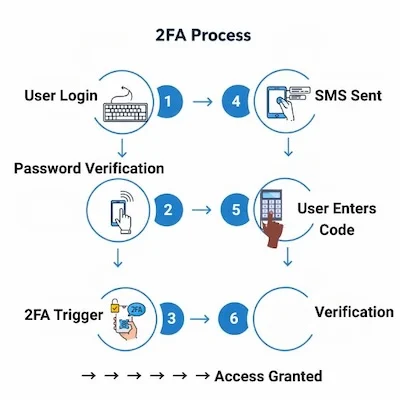
Understanding the 2FA Flow
The Complete Authentication Journey
User Login → Password Verification → 2FA Trigger → SMS Sent → User Enters Code → Verification → Access GrantedKey Components
- Authentication Server – Handles login logic and 2FA coordination
- SMS Gateway – Delivers OTP codes via SMS
- Database – Stores user data and 2FA sessions
- Frontend Interface – User-facing verification screens
- Security Layer – Rate limiting, encryption, and fraud detection
Step 1: Setting Up Your SMS Gateway
Choosing the Right SMS Provider
Before diving into implementation, you need a reliable SMS gateway. Here’s what to look for:
Essential Features:
- High delivery rates (95%+)
- Global coverage for your user base
- DLT compliance (for India)
- Real-time delivery status
- API reliability and uptime guarantees
Recommended Providers:
- SMSGatewayCenter – Comprehensive SMS API with 99.9% uptime
- Twilio – Popular choice for international coverage
- MessageBird – European-focused provider
SMS Gateway Configuration
The foundation of your 2FA system is a reliable SMS gateway. Choose a provider that offers:
- RESTful API for easy integration
- Webhook support for delivery confirmations
- Rate limiting to prevent abuse
- Multiple carrier support for better delivery rates
- Detailed analytics for monitoring performance
Step 2: Database Schema Design
User Table Structure
Your database needs to support 2FA functionality with these key tables:
Users Table:
- User ID and authentication details
- Phone number for SMS delivery
- 2FA enabled/disabled status
- Last login timestamps
- Security preferences
2FA Sessions Table:
- Session tokens for verification
- OTP codes (hashed, never plain text)
- Expiration timestamps
- IP addresses and user agents
- Success/failure tracking
Login Attempts Table:
- Failed login tracking
- IP-based rate limiting
- Suspicious activity detection
- Account lockout management
Security Considerations
- OTP hashing – Never store OTP codes in plain text
- Session expiration – OTP codes should expire quickly (5-10 minutes)
- Rate limiting – Prevent brute force attacks
- IP tracking – Monitor for suspicious login patterns
Step 3: Core 2FA Implementation
The Complete 2FA Class
Your 2FA system needs to handle multiple scenarios securely:
Key Functions:
- Generate and send OTP – Create secure codes and deliver via SMS
- Verify OTP – Validate user-entered codes
- Session management – Handle 2FA sessions securely
- Rate limiting – Prevent abuse and attacks
- Error handling – Graceful failure management
OTP Generation and Delivery
Security Requirements:
- 6-digit codes for optimal security/usability balance
- Cryptographic randomness – Use secure random generators
- Time-based expiration – Codes expire after 10 minutes
- One-time use – Each code can only be used once
- Rate limiting – Prevent code flooding
Verification Process
Multi-layer Security:
- Code validation – Check if OTP matches and hasn’t expired
- Session validation – Ensure request comes from valid session
- IP validation – Monitor for suspicious location changes
- Device fingerprinting – Track device consistency
Step 4: Integration with Authentication System
Login Controller with 2FA
Your authentication system needs to coordinate between password verification and 2FA:
Authentication Flow:
- Verify credentials – Check username/password
- Check 2FA status – Is 2FA enabled for this user?
- Generate OTP – Create and send verification code
- Wait for verification – User enters OTP code
- Complete login – Grant access after successful verification
Session Management
Security Best Practices:
- Temporary sessions – 2FA sessions expire quickly
- Secure tokens – Use cryptographically secure session tokens
- Device tracking – Monitor for suspicious device changes
- Activity logging – Track all authentication attempts
Step 5: Frontend Implementation
Login Form with 2FA
Your user interface needs to guide users through the 2FA process:
User Experience Design:
- Clear instructions – Guide users through each step
- Progress indicators – Show where users are in the process
- Error handling – Clear messages for failed attempts
- Resend functionality – Allow users to request new codes
- Mobile optimization – Ensure it works well on phones
Responsive Design
Mobile-First Approach:
- Touch-friendly buttons – Easy to tap on mobile devices
- Large input fields – Easy to enter 6-digit codes
- Clear typography – Readable on small screens
- Fast loading – Optimize for mobile networks
Step 6: Security Best Practices
Rate Limiting Implementation
Protect your system from abuse with comprehensive rate limiting:
Rate Limiting Strategy:
- Login attempts – Limit failed password attempts
- OTP requests – Prevent code flooding
- Verification attempts – Limit failed OTP attempts
- IP-based limits – Prevent attacks from single IPs
- User-based limits – Prevent attacks on specific accounts
Enhanced Security Measures
Multi-layer Protection:
- Real-time monitoring – Detect and respond to attacks
- Automatic blocking – Block suspicious IPs automatically
- Alert systems – Notify administrators of attacks
- Audit logging – Comprehensive security event tracking
- Incident response – Plan for security incidents
Step 7: Testing and Validation
Unit Tests for 2FA
Comprehensive testing ensures your 2FA system works reliably:
Test Scenarios:
- Successful authentication – Complete login flow
- Invalid OTP codes – Wrong code handling
- Expired codes – Time-based expiration
- Rate limiting – Abuse prevention
- Error conditions – Network failures, SMS delivery issues
Integration Testing
End-to-End Testing:
- Complete user flows – From login to access
- Error scenarios – Network issues, invalid inputs
- Performance testing – Load testing under stress
- Security testing – Penetration testing and vulnerability assessment
Step 8: Monitoring and Analytics
2FA Analytics Dashboard
Track the performance and security of your 2FA system:
Key Metrics:
- Success rates – Percentage of successful verifications
- Delivery rates – SMS delivery success
- Response times – How quickly users complete 2FA
- Failure analysis – Why verifications fail
- Security events – Suspicious activity detection
Performance Monitoring
Real-time Monitoring:
- System health – API response times and availability
- Error rates – Failed SMS deliveries and verifications
- User experience – Time to complete 2FA process
- Security alerts – Suspicious login patterns
Step 9: Deployment and Maintenance
Production Deployment Checklist
Before going live, ensure your system is ready:
Pre-deployment Checks:
- Security audit – Comprehensive security review
- Performance testing – Load testing under expected traffic
- Backup systems – Data backup and recovery procedures
- Monitoring setup – Real-time monitoring and alerting
- Documentation – Complete system documentation
Ongoing Maintenance
Regular Tasks:
- Security updates – Keep systems patched and updated
- Performance monitoring – Track system performance
- User feedback – Collect and act on user feedback
- Analytics review – Regular review of system metrics
- Compliance checks – Ensure regulatory compliance
Common Issues and Troubleshooting
Issue 1: SMS Delivery Failures
Symptoms:
- Users not receiving OTP codes
- High failure rates in SMS logs
- Support tickets about missing codes
Solutions:
- Multi-carrier strategy – Use backup SMS providers
- Delivery monitoring – Track delivery rates in real-time
- Retry mechanisms – Automatic retry for failed deliveries
- User notifications – Clear messages when SMS fails
Issue 2: High Rate of Failed Verifications
Symptoms:
- Many users failing to verify OTP
- Support tickets about invalid codes
- Low conversion rates
Solutions:
- Better error messages – Clear guidance for users
- Code formatting – Ensure codes are easy to read
- Resend functionality – Allow users to request new codes
- User education – Clear instructions on 2FA process
Issue 3: Performance Bottlenecks
Symptoms:
- Slow OTP verification
- Database connection timeouts
- High server load during peak times
Solutions:
- Database optimization – Index optimization and query tuning
- Caching strategies – Cache frequently accessed data
- Load balancing – Distribute load across multiple servers
- Connection pooling – Efficient database connection management
Future Trends and Considerations
Emerging Technologies
What’s Next in 2FA:
- RCS (Rich Communication Services) – Enhanced SMS with rich media
- AI-powered security – Machine learning for threat detection
- Biometric integration – Fingerprint and facial recognition
- Hardware tokens – Physical security keys
Regulatory Changes
Compliance Requirements:
- Enhanced privacy laws – Stricter data protection requirements
- Industry-specific regulations – Banking, healthcare, and government requirements
- Cross-border compliance – International data protection laws
- Audit requirements – Regular security audits and assessments
Conclusion: Building Trust Through Security
Implementing SMS-based Two-Factor Authentication is more than just adding a security layer—it’s about building trust with your users and protecting their valuable data. The comprehensive system we’ve designed provides:
Key Benefits:
- Enhanced Security – Prevents 99.9% of automated attacks
- User Trust – Demonstrates commitment to account security
- Regulatory Compliance – Meets industry security requirements
- Scalable Architecture – Grows with your business needs
- Comprehensive Monitoring – Proactive issue detection and resolution
Success Metrics to Track:
- 2FA Adoption Rate – Percentage of users enabling 2FA
- Verification Success Rate – Successful OTP verifications
- SMS Delivery Rate – Successful message delivery
- Support Ticket Reduction – Fewer security-related issues
- Account Takeover Prevention – Successful attack prevention
Next Steps:
- Start with a pilot program – Test with a small user group
- Monitor and optimize – Track metrics and improve performance
- Educate users – Provide clear guidance on 2FA benefits
- Plan for expansion – Consider additional authentication methods
Ready to Implement?
Whether you’re building a new application or enhancing an existing one, the SMS 2FA system we’ve designed provides a solid foundation for secure user authentication. The modular architecture allows you to start simple and add advanced features as your needs grow.
Start your 2FA implementation today and take the first step toward building a more secure, trustworthy platform for your users.
Need help implementing any part of this 2FA system? Our technical team is ready to assist with integration, optimization, and best practices. Contact us for a personalized consultation.
Related Articles:
- How E-commerce Businesses Can Boost Sales with SMS Marketing: Complete 2025 Guide
- WhatsApp Business API vs SMS API: The Ultimate 2025 Comparison Guide
- 10 Essential Features Every SMS Gateway Should Have in 2025