To send an SMS via API you sign up for an account, generate either a userid/password pair or an API key, then send a POST request to the gateway’s send endpoint with parameters for the recipient number, message body, sender ID, and message type. The gateway responds with a transaction ID and status you can log and reconcile against delivery reports. If you are sending to Indian numbers for transactional or promotional purposes, you also need an approved DLT entity ID and template ID attached to every request, or the operator will silently drop the message.
What Is an SMS API
An SMS API is a set of HTTP endpoints that a messaging provider exposes so external applications can trigger SMS delivery, check delivery status, manage sender IDs, and handle templates programmatically. Instead of logging into a dashboard and typing a message, your backend code makes a request and the gateway routes it to the correct mobile network operator.
Search intent for “SMS API” splits into two camps: developers who want to integrate messaging into an app (informational and how-to), and businesses evaluating providers before signing up (commercial). This guide is written for the first group, but the SMS API vs WhatsApp Business API section below addresses the evaluation angle too.
How an SMS API Actually Works
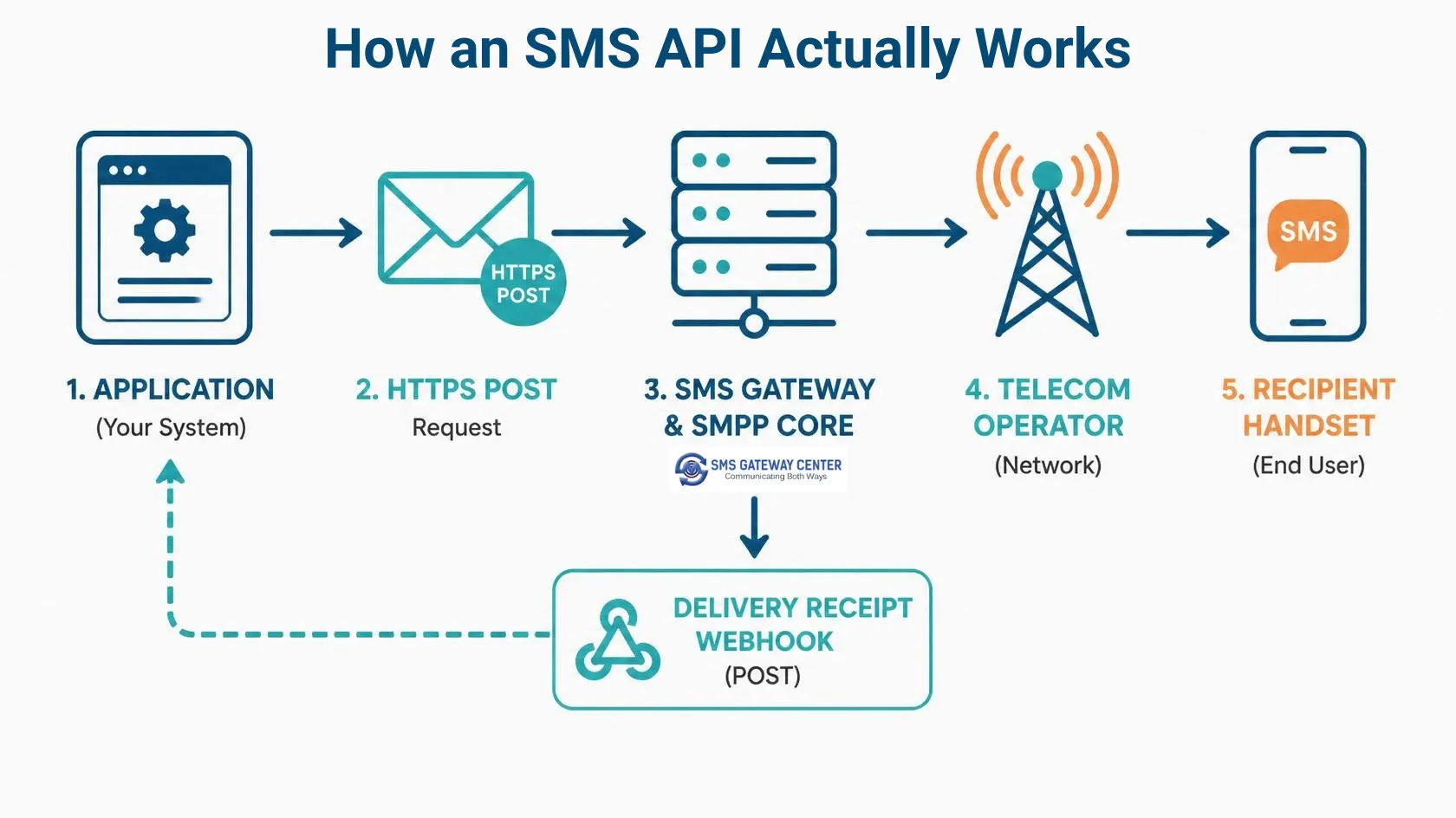
A typical request cycle has four stages. Your application constructs an HTTPS POST request with the recipient’s number, message text, and your credentials. The gateway validates the request, checks your account balance and sender ID approval, and queues the message for delivery to the operator network. The operator delivers the SMS to the handset and generates a delivery receipt (DLR), which the gateway either returns synchronously in some cases or pushes to your registered webhook. Your application should log the transaction ID from the initial response so you can match it against the delivery receipt later, since delivery is asynchronous and can take anywhere from under a second to a few minutes depending on operator load.
Most competing “getting started” guides stop at the initial send call and never explain the DLR loop, which is the part that actually matters in production, because “sent” and “delivered” are two different states and conflating them is the single most common integration mistake teams make in their first month.
SMS API vs SMPP: Which One Do You Need
| Factor | HTTP SMS API | SMPP |
|---|---|---|
| Setup complexity | Low, standard REST-style calls | Higher, requires a persistent binding and session management |
| Best for | Web apps, low to medium volume, quick integration | High-volume senders, telecom-grade throughput needs |
| Connection type | Stateless HTTPS requests | Stateful TCP socket connection |
| Typical use case | Transactional alerts, OTP, marketing campaigns | Enterprise platforms sending large volumes continuously |
| Learning curve | Minimal, works with any HTTP client | Requires understanding of PDU structure and bind types |
If you are building a web or mobile application and sending under a few hundred thousand messages a day, the HTTP API in this guide is the right starting point. If you are running a telecom-grade platform, see the SMPP connectivity documentation instead.
Getting Your Credentials
Sign up for a free account, which gives you a userid and password immediately. From your account dashboard you can also generate a dedicated API key, which is the recommended method for production because it can be regenerated independently of your login password if it leaks. The process for generating and rotating a key is covered in detail in how to create and use your SMS Gateway Center API key.
Authentication Methods
There are two ways to authenticate a request to the send endpoint:
userid and password: pass your registered username and URL-encoded password directly as request parameters. Simple to set up but exposes credentials in the request body on every call.
apiKey header: generate a unique API key from your control panel and send it as an HTTP header (apikey: YOUR_KEY) instead of password but require your userid parameter. This is the safer option for production systems since the key can be revoked and regenerated without touching your account login.
Use one method or the other, not both. Full parameter-level detail is in the authentication documentation.
Sending Your First SMS: Step by Step
- Sign up for an account at the signup page and confirm your registration.
- Get your credentials: note your userid, or generate an apiKey from the dashboard.
- Register a sender ID: a 6-character alphanumeric sender ID needs approval before it will deliver. For India, this ties into DLT (see below).
- Build the request: a POST to the send endpoint with your credentials, recipient number, message, sender ID, and message type.
- Send and check the response: read the
statusandtransactionIdfields, then reconcile against the delivery report endpoint once the DLR arrives.
The core endpoint for a quick single or batch send is:
POST https://unify.smsgateway.center/SMSApi/send
Request Parameters Reference
| Parameter | Required | Example | Description |
|---|---|---|---|
| userid | Yes, require for using apiKey header or password | YourUsername | Registered username |
| password | Yes, unless using apiKey header | YourPassword | URL-encoded password |
| apikey | Alternative to password | XXXXXXXXXXXXXXXXXXXX | Sent as an HTTP header, not a body parameter |
| sendMethod | Yes | quick | Must be set to quick for a batch/single send |
| mobile | Yes | 919999999999 | Recipient number with country code |
| msg | Yes | Hello World | Message content |
| senderid | Yes | SENDER | Your approved sender ID |
| msgType | Yes | text or unicode | text for English, unicode for regional-language content |
| output | No | plain or json | Response format, defaults to plain |
| duplicatecheck | No | true or false | Removes duplicate numbers, defaults to true |
| scheduleTime | No | 2026-08-01 09:00:00 | Format YYYY-MM-DD HH:MM:SS for scheduled sends |
| trackLink | No | true or false | Enables link click tracking inside the message |
| dltEntityId | Required for India | numeric ID | Your DLT-registered Principal Entity ID |
| dltTemplateId | Required for India | numeric ID | Your DLT-approved content template ID |
Reading the Response and Handling Errors
A successful call to the send endpoint returns JSON like this:
{
  "status": "success",
  "mobile": "919999999999",
  "invalidMobile": "",
  "transactionId": "6305583318236810379",
  "statusCode": "200",
  "reason": "success"
}
Store transactionId against your internal message record. It is the key you will use to query the delivery report endpoint later and confirm whether the message actually reached the handset, not just whether the gateway accepted it.
If a request fails, the gateway returns a numeric error code you can map using the API error code list endpoint, which returns a full JSON list of every possible error and HTTP status pairing. Delivery-side failures (as opposed to request-side rejections) use a separate set of codes documented at the delivery error code list endpoint, since a message can be accepted by the API and still fail at the operator level for reasons like an invalid or DND-registered number.
Code Samples
cURL
curl --location --request POST 'https://unify.smsgateway.center/SMSApi/send' \
--header 'apikey: XXXXXXXXXXXXXXXXXXXX' \
--header 'content-type: application/x-www-form-urlencoded' \
--data-urlencode 'sendMethod=quick' \
--data-urlencode 'mobile=919999999999' \
--data-urlencode 'msg=Hello World' \
--data-urlencode 'senderid=SENDER' \
--data-urlencode 'msgType=text' \
--data-urlencode 'duplicatecheck=true' \
--data-urlencode 'output=json'
PHP
<?php

$curl = curl_init();

curl_setopt_array($curl, array(
  CURLOPT_URL => "https://unify.smsgateway.center/SMSApi/send",
  CURLOPT_RETURNTRANSFER => true,
  CURLOPT_ENCODING => "",
  CURLOPT_MAXREDIRS => 10,
  CURLOPT_TIMEOUT => 30,
  CURLOPT_HTTP_VERSION => CURL_HTTP_VERSION_1_1,
  CURLOPT_CUSTOMREQUEST => "POST",
  CURLOPT_POSTFIELDS => "sendMethod=quick&mobile=919999999999&msg=Hello+World&senderid=SENDER&msgType=text&duplicatecheck=true&output=json",
  CURLOPT_HTTPHEADER => array(
    "apikey: XXXXXXXXXXXXXXXXXXXX",
    "cache-control: no-cache",
    "content-type: application/x-www-form-urlencoded"
  ),
));

$response = curl_exec($curl);
$err = curl_error($curl);
curl_close($curl);

if ($err) {
  echo "cURL Error #:" . $err;
} else {
  echo $response;
}
Node.js
const axios = require('axios');
const qs = require('qs');

const data = qs.stringify({
  sendMethod: 'quick',
  mobile: '919999999999',
  msg: 'Hello World',
  senderid: 'SENDER',
  msgType: 'text',
  duplicatecheck: 'true',
  output: 'json'
});

axios({
  method: 'post',
  url: 'https://unify.smsgateway.center/SMSApi/send',
  headers: {
    'apikey': 'XXXXXXXXXXXXXXXXXXXX',
    'content-type': 'application/x-www-form-urlencoded'
  },
  data: data
})
.then((response) => console.log(response.data))
.catch((error) => console.error(error));
Python
import requests

url = "https://unify.smsgateway.center/SMSApi/send"

payload = {
    'sendMethod': 'quick',
    'mobile': '919999999999',
    'msg': 'Hello World',
    'senderid': 'SENDER',
    'msgType': 'text',
    'duplicatecheck': 'true',
    'output': 'json'
}

headers = {
    'apikey': 'XXXXXXXXXXXXXXXXXXXX'
}

response = requests.post(url, data=payload, headers=headers)
print(response.text)
Java
import java.io.*;
import java.net.*;

public class SendSms {
    public static void main(String[] args) throws Exception {
        String data = "sendMethod=quick&mobile=919999999999&msg=" + URLEncoder.encode("Hello World", "UTF-8")
                + "&senderid=SENDER&msgType=text&duplicatecheck=true&output=json";

        URL url = new URL("https://unify.smsgateway.center/SMSApi/send");
        HttpURLConnection conn = (HttpURLConnection) url.openConnection();
        conn.setRequestMethod("POST");
        conn.setRequestProperty("apikey", "XXXXXXXXXXXXXXXXXXXX");
        conn.setRequestProperty("Content-Type", "application/x-www-form-urlencoded");
        conn.setDoOutput(true);

        try (OutputStream os = conn.getOutputStream()) {
            os.write(data.getBytes("UTF-8"));
        }

        BufferedReader br = new BufferedReader(new InputStreamReader(conn.getInputStream()));
        String line;
        StringBuilder response = new StringBuilder();
        while ((line = br.readLine()) != null) {
            response.append(line);
        }
        System.out.println(response.toString());
    }
}
Postman
Import the ready-made collection from the Download SMS Postman page, which comes pre-configured with the send endpoint, headers, and body so you only need to swap in your own credentials and test values.
DLT and India Compliance
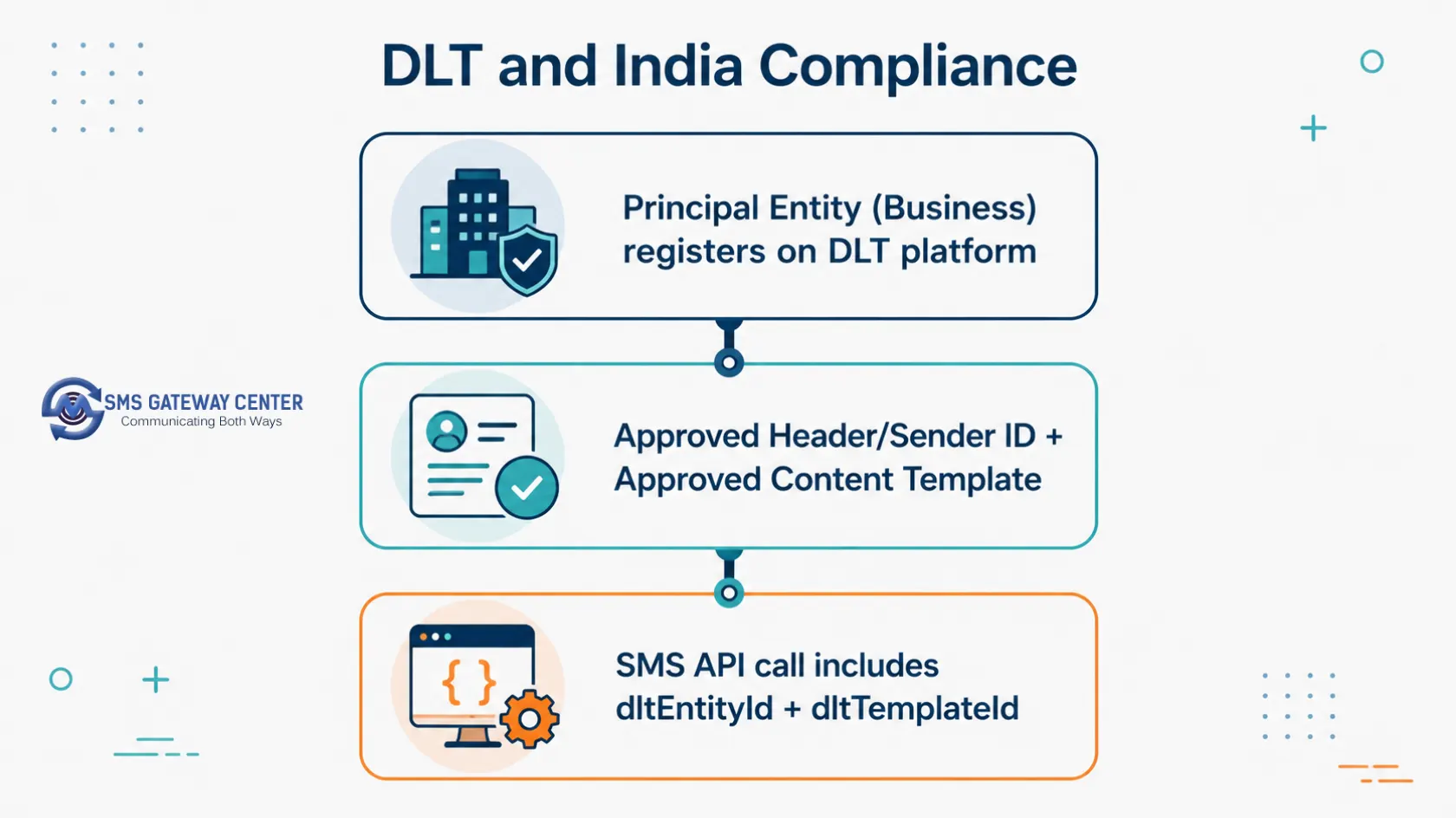
If any recipient number is on India’s mobile network, the message must be tied to a DLT-registered Principal Entity and an approved content template, or telecom operators will reject or silently drop it under TRAI regulations, regardless of whether your API call itself succeeds. Two additional parameters, dltEntityId and dltTemplateId, need to be included in the send request once you have completed registration. The full walkthrough, including PE-TM binding, is covered in the DLT registration guide.
Rate Limits and Throughput
Exact throughput ceilings depend on your account tier and route (transactional, promotional, or OTP), and operators impose their own per-second caps on top of gateway-level limits. As a practical rule, batch your sends through the group or file-upload endpoints rather than looping single sendMethod=quick calls in a tight loop, since that pattern is the most common cause of rate-limit errors reported by integrators.
Common Mistakes and How to Avoid Them
Sending unicode content with msgType=text truncates or garbles regional-language messages, since text mode assumes GSM 7-bit encoding. Treating the initial API response as final delivery confirmation instead of polling or subscribing to delivery receipts leads to false “message sent” assumptions when the actual failure happens at the operator level. Reusing a sender ID across DLT and non-DLT routes, or omitting dltEntityId/dltTemplateId on Indian transactional traffic, is the most frequent cause of messages that succeed at the API layer but never reach the handset. If you need message content with line breaks, the escaping rules differ from a standard URL-encoded newline; see how to use newline in SMS message when sending via HTTP SMS API for the exact syntax.
SMS API vs WhatsApp Business API: When to Use Each
| Factor | SMS API | WhatsApp Business API |
|---|---|---|
| Reach | Works on every phone, no app required | Requires the recipient to have WhatsApp installed |
| Delivery certainty | High, network-level delivery | Depends on recipient’s WhatsApp status and opt-in |
| Rich media | Plain text and links only | Images, documents, buttons, carousels |
| Best for | OTP, critical alerts, universal reach | Marketing, support conversations, rich engagement |
| Setup complexity | Low | Higher, requires template approval and business verification |
For a full breakdown with pricing and use-case mapping, see the WhatsApp Business API vs SMS API comparison guide.
Pros and Cons of Starting with the HTTP SMS API
Pros: fast to integrate, works with any language that can make an HTTPS call, no persistent connection to manage, good fit for low-to-medium volume.
Cons: less efficient than SMPP at very high throughput, each request carries full HTTP overhead, scheduling and retries need to be built into your own application logic unless you use the schedule and campaign endpoints.
FAQs
Do I need a website to use an SMS API? No. You need a server or backend process that can make outbound HTTPS requests, which can be anything from a mobile app backend to a cron job.
Can I send the same message to multiple numbers in one call? Yes, using the group or file-upload send endpoints instead of the quick single-batch call, which accept a list or a file of recipients.
What happens if my sender ID isn’t approved yet? The API will reject the request with an error code corresponding to an invalid or unapproved sender ID rather than queueing the message.
Is JSON the default response format? No, plain text is the default. Set output=json explicitly if your application parses JSON.
How do I know if a message was actually delivered, not just accepted? Check the delivery report endpoint using the transactionId from your send response, or subscribe to delivery receipt webhooks for real-time updates.
Sign up for a free account and send a test message using your own number within your first session, before wiring the API into production code.