Table of Contents
- The Short Answer
- TL;DR
- Why Dual-Key Rotation Advice Doesn’t Fit Here
- The Four API Key Endpoints at a Glance
- Reading the Key Back: apikeyList Is Not a List
- Which Credential Rotates the Key
- The Rotation Sequence, Step by Step
- A Rotator in Python
- Reload on a Version Change, Not on an Error Code
- A Sending Client in Node.js
- Pausing the Queue So Nothing Is Lost
- Probing a Key Without Sending Anything
- Catching Portal Rotations With Fingerprint Drift
- When the Key Leaks: Update, Don’t Delete
- Delete Is for Decommissioning
- What a Key Rotation Doesn’t Touch
- How Often to Rotate
- Decision Matrix
- Rotation Checklist
- Unspecified Behaviour and How to Code Around It
- FAQs
The Short Answer
You can’t rotate an { the way most guides tell you to, because there’s no moment where the old key and the new key both work. Each account has one key slot. Read API Key returns a single key, and the moment you regenerate it, the old one stops working.
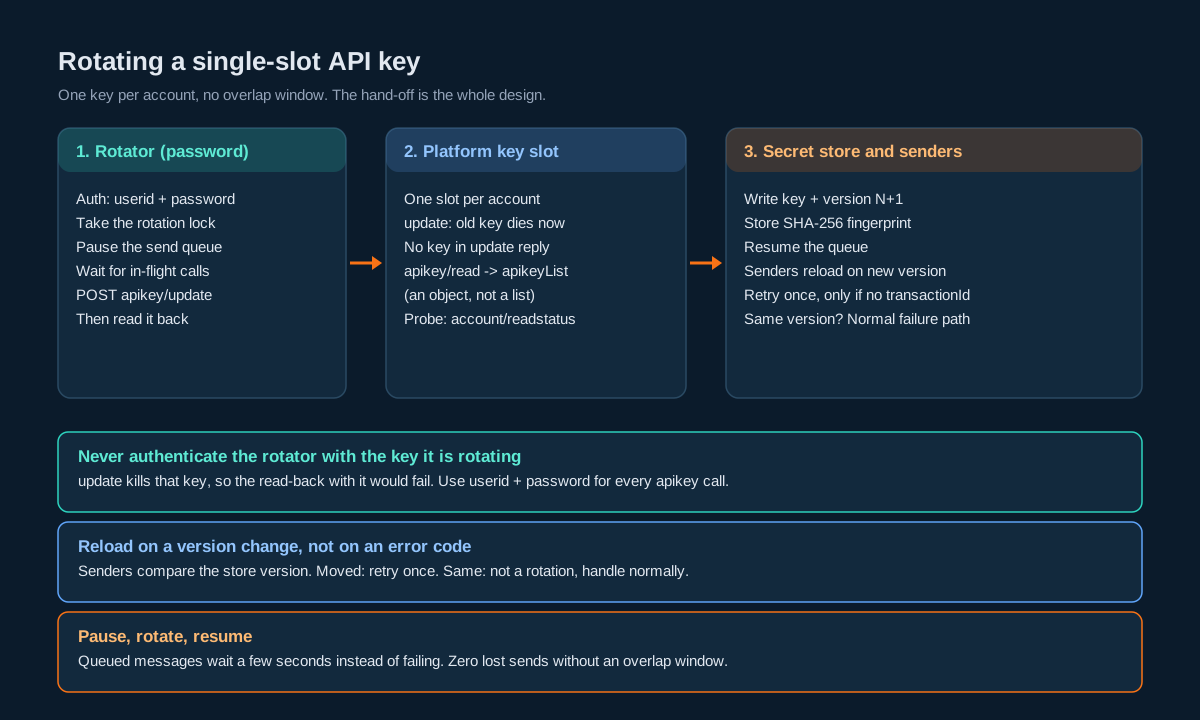
So you rotate it as a hand-off. A small rotator job, authenticated with the account’s userid and password rather than the key it’s about to kill, calls SMSApi/apikey/update, reads the new key back with SMSApi/apikey/read, checks it with a read-only call, and writes it to your secret store under a new version number. Your senders reload the key whenever the version changes. If you pause the send queue for those few seconds, not a single message fails.
TL;DR
- One slot, no overlap. The read endpoint returns
count: 1and an object calledapikeyListholding oneapikey. Regenerating the key invalidates the previous one straight away. - Update and create don’t hand you the key. Both return a plain success message. You always fetch the new value with
SMSApi/apikey/read. - Rotate with the password, not the key. A rotator that authenticates with the key it’s rotating locks itself out halfway through. Keep
useridandpasswordin a separate secret path that only the rotator can read. - Version the secret. Store the key with a version number and a short SHA-256 fingerprint. Clients compare versions, never parse error messages.
- Reload on a version change. When a send fails, the client re-reads the secret. New version: retry once. Same version: it isn’t a rotation problem, so handle it like any other failure.
- Pause, rotate, resume. A queue-based sender holds messages for a few seconds instead of failing them. That’s how you get zero lost messages without an overlap window.
- Probe without sending. Check a new key with
SMSApi/account/readstatus, which costs nothing and sends nothing. - Watch for drift. Anyone who regenerates the key in the dashboard breaks production. Compare the live key’s fingerprint with your store’s on a schedule.
- On a leak, update, then change the password. Update kills the leaked key and gives you a new one in one step. Delete is for when you’re retiring the key for good.
Why Dual-Key Rotation Advice Doesn’t Fit Here
Search for “API key rotation without downtime” and almost every answer describes the same pattern. Issue a second key, deploy it everywhere, wait until nobody’s using the first one, then revoke it. The safety comes from the overlap window, a stretch of time where both keys are valid.
That pattern needs a provider that lets you hold two live keys. This one doesn’t. The read endpoint returns one key in an object, not an array. The regeneration help page is blunt about it: regenerating “will invalidate the previous key, so any existing integrations using the old key will stop working.” There’s no grace period to configure and no second slot to stage into.
That changes the problem. You aren’t trying to overlap two keys. You’re trying to make the gap between “old key dead” and “every sender has the new key” short, safe and invisible to customers. Three things get you there:
- A single rotator that owns the slot, so two processes never regenerate at once.
- A versioned secret that every sender reloads when it changes, so the gap is as long as one secret read.
- A queue that can pause, so whatever does fall in the gap waits instead of failing.
If you build only the first two, you’ll see a burst of failed sends at every rotation, sized by your traffic and your reload speed. Add the third and the burst goes to zero.
The Four API Key Endpoints at a Glance
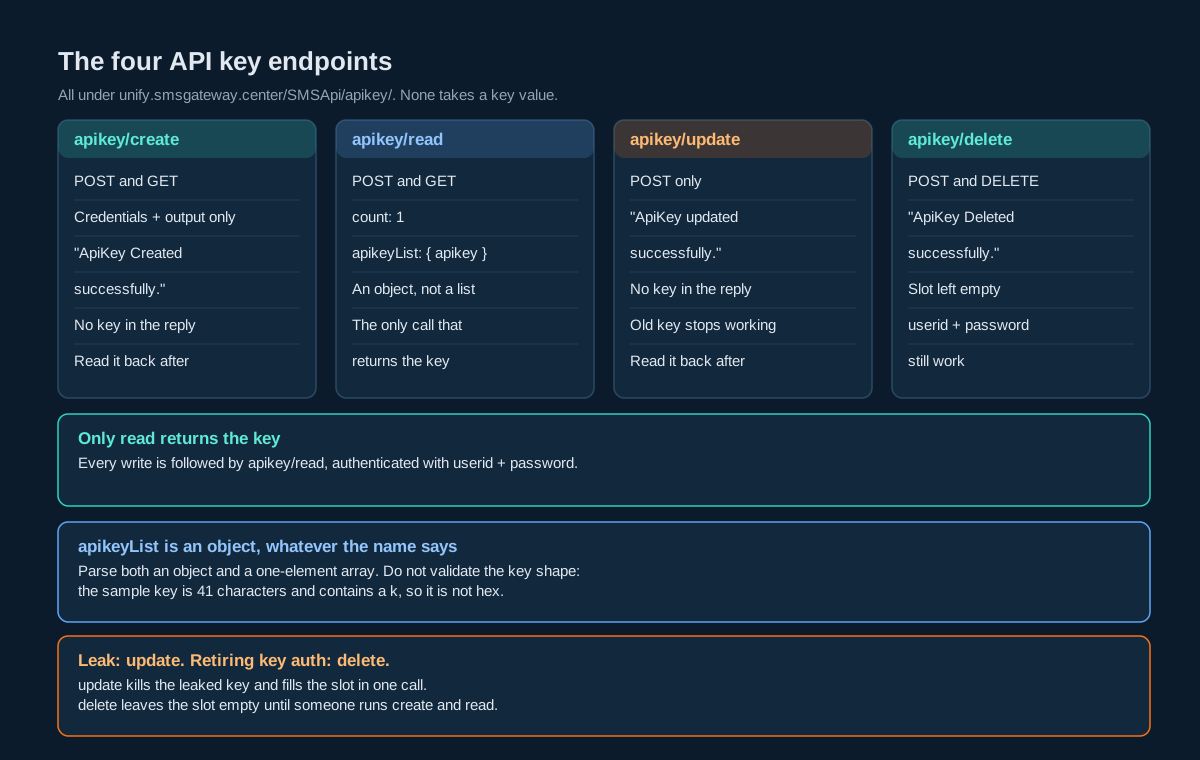
All four live under https://unify.smsgateway.center/SMSApi/apikey/. They take only your login credentials and output. None of them takes a key value as a parameter.
| Endpoint | Methods on its page | What it returns | What it does to the slot |
|---|---|---|---|
apikey/create | POST and GET | status, msg “ApiKey Created successfully.”, code “200” | Creates a key. The value isn’t in the response. |
apikey/read | POST and GET | count 1 and apikeyList holding apikey | Nothing. Read-only. |
apikey/update | POST only | status, msg “ApiKey updated successfully.”, code “200” | Replaces the key. The old key stops working. |
apikey/delete | POST and DELETE | status, msg “ApiKey Deleted successfully.”, code “200” | Removes the key. Only userid and password still work. |
A few things jump out once they’re side by side.
None of the writes returns the key. If your code expects update to hand back the new value, it’ll get a success message and nothing to store. The read is always the second half of every write.
The methods differ. update is POST only. delete accepts POST and DELETE. create and read accept POST and GET. Use POST for all four and you never have to remember which is which.
Every response nests under response with api “apikey” and an action that names the operation. Check response.status, and treat the action name as a sanity check that you hit the endpoint you meant to.
Reading the Key Back: apikeyList Is Not a List
Here’s the read response, verbatim from the endpoint’s page:
{
  "response": {
    "api": "apikey",
    "action": "read",
    "status": "success",
    "msg": "success",
    "code": "200",
    "count": 1,
    "apikeyList": {
      "apikey": "902be2ba73523ek3k32c5f0b5f8f684337f710bc4"
    }
  }
}
Two traps sit in those eight lines.
The name apikeyList says array. The value is an object. Code written against the name (response.apikeyList[0].apikey) gets undefined in JavaScript, a KeyError in Python and a class cast exception in Java. Code written against the sample works.
The sample key also isn’t hex. It’s 41 characters and contains a k, so a validator that insists on [0-9a-f] or on 32 or 40 characters will reject a perfectly good key. Don’t validate the alphabet or the length. Check that it’s a non-empty string with no whitespace, then prove it works with a probe.
Parse it defensively, so a future change from object to one-element array doesn’t take your rotator down. This Java version accepts both shapes and refuses anything else:
import com.fasterxml.jackson.databind.JsonNode;
import com.fasterxml.jackson.databind.ObjectMapper;

public final class ApiKeyReadParser {
    private static final ObjectMapper MAPPER = new ObjectMapper();

    /** Returns the key, or throws if the response isn't a usable success. */
    public static String extractKey(String body) throws Exception {
        JsonNode r = MAPPER.readTree(body).path("response");
        if (!"success".equals(r.path("status").asText())) {
            throw new IllegalStateException("apikey/read did not succeed");
        }
        JsonNode list = r.path("apikeyList");
        JsonNode entry = list.isArray() ? list.path(0) : list; // object today, array tomorrow
        String key = entry.path("apikey").asText("");
        if (key.isEmpty() || !key.equals(key.strip()) || key.chars().anyMatch(Character::isWhitespace)) {
            throw new IllegalStateException("apikey/read returned no usable key");
        }
        return key;
    }
}
Note what it doesn’t do. It doesn’t look at code, count or msg. count is 1 here even though there’s nothing to count, and msg is free text. Status at the right nesting level, then the payload, then stop.
Which Credential Rotates the Key
Every API key endpoint accepts either form credentials (userid plus password) or the apikey header. That choice matters more for rotation than for anything else.
Say the rotator authenticates with the key. It calls update, which succeeds and kills that key. Now it calls read to fetch the new value, using the same key in the header. That call fails, because the key is dead. You’ve rotated into a state where nothing you control knows the current key, and you have to go to the dashboard by hand.
So the rotator authenticates with userid and password for every apikey/* call. Those credentials don’t change when the key does. Your senders never see the password. They only ever get the key.
That gives you two secrets with very different jobs:
| Secret | Who reads it | Used for | Rotated by |
|---|---|---|---|
userid + password | The rotator only | apikey/update, apikey/read, drift checks | A person, rarely, through the account settings |
apikey | Every sender | SMSApi/send and all other traffic | The rotator, on a schedule or on demand |
Keep them in separate paths in your secret store with separate access policies. If a sender host is compromised, the attacker gets the key, which you can rotate in seconds. They don’t get the password, which is your way back in.
The same split applies if you use the account’s key for anything else your team runs, like a reporting job or a CRM connector. They’re senders. They read the key from the store like everything else and never hold the password.
The Rotation Sequence, Step by Step
Here’s the whole thing in order. Every step is there for a reason, and the reasons are mostly about what happens when a step fails halfway.
- Take the rotation lock. One rotator at a time. Two rotators racing each other will each regenerate the key, and whichever reads back first publishes a key that’s already dead.
- Pause the send queue and let in-flight calls finish. Stop pulling new jobs, wait for the requests already on the wire to return. A few seconds is usually plenty.
- Call
SMSApi/apikey/updatewithuseridandpassword. Checkresponse.status. From here on, the old key is gone. - Call
SMSApi/apikey/readwith the same credentials. Pull outresponse.apikeyList.apikey. This is the only place the new value ever appears. - Probe the new key without sending anything. Call
SMSApi/account/readstatuswith the new key in theapikeyheader and check for success. - Publish it as a new version. Write the key, version N+1, its fingerprint and a timestamp to your secret store in one write.
- Resume the queue. Senders pick up the new version on their next job or their next failure, whichever comes first.
- Log the rotation and release the lock. Old fingerprint, new fingerprint, who or what triggered it, and why. Never the key itself.
What if the job dies between steps 3 and 6? You don’t know whether update landed, and senders are holding a key that may be dead. Don’t guess. Restart from step 4: read the live key, compare its fingerprint with the one in your store, and if they differ, carry on from step 5 with the live key. The read-back answers the question for the cost of one call, whatever state the slot ended up in.
The same rule covers a timeout on step 3. A timed-out update may or may not have happened. Reading the slot tells you which, so a rotator that always reads after a write never has to reason about partial failure.
A Rotator in Python
This is the rotator from the sequence above, with the secret store and queue left as small interfaces you’d back with whatever you already run. The trap it guards against is the one from the previous section: every apikey/* call goes out with userid and password in the form body, never with the key header.
import hashlib
import time
import requests

BASE = "https://unify.smsgateway.center/SMSApi"

def fingerprint(key: str) -> str:
    """Short, non-reversible label for logs and drift checks. Never log the key."""
    return hashlib.sha256(key.encode("utf-8")).hexdigest()[:12]

def _ok(body: dict) -> bool:
    return isinstance(body, dict) and body.get("response", {}).get("status") == "success"

class Rotator:
    def __init__(self, userid, password, store, queue, timeout=15):
        self.creds = {"userid": userid, "password": password, "output": "json"}
        self.store = store      # get() -> {"version", "key", "fp"}; put(dict)
        self.queue = queue      # pause(), wait_idle(seconds), resume()
        self.timeout = timeout

    def _post(self, path, data=None, headers=None):
        resp = requests.post(f"{BASE}/{path}", data=data, headers=headers, timeout=self.timeout)
        try:
            return resp.json()
        except ValueError:
            return {}

    def read_live_key(self) -> str:
        body = self._post("apikey/read", data=self.creds)
        if not _ok(body):
            raise RuntimeError("apikey/read failed")
        entry = body["response"].get("apikeyList")
        if isinstance(entry, list):          # tolerate a future array shape
            entry = entry[0] if entry else {}
        key = (entry or {}).get("apikey", "")
        if not isinstance(key, str) or not key or any(c.isspace() for c in key):
            raise RuntimeError("apikey/read returned no usable key")
        return key

    def probe(self, key: str) -> bool:
        body = self._post("account/readstatus",
                          data={"userid": self.creds["userid"], "output": "json"},
                          headers={"apikey": key})
        return _ok(body)

    def publish(self, key: str, reason: str) -> dict:
        current = self.store.get() or {"version": 0, "fp": None}
        record = {"version": current["version"] + 1, "key": key,
                  "fp": fingerprint(key), "rotated_at": int(time.time()),
                  "reason": reason, "previous_fp": current["fp"]}
        self.store.put(record)
        return record

    def rotate(self, reason="scheduled") -> dict:
        self.queue.pause()
        try:
            self.queue.wait_idle(seconds=30)
            try:
                updated = _ok(self._post("apikey/update", data=self.creds))
            except requests.RequestException:
                updated = False                  # unknown outcome; the read decides
            live = self.read_live_key()
            stored = self.store.get() or {}
            if not updated and fingerprint(live) == stored.get("fp"):
                raise RuntimeError("update did not change the key; nothing published")
            for _ in range(3):                   # allow a moment for the new key to settle
                if self.probe(live):
                    break
                time.sleep(2)
            else:
                raise RuntimeError("new key failed the probe; not publishing")
            return self.publish(live, reason)
        finally:
            self.queue.resume()
A few choices in there are deliberate.
rotate() resumes the queue in a finally. If anything throws, senders come back up with whatever key the store holds. If that key is dead, they’ll fail, reload, find the same version and treat it as a real failure, which is what you want: a loud alert, not a silent stall.
The probe gets three tries, two seconds apart, before the rotator gives up. A brand-new key that fails once and passes a moment later is a settling delay, not a bad key.
The update result is advisory. What gets published is decided by the read-back and the probe, never by the update’s msg.
The probe passes userid in the body alongside the apikey header. The key replaces the password, not the user ID.
Run it from a scheduler with a distributed lock around rotate(). The lock is your step 1.
Reload on a Version Change, Not on an Error Code
The obvious way to make senders rotation-aware is to spot the “invalid key” error and reload. Don’t. You’d be branching on an error code or parsing a reason string, and both are free to change. You’d also misfire: plenty of failures that look like auth problems aren’t rotations.
There’s a better signal, and you own it: the version number in your secret store.
When a send fails, the client re-reads the secret. Then it asks one question. Is the version newer than the one I just used?
- Yes. A rotation happened while I was holding the old key. Retry this send once with the new key.
- No. Whatever went wrong, it wasn’t a rotation. Hand the failure to your normal retry and error handling, exactly as you would have without any of this.
That rule works whatever the platform’s auth failure looks like, because it never looks at it. It also can’t loop: a retry happens at most once, and only when the version moved.
There’s one more condition on the retry. Only retry when the failed response carries no transactionId. A response with an ID means the platform accepted something, and retrying it could send the message twice. Requests that fail authentication shouldn’t produce an ID, but you don’t have to rely on that: if there’s an ID, don’t retry, full stop. Your idempotency layer covers anything this rule misses. The duplicatecheck parameter on SMSApi/send won’t, because it removes duplicate numbers inside one request, not repeats across two.
Between failures, senders can also refresh the secret on a timer, say every 30 seconds, so most of them have the new key before they ever use the old one. With the queue paused during rotation, the timer alone is usually enough. The reload-on-failure path is the backstop.
A Sending Client in Node.js
Here’s the client half. The trap this one guards against is a retry loop: without the version check, a send that fails for any reason would reload and retry forever.
const BASE = "https://unify.smsgateway.center/SMSApi";

class KeyedSender {
  constructor(userid, secretStore) {
    this.userid = userid;
    this.store = secretStore;      // async get() -> { version, key }
    this.current = null;
  }

  async loadKey() {
    this.current = await this.store.get();
    return this.current;
  }

  async postSend(fields, key) {
    const body = new URLSearchParams({ userid: this.userid, output: "json", ...fields });
    const res = await fetch(`${BASE}/send`, {
      method: "POST",
      headers: { apikey: key, "content-type": "application/x-www-form-urlencoded" },
      body,
    });
    try { return await res.json(); } catch { return {}; }
  }

  async send(fields) {
    const used = this.current ?? (await this.loadKey());
    const first = await this.postSend(fields, used.key);
    if (first.status === "success") return first;

    // Never retry something the platform may have accepted.
    if (first.transactionId) return first;

    const fresh = await this.loadKey();
    if (fresh.version <= used.version) return first; // not a rotation; normal failure path

    return this.postSend(fields, fresh.key);          // exactly one retry, new key
  }
}

module.exports = { KeyedSender };
Call it with the same fields you’d send anyway: sendMethod, mobile, msg, senderid, msgType, and your DLT fields. Nothing about rotation leaks into the calling code.
Two things to keep straight. status is read at the top level because a quick send returns a flat object; if you send by group or file, read status wherever that response shape puts it, following the same rule as the rest of your client. And fields never contains password. The sender doesn’t have it.
Pausing the Queue So Nothing Is Lost
Even with fast reloads, there’s a window between update succeeding and the last sender picking up the new key. Every send in that window fails once. The reload-and-retry path rescues most of them, but “most” isn’t the goal.
If your sends already go through a queue (and if you’re sending at any volume they should, for rate limiting and backpressure reasons alone), the fix is cheap: stop consuming during the rotation.
- The rotator flips a pause flag that workers check before pulling a job.
- Workers finish the request they’re on and go idle. The rotator waits until in-flight count is zero, or a timeout passes.
- Rotation runs: update, read, probe, publish.
- The rotator clears the flag. Workers reload the secret before their first job, because the version moved.
Messages queued during those seconds just wait. Nothing fails, nothing retries, nothing goes out twice. For OTPs that latency matters, so do it during your quietest hour and keep the pause short. A rotation that reads, probes and publishes in a couple of seconds is a couple of seconds of OTP delay, once a month.
If you can’t pause (a synchronous API where the caller is waiting on the send), skip step 1 and rely on reload-and-retry. You’ll see a handful of single retries per rotation. That’s fine as long as you can see them, which is what the next sections are about.
Probing a Key Without Sending Anything
You need a way to ask “does this key work?” that doesn’t send a message, doesn’t cost anything and doesn’t change state. SMSApi/account/readstatus fits: it returns account status including smsBalance, and it accepts the apikey header like everything else.
A raw probe from the shell looks like this. The trap here is the header name: send the key as an apikey header, not as Authorization: Bearer, and keep userid in the body.
curl -s -X POST "https://unify.smsgateway.center/SMSApi/account/readstatus" \
  -H "apikey: ${SMSGC_APIKEY}" \
  --data-urlencode "userid=${SMSGC_USERID}" \
  --data-urlencode "output=json"
HTTP header names are case-insensitive under RFC 9110, so apikey and apiKey reach the server the same way. The value is what matters.
Use the probe in three places: in the rotator before publishing, in a health check every few minutes so a dead key pages someone before customers notice, and after any manual change in the dashboard. Don’t use apikey/read as a health check. It works, but it puts the key on the wire in a response body, and a health check runs often enough to make that a habit you don’t want.
Catching Portal Rotations With Fingerprint Drift
Your rotator isn’t the only thing that can change the key. Anyone with dashboard access can regenerate it from the API key settings page, and the help page for that flow tells them to “blank out the API key value” and save. One well-meaning click there and every sender you run is holding a dead key, with nothing in your secret store to say why.
Catch it with a drift check. Every fifteen minutes or so, the rotator (it has the password, so it’s the right job for this) reads the live key and compares fingerprints:
def drift_check(rotator, alert):
    live = rotator.read_live_key()
    stored = rotator.store.get() or {}
    if fingerprint(live) == stored.get("fp"):
        return "in_sync"
    if not rotator.probe(live):
        alert("live key fails probe; manual attention needed")
        return "broken"
    record = rotator.publish(live, reason="adopted_drift")
    alert(f"key changed outside the rotator; adopted as v{record['version']}")
    return "adopted"
Adopting the live key gets senders working again straight away. The alert is the important part, though. A key that changed without your rotator is either a teammate who didn’t know, or someone who had the old key and used it to call apikey/update. You can’t tell which from the API, so treat an unexplained drift as a possible leak and follow the next section.
While you’re in the dashboard settings: the create form lets you type your own key value instead of leaving it blank for a random one. Don’t. A human-chosen key is guessable in ways a generated one isn’t, and nothing stops two environments ending up with the same value. Always let the platform generate it.
When the Key Leaks: Update, Don’t Delete
A key in a public repo, a log line, a screenshot in a ticket. Whatever the route, the first move is the same: run the rotator with reason="leak". Don’t wait for a quiet hour.
Why update and not delete? Both kill the leaked key. But delete leaves the slot empty, so your senders are down until someone runs create and read. update kills the leaked key and puts a fresh one in the slot in one call, and the rotator has it published seconds later. Same security result, no extra outage.
Then work through the rest:
- Change the account password. A key authorises everything the account can do through the API. Assume the holder tried more than sending, and close the second door too. Update the rotator’s secret path right after.
- Check what the key could have changed. Read back your webhook with
SMSApi/webhook/readand comparesmsWebhookwith the URL you expect. A redirected webhook quietly ships your delivery reports to someone else. Do the same for sender IDs and templates with their read endpoints. - Look for traffic you didn’t send. Pull delivery reports for the exposure window with
SMSApi/reports/statusand diff them against your own outbound message table. Anything on the platform’s side that isn’t on yours went out under the leaked key. - Find the leak and close it. A key in a log means a logger that prints headers. A key in a repo means a config file that shouldn’t be committed. Fix the cause or you’ll be doing this again.
- Record it. Old fingerprint, new fingerprint, when the leak started, when the key died, what you found in steps 2 and 3.
If the rotator itself can’t run (the password was in the same leak, say), rotate from the dashboard, then let the drift check adopt the new key once you’ve updated the rotator’s credentials.
Delete Is for Decommissioning
SMSApi/apikey/delete has a narrower job than it looks. Use it when you’re done with key authentication for that account: you’ve moved a product onto OAuth, or you’re shutting down an integration and want nothing left that can authenticate as it.
Before deleting, make sure nothing still reads the key from your store. After deleting:
- Probe with the old key. It should fail. If it succeeds, the delete didn’t take, so stop and investigate.
- Mark the secret in your store as retired rather than removing it, so a sender that reloads gets a clear “no key” instead of a stale one.
- Leave the drift check running for a week. A key that reappears means somebody created one by hand.
If you need key auth again later, create and then read gets you back to the start of this whole cycle.
What a Key Rotation Doesn’t Touch
Rotating the API key changes one credential. Several other secrets sit near it, and it’s easy to assume they move together.
| Thing | Changes when the API key rotates? | What to do |
|---|---|---|
Account userid and password | No | Rotate separately, by hand, after a leak or a staff change |
| Message encryption token | No. It’s a separate token from the API key. | Rotate on its own schedule; see SMS message encryption |
| Your inbound callback URL secret | No. It’s yours, not the platform’s. | Rotate when you change the callback URL |
| Webhook URL and rate | No | Read back after a leak in case it was altered |
| OAuth access and refresh tokens | Unclear | Probe with a token after rotating; see the next sections |
| Scheduled SMS bookings | Unclear | Compare SMSApi/schedule/read before and after |
The encryption row trips people up most. The encryption token help page is explicit that the two are separate. Rotating the API key does nothing for message confidentiality, and rotating the encryption token does nothing for API access.
How Often to Rotate
The key doesn’t expire on its own, so the schedule is yours. Two kinds of trigger cover it.
Scheduled. Monthly is a sensible default once the rotator is automated. It keeps the code path exercised, so the day you need it in a hurry, you already know it works. If rotation still involves a person and a dashboard, you’ll rotate far less often than you should; the OWASP Secrets Management Cheat Sheet makes the same point about manual rotation being where the mistakes come from.
Event-driven. Rotate right away when someone who could read the key leaves the team, when a vendor or contractor with access is offboarded, when a host that held the key is rebuilt after an incident, and on any suspected leak.
Rotating weekly or daily buys little extra if the key never leaves your secret store, and each rotation is a short pause in sending. If you want shorter-lived credentials than that, the answer isn’t faster key rotation; it’s a different mechanism, such as OAuth with its one-hour access tokens.
Decision Matrix
| Situation | Do this | Don’t do this |
|---|---|---|
| Routine monthly rotation | Rotator with queue pause, quietest hour | Regenerate in the dashboard and paste the key into config |
| Key seen in a repo, log or ticket | Rotator with reason="leak" now, then change the password | Wait for the scheduled rotation |
| Someone regenerated the key in the dashboard | Let the drift check adopt it, then ask who and why | Treat it as harmless because things work again |
| Moving an integration to OAuth | Migrate senders, then apikey/delete, then probe | Delete first and migrate after |
| Synchronous sends, no queue | Rotate with reload-and-retry only, expect a few single retries | Retry on any failure without the version check |
| Sends failing and the version hasn’t moved | Normal failure handling, check the probe | Assume a rotation and keep reloading |
| Building a SaaS that sends for customers | Use OAuth instead of holding their keys | Store each customer’s API key and rotate it for them |
| Need credentials that expire on their own | OAuth access tokens | Rotating the API key daily |
Rotation Checklist
Before the first rotation
useridandpasswordstored in a secret path only the rotator can read- API key stored with
version,fp,rotated_atandreason - Every sender reads the key from the store, none from a config file or environment baked into an image
- Senders refresh on a timer and reload on failure, retrying only when the version moved and there’s no
transactionId - A distributed lock around the rotator
- Queue workers honour a pause flag and report in-flight count
- Probe on
SMSApi/account/readstatuswired into a health check - Logs scrubbed of the
apikeyheader; fingerprints only
During a rotation
- Lock taken, queue paused, in-flight drained
apikey/updatecalled withuseridandpassword- New key read back from
apikey/read, never taken from the update response - Probe passes with the new key
- New version published, queue resumed, lock released
After a rotation
- Old key fails the probe
- Scheduled bookings in
SMSApi/schedule/readmatch what was there before - Any OAuth tokens you hold still work
- Rotation logged with both fingerprints
Unspecified Behaviour and How to Code Around It
A few behaviours around the key slot aren’t pinned down by anything you can read ahead of time. Each item below gives you the choice that stays safe whichever way the platform actually behaves, and none of them needs you to wait for an answer before shipping.
One. Read the slot after every write, including create. What create does on an account that already has a key, overwrite it or refuse, isn’t something you can know in advance. If you always read back and compare fingerprints, you don’t need to: the read tells you what’s in the slot now, and that’s all your store needs.
Two. Treat a timed-out update as “maybe”. A timeout tells you nothing about whether the key changed. The rotator above reads the slot whatever happened, so a lost response costs one extra call, never a split brain between your store and the platform.
Three. Accept apikeyList as an object or a one-element array. It’s an object today with a name that suggests a list. Parsing both shapes and rejecting anything else costs two lines and survives a fix in either direction.
Four. Validate the key by probing it, not by its shape. Nothing fixes the key’s length or alphabet, and the sample isn’t hex. Non-empty, no whitespace, passes the probe: that’s the whole test.
Five. Decide retries by the version number, not by the auth error. The exact payload for a rejected key isn’t something you should build on. A client that only retries when your own secret store’s version moved never needs to recognise it.
Six. Never retry a response that carries a transactionId. Whether an auth failure could ever come back with an ID is unknowable from outside. Refusing to retry anything with an ID makes the question irrelevant, and your idempotency layer catches the rest.
Seven. Probe your OAuth tokens after each rotation. Whether OAuth access and refresh tokens are tied to the API key isn’t something you can rely on either way. Probe with a token after rotating. If it fails, your OAuth refresh path marks the connection for re-authorisation, which it has to handle anyway.
Eight. Compare scheduled bookings before and after rotating. Whether a booking made through SMSApi/send with scheduleTime survives a key rotation isn’t something to assume. Snapshot the uuId list from SMSApi/schedule/read before you rotate and diff it after. If anything’s missing, rebook it from your own scheduler.
Nine. Change the password after any leak, even if you think the key couldn’t touch it. What a key holder can and can’t change about the account is a question you don’t have to answer. Changing the password closes the door whichever answer is true.
Ten. Run exactly one rotator per account. Whether two update calls a second apart are handled cleanly on the platform side doesn’t matter if they never happen. A lock on your side guarantees it.
Eleven. Give a brand-new key a few seconds before declaring it bad. Whether a regenerated key is valid everywhere at the instant update returns isn’t something to bet on. Three probes, two seconds apart, separates a settling delay from a real failure.
Twelve. Treat the old key as dead the moment you call update, even if it still works. If an old key keeps working briefly, nothing in this design notices or cares. If it dies instantly, nothing breaks either, because senders reload on the version change.
FAQs
Can I have two API keys active at the same time on SMSGatewayCenter?
No. The read endpoint returns one key, and regenerating it invalidates the previous one straight away. Plan rotation as a hand-off between one key and the next, using a versioned secret and a short queue pause, rather than an overlap.
Does SMSApi/apikey/update return the new key?
No. It returns status, msg “ApiKey updated successfully.” and code “200”. Call SMSApi/apikey/read straight after and take the key from response.apikeyList.apikey.
Which credential should call the API key endpoints?
Your userid and password. If you authenticate update with the key itself, the key dies mid-rotation and you can’t read the new one with it. Keep the password in a secret only the rotator can see.
How do I send the API key on normal requests?
As an apikey HTTP header, with userid still in the request body and no password. Header names are case-insensitive, so apikey and apiKey are the same thing to the server.
Will rotating the key cause downtime?
Not if your sends go through a queue. Pause consumption, rotate, publish the new version and resume. Messages wait a few seconds instead of failing. Without a queue, expect a few sends to fail once and succeed on the reload-and-retry.
Does rotating the API key also rotate my message encryption token?
No. They’re separate secrets. Rotate the encryption token on its own schedule.
Should I use apikey/delete when a key leaks?
Use apikey/update instead. Both kill the leaked key, but update puts a fresh one in the slot in the same call, so your senders are back within seconds. Save delete for retiring key authentication altogether.
How often should I rotate the key?
Monthly on a schedule once it’s automated, plus right away when someone with access leaves, when a vendor is offboarded, or when you suspect a leak. If you need credentials that expire on their own, use OAuth rather than rotating the key every day.
Someone regenerated the key in the dashboard and everything broke. What now?
Run the drift check: read the live key with the password, probe it, and publish it as a new version so senders reload. Then find out who changed it and why, and treat it as a possible leak until you know.
Want a Second Look at How You Store API Keys?
Running SMS, WhatsApp or RCS traffic from your own backend and want a second pair of eyes on how you hold and rotate credentials? Start with the developer API reference, or get in touch with our team to talk through your integration.
More from our Blog
SMS Message Encryption: What It Hides, What It Doesn’t, and How to Get the Wire Format Right
SMS Click Tracking and Attribution: Joining Smart Link Clicks to Messages and Recipients
Two-Way SMS Keyword Design: Routing, Auto-Replies and Conversation State on a Long Code