
Formidable Forms SMS & WhatsApp Notifications
Every new Formidable Forms entry can trigger an immediate message. SGC Connect finds the Phone field and sends your approved template on SMS, WhatsApp, RCS or Voice.
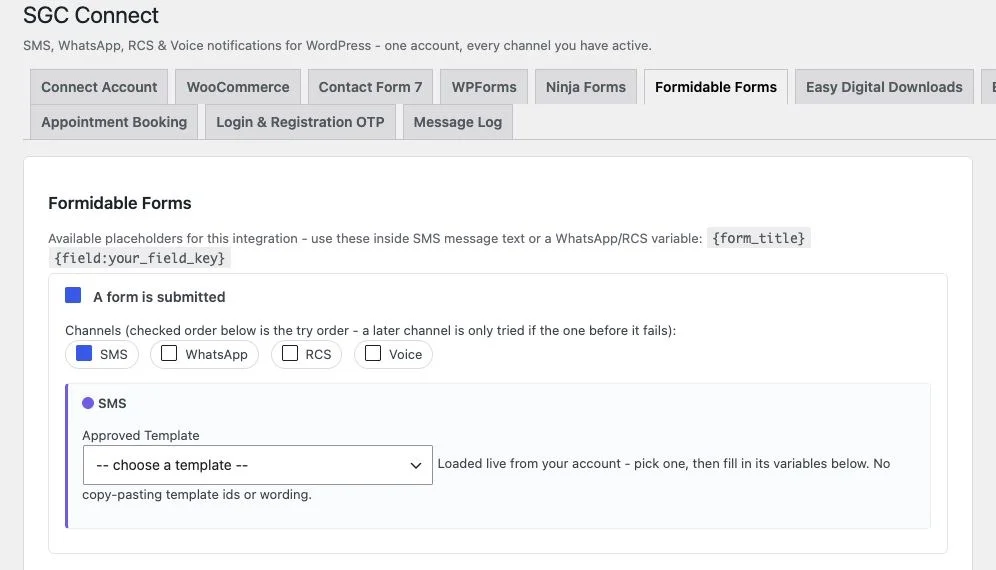
What the Formidable Forms module does
The Formidable Forms module sends a message when a new entry is created. The number is read from the form's Phone field, and submitted values are available in the message using each field's key.
Forms without a Phone field send nothing.
Placeholder tokens
Use these inside template variables to put live values in the message.
{form_title}{field:your_field_key}Events you can notify
| Event | When it is sent |
|---|---|
| A form is submitted | Sent when a new entry is created. |
Every event has its own switch, channel choice (SMS, WhatsApp, RCS, Voice, with fallback in the order ticked) and approved template.
How to set it up
- Add a Phone field to your Formidable form.
- Open the Formidable Forms tab in SGC Connect and turn on the submit event.
- Choose channels and a template.
- Use {field:your_field_key} with the key shown in the Formidable builder, then save.
- Submit a test entry and verify the send in the Message Log.
Good ways to use it
- Registration and survey forms with thank you messages.
- Application forms that confirm receipt.
- Directory or listing submissions with an acknowledgement.
Get SGC Connect for Formidable Forms
Free from WordPress.org. Connect your SMSGatewayCenter account and start sending in minutes.
Formidable Forms with SGC Connect: FAQ
The form's Phone field.
When a new entry is created for the form.