
WooCommerce SMS, WhatsApp & RCS Notifications
Keep every customer informed from checkout to delivery. SGC Connect sends an order message the moment an order changes status, and wins back shoppers who left without paying, on the channel they actually read.
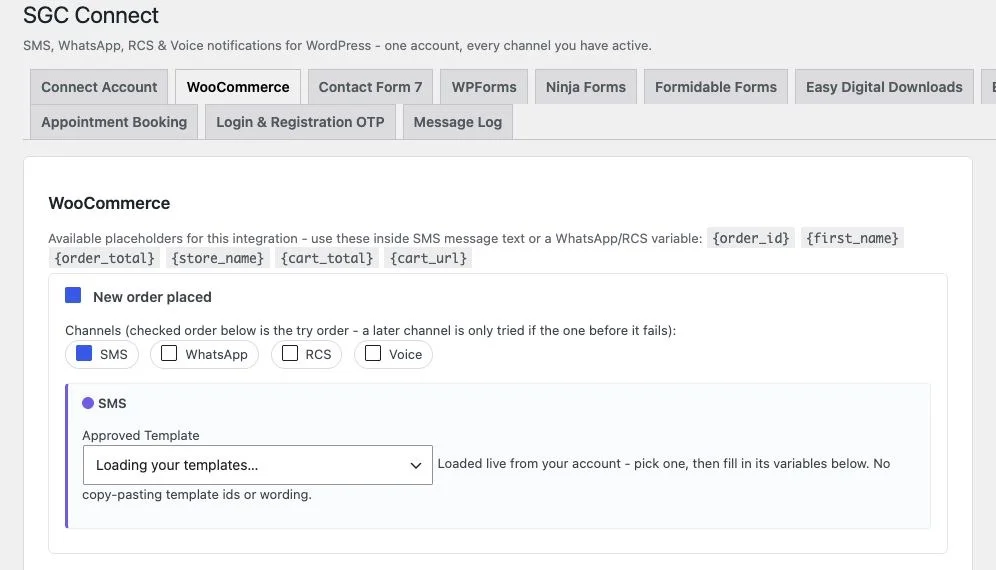
What the WooCommerce module does
The WooCommerce module listens to your store's order lifecycle and sends one message per status change to the billing phone number on the order. Each event has its own on/off switch, its own channel choice and its own approved template.
It also tracks carts. When a shopper has typed a phone number at checkout but not placed an order, a single reminder is sent after 60 minutes. The module works with both the block based Cart and Checkout and the classic shortcode checkout.
The number is read from the order's billing phone. Orders without a billing phone are skipped. Cart reminders run on WP-Cron, so they depend on site visits or a real server cron calling wp-cron.php.
Placeholder tokens
Use these inside template variables to put live values in the message.
{order_id}{first_name}{order_total}{store_name}{cart_total}{cart_url}Events you can notify
| Event | When it is sent |
|---|---|
| New order placed | Sent as soon as the order is created. |
| Order processing | Sent when payment is received and the order moves to processing. |
| Order shipped / completed | Sent when the order is marked completed. |
| Order cancelled or failed | Sent when an order is cancelled or its payment fails. |
| Cart abandoned | Sent once, 60 minutes after a shopper entered a phone number at checkout without ordering. The timer restarts if the cart changes. |
Every event has its own switch, channel choice (SMS, WhatsApp, RCS, Voice, with fallback in the order ticked) and approved template.
How to set it up
- Install and activate SGC Connect, then connect your SMSGatewayCenter account under SGC Connect, Connect Account.
- Open the WooCommerce tab. It appears automatically because WooCommerce is active.
- Turn on an event, tick the channels you want and pick an approved template.
- Fill each template variable with the tokens above, for example {order_id} and {first_name}, then save.
- Place a test order and confirm the send in the Message Log.
Good ways to use it
- Order confirmation and shipping updates that reduce "where is my order" support tickets.
- Abandoned cart recovery with a direct link back to the cart using {cart_url}.
- WhatsApp first, SMS as fallback, so an order update always reaches the customer.
Get SGC Connect for WooCommerce
Free from WordPress.org. Connect your SMSGatewayCenter account and start sending in minutes.
WooCommerce with SGC Connect: FAQ
From the billing phone on the order. If an order has no billing phone, no message is sent for it.
When a shopper types a phone number at checkout but does not place an order, the plugin waits 60 minutes and sends one reminder. If they change their cart again the timer restarts. Shoppers who never entered a number cannot be messaged.
Yes. Both the block based Cart and Checkout and the classic shortcode checkout are supported.
Reminders run on WP-Cron, which fires only when someone visits your site. On a very quiet site ask your host to call wp-cron.php from a real server cron every few minutes.