Table of Contents
- The Short Answer
- TL;DR
- The Fourteen Operations at a Glance
- Authentication and Request Encoding
- Sending a Call: quick, group and bulkupload
- Voice OTP: the PIN Send
- The Audio Library: Upload, IDs and Renewal
- One Call, Four Identifiers
- Big Numbers and the Types That Break Them
- Redial: Who Owns the Retry
- Scheduling, Moving and Cancelling Calls
- Reading Delivery Reports
- What a Voice DLR Row Tells You
- Paging Without a Page Parameter
- Summary, Upload History and the Daily Archive
- Time Zones and Date Formats
- Four Client Samples, Four Traps
- A Data Model for Voice Calls
- Production Checklist
- Unspecified Behaviour and How to Code Around It
- FAQs
The Short Answer
The SMSGatewayCenter Voice Call API lives under https://unify.smsgateway.center/VoiceApi/ and covers fourteen operations on nine paths: sending a call (VoiceApi/send with sendMethod set to quick, group or bulkupload), sending a voice OTP (VoiceApi/send?sendMethod=pin), uploading and renewing audio clips (VoiceApi/save), reading, moving and cancelling scheduled calls, and five kinds of report, from per-call delivery rows to a zipped daily archive.
Getting a call to ring is the easy part. The parts that bite in production are all about data:
- One call carries four identifiers:
transactionIdin the send reply,uuidin schedule requests,uuIdin report rows, and a per-callmsgIdin delivery rows. - Those IDs are 18 or 19 digits long. Several are typed as integers in the reference, and any language that parses JSON numbers into doubles will silently change them.
- The voice OTP
pinis typed as an integer, so an OTP that starts with zero can lose a digit before it’s ever spoken. - The platform redials unanswered calls for you (
reDial0, 1 or 2,redialInterval5, 10 or 15 minutes). If your code also retries, one person can get four or more calls. - The report endpoints return cursors and page counts, but the request schemas have no page parameter, so you control result size by narrowing the date window.
Store every identifier as text, send the PIN as a string, pick one owner for retries, and page by splitting date ranges. The rest of this guide goes through each endpoint field by field and gives you code that holds up whichever way the open questions resolve.
TL;DR
- Base URL:
https://unify.smsgateway.center. The reference is an OpenAPI 3.0 file rendered as Swagger on the Voice Call API page. - Auth:
useridpluspassword, oruseridplus theapikeyheader. Use the header.useridstill goes in the request. - Encoding: POST endpoints take
multipart/form-data. Every form field is text on the wire, whatever type the schema gives it. - Send reply:
{status, mobile, invalidMobile, transactionId, statusCode, reason}, withtransactionIdas a quoted 19-digit string andstatusCodeas the string"200". - Voice OTP:
pinandpinClipIdwith a GET toVoiceApi/send?sendMethod=pin. Always sendpinas a string so leading zeros survive. - Audio library:
VoiceApi/saveuploads an mp3 and returnslibraryIdas a string.VoiceApi/save?reUpload=truerenews an expired clip. There’s no endpoint to list clips, so keep your own registry. - Redial: at most two platform redials, at most 15 minutes apart. Worst case, the last attempt starts 30 minutes after the first. Make sure a voice OTP is still valid by then, or set
reDialto 0. - Scheduling:
scheduleTimeon send, thenreport/schedule,report/schedulelog,updateScheduleandcancelSchedule, all keyed byuuid. - Reports:
report/dlrby date range, byuuid(?tId=true) or by mobile (?isMob=true);report/summaryfor daily buckets;report/uploadhistoryfor CSV uploads;report/dayfor a zipped archive. - Rows: delivery rows sit directly in
response.reports_dlrList, not wrapped in an extra object the way severalSMSApi/lists are. - Types: treat
msgId,uuId,transactionId,libraryId,mobileNoandpinas strings in your code and your database. - Paging: no page parameter is defined on any report request. Keep each window small enough that
count.totalequals the rows you got back, and split it when it isn’t.
The Fourteen Operations at a Glance
Here’s every operation in the reference, with the method each one is defined under and the key it’s addressed by.
| # | Operation | Method and path | Addressed by | Main reply payload |
|---|---|---|---|---|
| 1 | Send a library call | POST VoiceApi/send | libraryId, sendMethod | flat {status, transactionId, ...} |
| 2 | Send a voice OTP | GET VoiceApi/send?sendMethod=pin | pin, pinClipId | flat {status, transactionId, ...} |
| 3 | Upload a clip | POST VoiceApi/save | libraryName, audioTrack | flat {status, length, frequency, libraryId, ...} |
| 4 | Renew a clip | GET VoiceApi/save?reUpload=true | libraryId | same as upload |
| 5 | List a scheduled transaction | POST VoiceApi/report/schedule | uuid | response.reports_scheduleList[] |
| 6 | List the calls in a schedule | POST VoiceApi/report/schedulelog | uuid | response.reports_scheduleList[] |
| 7 | Move a schedule | POST VoiceApi/updateSchedule | uuid, scheduleTime | flat {status, transactionId, ...} |
| 8 | Cancel a schedule | POST VoiceApi/cancelSchedule | uuid | flat {status, transactionId, ...} |
| 9 | Delivery report by dates | POST VoiceApi/report/dlr | fromdate, todate | response.reports_dlrList[] |
| 10 | Delivery report by transaction | GET VoiceApi/report/dlr?tId=true | uuid | response.reports_dlrList[] |
| 11 | Delivery report by mobile | GET VoiceApi/report/dlr?isMob=true | mobile | response.reports_dlrList[] |
| 12 | Daily summary | POST VoiceApi/report/summary | fromdate, todate | response.report_summaryList[] |
| 13 | Bulk upload history | POST VoiceApi/report/uploadhistory | fromdate, todate | response.reports_uploadHistoryList[] |
| 14 | Daily archive | GET VoiceApi/report/day | date | a .zip file |
Two shapes come back. Write operations (send, save, update, cancel) return a flat object with status, statusCode and reason at the top level. Read operations wrap everything in response, with status, code, msg, api, action, cursors, pages and count alongside the list.
Look closely at the list names. Delivery, schedule and upload lists are reports_...List, plural. The summary list is report_summaryList, singular. A generic reader that builds the key from a pattern will miss one of them, so map each endpoint to its list key explicitly.
The voice family also differs from the SMSApi/ families you may already have integrated. There, list rows are often wrapped in an extra object (scheduleList[i].schedule, for example). Here, each row is the object itself: response.reports_dlrList[i].msgId, not response.reports_dlrList[i].dlr.msgId. If you share a parser between products, branch on product, not on a guess.
Authentication and Request Encoding
Every request needs userid. Then you either add password as a field, or send your API key in the apikey header. The reference defines the header scheme in so many words: if you use an API key, there’s no need to send the password. Use the header. It keeps the password out of query strings, server logs and browser history, and it lets you rotate the key without touching the login. (The API key rotation guide covers doing that without dropping traffic.)
POST /VoiceApi/send HTTP/1.1
Host: unify.smsgateway.center
apikey: YOUR_API_KEY
Content-Type: multipart/form-data; boundary=----b

------b
Content-Disposition: form-data; name="userid"

YourUsername
------b
Content-Disposition: form-data; name="sendMethod"

quick
------b--
Header names are case-insensitive in HTTP (RFC 9110, section 5.1), so apikey, apiKey and APIKEY all reach the server as the same header.
The POST operations declare multipart/form-data request bodies. That matters more than it looks. In a multipart form, every field is a string of bytes. The schema can say libraryId is an integer and duplicateCheck is a boolean, but on the wire you’re sending the characters 7432106150028594097 and true. The integer typing only becomes dangerous when a tool reads the schema and generates a client in a language with lossy numbers. We’ll get to that in Big Numbers.
The GET operations (voice OTP, clip renewal, the two DLR searches and the daily archive) take their parameters in the query string. For those, URL-encode every value, and keep password out of them entirely by using the header.
Every operation accepts output with json, plain or xml. Ask for json and parse JSON. The renewal and cancellation descriptions mention format instead of output; the parameter tables for both say output. Send output=json, and if you want belt and braces, send format=json too. An extra form field costs nothing.
Sending a Call: quick, group and bulkupload
POST VoiceApi/send places one or more outbound calls that play a clip from your audio library. The request fields, as the reference defines them:
| Field | Type in the reference | Values and notes |
|---|---|---|
userid | string | Always required |
password | string | Omit when you send the apikey header |
audioType | string | library for this operation |
sendMethod | string enum | quick needs mobile, group needs group, bulkupload needs phoneList |
libraryId | integer | The clip to play, a 19-digit value such as 7432106150028594097 |
mobile | string | Comma-separated numbers in international format, for quick |
group | string | Group IDs or names, for group |
phoneList | binary file | A CSV upload, for bulkupload |
identifier | string | Free text to label the campaign, such as My Campaign |
scheduleTime | string | Optional, YYYY-MM-DD HH:MM |
duplicateCheck | boolean | true or false |
reDial | integer enum | 0, 1 or 2 |
redialInterval | integer enum | 5, 10 or 15 (minutes) |
output | string enum | json, plain, xml |
The success reply is flat:
{
  "status": "success",
  "mobile": "919xxxxxxxx1",
  "invalidMobile": "",
  "transactionId": "6305583318236810379",
  "statusCode": "200",
  "reason": "success"
}
A few things to do with it straight away.
Save transactionId as text before you do anything else. It’s the only handle you get on this request. Everything later (schedule reads, moves, cancels, delivery lookups) needs it.
Read invalidMobile. It’s a string, empty in the sample. When you send a comma list, some numbers can be accepted and some rejected in one call. Split invalidMobile on commas, trim, drop empties, and mark those recipients as rejected at submission in your own table. Don’t wait for a delivery report that will never come for them.
Treat mobile as an echo, not a receipt. It tells you what the platform accepted. Your per-recipient truth comes from the delivery rows, which carry their own msgId for each call.
Check status, not statusCode. statusCode is the string "200" here, but voice and SMS families quote and unquote their codes differently, and the error shape for voice isn’t spelled out in the reference. Read status, return on anything other than success, and only then bind the rest of the payload.
Label every campaign with identifier. It comes back on delivery rows as identifier, and on schedule rows the campaign label appears as campaignName. Put your own campaign or job ID in it (a short ASCII string), so you can join platform rows back to your jobs even when a transaction ID goes missing.
Which sendMethod to use
Use quick for anything driven by an event in your system: one person, or a handful you already know. Use group when the audience already lives in a platform contact group you maintain through the group and contact APIs. Use bulkupload when you’re generating a large list offline and want the platform to ingest a file. Bulk uploads produce an upload history row (see the summary and archive section) that tells you how many entries were valid, so read it before you assume the campaign went out.
There’s a second, older sendMethod in the knowledge base. The Voice Call API KB entry shows sendMethod=simpleVoice with audioType set to audio (upload a file in the same call), t2s (text to speech, with msg and msgType=text) or library. The OpenAPI file only describes the library path. If you need text to speech or inline audio, test those calls in your account first and pin the exact field names your account accepts in a contract test; the contract testing guide shows how.
Voice OTP: the PIN Send
The voice OTP call reads a one-time code aloud. The OpenAPI file defines it as GET VoiceApi/send?sendMethod=pin with these query parameters:
| Parameter | Type in the reference | Notes |
|---|---|---|
userid | string | Required |
password | string | Omit with the apikey header |
mobile | string | Recipient in international format |
pin | integer | The OTP to read out, sample 123456 |
pinClipId | string | The clip played with the PIN |
output | string enum | json, plain, xml |
The KB pages for voice OTP add audioType=pin, pinRepeatCount (how many times the clip and PIN repeat, 1 or 2), reDial, redialInterval, duplicateCheck, and name the stock clips: OneTimePassword, VerificationCode, Default, FollowingCode, Registration and UseThisCode (see what parameters a voice OTP needs and how the PIN API works). The reply has the same flat shape as a normal send, with a transactionId.
The integer PIN trap
pin is typed as an integer. OTPs are not integers. They’re short strings of digits, and a meaningful share of them start with zero. With six-digit codes drawn uniformly, one in ten starts with 0.
If your code holds the OTP in an integer variable, or a generated client serialises it from an integer field, 012345 becomes 12345. The user hears five digits, types five digits, and your verifier compares against six. Your login funnel quietly loses about one attempt in ten, and nothing in your logs says why.
Fix it at both ends:
- Generate OTPs as strings, and keep them as strings everywhere.
- Put the string straight into the query:
pin=012345. URL encoding leaves digits alone. - If you use a generated client, override the
pinfield to a string type, or bypass the client for this one call. - Or generate codes without a leading zero (first digit from 1 to 9). That shrinks the code space by 10 percent, which is a fair trade if you can’t control every serialiser in the path.
Voice OTP next to SMS OTP
Voice OTP is usually a fallback: the SMS didn’t arrive, or the user tapped “call me instead”. Two timing rules keep it honest.
First, the OTP has to still be valid when the call is answered. With platform redial enabled, the last attempt can start up to reDial x redialInterval minutes after the first (see Redial). With reDial=2 and redialInterval=15, that’s 30 minutes. Most OTPs expire long before that. For voice OTP, set reDial=0 and let the user ask again, or make sure your OTP lifetime covers the redial window.
Second, a voice fallback for the same login attempt should read the same code as the SMS, not a new one. Two live codes for one attempt confuses people and doubles your attack surface. The OTP delivery checklist covers the SMS side of this.
The Audio Library: Upload, IDs and Renewal
Library calls play a clip you’ve uploaded. POST VoiceApi/save takes three fields beyond auth:
libraryName: a label you choose, such asTestaudioTrack: the mp3 file, sent as a multipart file partoutput
The reply:
{
  "status": "success",
  "length": "15",
  "frequency": "41000",
  "libraryId": "6305583318236810379",
  "statusCode": "200",
  "reason": "success"
}
libraryId comes back as a quoted string. Then the send and renew requests define libraryId as an integer. Same value, two types. Store the string you received and send exactly that string back. Never round-trip it through a number.
length and frequency are quoted strings too, with no units attached. Save them raw next to the clip, and if you want a duration in seconds for your own UI, measure the file you uploaded with your own audio tooling rather than reading meaning into length.
Renewal, and why you need your own clip registry
GET VoiceApi/save?reUpload=true with libraryId renews a clip “if audio track is expired”. So clips expire. There’s no published clip lifetime, and no endpoint to list your clips or read a clip’s status.
That leaves you one practical design: keep a clip registry in your own database.
| Column | Why |
|---|---|
library_id (text) | The string from the upload reply |
library_name | What you sent as libraryName |
source_sha256 | Hash of the mp3 you uploaded, so you know which file a clip is |
source_path | Where you keep the original; never delete it while the clip is in use |
uploaded_at, renewed_at | Your own timestamps |
length_raw, frequency_raw | The strings from the reply |
last_ok_send_at | Updated whenever a send with this clip succeeds |
Then add a pre-flight step before every scheduled campaign: renew the clip, check status is success, and only then submit. Renewing a clip that hasn’t expired yet should be harmless, but nothing confirms it, so try it once on a scratch clip in your account and watch what happens to the libraryId and your balance. If the ID changes on renewal, update the registry from the reply every time.
The voice library walkthrough shows the same library in the dashboard, which is handy when you need to compare what your registry says with what the account holds.
One Call, Four Identifiers
Follow a single scheduled library call through the API and you’ll meet its identifier under four names:
transactionIdin the send reply, a quoted string:"6305583318236810379".uuidin the request toreport/schedule,report/schedulelog,updateSchedule,cancelScheduleandreport/dlr?tId=true, typed as an integer.uuId(capital I) in schedule rows and delivery rows, typed as a string.msgIdin each delivery row, typed as an integer. This one is different: it identifies one call to one number, while the other three identify the whole request.
The reply from updateSchedule and cancelSchedule goes back to calling it transactionId. Their descriptions also say transactionId for the request, while their parameter tables say uuid. When the table and the prose disagree, send what the table says (uuid), because that’s what the Swagger “Try it out” form sends.
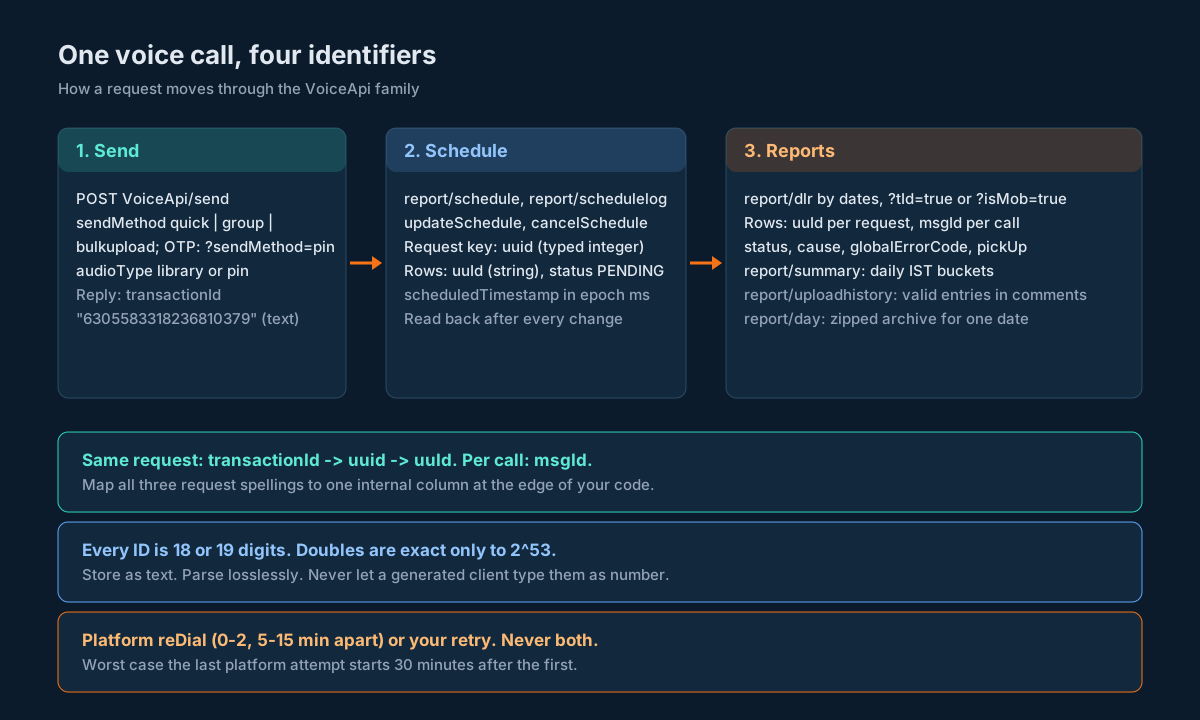
The fix is boring and it works: pick one internal name, say provider_txn_id, and map all three request-level spellings onto it at the edge of your code. Keep msgId separately as provider_call_id. Both are text columns.
Here’s a small adapter that does the mapping for every reply shape in this family:
TXN_KEYS = ("transactionId", "uuId", "uuid")

def provider_txn_id(obj: dict) -> str | None:
    """Return the request-level ID from any voice reply or row, as text."""
    for key in TXN_KEYS:
        value = obj.get(key)
        if value not in (None, ""):
            return str(value)
    return None

def provider_call_id(row: dict) -> str | None:
    value = row.get("msgId")
    return None if value in (None, "") else str(value)
str(value) is only safe if value was never a float. In Python, the standard json module parses big integers as exact int, so str() is fine. In other languages it isn’t, which is the next section.
Big Numbers and the Types That Break Them
Every identifier in the voice API is 18 or 19 digits. A 64-bit double, the only number type in JavaScript and the default for many JSON parsers, holds integers exactly only up to 2^53, which is 9,007,199,254,740,992 (16 digits). Above that, it rounds to the nearest value it can represent. RFC 8259, section 6 warns about exactly this range for interoperable JSON numbers, and the IEEE 754 format is why.
Here’s what happens to the sample values from the reference when they pass through a double, computed in Python with int(float(v)):
| Field | Sample value | After a double |
|---|---|---|
transactionId | 6305583318236810379 | 6305583318236810240 |
libraryId | 7432106150028594097 | 7432106150028594176 |
msgId | 8358730171396737017 | 8358730171396737024 |
uuId (DLR row) | 759513504945227190 | 759513504945227136 |
uuid (schedule sample) | 3076070760769274250 | 3076070760769274368 |
Every one changes. And JSON.parse in Node prints 7432106150028594097 as 7432106150028594000, so the corruption even looks plausible in a log.
The schedule row sample in the reference shows uuId as "6653312612485645000". Those three trailing zeros are the pattern a 19-digit value shows after it’s been through a JavaScript number. Whatever produced that sample, it’s a good reminder of how quietly this happens.
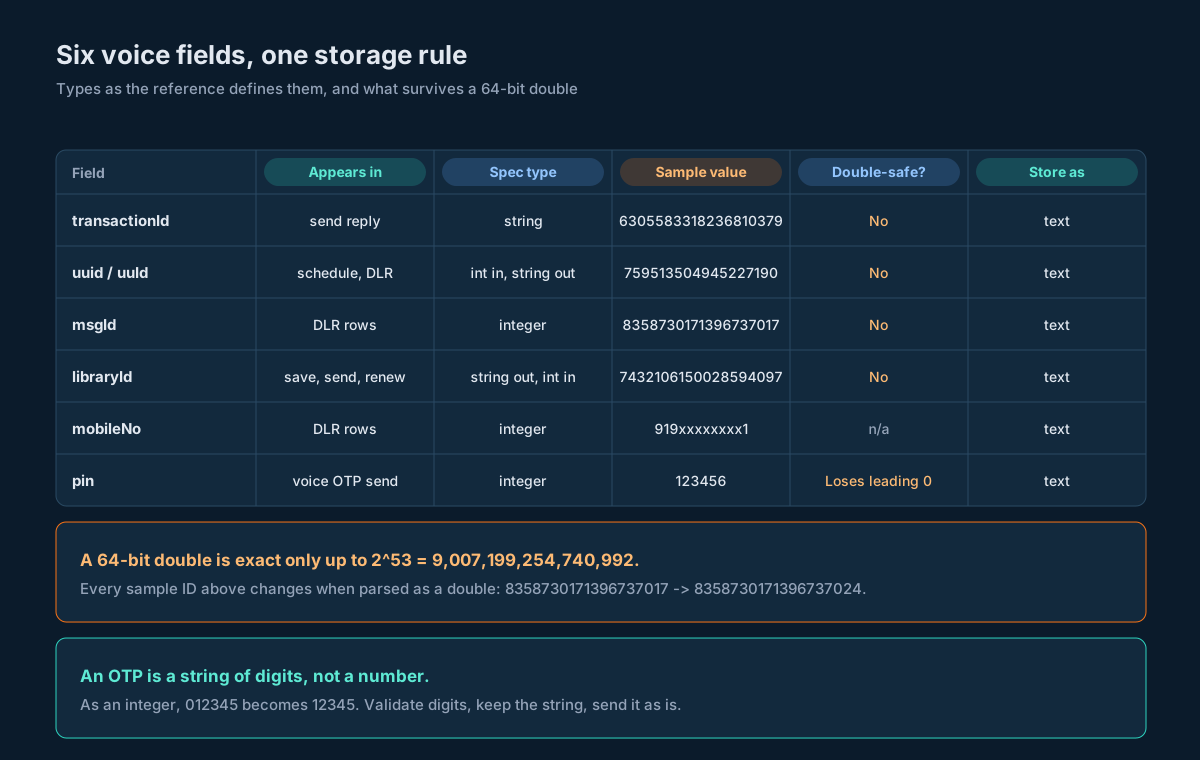
Where each field can bite
transactionIdis a quoted string in the send reply. Safe on arrival. The risk is later, if you put it in a numeric column or a JSON body as a bare number.uuidis typed integer in requests. In a multipart form it’s text anyway. In a generated TypeScript client it becomesnumber, and every schedule call you make with it targets the wrong ID.uuIdis typed string in report rows. Safe, as long as the server sends it quoted.msgIdis typed integer in delivery rows. If the server sends it as a bare number,JSON.parsein Node rounds it before your code ever sees it. Use a lossless parser.libraryIdis a string in the upload reply and an integer in send and renew requests. Keep the string.mobileNois typed integer in delivery rows, with a sample of"919xxxxxxxx1", which isn’t a number at all. A twelve-digit Indian mobile number fits in a double, but it overflows a 32-bit int, and phone numbers are identifiers, not quantities. Text.
The column types
provider_txn_id   TEXT  NOT NULL,   -- transactionId / uuid / uuId
provider_call_id  TEXT,             -- msgId, one per call
library_id        TEXT,
mobile_e164       TEXT  NOT NULL
Don’t use BIGINT “because it fits”. Java’s long and Postgres BIGINT do hold 19-digit values up to 9,223,372,036,854,775,807, but the first time one of those IDs passes through a dashboard, a spreadsheet export or a JavaScript service, it gets rounded. Text survives all of them.
Redial: Who Owns the Retry
The platform can redial an unanswered call for you. reDial takes 0, 1 or 2, and redialInterval takes 5, 10 or 15 minutes. So the platform will make at most three attempts, and if each wait is the interval, the last attempt starts at most reDial x redialInterval minutes after the first:
reDial | redialInterval | Attempts | Last attempt starts after |
|---|---|---|---|
| 0 | any | 1 | 0 minutes |
| 1 | 5 | 2 | 5 minutes |
| 1 | 15 | 2 | 15 minutes |
| 2 | 5 | 3 | 10 minutes |
| 2 | 10 | 3 | 20 minutes |
| 2 | 15 | 3 | 30 minutes |
Now add your own retry logic. A worker that resubmits when it doesn’t see “answered” within ten minutes, on top of reDial=2, can put six calls on one person’s phone. For a reminder, that’s annoying. For a collections or healthcare line, it’s a complaint.
Pick one owner per call:
- Let the platform own it for campaign calls. Set
reDialandredialInterval, and make your own worker never resubmit atransactionIdthat the platform accepted. Your job is to read the result, not to call again. - Own it yourself for anything with business logic between attempts: an OTP that should switch channel, a call that should stop if the customer paid in the meantime. Send with
reDial=0, and make the next attempt a new, deliberate send with its own idempotency key.
Never mix them for the same message. If you do want your own retry after the platform gives up, wait until the window in the table above has passed and the delivery row is final, then decide.
duplicateCheck=true asks the platform to drop duplicates, but the window and the matching rule (same number? same clip? same day?) aren’t spelled out. Keep your own idempotency key per logical call, as the idempotency guide describes, and treat duplicateCheck as a second net, not the first.
Scheduling, Moving and Cancelling Calls
Add scheduleTime to a send and the call is booked for later. The send reply gives you the transactionId as usual. From there, four operations manage the booking.
Read the booking. POST VoiceApi/report/schedule with uuid returns:
{
  "response": {
    "msg": "success",
    "cursors": { "next": "a", "start": "a" },
    "reports_scheduleList": [
      {
        "scheduledTimestamp": "1722487200000",
        "total": "1",
        "amount": 0.12,
        "uuId": "6653312612485645000",
        "campaignName": "",
        "cursorId": 10,
        "status": "PENDING"
      }
    ],
    "code": "200",
    "pages": { "current": 1, "last": 1 },
    "count": { "total": 1, "current": 1 },
    "action": "schedule",
    "api": "reports",
    "status": "success"
  }
}
scheduledTimestamp is epoch milliseconds as a quoted string. total is a quoted count of recipients. amount is an unquoted float. The status inside the row (PENDING) is the booking state; the status at the end of response is the API call’s result. Read the outer one first.
Read the calls inside it. POST VoiceApi/report/schedulelog takes the same uuid and is described as returning the individual messages in the booking. Its sample reply is identical to the report/schedule sample, down to action: "schedule". Parse it loosely, and log the first real reply you get so you can see which fields actually come back.
Move it. POST VoiceApi/updateSchedule with uuid and a new scheduleTime (sample 2024-01-31 10:00:00). The reply is flat: {status, transactionId, statusCode, reason}. Notice the transactionId in that sample (4740098350240514988) is a different number from the uuid in the request sample (1658333450312107482). Whether a move keeps the original ID or issues a new one, you can’t tell from the samples alone. Handle both: if the reply’s transactionId differs from what you sent, record it as the booking’s current ID and keep the old one as an alias.
Cancel it. POST VoiceApi/cancelSchedule with uuid. Same flat reply.
After a move or a cancel, read the booking back with report/schedule and check scheduledTimestamp or status changed the way you asked. A success reply tells you the request was accepted. The read-back tells you what the platform now holds.
A cutoff keeps cancels safe
What happens if you cancel a booking that has already started dialling? Some numbers may have been called and some not. Rather than depend on the answer, set a cutoff: your system refuses to move or cancel a booking less than, say, ten minutes before scheduledTimestamp. Inside the cutoff, the booking is final, and any change becomes a new send. The scheduling guide uses the same pattern for SMS bookings.
Reading Delivery Reports
There’s no push for voice delivery in the reference, so you poll. VoiceApi/report/dlr has three variants:
| Variant | Method | Filter | Use it for |
|---|---|---|---|
| By dates | POST | fromdate, todate | Your regular sync job |
| By transaction | GET with ?tId=true | uuid | Checking one request right after it’s due |
| By mobile | GET with ?isMob=true | mobile | Support lookups (“did we call this person?”) |
All three return the same shape. Here it is assembled from the example values in the reference:
{
  "response": {
    "msg": "success",
    "cursors": { "next": "0", "start": "0" },
    "code": "200",
    "pages": { "current": 1, "last": 0 },
    "count": { "total": 0, "current": 1 },
    "reports_dlrList": [
      {
        "identifier": "",
        "amount": 0.2,
        "deliveryTime": 0,
        "answeredDuration": 0,
        "audioType": "pin",
        "channel": "API",
        "msgId": 8358730171396737017,
        "cause": "Waiting For Report",
        "pickUp": 0,
        "audioLength": 26,
        "mobileNo": "919xxxxxxxx1",
        "uuId": "759513504945227190",
        "globalErrorCode": 108,
        "cursorId": 0,
        "hangUp": 0,
        "submitTime": 1720330311336,
        "pulse": 1,
        "status": "SUBMITTED"
      }
    ],
    "action": "dlr",
    "api": "reports",
    "status": "success"
  }
}
msgId is shown unquoted because the schema types it as an integer. Plan for the server to send it that way, and parse accordingly.
The sample’s pages.last is 0 and count.total is 0 while the list holds one row. Don’t use count.total to decide whether the list is empty. Use the list’s length.
The ?tId=true and ?isMob=true suffixes are part of the path as the reference defines it. Send them. They’re how the server tells the three searches apart on a single path, and sending a flag the server ignores costs nothing.
The descriptions for the by-transaction and by-mobile searches say “prepare a POST request”, while the definitions are GET. Use GET, which is what the definition says and what the Swagger form sends, and keep the method in one constant so you can flip it if your account answers differently.
A sync job that doesn’t miss late rows
Voice rows change after they’re written. A row starts at SUBMITTED with cause “Waiting For Report” and gets updated once the call ends. So a sync job has to read the same window more than once.
- Every few minutes, read the window from 2 hours ago to now.
- Upsert each row keyed on
provider_call_id(themsgIdas text). - Never overwrite a final status with a non-final one (see the next section for “final”).
- Once a day, re-read the previous day in full, to catch anything the short window missed.
Upserts make re-reading free: the same row arriving twice just updates nothing. The delivery report ingestion guide builds the same pattern for SMS in more depth.
What a Voice DLR Row Tells You
Voice rows carry more than SMS rows, because a call has a life of its own after it’s delivered. Here’s every field, with what you can safely do with it.
| Field | Sample | Type | What to do with it |
|---|---|---|---|
msgId | 8358730171396737017 | integer | Primary key for one call. Text. |
uuId | “759513504945227190” | string | Joins the call to its request. Text. |
mobileNo | “919xxxxxxxx1” | integer (sample is a string) | Recipient. Text. |
identifier | “” | string | Your campaign label from the send. |
status | “SUBMITTED” | string | Store raw; map with an allowlist. |
cause | “Waiting For Report” | string | Human-readable reason. Store, display, never parse. |
globalErrorCode | 108 | integer | Machine-readable reason. Store; map with an allowlist. |
submitTime | 1720330311336 | integer | Epoch ms; the sample is 2024-07-07 05:31:51 UTC. |
deliveryTime | 0 | integer | Store raw; 0 means nothing recorded yet. |
pickUp | 0 | integer | Store raw; 0 means nothing recorded yet. |
hangUp | 0 | integer | Store raw; 0 means nothing recorded yet. |
answeredDuration | 0 | integer | Store raw; 0 in a fresh row. |
audioLength | 26 | integer | Length of the clip. Store raw. |
pulse | 1 | integer | Store raw for billing reconciliation. |
amount | 0.2 | float | Charge for the row. |
audioType | “pin” | string | pin for voice OTP, library for clips. |
channel | “API” | string | Where the send came from. |
cursorId | 0 | integer | The row’s position in the result. |
Three rules make this table safe to build on.
Zero means “nothing yet”, not “midnight 1970”. deliveryTime, pickUp and hangUp are 0 in the sample row. Store them raw, add a nullable column for each that you fill only when the value is nonzero, and chart from those. Otherwise every chart you draw has a spike at 1 January 1970.
Classify status with an allowlist that fails open to “pending”. The only values in the reference are SUBMITTED for rows and PENDING for bookings. The daily summary hints at the rest: it counts success, pending, notSent, failed, others and refund. So build a mapping from the raw status strings you actually observe to your own states, and send anything you haven’t mapped yet to pending. An unknown value then means “keep polling”, never “delivered” or “failed”.
FINAL = {}           # fill from statuses you have observed, e.g. {"ANSWERED": "answered"}
NON_FINAL = {"SUBMITTED": "pending"}

def call_state(raw_status: str) -> tuple[str, bool]:
    s = (raw_status or "").strip().upper()
    if s in FINAL:
        return FINAL[s], True
    return NON_FINAL.get(s, "pending"), False
Derive “answered” from the call fields, not from the status string. In a fresh row, pickUp and answeredDuration are both 0. Make one test call that you answer and one that you let ring out, and compare the rows. Once you’ve seen those fields go nonzero on an answer, they give you “answered” whatever the status vocabulary turns out to be. Leave voicemail on for a third call to see whether a voicemail box counts as a pickup.
If you want “heard the whole message”, compare answeredDuration with audioLength. Before you rely on that ratio, make three test calls to a phone you control with a clip of known length: hang up immediately, hang up halfway, and listen to the end. Look at the three rows. That tells you the units and what “full” looks like in your account.
Paging Without a Page Parameter
Every report reply has cursors (next, start), pages (current, last), count (total, current) and a cursorId on each row. None of the report request schemas has a field to send a cursor or a page number back.
So don’t plan on paging forward. Plan on asking for windows small enough that one reply holds everything, and prove it on every call:
- Request a window, say one hour.
- If
pages.lastis greater than 1, orcount.totalis greater than the rows you got, the window was too big. - Split it in half and request both halves.
- Repeat until every window comes back complete.
from datetime import datetime, timedelta

def fetch_window(client, start: datetime, end: datetime, min_span=timedelta(minutes=1)):
    rows, meta = client.dlr_by_dates(start, end)
    total = int(meta.get("count", {}).get("total") or 0)
    last = int(meta.get("pages", {}).get("last") or 0)
    complete = last <= 1 and total <= len(rows)
    if complete or (end - start) <= min_span:
        if not complete:
            client.alert("dlr window still truncated", start, end, total, len(rows))
        return rows
    mid = start + (end - start) / 2
    return (fetch_window(client, start, mid, min_span)
            + fetch_window(client, mid, end, min_span))
This works whatever the server’s page size is, and it keeps working if a page parameter appears later. Simulate a one-hour window holding 450 rows against a server that returns 100 rows per reply, and the function makes 15 requests and returns all 450. The halves overlap at mid, and the upsert on msgId absorbs any row that lands in both.
The sample’s count.total of 0 next to a one-row list (above) is why the check uses total <= len(rows) rather than equality: a reply with more rows than its own count is fine; a reply with fewer is truncated.
Summary, Upload History and the Daily Archive {#summary-archive}
Daily summary
POST VoiceApi/report/summary with fromdate and todate returns one row per day in response.report_summaryList (singular report_):
{
  "date": 1720290600000,
  "amount": 0.6,
  "total": 6,
  "success": 0,
  "pending": 3,
  "notSent": 2,
  "failed": 1,
  "others": 0,
  "cursorId": 0,
  "refund": 0
}
The buckets add up in the sample: 0 + 3 + 2 + 1 + 0 = 6. Check that sum on every row you ingest, and alert if it doesn’t hold. It’s the cheapest data quality test you’ll ever write.
date is 1720290600000, which is 2024-07-06 18:30 UTC, exactly midnight on 7 July in India Standard Time. So the summary’s days are IST days. If your own reporting runs in UTC, your daily totals and the summary’s won’t line up until you bucket in IST too.
Use the summary to reconcile. Count your own delivery rows per IST day and per bucket, and compare with the summary. A gap tells you your sync job missed a window.
Upload history
POST VoiceApi/report/uploadhistory lists your bulkupload files:
{
  "identifier": "668a72f0d346b.csv",
  "filename": "668a72f0d346b.csv",
  "comments": "Total 9 uploaded, valid entries of 0 found and 9 invalid entries found. Total Duplicate entries found are 0.",
  "uuId": "6764150675538529832",
  "cursorId": 1567,
  "timestamp": 1720349424941
}
The valid and invalid counts live inside the free-text comments. Parse them with a forgiving pattern, keep the raw string, and alert if the pattern stops matching:
import re

UPLOAD_RE = re.compile(
    r"Total\s+(\d+)\s+uploaded.*?valid entries of\s+(\d+).*?(\d+)\s+invalid"
    r".*?Duplicate entries found are\s+(\d+)", re.I | re.S)

def parse_upload_comment(text: str) -> dict | None:
    m = UPLOAD_RE.search(text or "")
    if not m:
        return None   # keep the raw comment and raise an alert
    total, valid, invalid, dupes = map(int, m.groups())
    return {"total": total, "valid": valid, "invalid": invalid, "duplicates": dupes}
The sample is worth a second look: 9 uploaded, 0 valid. A file in the wrong format gets accepted, gets a uuId, and calls nobody. After every bulk upload, find its history row by uuId and stop the campaign in your own system if valid is 0 or far below the row count of the file you sent.
Daily archive
GET VoiceApi/report/day with date (YYYY-MM-DD) returns a zip of that day’s delivery report; the sample reply is a message saying you’ll be prompted with a .zip file. In code, check the first two bytes of the body are PK (the zip signature) before you unzip. If they aren’t, you’ve got a JSON or text error, so log it and stop. Use the archive for backfills and audits; use report/dlr for anything recent.
Time Zones and Date Formats
Voice requests take dates in three shapes, and none carries a zone:
| Where | Format in the field definition | Format in the description |
|---|---|---|
scheduleTime on send | YYYY-MM-DD HH:MM | YYYY-MM-DD HH:MM:SS (spelled scheduletime) |
scheduleTime on updateSchedule | sample 2024-01-31 10:00:00 | YYYY-MM-DD HH:MM:SS |
fromdate, todate on report/dlr | YYYY-MM-DD HH:MM | YYYY-MM-DD HH:MM:SS |
fromdate, todate on summary and upload history | YYYY-MM-DD HH:MM:SS | YYYY-MM-DD HH:MM:SS |
date on report/day | YYYY-MM-DD | YYYY-MM-DD |
Replies, on the other hand, give epoch milliseconds, which have no zone problem at all. That asymmetry gives you a clean way to pin the input zone once:
- Book a test call (to your own number) for a wall-clock time well in the future, such as
2030-01-01 10:00. - Read it back with
report/schedule. - Convert
scheduledTimestampto UTC. If it’s 04:30 UTC, the platform read your input as IST. If it’s 10:00 UTC, it read UTC. - Cancel the booking, and store the result as configuration.
Run the probe in CI or at deploy time, and refuse to schedule anything if the answer ever changes. A scheduler that silently shifts every call by five and a half hours is worse than one that stops.
The daily summary’s IST midnight (above) suggests IST, which matches the account default for an Indian platform. Measure it anyway. The probe takes a minute and replaces a guess with a fact.
For the format, send what the field definition asks for. If the platform rejects it, try the description’s format, and pin whichever one the read-back confirms in a contract test.
Four Client Samples, Four Traps
Each sample below is short and does one thing, and each one shows a different way voice integrations lose data. Replace YourUsername and the key with your own, and point the first runs at your own phone number.
Python: send a voice OTP without losing the leading zero
import os
import requests

BASE = "https://unify.smsgateway.center"
HEADERS = {"apikey": os.environ["SGC_API_KEY"]}
USERID = os.environ["SGC_USERID"]

def send_voice_otp(mobile: str, pin: str, clip: str = "OneTimePassword") -> str:
    if not (pin.isdigit() and 4 <= len(pin) <= 8):
        raise ValueError("pin must be a string of 4 to 8 digits")
    params = {
        "userid": USERID,
        "sendMethod": "pin",
        "audioType": "pin",
        "mobile": mobile,
        "pin": pin,              # a string: "012345" stays six digits
        "pinClipId": clip,
        "pinRepeatCount": "2",
        "reDial": "0",           # the OTP owns its own retry
        "output": "json",
    }
    r = requests.get(f"{BASE}/VoiceApi/send", params=params, headers=HEADERS, timeout=15)
    body = r.json()
    if body.get("status") != "success":
        raise RuntimeError(f"voice OTP rejected: {body!r}")
    return str(body["transactionId"])
The trap is the type of pin. The validation at the top refuses anything but a digit string, so an integer can’t sneak in from a caller. requests sends sendMethod=pin in the query along with everything else, which matches the path in the reference. Note the timeout: a voice send that hangs should fail fast so your OTP flow can offer another channel.
Node.js: parse delivery rows without rounding msgId
// Node 18+ (global fetch and FormData)
const BASE = "https://unify.smsgateway.center";

// Quote bare 15+ digit numbers for the keys we treat as identifiers,
// before JSON.parse can round them.
const ID_KEYS = ["msgId", "mobileNo", "uuId", "uuid", "transactionId", "libraryId"];
const BARE_ID = new RegExp(`"(${ID_KEYS.join("|")})"\\s*:\\s*(-?\\d{15,})`, "g");

function parseLossless(text) {
  return JSON.parse(text.replace(BARE_ID, '"$1":"$2"'));
}

async function dlrByDates(fromdate, todate) {
  const form = new FormData();
  form.set("userid", process.env.SGC_USERID);
  form.set("fromdate", fromdate);   // "2026-10-26 10:00"
  form.set("todate", todate);
  form.set("output", "json");
  const res = await fetch(`${BASE}/VoiceApi/report/dlr`, {
    method: "POST",
    headers: { apikey: process.env.SGC_API_KEY },
    body: form,
  });
  const body = parseLossless(await res.text());
  const r = body.response || {};
  if (r.status !== "success") throw new Error(`dlr read failed: ${JSON.stringify(r)}`);
  return Array.isArray(r.reports_dlrList) ? r.reports_dlrList : [];
}

module.exports = { parseLossless, dlrByDates };
The trap is JSON.parse. Fed {"msgId":8358730171396737017}, it hands you 8358730171396737000, and every upsert keyed on that value collides with the wrong row or misses the right one. The regex runs on the raw text first and turns those bare numbers into strings. It only touches the named keys and only numbers of 15 digits or more, so amount, pulse and timestamps stay numbers. If you’d rather use a library, json-bigint or a reviver with source access does the same job.
Running the function above on {"msgId":8358730171396737017,"amount":0.2} gives { msgId: '8358730171396737017', amount: 0.2 }.
Java: keep phone numbers and PINs out of int
import java.net.URI;
import java.net.URLEncoder;
import java.net.http.HttpClient;
import java.net.http.HttpRequest;
import java.net.http.HttpResponse;
import java.nio.charset.StandardCharsets;
import java.time.Duration;
import java.util.regex.Matcher;
import java.util.regex.Pattern;

public class VoiceOtp {
    private static final Pattern TXN =
        Pattern.compile("\"transactionId\"\\s*:\\s*\"?(\\d+)\"?");

    static String enc(String v) {
        return URLEncoder.encode(v, StandardCharsets.UTF_8);
    }

    public static String send(String userid, String apiKey, String mobile, String pin)
            throws Exception {
        // mobile and pin are Strings on purpose:
        // 919999999999 overflows int, and "012345" as an int is 12345.
        String query = "userid=" + enc(userid)
            + "&sendMethod=pin&audioType=pin"
            + "&mobile=" + enc(mobile)
            + "&pin=" + enc(pin)
            + "&pinClipId=OneTimePassword&reDial=0&output=json";
        HttpRequest req = HttpRequest.newBuilder(
                URI.create("https://unify.smsgateway.center/VoiceApi/send?" + query))
            .header("apikey", apiKey)
            .timeout(Duration.ofSeconds(15))
            .GET()
            .build();
        String body = HttpClient.newHttpClient()
            .send(req, HttpResponse.BodyHandlers.ofString()).body();
        if (!body.contains("\"success\"")) {
            throw new IllegalStateException("voice OTP rejected: " + body);
        }
        Matcher m = TXN.matcher(body);
        if (!m.find()) throw new IllegalStateException("no transactionId: " + body);
        return m.group(1);   // keep it a String
    }
}
The trap here is quieter. A Java long holds every voice ID, so Java developers tend to relax. But generated clients and DTOs often map “integer” to Integer, and a twelve-digit mobile number like 919999999999 is far past Integer.MAX_VALUE (2,147,483,647). Keep mobile, pin and every ID as String in your DTOs, whatever the schema says. The regex extraction keeps this sample on the JDK alone; in a real service, bind with your JSON library into String fields. For brevity, the success check is a substring test; in production, parse the body and read status.
cURL: upload a clip, and don’t trust jq with IDs
# Upload an mp3 to the audio library
curl -sS https://unify.smsgateway.center/VoiceApi/save \
  -H "apikey: $SGC_API_KEY" \
  -F "userid=$SGC_USERID" \
  -F "libraryName=welcome-v3" \
  -F "[email protected];type=audio/mpeg" \
  -F "output=json" \
  -o save-reply.json

# Pull libraryId as raw text, not as a number
grep -o '"libraryId"[[:space:]]*:[[:space:]]*"\?[0-9]*' save-reply.json \
  | grep -o '[0-9]*$'
Two traps. First, the @ in [email protected] tells curl to attach the file. Leave it out and curl sends the literal text welcome-v3.mp3 as the field value, and you get an error, or worse, a “clip” that isn’t one. Second, jq 1.6 parses numbers as doubles: echo '{"msgId":8358730171396737017}' | jq .msgId prints 8358730171396737000. libraryId arrives quoted, so jq -r .libraryId is safe for that field, but msgId in delivery rows may not be. Check jq --version, test it on a known 19-digit value, and when in doubt pull IDs out with grep -o as above.
A Data Model for Voice Calls
Voice fits next to the outbound table you may already have for SMS (the outbound message table guide covers the general shape). The difference is that one voice request fans out into many calls, each with a life after delivery. Two tables cover it.
CREATE TABLE voice_request (
  id                BIGSERIAL PRIMARY KEY,
  idempotency_key   TEXT NOT NULL UNIQUE,     -- yours, per logical send
  provider_txn_id   TEXT UNIQUE,              -- transactionId / uuid / uuId
  previous_txn_ids  TEXT[] NOT NULL DEFAULT '{}', -- if a reschedule issues a new one
  kind              TEXT NOT NULL CHECK (kind IN ('library','pin')),
  send_method       TEXT NOT NULL,            -- quick | group | bulkupload | pin
  library_id        TEXT,                     -- for library calls
  pin_clip_id       TEXT,                     -- for voice OTP
  identifier        TEXT,                     -- what you sent as identifier
  redial            SMALLINT NOT NULL CHECK (redial BETWEEN 0 AND 2),
  redial_interval   SMALLINT CHECK (redial_interval IN (5,10,15)),
  scheduled_for     TIMESTAMPTZ,              -- your intent, in UTC
  scheduled_epoch_ms TEXT,                    -- scheduledTimestamp as read back
  invalid_mobiles   TEXT[] NOT NULL DEFAULT '{}',
  state             TEXT NOT NULL,            -- queued | submitted | booked | cancelled | rejected
  created_at        TIMESTAMPTZ NOT NULL DEFAULT now()
);

CREATE TABLE voice_call (
  provider_call_id  TEXT PRIMARY KEY,         -- msgId
  provider_txn_id   TEXT NOT NULL,            -- uuId on the row
  mobile_e164       TEXT NOT NULL,            -- mobileNo
  status_raw        TEXT NOT NULL,
  cause_raw         TEXT,
  global_error_code TEXT,
  state             TEXT NOT NULL,            -- from the allowlist; unknown -> pending
  is_final          BOOLEAN NOT NULL DEFAULT false,
  submit_time_ms    TEXT,
  delivery_time_raw TEXT,
  pick_up_raw       TEXT,
  hang_up_raw       TEXT,
  answered_duration_raw TEXT,
  audio_length_raw  TEXT,
  pulse_raw         TEXT,
  amount_raw        TEXT,                     -- keep the provider's exact value
  audio_type        TEXT,
  channel           TEXT,
  first_seen_at     TIMESTAMPTZ NOT NULL DEFAULT now(),
  last_seen_at      TIMESTAMPTZ NOT NULL DEFAULT now()
);

CREATE INDEX voice_call_txn ON voice_call (provider_txn_id);
CREATE INDEX voice_call_mobile ON voice_call (mobile_e164);
The upsert from a delivery row should only ever move a call forward:
INSERT INTO voice_call AS c (provider_call_id, provider_txn_id, mobile_e164,
       status_raw, cause_raw, global_error_code, state, is_final, last_seen_at)
VALUES ($1, $2, $3, $4, $5, $6, $7, $8, now())
ON CONFLICT (provider_call_id) DO UPDATE
SET status_raw = EXCLUDED.status_raw,
    cause_raw = EXCLUDED.cause_raw,
    global_error_code = EXCLUDED.global_error_code,
    state = EXCLUDED.state,
    is_final = EXCLUDED.is_final,
    last_seen_at = now()
WHERE NOT c.is_final;      -- a final row is never overwritten
Everything raw goes in as text. You’ll want it the day someone asks why a call cost what it did, or why your “answered” count doesn’t match the dashboard. Derived columns (answered, heard to the end, cost in your currency) live in views on top, so you can fix a derivation without re-ingesting history.
If you keep call records about people, they fall under your retention and erasure rules too. The data retention and erasure guide shows how to redact phone numbers while keeping opt-outs working.
Production Checklist
- Auth uses
useridplus theapikeyheader; no passwords in query strings. - Every identifier (
transactionId,uuid,uuId,msgId,libraryId) is text in code, queues, logs and the database. mobile,mobileNoandpinare strings everywhere, including generated DTOs.- Node services parse voice replies with a lossless parser; shell scripts don’t use
jqon IDs without a version check. transactionIdis saved before any other processing of a send reply.invalidMobileis split and recorded as rejected at submission.- Every send carries
identifierset to your own campaign or job ID. - Each call has exactly one retry owner: platform
reDial, or your code withreDial=0. - Voice OTP lifetime covers
reDial x redialInterval, or voice OTP usesreDial=0. - A clip registry holds
library_id, source file hash and path; clips are renewed in a pre-flight before campaigns. - The input time zone is pinned by a schedule-and-read-back probe at deploy time.
- Moves and cancels respect a cutoff before
scheduledTimestamp, and every change is read back. - The DLR sync re-reads a trailing window, upserts on
msgId, and never overwrites a final row. - Report windows are split until
pages.lastis at most 1 andcount.totalis at most the rows returned. - Status mapping is an allowlist; unknown values map to pending.
- Zero timestamps are treated as “nothing yet”.
- Daily summary rows are checked for
success + pending + notSent + failed + others = total, and reconciled against your own rows by IST day. - Every bulk upload is followed by an upload history check on valid entries.
- Archive downloads are checked for the
PKzip signature before unzipping. - A contract test pins the reply shapes your account actually returns.
Unspecified Behaviour and How to Code Around It
Some behaviours of the voice API aren’t pinned down by anything you can read today. Each item below gives you the choice that stays safe whichever way the answer goes, and none of them needs you to wait for one.
One. Send pin as a digit string and generate it as one. Whether the server reads pin as text or as a number, a string with its leading zero intact is correct in both cases, and an integer is wrong in one of them.
Two. Try the OTP sendMethod values in a sandbox and pin the one that works. The reference path uses sendMethod=pin, one KB page shows quick, another shows quickce, each with audioType=pin. Send a test OTP to your own phone with each, keep the one your account answers with success and an actual call, and lock it in a contract test so a change shows up as a failing test rather than silent OTP failures.
Three. Make one owner responsible for every retry. Whether redialInterval is measured from the start or the end of the previous attempt, a call owned by either the platform or your code (never both) can’t ring someone more times than you intended.
Four. Keep your own idempotency key, and treat duplicateCheck as a backstop. Whatever window and matching rule duplicateCheck uses, a unique key per logical call in your own database stops the duplicate before it leaves your system.
Five. Treat every report as unpageable and size your windows to fit. If a cursor or page parameter exists and isn’t listed, the window-splitting reader still returns every row. If it doesn’t exist, the window-splitting reader is the only thing that does.
Six. Map statuses through an allowlist where unknown means pending. The full set of row statuses isn’t published. An unknown value that maps to pending means more polling. An unknown value that maps to delivered or failed means a wrong answer you’ll never notice.
Seven. Measure the input time zone with a booking and a read-back. scheduleTime, fromdate and todate carry no zone, while scheduledTimestamp comes back as epoch milliseconds. One test booking turns the question into a number you can compare, and a deploy-time check catches it if the answer ever changes.
Eight. After a reschedule, record whatever transactionId comes back. Whether updateSchedule keeps the ID or issues a new one, storing the reply’s value as current and keeping the old one as an alias means every later lookup works.
Nine. Never cancel inside your cutoff. Nobody can tell you exactly what cancelSchedule does to a booking that has started dialling. A cutoff before scheduledTimestamp means you never have to find out.
Ten. Renew clips before campaigns and keep the source file. With no published clip lifetime and no endpoint to list clips, a pre-flight renewal plus your own registry means an expired clip shows up as a failed pre-flight, not as a campaign that played silence.
Eleven. Parse every voice reply losslessly, even fields the schema calls strings. If msgId arrives bare, a lossless parser keeps it exact. If it arrives quoted, the lossless parser leaves it alone. Either way the ID you store is the ID the platform sent.
Twelve. Validate test calls before trusting call-progress fields. Three calls to your own phone (rejected, answered briefly, answered to the end) tell you what pickUp, hangUp, answeredDuration and audioLength look like in practice, and protect every metric you build on them.
FAQs
What is the base URL for the Voice Call API?
https://unify.smsgateway.center, with every operation under /VoiceApi/. Calls are sent with VoiceApi/send, clips are uploaded with VoiceApi/save, and reports live under VoiceApi/report/.
Can I use an API key instead of a password?
Yes. Send userid as a field and the key in the apikey header, and leave password out. That keeps the password out of URLs and logs.
How do I send a voice OTP?
Use a GET to VoiceApi/send?sendMethod=pin with userid, mobile, pin, pinClipId and output=json. Send pin as a string so a code like 012345 keeps its leading zero, and set reDial=0 unless your OTP stays valid through the whole redial window.
Why did my stored transaction ID stop matching the delivery report?
Almost always because it passed through a double somewhere. Voice IDs are 18 or 19 digits, and doubles are exact only up to 16. Store IDs as text, parse JSON losslessly in Node, and check jq before using it on IDs.
How many times will the platform redial an unanswered call?
At most twice. reDial takes 0, 1 or 2, and redialInterval takes 5, 10 or 15 minutes, so the last attempt can start up to 30 minutes after the first.
Can I change or cancel a scheduled voice call?
Yes. VoiceApi/updateSchedule moves it and VoiceApi/cancelSchedule cancels it, both keyed by uuid. Read the booking back with VoiceApi/report/schedule afterwards, and stop making changes shortly before the scheduled time.
Is there a webhook for voice delivery reports?
Not in the Voice Call API reference. Poll VoiceApi/report/dlr by date range, re-read a trailing window so late updates are picked up, and upsert on msgId.
How do I get more rows than one report reply returns?
Make the date window smaller. The report requests have no page parameter, so split any window whose pages.last is above 1 or whose count.total exceeds the rows returned, and merge the halves.
Where can I see which clips are in my audio library?
Not through the API. There’s no list endpoint for clips, so keep your own registry of libraryId, name and source file, and use the dashboard when you need to compare.
Do the daily summary dates use UTC or IST?
IST. The sample date of 1720290600000 is exactly midnight on 7 July 2024 in India Standard Time. Bucket your own counts by IST day before you compare them with the summary.
Can I test voice calls before going live?
Yes. Point the first runs at your own phone, and use the sandbox and demo to get a feel for the platform. For voice specifically, three test calls (rejected, answered briefly, answered to the end) teach you more about the delivery rows than any spec.
Building voice into a product?
Start with a test call to your own phone, then wire up the delivery report sync before you send anything at volume. When you’re ready to run campaigns or voice OTP in production, talk to the SMSGatewayCenter team about routes, pricing and the account settings that fit your use case, or compare plans on the voice call pricing page.
More from our blog
SMS Account Security Audit Trail: Activity Logs, Login Alerts and Connected Devices via API
Building an SMS and WhatsApp Preference Centre: Purposes, Channels, Frequency and the Send Gate
API Key Rotation for an SMS API: Rotating a Single-Slot Key Without Dropping Messages
SMS Message Encryption: What It Hides, What It Doesn’t, and How to Get the Wire Format Right