Table of Contents
- The Short Answer
- TL;DR
- How a Button Travels: Template, Send, Tap
- Three Endpoints and One Webhook
- Where Each Button Field Lives
- Validating the Buttons Array Before You Submit
- Designing the Payload: Signed Tokens, Not Labels
- Sending With buttonsPayload and buttonUrlPath
- Receiving the Tap on the MO Webhook
- Classifying a Tap in a Fixed Order
- The Python Module, Tested
- Opt-Out Buttons Fail Open
- Dynamic URL Buttons and Click Tracking
- The Tables Behind It
- What the Inbox Poll Can and Can’t Tell You
- Buttons and the 24-Hour Window
- Ten Mistakes With WhatsApp Buttons
- Decision Matrix: Quick Reply, URL Button or Typed Keyword
- The Production Checklist
- Unspecified Behaviour and How to Code Around It
- FAQs
The Short Answer
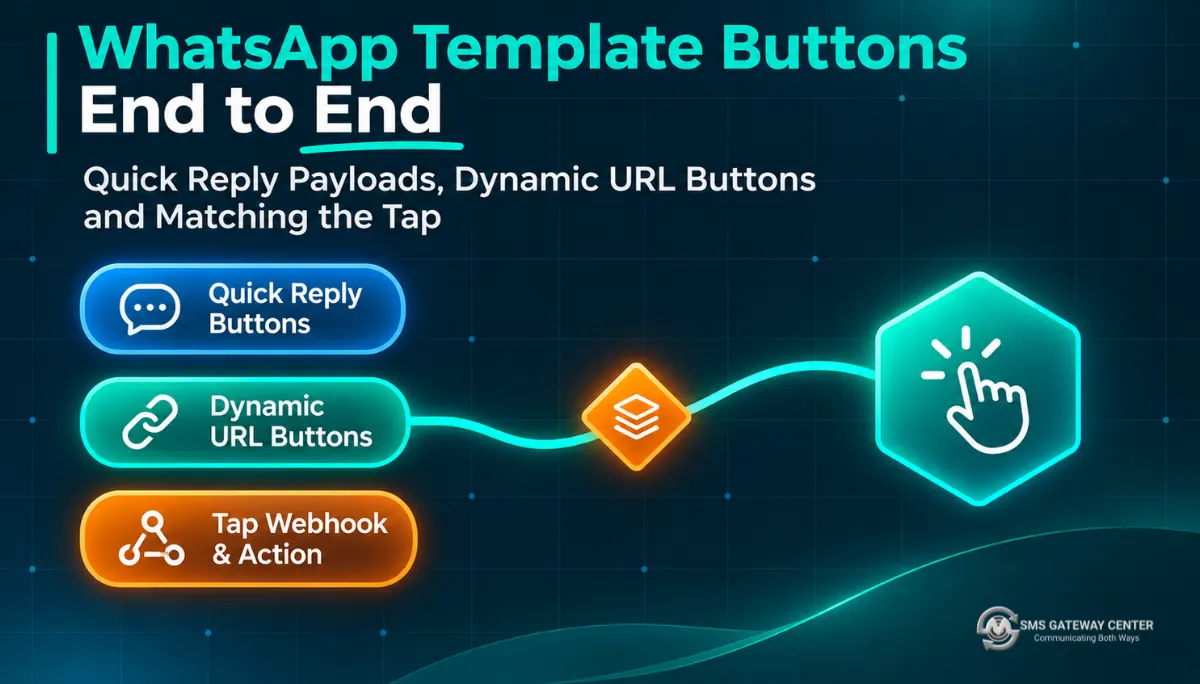
A WhatsApp quick reply button is a round trip, and each leg is set in a different place. You define the button’s label when you create the template with WAApi/template. You attach a payload to each button on every send with the buttonsPayload field of WAApi/send. When someone taps, WhatsApp sends you a message of type button that carries that payload and the label, and you receive it on the WhatsApp MO webhook.
So route on the payload, never on the label. Make each payload a short signed token that points at one send, store every tap once keyed on its WhatsApp message ID, accept only the first answer per send, and let opt-out buttons work even when everything else about the tap looks wrong. URL, phone and copy code buttons never come back to your webhook at all: a URL tap opens the browser, so you measure it at your own redirect.
TL;DR
- Labels are fixed at approval, payloads are per send.
WAApi/templatetakes abuttonsJSON array withtextandtype(QUICK_REPLY,URL,PHONE_NUMBER).WAApi/sendtakesbuttonsPayloadas JSON with keysbutton1,button2,button3, and the page says “This value will return in reply.” - The tap arrives as
type: "button". Meta’s reference puts your payload inbutton.payload, the label inbutton.text, and the ID of the message that held the button incontext.id. The timestamp is a string in seconds. - Validate before you submit. The knowledge base allows up to 3 quick replies and 2 call-to-action buttons with labels up to 20 characters. Meta allows more. Enforce the stricter numbers.
- Put quick replies first. Then
button1means the first quick reply whichever way the platform counts positions. - Sign your payloads. A 41-character token of the form
key.ref.sigtells you which send and which button, and nobody can produce one by typing. - Store first, decide second. Insert the tap keyed on its
wamid, answer 200, then classify: replay, opt-out, expired, already answered, accepted, or untracked. - Opt-outs fail open. A Stop tap from an old message, a re-tap, or a template sent without your token still suppresses the number.
- Measure URL taps yourself.
buttonUrlPathfills the variable at the end of a URL button. Put an opaque token there and count the hit on your redirect.
How a Button Travels: Template, Send, Tap
Most write-ups on WhatsApp buttons stop at “add a Quick Reply in the template builder”. That’s the first of three legs, and it’s the only one that doesn’t touch your production code.
Leg one: the template. You create a template with up to three quick replies or up to two call-to-action buttons (the buttons knowledge base entry lists Quick Reply, Visit Website, Call Phone Number, and Copy Code for authentication templates). Meta reviews the whole template, labels included. The labels, their order and the base URL of any URL button are part of what gets approved. WAApi/template has create, read and delete but no update, so different wording on the API path means a new template.
Leg two: the send. Every time you send that template, you can attach a payload to each quick reply and a suffix to the URL button. This is the only leg where you get to say “this particular button, on this particular message, means this particular thing”. If you skip it, every copy of the template is indistinguishable from every other copy once someone taps.
Leg three: the tap. The person taps “Confirm”. WhatsApp sends a message back to your business number, of type button, carrying the payload you attached and the label they saw. The platform forwards it to your MO webhook. Now your code has to answer a surprisingly hard question: which message was this a reply to, which button was it, and has this person already answered?
The rest of the work is making leg three boring. That only works if legs one and two are set up for it.
Three Endpoints and One Webhook
Four surfaces carry button data. Three are REST endpoints on https://unify.smsgateway.center/, one is a push you configure in the portal.
| Surface | Method | What it does for buttons | Key fields |
|---|---|---|---|
WAApi/template | POST | Creates the template, buttons included | buttons (JSON array), category, msgType, templateName, wabaNumber |
WAApi/send | POST | Sends an approved template and attaches per-send button data | templateName, buttonsPayload (JSON), buttonUrlPath |
rest/wa/v1/inbox | GET | Lists inbound messages, newest first | messageType, messageTypeId, message, waMsgId, timestamp |
| MO webhook | Push | Delivers each inbound message, taps included, to your URL | messages[].type, button.payload, button.text, context.id, id |
A few things about this table are easy to miss.
The create template page shows the buttons field in Meta’s own shape: [{"text": "YES", "type": "QUICK_REPLY"}] for quick replies and [{"phone_number": "...", "text": "...", "type": "PHONE_NUMBER"}, {"text": "...", "type": "URL", "url": "https://..."}] for call to action. There’s no payload in it. Quick reply payloads aren’t part of the template at all on the API path.
The send page is where payloads live: buttonsPayload is “Button Payload in JSON format. This value will return in reply,” with the example {"button1": "Hello_button1", "button2": "Hello_button2", "button3": "Hello_button3"}. buttonUrlPath is the “Dynamic Button URL path”, example /photo/products/.
The MO webhook isn’t a REST call you make. You set it up in the portal: Webhooks, Add Webhook, product WhatsApp, report type MO, pick the WABA number, give it your URL, and optionally add custom parameters and custom headers (setup steps). That custom header is how you’ll authenticate the platform to your endpoint later.
The inbox poll is read-only and accepts the apikey header with userid. It’s useful for backfill and support screens, but as you’ll see in the inbox section, it doesn’t expose a button payload field.
If you want the full WhatsApp endpoint family with its envelopes and error shapes, the WhatsApp Business API wire contract covers all ten operations.
Where Each Button Field Lives
Here’s the whole button surface on one page. The “Match on” column is the part people get wrong.
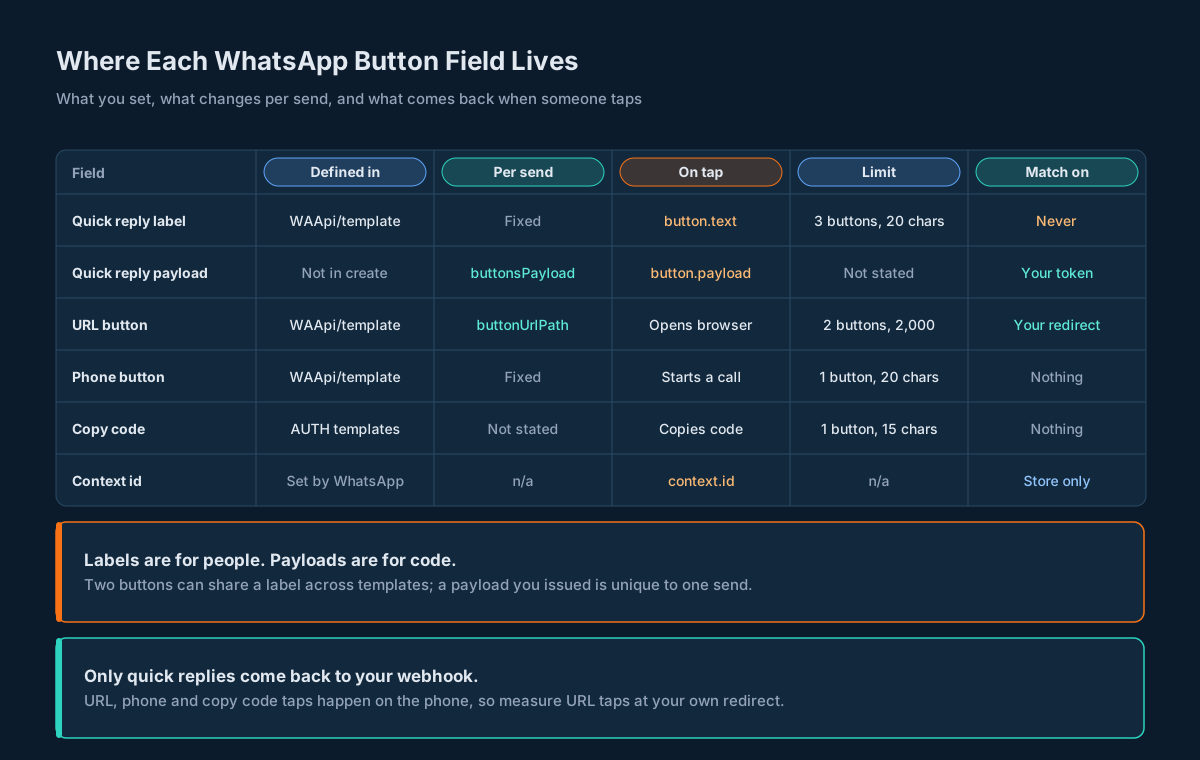
| Field | Defined in | Changes per send? | What reaches you on tap | Limit you should enforce | Route on it? |
|---|---|---|---|---|---|
| Quick reply label | WAApi/template buttons[].text | No | button.text | 3 buttons, 20 characters | No |
| Quick reply payload | Not in the create call | Yes, buttonsPayload | button.payload | Keep it short and ASCII | Yes |
| URL button | WAApi/template buttons[].url | Suffix only, buttonUrlPath | Nothing: it opens the browser | 2 buttons, URL up to 2,000 characters | At your redirect |
| Phone button | WAApi/template buttons[].phone_number | No | Nothing: it starts a call | 1 button, number up to 20 characters | No |
| Copy code | Authentication templates | Per Meta, set at send time | Nothing: it copies to the clipboard | 1 button, code up to 15 characters | No |
| Context ID | Set by WhatsApp | n/a | context.id | n/a | Store it, don’t route on it |
The limits combine two sources. The knowledge base says up to 3 quick replies, up to 2 call-to-action buttons, and button text up to 20 characters. Meta’s template components reference is looser: up to 10 buttons in total, up to 10 quick replies, 2 URL buttons, 1 phone number button, 1 copy code button, labels up to 25 characters, URLs up to 2,000 characters with one variable at the end, phone numbers up to 20 characters. When two limits disagree, build to the smaller one. A template that passes the stricter check passes both.
Two Meta rules matter for layout. Quick replies and other buttons must sit in two groups, so “Quick Reply, Quick Reply, URL” is fine and “Quick Reply, URL, Quick Reply” is rejected. And templates with four or more buttons, or a quick reply mixed with any other type, can’t be viewed on WhatsApp desktop clients; the person gets told to open the message on their phone. If your audience reads WhatsApp on a laptop at work, that second rule might decide your design for you.
Validating the Buttons Array Before You Submit
Template review takes time, and a rejected template costs you a round of it. Most button rejections are mechanical, so catch them in code before the POST.
Here’s what the validator checks, in plain words:
- The array isn’t empty, and every
typeis one ofQUICK_REPLY,URL,PHONE_NUMBERorCOPY_CODE. - At most 3 quick replies and at most 2 call-to-action buttons (URL plus phone), at most 2 URL buttons and 1 phone button.
COPY_CODEonly on anAUTHENTICATIONtemplate.- Every label is 1 to 20 characters.
- Every URL starts with
https://, is at most 2,000 characters, and has at most one variable, which must be{{1}}at the very end. - Phone numbers are at most 20 characters.
- Quick reply labels are unique, ignoring case and surrounding spaces.
- Quick replies come first. Meta allows either group to go first. This validator doesn’t, and the payload design section explains why.
That last rule is a choice, not a platform requirement. It costs nothing: “Confirm, Reschedule, Track order” looks the same to the person as “Track order, Confirm, Reschedule” once WhatsApp lays it out, and it removes a whole class of off-by-one bugs.
Run the validator in CI against every template definition you keep in your repo, and run it again right before the create call. The function lives in the Python module further down; this is how you’d call it:
from wabuttons import validate_buttons, ButtonError

buttons = [
    {"type": "QUICK_REPLY", "text": "Confirm"},
    {"type": "QUICK_REPLY", "text": "Reschedule"},
    {"type": "URL", "text": "Track order",
     "url": "https://example.com/t/{{1}}"},
]
try:
    validate_buttons(buttons, "UTILITY")
except ButtonError as err:
    raise SystemExit(f"fix the template before submitting: {err}")
Send the array as a JSON string in the buttons form field of WAApi/template, with the apikey header and userid. Keep the template definition, including your own key for each quick reply, in your database too. The platform’s copy holds labels; yours holds meaning.
Designing the Payload: Signed Tokens, Not Labels
When a tap arrives, Meta’s button webhook reference shows two strings: button.payload and button.text. In Meta’s own example both are “Unsubscribe”. So unless you set the payload yourself, plan on it being the label, and on routing by label whether you meant to or not.
Labels are bad routing keys for four reasons:
- They repeat across templates. “Confirm” on your appointment template and “Confirm” on your delivery template are the same string. A tap tells you nothing about which one was tapped.
- They repeat across sends. Even within one template, every copy has the same label. Without more information, a tap on Tuesday’s reminder and a tap on Monday’s look identical.
- People can type them. Someone can type “Confirm” as a normal message. Meta marks it
type: "text", but anything that collapses types downstream (a CRM sync, an export, a support tool) will lose that difference. - They change. Marketing rewrites “Confirm” to “Yes, I’ll be there” in the next template version, and your router quietly stops matching.
The fix is to put your own reference in the payload, per send. The shape used here is key.ref.sig:
keyis your stable name for the button, likeconfirmorstop. Lowercase letters, digits and underscores, up to 16 characters.refis 13 characters of base32 from 8 random bytes. It names one send of one template to one person. You save it before you send.sigis the first 10 base32 characters of an HMAC-SHA256 overkey.refwith a server-side secret.
That gives a token of at most 41 ASCII characters, like confirm.ABCDEFGHIJKLM.QWERTYUIOP. It carries no phone number, no order ID and nothing personal, so it’s safe in logs and in the platform’s reports.
The signature is what turns “a string came back” into “a string we issued came back”. Nobody can type a valid token by accident, a payload from another system’s template can’t collide with yours, and if someone copies a token from one chat into another, it still points at the original send, where your expiry and first-answer rules apply.
Why not put the order ID straight into the payload? Because then the payload is personal data travelling through Meta and the platform, it’s guessable, and changing your ID format breaks old buttons. A random ref that you look up in your own table has none of those problems.
If you’ve built RCS suggestion postbacks, this will feel familiar. The RCS rich cards article uses the same idea with a fixed _[message_id] suffix. WhatsApp gives you the whole payload, so you can make it signed.
Sending With buttonsPayload and buttonUrlPath
buttonsPayload is a JSON object in a form field. Keys are button1 to button3, values are your tokens. Keep the key numbering aligned with the order of quick replies in the template, which is why the validator insists that quick replies come first: whether the platform counts button1 as the first quick reply or the first button of any type, those are the same button.
Save the issue row before you call the API. If the send succeeds and your process dies before it writes the ref, the first tap will look like a payload you never issued.
Here’s the send with cURL. The trap in this one is the form encoding. With -F, cURL treats a value that starts with @ or < as a file to read. Your JSON starts with {, so it’d work today, and break the day someone changes the payload format. --form-string sends every value as literal text.
#!/usr/bin/env bash
# Send an approved template with per-send button payloads.
# --form-string sends the JSON as text; -F would treat a leading @ or < as a file.
set -euo pipefail
PAYLOAD='{"button1":"confirm.ABCDEFGHIJKLM.QWERTYUIOP","button2":"resched.ABCDEFGHIJKLM.ASDFGHJKLZ"}'
curl --silent --show-error --fail-with-body \
  'https://unify.smsgateway.center/WAApi/send' \
  --header "apikey: ${SGC_API_KEY}" \
  --form-string "userid=${SGC_USERID}" \
  --form-string 'wabaNumber=9170396xxxxx' \
  --form-string 'mobile=919876543210' \
  --form-string 'sendMethod=quick' \
  --form-string 'msgType=text' \
  --form-string 'templateName=appt_confirm_v2' \
  --form-string 'msg=Hi {#var#}, your appointment is on {#var#}.' \
  --form-string "buttonsPayload=${PAYLOAD}" \
  --form-string 'buttonUrlPath=a/7KQ2M9' \
  --form-string 'output=json'
The tokens above are placeholders to show the shape; real ones come from the module. msg follows the same rules as any template send, and the wire contract article covers it and the reply envelope. Two things are specific to buttons:
- One payload per quick reply, every time. If you send
button1andbutton2but the template has three quick replies, nothing pins down what the third carries on a tap; in Meta’s example an unset payload reads the same as the label. Your classifier will treat it as untracked. Send all of them. buttonUrlPathis the variable part only. The template’s URL ends in{{1}}; this field fills it. Percent-encode it, and keep it opaque (more on that in the URL buttons section).
A group or file send (sendMethod of group or file) is one request with one buttonsPayload, so every copy carries the same tokens. That’s fine for analytics (“how many people tapped Confirm on this campaign”) but it can’t tell you which person’s appointment to confirm, except through the sender’s number on the tap. If each person’s answer changes something specific to them, send per person with sendMethod=quick and a ref per message.
Receiving the Tap on the MO Webhook
The MO webhook delivers inbound WhatsApp messages as JSON. The knowledge base MO format entry shows a flat object with metadata, messaging_product, messages and contacts, and a text message inside messages with from, id, text.body, type and timestamp. That’s the inner value of Meta’s webhook, without the entry[].changes[] wrapper around it.
For a quick reply tap, Meta’s button reference shows what goes in messages[]:
{
  "context": {
    "from": "15550783881",
    "id": "wamid.HBgLMTQxMjU1NTA4MjkVAgASGBQzQUNCNjk5RDUwNUZGMUZEM0VBRAA="
  },
  "from": "16505551234",
  "id": "wamid.HBgLMTY1MDM4Nzk0MzkVAgASGBQzQUFERjg0NDEzNDdFODU3MUMxMAA=",
  "timestamp": "1750091045",
  "type": "button",
  "button": {
    "payload": "Unsubscribe",
    "text": "Unsubscribe"
  }
}
Read it field by field:
typeisbutton. A typed message istext. That one field is the difference between a tap and someone typing the label.button.payloadis what you sent inbuttonsPayload.button.textis the label they saw.idis the WhatsApp message ID of the tap itself. It’s your dedupe key.context.idis the message ID of the message that contained the button. Store it. Don’t route on it: your token already says which send this was, without you having to map WhatsApp message IDs back to your sends.timestampis a string of Unix seconds."1750091045"is 2025-06-16 16:24:05 UTC. The inbox poll, by contrast, givestimestampas a number in milliseconds (1752480000000is 2025-07-14 08:00:00 UTC). Mix the two up and your “tapped within 24 hours” check is off by a factor of a thousand.
Parse both shapes, flat and wrapped. It costs four lines and means you don’t care which one arrives. Then do the one thing a webhook handler must do quickly: write the tap somewhere durable, keyed on id, and answer 200. Decide what it means afterwards, out of the request path.
Here’s a Node receiver. The trap it’s built around is the timestamp: it refuses anything that isn’t 9 to 11 digits of seconds rather than guessing the unit. It also checks a shared secret in a custom header, which you add in the portal’s webhook form under Add Custom Headers.
// MO webhook receiver for WhatsApp quick-reply taps (Node 18+).
import { createServer } from 'node:http';
import { timingSafeEqual } from 'node:crypto';

const SHARED = process.env.MO_HEADER_SECRET ?? '';

function headerOk(value) {
  const a = Buffer.from(String(value ?? ''));
  const b = Buffer.from(SHARED);
  return SHARED.length > 0 && a.length === b.length && timingSafeEqual(a, b);
}

// Webhook timestamps are strings in seconds; inbox rows are numbers in ms.
export function tapTimeMs(m) {
  const s = String(m.timestamp ?? '');
  if (!/^\d{9,11}$/.test(s)) throw new Error(`bad timestamp ${s}`);
  return Number(s) * 1000;
}

export function extractTaps(body) {
  const values = Array.isArray(body.entry)
    ? body.entry.flatMap((e) => (e.changes ?? []).map((c) => c.value ?? {}))
    : [body];
  return values.flatMap((v) => (v.messages ?? [])
    .filter((m) => m.type === 'button')
    .map((m) => ({
      wamid: String(m.id),
      sender: String(m.from),
      contextId: String(m.context?.id ?? ''),
      payload: String(m.button?.payload ?? ''),
      label: String(m.button?.text ?? ''),
      tappedAtMs: tapTimeMs(m),
    })));
}

// save(tap) must be an idempotent insert keyed on wamid.
export function makeHandler(save) {
  return async (req, res) => {
    if (req.method !== 'POST' || !headerOk(req.headers['x-mo-secret'])) {
      res.writeHead(401).end();
      return;
    }
    let raw = '';
    for await (const chunk of req) raw += chunk;
    let body;
    try { body = JSON.parse(raw); } catch {
      res.writeHead(200).end(); // bad body: log it, never ask for a retry
      return;
    }
    for (const tap of extractTaps(body)) await save(tap);
    res.writeHead(200).end(); // after the durable insert, before routing
  };
}

if (process.argv[2] === 'serve') {
  const rows = new Map();
  createServer(makeHandler(async (t) => { rows.set(t.wamid, t); }))
    .listen(8080);
}
The header name x-mo-secret is yours to choose; whatever you type in the portal is what the handler checks. The handler only accepts POST. If you picked GET as the webhook’s send method in the portal, change that line to match.
save has to be an idempotent insert. In SQL that’s an INSERT ... ON CONFLICT (wamid) DO NOTHING, and the tables section has the schema. Text messages and anything else that isn’t a tap fall through extractTaps; send them to your normal inbound path, which for typed keywords is the routing in two-way SMS keyword routing adapted to WhatsApp.
Classifying a Tap in a Fixed Order
Once the tap is stored, a worker decides what it means. Do the checks in a fixed order, because the order is the policy.
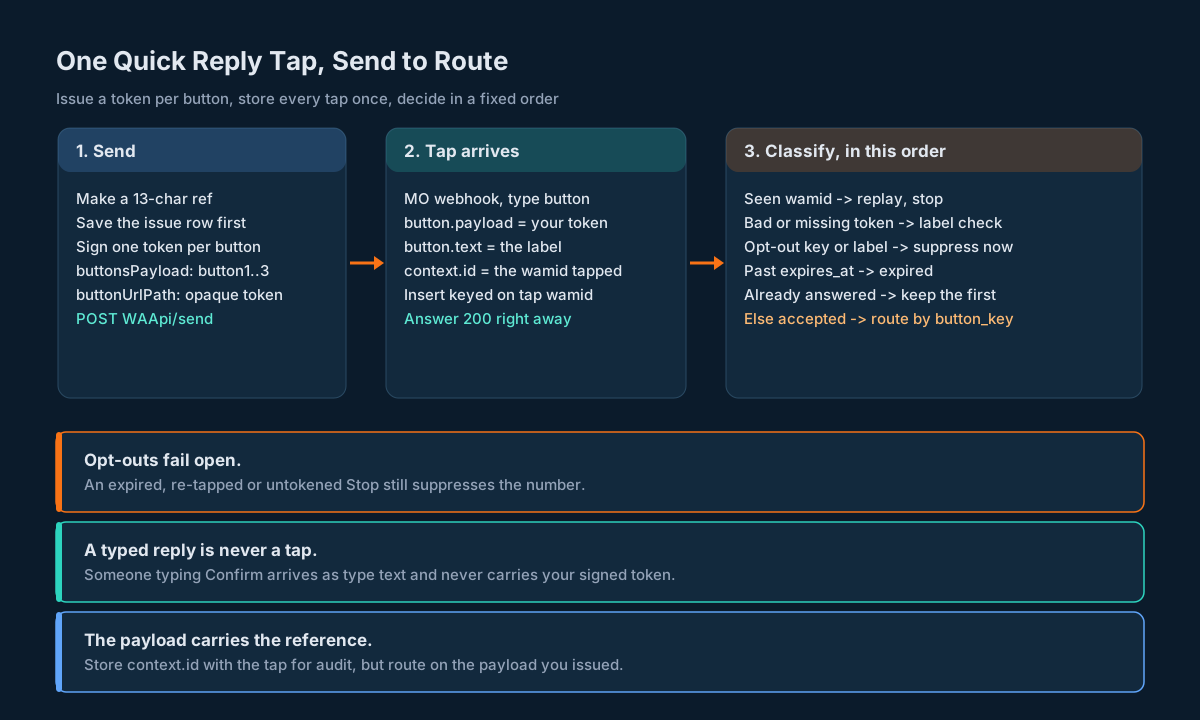
- Seen this
wamidbefore? It’s a replay. Stop. Nothing else runs twice. - Is the payload a token you signed? If not, check the label against your opt-out labels. A match suppresses the number. Otherwise the tap is untracked: route it to a person or your generic inbound handler.
- Is the button key an opt-out key? Suppress now. Expiry and earlier answers don’t matter.
- Do you know this ref, and was this key issued with it? If not, it’s an unknown ref. Log it loudly; it usually means you sent before saving the issue row.
- Is it past
expires_at? It’s expired. Tell the person nicely if the conversation allows it (see the window section), and don’t act on it. - Has this ref already been answered? Keep the first answer. A second tap, even on a different button, is recorded but doesn’t change anything.
- Otherwise it’s accepted. Route by
button_key.
“First tap wins” is deliberate. People tap Confirm, then change their mind and tap Reschedule. If the second tap overrides the first, your system’s state depends on the order in which two webhooks arrive, and that order isn’t promised anywhere. If the first tap wins, a change of mind becomes a new conversation (“You confirmed already. Want to reschedule instead?”), which is a far easier thing to get right.
Opt-outs jump the queue because the cost of getting them wrong is asymmetric. Ignoring an expired Confirm costs you a booking. Ignoring a Stop costs you a complaint and maybe more. The opt-out and suppression article has the suppression ledger these taps should write to.
The Python Module, Tested
Here’s the whole thing in one file: the validator, token issuing and checking, the send fields, the MO parser and the classifier. It uses only the standard library. The trap this sample is built around is the opt-out order: an expired or already-answered Stop still has to suppress, and the tests check exactly that.
"""WhatsApp template buttons: validate, issue payloads, match taps."""
import base64
import hashlib
import hmac
import json
import re
import secrets
from dataclasses import dataclass
from urllib.parse import quote

# Stricter of the platform KB and Meta's component limits.
MAX_QUICK_REPLIES = 3
MAX_CTA = 2
MAX_LABEL = 20
MAX_URL = 2000
MAX_PHONE = 20
TOKEN_RE = re.compile(r"^[a-z0-9_]{1,16}\.[A-Z2-7]{13}\.[A-Z2-7]{10}$")
KEY_RE = re.compile(r"^[a-z0-9_]{1,16}$")


class ButtonError(ValueError):
    pass


def validate_buttons(buttons, category):
    """Check a WAApi/template `buttons` array before you submit it."""
    if not isinstance(buttons, list) or not buttons:
        raise ButtonError("buttons must be a non-empty list")
    types = [b.get("type") for b in buttons]
    qr = [b for b in buttons if b.get("type") == "QUICK_REPLY"]
    cta = [b for b in buttons if b.get("type") in ("URL", "PHONE_NUMBER")]
    if len(qr) > MAX_QUICK_REPLIES:
        raise ButtonError("more than %d quick replies" % MAX_QUICK_REPLIES)
    if len(cta) > MAX_CTA:
        raise ButtonError("more than %d call-to-action buttons" % MAX_CTA)
    if types.count("URL") > 2 or types.count("PHONE_NUMBER") > 1:
        raise ButtonError("too many URL or phone buttons")
    if "COPY_CODE" in types and category != "AUTHENTICATION":
        raise ButtonError("COPY_CODE needs an AUTHENTICATION template")
    # Quick replies first, so buttonN in buttonsPayload is unambiguous.
    if qr and types[:len(qr)] != ["QUICK_REPLY"] * len(qr):
        raise ButtonError("put every QUICK_REPLY before other buttons")
    for b in buttons:
        t = b.get("type")
        if t not in ("QUICK_REPLY", "URL", "PHONE_NUMBER", "COPY_CODE"):
            raise ButtonError("unknown button type %r" % t)
        if t != "COPY_CODE":
            label = b.get("text", "")
            if not label or len(label) > MAX_LABEL:
                raise ButtonError("label %r must be 1-%d chars"
                                  % (label, MAX_LABEL))
        if t == "URL":
            url = b.get("url", "")
            if not url.startswith("https://") or len(url) > MAX_URL:
                raise ButtonError("URL must be https and <= 2000 chars")
            if "{{" in url and not url.endswith("{{1}}"):
                raise ButtonError("the one URL variable goes at the end")
            if url.count("{{") > 1:
                raise ButtonError("a URL button takes one variable")
        if t == "PHONE_NUMBER":
            if len(b.get("phone_number", "")) > MAX_PHONE:
                raise ButtonError("phone_number is over 20 chars")
    labels = [b["text"].strip().lower() for b in qr]
    if len(set(labels)) != len(labels):
        raise ButtonError("quick reply labels must differ")
    return True


def _b32(raw):
    return base64.b32encode(raw).decode("ascii").rstrip("=")


def _sign(secret, body):
    mac = hmac.new(secret, body.encode("ascii"), hashlib.sha256).digest()
    return _b32(mac)[:10]


def make_token(secret, button_key, ref):
    if not KEY_RE.match(button_key):
        raise ButtonError("button key must match [a-z0-9_]{1,16}")
    body = "%s.%s" % (button_key, ref)
    return "%s.%s" % (body, _sign(secret, body))


def read_token(secret, payload):
    """Return (button_key, ref) for a payload we issued, else None."""
    if not isinstance(payload, str) or not TOKEN_RE.match(payload):
        return None
    key, ref, sig = payload.split(".")
    if not hmac.compare_digest(sig, _sign(secret, key + "." + ref)):
        return None
    return key, ref


def build_send_fields(secret, button_keys, url_suffix=None):
    """Form fields for WAApi/send, plus the ref you must save first."""
    if len(button_keys) > MAX_QUICK_REPLIES:
        raise ButtonError("more keys than quick replies")
    ref = _b32(secrets.token_bytes(8))  # 13 chars
    payload = {"button%d" % (i + 1): make_token(secret, k, ref)
               for i, k in enumerate(button_keys)}
    fields = {"buttonsPayload": json.dumps(payload, separators=(",", ":"))}
    if url_suffix is not None:
        fields["buttonUrlPath"] = quote(url_suffix, safe="/")
    return ref, fields


@dataclass
class Tap:
    wamid: str
    sender: str
    context_id: str
    payload: str
    label: str
    sent_at: int  # epoch seconds, parsed from a string


def parse_mo(body):
    """Pull quick-reply taps out of an MO webhook body.

    Accepts the flat shape (metadata, messages, contacts) and Meta's
    entry[].changes[].value wrapper. Other message types are skipped.
    """
    values = []
    if isinstance(body.get("entry"), list):
        for entry in body["entry"]:
            for change in entry.get("changes", []):
                values.append(change.get("value", {}))
    else:
        values.append(body)
    taps = []
    for value in values:
        for m in value.get("messages", []) or []:
            if m.get("type") != "button":
                continue
            btn = m.get("button") or {}
            taps.append(Tap(
                wamid=str(m.get("id", "")),
                sender=str(m.get("from", "")),
                context_id=str((m.get("context") or {}).get("id", "")),
                payload=str(btn.get("payload", "")),
                label=str(btn.get("text", "")),
                sent_at=int(str(m.get("timestamp", "0"))),
            ))
    return taps


class MemoryStore:
    """Test double for the issued_button and button_tap tables."""

    def __init__(self):
        self.issued = {}   # ref -> dict(message_id, keys, expires_at)
        self.answers = {}  # ref -> button_key (first tap wins)
        self.seen = set()  # tap wamids

    def issue(self, ref, message_id, keys, expires_at):
        self.issued[ref] = {"message_id": message_id, "keys": set(keys),
                            "expires_at": expires_at}


def classify(tap, store, secret, now, optout_keys=(), optout_labels=()):
    """Decide what one tap means. Returns (outcome, detail)."""
    if tap.wamid in store.seen:
        return "replay", None
    store.seen.add(tap.wamid)
    hit = read_token(secret, tap.payload)
    if hit is None:
        # Opt-outs fail open: honour the label even without our token.
        if tap.label.strip().lower() in {x.lower() for x in optout_labels}:
            return "optout_by_label", tap.sender
        return "untracked", tap.label
    key, ref = hit
    if key in optout_keys:
        # Never let expiry or an earlier answer block an opt-out.
        return "optout", tap.sender
    row = store.issued.get(ref)
    if row is None or key not in row["keys"]:
        return "unknown_ref", ref
    if now > row["expires_at"]:
        return "expired", row["message_id"]
    if ref in store.answers:
        return "already_answered", store.answers[ref]
    store.answers[ref] = key
    return "accepted", (row["message_id"], key)
build_send_fields returns the ref separately from the form fields so you can save the issue row first, in the same transaction as your outbound message row, and only then call WAApi/send. read_token checks the shape with a regex before it touches HMAC, so a 3 KB string typed by a person never reaches the crypto. And hmac.compare_digest keeps the signature check constant-time.
MemoryStore stands in for the tables described in the tables section. In production, seen is the primary key on the tap table and answers is a partial unique index, so the database enforces replay protection and first-tap-wins even with several workers running.
The tests run the real module against MO bodies in both shapes:
import json
import unittest

import wabuttons as wb

SECRET = b"rotate-me-from-your-secret-store"


def mo(payload, label, wamid, wrap=False):
    msg = {"context": {"from": "919999999999", "id": "wamid.CTX"},
           "from": "919876543210", "id": wamid,
           "timestamp": "1750091045", "type": "button",
           "button": {"payload": payload, "text": label}}
    value = {"messaging_product": "whatsapp", "messages": [msg],
             "contacts": [{"wa_id": "919876543210"}]}
    if wrap:
        return {"object": "whatsapp_business_account",
                "entry": [{"changes": [{"value": value,
                                        "field": "messages"}]}]}
    return value


class Validate(unittest.TestCase):
    def test_good_template(self):
        self.assertTrue(wb.validate_buttons([
            {"type": "QUICK_REPLY", "text": "Confirm"},
            {"type": "QUICK_REPLY", "text": "Reschedule"},
            {"type": "URL", "text": "Track order",
             "url": "https://example.com/t/{{1}}"},
        ], "UTILITY"))

    def test_rejects(self):
        bad = [
            ([{"type": "QUICK_REPLY", "text": "x" * 21}], "UTILITY"),
            ([{"type": "QUICK_REPLY", "text": "a"}] * 4, "MARKETING"),
            ([{"type": "URL", "text": "Go", "url": "https://e.com/{{1}}/x"}],
             "UTILITY"),
            ([{"type": "URL", "text": "Go", "url": "https://e.com/"},
              {"type": "QUICK_REPLY", "text": "Yes"}], "UTILITY"),
            ([{"type": "COPY_CODE", "example": "250FF"}], "UTILITY"),
            ([{"type": "QUICK_REPLY", "text": "Yes"},
              {"type": "QUICK_REPLY", "text": "yes "}], "UTILITY"),
        ]
        for buttons, cat in bad:
            with self.assertRaises(wb.ButtonError):
                wb.validate_buttons(buttons, cat)


class Tokens(unittest.TestCase):
    def test_send_fields_and_round_trip(self):
        ref, fields = wb.build_send_fields(
            SECRET, ["confirm", "resched"], url_suffix="o/88 12")
        payload = json.loads(fields["buttonsPayload"])
        self.assertEqual(sorted(payload), ["button1", "button2"])
        self.assertEqual(fields["buttonUrlPath"], "o/88%2012")
        for tok in payload.values():
            self.assertLessEqual(len(tok), 41)
            self.assertEqual(wb.read_token(SECRET, tok)[1], ref)

    def test_forged_and_typed(self):
        ref, fields = wb.build_send_fields(SECRET, ["confirm"])
        tok = json.loads(fields["buttonsPayload"])["button1"]
        forged = tok[:-1] + ("A" if tok[-1] != "A" else "B")
        self.assertIsNone(wb.read_token(SECRET, forged))
        self.assertIsNone(wb.read_token(SECRET, "Confirm"))
        self.assertIsNone(wb.read_token(b"other-key", tok))


class Matching(unittest.TestCase):
    def setUp(self):
        self.store = wb.MemoryStore()
        self.ref, f = wb.build_send_fields(SECRET, ["confirm", "stop"])
        self.p = json.loads(f["buttonsPayload"])
        self.store.issue(self.ref, "msg-1", ["confirm", "stop"],
                         expires_at=2_000)

    def run_tap(self, payload, label, wamid, now=1_000, wrap=False):
        (tap,) = wb.parse_mo(mo(payload, label, wamid, wrap))
        return wb.classify(tap, self.store, SECRET, now,
                           optout_keys={"stop"},
                           optout_labels={"Stop promotions"})

    def test_first_tap_wins_and_replay(self):
        self.assertEqual(self.run_tap(self.p["button1"], "Confirm", "w1"),
                         ("accepted", ("msg-1", "confirm")))
        self.assertEqual(self.run_tap(self.p["button1"], "Confirm", "w1"),
                         ("replay", None))
        self.assertEqual(self.run_tap(self.p["button1"], "Confirm", "w2"),
                         ("already_answered", "confirm"))

    def test_expiry_does_not_block_optout(self):
        self.assertEqual(
            self.run_tap(self.p["button1"], "Confirm", "w3", now=5_000),
            ("expired", "msg-1"))
        self.assertEqual(
            self.run_tap(self.p["button2"], "Stop", "w4", now=5_000,
                         wrap=True),
            ("optout", "919876543210"))

    def test_label_only_payloads(self):
        self.assertEqual(self.run_tap("Stop promotions", "Stop promotions",
                                      "w5"),
                         ("optout_by_label", "919876543210"))
        self.assertEqual(self.run_tap("Confirm", "Confirm", "w6"),
                         ("untracked", "Confirm"))

    def test_parse_skips_text_and_reads_string_seconds(self):
        body = mo(self.p["button1"], "Confirm", "w7")
        body["messages"].append({"id": "w8", "type": "text",
                                 "text": {"body": "Confirm"}})
        taps = wb.parse_mo(body)
        self.assertEqual(len(taps), 1)
        self.assertEqual(taps[0].sent_at, 1750091045)
        self.assertEqual(taps[0].context_id, "wamid.CTX")


if __name__ == "__main__":
    unittest.main()
Run them with python3 -m unittest -v test_wabuttons. All eight pass on Python 3.10: the validator accepts a good template and rejects six bad ones (a 21-character label, four quick replies, a variable in the middle of a URL, a URL before a quick reply, copy code on a utility template, and two labels that differ only by case and a trailing space), tokens round-trip and forged or foreign ones fail, first tap wins, replays are dropped, an expired Stop still suppresses, and string-seconds timestamps parse.
Rotate the signing secret the way you’d rotate any key: keep the previous secret valid for as long as your longest expires_at, check both, and sign new tokens only with the new one. The API key rotation guide walks through the same overlap pattern for the platform’s own key.
Opt-Out Buttons Fail Open
Marketing templates often carry a “Stop promotions” quick reply. Meta’s own components page uses “Unsubscribe from Promos” as its example, and describes opt-out as a common use of quick replies. Treat that button differently from every other button you have.
The rule is simple: any tap that plausibly means “stop” suppresses the number, and nothing else in the pipeline gets a vote. In practice that means three paths into suppression:
- A signed token whose key is an opt-out key. Suppress, even if the token is expired or that send was already answered. Someone who tapped Confirm last week and taps Stop today has changed their mind about receiving messages, not about the appointment.
- An unsigned payload whose label matches an opt-out label. This covers templates you sent before you added tokens, sends where
buttonsPayloadgot dropped, and templates someone created in the portal. Keep the list of opt-out labels in your template table, not in code. - A typed message that says stop. That’s not a button tap, but it’s the same intent, and your text keyword router should send it to the same suppression ledger.
Suppression is per purpose and per channel. A WhatsApp “Stop promotions” tap stops WhatsApp marketing; whether it also stops SMS marketing is your policy decision, and the preference centre design is the place to make it once. Whatever you decide, write the tap’s wamid into the suppression event as its source, so you can show later exactly which message the person was looking at when they asked you to stop.
Don’t send a “you’ve been unsubscribed” message unless you’re sure you’re inside the service window and your policy calls for one. A confirmation that arrives as a fresh marketing template is the one message that person definitely didn’t want.
Dynamic URL Buttons and Click Tracking
A URL button opens the person’s browser. It doesn’t send anything back to your business number, so the MO webhook never hears about it. If you want to know who tapped, you find out on your own server.
The template defines the base: https://example.com/t/{{1}}. Meta allows one variable and it has to be at the end of the URL. On each send, buttonUrlPath fills {{1}}. The send page’s example value is /photo/products/.
Put an opaque token there, not data:
- Not an order number or a phone number. The URL sits in the person’s chat history, in their browser history, and in any link preview. A 7-character random token like
a/7KQ2M9reveals nothing. - Percent-encode it. Meta’s components page warns that unencoded special characters in URL button parameters can fail validation and the send errors out. Spaces become
%20,|becomes%7C.quote(suffix, safe="/")in Python does it, and the module’s test checks thato/88 12goes out aso/88%2012. The encoding rules themselves are RFC 3986. - Resolve it on a redirect you own.
/t/<token>looks up the send, writes a click row, and redirects to the real page. That row is your URL-button tap count.
Count URL clicks the way you’d count any SMS link: bots and link previewers will fetch the URL too, so separate first fetch from human visit. The SMS click tracking article covers the redirect, the bot filtering and the attribution model; it applies to WhatsApp URL buttons unchanged.
Phone buttons and copy code buttons give you nothing back at all. Measure a phone button by the calls arriving at that number, and a copy code button by the code being used where it’s entered.
The Tables Behind It
Three tables carry the whole design. The SQL runs as written in SQLite, and the types map directly to PostgreSQL.
CREATE TABLE wa_button_template (
  template_name  TEXT    NOT NULL,
  waba_number    TEXT    NOT NULL,
  position       INTEGER NOT NULL,          -- 1-based, quick replies first
  button_type    TEXT    NOT NULL,          -- QUICK_REPLY, URL, PHONE_NUMBER
  label          TEXT    NOT NULL,
  button_key     TEXT,                      -- your stable key, QR only
  is_optout      INTEGER NOT NULL DEFAULT 0,
  PRIMARY KEY (template_name, waba_number, position)
);

CREATE TABLE wa_button_issue (
  ref            TEXT PRIMARY KEY,          -- 13-char base32, in the token
  message_id     TEXT NOT NULL,             -- your outbound row id
  template_name  TEXT NOT NULL,
  mobile         TEXT NOT NULL,
  issued_at      TIMESTAMPTZ NOT NULL,
  expires_at     TIMESTAMPTZ NOT NULL
);

CREATE TABLE wa_button_tap (
  wamid          TEXT PRIMARY KEY,          -- id of the tap message
  context_wamid  TEXT,
  sender         TEXT NOT NULL,
  payload        TEXT NOT NULL,
  label          TEXT NOT NULL,
  ref            TEXT,                      -- NULL when untracked
  button_key     TEXT,
  outcome        TEXT NOT NULL,
  tapped_at      TIMESTAMPTZ NOT NULL,
  received_at    TIMESTAMPTZ NOT NULL
);

-- First tap wins: at most one accepted answer per issue.
CREATE UNIQUE INDEX one_answer_per_issue
  ON wa_button_tap (ref) WHERE outcome = 'accepted';
The trap here is concurrency. Two workers can classify two taps for the same ref at the same moment, both see “not answered yet”, and both accept. The partial unique index makes the second insert fail, and the worker that loses catches the conflict and writes the row again as already_answered. In SQLite, a second accepted row for the same ref fails with UNIQUE constraint failed: wa_button_tap.ref, and a replayed wamid fails on the primary key.
A few column notes:
waba_number,mobileandsenderareTEXT. Phone numbers aren’t numbers, and some WhatsApp report fields arrive as bare 12-digit JSON numbers. The lossless JSON parsing guide explains why every ID and phone number should become text at one boundary.message_idpoints at your outbound message table, so a tap joins straight to everything else you know about that send. If you followed the outbound message table design, that’s the row’s primary key.wa_button_template.button_keyis where meaning lives. The platform knows “Confirm” is the first quick reply; only your table knows it meansconfirm.
A useful report falls out for free:
SELECT i.template_name, t.button_key, COUNT(*) AS taps
FROM wa_button_tap t JOIN wa_button_issue i ON i.ref = t.ref
WHERE t.outcome = 'accepted'
GROUP BY i.template_name, t.button_key ORDER BY taps DESC;
Divide by the count of issue rows per template and you have an answer rate per button that doesn’t double-count anyone who tapped twice.
What the Inbox Poll Can and Can’t Tell You
GET rest/wa/v1/inbox lists inbound WhatsApp messages, newest first, with page and limit (default 50, maximum 200), and filters for wabaNumber, mobileNo, isReplied, agentId, waMsgId and a date range. Each row has incomingId, waMsgId, messageType, messageTypeId, message, mediaUrl, timestamp in milliseconds, charges and a few more.
What it doesn’t have is a payload field. The inbox reference shows a text row with messageType “text” and messageTypeId 1, and nothing about how a button tap is represented. So a tap in the inbox is, at best, a row whose message holds either the label or the payload, under a messageType you’ll have to observe.
That makes the inbox the wrong primary source for button routing and a fine secondary one:
- Backfill after a webhook outage. Pull the window you missed, filter to rows from numbers you sent buttons to, and look up each
waMsgIdin your tap table. Anything missing gets inserted withoutcomeset by the same classifier. Ifmessageholds your token, it’ll classify normally. If it holds the label, it’ll classify as untracked or as an opt-out by label, which is the safe result. - Support screens. Agents want to see “Rahul tapped Reschedule at 10:05” in the conversation. The inbox gives you the conversation; your tap table gives you the meaning.
Two cautions. Paging by page on a list that’s newest first shifts under you if new messages arrive mid-backfill, so walk with a narrow fromDate/toDate window and dedupe on waMsgId rather than trusting page boundaries. And timestamp here is milliseconds, while the webhook’s is a string of seconds. The four-channel inbox comparison has the full row shape and polling advice.
Buttons and the 24-Hour Window
A quick reply tap is an inbound message from the person, and the buttons knowledge base points out that interactions like this open the 24-hour customer care window. Inside that window you can reply with a session message: the send page’s note says to send an open message and leave out templateName, and “If its in session then the message will get delivered.”
That’s what makes buttons worth the effort. The template gets you into the conversation; the tap lets you answer with a free-form message that fits what they chose. A practical flow for an appointment reminder:
- Send
appt_confirm_v2with tokens forconfirmandresched, expiring at the appointment time. - On an accepted
confirm, mark the booking confirmed and reply in session: “Thanks, see you at 10:30.” - On an accepted
resched, reply in session with the next three free slots, and handle the reply as text. - On
expired, reply in session: “That appointment has passed. Reply BOOK to make a new one.” - On
already_answered, reply in session with what they chose the first time.
The window starts when they tap, not when you sent. A tap at 23:58 on a reminder you sent three days ago gives you a fresh 24 hours. Use tapped_at from the webhook, converted from seconds, for any “are we still in the window” check, and if a session reply fails, log it and fall back to doing nothing rather than to another template. Someone who tapped a button and got silence is mildly annoyed. Someone who got a second marketing template is worse.
If you’d rather not build the replies in code, the portal can do the simple version. The chatbot trigger entry describes a Postback ID on each quick reply that matches a keyword in Auto Response. That’s good for fixed answers. As soon as the answer depends on your data (which appointment, which order), the tap has to reach your code.
Ten Mistakes With WhatsApp Buttons
- Routing on
button.text. Labels repeat across templates and sends, and they change between template versions. Route on your payload. - Sending no
buttonsPayload. Then the payload you get back is whatever WhatsApp puts there, which in Meta’s own example is the label. You’ve built a label router without meaning to. - Putting personal data in the payload or URL suffix. Order numbers and phone numbers end up in chat history, logs and link previews. Use a random ref and look it up.
- Saving the ref after the send. A crash between the two leaves taps pointing at a ref you never saved. Save first, send second.
- Doing the work inside the webhook request. Booking systems are slow. Insert the tap, answer 200, route asynchronously.
- No dedupe on the tap’s
id. A retried push, if the platform retries, and your own inbox backfill can both deliver the same tap twice. The primary key onwamidmakes the second one a no-op. - Letting the last tap win. Two taps on the same message race. Keep the first answer and turn changes of mind into a new exchange.
- Letting expiry block an opt-out. An old Stop is still a Stop.
- Mixing up seconds and milliseconds. The webhook’s
timestampis a string of seconds; the inbox’s is a number of milliseconds. Normalise at parse time. - Counting URL buttons from the webhook. They never arrive there. Count them at your redirect, with bot filtering.
Decision Matrix: Quick Reply, URL Button or Typed Keyword
| You want the person to… | Use | You learn about it from | Watch out for |
|---|---|---|---|
| Pick one of up to three fixed answers | Quick reply | MO webhook, type: "button" | First tap wins; expiry; opt-out order |
| Open a page about this specific message | URL button with buttonUrlPath | Your redirect logs | Bots and link previewers; percent-encoding |
| Call your support line | Phone button | Your telephony logs | No per-message attribution at all |
| Copy a one-time code | Copy code (authentication only) | Code entry on your side | Template category must be AUTHENTICATION |
| Answer freely, or pick from more than three options | A typed reply inside the window | MO webhook, type: "text" | Free text needs a keyword router |
| Stop marketing messages | Quick reply flagged as opt-out | MO webhook, plus label fallback | Must work on old and untokened templates |
If you need more than three choices, don’t fight the limit. Send the template with two buttons (“See options”, “Not now”), and when they tap “See options” you’re in the service window, where a session message can carry a list as plain text.
The Production Checklist
- Every template’s
buttonsarray passes the validator: 3 quick replies or fewer, 2 call-to-action buttons or fewer, labels 20 characters or fewer, quick replies first, URL variable only at the end. - Each quick reply has a stable
button_keyin your template table, and opt-out buttons are flagged. - A signing secret lives in your secret store, with an overlap period for rotation.
- The issue row is saved before
WAApi/sendis called, with a sensibleexpires_at. - Every send of a buttoned template carries a token for every quick reply in
buttonsPayload. buttonUrlPathcarries an opaque, percent-encoded token, never personal data.- The WhatsApp MO webhook is configured in the portal with a custom secret header, and the handler rejects requests without it.
- The handler inserts taps keyed on
wamidand answers 200 before any routing. - The classifier runs in the fixed order: replay, token check with label fallback, opt-out, unknown ref, expiry, already answered, accepted.
- A partial unique index enforces one accepted answer per ref.
- Opt-out taps write to the suppression ledger with the tap’s
wamidas the source. - Webhook timestamps are parsed as string seconds and inbox timestamps as number milliseconds.
- A backfill job can replay a date window from the inbox through the same classifier.
- URL button clicks are counted at your redirect, with bot filtering.
- You’ve sent one buttoned template to a phone you control and compared the raw webhook body with this design (see the next section).
Unspecified Behaviour and How to Code Around It
Some parts of the button round trip aren’t pinned down by anything you can read today. Each item below gives you the choice that stays correct whichever way the platform behaves, so none of them needs you to wait for an answer.
One. Send a token for every quick reply, and put quick replies first. Whether button1 counts the first quick reply or the first button of any kind isn’t stated. With quick replies at the front, both readings point at the same button, and with a token on every one, no button falls back to its label.
Two. Send one buttoned template to a phone you control and keep the raw webhook body as a fixture. The knowledge base shows a text MO body; Meta shows a tap body. Capture a real tap from your own account once, check type, button.payload, button.text and context.id against this design, and add the captured body to your test suite. If the shape ever drifts, your tests fail before your router does.
Three. Parse the flat body and Meta’s wrapped body. The knowledge base sample is flat; Meta’s reference is wrapped in entry[].changes[].value. A parser that accepts both doesn’t need to know which one your account gets.
Four. Treat the inbox message on a tap as either the label or the payload. The classifier handles both: a token classifies normally, a label classifies as untracked or as an opt-out. Backfill from the inbox is then safe whatever the field holds.
Five. Accept only the messageType values you’ve seen for taps, and send the rest to a person. The inbox’s messageType and messageTypeId value sets aren’t published. Record the values you observe on your test tap and treat anything new as untracked. An unknown type then fails closed: a person looks at it, nobody gets auto-confirmed.
Six. Make the handler correct whether or not the push is retried. The idempotent insert on wamid means one delivery, two deliveries or a backfill all end with exactly one row.
Seven. Pick one router per template: the portal’s Auto Response or your code. It isn’t stated whether a buttonsPayload value replaces a Postback ID set in the portal, or how Auto Response matches when both exist. If a template drives Auto Response, send it without buttonsPayload. If your code routes it, don’t configure Auto Response keywords for its buttons. Either way, only one system acts on each tap.
Eight. Keep payloads short, ASCII and free of JSON-special characters. No length limit for buttonsPayload values is published. The 41-character key.ref.sig format uses only letters, digits, dots and underscores, which survives any reasonable limit and any encoding layer between you and WhatsApp.
Nine. Build URL buttons for the strictest encoding. It isn’t stated whether the platform encodes buttonUrlPath for you. Sending a value that’s already percent-encoded and made only of characters that never need encoding (letters, digits, /) is correct either way, because there’s nothing left to encode twice.
Ten. Enforce the knowledge base limits, not Meta’s. The platform’s template builder documents 3 quick replies, 2 call-to-action buttons and 20-character labels; Meta allows 10 buttons and 25 characters. A template inside the smaller limits is valid under both.
Eleven. Set expires_at from your business rule, not from the chat. The button stays tappable in the person’s chat for as long as the message exists. Your expiry check is the only thing that stops a tap on last month’s reminder from confirming something today.
FAQs
Can I set a quick reply payload when I create the template through the API?
No, not on the API path. WAApi/template takes the buttons array with text and type only. The payload goes on each send, in buttonsPayload. The portal’s template builder has a Postback ID field for Auto Response, which is a separate mechanism.
What does buttonsPayload look like?
A JSON object in a form field, with keys button1, button2 and button3 and your payload strings as values, for example {"button1":"confirm.ABCDEFGHIJKLM.QWERTYUIOP"}.
How do I know which message a tap belongs to?
Put a reference in the payload. A signed token with a random ref that you saved before sending tells you the send, the template and the button. context.id identifies the WhatsApp message that held the button; store it for audit.
Why not just match on the button label?
Because the same label appears on many templates and every send of each one, people can type it, and it changes between template versions. Labels are for people. Payloads are for code.
Do URL button taps reach my webhook?
No. A URL button opens the browser, and Meta’s button webhook fires for quick reply taps. Put an opaque token in buttonUrlPath and count the visit on your own redirect.
How many buttons can a template have?
Build to the knowledge base numbers: up to 3 quick replies or up to 2 call-to-action buttons, with labels up to 20 characters. Meta’s own limits are higher (10 buttons, 25-character labels), so templates within the smaller numbers pass both.
What happens if someone taps the same button twice?
Each tap is a separate message with its own id, so you’ll get two. Store both, accept the first, and record the second as already answered. If it’s the same message delivered twice, the id is the same and the second insert does nothing.
Can an expired button still unsubscribe someone?
Yes, and it should. Opt-out keys and opt-out labels skip the expiry and already-answered checks entirely.
Does a tap open the 24-hour window?
Yes. It’s an inbound message, so you can answer in session by sending without templateName while the window is open.
Is the timestamp on a tap in seconds or milliseconds?
Seconds, as a string, on the webhook: "1750091045". The inbox poll uses milliseconds as a number. Convert at parse time.
Can I use buttons with a group send?
Yes, but every copy carries the same tokens, because it’s one request with one buttonsPayload. That’s fine for campaign-level counts. For per-person actions, send per person with sendMethod=quick and a ref per message.
Turn Every Button Tap Into an Answer You Can Trust
Try the full round trip on the SMSGatewayCenter sandbox: create a template with two quick replies, send it to your own phone with signed tokens in buttonsPayload, and watch the tap land on your MO webhook. When you’re ready to run it at volume on the WhatsApp Business API, talk to the team about your templates and webhook setup.
More from our blog
Missed Call Verification and Lead Capture: Callback Design, Session Matching and the Lead Pipeline
Lossless JSON Parsing for Messaging APIs: 19-Digit IDs, Mixed Types and JSON Inside JSON
RCS Rich Cards and Carousels as a Content Model: Validate, Version and Send Cards Without Surprises
Voice Call API Wire Contract: OBD Calls, Voice OTP, Audio Library, Schedules and Delivery Reports