Table of Contents
- The Short Answer
- TL;DR
- Three Security Surfaces at a Glance
- What the Activity Log Gives You
- Why Offset Paging a Newest-First Log Drifts
- An Incremental Sync That Never Misses or Doubles
- Storing Activity Rows: Raw First, Hash-Chained
- Classifying Free-Text Activity Without Breaking
- Reading the Connected Devices List
- Never Store a Session Token
- Timestamps You Can and Can’t Trust
- Spotting New Devices and Unexpected IPs
- Logging Out One Device or All the Others
- What Logging Out Doesn’t Revoke
- Notification Settings as Checked Config
- Read and Update Speak Different Shapes
- An Incident Runbook That Uses All Three
- Decision Matrix
- Implementation Checklist
- Unspecified Behaviour and How to Code Around It
- FAQs
The Short Answer
Your SMS account gives you three security APIs. SMSApi/activity/read returns the account’s activity history, newest first, up to 200 rows a call. SMSApi/security/connectedDevices lists every live session, and two POST calls log out one session or all the others. SMSApi/notifications/read and /update control who gets emailed about logins, low balance and usage.
None of them pushes anything to you, so you build the audit trail by polling. Sync the activity log by walking pages from offset 0 and stopping at the first row you already have, de-duplicating on activityId. Diff the session list against the last poll and alert on new devices and on API sessions from IPs you don’t own. Read the notification settings back every day and compare them to what you expect, because the first thing an intruder wants to switch off is the login alert. And remember that logging a session out doesn’t touch your API key or password. A real incident needs all three.
TL;DR
- Three surfaces, all pull-only. Activity log (read-only), connected devices (read plus two logout writes), notification settings (read plus update).
- The activity log is newest-first with offset paging. New events shift every page while you walk it. Advance the offset by the rows you actually got, de-duplicate on
activityId, and stop at the first row you already stored. - Keep the raw
activitytext. There’s no event-type field, so classification is your job. Rules that fall through tounclassifiedsurvive new wording; rules that throw don’t. - Hash-chain your copy. The platform’s log can’t be edited through the API, but your copy can be edited by anyone with database access. A SHA-256 chain makes tampering visible.
- The device list includes a
sessionTokenfor every session. Drop it the moment you parse. Log out bysessionId. - Trust the activity log’s ISO 8601 timestamps. Session times are zone-free strings plus an epoch you should sanity-check against your own clock.
- Alert on two things: a session fingerprint you haven’t seen, and any
loginMethodofAPIfrom an IP outside your egress list. - Logging out isn’t revoking. Sessions end; the API key and password still work. Rotate both during an incident.
- Notification settings are config. Read them back, diff them against a desired state, and alert when someone changes who receives login alerts.
- Read and update use different names.
loginAlerts.enabledon read isenableLoginAlerton update;latencyAlertkeeps its name but drops the nesting. Map them explicitly.
Three Security Surfaces at a Glance
All five endpoints live on https://unify.smsgateway.center/, take userid with either password or the apikey header, and accept output=json. Here’s what each one is for.
| Surface | Endpoint | Method | Changes state? | Main identifier | Error codes |
|---|---|---|---|---|---|
| Activity log | SMSApi/activity/read | POST, GET | No | activityId (integer) | 482 to 484 |
| Connected devices | SMSApi/security/connectedDevices | POST, GET | No | sessionId (string) | 500 |
| Log out one device | SMSApi/security/logoutDevice | POST | Yes | sessionId or sessionToken | 448 to 453 |
| Log out all others | SMSApi/security/logoutAllOtherDevices | POST | Yes | currentSessionId in the reply | 454 to 456 |
| Notification settings | SMSApi/notifications/read and /update | read POST, GET; update POST | update only | none | 475 to 481 |
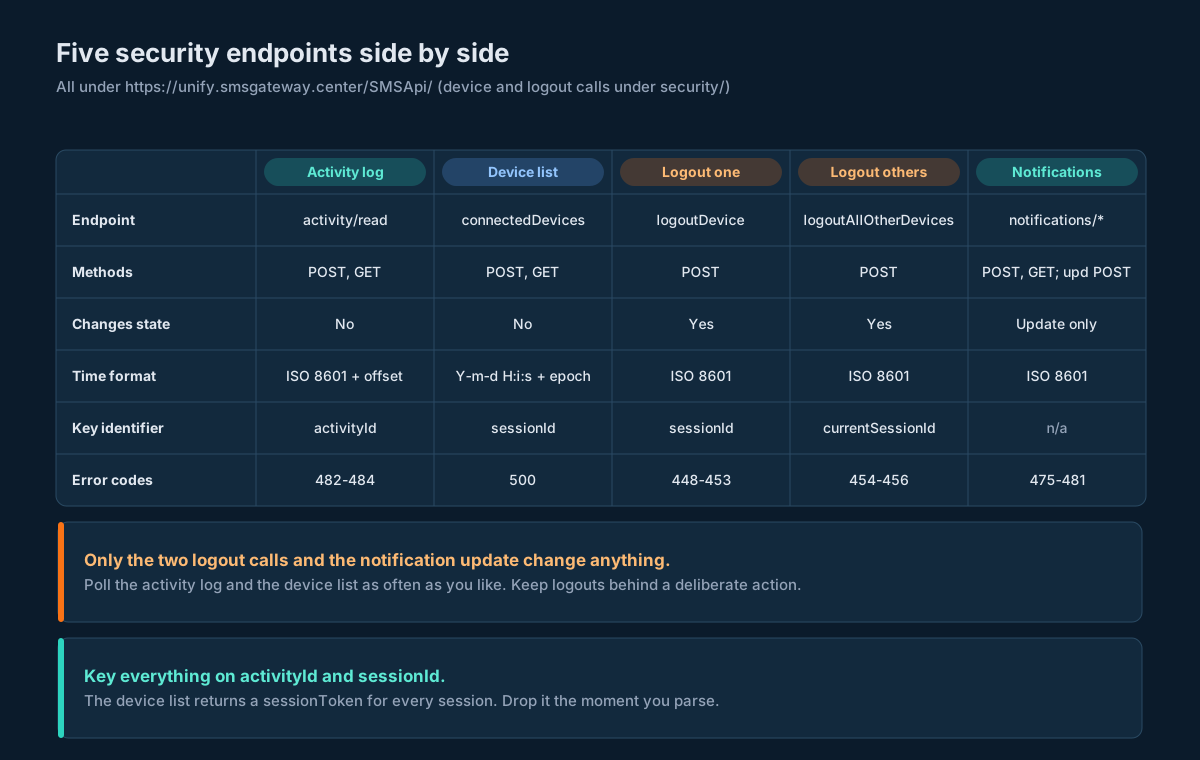
A few things jump out of that table before you write any code.
The activity log is the only one with history. The device list is a snapshot of right now: once a session expires or gets logged out, it disappears from the list and the only trace left is whatever the activity log recorded. So if you want to answer “who was signed in last Tuesday?”, you need to have been polling last Tuesday.
Only two calls are dangerous. Polling the log and the device list can’t break anything. logoutDevice and logoutAllOtherDevices can lock people out, including you, so they belong behind a deliberate action, not inside a loop.
The settings endpoint has no identifier at all. It’s one document per account. That makes it easy to treat as config: one desired state, one actual state, one diff.
Every reference page for these endpoints shows the parameters with userid and password. Use the apikey header with userid instead, as you would on every other endpoint. If you’re also rotating that key on a schedule, the API key rotation guide explains why the job that rotates it should authenticate with userid and password rather than the key it’s replacing. The same reasoning applies to the incident runbook further down.
What the Activity Log Gives You
SMSApi/activity/read returns the authenticated user’s own activity, newest first. You pass limit (1 to 200, default 50) and offset (default 0). Here’s the shape of a successful reply, trimmed to two rows:
{
  "response": {
    "api": "activity",
    "action": "read",
    "status": "success",
    "msg": "Activity logs retrieved successfully",
    "code": 200,
    "count": 1250,
    "data": {
      "logs": [
        {
          "activityId": 12345,
          "activity": "User logged in successfully",
          "ipAddress": "192.168.1.100",
          "timestamp": "2025-12-04T18:30:45+05:30",
          "formattedTime": "04 Dec 2025, 06:30 PM"
        },
        {
          "activityId": 12343,
          "activity": "API Key created via user panel",
          "ipAddress": "192.168.1.100",
          "timestamp": "2025-12-04T17:15:20+05:30",
          "formattedTime": "04 Dec 2025, 05:15 PM"
        }
      ],
      "pagination": {
        "limit": 50,
        "offset": 0,
        "total": 1250,
        "returned": 50,
        "hasMore": true
      }
    }
  }
}
Five fields per row. activityId is an integer, timestamp is ISO 8601 with an offset, and formattedTime is the same moment for display. You only want the first one of those two. ipAddress is where the action came from. And activity is a free-text sentence.
That last field carries all the meaning, and it’s prose. There’s no type, no actor, no target. “API Key created via user panel” tells you the action and the channel in one sentence. “SMS sent to +1234567890 – Delivered successfully” carries a phone number. The reference page groups activities into categories (authentication, SMS operations, API calls, account management, contact management, credit transactions, support, configuration), but those categories aren’t in the payload. You’ll derive them yourself, and the classification section shows how to do that without breaking the day the wording changes.
Two counters in the reply mean the same thing: count at the top and pagination.total. Both are the total number of rows available, not the number on this page. For the page size, count logs yourself. The reference sample says returned: 50 while showing five rows, which is fine for a trimmed example and a good reason not to trust a counter when the array is right there.
The log is read-only through the API. A create, update or delete attempt gets error 484. That’s useful: nobody holding your API key can quietly remove the row that says they logged in. It doesn’t make the log tamper-proof in any stronger sense, and it doesn’t tell you how long rows are kept. Both of those push you toward keeping your own copy.
Scope matters too. The log only shows the authenticated user’s own activities. If you run sub-users or reseller child accounts, as described in the multi-brand architecture guide, plan on one sync per login, each with its own credentials and its own high-water mark.
Why Offset Paging a Newest-First Log Drifts
Offset paging on a list that grows at the front is the classic way to double-count. Here’s why.
Say the account has 450 events. You ask for offset=0, limit=200 and get events 450 down to 251. While you’re storing them, the account logs 30 new events: a few logins, a campaign, some API calls. You ask for offset=200. The list now has 480 rows, and position 200 is no longer event 250. It’s event 280. So page two starts with 30 rows you already have.
Now flip it. If rows vanish from the old end, because a retention job purged them, the list shrinks from the back. That doesn’t shift anything you haven’t read yet, so newest-first paging is mostly safe there. But if rows ever disappeared from the middle, everything after them would slide up and you’d skip rows without noticing.
Put plainly:
| What happens between two page calls | Effect on the next page | What saves you |
|---|---|---|
| New events arrive at the front | Overlap: you re-read rows from the previous page | De-duplicate on activityId |
| Old rows are purged from the back | Nothing you still need moves | Nothing needed |
| Rows disappear from the middle | Gap: rows slide past you unread | Compare your stored count to total after a backfill |
| Nothing changes | Clean pages | Nothing needed |
The first case is the normal one. On a busy account it happens on almost every backfill. The fix is boring and complete: treat every row as an upsert keyed on activityId, and advance the offset by the number of rows you actually received.
An Incremental Sync That Never Misses or Doubles
The trick is to stop thinking about pages and start thinking about a boundary. You already have some rows. The log is newest first. So walk from offset 0 until you hit a row you already have, and everything before it is new.
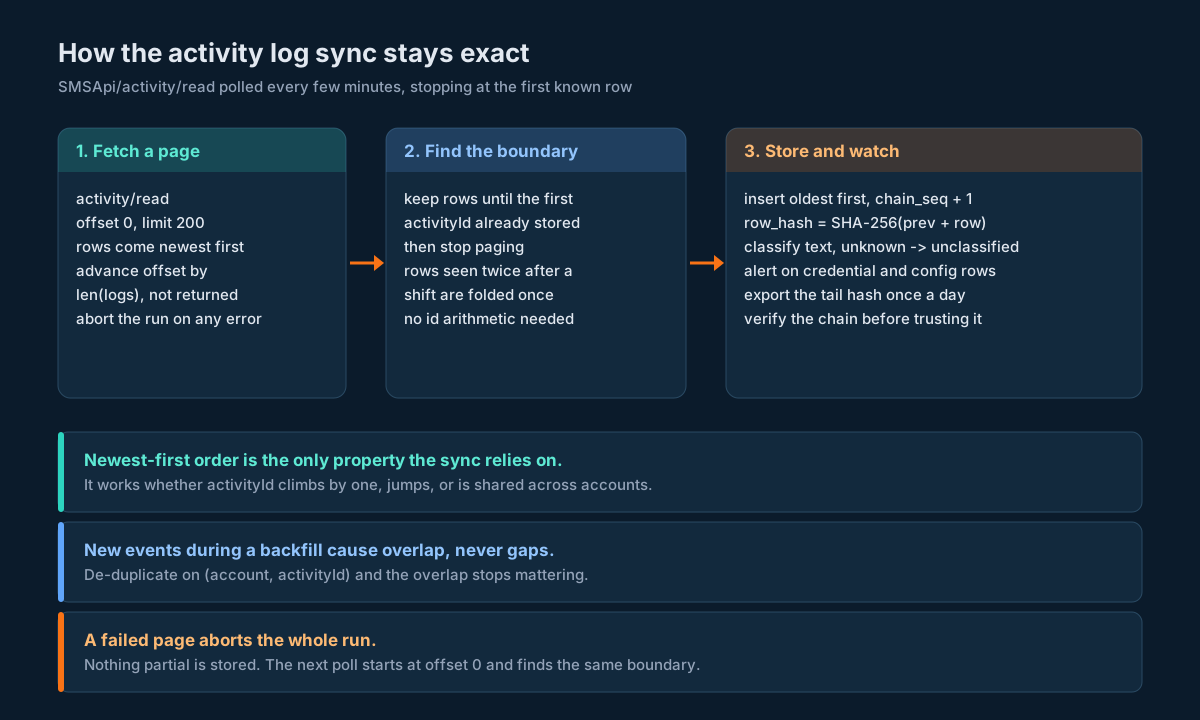
This relies on exactly one documented property: rows come back in reverse chronological order. It doesn’t assume activityId values are sequential or that they go up by one, which matters because nothing promises either. Here’s the whole thing in Python, with SQLite standing in for your database:
import hashlib, json, sqlite3
from datetime import datetime, timezone

SCHEMA = """
CREATE TABLE IF NOT EXISTS account_activity (
  activity_id   INTEGER NOT NULL,
  account       TEXT NOT NULL,
  occurred_at   TEXT NOT NULL,      -- normalised to UTC for sorting
  timestamp_raw TEXT NOT NULL,      -- exactly as received, used in the hash
  ip_address    TEXT,
  activity_raw  TEXT NOT NULL,
  category      TEXT NOT NULL DEFAULT 'unclassified',
  fetched_at    TEXT NOT NULL,
  chain_seq     INTEGER NOT NULL,   -- insertion order; the chain follows this
  prev_hash     TEXT NOT NULL,
  row_hash      TEXT NOT NULL,
  PRIMARY KEY (account, activity_id)
);
"""

def row_hash(prev_hash, row):
    body = json.dumps([row["activityId"], row["timestamp"], row.get("ipAddress"), row["activity"]],
                      separators=(",", ":"), ensure_ascii=True)
    return hashlib.sha256((prev_hash + body).encode("utf-8")).hexdigest()

def sync_activity(db, account, fetch_page, now_iso, page_size=200, max_pages=500):
    """fetch_page(offset, limit) returns the parsed response dict.
    Walks newest-first pages and stops at the first row already stored."""
    known = {r[0] for r in db.execute(
        "SELECT activity_id FROM account_activity WHERE account = ?", (account,))}
    fresh, offset = [], 0
    for _ in range(max_pages):
        resp = fetch_page(offset, page_size).get("response") or {}
        if resp.get("status") != "success":
            raise RuntimeError("activity/read failed: keep the old high-water mark")
        data = resp.get("data") or {}
        logs = data.get("logs") or []
        hit_known = False
        for row in logs:
            if int(row["activityId"]) in known:
                hit_known = True
                break
            fresh.append(row)
        if hit_known or not logs or not (data.get("pagination") or {}).get("hasMore"):
            break
        offset += len(logs)          # advance by what you got, not by "returned"
    # de-duplicate rows seen twice because the list shifted under us
    seen, ordered = set(), []
    for row in reversed(fresh):      # oldest first, so the hash chain runs forward in time
        aid = int(row["activityId"])
        if aid not in seen:
            seen.add(aid)
            ordered.append(row)
    last = db.execute("SELECT chain_seq, row_hash FROM account_activity WHERE account = ? "
                      "ORDER BY chain_seq DESC LIMIT 1", (account,)).fetchone()
    seq, prev = (last[0], last[1]) if last else (0, "0" * 64)
    with db:
        for row in ordered:
            h = row_hash(prev, row)
            utc = datetime.fromisoformat(row["timestamp"]).astimezone(timezone.utc).isoformat()
            seq += 1
            db.execute("INSERT INTO account_activity (activity_id, account, occurred_at, "
                       "timestamp_raw, ip_address, activity_raw, fetched_at, chain_seq, "
                       "prev_hash, row_hash) VALUES (?,?,?,?,?,?,?,?,?,?)",
                       (int(row["activityId"]), account, utc, row["timestamp"], row.get("ipAddress"),
                        row["activity"], now_iso, seq, prev, h))
            prev = h
    return len(ordered)
A few choices in there are worth calling out.
The chain follows insertion order, not timestamps. Two events in the same second can come back in either order, so chain_seq records the order you hashed them in, and verification walks that column. Sorting by time for the chain would fail on the first same-second pair. The plain INSERT (not INSERT OR IGNORE) is deliberate too: every row reaching it is new by construction, so a key collision means the boundary logic is broken and you want the transaction to fail loudly.
The first run is a backfill and needs no special code. With an empty table, nothing is “known”, so the loop walks until hasMore is false. Thirty new events arriving mid-backfill just show up twice in fresh and get folded by the de-duplication pass. Simulate it if you want proof: a 450-row log with 30 and then 25 events arriving between page calls. The backfill stores all 450 with no gaps, the next run picks up the 55 that arrived meanwhile, and the hash chain verifies end to end.
A failed page aborts the whole run. If page three errors, you don’t store pages one and two and move on. The next run starts from offset 0 again and finds the same boundary. Partial progress is fine to lose; a boundary in the wrong place isn’t.
The primary key is (account, activity_id), not activity_id alone. Nothing says activityId is unique across accounts, and if you sync several logins into one table, a collision would silently drop a row.
max_pages is a safety valve. At 200 rows a page, 500 pages is 100,000 rows. If a sync ever walks that far, something’s wrong with the boundary and you want it to stop and shout rather than hammer the API.
How often to poll comes down to how quickly you want to hear about a login. Every five minutes is a reasonable default for most accounts. On a quiet account each poll is one call that returns the row you already have and stops. On a busy one, the loop simply keeps paging until it meets the boundary, so you can’t fall behind by polling too slowly. You only get later alerts.
After the first backfill, compare your stored row count with total from the last page. If you’re short, re-run the backfill once; the upsert makes that safe. If you’re still short, log it. You’ve probably hit a retention window and the oldest rows are gone.
Storing Activity Rows: Raw First, Hash-Chained
Store exactly what you received. Normalise the timestamp into a UTC column for sorting, but keep timestamp_raw too, and never rewrite activity_raw. Classification, masking and enrichment go into other columns or other tables. When you’re reading an incident timeline at 2 a.m., you want the sentence the platform wrote, not your parser’s opinion of it.
The hash chain is cheap tamper evidence. Each row’s row_hash is SHA-256 over the previous row’s hash plus a canonical JSON of the four fields that matter. Change any stored row, delete one from the middle, or reorder them, and every hash after that point stops matching. Checking it is a single pass:
def verify_chain(db, account):
    prev = "0" * 64
    for aid, ts, ip, raw, stored_prev, stored_hash in db.execute(
            "SELECT activity_id, timestamp_raw, ip_address, activity_raw, prev_hash, row_hash "
            "FROM account_activity WHERE account = ? ORDER BY chain_seq", (account,)):
        expected = row_hash(prev, {"activityId": aid, "timestamp": ts,
                                   "ipAddress": ip, "activity": raw})
        if stored_prev != prev or stored_hash != expected:
            return aid               # first row that no longer matches
        prev = stored_hash
    return None
A chain only proves something if the tail hash lives somewhere the database admin can’t reach. Write the latest row_hash to a separate store once a day: an append-only bucket, a ticket, a message to your security channel. Then “the chain verifies and ends at the hash we published on the 14th” is a statement someone can check.
Two access rules round this out, and both come straight from the OWASP Logging Cheat Sheet. The writer should be a database account that can insert into this table and do nothing else. And reading the raw table should itself be restricted, because activity_raw contains phone numbers. Give most people a view with the digits masked:
CREATE VIEW account_activity_masked AS
SELECT account, activity_id, occurred_at, ip_address, category,
       mask_digits(activity_raw) AS activity
FROM account_activity;
mask_digits is whatever your database offers for regex replacement; the JavaScript version in the next section shows the pattern.
Retention is your call, and it should be a written policy rather than “forever by accident”. Pick a period that covers your incident investigations and any legal hold you’re subject to, then delete on schedule. When you do delete, delete from the old end only, and record the hash of the last row you removed so the chain still has a verifiable start.
Classifying Free-Text Activity Without Breaking
Since activity is a sentence, you need a classifier to turn it into something you can alert on. The design rule is simple: unknown wording must land in a bucket, never in an exception. The platform can rephrase “API Key created via user panel” tomorrow and your pipeline should keep running, just with one more unclassified row to look at.
Ordered regex rules work fine for this. First match wins, so put the specific rules above the general ones:
// Ordered rules: first match wins. Unknown wording falls through to 'unclassified'.
const RULES = [
  ['auth.login_failed', /\b(failed|invalid|incorrect)\b.*\blog ?in\b|\blog ?in\b.*\b(failed|invalid)\b/i],
  ['auth.login',        /\blogged in\b|\blog ?in successful/i],
  ['auth.logout',       /\blogged out\b|\blog ?out\b/i],
  ['credential.apikey', /\bapi ?key\b/i],
  ['credential.password', /\bpassword\b/i],
  ['config.webhook',    /\bwebhook\b/i],
  ['config.sender',     /\bsender ?id\b/i],
  ['config.template',   /\btemplate\b/i],
  ['config.notifications', /\bnotification\b/i],
  ['billing.credit',    /\bcredit|\bwallet\b|\bbalance\b/i],
  ['contacts',          /\bcontact|\bgroup\b/i],
  ['messaging.send',    /\bsms sent\b|\bsent to\b|\bcampaign\b|\bscheduled\b/i],
  ['support',           /\bticket\b/i],
];
const HIGH_RISK = new Set(['auth.login_failed', 'credential.apikey', 'credential.password',
                           'config.webhook', 'config.notifications']);

function classify(text) {
  for (const [category, re] of RULES) if (re.test(text)) return category;
  return 'unclassified';
}

// Mask long digit runs (phone numbers) before the text leaves the restricted table.
function maskDigits(text) {
  return text.replace(/\+?\d[\d\s-]{6,}\d/g, m => m.slice(0, 3) + '***' + m.slice(-2));
}

module.exports = { classify, maskDigits, HIGH_RISK };
Run against the five sample sentences on the activity log reference page, it gives:
activity text | Category | Masked text |
|---|---|---|
| User logged in successfully | auth.login | unchanged |
| SMS sent to +1234567890 – Delivered successfully | messaging.send | SMS sent to +12***90 – Delivered successfully |
| API Key created via user panel | credential.apikey | unchanged |
| Contact group ‘Customers’ created with 150 contacts | contacts | unchanged |
| Credit purchased: 10000 Credits added to account | billing.credit | unchanged |
Notice “150 contacts” and “10000 Credits” survive the mask. The pattern only catches runs of eight or more digits, which is roughly where phone numbers start and quantities usually stop. Tune that to your own data once you’ve seen a few thousand rows.
The auth.login_failed rule is speculative. Whether failed logins appear in this log at all, and in what words, is something you’ll only learn by watching. Keep the rule anyway: it costs nothing if it never matches, and it’s the most valuable alert in the set if it does.
Three habits keep the classifier honest over time.
Count unclassified per day and alert on a jump. A sudden rise usually means the wording changed, and the rule you care about most may have stopped matching. That’s the cheapest early warning you’ll get.
Store the category, never overwrite the text. When you improve a rule, re-run it over activity_raw and update category in place. The chain hashes don’t cover category, so reclassifying never breaks verification.
Alert on the category, not the sentence. Your paging rule should say “any credential.apikey row outside a change window”, not “text contains ‘API Key created'”. The day the phrasing moves, you fix one regex instead of every alert.
Reading the Connected Devices List
SMSApi/security/connectedDevices returns every active session on the account. No parameters beyond credentials and output. One row looks like this:
{
  "sessionId": "abc123def456ghi789jkl012mno345pqr678stu901vwx234yz",
  "sessionToken": "xyz789abc123def456ghi789jkl012mno345pqr678stu901vwx234",
  "deviceName": "Chrome on Windows",
  "deviceType": "Desktop",
  "platform": "Desktop",
  "os": "Windows",
  "browser": "Chrome",
  "location": "Mumbai, Maharashtra, India",
  "ipAddress": "192.168.1.1",
  "loginMethod": "UI",
  "loginTime": "2025-01-15 10:30:00",
  "lastActivity": "2025-01-15 11:45:00",
  "lastActivityTimestamp": 1705303500000,
  "timeAgo": "15 minutes ago",
  "isCurrentSession": false
}
The rows sit in response.sessions, and response.count is the number of sessions. That’s a different meaning of count from the activity log, where it’s the total across all pages. Read the array, not the counter.
Here’s what each field is good for when you’re building monitoring rather than a settings screen:
| Field | Use it for | Don’t use it for |
|---|---|---|
sessionId | The key for diffs and for logoutDevice | Display (it’s long and means nothing to people) |
sessionToken | Nothing. Drop it at parse time | Anything at all |
deviceName, os, browser, deviceType | A rough device fingerprint | Proving identity (all derived from a user agent) |
location | A human-readable hint | Hard rules (it’s IP geolocation, coarse and spoofable) |
ipAddress | Allowlist checks for API sessions | Assuming a private address means “internal” |
loginMethod | Splitting UI from API sessions | Nothing else; it’s the most useful field here |
loginTime, lastActivity | Display | Arithmetic (no time zone) |
lastActivityTimestamp | Ordering, after a sanity check | Blind trust (see timestamps) |
timeAgo | Nothing in code | Anything stored; it’s stale the moment you save it |
isCurrentSession | Knowing which row is the caller | Assuming your server’s call has a row at all |
deviceType and platform carry the same three values (Desktop, Mobile, Tablet). Pick one for your fingerprint and ignore the other.
The list only shows live sessions. When one expires, gets logged out, or times out, it’s gone, and the connected devices guide confirms that inactive sessions don’t appear. So the list can tell you who’s in right now and nothing about who was in an hour ago. Your poller’s snapshots are the only session history you’ll have, which is a good reason to keep them.
Never Store a Session Token
Look at that row again. Every session in the list comes back with a sessionToken, including sessions belonging to other devices. That token is accepted by logoutDevice as an alternative to sessionId, which tells you it identifies the session. Treat it as a live credential.
So the parser should drop it before anything else touches the payload:
KEEP = ("sessionId", "deviceName", "deviceType", "platform", "os", "browser",
        "location", "ipAddress", "loginMethod", "loginTime", "lastActivityTimestamp",
        "isCurrentSession")          # sessionToken is deliberately absent

def parse_sessions(resp):
    r = resp.get("response") or {}
    if r.get("status") != "success":
        return None                  # unknown state: do not diff, do not alert on "all gone"
    rows = r.get("sessions") or []
    return {s["sessionId"]: {k: s.get(k) for k in KEEP} for s in rows}
An allowlist of fields beats a denylist here. If a future version adds refreshToken or deviceSecret, an allowlist drops it without anyone noticing, and a denylist leaks it until someone does.
The same discipline applies one layer out. Don’t log the raw HTTP response from connectedDevices at debug level. Don’t send it to an error tracker on a parse failure. Don’t paste it into a ticket. The OWASP Logging Cheat Sheet lists session identifiers and access tokens among the things that shouldn’t be recorded directly, and a session token sitting in a log aggregator is exactly the kind of thing that turns a minor breach into a major one.
If you do need to log out by token for some reason, fetch the list, use the token in memory for that one call, and let it go. You never need to keep it. sessionId does the same job and is far less dangerous to store.
Also note the parse_sessions return of None on failure. A failed read isn’t an empty list. If your differ treated a failed call as “zero sessions”, it would announce that every session ended, and the next successful poll would announce they all started again. Skip the diff when the read fails.
Timestamps You Can and Can’t Trust
These three APIs use four time formats between them:
| Where | Field | Format | Zone |
|---|---|---|---|
| Activity log rows | timestamp | ISO 8601 | Explicit offset, e.g. +05:30 |
| Activity log rows | formattedTime | “04 Dec 2025, 06:30 PM” | None |
| Session rows | loginTime, lastActivity | Y-m-d H:i:s | None |
| Session rows | lastActivityTimestamp | Epoch milliseconds (integer) | UTC by definition |
| Logout and update replies | timestamp | ISO 8601 | Explicit offset (+00:00 on logout, +05:30 on notification update) |
The activity log’s timestamp is the one to build on. It carries its own offset, so it converts cleanly to UTC, and that’s what the sync code stores in occurred_at.
Session times are trickier. loginTime and lastActivity have no zone, so you can’t compare them with anything else without guessing. lastActivityTimestamp is an epoch, which is unambiguous in principle. In the published sample, though, it doesn’t agree with its own lastActivity string in any zone. Run the numbers:
from datetime import datetime, timezone, timedelta
IST = timezone(timedelta(hours=5, minutes=30))
print(datetime.fromtimestamp(1705303500000 / 1000, timezone.utc))   # 2024-01-15 07:25:00+00:00
print(datetime.fromtimestamp(1705303500000 / 1000, IST))            # 2024-01-15 12:55:00+05:30
# the same row's lastActivity string says "2025-01-15 11:45:00"
A year and some hours apart. On a reference page that’s just a hand-written sample, and the live API may well be consistent. But it’s a good reminder of the rule you’d follow anyway: measure, don’t assume.
Two things keep you safe whatever the real behaviour turns out to be.
Record first_seen_at from your own clock. The first time your poller sees a sessionId, stamp it with your server’s UTC time. That value is always comparable with everything else you store, and it’s accurate to within one polling interval. For “when did this device appear?”, it’s the honest answer.
Sanity-check the epoch before using it. If lastActivityTimestamp is in the future, or more than a couple of days older than your first_seen_at for a session that’s clearly still active, flag the row as clock-suspect and fall back to your own timestamps. The differ in the next section does exactly that.
If you need to know which zone loginTime uses, find out by measurement. Log in through the portal, poll the list straight away, and compare that session’s loginTime with your own clock. The offset you see is the offset to use, and it’s worth re-checking after any platform change.
Spotting New Devices and Unexpected IPs
With a clean parse, detection is a diff between the last snapshot and this one. New sessionId values are logins. Missing ones are logouts or expiries. The question is which logins deserve a page at 2 a.m.
Split them by loginMethod first, because UI and API sessions mean very different things.
API sessions should come from machines you own. Your servers have a short list of egress IPs. An API session from anywhere else means someone holds working credentials and is using them outside your infrastructure. That’s high severity, every time.
UI sessions come from people. People travel, change laptops and use their phones. Alerting on every new IP will train your team to ignore the alert within a week. Alert instead on a device fingerprint you haven’t seen on this account before: the combination of loginMethod, deviceType, os and browser.
import time

def fingerprint(s):
    return (s.get("loginMethod"), s.get("deviceType"), s.get("os"), s.get("browser"))

def diff_sessions(previous, current, known_fingerprints, api_egress_ips, now_ms=None):
    """previous/current: {sessionId: row}. Returns a list of (severity, message)."""
    now_ms = now_ms or int(time.time() * 1000)
    alerts = []
    for sid, s in current.items():
        if sid in previous:
            continue
        if s.get("loginMethod") == "API" and s.get("ipAddress") not in api_egress_ips:
            alerts.append(("high", f"API session from unexpected IP {s.get('ipAddress')}"))
        elif fingerprint(s) not in known_fingerprints:
            alerts.append(("medium", f"new device {s.get('deviceName')} from {s.get('location')}"))
        ts = s.get("lastActivityTimestamp")
        if isinstance(ts, int) and abs(now_ms - ts) > 86_400_000 * 2:
            alerts.append(("info", f"session {sid[:8]} clock looks off; using first-seen time"))
    for sid in previous.keys() - current.keys():
        alerts.append(("info", f"session {sid[:8]} ended"))
    return alerts
Feed known_fingerprints from your own history: every fingerprint that’s appeared on this account in the last 90 days and wasn’t followed by an incident. A medium alert on a new fingerprint should go to the account owner as a “was this you?” message, not to the on-call phone.
Then cross-reference the activity log. A new session should line up with a login row near the same moment, from the same ipAddress. A session with no matching login row is odd enough to look at. A burst of login rows with no new sessions might be failed attempts, depending on how the platform words them. Correlating the two sources catches things neither catches alone.
Two cautions on the inputs.
location is IP geolocation. It’s useful for a human reading the alert (“Mumbai, Maharashtra, India” is easier to judge than an address), but VPNs, mobile carriers and corporate proxies move it around constantly. Don’t build hard rules on it.
ipAddress is what the platform saw. The reference samples show private-range addresses such as 192.168.1.100, which is normal for placeholder data. If you ever see a private address on a real session, don’t read it as “from inside our network”. It more likely means a proxy in the path, and you should find out which one before you allowlist anything. If you already restrict API access by IP, as covered in IP-based API security, your egress list and that allowlist should be the same list.
Polling cadence follows from what you’re trying to catch. The device list is a snapshot, so a session that starts and ends between two polls is invisible to it. Only the activity log will show it. Poll both on the same schedule, every five minutes or so, and let the log cover the gaps.
Logging Out One Device or All the Others
Two calls change session state, and both are POST only.
SMSApi/security/logoutDevice takes either sessionId or sessionToken, not both. Use sessionId. A successful reply looks like this:
{
  "response": {
    "api": "security",
    "action": "logoutDevice",
    "status": "success",
    "msg": "Device logged out successfully",
    "code": 200,
    "count": 1,
    "logout": {
      "sessionId": "abc123def456ghi789jkl012mno345pqr678stu901vwx234yz",
      "deviceName": "Chrome on Windows",
      "loggedOut": true,
      "timestamp": "2025-01-15T12:00:00+00:00"
    }
  }
}
SMSApi/security/logoutAllOtherDevices takes nothing but credentials. It ends every session except the caller’s, and replies with logoutAll.currentSessionId, logoutAll.devicesLoggedOut and a timestamp. Here count is 1 while devicesLoggedOut can be 3, so once again: read the field you mean, not the counter.
The error codes are where you decide what “done” means. Some errors mean the goal is already met:
| Code | Meaning | Treat as |
|---|---|---|
| 448 | Session ID or token is required | Bug in your call. Fix and don’t retry |
| 449 | Invalid session ID | Bug or a stale ID. Re-read the list |
| 450 | Session not found | Done. It’s already gone |
| 451 | Session doesn’t belong to user | Alert. You’re holding an ID from another account |
| 452, 453 | Failed or error while logging out | Retry with backoff, then escalate |
| 454, 456 | Failed or error logging out other devices | Retry with backoff, then escalate |
| 455 | No active sessions found | Done. There was nothing else to log out |
| 500 | General error | Retry with backoff |
Whatever the reply, confirm by re-reading. Call connectedDevices again and check the session is missing. A "loggedOut": true tells you the platform accepted the request; the list not containing that sessionId tells you it worked. That read-back costs one call and turns an assumption into a fact.
Now the sharp edge. “All other devices” means all except the session making the call. When a person clicks the button in the portal, that’s their browser, and it’s exactly what they want. When your server calls it with the apikey header, which session is “current”? It might be an API session the call itself creates or reuses. It might be none. Either way, every human signed in to the portal gets logged out, including whoever is trying to deal with the incident.
So split the two cases. Automation logs out specific sessionId values it has decided are bad. logoutAllOtherDevices is for a person in a browser, or for a break-glass script that someone runs on purpose, knowing it will sign everyone out. Never put it in a scheduled job.
The portal’s own advice for a suspected compromise is to log out all other devices and then change the password, and the connected devices step-by-step guide walks through the screens. The next section explains why, for anyone using the API, that’s not quite enough.
What Logging Out Doesn’t Revoke
A session is one way into the account. It’s not the only one, and ending sessions does nothing to the others.
| Way in | Ended by logging out sessions? | What actually closes it |
|---|---|---|
| A live portal session | Yes | logoutDevice or logoutAllOtherDevices |
| The password | No | Change the password |
The API key (apikey header) | No | Rotate the key |
| An OAuth access token you issued to an app | Unclear | Let it expire and revoke the app’s refresh token |
| A webhook URL the intruder added | No | Read back webhook config and restore it |
| An email address added to alerts | No | Read back notification settings and restore them |
The first three rows are the obvious ones. Someone who has your password logs straight back in after you end their session. Someone who has your API key never had a session to end; every request authenticates on its own. If you’ve followed the API key rotation guide, you already have a rotator that can issue a new key with your senders paused and resumed, so rotating during an incident is a button, not a project. For apps connected through OAuth, the OAuth guide covers the token lifetimes involved.
The last two rows are about persistence. Someone who’s been inside your account for an hour doesn’t need to keep a session open if they’ve pointed your delivery webhook at their own server, or added their address to the login alerts so they’ll know when you’re investigating. Neither change shows up in the device list. Both should show up in the activity log, under configuration or account management, which is why the classifier marks config.webhook and config.notifications as high risk.
So an incident is closed when every row in that table is closed, and you’ve confirmed each one by reading it back. The runbook puts them in order.
Notification Settings as Checked Config
SMSApi/notifications/read returns one settings document for the account. The groups you’ll see depend on what the account has: everyone gets balanceAlerts, creditTransactionAlerts and loginAlerts; SMS accounts get smsAlerts; whatsappAlerts and voiceCallAlerts appear only when those products are enabled; reseller accounts get resellerAlerts.
For security, one group matters more than the rest:
"loginAlerts": {
  "enabled": true,
  "emails": "[email protected]"
}
If that’s on and pointed at a mailbox your security team reads, every portal login becomes an email. It’s the cheapest detection you’ll ever set up. It’s also the obvious target for anyone who gets in. Switch enabled to false, or swap the address for one of theirs, and your login alerts go quiet while the account looks perfectly normal.
So don’t treat these settings as a form someone filled in once. Treat them as config with a desired state, and check it:
- Keep the desired settings in version control, as update parameters:
enableLoginAlert=1,[email protected],enableBalanceAlert=1, and so on. - Once a day, and immediately after any
config.notificationsrow shows up in the activity log, callnotifications/read. - Diff the reply against the desired state.
- Any difference raises an alert. Whether you also auto-correct is a policy choice; at minimum, alert first, so a person sees that someone changed it.
- After any update, read the settings back and diff again.
The balance alerts are worth keeping in that desired state too. balanceAlerts.smsBalance and smsAmount set the thresholds, and a balance that hits zero stops your sends as surely as a breach does. The invoice reconciliation guide covers the billing side if you want to tie those thresholds to real spend.
Email lists compare as sets. "[email protected],[email protected]" and "[email protected], [email protected]" are the same list: split on commas, trim, lowercase, sort. Comparing raw strings would raise a false alarm every time someone reorders the addresses.
Read and Update Speak Different Shapes
notifications/read returns nested JSON with booleans. notifications/update takes flat form parameters with 1 and 0. The names don’t line up mechanically, so you need an explicit map:
| Read path | Update parameter | Read type | Update type |
|---|---|---|---|
balanceAlerts.enabled | enableBalanceAlert | boolean | 1 or 0 |
balanceAlerts.smsBalance | smsBalance | integer | integer |
balanceAlerts.smsAmount | smsAmount | string, e.g. “50.0000” | decimal, e.g. 50.00 |
balanceAlerts.emails | smsBalanceEmails | comma-separated string | comma-separated string |
balanceAlerts.dailyBalanceAlert.enabled | dailyBalanceAlert | boolean | 1 or 0 |
balanceAlerts.dailyBalanceAlert.emails | dailyBalanceAlertEmails | string | string |
smsAlerts.dailyUsageSummary.enabled | enableDailyUsageSummary | boolean | 1 or 0 |
smsAlerts.weeklyUsageSummary.enabled | enableWeeklyUsageSummary | boolean | 1 or 0 |
smsAlerts.monthlyUsageSummary.enabled | enableMonthlyUsageSummary | boolean | 1 or 0 |
smsAlerts.monthlyDaywiseUsageSummary.enabled | enableMonthlyDaywiseUsageSummary | boolean | 1 or 0 |
smsAlerts.latencyAlert.enabled | latencyAlert | boolean | 1 or 0 |
creditTransactionAlerts.weeklySummary.enabled | enableWeeklyCreditTransaction | boolean | 1 or 0 |
creditTransactionAlerts.monthlySummary.enabled | enableMonthlyCreditTransaction | boolean | 1 or 0 |
loginAlerts.enabled | enableLoginAlert | boolean | 1 or 0 |
loginAlerts.emails | loginAlertEmails | string | string |
Each .emails path under a summary maps to the matching ...Emails parameter (smsAlerts.weeklyUsageSummary.emails to weeklyUsageSummaryEmails, creditTransactionAlerts.monthlySummary.emails to monthlyCreditTransactionEmails, and so on).
Watch the two odd ones. latencyAlert and dailyBalanceAlert are the flag names on update, with no enable prefix, while every other flag has one. And smsAmount comes back as a four-decimal string but goes in as a plain decimal, so compare it as a number.
WhatsApp, voice and reseller settings have update parameters (enableWaDailyUsageSummary, enableVcDailyUsageSummary, enableUsersBalance and their email twins), but their read shapes aren’t in the reference sample. Don’t guess the nesting. Map only the paths you’ve seen in a real reply, and report anything else as unmapped. Here’s the drift check, with the map trimmed to a few entries for space:
FLAG_MAP = {
    ("balanceAlerts", "enabled"): "enableBalanceAlert",
    ("balanceAlerts", "dailyBalanceAlert", "enabled"): "dailyBalanceAlert",
    ("smsAlerts", "latencyAlert", "enabled"): "latencyAlert",
    ("loginAlerts", "enabled"): "enableLoginAlert",
    # ...one entry per row of the table above
}
EMAIL_MAP = {
    ("balanceAlerts", "emails"): "smsBalanceEmails",
    ("smsAlerts", "latencyAlert", "emails"): "latencyAlertEmails",
    ("loginAlerts", "emails"): "loginAlertEmails",
    # ...
}
NUMBER_MAP = {
    ("balanceAlerts", "smsBalance"): "smsBalance",
    ("balanceAlerts", "smsAmount"): "smsAmount",
}

def walk(node, path=()):
    if isinstance(node, dict):
        for k, v in node.items():
            yield from walk(v, path + (k,))
    else:
        yield path, node

def emails(value):
    return frozenset(e.strip().lower() for e in str(value or "").split(",") if e.strip())

def drift(current, desired):
    """current: response.notifications from read. desired: {update_param: value}.
    Returns (changes_to_send, unmapped_paths)."""
    changes, unmapped = {}, []
    for path, value in walk(current):
        if path in FLAG_MAP:
            p = FLAG_MAP[path]
            if p in desired and int(bool(value)) != int(desired[p]):
                changes[p] = int(desired[p])
        elif path in EMAIL_MAP:
            p = EMAIL_MAP[path]
            if p in desired and emails(value) != emails(desired[p]):
                changes[p] = ",".join(sorted(emails(desired[p])))
        elif path in NUMBER_MAP:
            p = NUMBER_MAP[path]
            if p in desired and abs(float(value) - float(desired[p])) > 1e-9:
                changes[p] = desired[p]
        else:
            unmapped.append(".".join(path))
    return changes, unmapped
Feed it a read where someone has turned login alerts off and pointed them at an outside address, and it returns {"enableLoginAlert": 1, "loginAlertEmails": "[email protected]"} as the changes to send, plus any WhatsApp paths it doesn’t recognise in unmapped. That’s the shape you want: a small, specific update, and a list of things a person should look at.
Three rules for the update call itself.
Send only what changed. The reference page says to include only the parameters you want to change, and the drift check already gives you exactly that set. A full rewrite risks blanking a field you didn’t mean to touch.
Don’t send an empty email list to mean “off”. To disable an alert, send its flag as 0 and leave the addresses alone. Whether an empty ...Emails= clears the list or is ignored isn’t something to find out in production.
Read back after every update. The platform filters parameters by your account’s products, so a WhatsApp parameter sent from an SMS-only account may be dropped without an error. And error 478 means “no changes made or nothing to update”, which can happen when your desired value already matches. In both cases the read-back settles it: if the diff is empty afterwards, you’re done.
Error 477 is an email validation failure. Validate addresses yourself before sending so the whole update doesn’t fail on one typo.
An Incident Runbook That Uses All Three
Here’s the order that works when you think someone else is in the account. The aim is to keep evidence, close every way in, and confirm each step by reading something back.
One. Freeze the evidence before you touch anything. Run the activity sync now, export the result, and save the current connectedDevices snapshot (tokens already stripped by your parser). Record the tail row_hash. Logging people out changes the session list, and you want the “before” picture.
Two. Log out the sessions you’ve identified as bad. By sessionId, from your tooling. If you can’t tell good from bad, have a person in the portal use “log out all other devices” from a browser they trust.
Three. Change the password. Do it from that same trusted browser. Until this step, anyone with the password can sign straight back in. The password help article covers the portal flow.
Four. Rotate the API key. Pause your senders, rotate, reload the new key, resume. Authenticate the rotation with userid and password (the new password), not with the key you’re replacing.
Five. Read back everything an intruder could have changed to stay in. Notification settings first, because they decide whether you’ll hear about the next login. Then webhooks, sender IDs and templates. Diff each against your known-good state and restore anything that moved.
Six. Read the device list again. Every session you ended should be gone. If one is still there, or a new one has appeared since step two, the password or key change didn’t take, or someone still holds a working credential. Go back to step three.
Seven. Work out what was done. Filter the frozen activity export to the incident window. Look for sends you don’t recognise, credit purchases, contact exports and configuration changes. Then compare platform delivery reports with your own records: anything in the reports that isn’t in your outbound message table was sent by someone else.
Eight. Keep watching. Tighten the session poller to every minute for a few days and treat any new API session or new UI fingerprint as high severity until you’re confident the account is clean.
The order matters more than any single step. Logging out before changing the password just invites the intruder to sign in again. Rotating the key before reading back the webhook leaves your delivery reports flowing to their server under a fresh key.
Decision Matrix
| Question you need answered | Surface | Call | Watch out for |
|---|---|---|---|
| Who’s signed in right now? | Connected devices | security/connectedDevices | Drop sessionToken; failed read is not “zero sessions” |
| Who was signed in last week? | Your snapshots plus the activity log | Your own store | The live list has no history |
| Did anyone create or change an API key? | Activity log | activity/read, credential.apikey rows | Wording can change; watch unclassified |
| Did anyone change webhooks or alerts? | Activity log, then the config itself | activity/read, then read-back | Alert on the change and on the drift |
| Is a login from an expected machine? | Connected devices | Check loginMethod and ipAddress | Private IPs may mean a proxy |
| End one suspicious session | Connected devices | security/logoutDevice with sessionId | 450 means already gone; confirm with a re-read |
| End everything except me | Connected devices | security/logoutAllOtherDevices | From a person’s browser only, never a job |
| Make sure login alerts still work | Notification settings | notifications/read, diff, update | Map read paths to update names explicitly |
| Keep a record we can defend | Your hash-chained copy | Daily tail-hash export | Chain follows insertion order |
Implementation Checklist
- Every call uses the
apikeyheader withuserid, except key rotation, which usesuseridandpassword. - Activity sync walks from offset 0, advances by
len(logs), stops at the first storedactivityId, and de-duplicates. - Primary key on
(account, activity_id); one sync per login for sub-users and child accounts. activity_rawandtimestamp_rawstored exactly as received;occurred_atnormalised to UTC.- Hash chain over insertion order, verified daily, tail hash exported somewhere separate.
- Writer account can only insert; raw table access restricted; masked view for everyone else.
- Classifier falls through to
unclassified; daily count ofunclassifiedwith an alert on a jump. - Session parser keeps an allowlist of fields;
sessionTokennever stored or logged. - A failed
connectedDevicesread skips the diff instead of reporting every session as ended. first_seen_atrecorded from your own clock; epoch values sanity-checked.- High alert on any
APIsession outside your egress IP list; owner prompt on new UI fingerprints. logoutAllOtherDevicesreachable only from a person’s browser or a deliberate break-glass script.- Every logout confirmed by re-reading the device list; 450 and 455 treated as done.
- Desired notification settings in version control; daily drift check plus a check after any
config.notificationsrow. - Notification updates send only changed parameters and are always read back.
- Incident runbook written down, in order, with password and key rotation in it.
- Written retention period for your activity copy, deleting from the old end only.
Unspecified Behaviour and How to Code Around It
Some of how these endpoints behave isn’t pinned down by anything you can read. Each item below gives you the choice that stays safe whichever way the real behaviour goes, and none of them needs you to wait for an answer.
One. Rely on the newest-first order, not on activityId arithmetic. You can’t be sure IDs are sequential, gap-free or even increasing. The sync stops at the first stored row in a reverse-chronological list, which works whether IDs climb by one, jump around, or come from a shared counter across accounts.
Two. Assume the platform’s activity log has a retention limit, and copy everything from day one. How long rows are kept isn’t something you can plan around. If you start syncing on the day you need the history, the history may already be gone. A five-minute poller from the first day turns “we can’t know” into a query.
Three. Key every row on (account, activity_id). Whether activityId is unique per account or globally makes no difference to a composite key. A single-column key only works if it’s global, and you’d find out it wasn’t by losing a row.
Four. Treat the activity text as unversioned prose. Wording can change without notice. Classify with rules that fall through to unclassified, count that bucket daily, and alert when it jumps. You’ll notice a rephrasing within a day instead of discovering months later that an alert went quiet.
Five. Don’t depend on failed logins appearing in the log. They may be recorded, recorded under different wording, or not recorded at all. Keep a rule for them, but get your primary login detection from the device list diff and the loginAlerts emails, which don’t depend on it.
Six. Drop sessionToken at parse time, every time. Whether that token can authenticate anything beyond logoutDevice is unclear. You don’t need to know: a field you never store can’t leak, and sessionId does everything you need.
Seven. Record your own first_seen_at for every session and treat platform session times as hints. loginTime has no zone and the epoch can disagree with it. Your own UTC clock reading at first sight is always comparable with the rest of your data and is accurate to one polling interval.
Eight. Never call logoutAllOtherDevices from automation. Which session counts as “current” for a call authenticated with the apikey header is unclear. If it’s an API session, every human gets logged out. If it’s none, possibly every session goes. Either way, logging out specific sessionId values from automation does what you meant and nothing more.
Nine. Confirm every logout by re-reading the device list. A success reply may arrive while the session lingers briefly, and a 450 may arrive for a session that’s already gone. The re-read is the only answer that doesn’t depend on which happened.
Ten. Rotate the password and API key in every incident, even after logging sessions out. Whether ending a session also invalidates anything else (OAuth tokens, mobile app sessions, a session that the API key creates) can’t be confirmed from outside. Rotating both credentials closes the door whatever the answer.
Eleven. Map only the notification paths you’ve seen, and fail closed on the rest. WhatsApp, voice and reseller read shapes may nest differently from the SMS ones. Unknown paths go to an unmapped list for a person to review; they’re never auto-corrected from a guess.
Twelve. Disable an alert with its flag, never with an empty email list, and read back after every update. Whether loginAlertEmails= clears the list or is ignored, and whether parameters for products you don’t have are dropped silently, are both settled by the read-back. Sending the flag as 0 gets the result you want either way.
FAQs
Can I get activity log events pushed to me instead of polling?
Not directly. SMSApi/activity/read is a pull endpoint. Poll it every few minutes with the incremental sync above; on a quiet account each poll is a single call that stops at the first row you already have.
How many activity rows can I fetch per call?
Up to 200. limit accepts 1 to 200 and defaults to 50. For a backfill use 200, and advance offset by the number of rows you actually received.
Why do I see the same activity row on two pages?
Because new events arrived while you were paging. The list is newest first, so every new event pushes older rows one position further back, and the next page starts with rows you’ve already read. De-duplicate on activityId and it stops mattering.
Can I filter the activity log by date or type?
No, the call takes only limit, offset and output. Copy the log into your own store and filter there. That’s also the only way to keep history beyond whatever the platform retains.
Does the activity log show what my sub-users did?
It shows the authenticated user’s own activities. Sync each login separately with its own credentials and keep a separate high-water mark for each.
Is it safe to store the sessionToken from the connected devices list?
No. Treat it as a live credential and drop it at parse time. Use sessionId for diffs and for logoutDevice; it does the same job.
Does logging out all other devices stop someone who has my API key?
No. API requests authenticate on every call and don’t depend on a portal session. Rotate the key, and change the password too, because the password can issue a new session or a new key.
Why did logoutAllOtherDevices sign out my whole team?
Because “other” means every session except the caller’s. If the call came from a server, the caller isn’t anyone’s browser. Use it only from a trusted browser, and use logoutDevice with specific sessionId values from automation.
What does error 455 mean when logging out other devices?
There were no other active sessions to end. Treat it as success, then re-read the device list to confirm.
How do I make sure login alerts can’t be quietly switched off?
Keep the desired enableLoginAlert and loginAlertEmails values in version control, read SMSApi/notifications/read daily and after any notification change in the activity log, and alert on any difference.
Why does my notification update return 478?
478 means no changes were made or there was nothing to update. Usually the value you sent already matched. Read the settings back; if they match your desired state, you’re done.
Are the session location and IP reliable enough to block on?
Not on their own. location is IP geolocation and ipAddress is what the platform saw, which a proxy or VPN can change. Hard-block only on API sessions from outside your known egress IPs, and treat everything else as a prompt to check.
Catch Account Takeovers Before They Cost You
Running messaging at a scale where an account takeover would hurt? Open an account on the SMSGatewayCenter demo, point the activity sync and session poller at it, and have your audit trail running before your first production send. If you’d like a hand wiring it into your SIEM, get in touch with the team.
More from our blog
Building an SMS and WhatsApp Preference Centre: Purposes, Channels, Frequency and the Send Gate
API Key Rotation for an SMS API: Rotating a Single-Slot Key Without Dropping Messages
SMS Message Encryption: What It Hides, What It Doesn’t, and How to Get the Wire Format Right
SMS Click Tracking and Attribution: Joining Smart Link Clicks to Messages and Recipients