Table of Contents
- The Short Answer
- TL;DR
- Why a Correct Parser Still Corrupts Your Data
- The Same Field, Two Types: A Map of the Responses
- What a Double Does to a 19-Digit ID
- Language by Language: Where the Digits Go Missing
- Python: Integers Are Safe, the Next Hop Isn’t
- Node.js: Rescue the Source Text in the Reviver
- Java: Read IDs as Text from the Tree
- jq and Shell Scripts: Quote Before You Parse
- JSON Inside JSON: Fields That Hold Strings
- Reading the Envelope Without Trusting Its Types
- Money and Rates: Decimal, Never Float
- Timestamps: Numbers, Strings and Formatted Twins
- Phone Numbers and PINs Are Text
- Writing It Back: Storage, Logs and Outbound JSON
- A Parsing Contract You Can Test
- Decision Matrix: Which Fix for Which Stack
- Implementation Checklist
- Unspecified Behaviour and How to Code Around It
- FAQs
The Short Answer
Treat every identifier and phone number as text, decide that at one boundary in your code, and decide it by field name rather than by endpoint. Messaging APIs return the same concept with different JSON types: on SMSGatewayCenter, the SMS delivery report quotes uuId as "6358884679059916409" while the WhatsApp report sends uuId as a bare number, 3917313917152021246. A JavaScript JSON.parse, jq 1.6, Gson into a Map, or Go into an interface{} turns that bare number into a double, and a double can’t hold 19 digits. You get 3917313917152021000 back, with no error.
The fix is small. In Python, the standard json module already keeps integers exact; add parse_float=Decimal for money. In Node.js 21 and newer, read context.source inside a JSON.parse reviver. In Java, read the Jackson tree and pull IDs out with bigIntegerValue() or textValue(). In shell, quote long integers before jq sees them. Then store IDs in TEXT columns, money in NUMERIC, epoch milliseconds in BIGINT, and decode JSON-in-a-string fields exactly once.
TL;DR
- Same key, different type.
uuIdis a string onSMSApi/reports/statusand an unquoted number onWAApi/report.mobileNois unquoted on both, but a string on the RCS inbox.codeis"200"on one and200on the other. - Doubles hold about 15 to 17 significant digits. Integers are exact only up to 9,007,199,254,740,991 (16 digits). Message IDs here are 19 digits. One thousand consecutive IDs near 3.9 x 10^18 collapse into just three distinct doubles.
- Python is safe by default for integers; JavaScript, jq 1.6, Gson to
Objectand Go tointerface{}are not. - Normalise by field name at one boundary. After it,
uuIdis text on every channel,submitTimeis a 64-bit integer whether it arrived as1783887217389or"1691165380316", andamountis aDecimal. - Decode nested JSON strings once. The RCS template list returns
dataas a JSON string. Parse it once, and accept an object too in case it ever arrives decoded. - Read
status, notcodeorstatusCode. Their types differ across endpoints, so don’t branch on them. - Refuse an ID that arrives as a float. It’s already damaged, and rounding it gives you a plausible wrong number.
- Test against the published samples with the masked digits filled in, and assert that the same key has the same type on every channel after normalisation.
Why a Correct Parser Still Corrupts Your Data
Nothing here is a parser bug. JSON itself has one number type with no size limit. RFC 8259 leaves the range and precision up to each implementation and warns that numbers beyond what an IEEE 754 double can represent exactly may not survive the trip between systems. Most JSON libraries map every number to a 64-bit double because that’s the cheap, common choice. That’s fine for counts and prices. It’s not fine for an 18 or 19-digit identifier.
So the damage happens in a gap between two correct things: a server that writes a valid 19-digit JSON number, and a client that parses it into a valid double. Neither side throws. The value you get back looks like an ID, has the right length, and is wrong in its last three or four digits.
Three things make messaging APIs especially exposed:
- IDs are long and numeric. SMS transaction IDs on the send response look like
"6305583318236810379". Delivery reportuuIdvalues look like6358884679059916409. Both sit well above the 16-digit safe range. - The same concept travels in different types. One endpoint quotes the ID, another doesn’t, a third has a spec that types it as an integer. Code that works on the first endpoint quietly breaks on the second.
- IDs are join keys. You match delivery reports back to sends, sends back to invoices, and inbound replies back to conversations. A rounded ID doesn’t throw an exception. It just fails to match, or worse, matches a different message. Delivery report ingestion and idempotent sending both assume the ID you stored is the ID the provider holds.
There are two more ways a value can change shape on the way in, and they cause the same kind of quiet mismatch: a field whose value is itself a JSON document wrapped in a string, and timestamps or amounts that arrive as a number on one endpoint and a string on the next. Both are covered below.
The Same Field, Two Types: A Map of the Responses
Here’s how the same concepts come back across the SMSGatewayCenter surfaces, taken from the published sample responses on the SMS delivery report, WhatsApp reports, RCS inbox and RCS template list pages, the SMS send response on the send SMS page, and the voice OpenAPI file behind the Voice Call API reference.
| Concept | SMS send (SMSApi/send) | SMS reports (SMSApi/reports/status, getDlr) | WhatsApp reports (WAApi/report) | RCS (RCSApi/send, rest/rcs/v1/inbox) | Voice spec (voice_api.yaml) |
|---|---|---|---|---|---|
| Message ID | "transactionId": "6305583318236810379" | "uuId": "6358884679059916409" | "uuId": 3917313917152021246 | "transactionId": "3983571817594375469" | uuid typed integer |
| Mobile number | "mobile": "919999999999" | "mobileNo": 9177709xxxxx (bare) | "mobileNo": 919xxxxxxxxx (bare) | "mobileNo": "919876543210" | mobileNo typed integer |
| Envelope code | "statusCode": "200" | "code": "200" | "code": 200 | "statusCode": "200" | statusCode "200" on send |
| Paging cursor | none | "next": "9ae9e5e" (string) | "next": 19382015 (number) | page and limit | none |
| Event time | not in sample | "submitTime": 1783887217389 | "submitTime": "1691165380316" | "receivedAt": 1752480000000 | not stated |
| Money | not in sample | "amount": 0.125 | none | not in inbox sample | not stated |
| JSON in a string | none | none | none | template list data, send customParams | none |
| Small integer IDs | none | "cursorId": 162438749 | "cursorId": 18366779 | "incomingId": "451", "botId": 3 | libraryId, msgId typed integer |
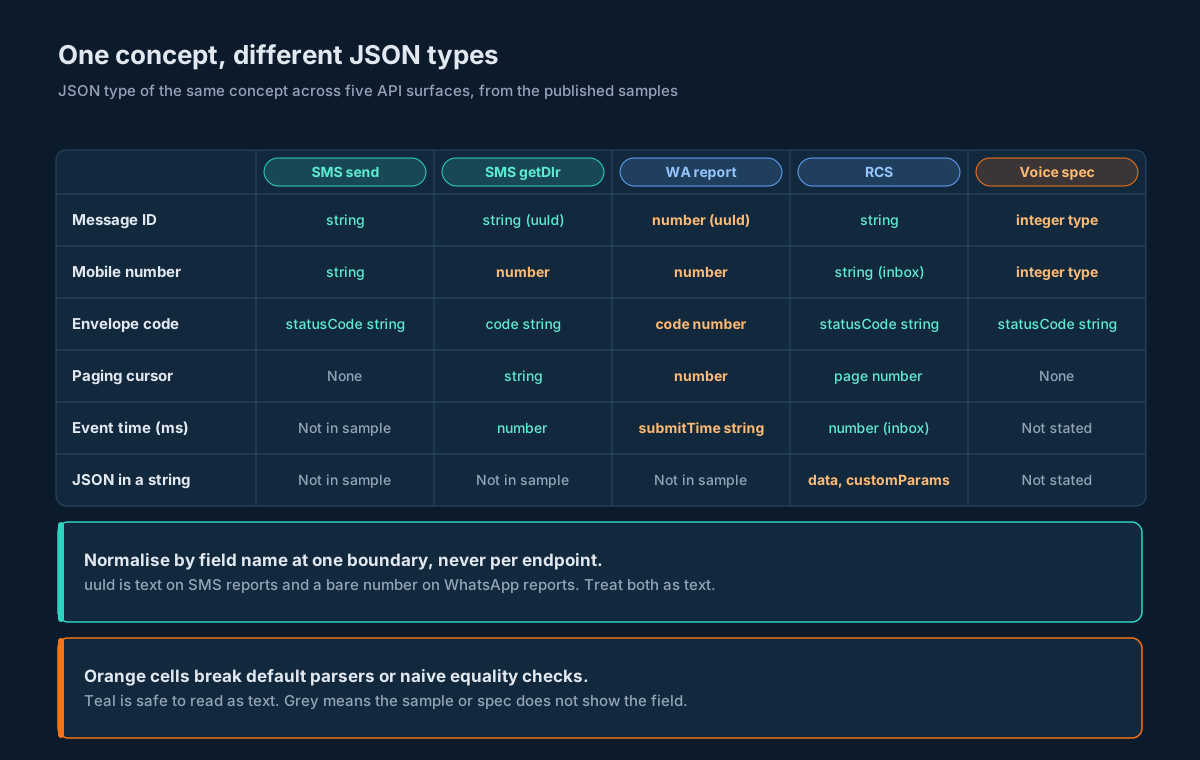
Read across a row and the pattern is plain. uuId is a string on SMS reports and a bare number on WhatsApp reports. submitTime flips the other way: a number on SMS, a string on WhatsApp. incomingId on the RCS inbox is a quoted "451" while botId next to it is a bare 3. None of this is wrong JSON. It just means you can’t write one parser per endpoint and expect your stored data to agree with itself.
A note on the samples: masked values such as 9177709xxxxx aren’t valid JSON as printed. When you copy a sample into a test fixture, swap the x characters for digits first, and keep the length the same so the fixture still exercises a 12-digit mobile number.
What a Double Does to a 19-Digit ID
An IEEE 754 double has a 53-bit significand. Every integer up to 2^53, which is 9,007,199,254,740,992, fits exactly. Above that, the gap between representable values grows. Between 2^61 and 2^62 (roughly 2.3 x 10^18 to 4.6 x 10^18) the gap is 512. Between 2^62 and 2^63 it’s 1,024. Every 19-digit ID in these samples falls in one of those two bands. (IEEE 754 has the background if you want it.)
Here’s what happens to the real sample IDs. The “double value” column is the exact value the double holds; the “JavaScript prints” column is what String(Number(id)) shows, which is the shortest decimal that rounds back to the same double.
| Source | Original ID | Exact double value | JavaScript prints | Off by |
|---|---|---|---|---|
WAApi/report uuId | 3917313917152021246 | 3917313917152020992 | 3917313917152021000 | -254 |
getDlr uuId (row 1) | 6358884679059916409 | 6358884679059916800 | 6358884679059917000 | +391 |
getDlr uuId (row 2) | 6626503083053237902 | 6626503083053238272 | 6626503083053238000 | +370 |
SMSApi/send transactionId | 6305583318236810379 | 6305583318236810240 | 6305583318236810000 | -139 |
RCSApi/send transactionId | 3983571817594375469 | 3983571817594375680 | 3983571817594375700 | +211 |
Two things to notice. First, the printed value and the stored value don’t even agree with each other, so a log line won’t tell you what your database holds. Second, collisions are real: one thousand consecutive IDs starting at 3917313917152021246 map to just three distinct doubles. If your provider ever hands out IDs that sit close together, two messages can end up with the same stored key.
Language by Language: Where the Digits Go Missing
| Runtime and call | What a 19-digit JSON integer becomes | Lossless option |
|---|---|---|
Python json.loads | Exact int (arbitrary precision) | Already safe for integers. Add parse_float=Decimal for money. |
Node.js or browser JSON.parse | Rounded number | Reviver with context.source (Node 21 and newer), or quote long integers before parsing |
Java, Jackson readTree | LongNode or BigIntegerNode, exact | Read IDs with textValue() or bigIntegerValue(). Don’t bind them to double. |
Java, Gson into Map or Object | Double by default | Bind to typed classes with String fields, or set a ToNumberPolicy such as LAZILY_PARSED_NUMBER |
PHP json_decode | int if it fits in 64 bits, otherwise float | JSON_BIGINT_AS_STRING flag |
Go encoding/json into interface{} | float64 | Decoder.UseNumber() to get json.Number, or string struct fields where the server quotes the value |
| jq 1.6 | Rounded | Quote long integers before jq, or use a newer jq and check it (see the shell section) |
| Spreadsheet import of a CSV export | Cut to 15 significant digits and often shown in scientific notation | Import ID columns as text |
Two languages on that list are safe by accident, which is a trap of its own. Python and Jackson keep the digits, so tests written in them pass. Then the same ID goes out to a browser dashboard, a Node service, or a CSV someone opens in a spreadsheet, and it rounds there. That’s why the fix below is about types at a boundary, not about picking a “safe” language.
Python: Integers Are Safe, the Next Hop Isn’t
Python’s json module parses integers into arbitrary-precision int, so 3917313917152021246 comes back intact. Two things still go wrong in Python code:
- Floats. By default,
0.125becomes a binary float. That’s exact for 0.125 as it happens, but not for most rates. Passparse_float=Decimaland money stays decimal. - The next hop. A Python service that keeps the ID as an
intand returns it in JSON to a browser has just moved the rounding to the browser. Convert IDs tostrat the boundary so every consumer downstream sees text.
The module below is the whole boundary. It reads status at the right nesting level, binds rows only on success, turns every known ID key into text whichever JSON type it arrived as, accepts epoch milliseconds as a number or a digit string, refuses an ID that’s already a float, and decodes JSON-in-a-string fields once.
"""Lossless parsing helpers for messaging API responses."""
import json
from decimal import Decimal

# Keys that hold identifiers or phone numbers. They are text, whatever
# JSON type the server used.
ID_KEYS = {
    "uuId", "uuid", "transactionId", "msgId", "mobileNo", "mobile",
    "wabaNumber", "incomingId", "cursorId", "dltTemplateId",
}

def loads(body):
    """Parse JSON keeping integers exact and decimals as Decimal."""
    return json.loads(body, parse_float=Decimal)


def id_text(value):
    """Return an identifier as a string, refusing values already damaged."""
    if value is None:
        return None
    if isinstance(value, bool):
        raise TypeError("boolean where an identifier was expected")
    if isinstance(value, (float, Decimal)):
        raise TypeError("identifier arrived as a non-integer number: %r" % value)
    return str(value)


def nested_json(value):
    """Decode a field that carries JSON as a string (once, never twice)."""
    if isinstance(value, (dict, list)):
        return value
    if not isinstance(value, str) or not value.strip():
        return None
    return json.loads(value, parse_float=Decimal)


def status_ok(envelope):
    """Read the status word only; never branch on code or statusCode."""
    return str(envelope.get("status", "")).lower() == "success"


def epoch_ms(value):
    """Accept epoch milliseconds as a number or a digit string."""
    if value is None or value == "":
        return None
    text = str(value)
    if not text.isdigit():
        raise ValueError("not an epoch value: %r" % value)
    return int(text)


def normalise_row(row):
    """Copy a report row, turning every known ID field into text."""
    out = dict(row)
    for key in ID_KEYS & row.keys():
        out[key] = id_text(row[key])
    for key in ("submitTime", "deliveryTime", "readTime", "receivedAt"):
        if key in row:
            out[key] = epoch_ms(row[key])
    return out


def sms_dlr_rows(envelope):
    """Rows from SMSApi/reports/status (method=getDlr)."""
    inner = envelope.get("response", {})
    if not status_ok(inner):
        return []
    return [normalise_row(r) for r in inner.get("reports_dlrList", [])]


def wa_report_rows(envelope):
    """Rows from WAApi/report."""
    if not status_ok(envelope):
        return []
    data = envelope.get("data") or {}
    return [normalise_row(r) for r in data.get("records", [])]


def rcs_templates(envelope):
    """Templates from RCSApi/template/list, with data decoded."""
    out = []
    for t in envelope.get("templates", []):
        model = (nested_json(t.get("data")) or {}).get("templateModel", {})
        out.append({
            "name": t.get("name"),
            "type": t.get("type"),
            "active": type(t.get("status")) is int and t["status"] == 1,
            "model": model,
        })
    return out
And the tests, run against the published sample responses with their masked digits filled in. The third test is the one that matters most: after normalisation, the same key has the same Python type on SMS and WhatsApp.
import json
from decimal import Decimal
import msgparse as mp

# Published samples, with masked digits (x) replaced by zeros so they parse.
SMS_DLR = '''{"response": {"msg": "success",
 "cursors": {"next": "9ae9e5e", "start": "9ae9e5d"}, "code": "200",
 "pages": {"current": 1, "last": 12}, "count": {"total": 23, "current": 2},
 "reports_dlrList": [{"country": "IN", "amount": 0.125, "msgType": "text",
   "cost": 1, "deliveryTime": 1783887217000, "length": 13, "channel": "API",
   "msgId": "orderCreate", "cause": "Template Mismatch",
   "mobileNo": 917770900000, "uuId": "6358884679059916409",
   "dltTemplateId": "120115914280000000", "globalErrorCode": 17,
   "cursorId": 162438749, "network": "Idea", "senderName": "SMSGAT",
   "flashMsg": false, "submitTime": 1783887217389, "text": "test template",
   "status": "FAILED"}],
 "action": "status", "api": "reports", "status": "success"}}'''

WA_REPORT = '''{"apiName": "report", "action": "waReport", "status": "success",
 "msg": "success", "code": 200, "data": {
 "cursors": {"next": 19382015, "start": 18366779},
 "pages": {"current": 1, "last": 1},
 "records": [{"msgType": "text", "deliveryTime": 1691165382000,
   "billingModel": "SIC", "msgId": "tnNwDCgP1WhfLwn", "cause": "Read By User",
   "readTime": 1691165389000, "mobileNo": 919000000000,
   "uuId": 3917313917152021246, "wabaNumber": 917039600000,
   "globalErrorCode": "8006", "cursorId": 18366779,
   "submitTime": "1691165380316", "status": "DELIVERED"}],
 "counts": {"total": 8, "current": 6}}}'''

RCS_LIST = json.dumps({"templates": [{
    "data": json.dumps({"templateModel": {"name": "Flight_Booking",
        "type": "carousel", "height": "SHORT_HEIGHT", "width": "SMALL_WIDTH",
        "botId": "YOUR_BOT_ID", "carouselList": [{"cardTitle": "Your Trip is Confirmed",
        "cardDescription": "Mumbai to Dubai",
        "mediaUrl": "https://example.com/media/flight.jpg",
        "suggestions": [{"suggestionType": "reply", "displayText": "View QR",
        "postback": "View QR_[message_id]", "preference": 1}]}],
        "createdViaApi": True}}),
    "creationTime": 1784978480698, "botName": "YourBot",
    "name": "Flight_Booking", "updationTime": 1784978480698,
    "category": "Promotional", "type": "carousel", "status": 1}]})


def test_sms_dlr_ids_are_text():
    rows = mp.sms_dlr_rows(mp.loads(SMS_DLR))
    assert rows[0]["uuId"] == "6358884679059916409"
    assert rows[0]["mobileNo"] == "917770900000"
    assert rows[0]["cursorId"] == "162438749"
    assert rows[0]["amount"] == Decimal("0.125")
    assert rows[0]["submitTime"] == 1783887217389


def test_wa_report_unquoted_uuid_survives():
    rows = mp.wa_report_rows(mp.loads(WA_REPORT))
    assert rows[0]["uuId"] == "3917313917152021246"
    assert rows[0]["wabaNumber"] == "917039600000"
    # submitTime is a string here and a number on SMS; both become int.
    assert rows[0]["submitTime"] == 1691165380316


def test_same_key_same_shape_across_channels():
    sms = mp.sms_dlr_rows(mp.loads(SMS_DLR))[0]
    wa = mp.wa_report_rows(mp.loads(WA_REPORT))[0]
    for key in ("uuId", "mobileNo", "submitTime", "deliveryTime"):
        assert type(sms[key]) is type(wa[key]), key


def test_rcs_data_decoded_once():
    t = mp.rcs_templates(mp.loads(RCS_LIST))[0]
    assert t["active"] is True
    assert t["model"]["carouselList"][0]["suggestions"][0]["postback"] == "View QR_[message_id]"


def test_rcs_status_true_is_not_active():
    env = {"templates": [{"name": "x", "type": "text_message", "status": True, "data": "{}"}]}
    assert mp.rcs_templates(env)[0]["active"] is False


def test_damaged_id_is_refused():
    try:
        mp.id_text(3.917313917152021e18)
    except TypeError:
        return
    raise AssertionError("float id accepted")


def test_error_envelope_gives_no_rows():
    env = {"apiName": "report", "status": "error", "code": 200, "data": []}
    assert mp.wa_report_rows(env) == []


if __name__ == "__main__":
    for name, fn in sorted(globals().items()):
        if name.startswith("test_"):
            fn()
            print("pass", name)
id_text refusing a float is deliberate. If something upstream has already turned an ID into 3.917313917152021e+18, converting it back with int() gives 3917313917152020992, which looks like a perfectly good ID. Failing loudly is the only safe answer. The Python SMS API tutorial covers the send side; this module slots in wherever you read responses.
Node.js: Rescue the Source Text in the Reviver
JSON.parse turns every number into a double before your code ever sees it, so the usual reviver tricks are too late: by the time the reviver gets value, the digits are gone. Node 21 and newer (and current Chromium-based browsers) pass a third argument to the reviver, context, whose source property holds the original text of the number. That’s enough to recover the exact digits.
The module below checks for that support once at startup. On a runtime that has it, ID keys come back as their source text. On an older runtime, it quotes every integer of 16 or more digits before parsing, using a small scanner that skips anything inside a string, so a message body containing ref: 1234567890123456, is left alone.
// Lossless JSON parsing for messaging API responses (Node.js 21+).
const ID_KEYS = new Set([
  'uuId', 'uuid', 'transactionId', 'msgId', 'mobileNo', 'mobile',
  'wabaNumber', 'incomingId', 'cursorId', 'dltTemplateId',
]);

// Does this runtime pass the source text to revivers? (Node 21+, V8 11.4+)
const HAS_SOURCE = (() => {
  let seen = false;
  JSON.parse('1', (k, v, ctx) => { seen = ctx?.source === '1'; return v; });
  return seen;
})();

export function parseLossless(body) {
  const text = HAS_SOURCE ? body : quoteLongInts(body);
  return JSON.parse(text, function (key, value, ctx) {
    if (typeof value !== 'number') return value;
    const src = ctx?.source ?? String(value);
    if (ID_KEYS.has(key)) return src;             // IDs are text, always
    if (/^-?\d+$/.test(src) && !Number.isSafeInteger(value)) {
      return BigInt(src);                         // a huge counter, if any
    }
    return value;
  });
}

// Older runtimes: quote integers of 16+ digits that sit outside strings.
export function quoteLongInts(body) {
  let out = '';
  let inString = false;
  for (let i = 0; i < body.length; i++) {
    const ch = body[i];
    if (inString) {
      out += ch;
      if (ch === '\\') { out += body[++i] ?? ''; continue; }
      if (ch === '"') inString = false;
      continue;
    }
    if (ch === '"') { inString = true; out += ch; continue; }
    const m = /^-?\d+(?![.eE\d])/.exec(body.slice(i, i + 40));
    if (m && (i === 0 || !/[\w.]/.test(body[i - 1]))) {
      out += m[0].replace('-', '').length >= 16 ? `"${m[0]}"` : m[0];
      i += m[0].length - 1;
      continue;
    }
    out += ch;
  }
  return out;
}
A short test, which also shows the trap itself on the first line:
import assert from 'node:assert/strict';
import { parseLossless, quoteLongInts } from './parse.mjs';

const wa = '{"status":"success","code":200,"data":{"records":[{"uuId":3917313917152021246,"mobileNo":919000000000,"submitTime":"1691165380316","deliveryTime":1691165382000}]}}';

assert.equal(JSON.parse(wa).data.records[0].uuId, 3917313917152021000);
const r = parseLossless(wa).data.records[0];
assert.equal(r.uuId, '3917313917152021246');
assert.equal(r.mobileNo, '919000000000');
assert.equal(r.deliveryTime, 1691165382000);
assert.equal(JSON.parse(quoteLongInts(wa)).data.records[0].uuId, '3917313917152021246');
// Strings that merely contain digits are left alone.
assert.equal(quoteLongInts('{"text":"code 1234567890123456 ok"}'), '{"text":"code 1234567890123456 ok"}');
assert.throws(() => JSON.stringify({ n: 10n }), TypeError);
console.log('node ok');
assert.equal(quoteLongInts('{"text":"ref: 1234567890123456, ok"}'), '{"text":"ref: 1234567890123456, ok"}');
assert.equal(quoteLongInts('{"t":"a\\"b: 1234567890123456","n":12345678901234567}'), '{"t":"a\\"b: 1234567890123456","n":"12345678901234567"}');
assert.equal(quoteLongInts('[0.1234567890123456789, 1e20, 42]'), '[0.1234567890123456789, 1e20, 42]');
console.log('node scanner ok');
Three things to keep in mind on the Node side:
BigIntdoesn’t serialise.JSON.stringify({ n: 10n })throws aTypeError. That’s one reason the module turns IDs into strings rather thanBigInt: strings go back out throughJSON.stringifywithout any special handling.Number(id)undoes everything. Once an ID is a string, keep it one. Comparing with===against another string is exact; converting either side to a number isn’t.- Validation libraries can re-coerce. A schema that declares
uuIdasnumberwill happily accept the rounded value. Declare ID fields as strings matching^\d+$.
The Node.js SMS API tutorial and the WhatsApp wire contract both show where these responses enter a Node service.
Java: Read IDs as Text from the Tree
Java has the opposite problem from JavaScript. Jackson’s tree model keeps integers exact: a 19-digit value inside the long range becomes a LongNode, and anything bigger becomes a BigIntegerNode. The trouble comes from what you bind it to. Map uuId to a double field, or parse with Gson into a Map<String, Object>, which gives you Double by default, and the digits go.
Reading the tree and pulling fields out by hand is the most predictable approach for responses whose types vary by endpoint. idText returns text whether the server quoted the ID or not, and bigIntegerValue() means it still works if an ID ever outgrows long. epochMs covers submitTime arriving as a number on SMS and a string on WhatsApp.
import com.fasterxml.jackson.databind.DeserializationFeature;
import com.fasterxml.jackson.databind.JsonNode;
import com.fasterxml.jackson.databind.ObjectMapper;
import java.io.IOException;
import java.util.ArrayList;
import java.util.Collections;
import java.util.List;

public final class ReportParser {
    private static final ObjectMapper MAPPER = new ObjectMapper()
            .enable(DeserializationFeature.USE_BIG_DECIMAL_FOR_FLOATS);

    public static final class Row {
        public final String uuId;
        public final String mobileNo;
        public final String status;
        public final long submitTimeMs;

        Row(String uuId, String mobileNo, String status, long submitTimeMs) {
            this.uuId = uuId;
            this.mobileNo = mobileNo;
            this.status = status;
            this.submitTimeMs = submitTimeMs;
        }
    }

    /** IDs come back as text whether the server quoted them or not. */
    static String idText(JsonNode n) {
        if (n == null || n.isNull() || n.isMissingNode()) return null;
        if (n.isTextual()) return n.textValue();
        if (n.isIntegralNumber()) return n.bigIntegerValue().toString();
        throw new IllegalStateException("identifier is neither text nor integer: " + n);
    }

    /** submitTime is a number on SMS reports and a string on WhatsApp reports. */
    static long epochMs(JsonNode n) {
        if (n.isIntegralNumber()) return n.longValue();
        if (n.isTextual()) return Long.parseLong(n.textValue());
        throw new IllegalStateException("not an epoch value: " + n);
    }

    /** Rows from WAApi/report. Read status first; bind rows only on success. */
    public static List<Row> waRows(String body) throws IOException {
        JsonNode root = MAPPER.readTree(body);
        if (!"success".equalsIgnoreCase(root.path("status").asText())) {
            return Collections.emptyList();
        }
        JsonNode records = root.path("data").path("records");
        List<Row> rows = new ArrayList<>();
        if (!records.isArray()) return rows;
        for (JsonNode r : records) {
            rows.add(new Row(
                    idText(r.path("uuId")),
                    idText(r.path("mobileNo")),
                    r.path("status").asText(),
                    epochMs(r.path("submitTime"))));
        }
        return rows;
    }
}
USE_BIG_DECIMAL_FOR_FLOATS makes decimals such as amount arrive as DecimalNode, so decimalValue() gives you an exact BigDecimal. If you prefer data binding, give every ID field the type String; Jackson’s default coercion turns a JSON number into its text form for a String target. The Java and Spring Boot guide covers the two-stage parse (envelope first, typed payload second) that this fits into.
Want to see the trap in plain Java, without any library? (long) Double.parseDouble("3917313917152021246") prints 3917313917152020992. new BigInteger("3917313917152021246") prints the original.
jq and Shell Scripts: Quote Before You Parse
jq 1.6, which is still what many long-term-support Linux releases install, stores every number as a double. That means jq -r .uuId on the WhatsApp report prints 3917313917152021000, and even jq -c . rewrites the number in the output. No filter you write afterwards can get the digits back.
The robust shell answer is to quote long integers before jq sees them. Python is on nearly every box that has jq, and its JSON parser can hand integer text to a callback before converting it:
#!/usr/bin/env bash
# Quote any JSON integer of 16 or more digits, then hand the result to jq.
# Usage: curl ... | ./quote_ids.sh '.data.records[] | [.uuId, .status] | @tsv'
set -euo pipefail
python3 -c '
import json, sys
def keep(s):
    return s if len(s.lstrip("-")) >= 16 else int(s)
doc = json.load(sys.stdin, parse_int=keep, parse_float=str)
json.dump(doc, sys.stdout)
' | jq -r "$1"
Use it like this:
curl -s -X POST 'https://unify.smsgateway.center/WAApi/report' \
  --form 'userid=YourUsername' --form 'password=xxxxx' \
  --form 'wabaNumber=91XXXXXXXXXX' --form 'fromDate=2026-11-02 00:00:00' \
  --form 'toDate=2026-11-02 23:59:59' --form 'pageLimit=20' \
  --form 'startCursor=1' --form 'output=json' \
  | ./quote_ids.sh '.data.records[] | [.uuId, .status] | @tsv'
Floats come through as strings too (parse_float=str), so 0.125 stays 0.125 rather than picking up binary noise. If you need arithmetic on a field in jq, convert it explicitly with tonumber for that one expression and accept the double there.
Newer jq releases (1.7 onwards) keep the original text of a number literal as long as you don’t do arithmetic on it. Check whatever is installed rather than trusting the version string:
echo '{"uuId": 3917313917152021246}' | jq -r .uuId
# Safe if it prints 3917313917152021246. Pre-quote if it prints 3917313917152021000.
JSON Inside JSON: Fields That Hold Strings
Some fields carry a whole JSON document as a string value. On the RCS template list, each template’s data field looks like this (shortened):
{
  "data": "{\"templateModel\":{\"name\":\"Flight_Booking\",\"type\":\"carousel\",\"height\":\"SHORT_HEIGHT\",\"width\":\"SMALL_WIDTH\",\"carouselList\":[{\"cardTitle\":\"Your Trip is Confirmed\",\"suggestions\":[{\"suggestionType\":\"reply\",\"displayText\":\"View QR\",\"postback\":\"View QR_[message_id]\",\"preference\":1}]}],\"createdViaApi\":true}}",
  "name": "Flight_Booking",
  "type": "carousel",
  "status": 1
}
The outer parse gives you a string. You have to parse that string a second time to reach templateModel. On the way out, RCSApi/send expects the same shape in reverse: customParams inside msg is itself a JSON string, so you serialise the parameter object first and then embed the resulting string.
Three habits keep this from biting:
- Decode exactly once, in the boundary. The
nested_jsonhelper in the Python module accepts a string and decodes it, accepts an object or array and returns it unchanged, and returnsNonefor an empty value. If a nested field ever arrives already decoded, nothing breaks. - Apply the same number rules inside. The inner document is JSON too. Parse it with the same lossless settings as the outer one, or a long number inside it rounds where you aren’t looking.
- Build outbound strings with a serialiser, never by concatenation. A customer name containing a quote mark breaks hand-built JSON. Serialise the inner object with your JSON library, then put the resulting string into the outer object and serialise that.
Here’s the outbound side for an RCS template send in Python. The inner customParams object is serialised on its own, then embedded:
import json

# Key names follow your template's variables; the point here is the double serialisation.
custom_params = {"name": "Asha", "orderid": "ORD-20391"}
msg = {
    "contentMessage": {
        "templateMessage": {
            "templateCode": "Flight_Booking",
            "customParams": json.dumps(custom_params, ensure_ascii=True),
        }
    },
    "ttl": "86400s",
}
form_value = json.dumps(msg, ensure_ascii=True)  # goes in the msg form field
assert json.loads(json.loads(form_value)["contentMessage"]["templateMessage"]["customParams"]) == custom_params
The RCS rich cards and carousels guide goes deeper into the templateModel that comes out of data and how to diff it against what you submitted.
Reading the Envelope Without Trusting Its Types
The envelope tells you whether the call worked. Its fields aren’t typed consistently either:
| Endpoint | Status field | Code field | Code type |
|---|---|---|---|
SMSApi/send | "status": "success" | statusCode | string "200" |
SMSApi/reports/status (getDlr) | response.status | response.code | string "200" |
WAApi/report | status | code | number 200 |
rest/rcs/v1/inbox | status | statusCode | string "200" (and "403" on the error sample) |
The status word is the one consistent signal, so read that. Notice the nesting, too: on getDlr it lives under response, while on WAApi/report it sits at the top level. A check written as body.code === 200 passes on WhatsApp and fails on SMS. A check written as body.statusCode == "200" fails on both reports. A check on status at the right level works everywhere.
The shape that holds up across all of these:
- Parse loosely, into a generic tree or dictionary.
- Read
statusat the level that endpoint uses. - If it isn’t
success, stop. Don’t bind the payload, because error replies can carry a different shape (an empty array where an object would be, for example). - Only then bind the typed payload.
Keep code, statusCode, msg and reason for logging. Don’t branch on them, and don’t parse the human-readable text in msg or reason.
Money and Rates: Decimal, Never Float
The SMS delivery report carries "amount": 0.125 per row. That particular value happens to be exact in binary, because it’s one eighth. Most rates aren’t. Add up a published rate of 0.17 ten thousand times with floats and you get 1700.0000000001817. Do the same with Decimal and you get 1700.00. Over a month of reconciliation that drift is real money, and it stops your totals matching the invoice.
The rules are short:
- Parse decimals as decimals.
json.loads(body, parse_float=Decimal)in Python,USE_BIG_DECIMAL_FOR_FLOATSin Jackson. In JavaScript, use the same source-text reviver approach to keepamountas a string, then hand it to a decimal library. - Store in
NUMERIC, neverREALorFLOAT. Four decimal places covers the rates on these surfaces. - Sum in the database or in decimal types. Convert to float only for display, at the very end.
Reconciling a messaging invoice across four channels builds the ledger these amounts feed into.
Timestamps: Numbers, Strings and Formatted Twins
Time fields come in three flavours on these surfaces:
| Field | Where | JSON type | Unit |
|---|---|---|---|
submitTime | getDlr rows | number | epoch milliseconds |
submitTime | WAApi/report rows | string | epoch milliseconds |
deliveryTime, readTime | WAApi/report rows | number | epoch milliseconds |
receivedAt | RCS inbox rows | number | epoch milliseconds |
receivedAtFormatted | RCS inbox rows | string | YYYY-MM-DD HH:MM:SS, no zone |
creationTime, updationTime | RCS template list | number | epoch milliseconds |
Epoch milliseconds right now are 13 digits, comfortably inside the safe-integer range, so doubles don’t hurt them. The risk here is type, not precision: "1691165380316" > 1783887217389 compares a string to a number, and every language has its own opinion about what that means.
Normalise every epoch field to a 64-bit integer at the boundary, accepting either a number or a string of digits. The epoch_ms helper in Python and epochMs in Java both do that. Then store as BIGINT.
When a row carries both an epoch value and a formatted string, as the RCS inbox does with receivedAt and receivedAtFormatted, use the epoch value. It’s unambiguous. The formatted string has no zone, so you’d have to guess one, and two sources that disagree are worse than one.
Phone Numbers and PINs Are Text
mobileNo arrives as a bare number on both the SMS and WhatsApp report samples, and as a string on the RCS inbox. Twelve-digit Indian mobile numbers with the 91 prefix fit easily inside a double, so they won’t round. They’re still not numbers:
- You never add or compare them by size.
- Other countries’ numbers can be longer, and formats with a leading
+or0can’t be numbers at all. - A number column in a spreadsheet shows them in scientific notation.
Turn them into strings at the boundary, same as IDs. The ID_KEYS set in the Python module includes mobileNo, mobile and wabaNumber for exactly this reason.
PINs are the sharper case. The voice OpenAPI file types the OTP pin as an integer. An OTP of 042913 sent as the integer 42913 is a five-digit number, and the call reads out the wrong code. Generate OTPs as digit strings and send them as strings. Whether the server reads pin as text or as a number, a string with its leading zero intact is correct either way. The Voice Call API wire contract covers the rest of that endpoint.
Writing It Back: Storage, Logs and Outbound JSON
Getting the parse right is half the job. The other half is not undoing it on the way out.
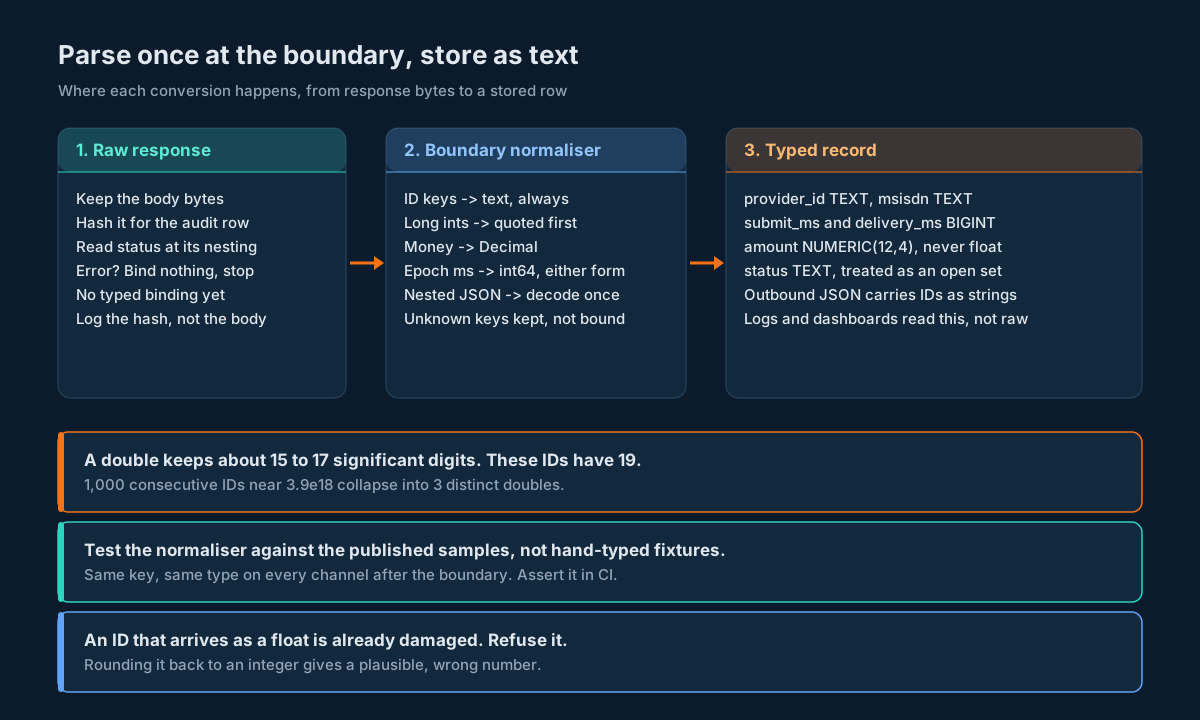
Storage. Use TEXT for every identifier and phone number, BIGINT for epoch milliseconds, and NUMERIC for money. Here’s a delivery report table that follows those rules (the DDL runs unchanged on PostgreSQL and SQLite):
CREATE TABLE delivery_report (
  channel        TEXT    NOT NULL,          -- 'sms' | 'whatsapp' | 'rcs' | 'voice'
  provider_id    TEXT    NOT NULL,          -- uuId / transactionId, as text
  msisdn         TEXT    NOT NULL,          -- mobileNo, as text
  status         TEXT    NOT NULL,          -- DELIVERED, FAILED, ... (open set)
  submit_ms      BIGINT,                    -- epoch milliseconds
  delivery_ms    BIGINT,
  amount         NUMERIC(12, 4),            -- never a float column
  raw_body_sha   TEXT,                      -- hash of the response it came from
  PRIMARY KEY (channel, provider_id, msisdn, submit_ms)
);
A REAL column silently does the same damage as JSON.parse. Insert 3917313917152021246 into a SQLite column declared REAL and read it back as an integer: you get 3917313917152020992. A TEXT column hands back the exact string, and an equality lookup on it matches. The outbound message table uses the same column types for the send side.
Logs. Log IDs as quoted strings. Structured loggers that serialise to JSON will otherwise emit them as numbers, and your log search tool will parse them as doubles. Then a search for the real ID finds nothing.
Outbound JSON. Any API you expose to your own frontends or partners should send IDs as strings, even if your internal type is an integer. That’s the only representation every client parses the same way.
CSV exports. Quote ID columns, and tell people who open them in a spreadsheet to import those columns as text.
A Parsing Contract You Can Test
Types drift. A field that’s quoted today could arrive bare after a platform release, or the other way round. You want to find out from a failing test, not from a reconciliation report three weeks later.
Pin the contract with three kinds of test:
- Golden fixtures from the published samples. Copy each sample response into a fixture file, fill in the masked digits, and run it through your boundary. The Python tests above do exactly that for
getDlr,WAApi/reportand the RCS template list. - A same-key, same-type assertion. After normalisation,
uuId,mobileNo,submitTimeanddeliveryTimemust have the same type on every channel. This catches the day someone adds a new endpoint and forgets to route it through the boundary. - A live shape probe. Once a night, call a read-only endpoint against your own account, run the raw body through a check that records the JSON type of each ID field, and alert if any type changes. Store the result, not the body. The contract testing harness shows how to run probes like this without sending a single message.
One more test worth having: feed your boundary an ID as a float and make sure it raises. That’s test_damaged_id_is_refused in the Python suite. It guards against someone “simplifying” the helper later.
Decision Matrix: Which Fix for Which Stack
| Your situation | Do this | Why |
|---|---|---|
| Python service, writes to a database | json.loads(..., parse_float=Decimal), IDs through id_text, TEXT columns | Integers already exact; protect money and the next hop |
| Python service that returns JSON to a browser | Same, and emit IDs as strings | The browser’s JSON.parse is where the rounding would happen |
| Node.js 21 or newer | Reviver reading context.source for ID keys | Exact digits with no pre-processing |
| Node.js 20 or older, or a runtime you don’t control | Scanner that quotes 16+ digit integers outside strings, then JSON.parse | Source text isn’t available, so fix the text first |
| Java with Jackson | readTree, idText helper, USE_BIG_DECIMAL_FOR_FLOATS | Tree keeps integers exact; binding decides what survives |
| Java with Gson | Typed classes with String ID fields, or a ToNumberPolicy | Object and Map targets default to Double |
| Go | Decoder.UseNumber() and json.Number, or typed structs with string IDs | interface{} targets default to float64 |
| PHP | json_decode($body, true, 512, JSON_BIGINT_AS_STRING) | Keeps oversized integers as strings |
| Shell with jq 1.6 | Pre-quote with quote_ids.sh | jq 1.6 rounds every number |
| Shell with newer jq | Run the one-line check; pre-quote anyway if it prints the rounded value | Behaviour depends on the build, so measure it |
| Spreadsheet or BI tool | Import ID and phone columns as text | Spreadsheets keep 15 significant digits |
Implementation Checklist
- List every endpoint you read, and every field in its response that holds an ID, a phone number, a time or money.
- Route every response through one boundary module. No endpoint-specific parsing outside it.
- Turn ID and phone fields into text by key name, whichever JSON type they arrive as.
- Refuse an ID that arrives as a float or non-integer number.
- Parse decimals as decimals and store money in
NUMERIC. - Accept epoch milliseconds as a number or a digit string; store as
BIGINT. - Prefer epoch fields over formatted twins with no zone.
- Decode JSON-in-a-string fields once, and accept an already-decoded object too.
- Build outbound nested JSON with a serialiser, never by string concatenation.
- Read
statusat the right nesting level; never branch oncodeorstatusCode. - Store IDs and phone numbers in
TEXTcolumns; check noREALorFLOATcolumn holds one. - Log IDs as quoted strings, and send them as strings in any JSON you emit.
- Generate OTPs and PINs as digit strings and send them as strings.
- Add golden fixtures from the published samples with masked digits filled in.
- Assert that the same key has the same type on every channel after normalisation.
- Check your jq build with the one-line test, or pre-quote.
- Run a nightly probe that records the JSON type of each ID field and alerts on change.
Unspecified Behaviour and How to Code Around It
A few behaviours that affect parsing aren’t pinned down by anything you can read today. Each item below gives you the choice that stays correct either way, and none of them needs you to wait for an answer before shipping.
One. Treat every ID as text, including the ones that are quoted today. uuId is quoted on SMS reports and bare on WhatsApp reports. Nothing promises either will stay that way. A boundary that returns text from a string or an integer is correct in both cases.
Two. Don’t assume IDs fit in a signed 64-bit integer. Every sample ID sits below 9,223,372,036,854,775,807, but no maximum is published. Text has no ceiling, and in Java bigIntegerValue() works whether or not the value fits in long.
Three. Read status, and treat code and statusCode as log-only. Their types already differ between endpoints. If they change again, code that never branched on them doesn’t notice.
Four. Accept every epoch field as a number or a digit string. submitTime is already both, depending on the channel. Applying the same rule to deliveryTime, readTime, receivedAt and creationTime costs one helper and survives any of them switching.
Five. Decode nested JSON fields if they’re strings and pass them through if they’re objects. data on the RCS template list is a string today. A helper that handles both shapes keeps working if that ever changes.
Six. Pass paging cursors back exactly as you received them. getDlr cursors look like short hex strings and WAApi/report cursors are numbers. Store the cursor as text and send it back as text. You never need to know what it encodes.
Seven. Treat cursorId and incomingId as IDs, even though they’re short. They’re small enough to survive a double today. Keeping them in the text set means you don’t have to revisit the decision if they grow.
Eight. Keep fields you don’t recognise. A new field in a report row shouldn’t fail the parse. Keep the whole row in a JSON column, or at least a hash of the raw body, and bind only the fields you know.
Nine. Read amount from its source text, never from a float. Whether the server sends 0.125 or "0.125", Decimal(str(value)) from the source text is exact. Converting a float to Decimal copies the float’s binary error.
Ten. Treat delivery statuses as an open set. DELIVERED, FAILED and PENDING appear in the SMS samples, READ is mentioned on the WhatsApp page. Store the string, map the ones you know, and route anything else to an “unknown” bucket that you alert on.
Eleven. Fill masked sample values with digits of the same length. A fixture built from 9177709xxxxx with zeros in place of the x characters keeps the 12-digit shape your normaliser has to handle, and parses.
Twelve. Compare IDs as strings, never as numbers. String equality on normalised text is exact everywhere. Numeric equality is exact only in some languages, and only until someone adds a conversion.
FAQs
Why does JSON.parse change my 19-digit message ID?
Because it converts every JSON number to a double, and a double holds integers exactly only up to 9,007,199,254,740,991. A 19-digit ID like 3917313917152021246 becomes 3917313917152021000 when printed and 3917313917152020992 in memory. No error is raised. Read the source text in a reviver (Node 21 and newer) or quote long integers before parsing.
Is Python safe for large message IDs?
Yes, for integers. Python’s json module parses them into exact int values. It isn’t safe for decimals unless you pass parse_float=Decimal, and it can’t protect the next system: if you send the ID on to a browser as a JSON number, it rounds there. Convert IDs to strings at the boundary.
Should I store message IDs in a BIGINT column?
Use TEXT. A BIGINT holds today’s sample IDs exactly, but there’s no published maximum, and every hop through a language without 64-bit integers is another chance to round. Text has no ceiling, compares exactly, and survives every client.
Does BigInt fix the problem in JavaScript?
Only if you create it from the source text, before the number becomes a double. BigInt(JSON.parse(body).uuId) is too late, because the digits are already gone. BigInt also throws in JSON.stringify, so for IDs a plain string is the simpler choice.
Why is uuId a string on the SMS report and a number on the WhatsApp report?
The two endpoints serialise the same concept differently: SMSApi/reports/status quotes uuId, WAApi/report doesn’t. Your code shouldn’t care. Normalise by field name at one boundary, and both become text.
How do I read the RCS template list’s data field?
Parse it a second time. The outer parse gives you a string. Decoding that string gives you {"templateModel": {...}}. Use the same lossless settings for the inner parse, and write the helper so it also accepts an object, in case the field ever arrives decoded.
Are phone numbers safe to keep as numbers?
No. Twelve-digit numbers fit in a double, so they won’t round, but they aren’t quantities. Spreadsheets show them in scientific notation, other formats carry a + or a leading 0, and an OTP with a leading zero loses a digit as an integer. Keep phone numbers and PINs as text.
Can jq handle 19-digit IDs?
jq 1.6 can’t; it rounds every number. Newer builds keep number literals intact if you don’t do arithmetic on them. Run echo '{"uuId": 3917313917152021246}' | jq -r .uuId and check the output. If it’s rounded, pre-quote long integers with a small Python filter before jq.
Keep Every Digit From the First Response to the Last Report
Building a delivery report pipeline, an invoice reconciler or an inbox across SMS, WhatsApp, RCS and voice? Try every endpoint in this guide against the SMSGatewayCenter sandbox, run the sample responses through the boundary module, and get in touch through our contact page when you’re ready to move to production volumes.
More from our blog
RCS Rich Cards and Carousels as a Content Model: Validate, Version and Send Cards Without Surprises
Voice Call API Wire Contract: OBD Calls, Voice OTP, Audio Library, Schedules and Delivery Reports
SMS Account Security Audit Trail: Activity Logs, Login Alerts and Connected Devices via API