Table of Contents
- The Short Answer
- TL;DR
- What Every Other Python SMS Tutorial Leaves Out
- Prerequisites
- Your First Send in Four Steps
- The Four Layers
- Layer One: Configuration and Credentials
- Layer Two: The HTTP Client
- The Two Mistakes That Break Python SMS Clients
- Layer Three: Typed Responses
- Counting Segments Before You Send
- The India DLT Layer
- Rendering DLT Variables Without Corrupting Them
- Sending OTPs
- Classifying Failures Before You Retry
- Concurrency: Threads, Asyncio and Why gather Is Wrong Twice
- Layer Four: Celery for Production Sending
- Receiving Delivery Reports with FastAPI
- Polling Delivery Reports Instead
- The Official Python SDK
- Security and Secrets
- Testing
- Production Readiness Checklist
- Ten Mistakes
- Frequently Asked Questions
The Short Answer
To send an SMS from Python, POST form-encoded credentials and message parameters to https://unify.smsgateway.center/SMSApi/send with an explicit timeout, then parse the JSON response and check statusCode rather than the HTTP status. That is five lines. Everything that makes the difference between a snippet and a system happens around those five lines: requests applies no timeout unless you pass one, so a stalled connection hangs your worker forever; the API is form-encoded, so passing json= silently sends the wrong content type; a timeout does not tell you whether the message was accepted, so retrying without an idempotency key double-sends and double-bills; and India’s DLT rules require template registration and careful variable substitution that naive str.replace chaining will corrupt.
TL;DR
requestshas no default timeout.requests.post(url, data=payload)can hang indefinitely. Always passtimeout=(connect, read).httpxdefaults to five seconds, which is better, but teams routinely disable it.- Use
data=, neverjson=. The endpoint expectsapplication/x-www-form-urlencoded. Passingjson=setsContent-Type: application/jsonand the request fails in a way that looks like an auth problem. - Check
statusCodein the body, not the HTTP status. A successful send returns"statusCode": "200"as a string onSMSApi/send, and an integer onWAApi/send. Type your model to accept both. - Reuse a
Sessionorhttpx.Client. A fresh connection per message means a fresh TLS handshake per message. - Count segments before sending. One credit is 160 GSM-7 characters or 70 Unicode. A single curly apostrophe re-encodes the whole message and can triple its cost.
- Substitute DLT variables positionally in one pass.
re.subinterprets backreferences in the replacement string, and chainedstr.replacecorrupts when a substituted value contains the next placeholder. - Classify failures before retrying. Permanent failures never succeed and always bill. Only transient ones deserve backoff.
- Celery with
acks_lateplus a non-idempotent send equals double delivery on worker crash. Pair it with an idempotency key. - Read the raw body in your DLR webhook. A form-encoded payload fed to a JSON parser or a pydantic form model fails or silently loses fields.
What Every Other Python SMS Tutorial Leaves Out
The pages currently ranking for this query, from vendors like Vonage, Telesign, LabsMobile, SMSAPI, smsmode, Ozeki and Melrose Labs, rank because they answer the literal question fast: here is import requests, here is requests.post, here is your message. That is legitimately what a developer wants in the first ninety seconds, and it is why those pages win the click.
They stop there. Not one of them addresses:
| Gap | Why it matters in Python specifically |
|---|---|
No default timeout in requests | A hung socket blocks a Gunicorn worker or a Celery process forever. This is the single most common Python integration outage. |
json= versus data= | Python’s two keyword arguments look interchangeable and are not. The failure presents as a confusing auth error. |
| Response type instability | statusCode is a quoted string on one endpoint and an integer on another. Untyped dict access papers over it until it does not. |
urllib3 Retry on POST | Enabling automatic retries on a non-idempotent POST double-sends and double-bills. |
asyncio.gather semantics | Unbounded fan-out plus first-exception cancellation that discards successful results. |
Celery acks_late | Redelivers on worker loss, which is correct for durability and catastrophic without idempotency. |
| Form-encoded webhooks in FastAPI | The idiomatic pydantic body model does not apply to a form-encoded push. |
| GSM-7 versus UCS-2 | Affects cost by up to 3x and is invisible in code review. |
| India DLT | Mandatory for Indian A2P traffic and absent from every international tutorial. |
This article is the part after the snippet. If you want the snippet first, the SMS API getting started guide covers authentication and a minimal call across languages. The sibling deep dives are SMS API in PHP and SMS API in Node.js, which cover the same architecture with each runtime’s own failure surface.
Prerequisites
- Python 3.11 or newer. The code uses
X | Yunion syntax,StrEnum, andtomllib-era typing conventions. Everything degrades gracefully to 3.10 withtyping.Union. - An SMSGatewayCenter account with either a username and password or an API key from your control panel.
- A registered sender ID. Indian headers are alphanumeric, up to six characters.
- DLT registration if you are sending to Indian numbers. This is not optional; see the DLT SMS hub.
- TLS 1.3 support. Older Python builds linked against ancient OpenSSL will fail the handshake. If you hit an SSL error before you hit an API error, work through the TLS 1.3 upgrade guide before debugging anything else.
python -m venv .venv
source .venv/bin/activate
pip install httpx pydantic tenacity celery redis fastapi uvicorn python-dotenv
pip install --group dev pytest pytest-asyncio respx
If you prefer requests, everything below translates directly and the differences are called out where they matter.
Your First Send in Four Steps
Step 1: Store your credentials outside your code.
# .env  (add to .gitignore)
SGC_USERID=your_username
SGC_PASSWORD=your_password
SGC_SENDERID=YOURID
SGC_DLT_ENTITY_ID=1234567890123456789
Step 2: Send one message.
import os

import httpx
from dotenv import load_dotenv

load_dotenv()

response = httpx.post(
    "https://unify.smsgateway.center/SMSApi/send",
    data={
        "userid": os.environ["SGC_USERID"],
        "password": os.environ["SGC_PASSWORD"],
        "sendMethod": "quick",
        "mobile": "919000000000",
        "msg": "Your order 4821 has shipped.",
        "senderid": os.environ["SGC_SENDERID"],
        "msgType": "text",
        "duplicatecheck": "true",
        "output": "json",
    },
    timeout=httpx.Timeout(15.0, connect=5.0),
)

print(response.json())
Step 3: Read the response.
{
  "status": "success",
  "mobile": "919000000000",
  "invalidMobile": "",
  "transactionId": "a1b2c3d4-...",
  "statusCode": "200",
  "reason": "success"
}
Step 4: Check the right field. response.status_code is HTTP. response.json()["statusCode"] is the API verdict. They disagree more often than you would expect, which is why the next several sections exist.
The equivalent cURL
Useful for reproducing a bug outside your application, and for pasting into a ticket:
curl --request POST \
  --url https://unify.smsgateway.center/SMSApi/send \
  --header 'content-type: application/x-www-form-urlencoded' \
  --data-urlencode 'userid=YourUsername' \
  --data-urlencode 'password=YourPassword' \
  --data-urlencode 'sendMethod=quick' \
  --data-urlencode 'mobile=919000000000' \
  --data-urlencode 'msg=Your order 4821 has shipped.' \
  --data-urlencode 'senderid=YOURID' \
  --data-urlencode 'msgType=text' \
  --data-urlencode 'output=json'
The full parameter reference lives on the Send SMS API documentation, and there is a ready-made Postman collection if you would rather click than type.
Want to run these calls before writing any code? Download the SMS Postman collection and send your first message in under a minute.
The Four Layers
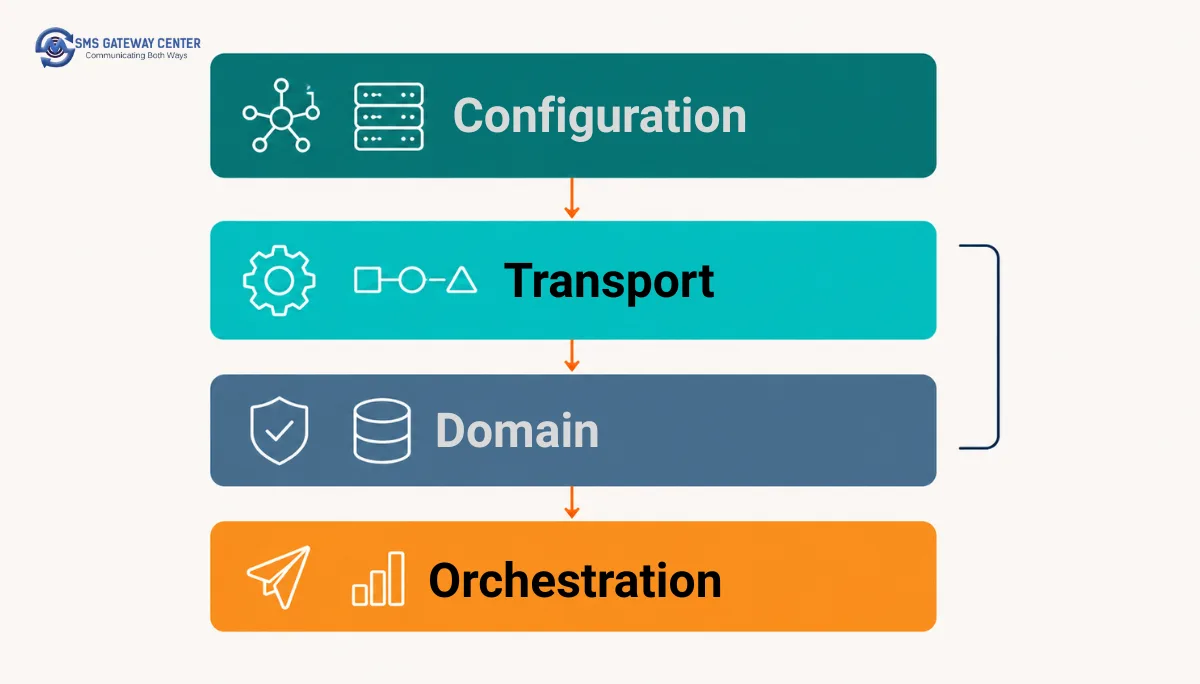
A production integration separates into four layers. Keeping them separate is what lets you test the middle two without a network and swap the outer two without rewriting logic.
| Layer | Responsibility | Depends on | Test strategy |
|---|---|---|---|
| 1. Configuration | Credentials, sender IDs, DLT identifiers, base URL | Environment only | Trivial, construct and assert |
| 2. Transport | Connection pooling, timeouts, form encoding, raw response | Layer 1 | Mock the network with respx |
| 3. Domain | Segment counting, template rendering, response typing, failure classification | Nothing external | Pure unit tests, no mocks at all |
| 4. Orchestration | Queueing, retries, concurrency, scheduling | Layers 2 and 3 | Integration tests with a Celery eager mode |
Layer 3 is the valuable one and the one tutorials never build. It has no I/O, so it is fast and exhaustively testable, and it is where every expensive bug actually lives.
Layer One: Configuration and Credentials
from __future__ import annotations

import os
from dataclasses import dataclass, field


@dataclass(frozen=True, slots=True)
class SmsConfig:
    userid: str
    password: str = field(repr=False)
    senderid: str
    base_url: str = "https://unify.smsgateway.center"
    api_key: str | None = field(default=None, repr=False)
    dlt_entity_id: str | None = None
    connect_timeout: float = 5.0
    read_timeout: float = 15.0

    @classmethod
    def from_env(cls) -> SmsConfig:
        try:
            return cls(
                userid=os.environ["SGC_USERID"],
                password=os.environ["SGC_PASSWORD"],
                senderid=os.environ["SGC_SENDERID"],
                api_key=os.environ.get("SGC_API_KEY"),
                dlt_entity_id=os.environ.get("SGC_DLT_ENTITY_ID"),
            )
        except KeyError as exc:
            raise RuntimeError(
                f"Missing required environment variable: {exc.args[0]}"
            ) from None

    def auth_payload(self) -> dict[str, str]:
        """Credentials go in the body only when no API key is configured."""
        return {} if self.api_key else {
            "userid": self.userid,
            "password": self.password,
        }

    def auth_headers(self) -> dict[str, str]:
        return {"apiKey": self.api_key} if self.api_key else {}
Two details worth copying.
field(repr=False) on secrets. A frozen dataclass generates a __repr__ that includes every field. The moment that object appears in a traceback, a Sentry event or a debug log, your password is in it. Marking secret fields repr=False removes them from the generated representation. This is the Python equivalent of the __debugInfo override used in the PHP tutorial and it costs one keyword argument.
from None on the re-raise. Without it, the KeyError chains into the traceback, and the chained exception’s message is the missing variable name. That is harmless here, but the habit matters: exception chaining leaks context, and credential-adjacent code is exactly where you do not want extra context.
API key versus username and password
userid + password | apiKey header | |
|---|---|---|
| Sent in | Request body | HTTP header |
| Appears in server access logs | Only if the body is logged, which it should not be | Only if headers are logged, which some proxies do |
| Rotatable without a password change | No | Yes |
| Revocable independently | No | Yes |
| Distinct key per service | No | Yes |
| Recommended for server-to-server | Acceptable | Preferred |
Use the API key in anything running unattended. Reserve the password path for interactive tooling and first-run testing. Either way, the password must be URL-encoded if it contains special characters, and httpx and requests both handle that for you when you pass data= a dict.
Layer Two: The HTTP Client
from __future__ import annotations

import httpx


class SmsTransport:
    """Owns the connection pool. Construct once, reuse for the process lifetime."""

    def __init__(self, config: SmsConfig) -> None:
        self._config = config
        self._client = httpx.Client(
            base_url=config.base_url,
            timeout=httpx.Timeout(
                config.read_timeout,
                connect=config.connect_timeout,
            ),
            limits=httpx.Limits(
                max_connections=50,
                max_keepalive_connections=20,
                keepalive_expiry=30.0,
            ),
            headers={
                "content-type": "application/x-www-form-urlencoded",
                "user-agent": "acme-notifications/1.4 (+python-httpx)",
                **config.auth_headers(),
            },
            # Do NOT enable automatic retries here. See below.
            follow_redirects=False,
        )

    def post_form(self, path: str, payload: dict[str, str]) -> httpx.Response:
        body = {**self._config.auth_payload(), **payload, "output": "json"}
        return self._client.post(path, data=body)

    def close(self) -> None:
        self._client.close()

    def __enter__(self) -> SmsTransport:
        return self

    def __exit__(self, *exc_info: object) -> None:
        self.close()
Points that are load-bearing:
data=, not json=. This is the single most common integration failure in Python against form-encoded APIs. httpx.post(url, json=payload) serialises to JSON and sets Content-Type: application/json. The endpoint expects application/x-www-form-urlencoded, so it does not see your userid at all, and returns an authentication error. Developers then spend an hour re-checking credentials that were never wrong. The output=json parameter controls the response format and has nothing to do with the request encoding.
One client, not one per call. httpx.post(...) at module level creates and discards a client, and therefore a TLS handshake, on every message. Under load that dominates your latency. Construct SmsTransport once at application startup.
follow_redirects=False. httpx defaults to not following redirects, unlike requests, which does. A redirect on a POST is not something you want silently followed with credentials attached. Being explicit documents the intent.
No raise_for_status() in the transport. When the API returns a non-2xx with a JSON error body, raising immediately discards the body, which is where reason and statusCode live. Let layer 3 decide.
If you are using requests instead
import requests
from requests.adapters import HTTPAdapter

session = requests.Session()
session.headers.update({
    "content-type": "application/x-www-form-urlencoded",
})
session.mount(
    "https://",
    HTTPAdapter(pool_connections=10, pool_maxsize=50, max_retries=0),
)

response = session.post(
    "https://unify.smsgateway.center/SMSApi/send",
    data=payload,
    timeout=(5, 15),          # (connect, read) - NEVER omit this
)
Note max_retries=0, explicitly. See the next section for why that is not paranoia.
The Two Mistakes That Break Python SMS Clients
Mistake one: omitting the timeout
This is worth its own section because it is the most damaging and the least visible.
# This can hang forever. There is no default timeout in requests.
requests.post(url, data=payload)
The requests documentation is explicit that without a timeout, a request can hang indefinitely. Not for thirty seconds. Indefinitely. If the remote end accepts your connection and then stops responding, the socket read blocks with no deadline.
In a synchronous web application, that ties up a worker process. Send a few hundred messages while the upstream is degraded and every worker is blocked on a socket, your health check fails, and your orchestrator restarts a service whose actual problem is one missing keyword argument.
httpx is better here: it applies a five-second default. The trap is different in httpx, and it is that timeout=None disables timeouts entirely, and developers reach for it the first time a legitimate slow response gets cut off. The correct fix is to raise the read timeout, not remove it.
Use a granular timeout so the two phases are tuned independently:
httpx.Timeout(
    15.0,        # default for read, write and pool
    connect=5.0, # a TCP handshake that takes 5s is never going to recover
)
Connect timeouts should be short. Read timeouts should exceed the API’s worst realistic processing time.
Mistake two: automatic retries on POST
Both urllib3 and httpx transports can be configured to retry failed requests transparently. On a POST that sends money or messages, this is a bug.
# DANGEROUS on a send endpoint.
from urllib3.util.retry import Retry

retry = Retry(total=3, allowed_methods=["POST"], status_forcelist=[502, 503, 504])
session.mount("https://", HTTPAdapter(max_retries=retry))
The failure sequence: the platform accepts your message, begins processing, and the response is lost to a network blip. urllib3 sees no response, retries, and the platform accepts the message a second time. Your recipient gets two messages, and since credits are consumed at submission rather than delivery, you paid twice.
Transport-level retries are safe on idempotent GETs, such as delivery report polling. They are unsafe on sends. Keep max_retries=0 on the send path and do retries in layer 4, where you control the idempotency key.
Layer Three: Typed Responses
from __future__ import annotations

from enum import StrEnum

from pydantic import BaseModel, Field, field_validator


class SendStatus(StrEnum):
    SUCCESS = "success"
    ERROR = "error"


class SendResult(BaseModel):
    status: SendStatus
    status_code: str = Field(alias="statusCode")
    reason: str = ""
    mobile: str = ""
    invalid_mobile: str = Field(default="", alias="invalidMobile")
    transaction_id: str | None = Field(default=None, alias="transactionId")

    model_config = {"populate_by_name": True, "extra": "ignore"}

    @field_validator("status_code", mode="before")
    @classmethod
    def _coerce_status_code(cls, value: object) -> str:
        """SMSApi/send returns "200" quoted. WAApi/send returns 200 unquoted."""
        return str(value)

    @field_validator("transaction_id", mode="before")
    @classmethod
    def _coerce_transaction_id(cls, value: object) -> str | None:
        return None if value is None else str(value)

    @property
    def ok(self) -> bool:
        return self.status is SendStatus.SUCCESS and self.status_code == "200"

    @property
    def rejected_numbers(self) -> list[str]:
        return [n for n in self.invalid_mobile.split(",") if n.strip()]
The two validators are not defensive programming for its own sake. They encode a real, observed inconsistency: statusCode comes back as the string "200" from SMSApi/send and as the integer 200 from WAApi/send. If you write if data["statusCode"] == 200: it works on one endpoint and silently fails on the other, and the failure is a false negative, meaning you treat a successful WhatsApp send as failed and retry it. Normalising to str at the boundary makes the rest of your code single-typed.
extra: "ignore" matters too. If the platform adds a field, your parser should not start throwing.
Composing the send
class SmsClient:
    def __init__(self, config: SmsConfig, transport: SmsTransport) -> None:
        self._config = config
        self._transport = transport

    def send(
        self,
        *,
        mobile: str,
        message: str,
        sender_id: str | None = None,
        unicode: bool = False,
        dlt_template_id: str | None = None,
        duplicate_check: bool = True,
    ) -> SendResult:
        payload: dict[str, str] = {
            "sendMethod": "quick",
            "mobile": mobile,
            "msg": message,
            "senderid": sender_id or self._config.senderid,
            "msgType": "unicode" if unicode else "text",
            "duplicatecheck": "true" if duplicate_check else "false",
        }

        if dlt_template_id:
            payload["dltTemplateId"] = dlt_template_id
        if self._config.dlt_entity_id:
            payload["dltEntityId"] = self._config.dlt_entity_id

        response = self._transport.post_form("/SMSApi/send", payload)
        return SendResult.model_validate(response.json())
Keyword-only arguments (the bare *) are deliberate. send("919000000000", "text") versus send("text", "919000000000") is a positional mistake that type checkers cannot catch when both parameters are str. Forcing keywords eliminates the whole class of error.
Counting Segments Before You Send
One credit covers 160 GSM-7 characters or 70 Unicode characters. Concatenated messages drop to 153 and 67 per segment because the User Data Header consumes payload. A single character outside the GSM-7 alphabet re-encodes the entire message.
from math import ceil
from typing import NamedTuple

GSM_BASIC = set(
    "@£$¥èéùìòÇ\nØø\rÅåΔ_ΦΓΛΩΠΨΣΘΞÆæßÉ !\"#¤%&'()*+,-./0123456789:;<=>?"
    "¡ABCDEFGHIJKLMNOPQRSTUVWXYZÄÖÑܧ¿abcdefghijklmnopqrstuvwxyzäöñüà"
)
# Extension-table characters cost TWO units each (escape + character).
GSM_EXTENDED = set("^{}\\[~]|€")


class Segmentation(NamedTuple):
    encoding: str
    units: int
    segments: int
    per_segment: int

    @property
    def is_unicode(self) -> bool:
        return self.encoding == "UNICODE"


def segment(message: str) -> Segmentation:
    units = 0
    is_gsm = True

    for char in message:
        if char in GSM_BASIC:
            units += 1
        elif char in GSM_EXTENDED:
            units += 2
        else:
            is_gsm = False
            break

    if not is_gsm:
        # UCS-2 bills 16-bit units, so an astral-plane emoji counts as two.
        units = len(message.encode("utf-16-be")) // 2

    single, multi = (160, 153) if is_gsm else (70, 67)
    segments = 1 if units <= single else ceil(units / multi)

    return Segmentation(
        encoding="TEXT" if is_gsm else "UNICODE",
        units=units,
        segments=max(1, segments),
        per_segment=single if units <= single else multi,
    )
Two subtleties that most implementations get wrong:
Iterating a str yields code points, not UTF-16 units. That is correct for the GSM branch. For the Unicode branch we deliberately switch to len(message.encode("utf-16-be")) // 2, because UCS-2 billing counts 16-bit units and a non-BMP emoji occupies two of them. Using len(message) in the Unicode branch undercounts emoji.
The extension table is not decoration. {, }, [, ], ~, ^, \, | and € each consume two units. A message that len() reports as 158 characters can be 164 GSM-7 units, which is two segments. URLs containing brackets are the usual culprit.
Verifying against the platform
You do not have to trust your own counter. The platform exposes its own calculator:
def price(transport: SmsTransport, message: str) -> dict[str, object]:
    response = transport.post_form("/SMSApi/info/msg", {"msg": message})
    return response.json()["response"]["msgList"]


# {'encoding': 'TEXT', 'length': 11, 'remaining': 149, 'credit': 1}
POST https://unify.smsgateway.center/SMSApi/info/msg returns encoding, length, remaining and credit, documented on the Get SMS Length and Cost page.
Call this at template save time, not send time. Adding a network round trip to every outbound message buys nothing if your local counter is correct. Call it once when a template is created or edited, assert that a template you expect to be English comes back as TEXT, and block the save otherwise. In CI:
import pytest


@pytest.mark.parametrize("name,template", ENGLISH_TEMPLATES.items())
def test_english_templates_stay_gsm7(name: str, template: str) -> None:
    result = segment(template)
    assert result.encoding == "TEXT", (
        f"Template {name!r} is Unicode. A curly quote, en dash, ellipsis "
        f"or rupee sign has crept in and will multiply its cost."
    )
    assert result.segments == 1, (
        f"Template {name!r} needs {result.segments} segments "
        f"({result.units} units). Trim it."
    )
That test has caught more real money than any performance optimisation I have written. The cost mechanics behind it are in the bulk SMS pricing breakdown.
The India DLT Layer
For Indian A2P traffic, TRAI’s regulations require every sender and every message template to be pre-registered on an operator DLT portal. Practically, that means two extra parameters on the send call and one extra validation step before it.
| Parameter | Meaning |
|---|---|
dltEntityId | Your registered Principal Entity identifier. Constant per account. |
dltTemplateId | The registered template identifier. Varies per message class. |
The message you send must match the approved template exactly, allowing for variable substitution. Mismatches are rejected before submission, which is at least free, but they are also invisible until you look.
Validate before you send
from pydantic import BaseModel, Field


class TemplateValidation(BaseModel):
    status: str
    status_code: str = Field(alias="statusCode")
    reason: str = ""
    template: str = ""

    model_config = {"populate_by_name": True, "extra": "ignore"}

    @property
    def matched(self) -> bool:
        return self.status == "success" and self.status_code == "200"

    @property
    def is_mismatch(self) -> bool:
        return self.status_code == "188"


def validate_template(
    transport: SmsTransport,
    *,
    sender_id: str,
    message: str,
    dlt_template_id: str,
) -> TemplateValidation:
    response = transport.post_form(
        "/SMSApi/validateTemplate",
        {
            "senderid": sender_id,
            "msg": message,
            "dltTemplateId": dlt_template_id,
        },
    )
    return TemplateValidation.model_validate(response.json())
A mismatch returns {"status": "error", "statusCode": "188", "reason": "message template mismatch"}. The endpoint is documented at validateTemplate.
Wire this into CI, not into your send path. Rendering every template with representative variables and asserting matched at build time catches a broken template before it reaches production. Calling it before every send doubles your API calls to prevent a problem that a build-time check already eliminated.
@pytest.mark.integration
@pytest.mark.parametrize("case", TEMPLATE_FIXTURES)
def test_registered_templates_still_match(transport, case) -> None:
    rendered = render_dlt(case.template, case.sample_values)
    result = validate_template(
        transport,
        sender_id=case.sender_id,
        message=rendered,
        dlt_template_id=case.dlt_template_id,
    )
    assert result.matched, f"{case.name}: {result.reason}"
Rendering DLT Variables Without Corrupting Them
DLT templates use {#var#} as the placeholder, and every placeholder is identical. There is no name to match on, so substitution is positional. This is where two idiomatic Python approaches both produce silent corruption.
Why re.sub is unsafe here
# BROKEN. Do not do this.
import re

def render_broken(template: str, values: list[str]) -> str:
    for value in values:
        template = re.sub(r"\{#var#\}", value, template, count=1)
    return template
re.sub treats the replacement string as a template, not a literal. Backslash sequences in it are interpreted. A value of C:\1 Depot inserts the first capture group, not the text. A value containing \g<0> inserts the whole match. Customer names, addresses and order references are user-controlled data, and user-controlled data reaching a regex replacement string is a corruption bug at best.
re.escape does not help, because it escapes the pattern, not the replacement. The correct escape is value.replace("\\", "\\\\"), which is easy to forget and easier to get wrong.
Why chained str.replace is unsafe here
# ALSO BROKEN.
def render_also_broken(template: str, values: list[str]) -> str:
    for value in values:
        template = template.replace("{#var#}", value, 1)
    return template
This one is subtler. If a substituted value itself contains the literal text {#var#}, the next iteration will substitute into the value you just inserted rather than into the next real placeholder. Every subsequent variable lands in the wrong slot. It only happens when data contains the placeholder text, which sounds unlikely until a support agent pastes a template fragment into a customer name field.
The correct approach: one positional pass
PLACEHOLDER = "{#var#}"


class TemplateArityError(ValueError):
    """Raised when the value count does not match the placeholder count."""


def render_dlt(template: str, values: list[str]) -> str:
    """Substitute {#var#} placeholders positionally in a single left-to-right pass.

    Never re-scans inserted text, so a value containing the placeholder
    literal cannot shift subsequent substitutions.
    """
    expected = template.count(PLACEHOLDER)
    if expected != len(values):
        raise TemplateArityError(
            f"Template expects {expected} value(s), received {len(values)}."
        )

    out: list[str] = []
    cursor = 0
    for value in values:
        index = template.index(PLACEHOLDER, cursor)
        out.append(template[cursor:index])
        out.append(str(value))
        cursor = index + len(PLACEHOLDER)
    out.append(template[cursor:])

    return "".join(out)
The cursor only ever moves forward across the original template, and inserted values go into a separate output list that is never scanned. Both failure modes are structurally impossible.
The arity check earns its place too. A template that expects three variables and receives two would otherwise ship with a literal {#var#} visible to the customer, and it would pass template validation only if the platform’s normalisation happened to tolerate it. Failing loudly at render time is correct.
>>> render_dlt("Hi {#var#}, order {#var#} ships on {#var#}.", ["Asha", "4821", "Tuesday"])
'Hi Asha, order 4821 ships on Tuesday.'

>>> render_dlt("Hi {#var#}, ref {#var#}.", ["{#var#}", "9"])
'Hi {#var#}, ref 9.'      # the injected placeholder stays inert
This same hazard exists in every language. The Node.js tutorial documents the JavaScript variant, where String.replace expands $& in the replacement.
Sending OTPs
There is a dedicated endpoint for one-time passwords that generates, stores and verifies the code, so you never persist it yourself.
Generate: POST https://unify.smsgateway.center/SMSApi/otp with sendMethod=generate.
from pydantic import BaseModel, Field


class OtpGenerated(BaseModel):
    status: str
    status_code: str = Field(alias="statusCode")
    reason: str = ""
    create_time: int | None = Field(default=None, alias="createTime")
    expiry_time: int | None = Field(default=None, alias="expiryTime")
    retry_after: int | None = Field(default=None, alias="retryAfter")

    model_config = {"populate_by_name": True, "extra": "ignore"}

    @property
    def ok(self) -> bool:
        return self.status_code == "300"


def generate_otp(
    transport: SmsTransport,
    config: SmsConfig,
    *,
    mobile: str,
    dlt_template_id: str | None = None,
    code_length: int = 6,
    expiry_seconds: int = 300,
) -> OtpGenerated:
    payload = {
        "sendMethod": "generate",
        "mobile": mobile,
        "msgType": "text",
        # The literal $otp$ placeholder is substituted by the platform.
        "msg": f"{{#var#}} is your verification code. Valid for "
               f"{expiry_seconds // 60} minutes.".replace("{#var#}", "$otp$"),
        "medium": "sms",
        "codeType": "num",
        "codeLength": str(code_length),
        "codeExpiry": str(expiry_seconds),
        "senderid": config.senderid,
    }
    if dlt_template_id:
        payload["dltTemplateId"] = dlt_template_id

    response = transport.post_form("/SMSApi/otp", payload)
    return OtpGenerated.model_validate(response.json())
Verify: same endpoint, sendMethod=verify.
def verify_otp(transport: SmsTransport, *, mobile: str, otp: str) -> bool:
    response = transport.post_form(
        "/SMSApi/otp",
        {"sendMethod": "verify", "mobile": mobile, "otp": otp},
    )
    return str(response.json().get("statusCode")) == "301"
Two things to handle properly.
statusCode 300 means generated, 301 means verified. These are not HTTP codes. Do not compare against 200.
retryAfter is a millisecond epoch, not a duration. Convert before showing a countdown, or your users will be told to wait fifty-seven thousand years.
from datetime import datetime, timezone


def seconds_until_resend(result: OtpGenerated) -> int:
    if result.retry_after is None:
        return 0
    target = datetime.fromtimestamp(result.retry_after / 1000, tz=timezone.utc)
    delta = (target - datetime.now(timezone.utc)).total_seconds()
    return max(0, int(delta))
Endpoints documented at Generate OTP and Verify OTP.
Classifying Failures Before You Retry
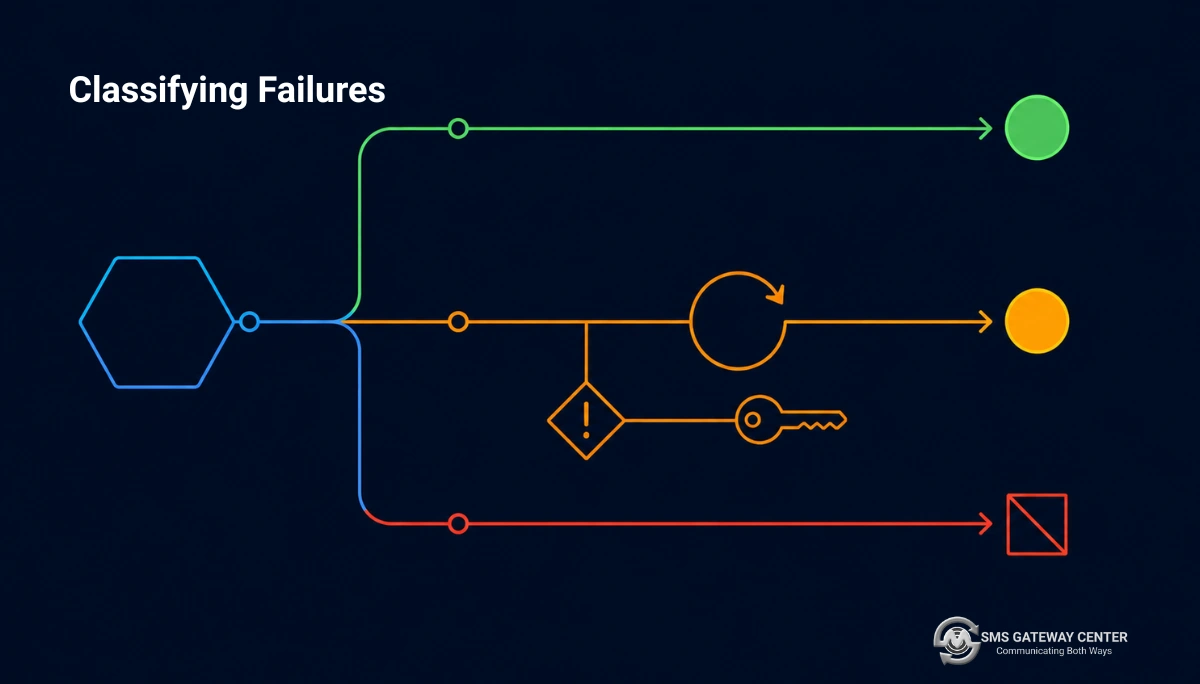
Retrying everything is expensive and retrying nothing loses recoverable messages. The distinction is mechanical.
from enum import StrEnum, auto


class Disposition(StrEnum):
    SUCCESS = auto()
    PERMANENT = auto()    # never retry, it will fail identically and bill again
    TRANSIENT = auto()    # retry with backoff
    AMBIGUOUS = auto()    # retry ONLY with an idempotency key


PERMANENT_CODES = frozenset({
    "188",   # template mismatch
    # Extend from SMSApi/info/responsecodes rather than hardcoding by hand.
})


def classify(result: SendResult | None, exc: Exception | None = None) -> Disposition:
    if exc is not None:
        if isinstance(exc, (httpx.ConnectTimeout, httpx.ConnectError)):
            # Never established a connection, so nothing was submitted.
            return Disposition.TRANSIENT
        if isinstance(exc, (httpx.ReadTimeout, httpx.WriteTimeout, httpx.RemoteProtocolError)):
            # The request may or may not have been accepted upstream.
            return Disposition.AMBIGUOUS
        return Disposition.TRANSIENT

    assert result is not None
    if result.ok:
        return Disposition.SUCCESS
    if result.status_code in PERMANENT_CODES:
        return Disposition.PERMANENT
    return Disposition.TRANSIENT
The distinction between ConnectTimeout and ReadTimeout is the part worth internalising, and it is specific to how httpx models failures.
A connect timeout means the TCP handshake never completed. Nothing was submitted, nothing was billed, and a plain retry is safe.
A read timeout means you sent the request and did not get a response. The platform may have accepted and processed it. Since credits are consumed at submission, a blind retry can bill twice and deliver twice. This is why AMBIGUOUS is a separate class rather than being folded into TRANSIENT.
requests collapses this distinction less cleanly: requests.exceptions.ConnectTimeout is a subclass of ConnectionError and ReadTimeout is separate, but a bare except requests.exceptions.Timeout catches both. If you use requests, catch the two subclasses separately.
Build PERMANENT_CODES from the platform’s own lists rather than by hand:
def load_permanent_codes(transport: SmsTransport) -> frozenset[str]:
    response = transport.post_form("/SMSApi/info/responsecodes", {})
    codes = response.json()["responsecodesList"]
    return frozenset(
        str(entry["errorcode"])
        for entry in codes
        if not str(entry.get("httpCode", "")).startswith("5")
    )
The API response code list and the delivery error code list are both fetchable. Cache the result and commit a snapshot so a network failure at boot does not leave you with an empty permanent set, which would cause you to retry everything. The broader strategy is in the SMS API retry strategy guide.
Backoff with full jitter
import random
import time


def full_jitter_delay(attempt: int, *, base: float = 0.5, cap: float = 30.0) -> float:
    """AWS-style full jitter. Prevents synchronised retry storms."""
    return random.uniform(0, min(cap, base * (2 ** attempt)))
Exponential backoff without jitter synchronises every failed worker onto the same retry schedule, so they all hammer the recovering upstream simultaneously. Full jitter spreads them.
Concurrency: Threads, Asyncio and Why gather Is Wrong Twice
Sending SMS is I/O bound, so the GIL is not your constraint. Both threads and asyncio work. Reach for multiprocessing here and you have misdiagnosed the problem.
The naive async version, and its two bugs
# WRONG in two separate ways.
results = await asyncio.gather(*[send(m) for m in messages])
Bug one: unbounded fan-out. Ten thousand messages creates ten thousand concurrent requests. You exhaust the connection pool, hit upstream rate limits, and convert a throughput problem into a failure cascade.
Bug two: first exception cancels the rest. By default gather propagates the first exception and you lose the results of every task that already succeeded. You now have no record of which messages were sent, so any recovery attempt risks double-sending.
The correct version
import asyncio
from dataclasses import dataclass


@dataclass(slots=True)
class Outcome:
    mobile: str
    result: SendResult | None
    error: Exception | None

    @property
    def ok(self) -> bool:
        return self.result is not None and self.result.ok


async def send_many(
    client: AsyncSmsClient,
    messages: list[tuple[str, str]],
    *,
    concurrency: int = 10,
) -> list[Outcome]:
    semaphore = asyncio.Semaphore(concurrency)

    async def one(mobile: str, text: str) -> Outcome:
        async with semaphore:
            try:
                return Outcome(mobile, await client.send(mobile=mobile, message=text), None)
            except Exception as exc:            # noqa: BLE001 - deliberate
                return Outcome(mobile, None, exc)

    return await asyncio.gather(*(one(m, t) for m, t in messages))
Two changes. A Semaphore bounds concurrency. Catching inside the task means gather never sees an exception, so nothing is cancelled and every outcome is returned. return_exceptions=True achieves the same and returns raw exception objects instead of typed outcomes; the wrapper is more work but keeps the return type homogeneous.
Pick the concurrency number from your account’s actual limits rather than from a blog post. We are deliberately not publishing a throughput figure here, because the correct value depends on your account configuration. Start conservatively and raise it while watching your error rate.
The batch endpoint
For identical text going to many recipients, the send endpoint accepts multiple numbers in one call, which is dramatically cheaper in requests than one call per recipient. A general account limit of 10,000 numbers per request applies, with higher ceilings available up to 1,00,000 depending on account configuration.
Two caveats that decide whether you should use it:
It is for identical text. Personalised transactional messages, which is most DLT traffic, still need one call per recipient because each has different variable values.
Partial success is the hazard. The response carries a single status and an invalidMobile field. If a batch is largely accepted with a handful of rejections, checking only status will convince you all of them went out. Always inspect rejected_numbers:
result = client.send(mobile=",".join(batch), message=announcement)

if result.rejected_numbers:
    logger.warning(
        "batch partially rejected",
        extra={"rejected_count": len(result.rejected_numbers),
               "accepted_count": len(batch) - len(result.rejected_numbers)},
    )
Confirm the exact delimiter and the partial-success semantics against the Send SMS documentation for your account before relying on batching for anything you must reconcile precisely.
Layer Four: Celery for Production Sending
Synchronous sending inside a web request is wrong for the same reason synchronous email is: the user waits on an upstream you do not control, and a failure becomes their problem.
from celery import Celery
from celery.exceptions import Ignore

app = Celery("notifications", broker="redis://localhost:6379/0")

app.conf.update(
    task_acks_late=True,
    task_reject_on_worker_lost=True,
    worker_prefetch_multiplier=1,
    task_time_limit=60,
    task_soft_time_limit=45,
)


@app.task(
    bind=True,
    max_retries=4,
    autoretry_for=(),          # deliberately empty; we classify manually
    acks_late=True,
)
def send_sms_task(
    self,
    *,
    idempotency_key: str,
    mobile: str,
    message: str,
    dlt_template_id: str | None = None,
) -> dict[str, object]:
    if already_sent(idempotency_key):
        logger.info("skipping duplicate", extra={"key": idempotency_key})
        raise Ignore()

    client = get_client()          # process-level singleton

    try:
        result = client.send(
            mobile=mobile,
            message=message,
            dlt_template_id=dlt_template_id,
            duplicate_check=True,
        )
        disposition = classify(result)
    except Exception as exc:       # noqa: BLE001
        disposition = classify(None, exc)
        result = None

    match disposition:
        case Disposition.SUCCESS:
            mark_sent(idempotency_key, result.transaction_id)
            return {"transaction_id": result.transaction_id}

        case Disposition.PERMANENT:
            mark_failed(idempotency_key, result.reason if result else "unknown")
            logger.error(
                "permanent send failure, not retrying",
                extra={"key": idempotency_key,
                       "code": result.status_code if result else None},
            )
            raise Ignore()

        case Disposition.AMBIGUOUS | Disposition.TRANSIENT:
            # AMBIGUOUS is safe to retry ONLY because duplicatecheck is on
            # and already_sent() guards the head of this task.
            raise self.retry(
                countdown=full_jitter_delay(self.request.retries),
                exc=RuntimeError(result.reason if result else "transport failure"),
            )
The configuration lines are the interesting part.
task_acks_late=True plus task_reject_on_worker_lost=True means a task whose worker is killed mid-execution goes back on the queue instead of vanishing. That is the right durability choice, and it is also exactly the setting that causes duplicate sends, because a worker that crashed after the API accepted the message will redeliver the task. The already_sent(idempotency_key) guard at the top and duplicatecheck=true on the API call are what make it safe. Enable acks_late without both and you have built a duplicate-message generator.
worker_prefetch_multiplier=1 stops a single worker from reserving a large batch of tasks it then holds hostage during a slow upstream.
autoretry_for=() is explicit rather than absent. Celery’s automatic retry decorator retries on any listed exception type, which cannot distinguish a permanent template mismatch from a transient network blip. Manual classification is the point.
raise Ignore() on permanent failure marks the task as finished rather than failed, which keeps your failure dashboards meaningful. A template mismatch is a data problem for a human, not an incident for the on-call engineer.
The idempotency key
Derive it from the business event, never from a random value:
import hashlib


def idempotency_key(event_type: str, entity_id: str, mobile: str) -> str:
    raw = f"{event_type}:{entity_id}:{mobile}"
    return hashlib.sha256(raw.encode()).hexdigest()[:32]


# order_shipped:4821:919000000000  ->  stable across retries AND across
# a re-fired job, a redeployed worker, and a duplicate upstream webhook.
A uuid4() generated at enqueue time is regenerated when the job is re-enqueued, which defeats the entire purpose. The key must be a pure function of the thing that happened.
Receiving Delivery Reports with FastAPI
A delivery receipt tells you whether the message actually arrived. Register a webhook once:
def register_webhook(transport: SmsTransport, url: str, rate: int = 10) -> dict:
    response = transport.post_form(
        "/SMSApi/webhook/create",
        {"smswebhook": url, "smswebhookrate": str(rate)},
    )
    return response.json()
smswebhookrate is the DLR delivery rate in TPS and defaults to 10. Documented at Create Webhook.
The receiver
import hmac
import os
from hashlib import sha256

from fastapi import FastAPI, Header, HTTPException, Request, Response, status

api = FastAPI()
WEBHOOK_SECRET = os.environ["SGC_WEBHOOK_SECRET"].encode()


@api.post("/webhooks/sms-dlr")
async def receive_dlr(
    request: Request,
    x_signature: str | None = Header(default=None),
) -> Response:
    # Read the RAW body. Do not declare a pydantic body model or Form(...)
    # parameters: the push may be form-encoded, and a JSON parser will 422
    # while a form model silently drops unexpected fields.
    raw = await request.body()

    if x_signature is not None:
        expected = hmac.new(WEBHOOK_SECRET, raw, sha256).hexdigest()
        if not hmac.compare_digest(expected, x_signature):
            raise HTTPException(status.HTTP_401_UNAUTHORIZED, "bad signature")

    # Persist first, parse later. An unparseable payload you still have
    # is recoverable; one you rejected is gone forever.
    await store_raw_dlr(raw, headers=dict(request.headers))
    await enqueue_dlr_processing(raw)

    # Acknowledge fast. Anything slow here causes upstream retries.
    return Response(status_code=status.HTTP_200_OK)
Four decisions, each of which is a bug if reversed.
Read the raw body. The idiomatic FastAPI pattern is a pydantic model bound to the request body, which assumes JSON. If the push is form-encoded, that returns 422 and the platform sees a failing endpoint. Form(...) parameters handle form encoding but drop any field you did not declare, which is precisely the wrong behaviour when the schema is not publicly documented and may gain fields.
Constant-time signature comparison. expected == x_signature short-circuits on the first differing byte and leaks timing information. hmac.compare_digest does not.
Persist before parsing. If your parser has a bug, a stored raw payload can be reprocessed. A rejected one cannot.
Acknowledge immediately. Do the database writes and business logic in a background worker. A webhook endpoint that takes two seconds under load will be retried by the sender, and now you are processing duplicates.
Note that the outbound push payload schema is not publicly documented, which is why this receiver deliberately does not assume field names. Log a few real payloads in a staging environment, then write your parser against what you observed. Background on interpreting the values is in the understanding delivery reports entry and the real-time DLR webhooks article.
Polling Delivery Reports Instead
If you cannot expose a public endpoint, poll. The report API is cursor-paginated and safe to retry, being a read.
from collections.abc import AsyncIterator


async def iter_dlr(
    client: httpx.AsyncClient,
    config: SmsConfig,
    *,
    from_date: str,
    to_date: str,
    page_limit: int = 500,
) -> AsyncIterator[dict[str, object]]:
    """Yield DLR records one at a time, following the cursor.

    An async generator gives the consumer backpressure for free: the next
    page is not fetched until the current page has been consumed.
    """
    cursor: str | None = None

    while True:
        payload = {
            "method": "getDlr",
            "userid": config.userid,
            "password": config.password,
            "fromdate": from_date,
            "todate": to_date,
            "pageLimit": str(page_limit),
            "output": "json",
        }
        if cursor:
            payload["startCursor"] = cursor

        response = await client.post("/SMSApi/reports/status", data=payload)
        response.raise_for_status()

        records = response.json().get("reports_dlrList") or []
        if not records:
            return

        for record in records:
            yield record

        cursor = records[-1].get("cursorId")
        if not cursor:
            return
Returning an async generator rather than a list matters at scale. A month of reports for a high-volume account will not fit comfortably in memory, and the generator lets the consumer process and discard each record. The consumer also controls the pace, so a slow database write naturally throttles the fetch.
Each record carries country, amount, msgType, cost, deliveryTime, length, channel, msgId, cause, mobileNo, uuId, dltTemplateId, globalErrorCode, cursorId, network, senderName, flashMsg, submitTime, text and status. The cost and length fields let you reconcile spend, which is covered in the pricing article. Full reference at the SMS Delivery Report page.
Use Decimal rather than float when you sum cost, for the usual reason:
from decimal import Decimal

total = sum((Decimal(str(r["cost"])) for r in records), start=Decimal("0"))
The Official Python SDK
There is a first-party SDK if you would rather not maintain the client yourself:
pip install sgc-python-sdk
Or from source:
pip install git+https://github.com/smsgatewaycenter/sgc_python_sdk.git
It is published on PyPI and developed on GitHub, and the Python SDK page points at the repository README for configuration and usage.
SDK or raw HTTP?
| Official SDK | Hand-rolled client | |
|---|---|---|
| Time to first message | Minutes | An hour |
| Timeout and pooling control | Whatever the SDK chose | Yours |
| Response typing | SDK’s model | Your pydantic models |
| Failure classification | Likely generic | Domain-specific |
| Upgrades | Handled for you | Your problem |
Fits an existing httpx observability stack | Maybe | Yes |
Use the SDK for scripts, internal tools, prototypes and anything where the integration is not the interesting part. Build the client shown in this article when SMS is on a revenue path and you need control over timeouts, retry semantics and instrumentation. The layered design above also means you can start with the SDK behind your layer 2 interface and swap it later without touching layers 3 and 4.
Security and Secrets
Never log the payload. The password is in it.
import logging

REDACT = {"password", "apiKey", "otp"}


class RedactingFilter(logging.Filter):
    def filter(self, record: logging.LogRecord) -> bool:
        payload = getattr(record, "payload", None)
        if isinstance(payload, dict):
            record.payload = {
                k: ("***" if k in REDACT else v) for k, v in payload.items()
            }
        return True


logging.getLogger("notifications").addFilter(RedactingFilter())
Normalise phone numbers before sending. Rejected numbers are free, but they are also invisible if you never check invalidMobile.
import phonenumbers


def to_e164_digits(raw: str, region: str = "IN") -> str | None:
    try:
        parsed = phonenumbers.parse(raw, region)
    except phonenumbers.NumberParseException:
        return None
    if not phonenumbers.is_valid_number(parsed):
        return None
    return phonenumbers.format_number(
        parsed, phonenumbers.PhoneNumberFormat.E164
    ).lstrip("+")
Rate-limit OTP requests per identifier. SMS pumping fraud works by driving OTP sends to numbers the attacker controls in expensive destinations, and you pay for every one. Cap per phone number, per account and per IP, and cap the number of verification attempts per generated code.
Do not put credentials in a URL. The endpoints accept GET on some paths. Credentials in a query string end up in proxy logs, browser history and referrer headers. Use POST.
Testing
Layer 3 needs no mocks at all, which is the payoff for keeping it pure:
def test_segment_counts_extension_characters_as_two() -> None:
    # 158 plain characters plus two braces = 162 units = 2 segments
    message = "a" * 158 + "{}"
    result = segment(message)
    assert result.encoding == "TEXT"
    assert result.units == 162
    assert result.segments == 2


def test_rupee_sign_forces_unicode() -> None:
    assert segment("Pay Rs. 1499 now").encoding == "TEXT"
    assert segment("Pay \u20b91499 now").encoding == "UNICODE"


def test_render_dlt_is_immune_to_injected_placeholders() -> None:
    out = render_dlt("Hi {#var#}, ref {#var#}.", ["{#var#}", "9"])
    assert out == "Hi {#var#}, ref 9."


def test_render_dlt_rejects_arity_mismatch() -> None:
    with pytest.raises(TemplateArityError):
        render_dlt("Hi {#var#}, ref {#var#}.", ["only-one"])
Layer 2 gets mocked at the network boundary with respx:
import httpx
import pytest
import respx


@respx.mock
def test_send_parses_success_response(client: SmsClient) -> None:
    route = respx.post("https://unify.smsgateway.center/SMSApi/send").mock(
        return_value=httpx.Response(
            200,
            json={
                "status": "success",
                "mobile": "919000000000",
                "invalidMobile": "",
                "transactionId": "txn-1",
                "statusCode": "200",
                "reason": "success",
            },
        )
    )

    result = client.send(mobile="919000000000", message="hi")

    assert result.ok
    assert result.transaction_id == "txn-1"
    # The request must be form-encoded, not JSON.
    assert route.calls.last.request.headers["content-type"].startswith(
        "application/x-www-form-urlencoded"
    )


@respx.mock
def test_integer_status_code_is_coerced() -> None:
    """WAApi/send returns statusCode unquoted. Parsing must not care."""
    payload = {"status": "success", "statusCode": 200, "messageId": 123}
    result = SendResult.model_validate(payload)
    assert result.status_code == "200"
    assert result.ok


@respx.mock
def test_read_timeout_is_classified_ambiguous(client: SmsClient) -> None:
    respx.post("https://unify.smsgateway.center/SMSApi/send").mock(
        side_effect=httpx.ReadTimeout("timed out")
    )

    with pytest.raises(httpx.ReadTimeout) as exc_info:
        client.send(mobile="919000000000", message="hi")

    assert classify(None, exc_info.value) is Disposition.AMBIGUOUS
That last test is the one worth writing first. It encodes the most expensive rule in the integration in four lines, and it will fail loudly if someone later “simplifies” the classifier by folding read timeouts into the transient bucket.
If you are on requests, swap respx for responses; the structure is identical.
Production Readiness Checklist
| # | Item | Done |
|---|---|---|
| 1 | Explicit connect and read timeouts on every call | ☐ |
| 2 | data= used for the request body, never json= | ☐ |
| 3 | One httpx.Client or requests.Session per process, not per call | ☐ |
| 4 | Transport-level automatic retries disabled on the send path | ☐ |
| 5 | statusCode checked from the body, not the HTTP status | ☐ |
| 6 | statusCode coerced to str so integer responses parse | ☐ |
| 7 | invalidMobile inspected on every send, especially batches | ☐ |
| 8 | Segment counter unit-tested, including extension characters and emoji | ☐ |
| 9 | CI test asserting English templates stay GSM-7 and single-segment | ☐ |
| 10 | DLT variables rendered positionally, never via re.sub or chained replace | ☐ |
| 11 | validateTemplate run against every registered template in CI | ☐ |
| 12 | Failures classified permanent, transient and ambiguous before retrying | ☐ |
| 13 | Business-derived idempotency key, not uuid4() | ☐ |
| 14 | duplicatecheck=true on the send call | ☐ |
| 15 | Backoff uses full jitter | ☐ |
| 16 | Concurrency bounded by a semaphore, results collected with no cancellation | ☐ |
| 17 | Celery acks_late paired with an idempotency guard | ☐ |
| 18 | Permanent failures raise Ignore(), not a task failure | ☐ |
| 19 | Webhook reads the raw body and verifies with hmac.compare_digest | ☐ |
| 20 | Webhook persists before parsing and acknowledges fast | ☐ |
| 21 | Secrets excluded from __repr__ and from logs | ☐ |
| 22 | Phone numbers normalised with phonenumbers before sending | ☐ |
| 23 | OTP sends rate-limited per number, per account and per IP | ☐ |
| 24 | TLS 1.3 verified working before debugging anything else | ☐ |
Ten Mistakes
1. Calling requests.post without timeout=. It can hang forever and will eventually take down a worker pool. There is no default.
2. Passing json= to a form-encoded endpoint. The request arrives with the wrong content type and no readable parameters. The error looks like an auth failure and wastes an afternoon.
3. Creating a client per message. A TLS handshake per SMS. Construct once.
4. Enabling urllib3 retries on the send endpoint. Double-sends and double-bills whenever a response is lost in transit.
5. Comparing statusCode to the integer 200. Works on SMSApi/send where it is quoted, fails on WAApi/send where it is not. Coerce at the boundary.
6. Using re.sub for DLT variable substitution. Backslashes and \g<0> in user-controlled values are interpreted as replacement directives.
7. Chaining str.replace for DLT variables. A value containing the placeholder literal shifts every subsequent substitution into the wrong slot.
8. Bare asyncio.gather. Unbounded concurrency, and the first exception discards every successful result.
9. acks_late without an idempotency guard. A worker that dies after the API accepted the message will send it again on redelivery.
10. Declaring a pydantic body model on the DLR webhook. A form-encoded push returns 422, the platform records your endpoint as failing, and you lose receipts.
Frequently Asked Questions
How do I send an SMS in Python? POST form-encoded parameters to https://unify.smsgateway.center/SMSApi/send using httpx or requests, with userid and password or an apiKey header, plus sendMethod, mobile, msg, senderid, msgType and output=json. Always pass an explicit timeout. Check statusCode in the JSON response body rather than the HTTP status code.
Should I use requests or httpx? httpx for new code. It applies a default timeout where requests applies none, it supports both sync and async with one API, and its exception hierarchy distinguishes connect from read timeouts, which matters for deciding whether a retry is safe. requests is entirely workable if it is already in your stack; just never omit timeout= and catch ConnectTimeout and ReadTimeout separately.
Why does my Python SMS request fail with an authentication error when the credentials are correct? Almost always because you passed json=payload instead of data=payload. That sets Content-Type: application/json on an endpoint expecting application/x-www-form-urlencoded, so none of your parameters are read, including the credentials. The output=json parameter controls the response format, not the request format.
Is there an official Python SDK? Yes. pip install sgc-python-sdk, published on PyPI and developed at github.com/smsgatewaycenter/sgc_python_sdk. Use it for scripts and prototypes. Build your own client when you need control over timeouts, retry classification and instrumentation.
How do I send SMS asynchronously in Python? Use httpx.AsyncClient with asyncio. Bound concurrency with an asyncio.Semaphore rather than firing an unbounded gather, and either catch exceptions inside each task or pass return_exceptions=True, otherwise the first failure cancels the remaining tasks and you lose the record of what already succeeded.
How do I handle retries without sending duplicates? Classify first. Permanent failures such as a template mismatch must never be retried, since they will fail identically and consume a credit each time. Transient failures such as a connect timeout are safe to retry plainly. Read timeouts are ambiguous, because the message may have been accepted, so retry those only with a business-derived idempotency key and duplicatecheck=true on the send call.
Why is my message costing more than one SMS? One credit covers 160 GSM-7 characters or 70 Unicode characters, dropping to 153 and 67 per segment once a message is concatenated. Any character outside the GSM-7 alphabet, such as a curly apostrophe, en dash, ellipsis or rupee sign, re-encodes the entire message to Unicode. Verify with POST https://unify.smsgateway.center/SMSApi/info/msg, which returns encoding, length, remaining and credit.
What is DLT and do I need it? DLT is India’s Distributed Ledger Technology registration regime under TRAI regulations. If you send A2P messages to Indian numbers you must register your entity, sender IDs and message templates, and pass dltEntityId and dltTemplateId on the send call. Messages that do not match a registered template are rejected.
How should I substitute variables into a DLT template in Python? Positionally, in a single left-to-right pass over the original template, writing into a separate output buffer. Do not use re.sub, which interprets backslash sequences in the replacement string, and do not chain str.replace, which re-scans inserted text and misplaces subsequent variables if a value contains the placeholder literal.
How do I receive delivery reports in FastAPI? Register a webhook via SMSApi/webhook/create, then expose a POST endpoint that reads the raw request body with await request.body() rather than binding a pydantic model, verifies any signature with hmac.compare_digest, persists the raw payload before parsing it, and returns 200 immediately while processing happens in a background worker.
Can I poll for delivery reports instead of using a webhook? Yes. POST https://unify.smsgateway.center/SMSApi/reports/status with method=getDlr, fromdate, todate and pageLimit returns a cursor-paginated reports_dlrList. Expose it as an async generator so the consumer gets natural backpressure instead of loading a month of records into memory.
How many messages can I send in one API call? The send endpoint accepts multiple recipients in a single request, with a general limit of 10,000 numbers and higher ceilings up to 1,00,000 available depending on account configuration. It is only appropriate for identical text; personalised transactional messages still require one call per recipient. Always inspect invalidMobile, because a batch can be partially rejected while the overall status still reads as success.
How do I test SMS code without sending real messages? Keep your domain logic free of I/O so segment counting, template rendering and failure classification can be tested with plain unit tests. Mock the network boundary with respx for httpx or responses for requests, and assert on the outgoing request’s content type as well as its body, since a JSON content type is a real and common bug.
Why am I getting SSL errors before I get any API response? Your Python build is probably linked against an OpenSSL version that cannot negotiate TLS 1.3. This presents as a handshake failure rather than an API error, so no amount of checking credentials will help. Resolve it first using the TLS upgrade guide, then debug the integration.
Talk to us
Building on this? Grab the official Python SDK, or talk to our team about DLT registration, sender IDs and throughput for your account.