Table of Contents
- The Short Answer
- TL;DR
- Two Ways to Get a Tracked Link
- The Four Linktrack Endpoints at a Glance
- Creating a Link and Finding Its lcId
- Turning On Tracking at Send Time
- What the Short URL Does to Message Length
- DLT: Whitelist the Short Domain, Not Just Yours
- Reading Clicks Back: The Visitor Report
- Parsing the Sentinels: “0”, “NA” and “0%”
- The Attribution Data Model
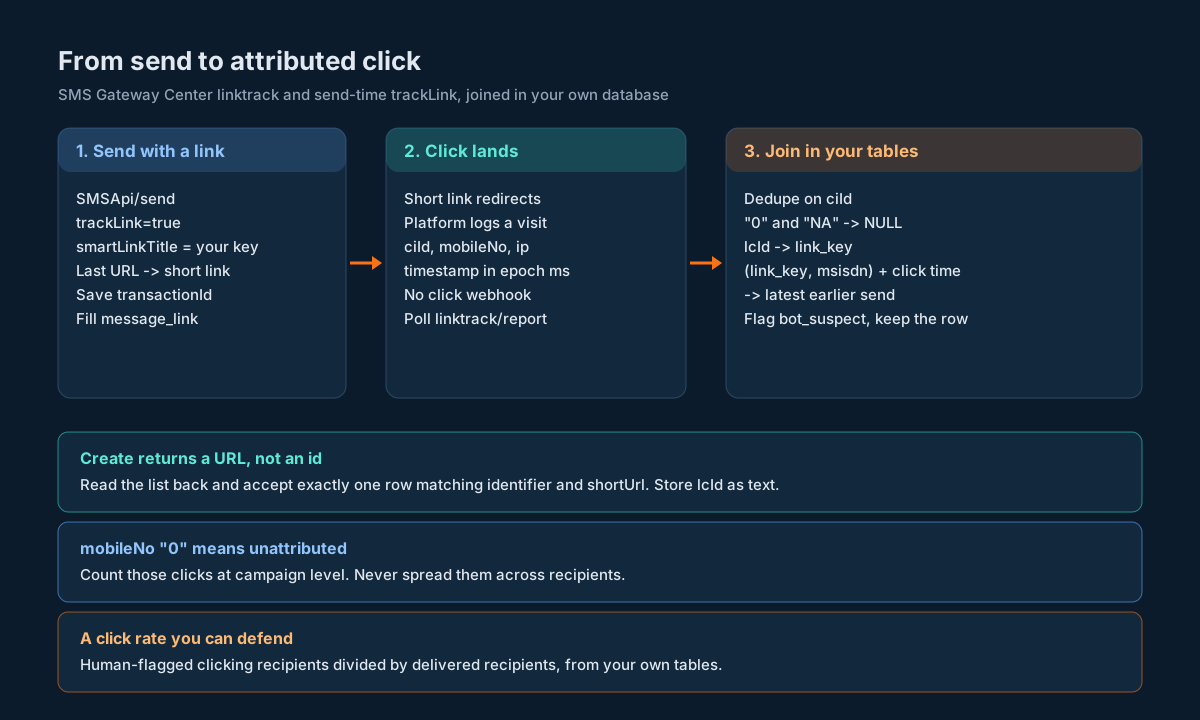
- Joining a Click to a Message and a Recipient
- Polling Without a Click Webhook
- Bot and Preview Clicks
- Computing a Click Rate You Can Defend
- Clicks Are Personal Data
- Deleting Links Safely
- Decision Matrix
- Pre-Launch Checklist
- Unspecified Behaviour and How to Code Around It
- FAQs
The Short Answer
You get tracked links on SMS Gateway Center two ways. Either you turn on trackLink=true when you call SMSApi/send, and the platform swaps the last URL in your message for a short link, or you create a link up front with SMSApi/linktrack/create and put the short URL into the message yourself. Clicks come back through SMSApi/linktrack/report, one row per visit, with a ciId, a mobileNo, device and network details and an epoch-millisecond timestamp. There’s no click webhook, so you poll.
The dashboard will happily show you totals. Attribution is a different job: it means every click row ends up joined to the message that carried the link and the recipient who got it, in a table you own. To get there you need four things. A link ledger keyed on the platform’s lcId. A click ledger keyed on ciId, deduplicated. A join from (lcId, mobileNo) to your outbound message rows. And a flag on every click that might be a link preview or a security scanner rather than a person, because on SMS a lot of them are.
TL;DR
- Two paths. Send-time
trackLink=true(plussmartLinkTitleandappendHttp) onSMSApi/send, or a standalone link fromSMSApi/linktrack/create. Only the send-time path ties clicks to recipients’ mobile numbers, per the product page. - Only the last URL in a message gets converted at send time. Put the one you care about last.
- Create returns the short URL and no id. The response is
linktrackList: ["http://t1x.in/WypK"]. Read the list back withSMSApi/linktrack/readand match on a uniqueidentifieryou chose, to find thelcId. - Read has no filters. It takes credentials and
outputonly. Pull the list and filter on your side. - Report takes
campaignidand returns rows with quotedciId,mobileNo,timestamp. AmobileNoof"0"means the click isn’t tied to a number."NA"shows up for unknown location and operator. - Delete is keyed
idand succeeds withcode"192", not"200". - Short links are 21 to 23 characters with
https://, 13 to 15 without. That can take a message from two segments to one. It can also lengthen a message whose URL was already short. - Whitelist the short link’s domain on your DLT portal, not just your own website’s.
- Store ids and timestamps as text, parse at the edge, treat
"0"and"NA"as null. - Flag suspected bot clicks; never delete them. Previews and scanners fetch links within seconds of delivery.
- Your click rate is unique human-flagged clicking recipients over delivered recipients, computed from your own tables, not the
clickThroughRatestring.
Two Ways to Get a Tracked Link
Start with this choice, because it decides what you can attribute later.
Send-time tracking. You call SMSApi/send with trackLink=true. The send page describes it in one line: “Enable true to track links from your SMS content.” You can add smartLinkTitle (“A brief title to recognise your smart link campaign”) and appendHttp (default true; set it to false to drop https:// from the short link). The platform finds the URL in your message, shortens it and tracks the clicks. The Smart Link Tracker product page says the system tracks “each click with unique identifiers tied to the recipient’s mobile number.” That’s the path that gives you per-recipient clicks.
Standalone links. You call SMSApi/linktrack/create with a longurl, an identifier and a type of url or attachment, and you get back a short URL. You then paste that URL into whatever you’re sending. Every recipient gets the same short URL, so the platform has nothing in the link itself that says who tapped it. Expect clicks on these links to come back as campaign-level traffic. The report sample shows exactly that shape: a desktop click with mobileNo set to "0".
One rule from the product page FAQ matters on the send-time path: “We will only convert SINGLE URL which is at the end of the message when system finds multiple URL in the message content.” If your message has a help link and an offer link, only the last one gets tracked. Put the URL you want to measure last, or create a standalone link for the other one and accept that it’ll be campaign-level.
Send-time trackLink=true | Standalone linktrack/create | |
|---|---|---|
| Where you turn it on | SMSApi/send parameter | Separate call before sending |
| What gets shortened | The last URL in the message | The longurl you pass, or an uploaded attachment |
| Per-recipient clicks | Yes, per the product page | Not from the link alone |
| Works for attachments | No | Yes, type=attachment with form-data |
| What you know up front | Nothing until the send goes out | The short URL, before you send |
| Best for | Campaigns where you care who clicked | Shared links, attachments, non-SMS channels |
The AI-powered link tracking announcement covers the dashboard side (geography, device and the insights tab). This guide is about the API side and the tables you build around it.
The Four Linktrack Endpoints at a Glance
All four live under https://unify.smsgateway.center/SMSApi/linktrack/. They take the usual credentials: userid and password as form fields, or the apikey header with userid. Send the header. Every response wraps its body in response with api set to "linktrack" and action set to the operation.
| Endpoint | Method | Key input | What comes back |
|---|---|---|---|
SMSApi/linktrack/create | POST | identifier, longurl, type (url or attachment), optional attachment as form-data | msg “Campaign created successfully.”, code “200”, count 1, linktrackList as an array of short URL strings |
SMSApi/linktrack/read | POST or GET | Credentials and output only | linktrackList[i].linktrack with lcId, identifier, destination, shortUrl, shortUrlAdvance, type, totalUploads, totalViewed, clickThroughRate, lastClickTimestamp, timestamp |
SMSApi/linktrack/report | POST | campaignid | linktrackList[i].linktrack with ciId, mobileNo, os, browser, device, deviceName, ip, city, state, country, mobLocation, mobOperator, timestamp |
SMSApi/linktrack/delete | POST | id | msg “Campaign deleted successfully.”, code “192” |
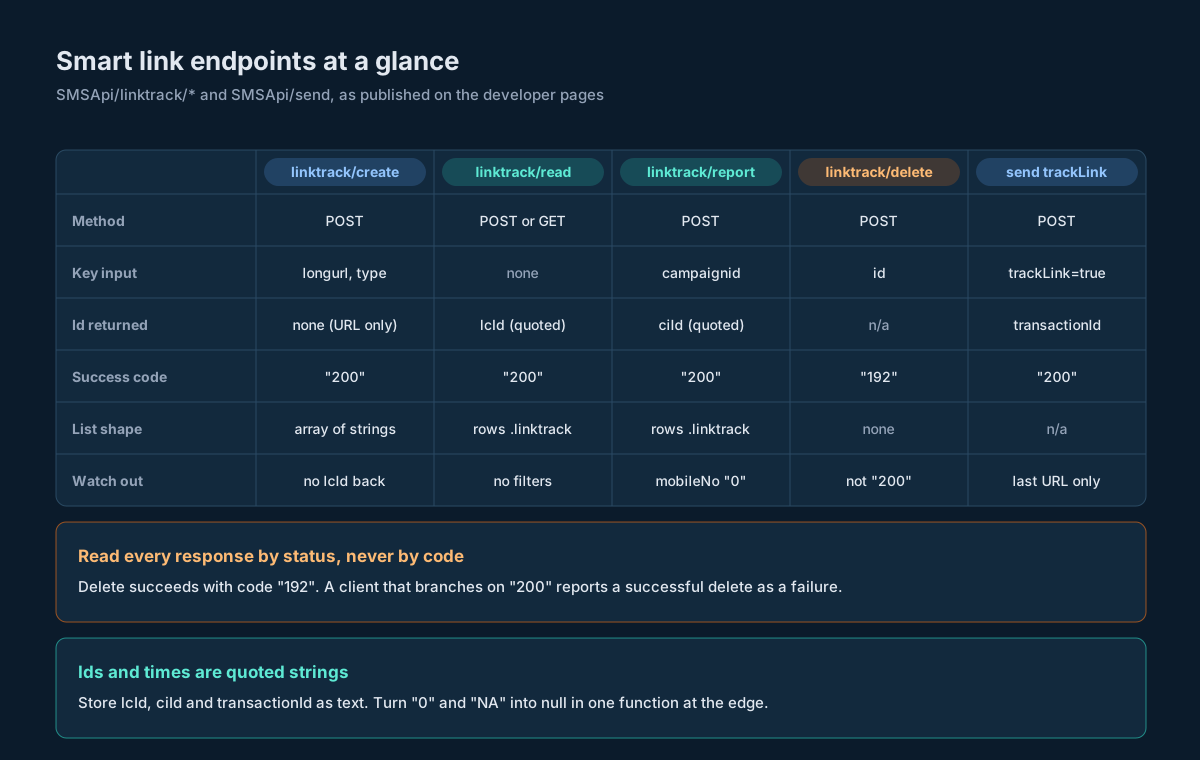
Three things in that table will bite you if you skip them.
The list key is the same, linktrackList, on all three list-returning endpoints, but the row shape isn’t. On create it’s an array of plain strings. On read and report each row is wrapped in an object keyed linktrack. A single parser that assumes one shape breaks on the other.
Delete’s success code is "192". If your client treats anything other than "200" as failure, a successful delete looks like an error. Read the status field (“success”) instead, which is what you should be doing everywhere anyway.
And create gives you no lcId. The next section is about that.
Creating a Link and Finding Its lcId
Here’s the create sample response, verbatim:
{
    "response": {
        "api": "linktrack",
        "action": "create",
        "status": "success",
        "msg": "Campaign created successfully.",
        "code": "200",
        "count": 1,
        "linktrackList": [
            "http://t1x.in/WypK"
        ]
    }
}
You get the short URL. You don’t get the lcId, and the lcId is what you’ll want as the key in your link ledger and, most likely, as the campaignid when you ask for the visitor report. So you read the list back and find your row.
Read takes no filter parameters, so you can’t ask for one link. You get the list and pick yours out. The safe way to pick is by identifier, which is free text you supplied (“Enter a breif desciption to remember smart link campaign URL”). Make it unique and machine-readable: put your own key in it. ship-2026-10-12-7f3a beats October shipping.
Match on both identifier and shortUrl. If exactly one row matches both, you’ve got your lcId. If none or several match, stop and don’t guess.
import requests

BASE = "https://unify.smsgateway.center/SMSApi/linktrack/"

def post(path, userid, apikey, **fields):
    r = requests.post(
        BASE + path,
        headers={"apikey": apikey},
        data={"userid": userid, "output": "json", **fields},
        timeout=30,
    )
    r.raise_for_status()
    body = r.json()
    resp = body.get("response") if isinstance(body, dict) else None
    if not isinstance(resp, dict) or resp.get("status") != "success":
        raise RuntimeError(f"linktrack/{path} failed: {body!r}")
    return resp

def create_and_resolve(userid, apikey, identifier, long_url):
    created = post("create", userid, apikey,
                   identifier=identifier, longurl=long_url, type="url")
    urls = created.get("linktrackList") or []
    if len(urls) != 1 or not isinstance(urls[0], str):
        raise RuntimeError(f"unexpected create payload: {created!r}")
    short_url = urls[0]

    listing = post("read", userid, apikey)
    rows = [item.get("linktrack", {}) for item in listing.get("linktrackList") or []
            if isinstance(item, dict)]
    hits = [row for row in rows
            if row.get("identifier") == identifier and row.get("shortUrl") == short_url]
    if len(hits) != 1:
        raise RuntimeError(f"{len(hits)} rows match {identifier!r}; not guessing")
    return {"lc_id": str(hits[0]["lcId"]), "short_url": short_url,
            "destination": hits[0].get("destination")}
Two traps in that code are deliberate. The lcId goes through str() and stays text: it’s quoted in the sample ("690"), and an id that arrives quoted today can arrive as a number tomorrow. And the read is a full list on every call, which is fine for a few hundred links and slow for tens of thousands. Cache the lcId the moment you resolve it, and never resolve the same link twice.
If the create call succeeds and the read-back fails, you have a live short URL with no lcId in your ledger. Save the row anyway with lc_id null and a pending_resolve status, and let a retry job finish it. Don’t create a second link to “fix” it, or you’ll have two links with the same identifier and the uniqueness check above will refuse both forever.
Turning On Tracking at Send Time
On the send-time path you add three optional fields to a normal SMSApi/send call:
| Parameter | Values | What the send page says |
|---|---|---|
trackLink | true or false | “Enable true to track links from your SMS content.” |
smartLinkTitle | Free text | “A brief title to recognise your smart link campaign.” |
appendHttp | true or false | “System default is true. Disable to remove https:// from smartlink.” |
curl -s https://unify.smsgateway.center/SMSApi/send \
  -H "apikey: $SGC_APIKEY" \
  --data-urlencode "userid=$SGC_USERID" \
  --data-urlencode "sendMethod=quick" \
  --data-urlencode "mobile=919xxxxxxxxx" \
  --data-urlencode "senderid=ACMEIN" \
  --data-urlencode "msgType=text" \
  --data-urlencode "msg=Your order 4471 has shipped. Track it here: https://www.example.com/orders/track?order=4471" \
  --data-urlencode "trackLink=true" \
  --data-urlencode "smartLinkTitle=ship-2026-10-12-7f3a" \
  --data-urlencode "appendHttp=true" \
  --data-urlencode "output=json"
The trap here is in the message, not the flags. The URL has to be the last one in the text, or a different URL gets tracked. And because the message goes through DLT template matching, the URL sits in a {#url#} slot in your registered template. More on that in the DLT section.
The send response is the normal one: status, mobile, invalidMobile, a quoted nineteen-digit transactionId, statusCode "200" and reason. Nothing in it names the link. So treat smartLinkTitle the way you treat identifier on create: put your own unique key in it. After the send, read the link list and look for exactly one row whose identifier equals that title. If you find it, store its lcId against the send. If you don’t, leave the link unresolved and keep the send’s transactionId, which you’ll need for the join anyway.
You’ll also see a field on read rows called shortUrlAdvance, and in the sample it looks like this: "http://t1x.in/WypK%xxxxxx%". That’s the short URL with a placeholder suffix on the end. It’s a strong hint at how per-recipient tracking works on the send-time path: one base link per campaign, plus a suffix per recipient. Don’t build your own suffixes by filling that placeholder in. Let the send call do it, and measure the result with one test message to a number you own.
Keep your own copy of what you asked for. The outbound row from the outbound message table already has the transactionId, the recipient, the template and the time. Add two columns: track_link (boolean, what you sent) and link_title (the smartLinkTitle you sent). Those two columns are what let you ask, months later, “which messages carried a tracked link, and which campaign was it?”
What the Short URL Does to Message Length
The product page FAQ gives the lengths: “The short URL range between 21 to 23 characters long”, and “When you Exclude HTTPS then actual Short URL count would be 13 to 15 characters.” The difference is the eight characters of https://. (The append HTTP knowledge base answer rounds that to “about 6 to 8 characters”. It’s eight.)
Here’s a shipping message with a long tracking URL, worked out in code rather than by eye:
| Version | URL length | Message length | GSM-7 segments |
|---|---|---|---|
| Original long URL with UTM tags | 104 | 176 | 2 |
Short link with https:// (23 chars max) | 23 | 95 | 1 |
Short link without https:// (15 chars max) | 15 | 87 | 1 |
The message text before the URL is Your order 4471 has shipped and will arrive by Thursday. Track it here: (72 characters). A single GSM-7 SMS holds 160 characters. Once you go over, each part holds 153, so 176 characters bills as two parts. With a short link it fits in one either way.
Notice what that means for previews and cost estimates. The message you preview isn’t the message that goes out. If you estimate segments from the text you submit, you’ll overestimate when a long URL gets shortened. If your URL was already short (say, a 12-character domain with no path), shortening can make it longer, and a message that sat at 158 characters can tip into two parts. Estimate with the short link’s worst case, 23 characters with https:// or 15 without, in place of the last URL. The preview and cost estimation guide has the segment rules, and the SMS length calculator is handy for spot checks.
Should you drop https://? It buys eight characters. The append HTTP knowledge base answer recommends keeping it on “unless you absolutely need to save characters”, because people are warier of links without it. That’s a fair default. Only turn it off when it’s the difference between one part and two on a large send, and check the click rate on a small batch first.
DLT: Whitelist the Short Domain, Not Just Yours
In India, a URL in a commercial SMS has to match a call-to-action that’s whitelisted on your DLT portal. A tracked link replaces your URL with one on the short link domain. If only your own domain is whitelisted, the shortened message no longer matches, and it fails.
The DLT whitelisting knowledge base answer says it plainly: “if you use a link shortener, including Smart Links, whitelist the short link’s domain, not only your website’s domain.” Do that before the first tracked send, on every DLT portal you send through.
Which domain? The API samples show t1x.in. The product page FAQ shows tx1.in. Those are different hosts, and you shouldn’t guess between them. Take the host from a real shortUrl your account returns (create one throwaway link and read it), whitelist that, and add a check in your sender that the host of every shortUrl you store is on your whitelist list. If you’ve set up your own short domain (the custom short domain answer says the team configures it for you), whitelist that one.
The template side matters too. The URL must sit in a {#url#} variable in the registered template, not as literal text, because the text that goes out isn’t the text you wrote. The variable tags answer covers which tag fits which value, and DLT template rejections covers what happens when the shape is wrong.
Reading Clicks Back: The Visitor Report
SMSApi/linktrack/report is POST only and takes one required input, campaignid, described as “Enter a specific campaign ID to view reports.” Here’s the sample row:
{
    "linktrack": {
        "ciId": "200272",
        "mobileNo": "0",
        "os": "Mac OS X 10.14.5",
        "browser": "Safari 12",
        "device": "Desktop",
        "deviceName": "Apple Macintosh",
        "ip": "1.10.247.193",
        "city": "Mumbai",
        "state": "Maharashtra",
        "country": "India",
        "mobLocation": "NA",
        "mobOperator": "NA",
        "timestamp": "1563114285782"
    }
}
Each row is a visit. ciId is the visit’s id, and it’s the one thing you can dedupe on. timestamp is epoch milliseconds as a string: 1563114285782 is 2019-07-14 19:54:45.782 IST. The link it belongs to in the read sample was created at 1563114084731, 19:51:24.731 IST, so that click came 201 seconds after the link existed.
There are two kinds of location in the row. city, state and country come from the IP address. mobLocation and mobOperator describe the mobile number’s circle and operator, and they’re "NA" here because mobileNo is "0": there’s no number to look up. On a click that’s tied to a recipient you’d expect both to be filled. Keep the two kinds in separate columns. An IP-based city is where the network said the request came from. A number-based location is the subscriber’s home circle. They disagree all the time, and both are useful.
What’s “campaign ID” here? The parameter is called campaignid, and delete’s id is described the same way (“Campaign ID”). The read rows carry lcId, and create’s message says “Campaign created successfully”, so the link and the “campaign” look like the same thing on this API. Test that once: create a link, click it from your own phone, then call report with that lcId as campaignid and check your click is there. Put the result in a contract test so you hear about it if it changes. The contract testing harness guide shows how to pin a shape like this.
Parsing the Sentinels: “0”, “NA” and “0%”
The linktrack payloads use strings for nearly everything, and they use particular strings to mean “nothing”. If you load them as-is, your reports fill with a phone number called 0, a city called NA and a click rate you can’t add up.
| Field | Sample value | What it means | Store as |
|---|---|---|---|
mobileNo | "0" | No recipient tied to this click | NULL |
mobLocation, mobOperator | "NA" | Not known | NULL |
lastClickTimestamp | "NA" | No clicks yet | NULL |
clickThroughRate | "0%" | A display percentage | Don’t store it; compute your own |
totalViewed, totalUploads | "0" | Counts, quoted | Integer, after parsing |
timestamp | "1563114285782" | Epoch milliseconds | timestamptz, keep the raw text too |
ciId, lcId | "200272", "690" | Ids, quoted | Text |
Do the cleanup in one function at the edge, and keep the raw row next to it. When a new sentinel turns up (an empty string, a "-", a null), you want to fix one function and replay, not hunt through reports.
// normalise.js: one place where linktrack strings become typed values
const NULLISH = new Set(["", "0", "NA", "N/A", "null", "-"]);

function nullable(value) {
  if (value === null || value === undefined) return null;
  const s = String(value).trim();
  return NULLISH.has(s) ? null : s;
}

function epochMs(value) {
  const s = nullable(value);
  if (s === null || !/^\d{12,14}$/.test(s)) return null; // refuse seconds, refuse junk
  return new Date(Number(s)).toISOString();
}

function normaliseClick(row, lcId) {
  const r = row && typeof row === "object" ? row.linktrack ?? row : {};
  const ciId = r.ciId === undefined || r.ciId === null ? null : String(r.ciId);
  if (!ciId) return null; // no id, nothing to dedupe on: park it, don't insert it
  return {
    ci_id: ciId,
    lc_id: String(lcId),
    mobile_no: nullable(r.mobileNo), // "0" -> null, never the number zero
    ip: nullable(r.ip),
    os: nullable(r.os),
    browser: nullable(r.browser),
    device: nullable(r.device),
    device_name: nullable(r.deviceName),
    ip_city: nullable(r.city),
    ip_state: nullable(r.state),
    ip_country: nullable(r.country),
    mob_location: nullable(r.mobLocation),
    mob_operator: nullable(r.mobOperator),
    clicked_at: epochMs(r.timestamp),
    raw: r,
  };
}

module.exports = { nullable, epochMs, normaliseClick };

if (require.main === module) {
  const sample = { linktrack: { ciId: "200272", mobileNo: "0", os: "Mac OS X 10.14.5",
    browser: "Safari 12", device: "Desktop", deviceName: "Apple Macintosh",
    ip: "1.10.247.193", city: "Mumbai", state: "Maharashtra", country: "India",
    mobLocation: "NA", mobOperator: "NA", timestamp: "1563114285782" } };
  console.log(normaliseClick(sample, "690"));
}
Run that and the sample comes out with mobile_no: null, mob_location: null and clicked_at: '2019-07-14T14:24:45.782Z', which is the same instant as 19:54:45.782 IST.
The "0" rule needs one caveat. "0" is nullish for mobileNo and wrong for counts. That’s why the counts (totalViewed, totalUploads) don’t go through nullable at all. Parse them with their own integer function that treats "0" as zero.
The Attribution Data Model
Four tables do the work. Two are new (links and clicks), one you already have (outbound messages), and one is a small mapping that says which messages carried which link.
-- One row per short link, whichever path made it.
CREATE TABLE link_campaign (
  link_key        text PRIMARY KEY,          -- your key, also in identifier / smartLinkTitle
  lc_id           text UNIQUE,               -- platform lcId; NULL until resolved
  created_via     text NOT NULL CHECK (created_via IN ('create', 'send')),
  short_url       text,                      -- exactly as returned
  short_host      text,                      -- host of short_url; must be DLT-whitelisted
  destination     text NOT NULL,
  link_type       text NOT NULL CHECK (link_type IN ('url', 'attachment')),
  resolve_status  text NOT NULL DEFAULT 'pending'
                  CHECK (resolve_status IN ('pending', 'resolved', 'failed')),
  created_at      timestamptz NOT NULL DEFAULT now(),
  retired_at      timestamptz                -- when you stopped putting it in messages
);

-- Which outbound messages carried which link. Fill it when you send.
CREATE TABLE message_link (
  transaction_id  text NOT NULL,             -- from SMSApi/send, as text (19 digits)
  msisdn          text NOT NULL,             -- the recipient, normalised
  link_key        text NOT NULL REFERENCES link_campaign(link_key),
  sent_at         timestamptz NOT NULL,
  PRIMARY KEY (transaction_id, msisdn, link_key)
);

-- One row per visit from linktrack/report. Never updated, never deleted by the ingester.
CREATE TABLE link_click (
  ci_id           text PRIMARY KEY,          -- platform ciId: the dedupe key
  lc_id           text NOT NULL,
  msisdn          text,                      -- mobileNo, NULL when "0"
  clicked_at      timestamptz,
  ip              text,
  os              text,
  browser         text,
  device          text,
  device_name     text,
  ip_city         text,
  ip_state        text,
  ip_country      text,
  mob_location    text,
  mob_operator    text,
  bot_suspect     boolean NOT NULL DEFAULT false,
  bot_reason      text,
  raw             jsonb NOT NULL,
  ingested_at     timestamptz NOT NULL DEFAULT now()
);

CREATE INDEX link_click_join ON link_click (lc_id, msisdn, clicked_at);
CREATE INDEX message_link_join ON message_link (link_key, msisdn, sent_at);
Why ci_id as the primary key and nothing else? Because it’s the only thing in a click row that’s meant to be unique. Two real clicks from the same phone a second apart are two rows, and you want both (the second one is how you’ll spot a preview fetch followed by a tap). Dedupe by ciId and let ON CONFLICT DO NOTHING absorb the overlap between polls.
Why a separate message_link table instead of a column on the outbound row? Because one message can, in principle, carry more than one link (a standalone link in the middle and a tracked one at the end), and one link carries many messages. A mapping table handles both without nulls. If you know you’ll only ever have one tracked link per message, a link_key column on the outbound row does the same job, and that’s fine too.
Joining a Click to a Message and a Recipient
The join has two keys: which link, and which phone. The link comes from lc_id, through link_campaign, to your link_key. The phone comes from msisdn on the click. On the send-time path that’s enough to find the recipient. To find the exact message, you also need time, because the same number can get the same link more than once (a reminder, a resend after a failure).
The rule: a click belongs to the latest message carrying that link to that number that was sent before the click.
-- Attribute each recipient-tied click to the latest earlier send of the same link.
SELECT c.ci_id,
       c.clicked_at,
       c.msisdn,
       lc.link_key,
       m.transaction_id,
       m.sent_at,
       c.clicked_at - m.sent_at AS time_to_click,
       c.bot_suspect
FROM link_click c
JOIN link_campaign lc ON lc.lc_id = c.lc_id
LEFT JOIN LATERAL (
  SELECT ml.transaction_id, ml.sent_at
  FROM message_link ml
  WHERE ml.link_key = lc.link_key
    AND ml.msisdn   = c.msisdn
    AND ml.sent_at <= c.clicked_at
  ORDER BY ml.sent_at DESC
  LIMIT 1
) m ON true
WHERE c.msisdn IS NOT NULL;
Three outcomes come out of that query, and each one tells you something.
A row with a transaction_id is attributed. That’s the goal.
A row with an msisdn but no transaction_id means the platform tied the click to a number you have no record of sending this link to. Usually that’s a forward: the recipient sent the message to someone else, and the platform recorded the forwardee’s network. Sometimes it’s a number-format mismatch (919... on one side, +91... on the other). Normalise numbers the same way on both tables before you decide it’s a forward.
Clicks with msisdn null aren’t in this query at all. They’re campaign-level. Count them, report them as unattributed, and don’t spread them across recipients.
Normalise the number format first. The send call wants a country code without + (919999999999 in the send page table). The report’s mobileNo sample is "0", so the format of a real one isn’t shown. Store every number in one canonical form (digits only, country code included) and convert on the way in from both sides. A join that silently fails on a + is the classic way to report a zero click rate for a campaign that worked.
Polling Without a Click Webhook
The webhook surface on this platform covers delivery reports and inbound messages. Clicks aren’t on it. You poll SMSApi/linktrack/report, one call per link, and because the page lists no date range, paging or “since” parameter, each call returns everything that link has collected so far.
That shapes the poller:
- Poll per active link, not per account. A link is active from its first send until some cut-off you choose. Most clicks on an SMS link arrive within hours of delivery. A tail goes on for days. A reasonable starting cut-off is 30 days after the link’s last send. Tune it from your own data: once
time_to_clickfrom the join query stops producing new rows past some age, shorten it. - Back off as the link ages. Every 5 minutes for the first two hours, hourly for the first two days, daily after that. Since each call returns the full history, the cost of a call grows with the link’s click count, not with the time since your last call. Polling an old busy link every five minutes is pure waste.
- Insert with
ON CONFLICT (ci_id) DO NOTHING. Overlap between polls is expected. The primary key absorbs it. - Count what you see. Log the number of rows returned per call. If a link that returned 4,000 rows yesterday returns 3,000 today, something changed on the platform side (a retention cut, a filter). You want to notice, not discover it when a report is short.
- Respect
status. Parse the envelope, checkstatusis"success", then readlinktrackList. On anything else, keep the old data and retry later. Never treat an error as “zero clicks”.
import time

SCHEDULE = [(2 * 3600, 300), (2 * 86400, 3600), (30 * 86400, 86400)]  # (age limit, interval) in seconds

def due(link_age_s, since_last_poll_s):
    for limit, interval in SCHEDULE:
        if link_age_s <= limit:
            return since_last_poll_s >= interval
    return False  # past the cut-off: stop polling this link

def poll_link(db, client, lc_id):
    resp = client.post("report", campaignid=lc_id)   # raises unless status == "success"
    rows = resp.get("linktrackList") or []
    inserted = 0
    for item in rows:
        click = normalise_click(item, lc_id)          # same rules as the Node normaliser
        if click is None:
            db.park_unkeyed(lc_id, item)
            continue
        inserted += db.insert_click_if_new(click)     # INSERT ... ON CONFLICT (ci_id) DO NOTHING
    db.record_poll(lc_id, returned=len(rows), inserted=inserted, at=time.time())
    return inserted
If you’d rather not poll at all, use the destination side. Your landing page sees every human visit with a query string you control. That’s the subject of the click rate section, and it’s the more reliable signal anyway.
Bot and Preview Clicks
On SMS, a meaningful share of clicks aren’t people. Phones fetch links to draw previews. Carriers and security apps open links to check for phishing. Corporate mail and chat gateways do the same when a message gets forwarded. At the redirect, every one of those looks like a click: a request, an IP, a user agent, a timestamp.
The vendors who’ve measured this agree on the main signs. Braze’s bot click filtering looks at user agents from crawlers, link previews and messaging security software. TrueDialog’s clicks report notes that you can’t tell from the link alone whether a person tapped or the phone previewed, and that deduplicating by contact doesn’t fix it. So the click ledger has to carry a judgement, and that judgement has to be revisable.
Flag, don’t delete. The bot_suspect and bot_reason columns are there so you can change your rules and recompute without having thrown anything away. Rules that are a good start:
| Signal | Why it points to a bot | Rule to start with |
|---|---|---|
| Click very soon after delivery | Previews and scanners fire as the message lands | Under 10 seconds after the delivery time from your DLR row |
| Data-centre or scanner user agent | Real phones don’t browse as bot, crawler, preview, scanner | Case-insensitive match on os, browser, device_name |
| Several clicks from one IP across many recipients in a minute | One scanner working through a batch | More than 5 distinct msisdn from one ip within 60 seconds |
| A click before the message was delivered | Nothing human can do that | clicked_at earlier than the delivery time |
| Desktop OS on a recipient-tied click within seconds | Gateways, not people, open links on servers that fast | device = Desktop and under 30 seconds |
Every threshold in that table is a starting point, not a published rule. Look at the distribution of time_to_click for your own traffic. If you see a sharp spike in the first few seconds and a smooth curve after, that spike is your preview traffic, and the boundary between them is your threshold.
A useful pattern: when a recipient-tied click is flagged as a bot and the same msisdn clicks again a minute later from a phone user agent, the second one is almost always the person. Keep both rows. Count the recipient as a human click.
Computing a Click Rate You Can Defend
The read endpoint gives you clickThroughRate as a string like "0%". The dashboard knowledge base answer defines it as “the percentage of people who clicked the link out of the total opens”, which isn’t a number you can reproduce, because “opens” for a link is the click. Don’t store it, don’t chart it and don’t compare campaigns on it. Compute your own from your tables, so every input is visible.
-- Recipient-level click rate for one link, from your own tables.
WITH delivered AS (
  SELECT DISTINCT ml.msisdn
  FROM message_link ml
  JOIN dlr_event d ON d.transaction_id = ml.transaction_id AND d.msisdn = ml.msisdn
  WHERE ml.link_key = :link_key
    AND d.status = 'DELIVERED'
),
human_clickers AS (
  SELECT DISTINCT c.msisdn
  FROM link_click c
  JOIN link_campaign lc ON lc.lc_id = c.lc_id
  WHERE lc.link_key = :link_key
    AND c.msisdn IS NOT NULL
    AND NOT c.bot_suspect
)
SELECT (SELECT count(*) FROM delivered)                                   AS delivered_recipients,
       (SELECT count(*) FROM human_clickers h JOIN delivered d USING (msisdn)) AS clicking_recipients,
       round(100.0 * (SELECT count(*) FROM human_clickers h JOIN delivered d USING (msisdn))
             / NULLIF((SELECT count(*) FROM delivered), 0), 2)            AS click_rate_pct;
The denominator is delivered recipients, not submitted. A message that never arrived can’t be clicked, and counting it hides delivery problems inside a “low engagement” story. That’s why the query joins to your delivery reports. The delivery report ingestion guide builds the dlr_event table this assumes.
Report three numbers side by side, every time: delivered recipients, human clicking recipients, and the rate. Then two more underneath: raw clicks (bots included) and unattributed clicks (no msisdn). If raw clicks are three times human clicks, people should see that, not have it smoothed away.
For anything that matters commercially (a sale, a booking, a form), measure on the destination too. Add your own query parameter to the long URL before it gets shortened, something like ?m=<link_key>, and have the landing page log a server-side event when it’s loaded and another when the visitor does the thing. Bots load pages. They rarely complete checkouts. A conversion count from your own server is the number to put in front of the finance team. The click rate is the leading indicator.
Clicks Are Personal Data
A click row ties a phone number to an IP address, a device, an approximate location and a time. In India that’s personal data under the Digital Personal Data Protection Act, 2023, and the same is true almost anywhere else you send. Treat the click ledger the way you treat the outbound message table.
Practical rules that keep you out of trouble:
- Purpose. Collect clicks to measure and improve messaging you were allowed to send. Don’t quietly turn them into a tracking profile used for something else.
- Retention. Pick a retention period for raw click rows (for example, 13 months, so you can compare a campaign with the same month last year) and delete or anonymise past it: drop
ip,msisdnanddevice_name, keep the counts. Write the rule down and run it as a job. - Access. The click ledger doesn’t need to be readable by everyone who can see campaign dashboards. Give dashboards aggregates. Give raw rows to the few people who debug the pipeline.
- Opt-outs. A recipient who opts out stops getting messages. Their old clicks can stay in aggregate counts, but don’t use them to target anything new. The opt-out and suppression guide covers the suppression table this ties into.
- Notice. If your messages carry tracked links, your privacy notice should say that link clicks are recorded and what’s recorded. One sentence is enough.
None of this is legal advice for your particular case. It’s the minimum an engineering team should build in before the first tracked send, rather than after the first question from a customer.
Deleting Links Safely
SMSApi/linktrack/delete is POST only, keyed id (“Enter a campaign ID to delete”), and a success looks like this:
{
    "response": {
        "api": "linktrack",
        "action": "delete",
        "status": "success",
        "msg": "Campaign deleted successfully.",
        "code": "192"
    }
}
Two things to settle before you ever call it.
What happens to links already in people’s inboxes. A message sent last week still has the short URL in it. Whether that URL keeps redirecting after a delete isn’t something you should find out from a customer. Assume it stops. That means: never delete a link that went out in a message inside your retention window, and never delete a link that’s in a message still sitting in a schedule. Retire it in your own table (retired_at) and stop putting it in new messages instead.
What happens to its click history. Pull the full report and confirm the row count matches your ledger before deleting. After a delete, assume the report is gone. Your link_click rows stay, because they’re yours.
If you need a clean-up job at all, make it delete only links that are older than your retention period, have retired_at set, have had no clicks in the last 90 days, and whose report you’ve ingested in full within the last day. Check status, not code, on the response, since success comes back as "192".
Decision Matrix
| You need | Use | Why |
|---|---|---|
| Who clicked, per recipient, on an SMS campaign | Send-time trackLink=true with a unique smartLinkTitle | It’s the path the product page ties to recipients’ numbers |
| A tracked link for an attachment (PDF, image) | linktrack/create with type=attachment | Send-time tracking shortens URLs only |
| One link shared across SMS, WhatsApp, email and a QR code | linktrack/create | You get the short URL before you send, and clicks are campaign-level anyway |
| Two tracked URLs in one SMS | Send-time for the last URL, standalone link for the other | Only the last URL gets converted at send time |
| A message right at 160 characters | Measure with the short link’s worst case; drop https:// only if it saves a part | The short link can lengthen a message whose URL was already short |
| Revenue or conversion numbers | Your own landing-page event, keyed by a query parameter on the long URL | Bots load pages; they rarely convert |
| A click rate for a weekly report | Your SQL over delivered recipients and human-flagged clicks | clickThroughRate is a display string with an unclear definition |
| Clicks in near real time | Poll linktrack/report on a backoff schedule | There’s no click webhook |
| Removing old links | Retire them in your table; delete only past retention after a full ingest | A deleted link may stop redirecting from old messages |
Pre-Launch Checklist
- Take the short host from a real
shortUrlyour account returns, and whitelist it on every DLT portal you send through. - Put the tracked URL in a
{#url#}slot in the registered template, and make it the last URL in the message. - Generate a unique key per link and send it as
identifier(create) orsmartLinkTitle(send). - Resolve
lcIdby reading the list back and matching exactly one row; store it as text. - Save
track_linkandlink_titleon every outbound row, and fillmessage_linkat send time. - Estimate segments with 23 characters (or 15 without
https://) in place of the last URL. - Normalise
"0","NA"and empty strings to null in one function; keep the raw row. - Store
ciId,lcId,transactionIdand phone numbers as text in one canonical format. - Insert clicks with
ON CONFLICT (ci_id) DO NOTHING; never update or delete click rows from the ingester. - Poll per active link on a backoff schedule with a cut-off; log rows returned per call.
- Flag suspected bot clicks with a reason; never drop them.
- Compute click rate over delivered recipients, from your own tables.
- Add a landing-page conversion event keyed by your link key.
- Write down retention for raw click rows and schedule the anonymising job.
- Send one test message to a phone you own, tap the link, and check the click appears with your number.
Unspecified Behaviour and How to Code Around It
A few behaviours here aren’t pinned down by anything you can read before you build. Each item below gives you a choice that stays safe whichever way the platform actually behaves, and none of them means waiting for an answer.
One. Resolve lcId by exact match on two fields, and fail closed. Create hands back a URL and no id. Match identifier and shortUrl together and accept exactly one row. Zero or two matches leave the link pending, which costs you a retry, not a wrong join.
Two. Treat smartLinkTitle as a probable identifier, and confirm it with a read-back. The send-time link should show up in the read list with your title somewhere on it. If one read after the send finds exactly one matching row, you’ve got the lcId. If it doesn’t, your attribution still works through transactionId and msisdn; you’ve only lost the shortcut.
Three. Use the lcId as campaignid, and prove it with your own click. Report asks for a “Campaign ID” and the only id the read list gives you is lcId. One tapped test link settles which it is for your account. Pin the answer in a contract test so a change shows up as a failing test, not an empty report.
Four. Never fill shortUrlAdvance yourself. The %xxxxxx% suffix looks like a per-recipient slot, but the rule for what goes there isn’t yours to guess. Let trackLink=true generate recipient links. If you need per-recipient links on another channel, put your own key on the long URL and attribute on your landing page instead.
Five. Don’t hard-code the short domain. The samples say t1x.in and the product FAQ says tx1.in. Read the host off every shortUrl you store and check it against your whitelist before the send. A mismatch blocks one send instead of failing a whole DLT batch.
Six. Send appendHttp exactly as the send table spells it, and check the result. The send page writes appendHttp; the knowledge base answer writes appendHTTP. Use the send page spelling, and on your test message confirm the link does or doesn’t start with https:// as you asked. If it ignores the flag, plan length on the 23-character worst case and you’re covered either way.
Seven. Treat every "0" phone number as unattributed, whichever path made the link. A click without a number can’t be pinned on a recipient, and spreading it across recipients invents data. Count it as campaign-level.
Eight. Assume a deleted link stops redirecting. If it keeps working, retiring rather than deleting cost you nothing. If it stops, you didn’t break a message in someone’s inbox.
Nine. Assume the report has no paging and no history guarantees. Ingest everything on each poll, dedupe on ciId and log row counts. If rows ever start disappearing from the platform’s side (retention, a cap on returned rows), your ledger already has them and the falling count tells you when it began.
Ten. Read status, not code. Success arrives as "200" on create, read and report and as "192" on delete. A client that branches on status handles both and doesn’t care which numbers come next.
Eleven. Assume a link on a non-SMS channel produces campaign-level clicks. The send-time switch is on SMSApi/send. If a WhatsApp or RCS click ever does come back with a number, treat it as a bonus and attribute it through the same join, which already handles both cases.
FAQs
Can I see exactly which recipient clicked an SMS link?
Yes, if you turn on trackLink=true when you send. The visitor report then carries a mobileNo for clicks tied to a recipient. Clicks on a standalone link created with linktrack/create and pasted into messages come back without one ("0").
Does linktrack/create return an id I can use later?
No. It returns the short URL in linktrackList. Read the list with linktrack/read and match your unique identifier and the shortUrl to get the lcId.
Why did only one of my two links get tracked?
Because send-time tracking converts a single URL, the last one in the message. Put the link you want to measure at the end, or create a standalone link for the other.
Will a tracked link make my message longer or shorter?
Usually shorter. Short links are 21 to 23 characters with https:// and 13 to 15 without. If your original URL was already shorter than that, the message gets longer, so estimate with the short link’s length.
Do I need to whitelist anything on DLT?
Yes. Whitelist the short link’s domain on every DLT portal you send through, not just your own website’s domain. Take the domain from a real short URL your account returns.
Is there a webhook for clicks?
Not for link clicks. Poll SMSApi/linktrack/report per link, and slow the polling down as the link gets older.
Why is my click rate so much higher than my sales?
Mostly previews and security scanners. They fetch links within seconds of delivery and look like clicks. Flag them, compute a human click rate, and measure conversions on your own landing page.
Can I use clickThroughRate from the read endpoint in reports?
Not as a source of truth. It’s a display string like "0%" with no stated numerator or denominator. Compute your own rate from delivered recipients and human-flagged clicks.
What does a delete response look like?status “success”, msg “Campaign deleted successfully.” and code “192”. Check status, and don’t delete links that are still in messages people might open.
Can I track attachment links?
Yes. Create the link with type=attachment and upload the file as form-data. You’ll get a short URL to put in the message. Clicks on it are campaign-level unless the report shows numbers.
Unlock End-to-End Click Analytics via API
Want click data you can join to your own message records? Try the API in the sandbox, turn on trackLink=true for one test send to your own phone, and watch the click come back through SMSApi/linktrack/report. When you’re ready for production volumes or a custom short domain, talk to our team.
More From Our Blog
Two-Way SMS Keyword Design: Routing, Auto-Replies and Conversation State on a Long Code