TABLE OF CONTENTS
- The Short Answer
- TL;DR
- One Base Path, Eight Endpoints, One Bot
- The Identity Model: Chat IDs, Not Phone Numbers
- Bot Setup, the Endpoint That Configures Infrastructure
- Building Your Audience: Recipients Is a Query, Not a Table
- Sending: One Endpoint, Eleven Message Types
- One Identifier, Three Names, Two JSON Types
- Templates: Two Actions, Two Envelopes
- The Delivery Report Field by Field
- The Payload Type Flip on Error
- Telegram, SMS and RCS Side by Side
- The Inbox and the Webhook That Is Not Yours
- Summary and Analytics: Which Number to Trust
- Endpoint Reference Table
- Your First Telegram Send in Six Steps
- Working Code in Four Languages
- Ten Mistakes That Cost a Sprint
- Choosing Between Telegram, SMS and RCS
- Production Checklist
- Unspecified Behaviour and How to Code Around It
- FAQs
The Short Answer
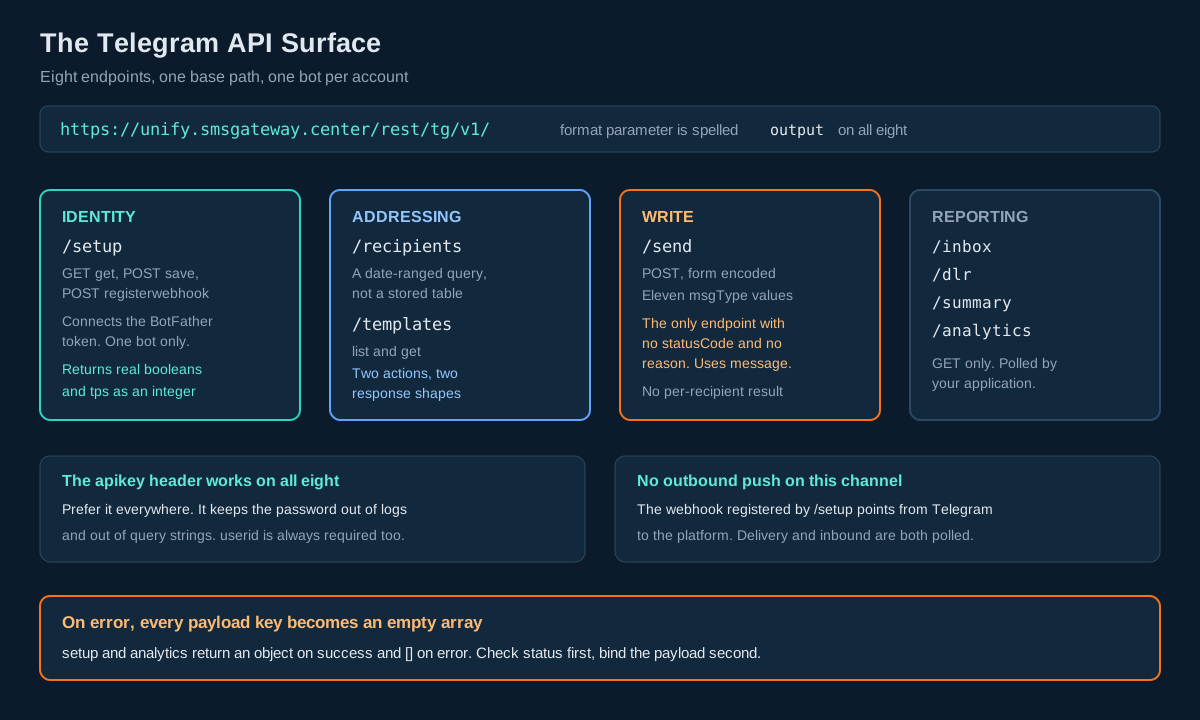
The SMSGatewayCenter Telegram API is eight REST endpoints under a single base path, https://unify.smsgateway.center/rest/tg/v1/. You connect one bot per account with a token from Telegram BotFather, the platform registers an inbound webhook with Telegram on your behalf, and from that point you address people by Telegram chatId rather than by mobile number. Sends go to /send as form encoded POST. Everything else is a GET: /setup, /recipients, /templates, /inbox, /dlr, /summary and /analytics. All eight take output=json and all eight accept an apikey request header in place of the password, which is the variant to use everywhere.
The part that costs people a day is not the endpoint list. It is that every Telegram endpoint returns its main payload as an object or array on success and as an empty array on error. A Go, Rust, Java or C# client that binds setup to a struct will unmarshal the success case cleanly and throw on the 403. Bind the payload loosely, branch on the top level status string before you touch anything else, and the family becomes easy.
TL;DR
- One base path, one bot, one auth header. All eight endpoints sit under
rest/tg/v1/, and all eight accept theapikeyheader. A legacy alias without thev1segment works on seven of them. The account is bound to exactly one Telegram bot, connected through/setupwith a BotFather token. - Chat IDs, not phone numbers. Telegram addresses a conversation, not a handset.
chatIdandtelegramUserIdare two different numbers for the same person and onlychatIdis addressable. You may send byphoneNumberinstead, but only for contacts who shared their number with your bot. - Your audience is opt in and it is a query.
/recipientsreturns distinct inbox contacts for a date range. It is not a durable subscriber table. Maintain your own. - One identifier, three names. The send response publishes
uniqueIdunquoted, anduuIdandtransactionIdas the same quoted string. The delivery report documents onlyuuIdandtransactionIdas matching what you sent. PersistuuId. globalErrorCodeis binary here.0delivered,1failed. On SMS it is a rich taxonomy and on RCS it carries values such as5007. Do not share an error mapping table across channels.isFinalexists and nothing else on the platform has it. The delivery row tells you outright whether the status is terminal, so your reconciler knows when to stop polling.- Three timestamps, two of them formatted.
submitTime,dispatchedTimeanddeliveryTimeare unquoted millisecond epochs.submitTimeanddeliveryTimehaveFormattedstring twins.dispatchedTimedoes not. - Cost is called
chargesand it is a quoted string. SMS calls itamountand returns an unquoted float. RCS calls itamountand returns a quoted string with four decimals. Three channels, three contracts. - The webhook in
/setupis inbound to the platform, not outbound to you. There is no documented push to your server on this channel. Reconciliation is polling. - Presentation fields leak into the contract.
/analyticsreturns hex colour codes./setupreturns aformModefield. Bind what you need and ignore the rest.
One Base Path, Eight Endpoints, One Bot
Every messaging channel on this platform has its own base path, and the base path is the thing that tells you which conventions apply. SMS sends go to SMSApi/send. WhatsApp goes to WAApi/send. RCS spreads itself across two generations, RCSApi/ for sends and templates and rest/rcs/v1/ for reporting, with different spellings of the format parameter on each.
Telegram is the cleanest of the four. All eight endpoints live under one path:
https://unify.smsgateway.center/rest/tg/v1/and the format parameter is spelled output on all of them, matching the rest/ generation convention rather than the format spelling used by RCSApi/. Seven of the eight also accept a legacy alias with the v1 segment removed, for example /rest/tg/inbox. Write the v1 form. The alias exists for older integrations and gives you nothing.
The single most consequential structural fact is that the account holds one bot. Not one bot per brand, not one per environment. The send endpoint has no bot selector parameter at all, and the documentation states plainly that the message is sent using the Telegram bot linked to the account making the call. Compare RCS, where botId is a required send parameter and rest/rcs/v1/bots lists several. On Telegram there is nothing to select because there is nothing to choose between.
That has an immediate deployment consequence. If staging and production share an account, they share a bot, and a save call from either one overwrites the token for both. Give non production its own account. This is the same shape as the single SMS webhook slot described in the delivery report ingestion article, and it bites in the same way: the resource is account scoped, the API offers no identifier, and nothing in the parameter list warns you.
Authentication follows the platform rule that holds everywhere: a token is an authorization, never an identity. userid is required on every single call regardless of how you authenticate. If you send the apikey header you still send userid alongside it. The authentication documentation covers the four mechanisms available across the platform; on Telegram the two that matter are userid plus password, and userid plus an apikey header.
The apikey header is accepted on every endpoint in the family, and on every other API on the platform. Some of the Telegram pages show only the userid and password cURL variant, so the header is easy to miss on /inbox, /dlr and /summary, but it works there exactly as it does on /setup and /send. Build one authenticated client, give it the header, and use it everywhere.
The only auth detail that genuinely varies is whether output is required:
| Endpoint | output required | Auth |
|---|---|---|
/setup | Yes | apikey header, or password |
/send | Optional | apikey header, or password |
/recipients | Yes | apikey header, or password |
/templates | Yes | apikey header, or password |
/inbox | Yes | apikey header, or password |
/dlr | Yes | apikey header, or password |
/summary | Yes | apikey header, or password |
/analytics | Yes | apikey header, or password |
Prefer the header in every environment. It keeps the account password out of your configuration, out of your request logs and, on the GET endpoints, out of the query string, which is the single easiest credential leak to create on this API. Send output=json on all eight; it costs nothing on /send and removes one thing to remember.
The Identity Model: Chat IDs, Not Phone Numbers
This is the conceptual jump, and everything downstream depends on getting it right.
SMS addresses a handset. You have a mobile number, you send to it, and the recipient’s consent is a legal and regulatory matter handled outside the protocol through DLT registration and consent capture. The number exists whether or not the person has ever heard of you.
Telegram addresses a conversation. A chatId comes into existence only when a person opens your bot and sends it something, usually /start. Before that moment there is no address to send to. Consent is not a compliance overlay bolted onto an addressable identifier; consent is what creates the identifier. That is a better privacy model and a harder growth model, and both facts shape how you build.
The recipients row makes the identity structure explicit:
{
    "chatId": "123456789",
    "telegramUserId": "987654321",
    "displayName": "Rahul",
    "firstName": "Rahul",
    "username": "rahul_demo"
}
Note carefully: chatId and telegramUserId are different values. They are not two spellings of one number. chatId identifies the conversation between that person and your bot and is the only one you can send to. telegramUserId identifies the Telegram account and appears as a filter on /inbox but is not accepted by /send. If you store one column and call it “telegram id” you will eventually put the wrong number in it, and the failure mode is a send that is accepted and goes nowhere useful. Store both, name them exactly as the API does, and make the send path read chatId and only chatId.
Both come back as quoted strings on read even though they are numeric and even though the send endpoint accepts them as bare digits in a form field. Keep them as strings end to end. Telegram chat IDs for groups and channels are negative and can be large, and there is no upside to parsing them.
username is the public @handle without the leading @. It is user changeable and must never be a key. displayName and firstName carry the same value in the documented sample, and there is no lastName field on the row at all even though the contact card message type has one. Treat every name field as decorative, present it in your support UI, and key nothing on it.
The third addressing route is phoneNumber, passed on /send instead of chatId. The documentation is precise about its limits: it matches contacts who shared their phone number with your bot, which in Telegram means the person tapped a share contact button at some point. It is a convenience for bridging an existing CRM keyed on mobile numbers, not a way to reach arbitrary handsets. If you are trying to reach someone who has never interacted with your bot, Telegram is not the channel; that send belongs on SMS, and multi channel fallback is the mechanism for expressing that preference once rather than branching on it in every call site.
One request rule, stated as a validation rule on the send page and worth honouring in your own code before the API ever sees it: use either chatId or phoneNumber, never both in the same request.
Bot Setup, the Endpoint That Configures Infrastructure
/setup has no analogue anywhere else on the platform. SMS sender IDs and RCS bots are provisioned through approval workflows with their own CRUD families. Telegram gives you a single endpoint that creates the identity, stores the credential and wires the inbound plumbing in one call.
It takes three actions, and unusually for this platform each has documented aliases:
| Action | Method | Aliases | What it does |
|---|---|---|---|
get | GET | empty, list, status | Returns connection status, feature flags and botChatUrl |
save | POST | connect, update | Creates or updates the bot, then registers the inbound webhook |
registerwebhook | POST | register_webhook, webhook | Re-registers the inbound webhook only |
Write the canonical spelling in your code. The aliases are there for compatibility and every extra accepted spelling is a way for two services in your estate to drift apart while both appear to work.
The parameters are few. botName is a display name of two to one hundred characters, required on save. botHandle is the bot username without the @, four to thirty two characters of letters, numbers and underscore, used to build https://t.me/{handle}. botToken is the BotFather token in digits:token form and is described as create only: optional on update, where omitting it keeps the existing token.
That last detail deserves attention because it is a security property, not a convenience. There is no way to read the bot token back out. Contrast apikey/read, which returns your API key in plaintext and therefore stores it recoverably. The Telegram token is write only through this API. Treat that as the intended design and match it in your own systems: put the token in a secret manager, pass it once at connect time, and never log the request body of a save call.
The success payload is the most information dense object in the family:
{
    "status": "success",
    "setup": {
        "isConfigured": true,
        "isActive": true,
        "formMode": "update",
        "botName": "My Store Support",
        "botHandle": "mystorebot",
        "botChatUrl": "https://t.me/mystorebot",
        "hasBotToken": true,
        "tps": 10,
        "canRegisterWebhook": true,
        "uiSendingEnabled": true,
        "apiAccessEnabled": true,
        "maxAgents": 5,
        "saved": true,
        "webhook": {
            "status": "success",
            "message": "Webhook registered successfully."
        }
    },
    "statusCode": "200",
    "reason": "Your Telegram bot has been connected and the webhook registered."
}
Several things here are worth naming.
These are real JSON booleans. isConfigured, isActive, hasBotToken, canRegisterWebhook, uiSendingEnabled, apiAccessEnabled and saved are true, not "1" and not 1. Almost nothing else on this platform does that. Group and contact rows use quoted "1". RCS bot and template rows use unquoted integer 1. The SMS delivery row has exactly one genuine boolean, flashMsg. If you have a shared helper that coerces platform truthiness from strings and integers, it will work here by accident, but write the Telegram binding against real booleans and do not let the helper hide the difference.
tps is a number you can read. It is an unquoted integer and it is the rate at which your account may send. This is the first per account throughput figure the platform exposes programmatically anywhere, and it is worth wiring into your sender rather than hardcoding a guess. Read it at startup, use it to size your token bucket, and re-read it after any plan change. The general approach to shaping a sender around a published rate is covered in rate limiting and backpressure in messaging systems; the difference on Telegram is that you no longer have to infer the number.
apiAccessEnabled and uiSendingEnabled are separate flags. Your account can send from the panel while the API is closed, which is exactly the state that produces the send error "Telegram API sending is disabled for this account." Check apiAccessEnabled in your deployment smoke test and fail the deploy loudly rather than discovering it on the first real broadcast.
webhook is a nested envelope with its own status. And its text field is called message, while the outer text field is called reason. Two levels, two vocabularies. A parser that searches the whole document for a key called status will find two and pick whichever comes first.
formMode is a user interface concept. It tells you whether the panel would render a create form or an edit form. It has no business being in an API response and it is a clear sign of what these endpoints are: the panel’s own backend, promoted to a public contract. That is not a criticism, it is a fact you can use. Bind the fields you actually need, ignore the rest, and never assert on a field you cannot explain the purpose of.
The botChatUrl field exists so your own apps can render a QR code client side from https://t.me/{botHandle}. There is no server side QR image endpoint, which is stated outright on the page. Generate it locally with any QR library; the URL is the whole payload.
Building Your Audience: Recipients Is a Query, Not a Table
Read the description of /recipients slowly, because the wording carries the whole architecture: it fetches distinct Telegram inbox contacts for a date range.
Your audience, as exposed by the API, is a projection over inbound messages, filtered by when those messages arrived. It is not a subscriber table with a stable primary key that you can page through from the beginning of time. A parent who subscribed to your school bot in April and has not messaged since will not appear in a query for the last seven days.
The defensive shape is straightforward and you should build it on day one, before you have enough subscribers for the problem to hurt.
Maintain your own telegram_subscriber table keyed on chat_id. Run a sweep job that walks /recipients from the date your bot went live up to today in windows of a week or two, pages through each window at limit=200, and upserts every row it sees. Record first_seen_at on insert and last_seen_at on every touch. After the initial backfill, a nightly sweep over the last few days keeps it current for the cost of a handful of requests. Your broadcast code then reads your table, never the API.
This gives you three things the API alone cannot: a stable audience that does not shrink when someone goes quiet, a place to record suppression and preference state, and a join key for the rest of your data model. The schema considerations are the same ones covered in the outbound message table, and the subscriber table is its natural sibling.
The paging contract is the rest/ generation standard: page starting at 1, limit defaulting to 50 with a maximum of 200. Offset paging, not cursors. That differs from the SMS delivery report, which uses an opaque cursors.next token fed back as startCursor. Do not share a pagination helper between the two.
The date parameters accept YYYY-MM-DD or a full date and time, and carry the aliases from and to. The envelope echoes what it actually used, expanded:
"fromDate": "2026-07-14 00:00:00",
"toDate": "2026-07-14 23:59:59",
That echo is genuinely useful. A date only input is expanded to the full day, inclusive at both ends, and the response tells you so. Log the echoed values rather than the values you sent, and your window arithmetic becomes auditable. No timezone is stated anywhere in the family, which is the standard situation on this platform, and the way to stay correct regardless is in the unspecified behaviour section below.
Sending: One Endpoint, Eleven Message Types
POST https://unify.smsgateway.center/rest/tg/v1/send, content type application/x-www-form-urlencoded.
msgType selects among eleven values: text, photo, audio, document, video, animation, voice, video_note, location, contact and poll. This is a far wider surface than any other channel here. SMS offers text and unicode. RCS offers text with the richness pushed into the template. Telegram lets you send a poll.
The parameter set is small because the complexity is pushed into two JSON string fields:
| Parameter | Required | Notes |
|---|---|---|
userid | Yes | Required even with the apikey header |
password | Conditional | Required when apikey is not sent |
msgType | Yes | One of the eleven values above |
chatId | Conditional | Comma separated for multiple recipients. Not with phoneNumber |
phoneNumber | Conditional | Country code, digits only. Not with chatId |
text | Conditional | Body for text, caption for media |
mediaPayload | Conditional | JSON string, extra fields for non text types |
replyMarkup | Optional | JSON string in Telegram Bot API reply_markup format |
output | Optional | Use json |
The length limit changes with msgType and nothing warns you. A text message allows 4096 characters. A caption on a media message allows 1024. If your code composes a body and then decides whether to attach an image, you have a path where adding a picture silently invalidates a message that was fine a moment ago. Validate against the limit that applies to the type you are about to send, not against a constant. This is the Telegram equivalent of the GSM 03.38 segment counting trap that shows up on SMS, discussed in SMS length calculation and how credits are counted, except that here the failure is a rejection rather than a surprise bill.
mediaPayload is a JSON string, not a JSON object. You serialise it and put the resulting string in a form field. Its documented fields:
| Field | Used for | Notes |
|---|---|---|
mediaUrl | photo, audio, document, video, animation, voice, video_note | Public https:// URL |
latitude, longitude | location | Latitude -90 to 90, longitude -180 to 180 |
phoneNumber, firstName, lastName | contact | Phone may include a leading + |
pollQuestion, pollOptions, isAnonymous | poll | Question max 300 characters, 2 to 10 options as a JSON array, isAnonymous is 0 or 1 |
Two traps live in that table.
phoneNumber means two different things in one request. At the top level it selects the recipient. Inside mediaPayload it is the number printed on a contact card you are sending to someone else. A helper that builds request bodies from a flat dictionary will collide these. Namespace them in your own code before they meet the wire.
Phone formats are inconsistent between the two positions. The top level phoneNumber is documented as digits only with country code. The contact card phoneNumber may include a leading +. Normalise on the way in and format on the way out, per position.
Media must be a public HTTPS URL. The platform fetches it; you are not uploading bytes. That means your media host is now in the delivery path, and a signed URL that expires in sixty seconds may expire before the fetch happens. Use stable URLs with a long or absent expiry, and serve them from somewhere with real availability.
replyMarkup is passed through to Telegram in the Bot API’s own reply_markup format, so inline keyboards, reply keyboards, force reply and remove keyboard all work. This is worth pausing on: it means the interactive surface of your messages is governed by Telegram’s own Bot API documentation, not by this platform’s. When a button behaves oddly, the answer is in Telegram’s spec.
Multiple recipients go in chatId as a comma separated list, exactly as SMS puts multiple numbers in mobile. And that brings us to the response.
One Identifier, Three Names, Two JSON Types
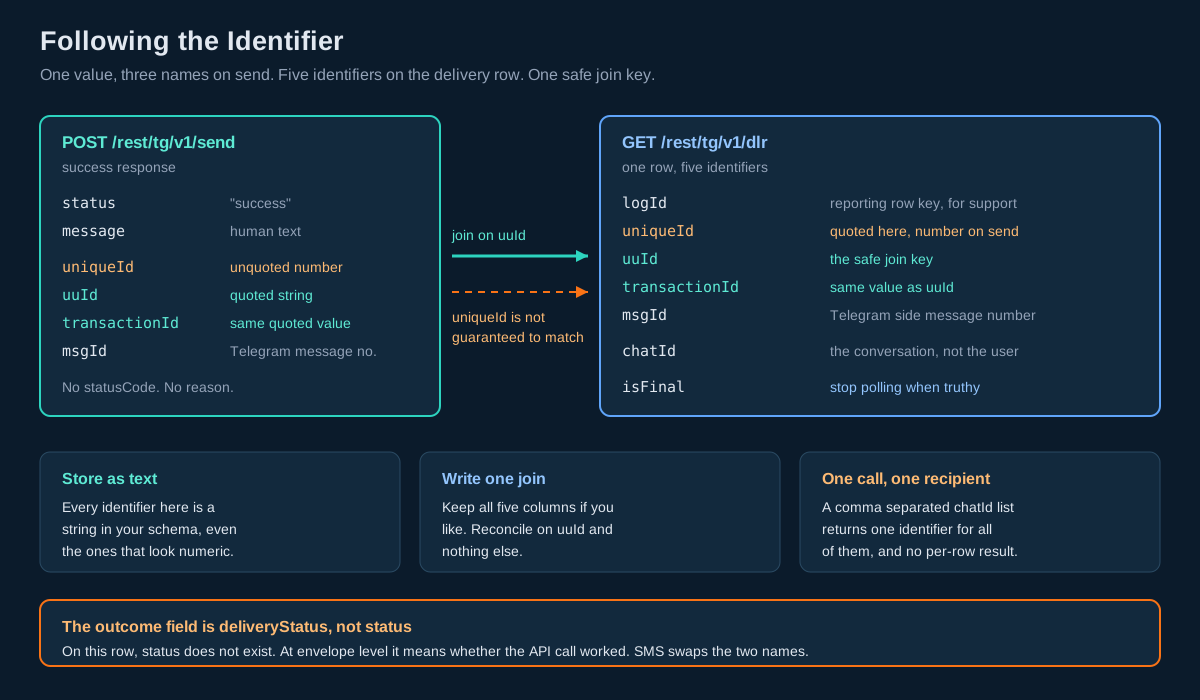
Here is the documented success response for a send:
{
    "status": "success",
    "message": "Message sent successfully.",
    "uniqueId": 17123456789012,
    "uuId": "17123456789012",
    "transactionId": "17123456789012",
    "msgId": "42"
}
One value appears three times under three field names, and it appears both as an unquoted JSON number and as a quoted string in the same object.
The correlation advice follows directly from what the delivery report page states, which is that uuId and transactionId are the same value returned when you send. It does not extend that guarantee to uniqueId, and the delivery report’s own sample row shows uniqueId as "90001" while uuId on that same row is "1234567890123456789". Two samples, two different relationships. Persist uuId, reconcile on uuId, and treat uniqueId as an internal number you happen to be able to see. Store it if you like, as a string, and never join on it.
The unquoted uniqueId is a numeric literal in a JSON document and is therefore subject to the language you parse it in. At fourteen digits the documented sample is comfortably inside JavaScript’s safe integer range, but nineteen digit identifiers exist elsewhere on this platform, and the Node.js integration tutorial covers what happens when one of those lands in a double. Since uuId gives you the same information as a string, there is no reason to go near the number.
msgId is "42", a quoted small integer, and it is the Telegram message ID: the identifier Telegram itself assigned inside that chat. Note that msgId now means three unrelated things across three channels. On the SMS delivery row it is a repeating free form label that shows the same value on different transactions. On RCS it is an opaque token. On Telegram it is a genuine Telegram side message number. A shared deserialiser that maps msgId to one concept is wrong on at least two channels.
Now the two structural facts about this response.
It carries no statusCode and no reason. Every other endpoint in the family returns both. /send returns message instead. So within one product, on one base path, the success envelope of the write endpoint does not match the success envelope of the seven read endpoints. Branch on status, read the human text from message on send and from reason everywhere else, and never write a generic is_ok(payload) helper that keys on the presence of statusCode.
The error response has two keys and nothing else:
{
    "status": "error",
    "message": "Telegram API sending is disabled for this account."
}
Every identifier field disappears. In a typed language, only status and message may be bound as required. Everything else is optional.
And there is no per recipient result. Send to three comma separated chat IDs and you get back one identifier and one status. There is no array of outcomes, and no invalidMobile style field of the kind SMS and RCS both return. You cannot tell from the response which of the three were accepted.
So make the decision that stays correct either way: send one recipient per call for anything you need to account for individually. The reasoning is in the unspecified behaviour section below.
Templates: Two Actions, Two Envelopes
GET https://unify.smsgateway.center/rest/tg/v1/templates
Telegram templates are a convenience, not a gate. Unlike DLT registered SMS content, which cannot be delivered in India without an approved template, and unlike RCS, where the template is the message, a Telegram template is a saved compose payload you may choose to reuse. Nothing stops you sending arbitrary text.
Two actions, and this endpoint is the only one in the family that offers more than list:
action=list returns every active template as a summary row:
{
    "templateId": 12,
    "templateName": "Order Confirmation",
    "msgType": "text",
    "mediaUrl": ""
}
action=get with templateId returns the full compose payload:
{
    "templateId": 12,
    "templateName": "Order Confirmation",
    "msgType": "text",
    "body": "Hi {name}, your order #{orderId} has shipped!",
    "mediaUrl": "",
    "mediaPayloadJson": "",
    "buttonsJson": "",
    "useReplyMarkup": 0
}
Four things to take from this.
The placeholder syntax is single curly braces. {name}, {orderId}. That is a third distinct syntax on one platform. DLT templates use {#var#}. RCS templates use square brackets, [name]. If you have a substitution routine, it is channel specific, and sharing it across channels will produce messages that deliver successfully with the placeholder still visible in the body. Worse, naive string replacement carries its own hazards in several languages; the $& expansion problem documented in the Node.js tutorial applies here identically.
useReplyMarkup is an unquoted integer 0, not a boolean. The setup endpoint hands you real booleans; this row does not. Same family, same response generation, different convention. Coerce explicitly.
Two fields are JSON encoded strings. mediaPayloadJson and buttonsJson hold serialised JSON inside a JSON string, so reading a template means a second parse. Both are empty in the documented sample, and an empty string is not valid JSON. Guard for empty before parsing or your template reader will throw on every text template.
The two actions return different envelope shapes. list returns templatesList as an array plus totalRecords, page and limit. get returns template as a single object with none of the paging fields. Same URL, same endpoint, two response shapes selected by a query parameter. Model them as two distinct operations in your client.
The error shapes differ too, and the page says so explicitly: for get validation or not found errors the payload uses an empty template array rather than templatesList, with status codes such as 400 or 404. Which leads directly to the next section.
The Delivery Report Field by Field
GET https://unify.smsgateway.center/rest/tg/v1/dlr
This is the endpoint you will spend the most time with, because it is the only way to learn what happened to a message. Here is the documented row, annotated by JSON type:
{
    "logId": "501",
    "uniqueId": "90001",
    "uuId": "1234567890123456789",
    "transactionId": "1234567890123456789",
    "chatId": "123456789",
    "phoneNumber": "919999999999",
    "msgId": "42",
    "message": "Your order is confirmed.",
    "msgType": "text",
    "charges": "0.50",
    "sendMethod": 1,
    "globalErrorCode": 0,
    "deliveryStatus": "delivered",
    "vendorErrorCode": "",
    "channel": 1,
    "channelName": "API",
    "isFinal": 1,
    "submitTime": 1712345678901,
    "submitTimeFormatted": "2026-07-07 10:14:38",
    "dispatchedTime": 1712345680000,
    "deliveryTime": 1712345681000,
    "deliveryTimeFormatted": "2026-07-07 10:14:41"
}
Five identifiers on one row
logId, uniqueId, uuId, transactionId and msgId. uuId and transactionId are the same value. logId is the row’s own key in the reporting store. msgId is Telegram’s message number. uniqueId is an internal number and, as established above, is not the same value you saw on the send response. Key your reconciliation on uuId, store logId for support conversations, and store msgId if you ever need to correlate with something a user forwarded you from inside Telegram.
isFinal is the field no other channel has
isFinal: 1 tells you the status will not change again. On SMS and on RCS you must infer terminality from the status vocabulary, which means hardcoding a list of terminal status strings and hoping a new one never appears. Telegram answers the question directly.
Use it. Your reconciler should stop polling a row the moment isFinal comes back truthy, and should keep polling with backoff while it is falsy. That removes the most common cause of the stuck row problem, and it removes the need to guess how long to wait before giving up. Combined with the pending counter on the summary endpoint you get two independent readings of the same question, which is the sort of redundancy worth having in a reconciler.
globalErrorCode is binary and that is a real difference
0 is delivered, 1 is failed. That is the entire code space, and deliveryStatus is described as a readable label derived from it.
On SMS, globalErrorCode is a rich taxonomy: 17 is a template mismatch, and the whole catalogue is queryable from the delivery error code list endpoint. On RCS it carries codes such as 5007. On Telegram it is a flag.
So a shared error mapping table across channels will either overmatch, treating Telegram’s 1 as whatever 1 means on SMS, or silently fail to explain any Telegram failure at all. Key your mapping on channel plus code, never on code alone. And note that the granular reason, when there is one, is meant to live in vendorErrorCode, which is an empty string on the documented successful row. Capture it, do not branch on it until you have seen real values.
deliveryStatus is lowercase here: "delivered", "failed". On RCS and SMS the equivalent values are uppercase. Compare case insensitively or normalise on ingest.
The field names are swapped relative to SMS, again
On the Telegram and RCS delivery rows, the outcome field is deliveryStatus. On the SMS delivery row, the outcome field is status, and on Telegram status at envelope level means whether the API call itself worked. This is the same swap documented for RCS, and it now holds across two of the three channels, which makes it the convention rather than the exception. Porting SMS reporting code to either newer channel means renaming this field, and the failure if you do not is quiet: your code reads status, finds "success", and records every message as delivered.
Three timestamps, one of them without a twin
submitTime, dispatchedTime and deliveryTime are unquoted millisecond epochs. submitTime and deliveryTime each have a Formatted string companion. dispatchedTime does not. If your ingest maps epoch and formatted fields in pairs, this one will fall out of the pattern.
The three together are genuinely useful, more so than the two you get on SMS. submitTime is when you handed the message over. dispatchedTime is when it left toward Telegram. deliveryTime is when it landed. The gap between the first two is your platform queue depth; the gap between the last two is Telegram’s. When a broadcast feels slow, that split tells you which side to look at, and it is the kind of measurement that turns observability for messaging pipelines from a dashboard into a diagnosis.
charges is a quoted string, and it is a third spelling
"0.50". Two decimal places, quoted. SMS calls the same concept amount and returns an unquoted float. RCS calls it amount and returns a quoted string with four decimals. Parse to a decimal type, never a float, and write one adapter per channel.
sendMethod is ambiguous here and channel is not
The row carries sendMethod: 1 with no explanation on the delivery report page. The summary endpoint documents sendMethod as a direction filter where 1 is outgoing and 2 is incoming, which strongly suggests the same meaning on this row, but the delivery page does not say so. Meanwhile channel: 1 with channelName: "API" is documented plainly: 1 API, 2 UI, 3 Agent.
Use channel and channelName when you want to know where a message came from. They are documented, they come as a matched code and label pair, and the label saves you a lookup table. Leave sendMethod alone on this row.
Worth noting in passing that sendMethod now means three unrelated things across the platform: a request parameter with string values on SMS and RCS sends, an undocumented integer on the Telegram delivery row, and a direction filter on the Telegram summary.
Filters
The available filters are generous: fromDate and toDate on submit time with from and to aliases, chatId, uuId aliased to transactionId, uniqueId, msgId, msgType, channel, phoneNumber, page and limit. Results come back newest first by submitTime.
There is one filter you should not use. status is documented as an alias for globalErrorCode. In a response where status at top level means whether the API call succeeded, accepting status as a request parameter meaning something entirely different is an invitation to a confusing bug. Write globalErrorCode=1 when you want failures. It is longer and it is unambiguous.
The Payload Type Flip on Error
This is the finding that will cost you the most if you meet it in production rather than reading it here.
Line up the error responses across the family:
{ "status": "error", "setup": [],          "statusCode": "403", "reason": "..." }
{ "status": "error", "templatesList": [],  "statusCode": "403", "reason": "..." }
{ "status": "error", "recipientsList": [], "statusCode": "403", "reason": "..." }
{ "status": "error", "inboxList": [],      "statusCode": "403", "reason": "..." }
{ "status": "error", "dlrList": [],        "statusCode": "403", "reason": "..." }
{ "status": "error", "summaryList": [],    "statusCode": "403", "reason": "..." }
{ "status": "error", "analytics": [],      "statusCode": "403", "reason": "..." }
For the list shaped endpoints this is unremarkable: an empty array where an array was expected. For setup and analytics it is not. Both return a JSON object on success and an empty array on error. The templates endpoint does the same thing on action=get, which the page states directly: the error payload uses an empty template array instead of the object.
This is the classic PHP serialisation artifact, where an empty associative array encodes as [] rather than {}. Understanding why it happens does not make it go away, and the consequence is concrete. In Go, json.Unmarshal of [] into a struct returns an error. In Rust, serde fails the same way. In Java with Jackson, or C# with System.Text.Json, you get a deserialisation exception. In every one of those languages, your client works perfectly against a healthy account and blows up with a parse error the first time the account hits a 403, which means the error you actually see in your logs is a JSON error rather than “Telegram API access is not enabled for this account.”
The correct client shape, and you should apply it to all eight endpoints without exception:
- Parse the response into a loose representation first:
map[string]any,serde_json::Value,JsonNode,dict. - Read the top level
statusstring. Nothing else. - If it is not
"success", readreasonon the seven read endpoints ormessageon/send, log it withstatusCode, and return. Do not touch the payload key. - Only on success, bind the payload key into your typed structure.
In Go specifically, declare the payload field as json.RawMessage and unmarshal it in step four. In Rust, serde_json::Value. In Jackson, JsonNode. That two stage parse costs you about ten lines and it makes every failure in the family legible.
Python and JavaScript will not crash, which is a mixed blessing: they will hand you an empty list where your code expects a dictionary, and you will get an AttributeError or a silent undefined somewhere further downstream and further from the cause. The two stage parse is worth writing in those languages too.
Telegram, SMS and RCS Side by Side
The platform now runs three outbound channels with independently designed contracts. This is the comparison nobody has written down, and it is the reason a shared deserialiser is not merely inelegant but incorrect.
| Concept | SMS | RCS | Telegram |
|---|---|---|---|
| Send base path | SMSApi/send | RCSApi/send | rest/tg/v1/send |
| Format parameter | output | format | output |
| Recipient identifier | mobile | mobile | chatId or phoneNumber |
| Sender identity | Sender ID, 6 chars | botId | The one account bot, implicit |
| Identity is selectable per send | Yes | Yes | No |
| Send response shape | Union of four, keyed on sendMethod | One shape, all methods | One shape |
Send response has statusCode | Yes | Yes | No |
| Send response text field | reason | reason | message |
| Per recipient outcome on send | invalidMobile | invalidMobile | None |
| Caller supplied correlation token | None | identifier | None |
| Scheduling parameter | scheduleTime | None | None |
| Template required | In India, yes | Yes | No |
| Placeholder syntax | {#var#} | [name] | {name} |
| Delivery outcome field | status | deliveryStatus | deliveryStatus |
| Outcome value casing | Uppercase | Uppercase | Lowercase |
globalErrorCode space | Rich taxonomy | Rich, e.g. 5007 | Binary, 0 or 1 |
| Terminality flag | None | None | isFinal |
| Cost field name | amount | amount | charges |
| Cost JSON type | Unquoted float | Quoted string, 4 dp | Quoted string, 2 dp |
| Cost semantics | Per part | Per message | Per message |
| Recipient number JSON type | Unquoted number | Quoted string | Quoted string |
| Timestamps per delivery row | 2 | 4 | 3 |
| Read and click tracking | No | Yes | No |
| Paging model | Opaque cursor | page and limit | page and limit |
| Delivery push to your server | One account webhook | Not documented | Not documented |
| Summary counter JSON type | Quoted strings | Unquoted integers | Unquoted integers |
| Summary covers inbound | No | No | Yes |
Two rows in that table deserve emphasis for anyone running more than one channel.
Telegram is the only channel that tells you a row is finished. If you are building a unified reconciler, that is a capability you can use on one third of your traffic and must emulate on the rest.
Telegram is the only summary that mixes directions. sendMethod 1 is outgoing and 2 is incoming, and both appear in the same list. Summing total across unfiltered rows gives you a number that means nothing. Always pass sendMethod=1 when you want outbound volume.
The Inbox and the Webhook That Is Not Yours
GET https://unify.smsgateway.center/rest/tg/v1/inbox
Here is a sentence that catches people out. /setup registers a webhook. That webhook is registered with Telegram, pointing at SMSGatewayCenter. It is how the platform receives inbound messages. It is not a push to your application.
The inbox endpoint is explicitly read only, and there is no documented outbound push for this channel. Inbound Telegram messaging is a polling integration, and you should design it as one rather than waiting for a callback that is not coming.
The row:
{
    "incomingId": "101",
    "chatId": "123456789",
    "telegramUserId": "987654321",
    "firstName": "Rahul",
    "username": "rahul_demo",
    "phoneNumber": "919999999999",
    "message": "Hello",
    "msgType": "text",
    "mediaUrl": "",
    "receivedAt": 1712345678901,
    "receivedAtFormatted": "2026-07-07 10:14:38",
    "isRead": 0
}
message is plain text here, which is worth noting against RCS, where the equivalent field holds double encoded JSON. mediaUrl is populated when someone sends you a picture or a file, so an inbound handler needs a media branch. msgType mirrors the outbound type vocabulary.
Filters: fromDate and toDate, chatId, telegramUserId, phoneNumber, isRead, page and limit. Newest first by receivedAt.
Note what isRead is and is not. It is a filterable field and a row value. There is no endpoint in this family that sets it. Something else, presumably the panel, owns that flag. So isRead tells you what a human in the panel has looked at, which is a different question from what your integration has processed.
Build the poller on your own cursor. Keep the highest receivedAt you have successfully handled, poll from slightly before it to allow for clock skew and late arrivals, deduplicate on incomingId, and advance only after your handler has committed. Four moving parts:
- A window. From
last_processed_atminus a small overlap, to now. - A page loop.
limit=200, incrementpageuntil you have fewer rows than the limit. - A dedupe.
incomingIdis the natural key. A unique index on it makes the poller idempotent and lets you run two instances without coordination. - A commit. Advance
last_processed_atonly after handling succeeds, so a crash replays rather than skips.
Replying is a send. /inbox gives you the chatId, /send takes it, and the conversation continues. There is no threading concept and no reply-to parameter, so a reply is simply a new message to the same chat.
Summary and Analytics: Which Number to Trust
Two aggregate endpoints exist and they answer different questions.
GET /rest/tg/v1/summary returns bucketed counters:
{
    "summaryId": "88",
    "sendMethod": 1,
    "sendMethodName": "Outgoing",
    "total": 120,
    "success": 115,
    "failed": 3,
    "pending": 2,
    "summaryTime": 1712345678901,
    "summaryTimeFormatted": "2026-07-07 10:14:38"
}
Counters are unquoted integers, which matches RCS and differs from the SMS summary where they are quoted strings except for pending. sendMethod filters direction. summaryId is a quoted string.
GET /rest/tg/v1/analytics returns dashboard shaped data across five actions: overview, today, messagebreakdown, subscriberstats and subscribertrend. Date ranges cannot exceed 31 days, the same cap the SMS dashboard endpoint carries.
The analytics payload contains the most interesting number in the family, and also the clearest evidence of where these endpoints came from:
"messageBreakdown": [
    { "label": "Submitted", "value": 120, "labelColor": "#0B62A4" },
    { "label": "Delivered", "value": 115, "labelColor": "#01c0c8" }
]
Those are hex colour codes in an API response. Along with formMode on the setup endpoint, they tell you these are the panel’s own data sources exposed as a public contract. The practical rule that follows applies to the whole family: bind the fields your code needs and ignore everything else. Do not assert on field counts, do not fail on unknown keys, and do not build a feature on a field whose purpose you cannot state.
Two more analytics notes worth acting on.
total means submitted. The page states it: total is submitted messages, success is delivered. That is the correct denominator and it matters. A delivery rate computed as delivered divided by delivered plus failed freezes at a healthy looking constant whenever reports stop arriving, because both terms stop moving together. Divide by submitted and a reporting outage shows up as a falling rate, which is what you want. This is the denominator trap covered at length in observability for messaging pipelines, and the Telegram analytics endpoint hands you the right denominator by default.
subscriberTrend publishes the same series three times. There is a labels array, a parallel counts array, and a series array of objects each carrying date, label and count. Parallel arrays are an index alignment bug waiting to happen. Read series and ignore the other two.
subscriberStats is not date filtered and returns four fixed windows: today, week, fifteenDays and month. Subscriber counts are described as unique new Telegram customer mappings by creation date, which means this is your opt in growth rate. On a channel where the audience only grows by consent, that is the number that tells you whether the channel is becoming viable, and it is the one to put on a wall.
For daily reconciliation, derive your own totals from /dlr rows you have ingested and use /summary and /analytics as an independent cross check. When your number and theirs disagree, you have found either an ingest gap or a bucketing difference, and either is worth knowing about before finance asks.
Endpoint Reference Table
All paths relative to https://unify.smsgateway.center/rest/tg/v1/.
| Endpoint | Method | Actions | Payload key | Purpose |
|---|---|---|---|---|
setup | GET, POST | get, save, registerwebhook | setup (object) | Connect the bot, register the inbound webhook, read account flags and tps |
send | POST | none | none | Send one of eleven message types to chat IDs or a phone number |
recipients | GET | list | recipientsList | Distinct inbox contacts for a date range |
templates | GET | list, get | templatesList / template | List saved templates or fetch one compose payload |
inbox | GET | list | inboxList | Incoming messages, read only |
dlr | GET | list | dlrList | Delivery reports with eleven filters |
summary | GET | list | summaryList | Bucketed counters, both directions |
analytics | GET | overview, today, messagebreakdown, subscriberstats, subscribertrend | analytics (object) | Dashboard metrics and subscriber growth |
Success status codes, tabulated the way you should tabulate every CRUD family on this platform:
| Endpoint | Success statusCode | Notes |
|---|---|---|
setup | "200" | Plus a nested webhook.status |
send | absent | Returns status and message only |
recipients | "200" | |
templates | "200" | Both actions |
inbox | "200" | |
dlr | "200" | |
summary | "200" | |
analytics | "200" |
Seven of eight publish "200" as a quoted string. The send endpoint publishes no status code at all. Compare RCS, where seven of eight publish "200" and RCSApi/template/list publishes no status field of any kind, and SMS, where SMSApi/group/delete returns "224" on success. Tabulating this per family takes five minutes and has caught a live anomaly in every family it has been applied to.
The documented account level error is uniform and useful:
{ "status": "error", "dlrList": [], "statusCode": "403", "reason": "Telegram API access is not enabled for this account." }Treat 403 as a configuration problem, not a transient one. Do not retry it.
Your First Telegram Send in Six Steps
- Create the bot. Open BotFather in Telegram, run
/newbot, choose a name and a username, and copy the token it gives you. It looks like123456789:AA.... Put it straight into your secret manager. - Connect it.
POST /rest/tg/v1/setupwithaction=save,botName,botHandleandbotToken. Read the response. ConfirmisConfigured,isActiveandapiAccessEnabledare alltrue, and note thetpsvalue. - Subscribe yourself. Open
https://t.me/{botHandle}on your own phone and send/start. You are now the first row in your audience. - Find your chat ID.
GET /rest/tg/v1/recipientswith today’s date. YourchatIdis in the list. This round trip is also the fastest way to confirm the inbound webhook is actually working, because your/startonly became a recipients row by arriving through it. - Send.
POST /rest/tg/v1/sendwithmsgType=text, yourchatIdand a shorttext. Save theuuIdfrom the response. - Reconcile.
GET /rest/tg/v1/dlrfiltered by thatuuId. ReaddeliveryStatus,globalErrorCodeandisFinal. You have now exercised the entire loop, and you have a real payload to write your parser against rather than a sample from a page.
Step 6 is worth doing before you write any binding code at all. One real response is worth more than any published sample, because it tells you what your account actually returns rather than what the documentation says it should.
Working Code in Four Languages
Four short samples, each demonstrating a different trap rather than four translations of the same call.
cURL: the baseline send
curl --location 'https://unify.smsgateway.center/rest/tg/v1/send' \
  --header 'Content-Type: application/x-www-form-urlencoded' \
  --header 'apikey: YOUR_API_KEY' \
  --data-urlencode 'userid=YourUsername' \
  --data-urlencode 'msgType=text' \
  --data-urlencode 'chatId=123456789' \
  --data-urlencode 'text=Your order is confirmed.' \
  --data-urlencode 'output=json'
Note userid is present even though the apikey header is. That is not redundancy, it is required.
Python: the two stage parse that survives a 403
import requests

BASE = "https://unify.smsgateway.center/rest/tg/v1"

def tg_get(path, api_key, userid, **params):
    params.update({"userid": userid, "output": "json"})
    r = requests.get(f"{BASE}/{path}", params=params,
                     headers={"apikey": api_key}, timeout=30)
    r.raise_for_status()
    body = r.json()

    # Stage one: read only the status string.
    if body.get("status") != "success":
        raise RuntimeError(
            f"{path} failed: {body.get('reason')} "
            f"(statusCode={body.get('statusCode')})"
        )

    # Stage two: only now is the payload key safe to touch.
    return body

reports = tg_get("dlr", API_KEY, USERID,
                 fromDate="2026-07-01", toDate="2026-07-07",
                 globalErrorCode=1, limit=200)

for row in reports["dlrList"]:
    print(row["uuId"], row["deliveryStatus"], row["isFinal"])
Without the status check, a 403 hands you {"dlrList": []} and the loop runs zero times in silence. Zero failures and an access problem look identical.
Go: the raw message that stops the unmarshal from exploding
type tgEnvelope struct {
    Status     string          `json:"status"`
    StatusCode string          `json:"statusCode"`
    Reason     string          `json:"reason"`
    Setup      json.RawMessage `json:"setup"`
}

type tgSetup struct {
    IsConfigured     bool   `json:"isConfigured"`
    IsActive         bool   `json:"isActive"`
    APIAccessEnabled bool   `json:"apiAccessEnabled"`
    BotChatURL       string `json:"botChatUrl"`
    TPS              int    `json:"tps"`
}

func readSetup(body []byte) (*tgSetup, error) {
    var env tgEnvelope
    if err := json.Unmarshal(body, &env); err != nil {
        return nil, err
    }
    if env.Status != "success" {
        return nil, fmt.Errorf("setup: %s (%s)", env.Reason, env.StatusCode)
    }
    var s tgSetup
    if err := json.Unmarshal(env.Setup, &s); err != nil {
        return nil, err
    }
    return &s, nil
}
Declaring Setup as a struct instead of json.RawMessage compiles, passes every test against a working account, and fails on the 403 with a type error that names nothing useful. The booleans are real booleans, so bool is correct here and would not be on any other channel.
PHP: sending a photo without colliding the two phoneNumber fields
$mediaPayload = json_encode([
    'mediaUrl' => 'https://cdn.example.com/receipts/inv-8841.jpg',
]);

$fields = [
    'userid'       => $userid,
    'password'     => $password,
    'msgType'      => 'photo',
    'chatId'       => $chatId,          // recipient
    'text'         => 'Your invoice is attached.',  // caption: 1024 max
    'mediaPayload' => $mediaPayload,
    'output'       => 'json',
];

$ch = curl_init('https://unify.smsgateway.center/rest/tg/v1/send');
curl_setopt_array($ch, [
    CURLOPT_POST           => true,
    CURLOPT_POSTFIELDS     => http_build_query($fields),
    CURLOPT_RETURNTRANSFER => true,
    CURLOPT_TIMEOUT        => 30,
]);
$body = json_decode(curl_exec($ch), true);
curl_close($ch);

if (($body['status'] ?? '') !== 'success') {
    throw new RuntimeException($body['message'] ?? 'unknown telegram error');
}
$uuId = $body['uuId'];   // the quoted one. Never $body['uniqueId'].
Two things in eleven lines: the caption limit is 1024 and not 4096 because msgType is photo, and the error branch reads message rather than reason because this is the send endpoint. Both are easy to get wrong and neither produces an obvious symptom.
For the wider platform, the PHP and Python integration tutorials cover the SMS surface in depth. The official SDKs do not currently cover the Telegram endpoints, so the calls above are the reference implementation.
Ten Mistakes That Cost a Sprint
- Binding the payload key to a struct in a typed language. Works until the first 403, then fails with a JSON error that hides the real message. Two stage parse.
- Reconciling on
uniqueId. The delivery report only guaranteesuuIdandtransactionIdmatch what you sent. Reconcile onuuId. - Reading
statusfrom a delivery row. There is nostatuson the row. The outcome isdeliveryStatus, andstatusat envelope level is about the API call. - Sharing a
globalErrorCodemapping across channels. Binary on Telegram, rich taxonomy on SMS and RCS. Key on channel plus code. - Treating
/recipientsas a subscriber table. It is a date ranged query over inbound messages. Keep your own table. - Sending to many chat IDs in one call and assuming all landed. One identifier comes back for N recipients and there is no per recipient result.
- Composing a message body, then attaching an image. The limit drops from 4096 to 1024 when
msgTypestops beingtext. - Using
chatIdandtelegramUserIdinterchangeably. Different numbers, and onlychatIdis addressable. - Waiting for a delivery webhook. The webhook in
/setuppoints at the platform, not at you. Poll/dlr. - Summing summary rows without filtering direction. Incoming and outgoing share the list. Pass
sendMethod=1.
Choosing Between Telegram, SMS and RCS
| Dimension | Choose SMS | Choose RCS | Choose Telegram |
|---|---|---|---|
| Recipient has not interacted with you | Yes | Yes | No, impossible |
| Guaranteed reach on any handset | Yes | No | No |
| Regulated OTP and transactional alerts in India | Yes | No | No |
| Rich media in the message | No | Yes | Yes |
| Interactive buttons | No | Yes | Yes |
| Polls and surveys | Via long code | No | Yes, natively |
| Read and click tracking | No | Yes | No |
| Two way conversation | Via long code | Poll the inbox | Poll the inbox |
| Per message carrier fee | Yes | Yes | No Telegram fee |
| Template approval before sending | Required in India | Required | Not required |
| Message length | 160 per segment | No segment concept | 4096, or 1024 as a caption |
| Terminal status is explicit | No | No | Yes, isFinal |
| Scheduling through the API | Yes | No | No |
| Good for a school parent broadcast | Workable, costs add up | Handset dependent | Strong fit |
| Good for a password reset code | Strong fit | No | No |
| Good for an order status update | Strong fit | Strong fit | Strong fit if subscribed |
The honest summary: Telegram is excellent for ongoing communication with a community that has chosen to hear from you, and useless for reaching someone who has not. It complements SMS rather than replacing it, and the sensible architecture routes critical universal messages to SMS and routine community messages to Telegram, with multi channel fallback expressing the preference once rather than in every call site.
Production Checklist
Setup and identity
- Non production uses a separate account, because the bot is account scoped
- All eight endpoints called with the
apikeyheader, never with a password in a query string - Bot token stored in a secret manager, never logged, never read back
saverequest bodies excluded from request logging- Deployment smoke test asserts
isConfigured,isActiveandapiAccessEnabled tpsread at startup and used to size the sender’s rate limitermaxAgentschecked against how many support seats you expectbotChatUrlrendered as a QR code client side- A documented runbook step calls
registerwebhookif inbound messages stop
Data model
telegram_subscribertable keyed onchat_idas a stringtelegram_user_idstored separately and never used for sendingfirst_seen_atandlast_seen_atmaintained by the sweep- Backfill sweep over
/recipientsfrom bot go-live date completed - Nightly sweep job scheduled and monitored
- Outbound table stores
uuIdas the correlation key logIdandmsgIdstored for support lookups- All identifiers stored as text, never integers
chargesparsed into a decimal type, never a float
Sending
- One recipient per call wherever per message accounting matters
- Length validated against 4096 or 1024 depending on
msgType chatIdandphoneNumbermutually exclusive, enforced before the call- Contact card
phoneNumbernamespaced separately from recipientphoneNumber - Media URLs public, HTTPS, and stable for longer than the fetch window
replyMarkupvalidated against the Telegram Bot API format- Send errors read
message, notreason - Rate limiter honours the
tpsvalue from setup
Reporting
- Two stage parse implemented on all eight endpoints
403treated as configuration, not retried- Reconciler stops polling when
isFinalis truthy globalErrorCodemapping keyed on channel plus codedeliveryStatuscompared case insensitivelydispatchedTimehandled without assuming aFormattedtwin- Queue latency measured as
dispatchedTimeminussubmitTime - Delivery rate computed with submitted as the denominator
/summaryqueried withsendMethod=1for outbound totalssubscriberTrendread fromseries, not the parallel arrays- Daily totals derived from ingested rows and cross checked against
/summary
Inbox
- Poller keyed on
incomingIdwith a unique index - Cursor advanced only after the handler commits
- Overlap window on each poll to absorb clock skew
- Media branch handles a populated
mediaUrl - Own processed flag maintained rather than relying on
isRead - Replies sent to
chatIdfrom the inbox row
Unspecified Behaviour and How to Code Around It
Some behaviours on this API are not pinned down by anything you can read. Each item below gives you the choice that stays correct whichever way the behaviour actually resolves, so none of them require you to wait for an answer before shipping.
One. Send one recipient per call when you need per message accounting. A comma separated chatId list returns a single identifier and a single status, with no per recipient array. Whether the platform fans out internally and records N delivery rows, or treats the batch as one unit, is not something you want to discover during a reconciliation dispute. Loop in your own code, one call per chat ID, pace it with the tps value from setup, and every message gets its own uuId. Slower on the wire, and it makes your outbound table and the delivery report agree row for row. Use the comma separated form only for fire and forget notices where nobody will ever ask what happened to one particular person.
Two. Treat every timestamp as opaque until you have calibrated it once. No timezone is stated for any date field in the family, and the Formatted strings carry no offset. Send one message to yourself, note the wall clock time on your phone to the second, then read the row back and compare submitTimeFormatted against it. That single observation tells you the offset for every timestamp in the family. Until you have done it, store the raw millisecond epochs, which are unambiguous, and render the Formatted strings only as opaque display text. Never parse a Formatted string into a timestamp type and never use one in arithmetic.
Three. Persist uuId and reconcile on uuId only. The send response offers three names for what appears to be one value, and the delivery report guarantees only two of them match. Store all three columns if you like, as strings, but write exactly one join and write it on uuId. If the relationship between uniqueId and uuId is different from what a sample suggests, your reconciliation is unaffected.
Four. Cache the template body, do not resolve it at send time. A template is a saved compose payload rather than an enforced gate, and nothing documents what happens if the template changes between the moment you read it and the moment you send. Fetch with action=get, substitute your {name} placeholders locally, send the resulting literal text, and store the exact string you sent alongside the message. Your outbound record is then self describing and does not depend on a template that someone may edit next week.
Five. Guard every JSON-in-JSON field for emptiness before parsing. mediaPayloadJson and buttonsJson arrive as strings containing serialised JSON, and the documented sample shows both as empty strings. An empty string is not valid JSON and will throw in every language. Write one helper that returns an empty structure for null, empty and whitespace, and route both fields through it. Correct whether the platform sends "", null or omits the key.
Six. Empty the meaning out of sendMethod on the delivery row. The field is present with value 1 and no explanation on the delivery report page, while the summary endpoint documents the same name as a direction filter. Use channel and channelName when you need to know where a message originated. Both are documented, they arrive as a matched code and label, and your code stays correct regardless of what sendMethod turns out to mean on that row.
Seven. Write globalErrorCode=1 rather than status=1 when filtering failures. The two are documented as aliases on the request, but status already means the API call outcome in the response of that same endpoint. Using the unambiguous spelling costs you nothing and removes a class of bug where a reader, or a future maintainer, mistakes a request filter for a response assertion.
Eight. Maintain your own processed marker for the inbox. isRead is filterable and appears on every row, and no endpoint in this family sets it. Whatever owns that flag, it is not answering the question your integration cares about. Track your own cursor and your own per message processed state, keyed on incomingId, and treat isRead as information about human activity in the panel rather than about your pipeline.
Nine. Derive daily totals from the rows you ingested, and use /summary as a check. The summary bucket granularity is not stated and the documented summaryTime is not midnight, so the bucket may or may not be a calendar day. Sum your own ingested delivery rows for your reporting numbers, then compare against /summary on a schedule. Agreement is reassuring; disagreement points at either an ingest gap or a bucketing difference, and you want to find both.
Ten. Bind only the fields you use, and fail on none that you do not. Hex colour codes and a formMode field sit in these responses today. Fields of that kind change without notice because they exist to serve a screen. Configure your deserialiser to ignore unknown properties, never assert on the shape of a response beyond the keys you read, and a cosmetic change on the platform side stays cosmetic on yours.
Eleven. Re-register the webhook as a routine recovery step, not an emergency one. registerwebhook exists as a standalone action, which tells you re-registration is an expected operation rather than a repair. Put it in your runbook: if inbound messages stop arriving and the account is otherwise healthy, call it once and re-check /inbox. Cheap, safe to repeat, and it resolves the case where the registration lapsed without anyone noticing.
Twelve. Assume the bot token cannot be recovered, because it cannot. No endpoint returns it, and update calls accept its absence as “keep the current one”. If you lose the token, the recovery path runs through BotFather, not through this API. Store it where you store your other unrecoverable secrets and back it up accordingly.
FAQs
What is the base URL for the SMSGatewayCenter Telegram API?
https://unify.smsgateway.center/rest/tg/v1/ followed by the endpoint name: setup, send, recipients, templates, inbox, dlr, summary or analytics. A legacy alias without the v1 segment is accepted on seven of the eight. Use the v1 form.
Can I send a Telegram message to any phone number?
No. Telegram addresses conversations, and a conversation exists only after the person has messaged your bot. You may send by phoneNumber instead of chatId, but only for contacts who shared their number with your bot, which again requires prior interaction. To reach someone cold, use SMS.
How many Telegram bots can one account have?
One. The send endpoint has no bot selector, and the message goes out on the bot linked to the account making the call. Separate environments need separate accounts.
How do I get a chat ID?
Have the person open https://t.me/{yourBotHandle} and send /start. Then call /rest/tg/v1/recipients for that date range and read the chatId from the row. Store it in your own table; do not re-query it at send time.
What is the difference between chatId and telegramUserId?
chatId identifies the conversation with your bot and is the only value you can send to. telegramUserId identifies the Telegram account and is useful as an inbox filter. They are different numbers and are not interchangeable.
Which identifier should I store to track a message?
uuId. It is a quoted string on both the send response and the delivery report, and the delivery report documentation confirms it matches what the send returned. transactionId carries the same value. Do not reconcile on uniqueId.
Why does my strongly typed client crash only when something goes wrong?
Because the payload key changes JSON type on error. setup and analytics return an object on success and an empty array on error, and the list endpoints return an empty array in place of their rows. Parse the envelope loosely, check status first, and bind the payload only on success.
Is there a webhook that pushes Telegram delivery reports to my server?
Not a documented one. The webhook registered by /setup points from Telegram to SMSGatewayCenter so the platform can receive inbound messages. Both delivery reports and inbound messages are polled by your application, from /dlr and /inbox respectively.
How do I know when a delivery status is final?
Read isFinal on the delivery row. Telegram is the only channel on this platform that publishes an explicit terminality flag, so your reconciler can stop polling a row as soon as it is truthy instead of guessing from the status vocabulary.
Do Telegram messages need an approved template like DLT SMS?
No. Templates on this channel are saved compose payloads you may reuse, not a compliance gate. You can send arbitrary text. Regulated Indian SMS is a different matter entirely and is covered in the DLT registration guide.
What is the maximum message length?
4096 characters for a text message, 1024 characters for a caption on a media message. The limit changes with msgType, so validate against the type you are about to send rather than against a constant.
How many messages per second can I send?
Read the tps field from the /setup response. It is an unquoted integer and reflects the rate configured on your account. Size your rate limiter from that value rather than hardcoding one.
Can I schedule a Telegram message through the API?
No scheduling parameter is documented on /send. Hold scheduled sends in your own job store and dispatch at the appropriate time.
How does Telegram pricing compare with SMS?
Telegram does not charge a per message carrier fee for standard bot messaging, so the recurring cost is the SMSGatewayCenter platform fee under either a per message or a subscription model. SMS carries per message carrier and DLT costs, which is why the per SMS rate is only part of the picture, as explained in what actually drives bulk SMS cost. Exact Telegram rates depend on your account, so ask for a quote on the Bulk Telegram Messaging page.
Building on Telegram alongside SMS or WhatsApp?
Telegram API access is enabled per account. Get in touch to have it switched on, or read the full Telegram developer documentation to start integrating today.
Recent Articles
- RCS Messaging API: Complete Reference and Migration Path from SMS
- Delivery Report Ingestion: Building a System of Record, Not a Dashboard
- Contact Groups and Segments: The Data Model Behind a Group Send
- Campaign Splitting: What Happens When One Send Becomes Several Transactions
- Message Preview and Cost Estimation: Showing Users What They Are About to Send