
The PE-TM Binding Chain process on the SmartPing DLT platform (also known as PingConnect, associated with Videocon DLT) allows enterprises (Principal Entities) to establish a compliant SMS workflow by linking with telemarketers (TMs). This ensures adherence to TRAI regulations for SMS traffic in India, particularly following the TCCCPR 2018 guidelines, which mandate that all SMS must be traceable by December 1, 2024. The chain requires approval from all stakeholders, including TM-AF (Access Facilitator) and TM-DF (Delivery Facilitator). This article provides a step-by-step guide for enterprises to initiate a PE-TM Binding Chain on the SmartPing DLT portal.
Prerequisites #
Before starting, ensure you have the following:
- An active enterprise account on the SmartPing DLT portal (https://smartping.live/entity/login).
- Your registered login credentials (e.g., username and password).
- The Telemarketer’s ID (e.g., 1102523340000011213 for Popular SoftTech and Marketing Private Limited).
Step-by-Step Instructions #
Log In to the SmartPing DLT Portal #
Visit the SmartPing DLT portal and click the Login button to access your enterprise account.
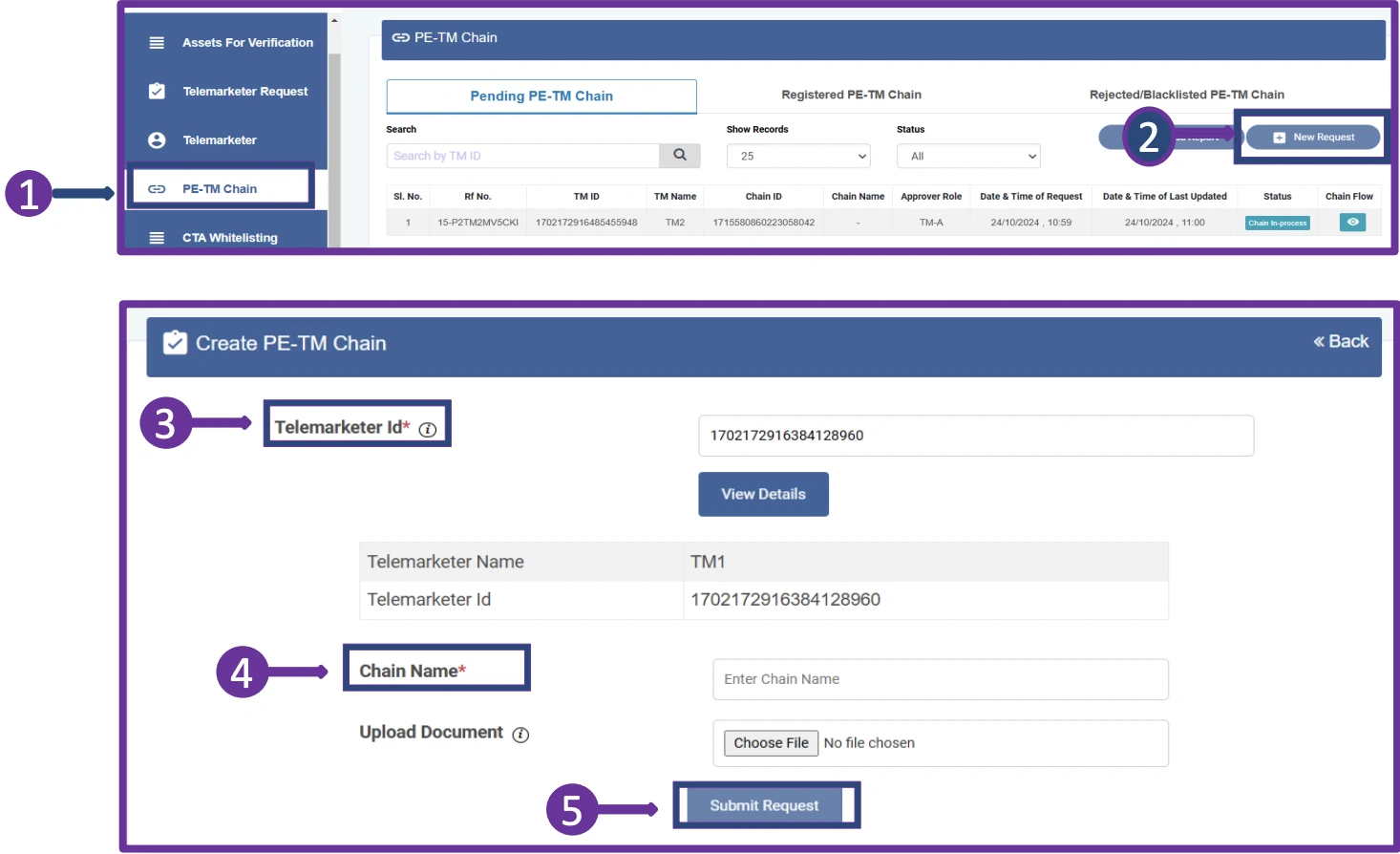
Step 1: Access the PE-TM Chain Section #
Once logged in, locate the PE-TM Chain option in the side menu bar of the Entity panel and click on it.
Step 2: Initiate a New Chain Request #
In the PE-TM Chain section, find the option to initiate a new request and click on it to start creating a new chain.
Step 3: Enter Telemarketer Details #
Input the Telemarketer’s ID (e.g., 1102523340000011213 for Popular SoftTech and Marketing Private Limited). Click on View Details to display the TM’s name. If required, upload any necessary documents (note: document upload may be optional, as per some DLT platforms).
Step 4: Name the Chain #
Enter a unique Chain Name to ensure proper identification of the chain within the SmartPing DLT system.
Step 5: Submit the Request #
Click the Submit button to send the chain request to the telemarketer for acceptance and to define their role as either a TM Aggregator (TM-AF) or TM Delivery (TM-DF).
Next Steps for Approval #
After the telemarketer approves the request, SmartPing (Videocon DLT) will notify SMSGatewayCenter to review and approve the TM chain. Once SMSGatewayCenter approves, SmartPing will send you a confirmation of the completed chain. Note that all stakeholders, including TM-AF and TM-DF, must approve the chain at each stage. The enterprise and TM-AF must select the next hop for traffic submission, while the TM-DF cannot choose a next hop and must generate a hash to submit via the TLV parameter (details for this process will be provided separately to TM-DFs).
Conclusion #
Initiating a PE-TM Binding Chain on the SmartPing DLT portal is a straightforward process that ensures compliance with TRAI regulations for SMS traffic. By following these steps, enterprises can seamlessly link with telemarketers and manage their SMS campaigns effectively. For any assistance, contact our support team at contact @ smsgatewaycenter.com or call us at +91-9619-141-191.
Check more info on DLT SMS.