
To link SMSGatewayCenter as your telemarketer in Jio True Connect, follow these steps:
1. Note our Telemarketer Details #
- Company Name: Popular SoftTech and Marketing Private Limited
- Telemarketer (TM) ID: 1102523340000011213
2. Linking Process in Jio True Connect #
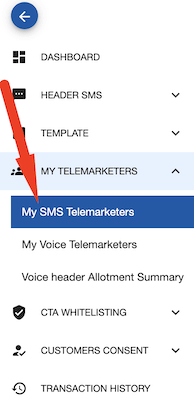
Login to Jio DLT portal. Navigate to My Telemarketers > My SMS Telemarketers
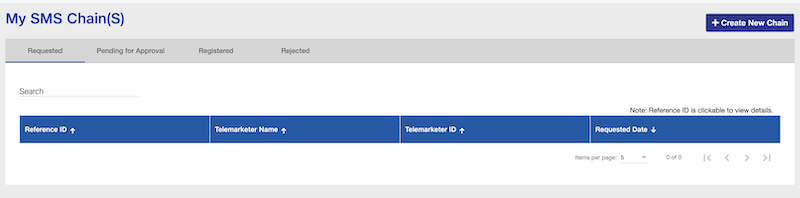
Click the “Create New Chain” button.
In the search field, you can:
Use one of the following options:
- Search by Company Name: Enter “Popular SoftTech and Marketing Private Limited” in the telemarketer search.
- Search by TM ID: Enter the TM ID “1102523340000011213” for precise results.
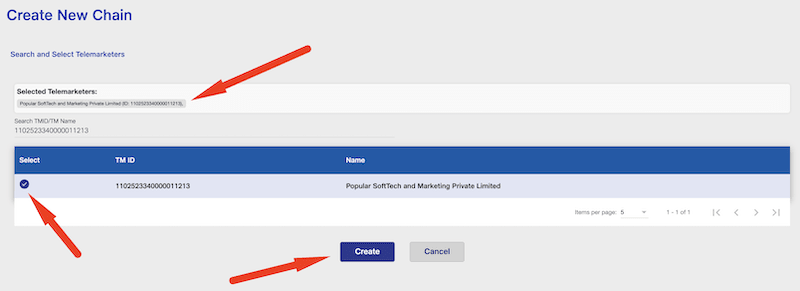
Once the correct telemarketer appears, select it and click “Create” to complete the linkage.
3. Verification #
- Ensure that the telemarketer “1102523340000011213” or “Popular SoftTech and Marketing Private Limited” appears in the search results.
- Select and save/confirm the telemarketer linkage.
4. Next Steps #
- Once linked, your existing OTP, transaction, and other template types in Jio True Connect will remain available for use with the linked telemarketer.
Tips #
- Double-check the TM ID for typos to avoid linking errors.
- If you do not see the telemarketer listed, try searching both by company name and TM ID.
- For further assistance, you may contact Jio True Connect support with these details.
Your sender IDs and PE IDs should now correctly route through the selected telemarketer, and your messaging templates will continue to function without disruption.
Found this useful?Add as Preferred Source on Google